Page 235 of 465
234
uuCustomized Features u
Features
*1 : Default Setting
Setup
GroupCustomizable FeaturesDescriptionSelectable Settings
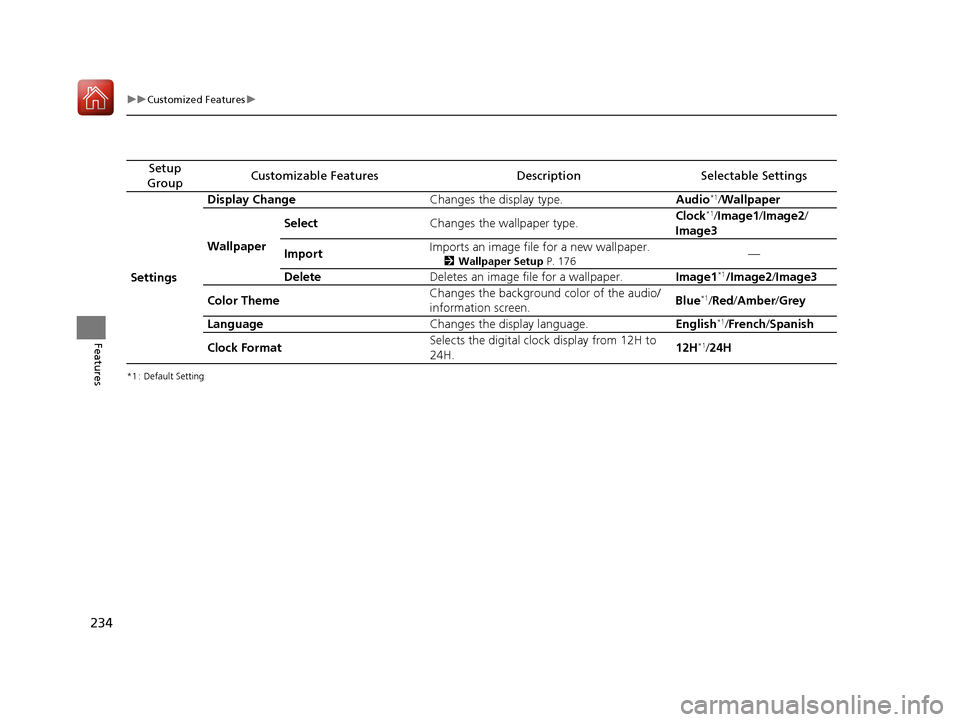
Settings Display Change
Changes the display type. Audio
*1/Wallpaper
Wallpaper Select
Changes the wallpaper type. Clock*1/
Image1/ Image2/
Image3
Import Imports an image file for a new wallpaper.
2
Wallpaper Setup P. 176—
Delete Deletes an image file for a wallpaper. Image1
*1/Image2/Image3
Color Theme Changes the background color of the audio/
information screen.
Blue
*1/
Red/ Amber /Grey
Language Changes the display language. English
*1/French /Spanish
Clock Format Selects the digital clock display from 12H to
24H. 12H
*1/
24H
17 FIT -31T5A6200.book 234 ページ 2016年5月27日 金曜日 午後6時33分
Page 237 of 465
uuCustomized Features u
236
Features
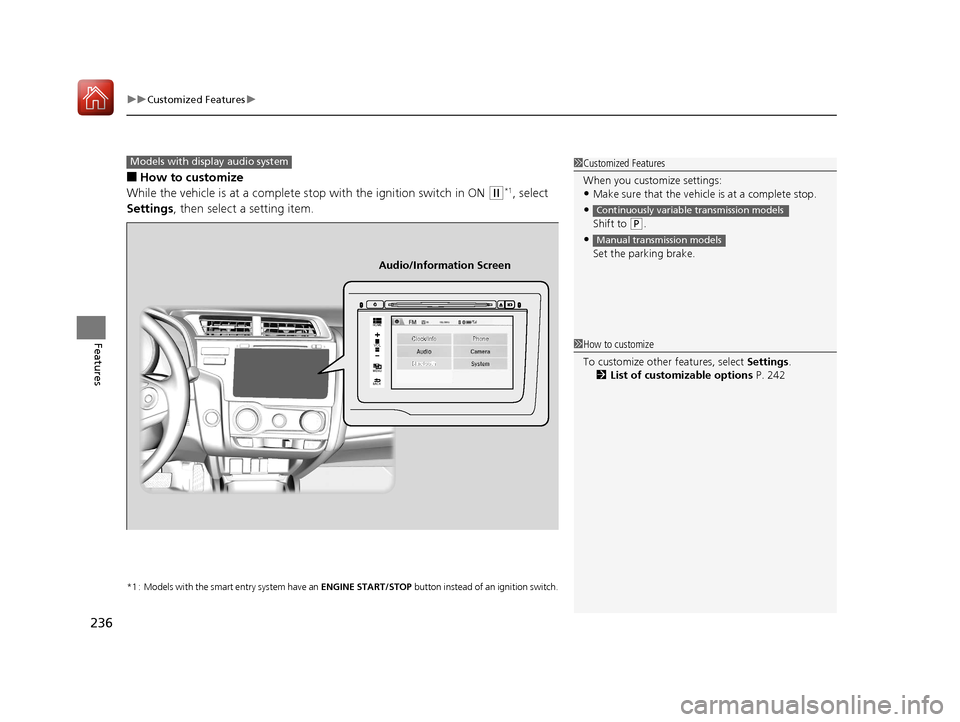
■How to customize
While the vehicle is at a complete stop with the ignition switch in ON
(w*1, select
Settings , then select a setting item.
*1 : Models with the smart entry system have an ENGINE START/STOP button instead of an ignition switch.
1Customized Features
When you customize settings:
•Make sure that the vehicle is at a complete stop.
•
Shift to (P.
•
Set the parking brake.
Continuously variable transmission models
Manual transmission models
Models with display audio system
92/
+20(
0(18
%$&.
Clock/Info Phone
Audio/Information Screen
1How to customize
To customize other features, select Settings .
2 List of customizable options P. 242
17 FIT -31T5A6200.book 236 ページ 2016年5月27日 金曜日 午後6時33分
Page 238 of 465
237
uuCustomized Features u
Continued
Features
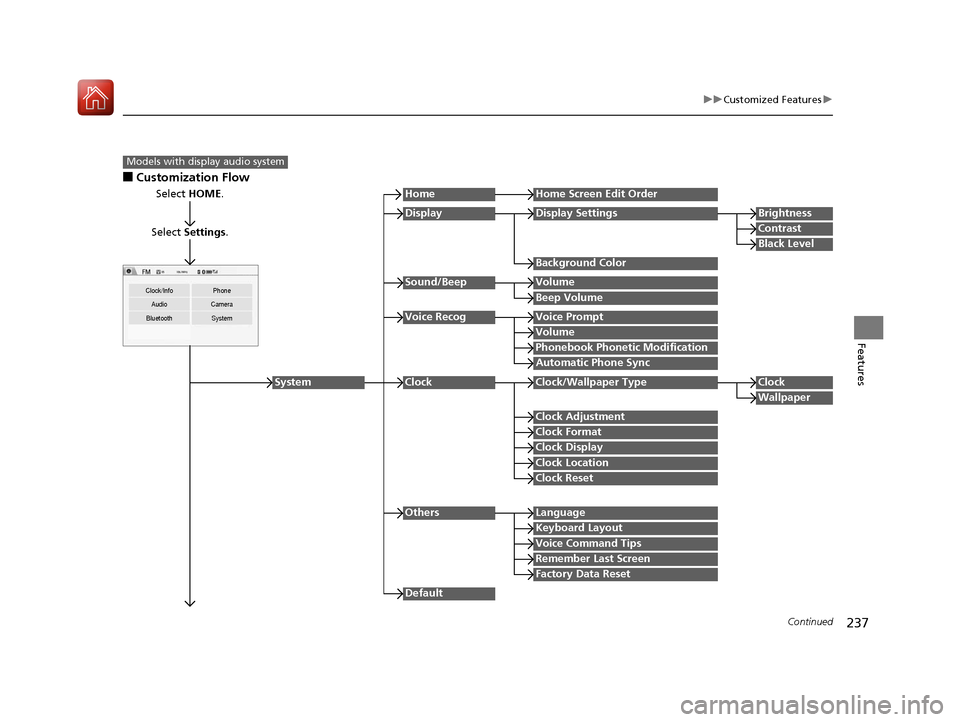
■Customization Flow
Models with display audio system
Select HOME.
Select Settings .
Clock/Info Phone
Audio Camera
Bluetooth System
HomeHome Screen Edit Order
Background Color
DisplayDisplay SettingsBrightness
Contrast
Black Level
Beep Volume
Sound/BeepVolume
Volume
Voice RecogVoice Prompt
Automatic Phone Sync
Phonebook Phonetic Modification
Default
Factory Data Reset
Clock Format
ClockClock/Wallpaper TypeClock
Wallpaper
Clock Adjustment
Clock Display
Clock Location
Clock Reset
Keyboard Layout
OthersLanguage
Remember Last Screen
Voice Command Tips
System
17 FIT -31T5A6200.book 237 ページ 2016年5月27日 金曜日 午後6時33分
Page 239 of 465
238
uuCustomized Features u
Features
*1 : May change depending on your currently selected source.
Sound
Color
Tint
Audio
Audio Source Pop-Up
[Your selected media] Cover Art*1
Color
Display Adjustment*1DisplayBrightness
Contrast
Black Level
Aspect Ratio Adjustment*1
Change Bluetooth Audio Device*1
Bluetooth Device List*1
Default
RDS INFO*1
17 FIT -31T5A6200.book 238 ページ 2016年5月27日 金曜日 午後6時33分
Page 240 of 465
239
uuCustomized Features u
Continued
Features
Clock Format
ClockClock/Wallpaper TypeClock
Wallpaper
Clock Adjustment
Clock Display
Clock Location
Clock Reset
Clock/Info
Default
InfoInfo Screen Preference
17 FIT -31T5A6200.book 239 ページ 2016年5月27日 金曜日 午後6時33分
Page 242 of 465
241
uuCustomized Features u
Continued
Features
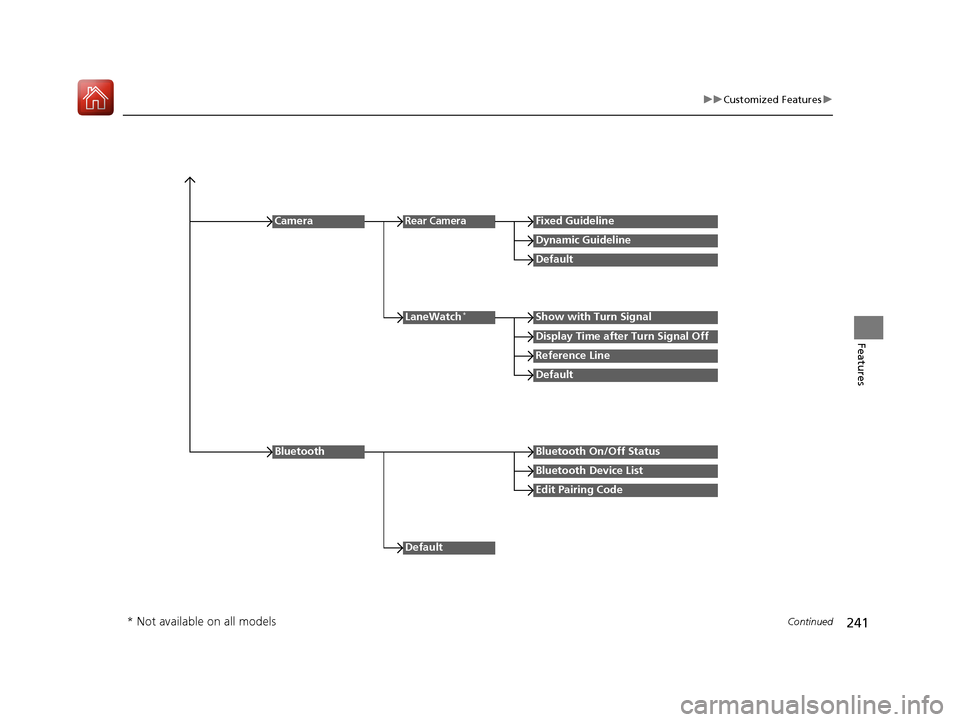
Reference Line
LaneWatch*Show with Turn Signal
Display Time after Turn Signal Off
Default
Camera
Default
Rear CameraFixed Guideline
Dynamic Guideline
Default
Bluetooth On/Off Status
Bluetooth Device List
Edit Pairing Code
Bluetooth
* Not available on all models
17 FIT -31T5A6200.book 241 ページ 2016年5月27日 金曜日 午後6時33分
Page 243 of 465
242
uuCustomized Features u
Features
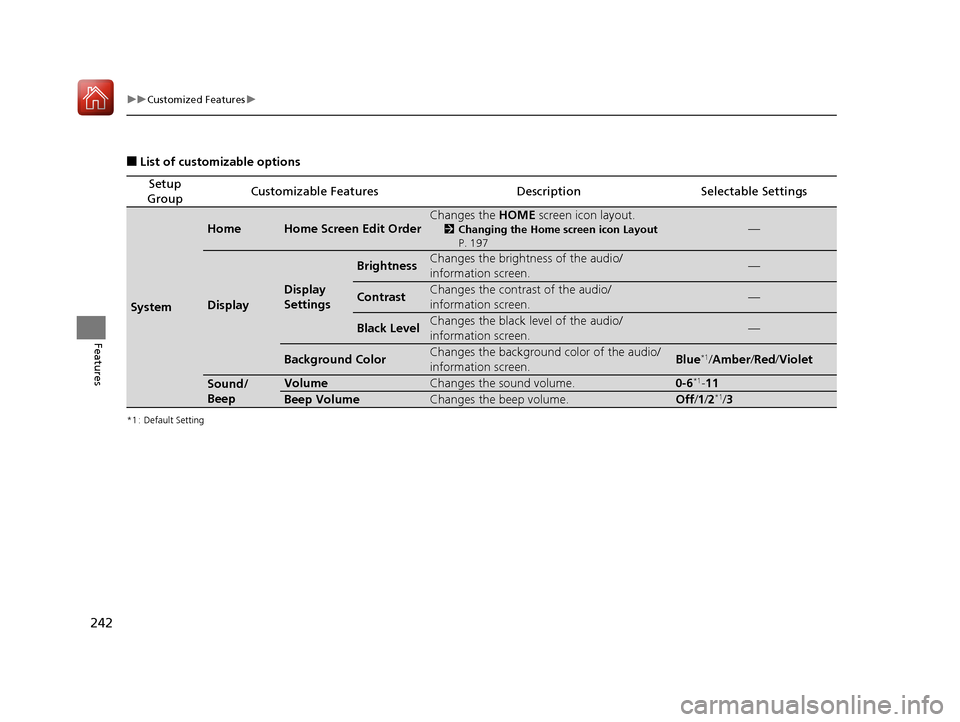
■List of customizable options
*1 : Default Setting
Setup
GroupCustomizable FeaturesDescriptionSelectable Settings
System
HomeHome Screen Edit OrderChanges the HOME screen icon layout.
2Changing the Home screen icon Layout
P. 197—
Display
Display
Settings
BrightnessChanges the brightness of the audio/
information screen.—
ContrastChanges the contrast of the audio/
information screen.—
Black LevelChanges the black level of the audio/
information screen.—
Background ColorChanges the background color of the audio/
information screen.Blue*1/ Amber /Red/ Violet
Sound/
BeepVolumeChanges the sound volume.0-6*1-11
Beep VolumeChanges the beep volume.Off /1 /2*1/3
17 FIT -31T5A6200.book 242 ページ 2016年5月27日 金曜日 午後6時33分
Page 244 of 465

243
uuCustomized Features u
Continued
Features
*1 : Default Setting
Setup
GroupCustomizable FeaturesDescriptionSelectable Settings
System
Voice Recog
Voice PromptTurns the voice prompt on and off.On*1/ Off
VolumeChanges the volume of the voice prompt.0-6*1-11
Phonebook Phonetic
ModificationModifies a voice command for the phonebook.—
Automatic Phone SyncSets a phonebook data to be automatically
imported when a phon e is paired to HFL.On/Off
Clock
Clock/
Wallpaper
Type
ClockChanges the clock display type.Analog /Digital*1/ Small
Digital /Off
Wallpaper
●Changes the wallpaper type.●Imports an image file for a new wallpaper.●Deletes an image file for a wallpaper.
2 Wallpaper Setup P. 198
Blank/Galaxy*1/Metallic
Clock AdjustmentAdjusts Clock.
2 Clock P. 90—
Clock FormatSelects the digital clock display from 12H to
24H.12H*1/24H
Clock DisplaySelects whether the clock display comes on.On*1/ Off
Clock LocationChanges the clock display layout.Right upper*1/Left upper /
Right lower /Left lower /Off
Clock ResetCancels/Resets all customized items for clock
display as default.Yes /No
17 FIT -31T5A6200.book 243 ページ 2016年5月27日 金曜日 午後6時33分
![HONDA FIT 2017 3.G Owners Manual 238
uuCustomized Features u
Features
*1 : May change depending on your currently selected source.
Sound
Color
Tint
Audio
Audio Source Pop-Up
[Your selected media] Cover Art*1
Color
Display Adjustment*](/manual-img/13/5936/w960_5936-238.png "HONDA FIT 2017 3.G Owners Manual 238
uuCustomized Features u
Features
*1 : May change depending on your currently selected source.
Sound
Color
Tint
Audio
Audio Source Pop-Up
[Your selected media] Cover Art*1
Color
Display Adjustment*")