Page 300 of 465
Continued299
uuBluetooth ® HandsFreeLink ®u HFL Menus
Features
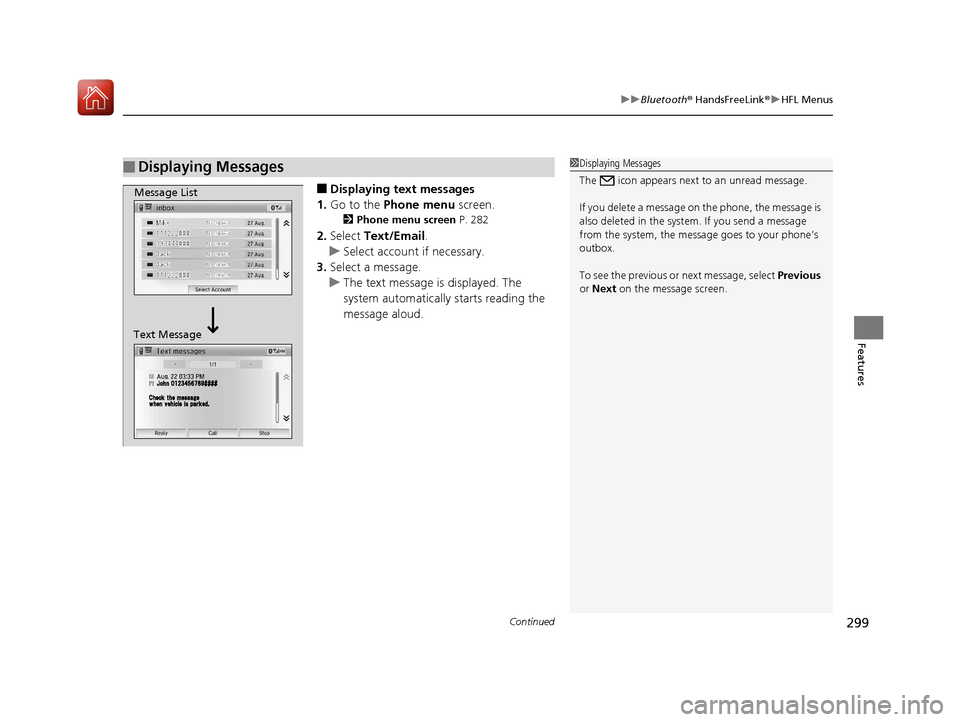
■Displaying text messages
1. Go to the Phone menu screen.
2Phone menu screen P. 282
2.Select Text/Email .
u Select account if necessary.
3. Select a message.
u The text message is displayed. The
system automatically starts reading the
message aloud.
■Displaying Messages1Displaying Messages
The icon appears next to an unread message.
If you delete a message on the phone, the message is
also deleted in the system. If you send a message
from the system, the message goes to your phone’s
outbox.
To see the previous or next message, select Previous
or Next on the message screen.
Message List
Text Message
17 FIT -31T5A6200.book 299 ページ 2016年5月27日 金曜日 午後6時33分
Page 301 of 465
300
uuBluetooth ® HandsFreeLink ®u HFL Menus
Features
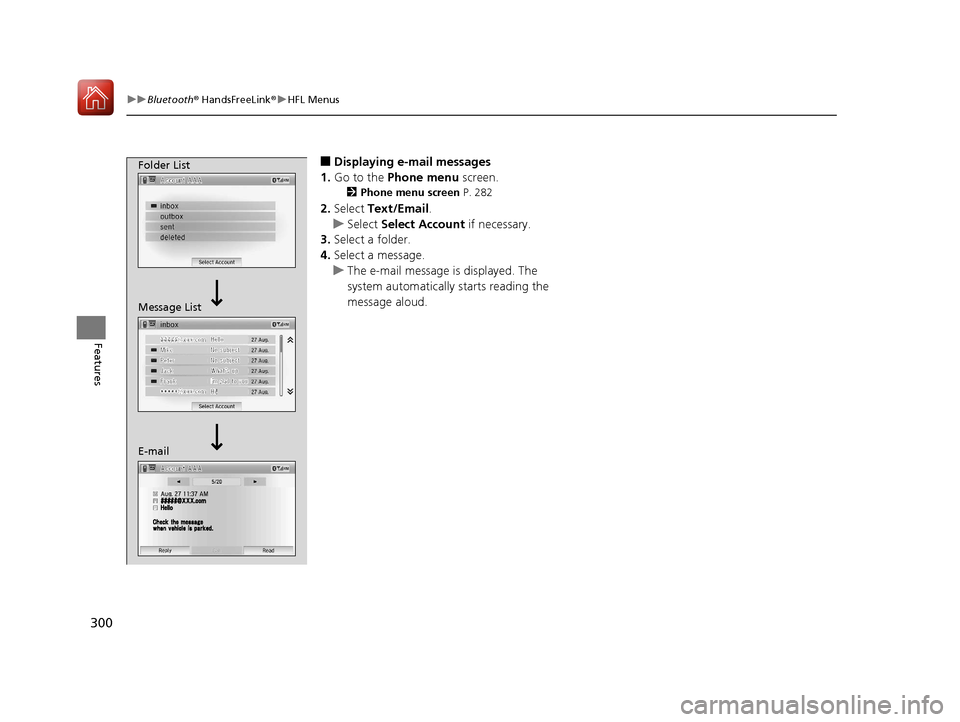
■Displaying e-mail messages
1. Go to the Phone menu screen.
2Phone menu screen P. 282
2.Select Text/Email .
u Select Select Account if necessary.
3. Select a folder.
4. Select a message.
u The e-mail message is displayed. The
system automatically starts reading the
message aloud.
Folder List
Message List
E-mail
17 FIT -31T5A6200.book 300 ページ 2016年5月27日 金曜日 午後6時33分
Page 302 of 465
Continued301
uuBluetooth ® HandsFreeLink ®u HFL Menus
Features
■Read or stop reading a message
1. Go to the text or e-mail message screen.
u The system automatica lly starts reading
the message aloud.
2 Displaying Messages P. 299
2.Select Stop to stop reading.
Select Read again to start reading the
message from the beginning.
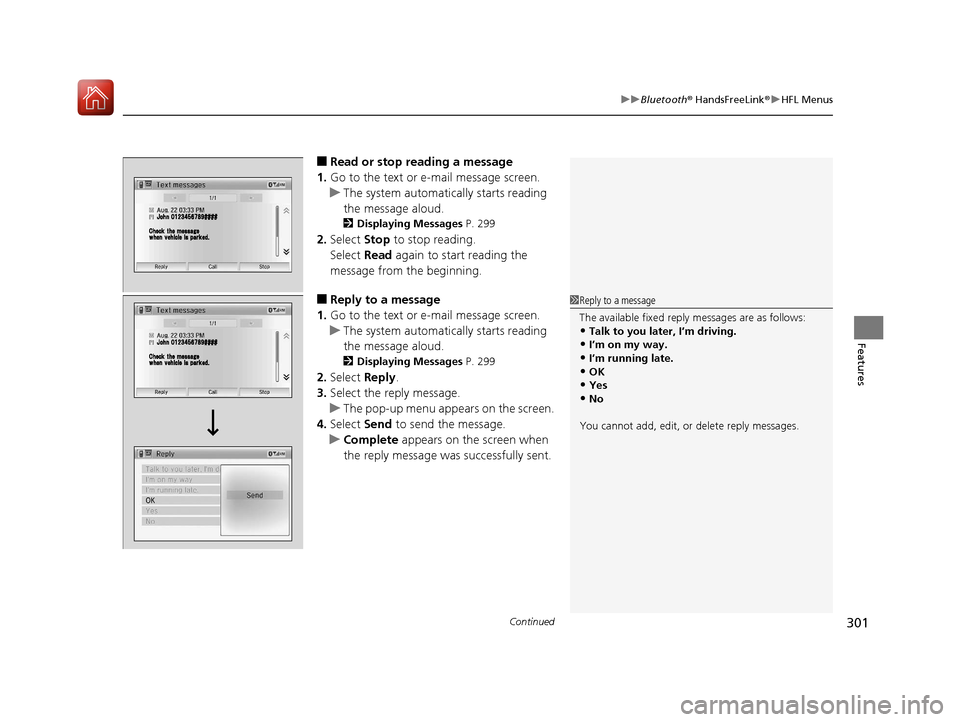
■Reply to a message
1. Go to the text or e-mail message screen.
u The system automatica lly starts reading
the message aloud.
2 Displaying Messages P. 299
2.Select Reply.
3. Select the reply message.
u The pop-up menu appears on the screen.
4. Select Send to send the message.
u Complete appears on the screen when
the reply message was successfully sent.
1 Reply to a message
The available fixed reply messages are as follows:
•Talk to you later, I’m driving.•I’m on my way.
•I’m running late.
•OK•Yes
•No
You cannot add, edit, or delete reply messages.
17 FIT -31T5A6200.book 301 ページ 2016年5月27日 金曜日 午後6時33分
Page 324 of 465
323
uuWhen Driving uShifting
Continued
Driving
Shifting
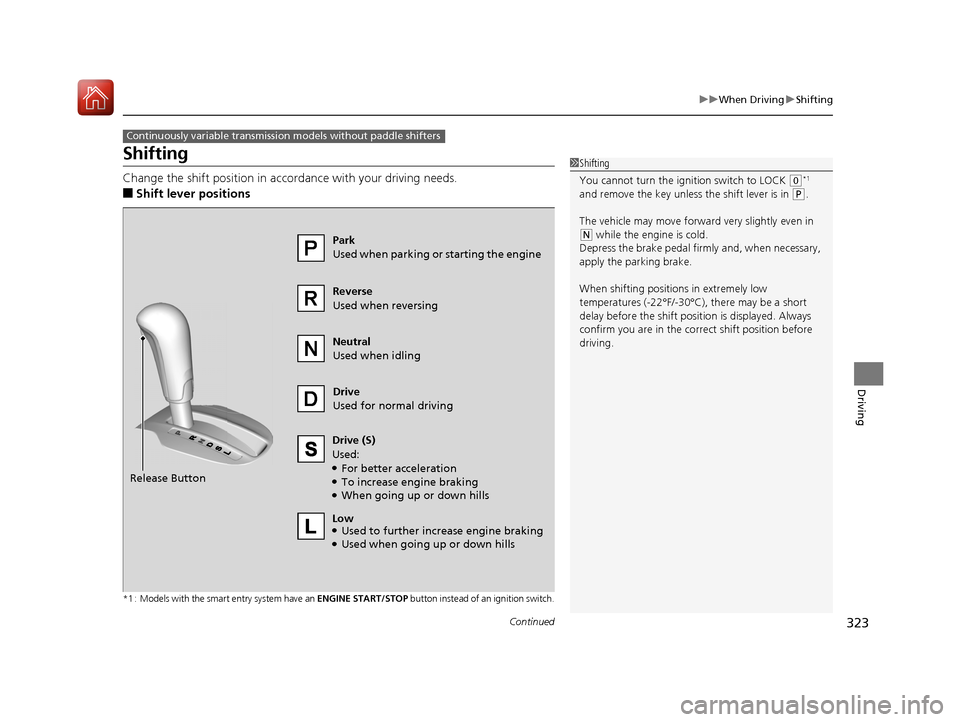
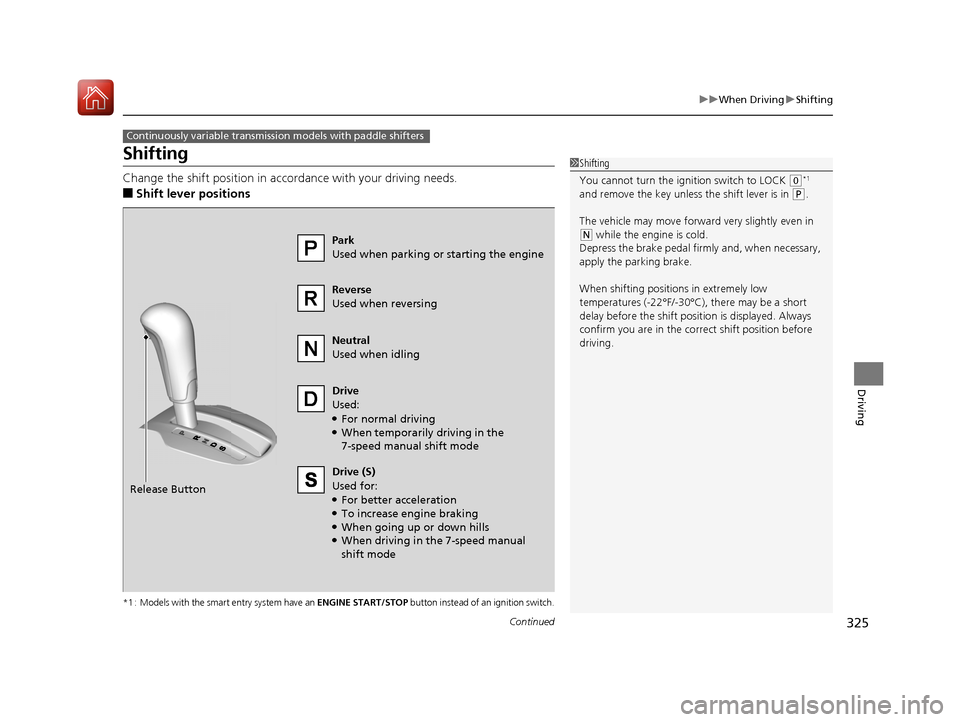
Change the shift position in accordance with your driving needs.
■Shift lever positions
*1 : Models with the smart entry system have an ENGINE START/STOP button instead of an ignition switch.
Continuously variable transmission models without paddle shifters
1Shifting
You cannot turn the ignition switch to LOCK
(0*1
and remove the key unless the shift lever is in ( P.
The vehicle may move forward very slightly even in
(N while the engine is cold.
Depress the brake pe dal firmly and, when necessary,
apply the parking brake.
When shifting positions in extremely low
temperatures (-22°F/-30°C), there may be a short
delay before the shift posit ion is displayed. Always
confirm you are in the corr ect shift position before
driving.Park
Used when parking or starting the engine
Reverse
Used when reversing
Neutral
Used when idling
Drive
Used for normal driving
Drive (S)
Used:
●For better acceleration●To increase engine braking●When going up or down hills
Release Button
Low
●Used to further increase engine braking●Used when going up or down hills
17 FIT -31T5A6200.book 323 ページ 2016年5月27日 金曜日 午後6時33分
Page 326 of 465
325
uuWhen Driving uShifting
Continued
Driving
Shifting
Change the shift position in accordance with your driving needs.
■Shift lever positions
*1 : Models with the smart entry system have an ENGINE START/STOP button instead of an ignition switch.
Continuously variable transmission models with paddle shifters
1Shifting
You cannot turn the ignition switch to LOCK
(0*1
and remove the key unless the shift lever is in ( P.
The vehicle may move forward very slightly even in
(N while the engine is cold.
Depress the brake pe dal firmly and, when necessary,
apply the parking brake.
When shifting positions in extremely low
temperatures (-22°F/-30°C), there may be a short
delay before the shift posit ion is displayed. Always
confirm you are in the corr ect shift position before
driving.Park
Used when parking or starting the engine
Reverse
Used when reversing
Neutral
Used when idling
Drive
Used:
●For normal driving●When temporarily driving in the
7-speed manual shift mode
Release Button Drive (S)
Used for:
●For better acceleration●To increase engine braking●When going up or down hills●When driving in the 7-speed manual
shift mode
17 FIT -31T5A6200.book 325 ページ 2016年5月27日 金曜日 午後6時33分
Page 328 of 465
Continued327
uuWhen Driving uShifting
Driving
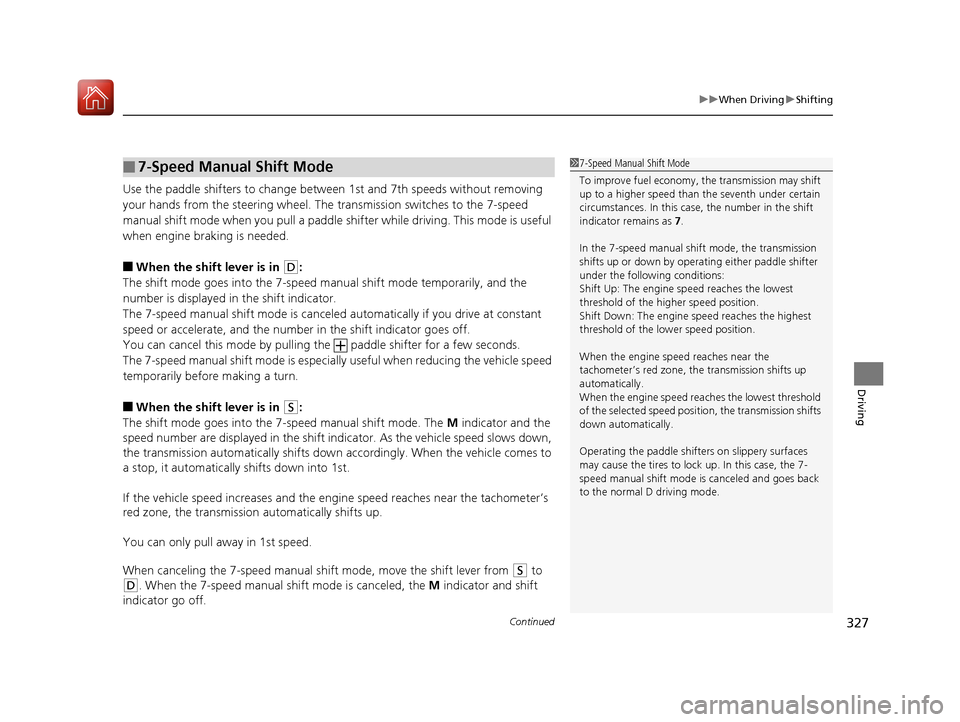
Use the paddle shifters to change between 1st and 7th speeds without removing
your hands from the steering wheel. The transmission switches to the 7-speed
manual shift mode when you pull a paddle shifter while driving. This mode is useful
when engine braking is needed.
■When the shift lever is in (D:
The shift mode goes into the 7-speed ma nual shift mode temporarily, and the
number is displayed in the shift indicator.
The 7-speed manual shift mode is canceled automatically if you drive at constant
speed or accelerate, and the number in the shift indicator goes off.
You can cancel this mode by pulling the paddle shifter for a few seconds.
The 7-speed manual shift mode is especial ly useful when reducing the vehicle speed
temporarily before making a turn.
■When the shift lever is in (S:
The shift mode goes into the 7-speed manual shift mode. The M indicator and the
speed number are displayed in the shift indicator. As the vehicle speed slows down,
the transmission automatically shifts down accordingly. When the vehicle comes to
a stop, it automatically shifts down into 1st.
If the vehicle speed increases and the engi ne speed reaches near the tachometer’s
red zone, the transmission automatically shifts up.
You can only pull away in 1st speed.
When canceling the 7-speed manual shift mode, move the shift lever from
(S to
(D. When the 7-speed manual sh ift mode is canceled, the M indicator and shift
indicator go off.
■7-Speed Manual Shift Mode1 7-Speed Manual Shift Mode
To improve fuel economy, the transmission may shift
up to a higher speed than the seventh under certain
circumstances. In this case, the number in the shift
indicator remains as 7.
In the 7-speed manual shif t mode, the transmission
shifts up or down by opera ting either paddle shifter
under the following conditions:
Shift Up: The engine sp eed reaches the lowest
threshold of the higher speed position.
Shift Down: The engine sp eed reaches the highest
threshold of the lower speed position.
When the engine speed reaches near the
tachometer’s red zone, the transmission shifts up
automatically.
When the engine speed reaches the lowest threshold
of the selected speed positi on, the transmission shifts
down automatically.
Operating the paddle shifte rs on slippery surfaces
may cause the tires to lock up. In this case, the 7-
speed manual shift mode is canceled and goes back
to the normal D driving mode.
17 FIT -31T5A6200.book 327 ページ 2016年5月27日 金曜日 午後6時33分
Page 339 of 465
uuWhen Driving uForward Collision Warning (FCW)*
338
Driving
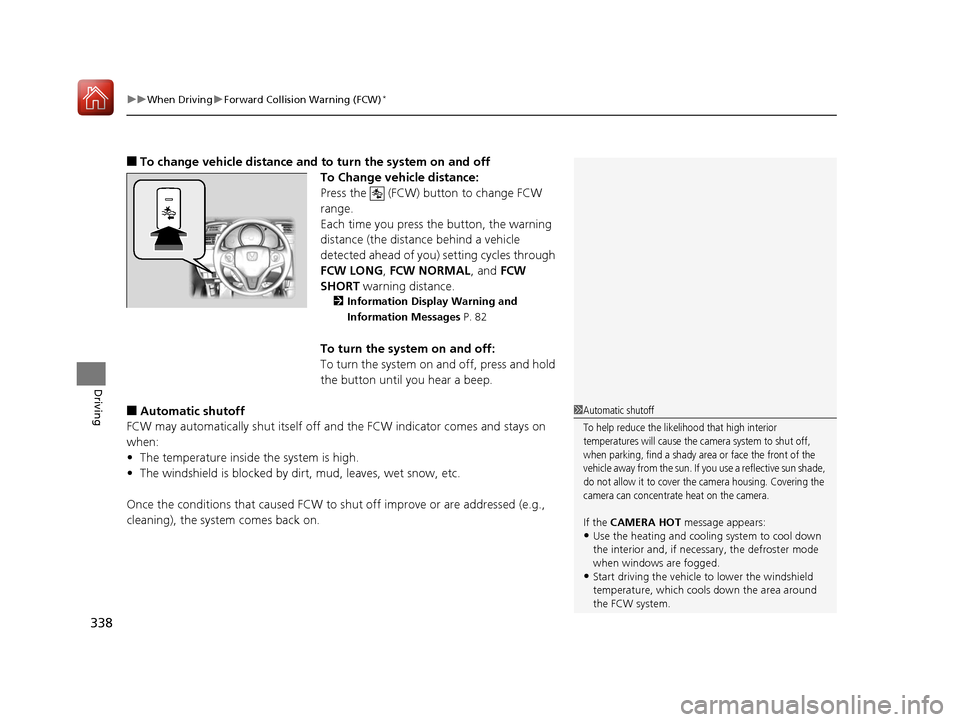
■To change vehicle dist ance and to turn the system on and off
To Change vehicle distance:
Press the (FCW) button to change FCW
range.
Each time you press the button, the warning
distance (the distance behind a vehicle
detected ahead of you) setting cycles through
FCW LONG , FCW NORMAL, and FCW
SHORT warning distance.
2Information Display Warning and
Information Messages P. 82
To turn the system on and off:
To turn the system on and off, press and hold
the button until you hear a beep.
■Automatic shutoff
FCW may automatically shut itself off a nd the FCW indicator comes and stays on
when:
• The temperature inside the system is high.
• The windshield is blocked by di rt, mud, leaves, wet snow, etc.
Once the conditions that caused FCW to shut off improve or are addressed (e.g.,
cleaning), the system comes back on.1 Automatic shutoff
To help reduce the likelihood that high interior
temperatures will cause the camera system to shut off,
when parking, find a shady area or face the front of the
vehicle away from the sun. If you use a reflective sun shade,
do not allow it to cover the camera housing. Covering the
camera can concentrate heat on the camera.
If the CAMERA HOT message appears:•Use the heating and cooling system to cool down
the interior and, if nece ssary, the defroster mode
when windows are fogged.
•Start driving the vehicle to lower the windshield
temperature, which cool s down the area around
the FCW system.
17 FIT -31T5A6200.book 338 ページ 2016年5月27日 金曜日 午後6時33分
Page 346 of 465
345
uuWhen Driving uLaneWatchTM*
Continued
Driving
LaneWatchTM*
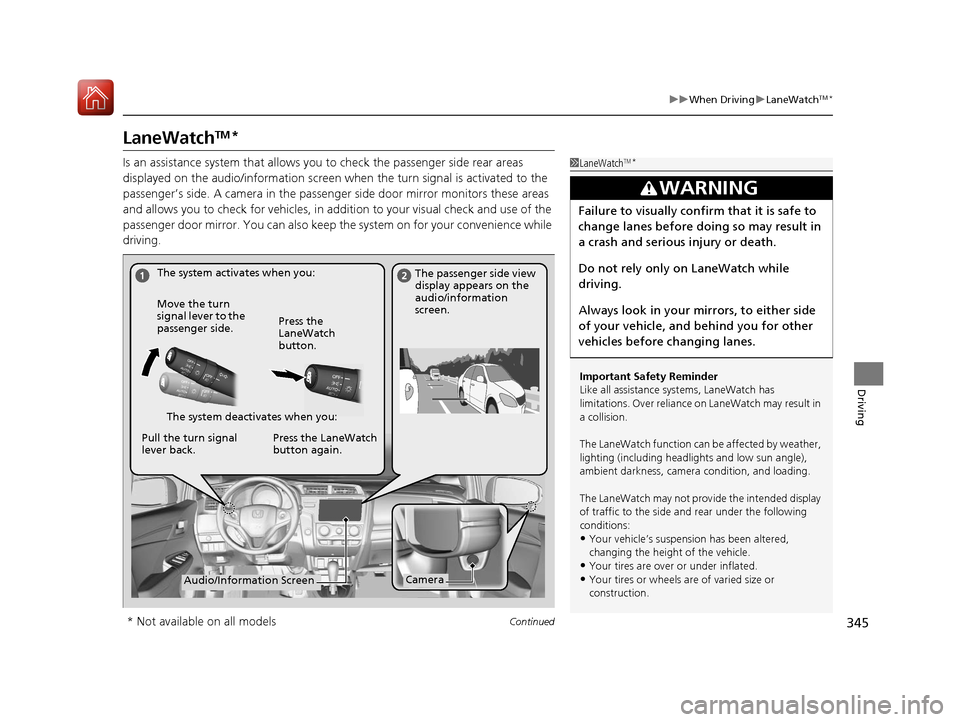
Is an assistance system that allows yo u to check the passenger side rear areas
displayed on the audio/information screen when the turn signal is activated to the
passenger’s side. A camera in the passenge r side door mirror monitors these areas
and allows you to check for ve hicles, in addition to your visual check and use of the
passenger door mirror. You can also keep the system on for your convenience while
driving.1 LaneWatchTM*
Important Safety Reminder
Like all assistance systems, LaneWatch has
limitations. Over reliance on LaneWatch may result in
a collision.
The LaneWatch function can be affected by weather,
lighting (including headli ghts and low sun angle),
ambient darkness, camera condition, and loading.
The LaneWatch may not prov ide the intended display
of traffic to the side and rear under the following
conditions:
•Your vehicle’s suspensi on has been altered,
changing the height of the vehicle.
•Your tires are over or under inflated.
•Your tires or wheels are of varied size or
construction.
3WARNING
Failure to visually confirm that it is safe to
change lanes before do ing so may result in
a crash and serious injury or death.
Do not rely only on LaneWatch while
driving.
Always look in your mirrors, to either side
of your vehicle, and behind you for other
vehicles before changing lanes.
The system activates when you: The passenger side view
display appears on the
audio/information
screen.
Move the turn
signal lever to the
passenger side. Press the
LaneWatch
button.
The system deactivates when you:
Pull the turn signal
lever back. Press the LaneWatch
button again.
CameraAudio/Information Screen
* Not available on all models
17 FIT -31T5A6200.book 345 ページ 2016年5月27日 金曜日 午後6時33分