2017 FORD TAURUS turn off
[x] Cancel search: turn offPage 56 of 504
Note:You can clear or change your MyKeysettings at any time during the same keycycle as you created the MyKey. Once youhave switched the vehicle off, however, youwill need an admin key to change or clearyour MyKey settings.
CLEARING ALL MYKEYS
You can clear or change your MyKeysettings using the information displaycontrol on the steering wheel. SeeInformation Displays (page 89).
Switch the ignition on using an admin key.
To clear all MyKeys of all MyKey settings, press the left arrow button to accessthe main menu and scroll to:
Action and DescriptionMessage
Press the OK button or the right arrow button.Settings
Press the OK button or the right arrow button.MyKey
Press and hold the OK button until the instrument clusterdisplays the following message.Clear MyKey
All MyKeys
Cleared
Note:When you clear your MyKeys, you remove all restrictions and return all MyKeys totheir original admin key status.
53
Taurus (CPH) Canada/United States of America, enUSA, First Printing
MyKey™
Page 60 of 504
LOCKING AND UNLOCKING
You can use the power door lock controlor the remote control to lock and unlockyour vehicle.
Power Door Locks
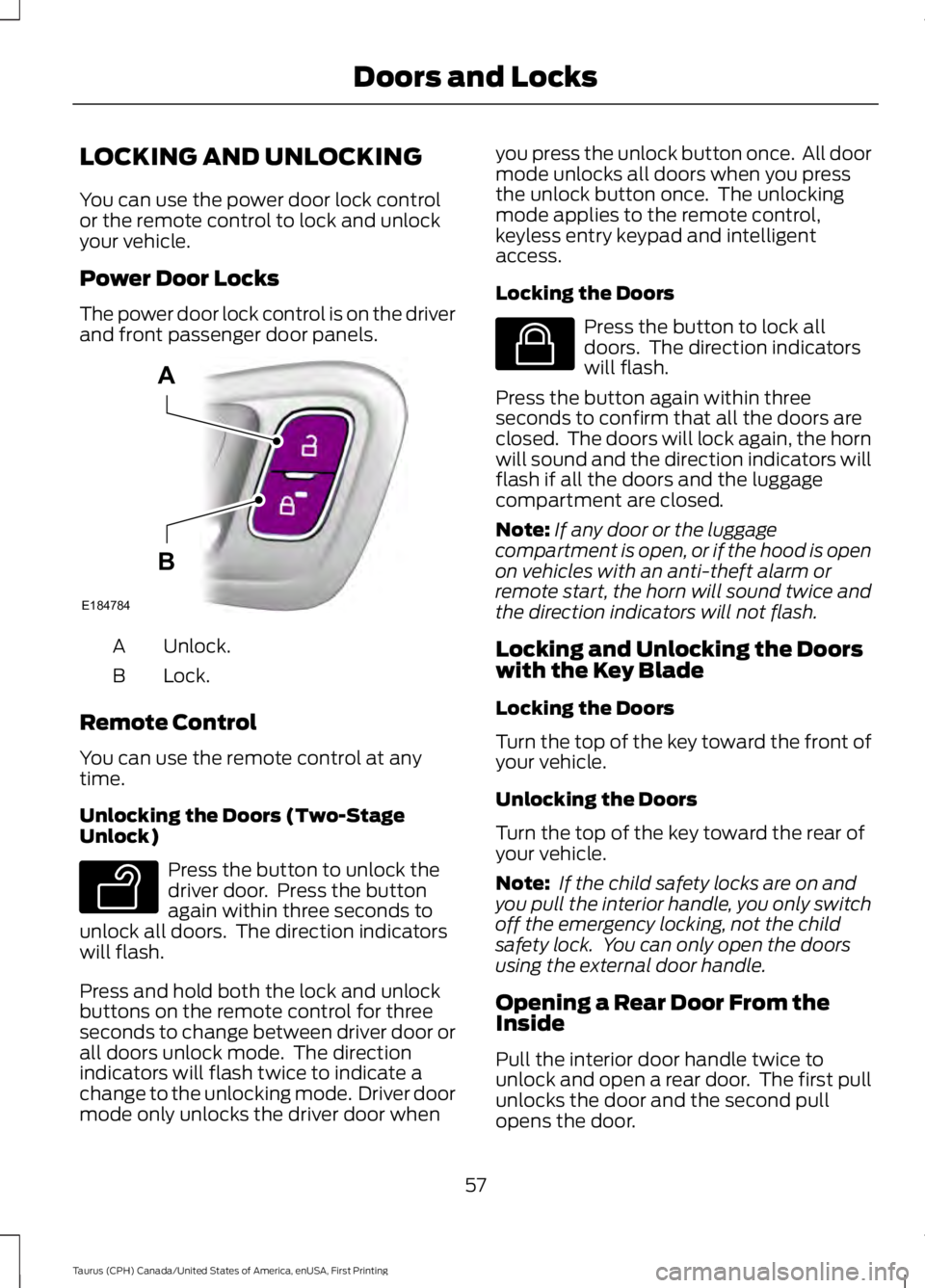
The power door lock control is on the driverand front passenger door panels.
Unlock.A
Lock.B
Remote Control
You can use the remote control at anytime.
Unlocking the Doors (Two-StageUnlock)
Press the button to unlock thedriver door. Press the buttonagain within three seconds tounlock all doors. The direction indicatorswill flash.
Press and hold both the lock and unlockbuttons on the remote control for threeseconds to change between driver door orall doors unlock mode. The directionindicators will flash twice to indicate achange to the unlocking mode. Driver doormode only unlocks the driver door when
you press the unlock button once. All doormode unlocks all doors when you pressthe unlock button once. The unlockingmode applies to the remote control,keyless entry keypad and intelligentaccess.
Locking the Doors
Press the button to lock alldoors. The direction indicatorswill flash.
Press the button again within threeseconds to confirm that all the doors areclosed. The doors will lock again, the hornwill sound and the direction indicators willflash if all the doors and the luggagecompartment are closed.
Note:If any door or the luggagecompartment is open, or if the hood is openon vehicles with an anti-theft alarm orremote start, the horn will sound twice andthe direction indicators will not flash.
Locking and Unlocking the Doorswith the Key Blade
Locking the Doors
Turn the top of the key toward the front ofyour vehicle.
Unlocking the Doors
Turn the top of the key toward the rear ofyour vehicle.
Note: If the child safety locks are on andyou pull the interior handle, you only switchoff the emergency locking, not the childsafety lock. You can only open the doorsusing the external door handle.
Opening a Rear Door From theInside
Pull the interior door handle twice tounlock and open a rear door. The first pullunlocks the door and the second pullopens the door.
57
Taurus (CPH) Canada/United States of America, enUSA, First Printing
Doors and LocksE184784
A
B E138629 E138623
Page 63 of 504

6. Press the power door unlock controland within five seconds, press thepower door lock control. The hornsounds once if disabled or twice ifenabled.
7. Switch the ignition off. The hornsounds indicating programming iscomplete.
To enable or disable autounlock, do thefollowing:
1. Switch the ignition on.
2. Press the power door unlock controlthree times.
3. Switch the ignition off.
4. Press the power door unlock controlthree times.
5. Switch the ignition on. The hornsounds indicating your vehicle is inprogramming mode.
6. Press the power door lock control andwithin five seconds, press the powerdoor unlock control. The horn soundsonce if disabled or twice if enabled.
7. Switch the ignition off. The hornsounds indicating programming iscomplete.
Illuminated Entry (If Equipped)
The interior lamps and some exteriorlamps illuminate when you unlock thedoors with the remote control.
The lamps turn off if:
•The ignition is on.
•You press the remote control lockbutton.
•25 seconds have elapsed.
The lamps do not turn off if:
•You switch them on with the lightingcontrol.
•Any door is open.
Illuminated Exit (If Equipped)
The interior lamps and some exteriorlamps illuminate when all doors are closedand you switch the ignition off.
The lamps will turn off if all the doorsremain closed and:
•25 seconds have elapsed.
•You lock your vehicle from the outside.
Battery Saver
If you leave the courtesy lamps, interiorlamps or headlamps on, the battery savershuts them off 10 minutes after you switchthe ignition off.
Battery Saver for Intelligent AccessKeys (If Equipped)
If you leave the ignition switched on andthe engine is not running, the battery saverwill turn the ignition off when it detects acertain amount of battery drain, or after45 minutes have elapsed.
KEYLESS ENTRY
SECURICODE™ Keyless EntryKeypad
The keypad is near the driver window. Itilluminates when touched.
Note: If you enter your entry code too faston the keypad, the unlock function may notwork. Enter your entry code again moreslowly.
60
Taurus (CPH) Canada/United States of America, enUSA, First Printing
Doors and Locks
Page 64 of 504
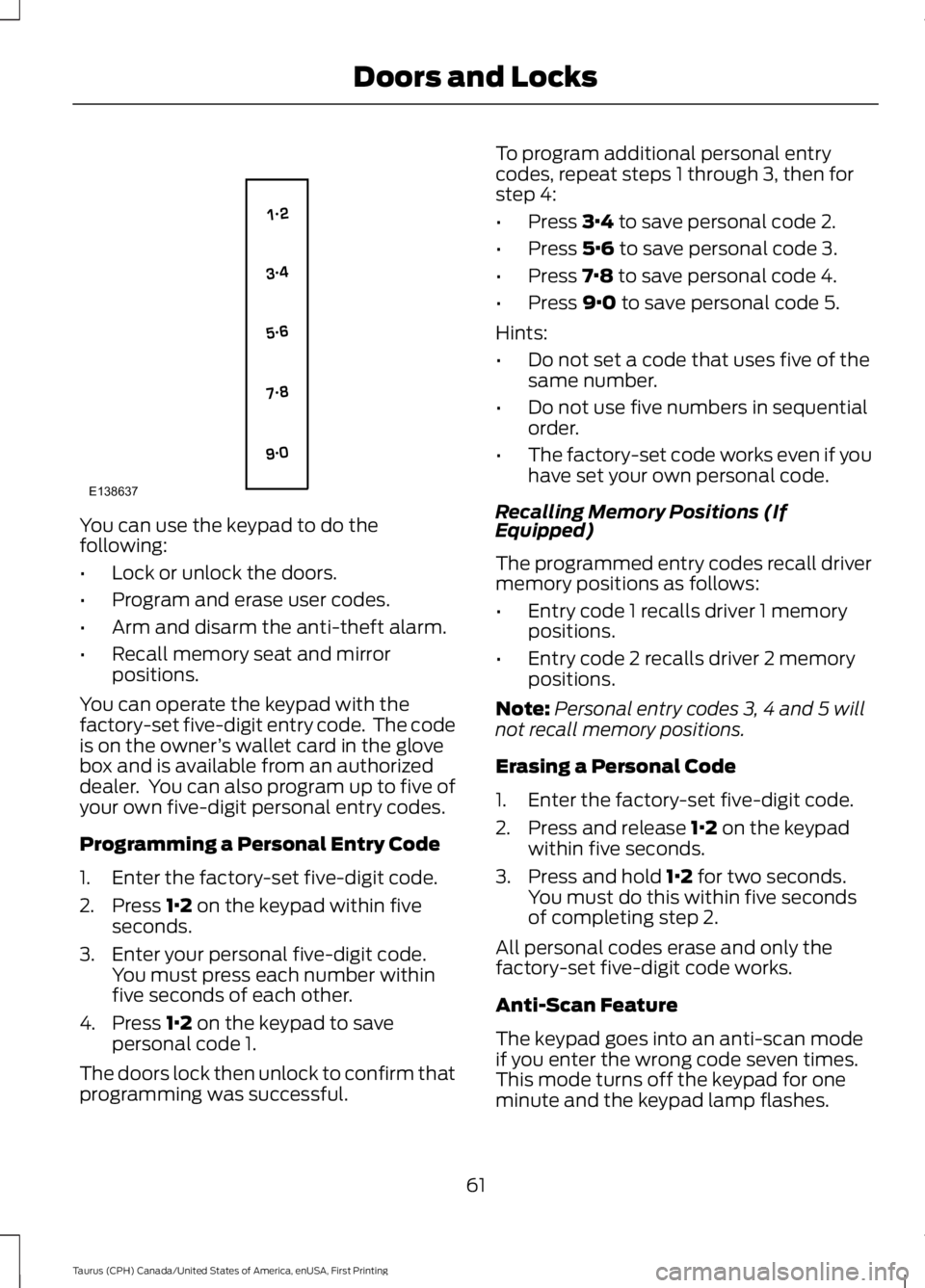
You can use the keypad to do thefollowing:
•Lock or unlock the doors.
•Program and erase user codes.
•Arm and disarm the anti-theft alarm.
•Recall memory seat and mirrorpositions.
You can operate the keypad with thefactory-set five-digit entry code. The codeis on the owner’s wallet card in the glovebox and is available from an authorizeddealer. You can also program up to five ofyour own five-digit personal entry codes.
Programming a Personal Entry Code
1. Enter the factory-set five-digit code.
2. Press 1·2 on the keypad within fiveseconds.
3. Enter your personal five-digit code.You must press each number withinfive seconds of each other.
4. Press 1·2 on the keypad to savepersonal code 1.
The doors lock then unlock to confirm thatprogramming was successful.
To program additional personal entrycodes, repeat steps 1 through 3, then forstep 4:
•Press 3·4 to save personal code 2.
•Press 5·6 to save personal code 3.
•Press 7·8 to save personal code 4.
•Press 9·0 to save personal code 5.
Hints:
•Do not set a code that uses five of thesame number.
•Do not use five numbers in sequentialorder.
•The factory-set code works even if youhave set your own personal code.
Recalling Memory Positions (IfEquipped)
The programmed entry codes recall drivermemory positions as follows:
•Entry code 1 recalls driver 1 memorypositions.
•Entry code 2 recalls driver 2 memorypositions.
Note:Personal entry codes 3, 4 and 5 willnot recall memory positions.
Erasing a Personal Code
1. Enter the factory-set five-digit code.
2. Press and release 1·2 on the keypadwithin five seconds.
3. Press and hold 1·2 for two seconds.You must do this within five secondsof completing step 2.
All personal codes erase and only thefactory-set five-digit code works.
Anti-Scan Feature
The keypad goes into an anti-scan modeif you enter the wrong code seven times.This mode turns off the keypad for oneminute and the keypad lamp flashes.
61
Taurus (CPH) Canada/United States of America, enUSA, First Printing
Doors and LocksE138637
Page 65 of 504
The anti-scan feature turns off after anyof the following occur:
•One minute of keypad inactivity.
•You press the unlock button on theremote control.
•You switch your vehicle on.
•You unlock the vehicle using intelligentaccess.
Locking and Unlocking the Doors
Locking All Doors
Press and hold 7·8 and 9·0 on the keypadsimultaneously with the driver door closed.You do not need to enter a code first.
Unlocking All Doors
Enter the factory-set code or your personalcode, then press 3·4 on the keypad withinfive seconds.
Unlocking Only the Driver Door
Enter the factory-set or your personalfive-digit code. You must press eachnumber within five seconds of each other.The interior lamps illuminate.
Note:All doors unlock if the two-stageunlocking feature is turned off. See Lockingand Unlocking (page 57).
INTERIOR LUGGAGE
COMPARTMENT RELEASE
WARNINGS
Keep vehicle doors and luggagecompartment locked and keep keysand remote transmitters out of achild’s reach. Unsupervised children couldlock themselves in the trunk and risk injury.Children should be taught not to play invehicles.
WARNINGS
Do not leave children or animalsunattended in the vehicle. On hotdays, the temperature in the trunk orvehicle interior can rise very quickly.Exposure of people or animals to thesehigh temperatures for even a short timecan cause death or serious heat-relatedinjuries, including brain damage. Smallchildren are particularly at risk.
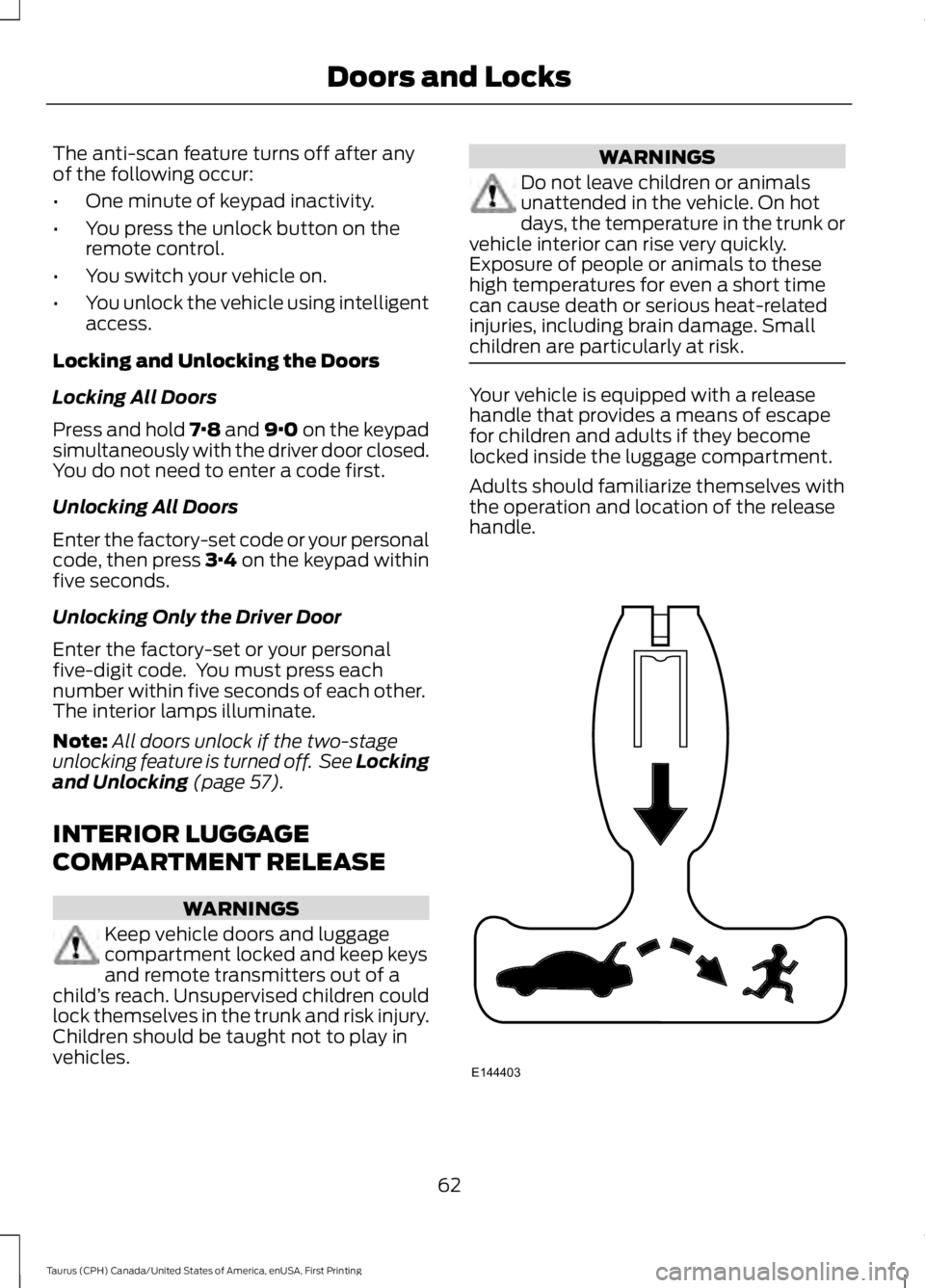
Your vehicle is equipped with a releasehandle that provides a means of escapefor children and adults if they becomelocked inside the luggage compartment.
Adults should familiarize themselves withthe operation and location of the releasehandle.
62
Taurus (CPH) Canada/United States of America, enUSA, First Printing
Doors and LocksE144403
Page 70 of 504
End of Travel Position
The steering column sets a stoppingposition just short of the end of the columnposition to prevent damage to the steeringcolumn. A new stopping position sets if thesteering column encounters an objectwhen tilting or telescoping.
To reset the steering column to its normalstopping position:
1. Confirm there is nothing obstructingthe motion of the steering column.
2. Press and hold the steering columncontrol until the steering column stopsmoving.
3. Press the steering column controlagain. The steering column may beginto move again.
4. When the steering column stops,continue holding the control for anadditional few seconds.
5.Repeat for each direction as necessary.
A new stopping position is set. The nexttime you tilt or telescope the steeringcolumn, it will stop just short of the end ofthe column position.
Memory Feature
You can save and recall the steeringcolumn position with the memory function.See Memory Function (page 125).
Note:Pressing the adjustment controlduring memory recall cancels the operation.
Easy Entry and Exit Feature
When you switch the ignition off, thesteering column will move to allow extraroom to exit your vehicle. The column willreturn to the previous setting when youswitch the ignition on. You can enable ordisable this feature in the informationdisplay. See Information Displays (page89).
AUDIO CONTROL
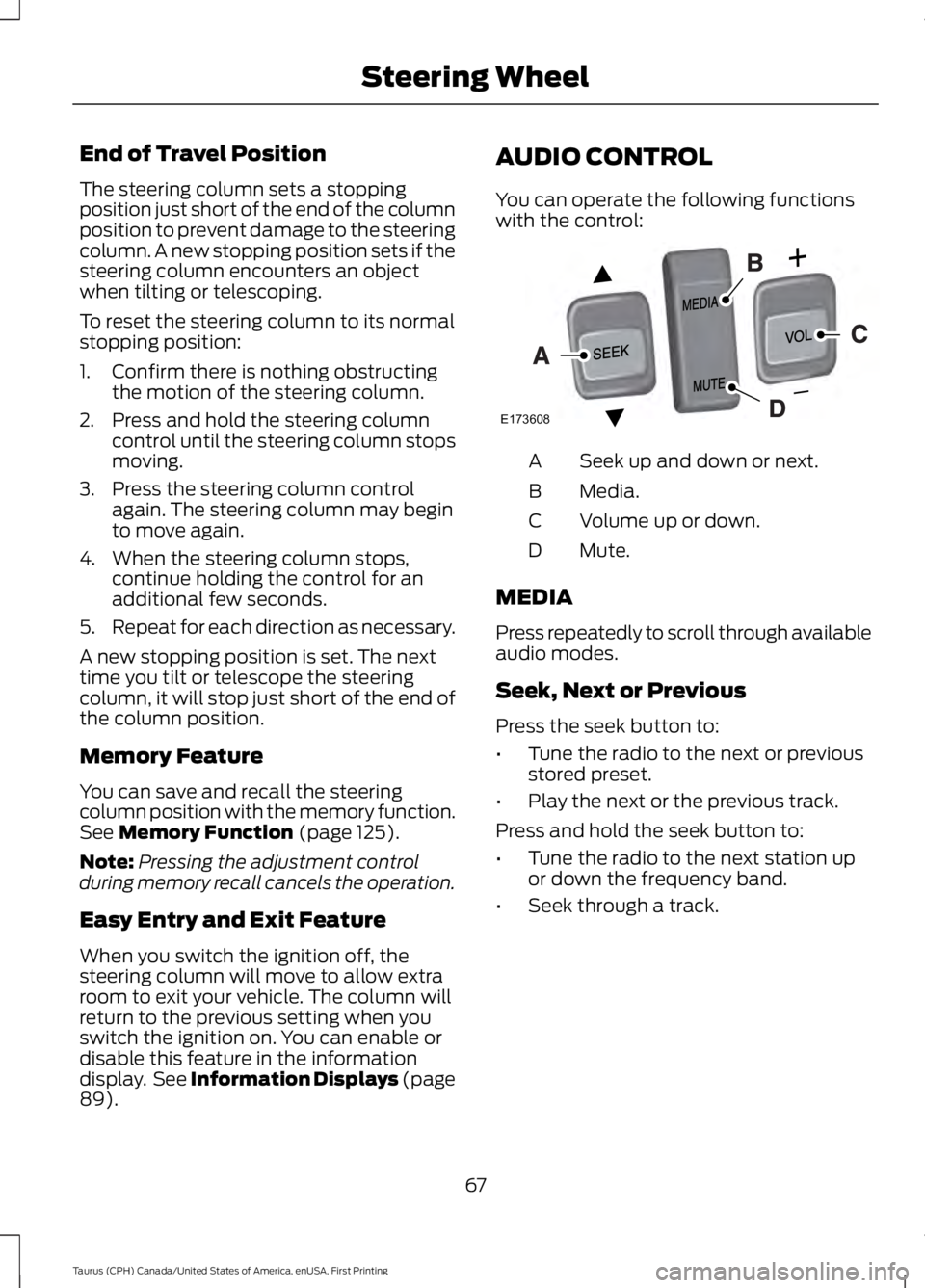
You can operate the following functionswith the control:
Seek up and down or next.A
Media.B
Volume up or down.C
Mute.D
MEDIA
Press repeatedly to scroll through availableaudio modes.
Seek, Next or Previous
Press the seek button to:
•Tune the radio to the next or previousstored preset.
•Play the next or the previous track.
Press and hold the seek button to:
•Tune the radio to the next station upor down the frequency band.
•Seek through a track.
67
Taurus (CPH) Canada/United States of America, enUSA, First Printing
Steering WheelE173608
Page 73 of 504

WINDSHIELD WIPERS
Note:Fully defrost the windshield beforeyou switch the windshield wipers on.
Note:Make sure you switch the windshieldwipers off before entering a car wash.
Note:Clean the windshield and wiperblades if they begin to leave streaks orsmears. If that does not resolve the issue,install new wiper blades. See Changingthe Wiper Blades (page 254).
Note:Do not operate the wipers on a drywindshield. This may scratch the glass,damage the wiper blades or cause the wipermotor to burn out. Always use thewindshield washers before wiping a drywindshield.
Rotate the end of the control:
•Away from you to increase the wiperspeed.
•Toward you to decrease the wiperspeed.
Speed Dependent Wipers
When your vehicle speed increases, theinterval between wipes decreases.
AUTOWIPERS (If Equipped)
Note:Fully defrost the windshield beforeswitching on the windshield wipers.
Note:Make sure you switch off thewindshield wipers before entering a carwash.
Note:Clean the windshield and wiperblades if they begin to leave streaks orsmears. If that does not resolve the issue,install new wiper blades. See Changingthe Wiper Blades (page 254).
Wet or winter driving conditions with ice,snow or salty road mist can causeinconsistent and unexpected wiping orsmearing. In these conditions, you can dothe following to help keep your windshieldclear:
•Lower the sensitivity of the autowipersto reduce the amount of smearing.
•Switch to normal or high-speed wipe.
•Switch the autowipers off.
The autowipers feature uses a rain sensor,located in the area around the interiormirror. The rain sensor monitors theamount of moisture on the windshield andautomatically turns on the wipers. Itadjusts the wiper speed by the amount ofmoisture that the sensor detects on thewindshield.
Note:This autowiper feature isautomatically set to on and remains on untilyou switch it off in the information display.You can also switch the feature back on atany time. See General Information (page89).
70
Taurus (CPH) Canada/United States of America, enUSA, First Printing
Wipers and WashersE213986 E208496
Page 74 of 504

Use the rotary control to adjust thesensitivity of the rain sensor. Set thecontrol to low sensitivity, and the wiperswill turn on when the rain sensor detectsa large amount of moisture on thewindshield. Set the control to highsensitivity, and the wipers will turn on whenthe rain sensor detects a small amount ofmoisture on the windshield.
Note:When you set the wiper system tointermittent wipe and the autowiper systemis on, the autowiper sensitivity settingadjusts the wiper speed according to themoisture on the windshield only. Use thewiper lever to wipe the windshieldon-demand.
Keep the outside of the windshield clean.The rain sensor is very sensitive. If the areaaround the mirror is dirty, then the wipersmay operate if dirt, mist or insects hit thewindshield.
WINDSHIELD WASHERS
Note:Do not operate the wipers on a drywindshield. This may scratch the glass,damage the wiper blades or cause the wipermotor to burn out. Always use thewindshield washers before wiping a drywindshield.
Note:Do not operate the washers whenthe washer reservoir is empty. This maycause the washer pump to overheat.
Press the end of the wiper lever to activatethe washer:
•A brief press causes a single wipewithout washer fluid.
•A quick press and hold causes thewipers to swipe the windshield threetimes with washer fluid.
•A long press and hold activates thewipers and washer fluid for up to 10seconds.
A wipe occurs a few seconds after washingto clear any remaining washer fluid. Youcan switch this feature on and off throughthe information display. See GeneralInformation (page 89).
71
Taurus (CPH) Canada/United States of America, enUSA, First Printing
Wipers and WashersE213988