2017 FORD SUPER DUTY lock
[x] Cancel search: lockPage 434 of 636
Specification
Name
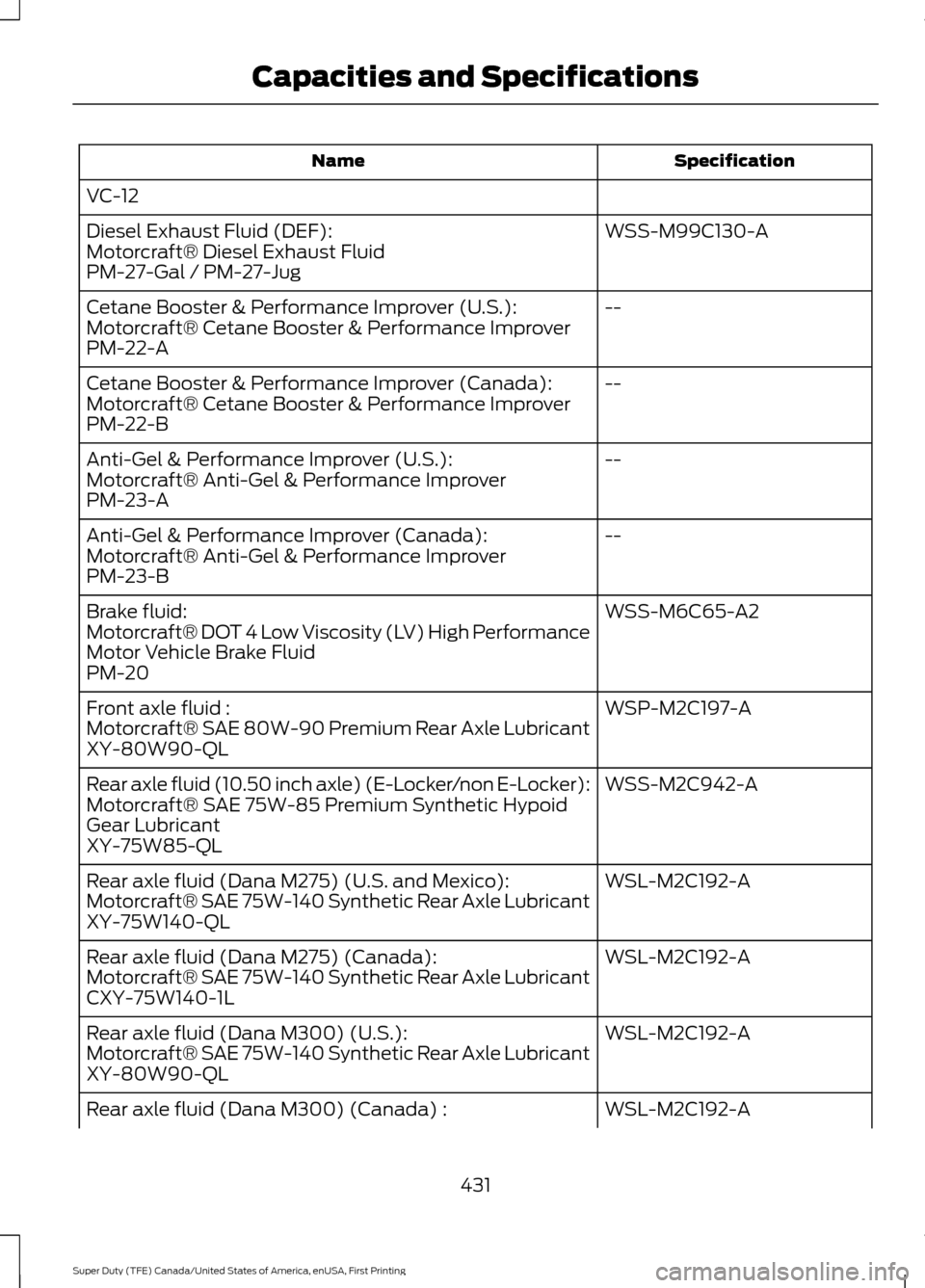
VC-12 WSS-M99C130-A
Diesel Exhaust Fluid (DEF):
Motorcraft® Diesel Exhaust Fluid
PM-27-Gal / PM-27-Jug
--
Cetane Booster & Performance Improver (U.S.):
Motorcraft® Cetane Booster & Performance Improver
PM-22-A
--
Cetane Booster & Performance Improver (Canada):
Motorcraft® Cetane Booster & Performance Improver
PM-22-B
--
Anti-Gel & Performance Improver (U.S.):
Motorcraft® Anti-Gel & Performance Improver
PM-23-A
--
Anti-Gel & Performance Improver (Canada):
Motorcraft® Anti-Gel & Performance Improver
PM-23-B
WSS-M6C65-A2
Brake fluid:
Motorcraft® DOT 4 Low Viscosity (LV) High Performance
Motor Vehicle Brake Fluid
PM-20
WSP-M2C197-A
Front axle fluid :
Motorcraft® SAE 80W-90 Premium Rear Axle Lubricant
XY-80W90-QL
WSS-M2C942-A
Rear axle fluid (10.50 inch axle) (E-Locker/non E-Locker):
Motorcraft® SAE 75W-85 Premium Synthetic Hypoid
Gear Lubricant
XY-75W85-QL
WSL-M2C192-A
Rear axle fluid (Dana M275) (U.S. and Mexico):
Motorcraft® SAE 75W-140 Synthetic Rear Axle Lubricant
XY-75W140-QL
WSL-M2C192-A
Rear axle fluid (Dana M275) (Canada):
Motorcraft® SAE 75W-140 Synthetic Rear Axle Lubricant
CXY-75W140-1L
WSL-M2C192-A
Rear axle fluid (Dana M300) (U.S.):
Motorcraft® SAE 75W-140 Synthetic Rear Axle Lubricant
XY-80W90-QL
WSL-M2C192-A
Rear axle fluid (Dana M300) (Canada) :
431
Super Duty (TFE) Canada/United States of America, enUSA, First Printing Capacities and Specifications
Page 436 of 636
Specification
Name
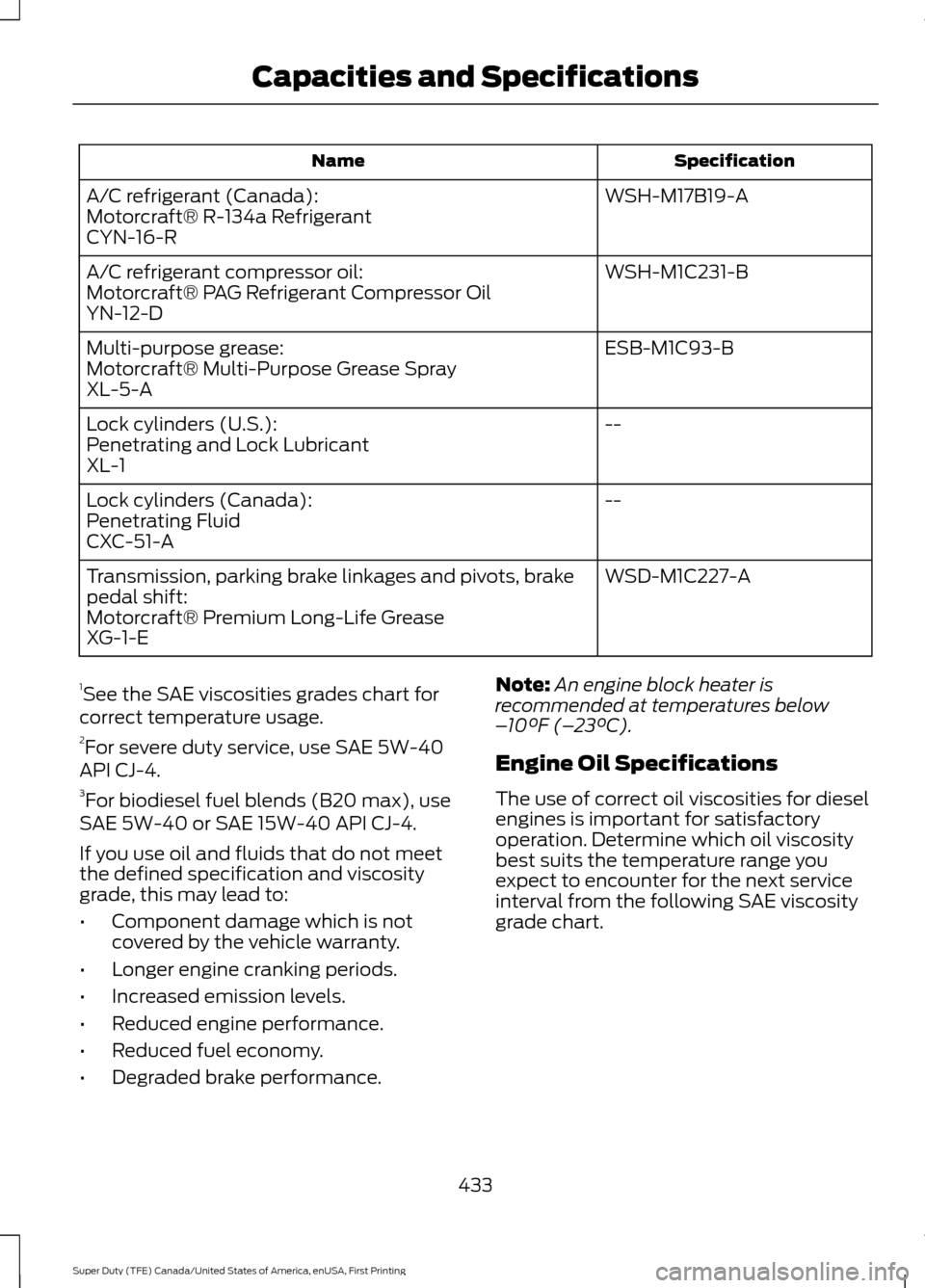
WSH-M17B19-A
A/C refrigerant (Canada):
Motorcraft® R-134a Refrigerant
CYN-16-R
WSH-M1C231-B
A/C refrigerant compressor oil:
Motorcraft® PAG Refrigerant Compressor Oil
YN-12-D
ESB-M1C93-B
Multi-purpose grease:
Motorcraft® Multi-Purpose Grease Spray
XL-5-A
--
Lock cylinders (U.S.):
Penetrating and Lock Lubricant
XL-1
--
Lock cylinders (Canada):
Penetrating Fluid
CXC-51-A
WSD-M1C227-A
Transmission, parking brake linkages and pivots, brake
pedal shift:
Motorcraft® Premium Long-Life Grease
XG-1-E
1 See the SAE viscosities grades chart for
correct temperature usage.
2 For severe duty service, use SAE 5W-40
API CJ-4.
3 For biodiesel fuel blends (B20 max), use
SAE 5W-40 or SAE 15W-40 API CJ-4.
If you use oil and fluids that do not meet
the defined specification and viscosity
grade, this may lead to:
• Component damage which is not
covered by the vehicle warranty.
• Longer engine cranking periods.
• Increased emission levels.
• Reduced engine performance.
• Reduced fuel economy.
• Degraded brake performance. Note:
An engine block heater is
recommended at temperatures below
– 10°F (– 23°C).
Engine Oil Specifications
The use of correct oil viscosities for diesel
engines is important for satisfactory
operation. Determine which oil viscosity
best suits the temperature range you
expect to encounter for the next service
interval from the following SAE viscosity
grade chart.
433
Super Duty (TFE) Canada/United States of America, enUSA, First Printing Capacities and Specifications
Page 440 of 636
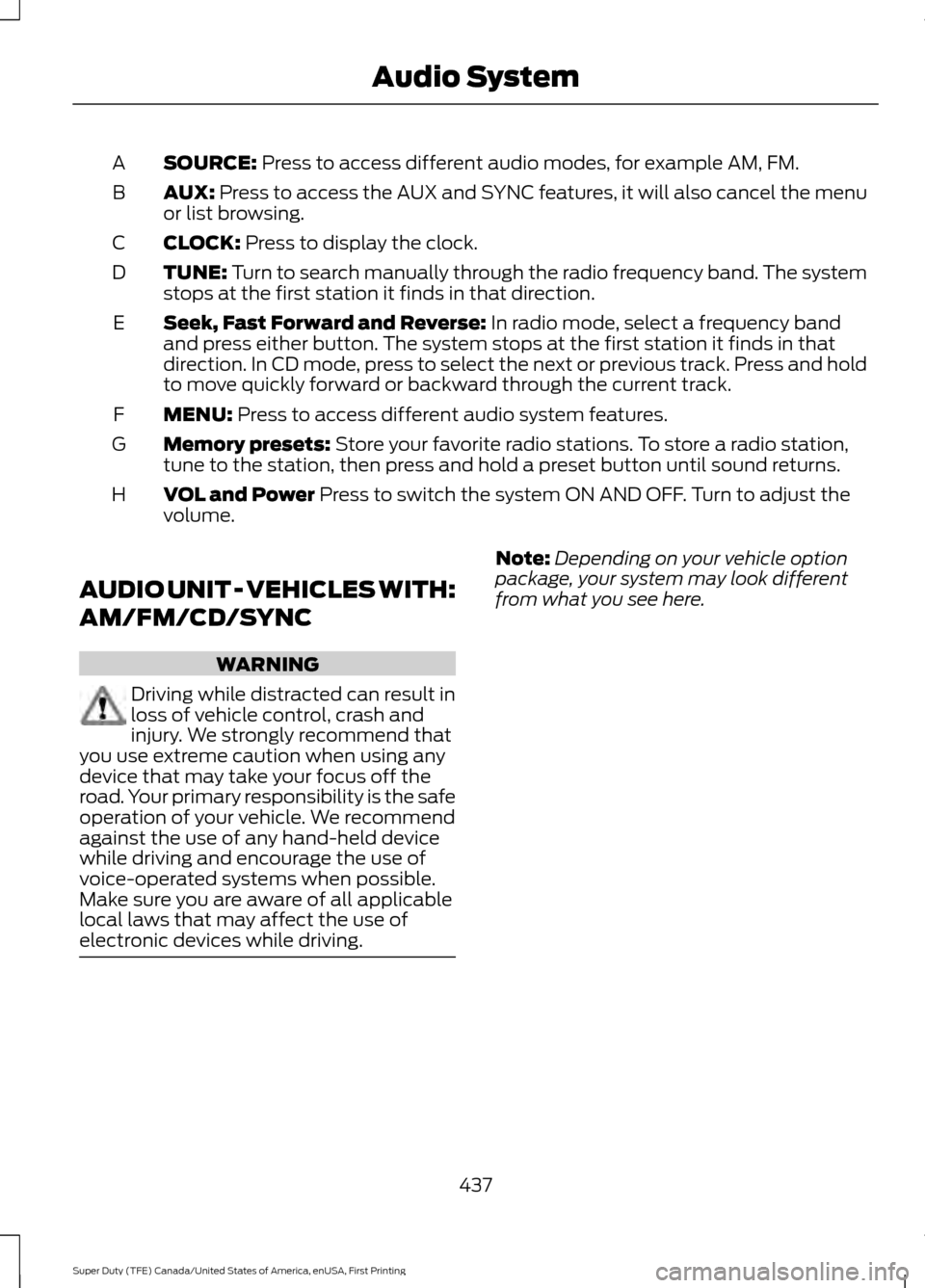
SOURCE: Press to access different audio modes, for example AM, FM.
A
AUX:
Press to access the AUX and SYNC features, it will also cancel the menu
or list browsing.
B
CLOCK:
Press to display the clock.
C
TUNE:
Turn to search manually through the radio frequency band. The system
stops at the first station it finds in that direction.
D
Seek, Fast Forward and Reverse:
In radio mode, select a frequency band
and press either button. The system stops at the first station it finds in that
direction. In CD mode, press to select the next or previous track. Press and hold
to move quickly forward or backward through the current track.
E
MENU:
Press to access different audio system features.
F
Memory presets:
Store your favorite radio stations. To store a radio station,
tune to the station, then press and hold a preset button until sound returns.
G
VOL and Power
Press to switch the system ON AND OFF. Turn to adjust the
volume.
H
AUDIO UNIT - VEHICLES WITH:
AM/FM/CD/SYNC WARNING
Driving while distracted can result in
loss of vehicle control, crash and
injury. We strongly recommend that
you use extreme caution when using any
device that may take your focus off the
road. Your primary responsibility is the safe
operation of your vehicle. We recommend
against the use of any hand-held device
while driving and encourage the use of
voice-operated systems when possible.
Make sure you are aware of all applicable
local laws that may affect the use of
electronic devices while driving. Note:
Depending on your vehicle option
package, your system may look different
from what you see here.
437
Super Duty (TFE) Canada/United States of America, enUSA, First Printing Audio System
Page 442 of 636
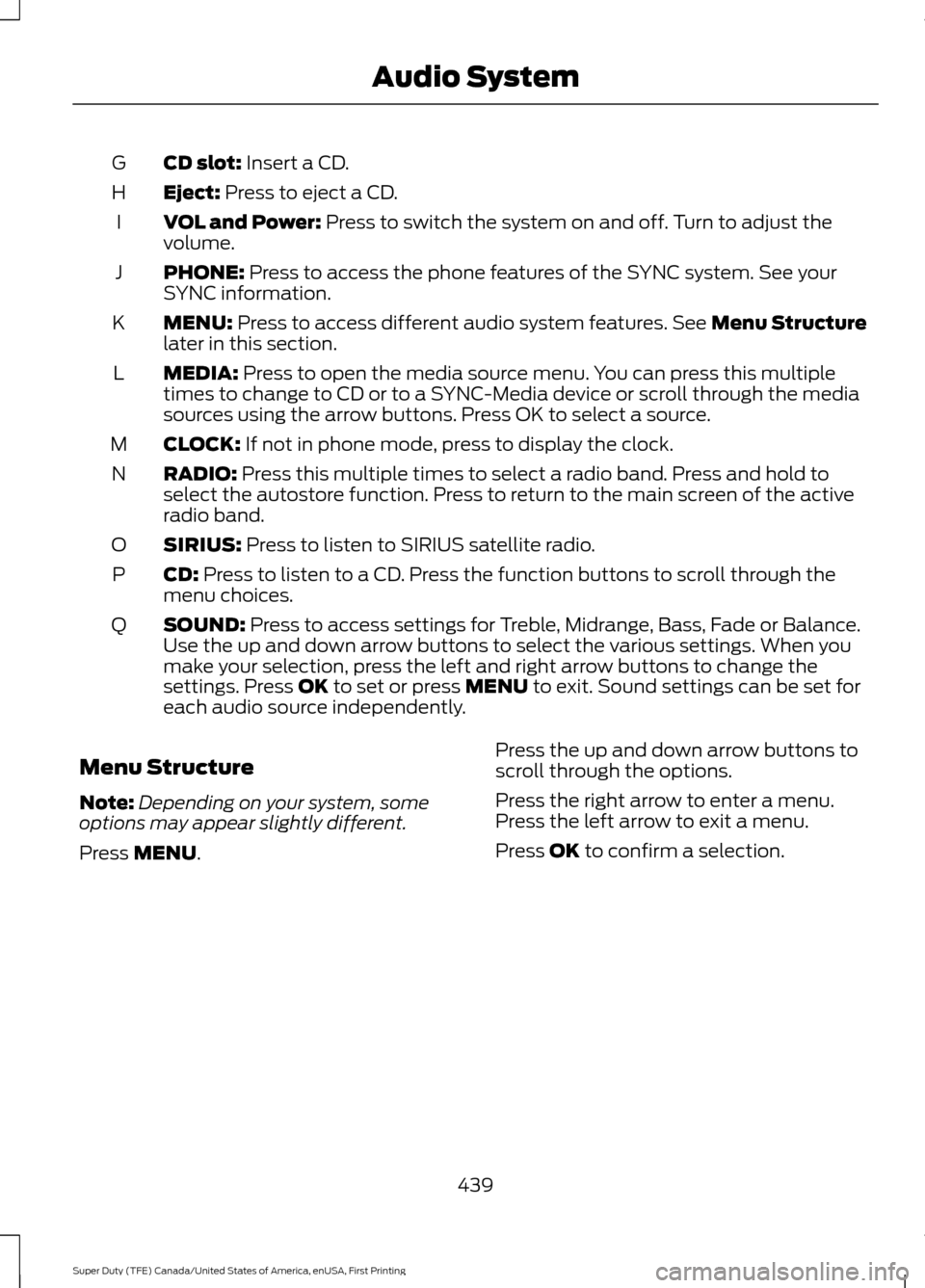
CD slot: Insert a CD.
G
Eject:
Press to eject a CD.
H
VOL and Power:
Press to switch the system on and off. Turn to adjust the
volume.
I
PHONE:
Press to access the phone features of the SYNC system. See your
SYNC information.
J
MENU:
Press to access different audio system features. See Menu Structure
later in this section.
K
MEDIA:
Press to open the media source menu. You can press this multiple
times to change to CD or to a SYNC-Media device or scroll through the media
sources using the arrow buttons. Press OK to select a source.
L
CLOCK:
If not in phone mode, press to display the clock.
M
RADIO:
Press this multiple times to select a radio band. Press and hold to
select the autostore function. Press to return to the main screen of the active
radio band.
N
SIRIUS:
Press to listen to SIRIUS satellite radio.
O
CD:
Press to listen to a CD. Press the function buttons to scroll through the
menu choices.
P
SOUND:
Press to access settings for Treble, Midrange, Bass, Fade or Balance.
Use the up and down arrow buttons to select the various settings. When you
make your selection, press the left and right arrow buttons to change the
settings. Press
OK to set or press MENU to exit. Sound settings can be set for
each audio source independently.
Q
Menu Structure
Note: Depending on your system, some
options may appear slightly different.
Press
MENU. Press the up and down arrow buttons to
scroll through the options.
Press the right arrow to enter a menu.
Press the left arrow to exit a menu.
Press OK to confirm a selection.
439
Super Duty (TFE) Canada/United States of America, enUSA, First Printing Audio System
Page 443 of 636
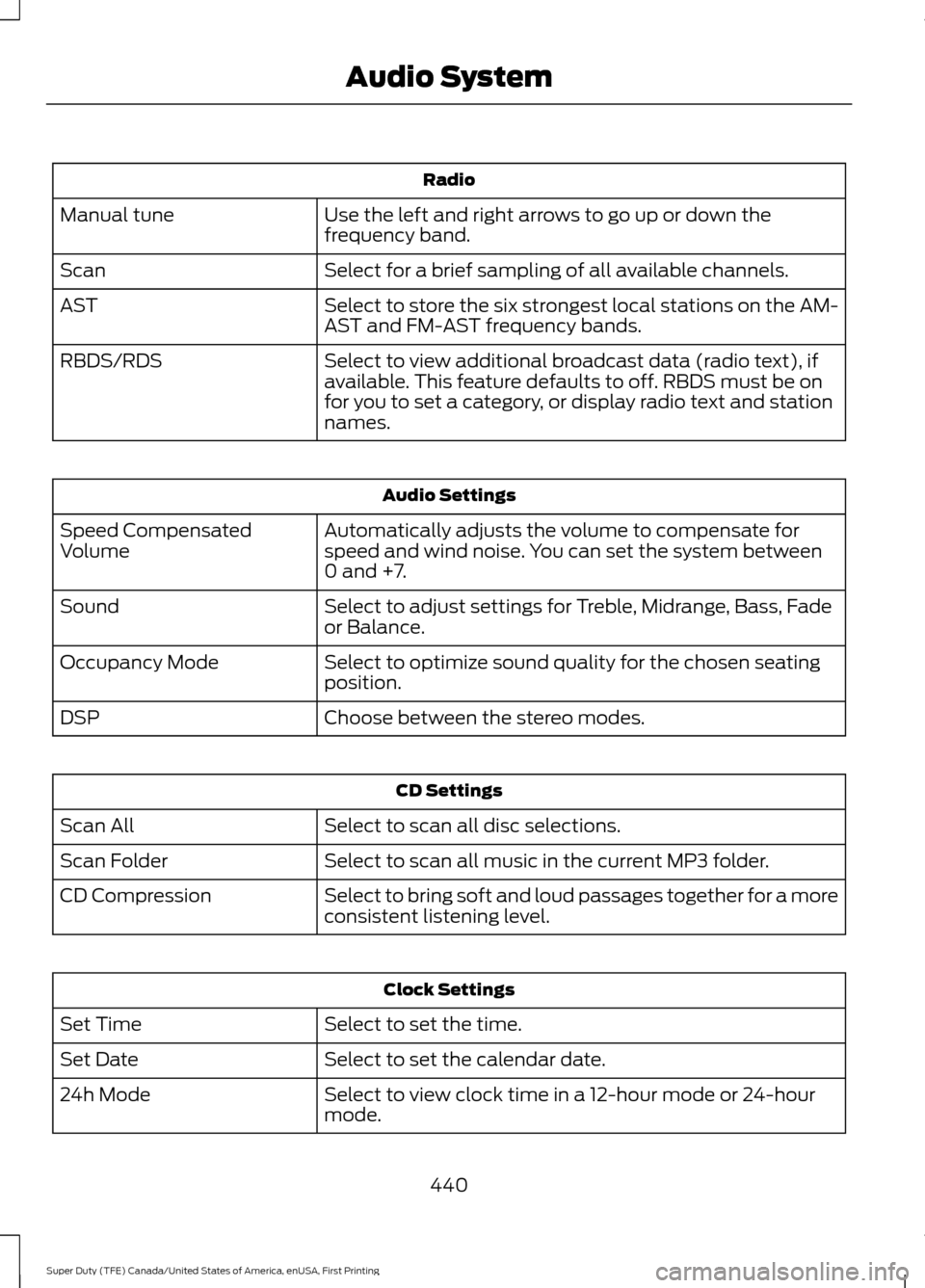
Radio
Use the left and right arrows to go up or down the
frequency band.
Manual tune
Select for a brief sampling of all available channels.
Scan
Select to store the six strongest local stations on the AM-
AST and FM-AST frequency bands.
AST
Select to view additional broadcast data (radio text), if
available. This feature defaults to off. RBDS must be on
for you to set a category, or display radio text and station
names.
RBDS/RDS Audio Settings
Automatically adjusts the volume to compensate for
speed and wind noise. You can set the system between
0 and +7.
Speed Compensated
Volume
Select to adjust settings for Treble, Midrange, Bass, Fade
or Balance.
Sound
Select to optimize sound quality for the chosen seating
position.
Occupancy Mode
Choose between the stereo modes.
DSP CD Settings
Select to scan all disc selections.
Scan All
Select to scan all music in the current MP3 folder.
Scan Folder
Select to bring soft and loud passages together for a more
consistent listening level.
CD Compression Clock Settings
Select to set the time.
Set Time
Select to set the calendar date.
Set Date
Select to view clock time in a 12-hour mode or 24-hour
mode.
24h Mode
440
Super Duty (TFE) Canada/United States of America, enUSA, First Printing Audio System
Page 450 of 636
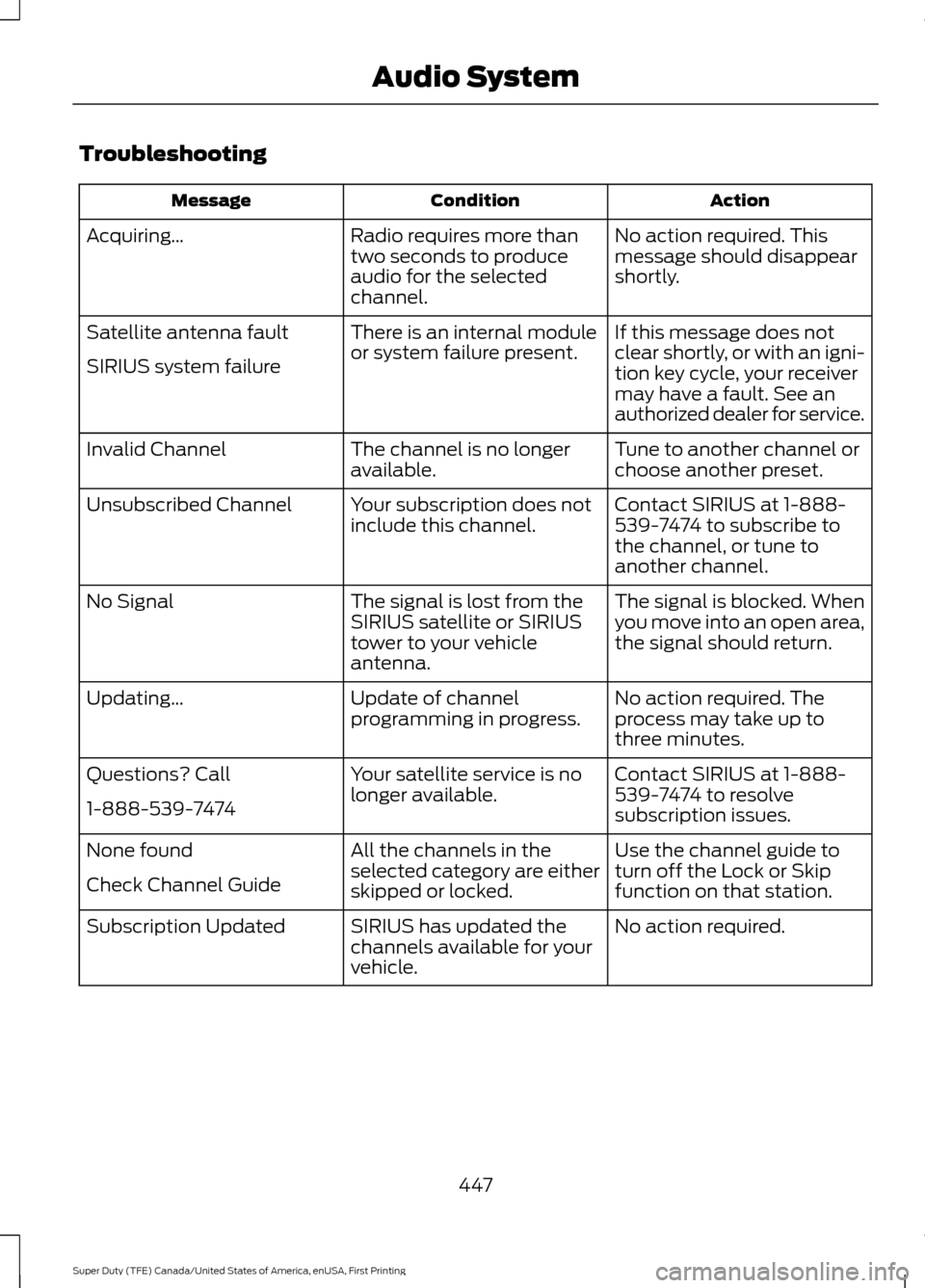
Troubleshooting
Action
Condition
Message
No action required. This
message should disappear
shortly.
Radio requires more than
two seconds to produce
audio for the selected
channel.
Acquiring\b
If this message does not
clear shortly, or with an igni-
tion key cycle, your receiver
may have a fault. See an
authorized dealer for service.
There is an internal module
or system failure present.
Satellite antenna fault
SIRIUS system failure
Tune to another channel or
choose another preset.
The channel is no longer
available.
Invalid Channel
Contact SIRIUS at 1-888-
539-7474 to subscribe to
the channel, or tune to
another channel.
Your subscription does not
include this channel.
Unsubscribed Channel
The signal is blocked. When
you move into an open area,
the signal should return.
The signal is lost from the
SIRIUS satellite or SIRIUS
tower to your vehicle
antenna.
No Signal
No action required. The
process may take up to
three minutes.
Update of channel
programming in progress.
Updating\b
Contact SIRIUS at 1-888-
539-7474 to resolve
subscription issues.
Your satellite service is no
longer available.
Questions? Call
1-888-539-7474
Use the channel guide to
turn off the Lock or Skip
function on that station.
All the channels in the
selected category are either
skipped or locked.
None found
Check Channel Guide
No action required.
SIRIUS has updated the
channels available for your
vehicle.
Subscription Updated
447
Super Duty (TFE) Canada/United States of America, enUSA, First Printing Audio System
Page 491 of 636
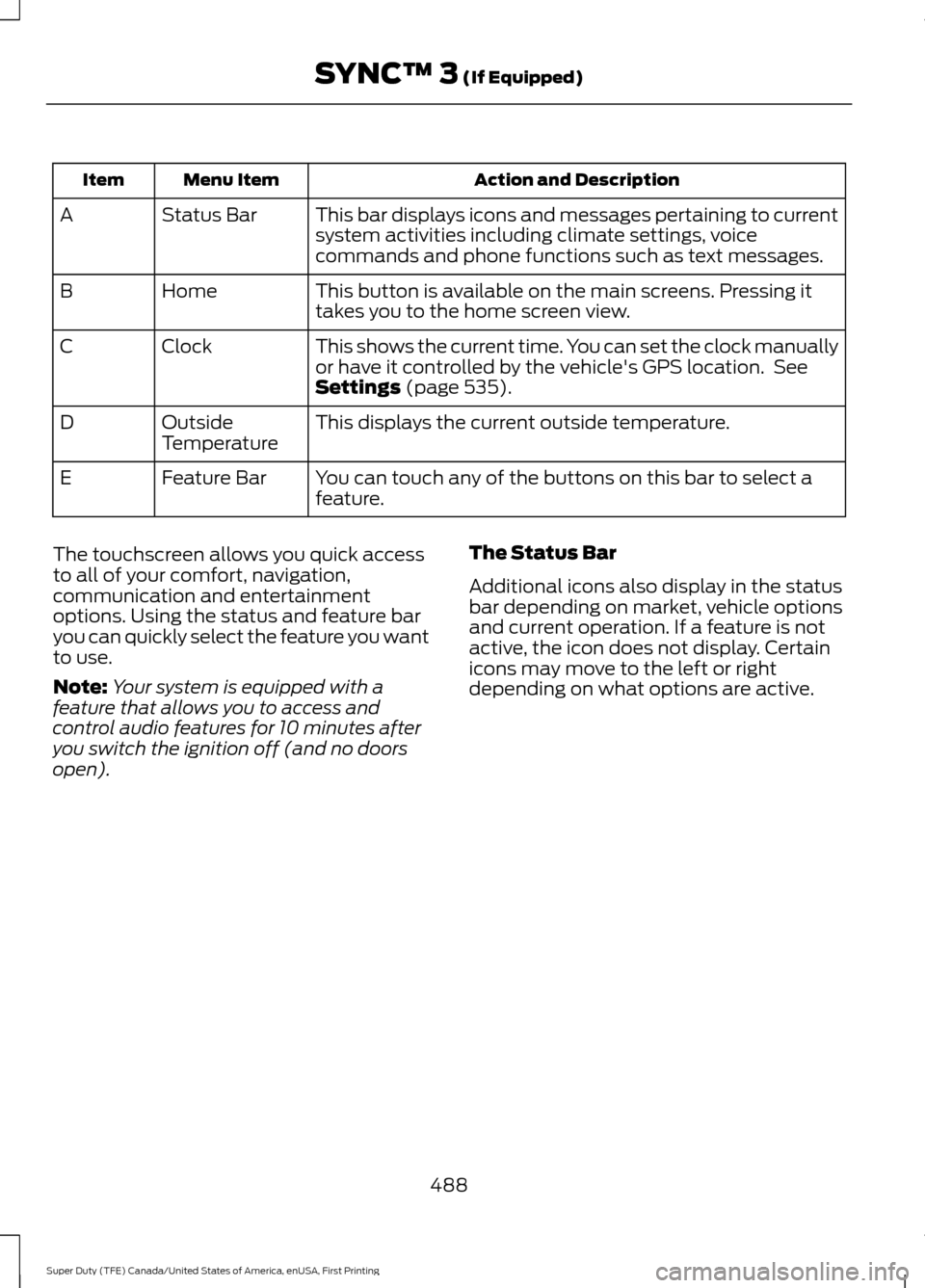
Action and Description
Menu Item
Item
This bar displays icons and messages pertaining to current
system activities including climate settings, voice
commands and phone functions such as text messages.
Status Bar
A
This button is available on the main screens. Pressing it
takes you to the home screen view.
Home
B
This shows the current time. You can set the clock manually
or have it controlled by the vehicle's GPS location. See
Settings (page 535).
Clock
C
This displays the current outside temperature.
Outside
Temperature
D
You can touch any of the buttons on this bar to select a
feature.
Feature Bar
E
The touchscreen allows you quick access
to all of your comfort, navigation,
communication and entertainment
options. Using the status and feature bar
you can quickly select the feature you want
to use.
Note: Your system is equipped with a
feature that allows you to access and
control audio features for 10 minutes after
you switch the ignition off (and no doors
open). The Status Bar
Additional icons also display in the status
bar depending on market, vehicle options
and current operation. If a feature is not
active, the icon does not display. Certain
icons may move to the left or right
depending on what options are active.
488
Super Duty (TFE) Canada/United States of America, enUSA, First Printing SYNC™ 3
(If Equipped)
Page 505 of 636
Please make sure that you are saying the
contact name exactly as it appears in your
contact list.
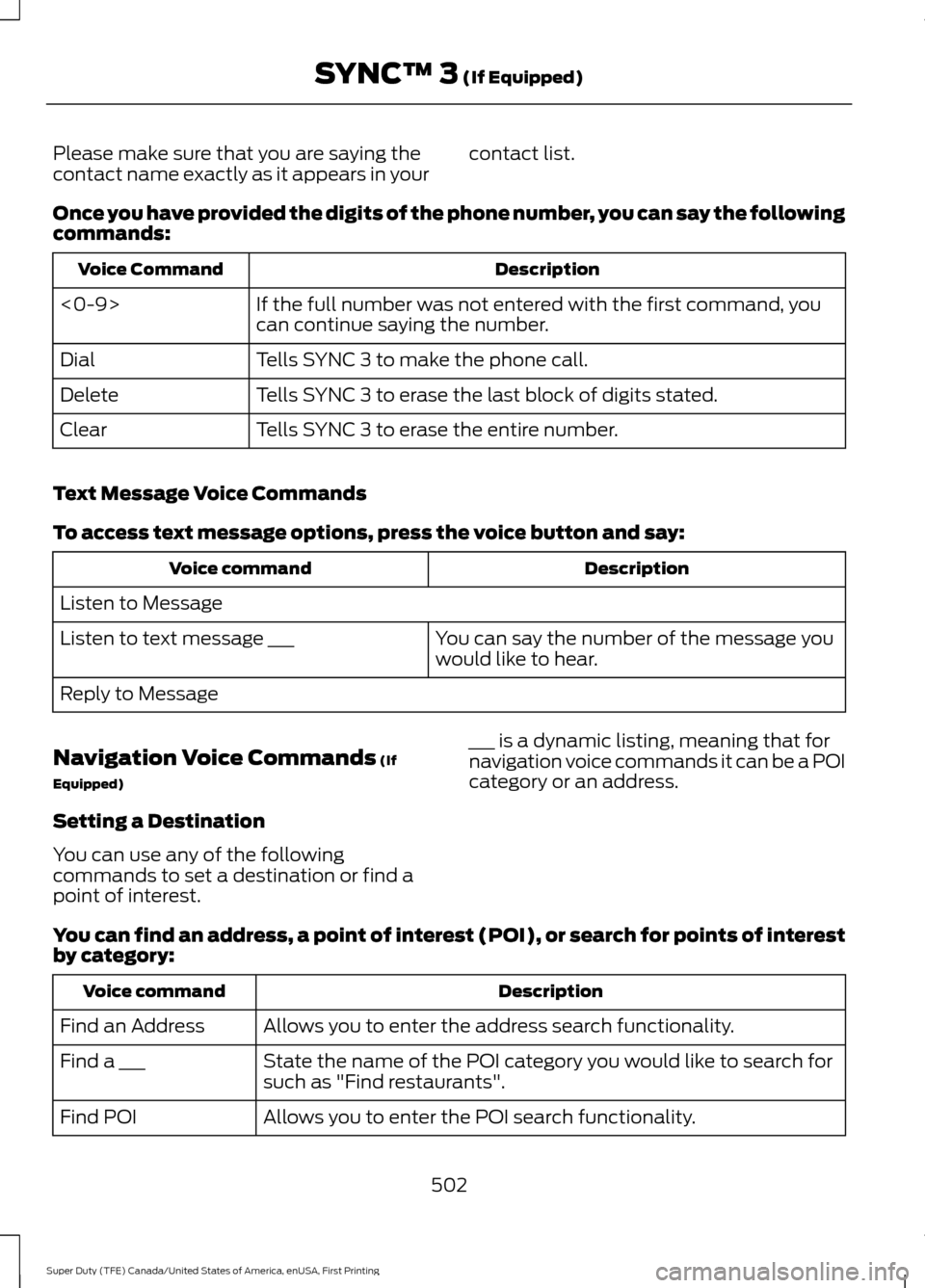
Once you have provided the digits of the phone number, you can say the following
commands: Description
Voice Command
If the full number was not entered with the first command, you
can continue saying the number.
<0-9>
Tells SYNC 3 to make the phone call.
Dial
Tells SYNC 3 to erase the last block of digits stated.
Delete
Tells SYNC 3 to erase the entire number.
Clear
Text Message Voice Commands
To access text message options, press the voice button and say: Description
Voice command
Listen to Message You can say the number of the message you
would like to hear.
Listen to text message ___
Reply to Message
Navigation Voice Commands (If
Equipped)
Setting a Destination
You can use any of the following
commands to set a destination or find a
point of interest. ___ is a dynamic listing, meaning that for
navigation voice commands it can be a POI
category or an address.
You can find an address, a point of interest (POI), or search for points of interest
by category: Description
Voice command
Allows you to enter the address search functionality.
Find an Address
State the name of the POI category you would like to search for
such as "Find restaurants".
Find a ___
Allows you to enter the POI search functionality.
Find POI
502
Super Duty (TFE) Canada/United States of America, enUSA, First Printing SYNC™ 3
(If Equipped)