Page 118 of 636
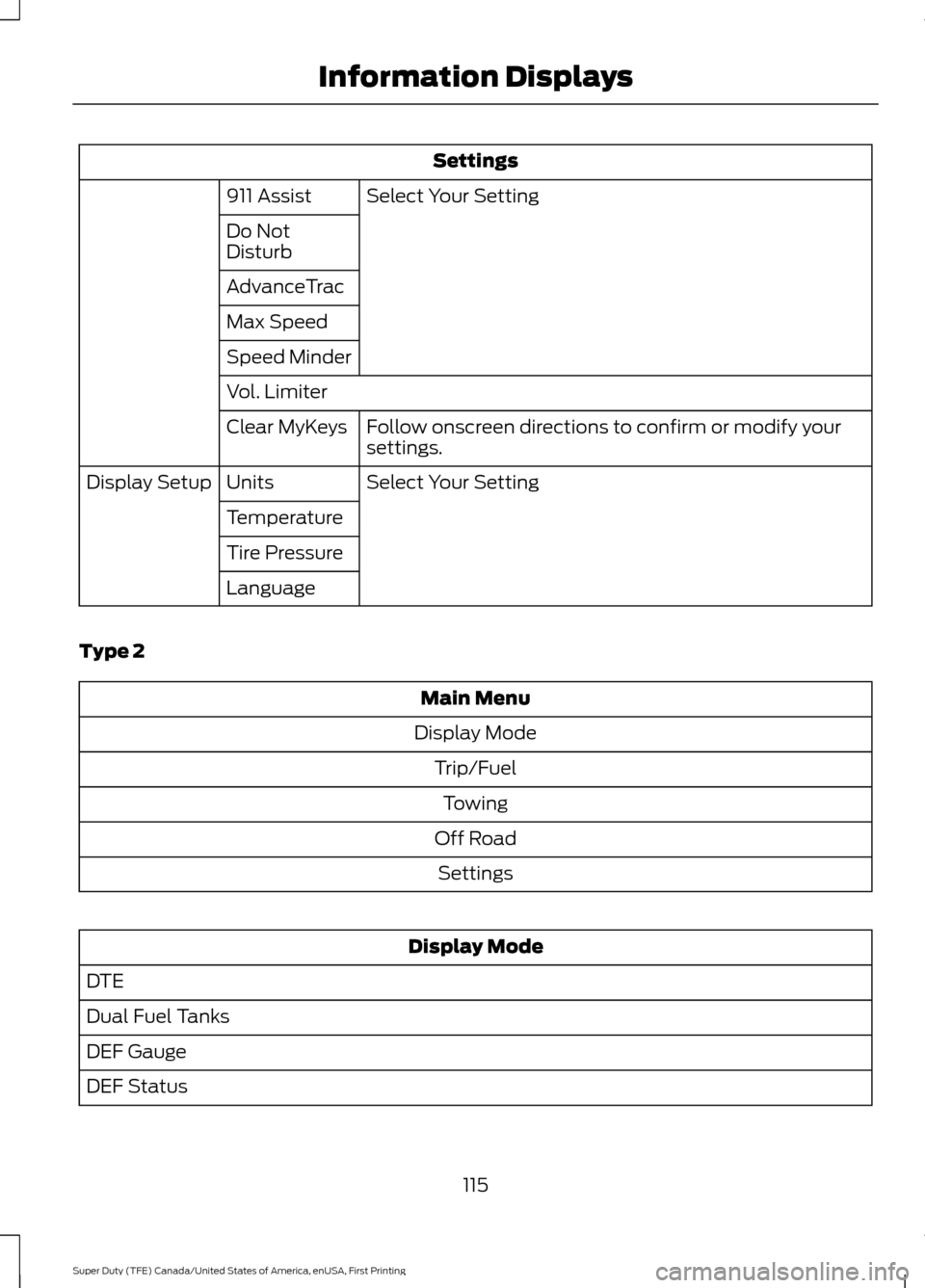
Settings
Select Your Setting
911 Assist
Do Not
Disturb
AdvanceTrac
Max Speed
Speed Minder
Vol. Limiter
Follow onscreen directions to confirm or modify your
settings.
Clear MyKeys
Select Your Setting
Units
Display Setup
Temperature
Tire Pressure
Language
Type 2 Main Menu
Display Mode Trip/FuelTowing
Off Road Settings Display Mode
DTE
Dual Fuel Tanks
DEF Gauge
DEF Status
115
Super Duty (TFE) Canada/United States of America, enUSA, First Printing Information Displays
Page 119 of 636
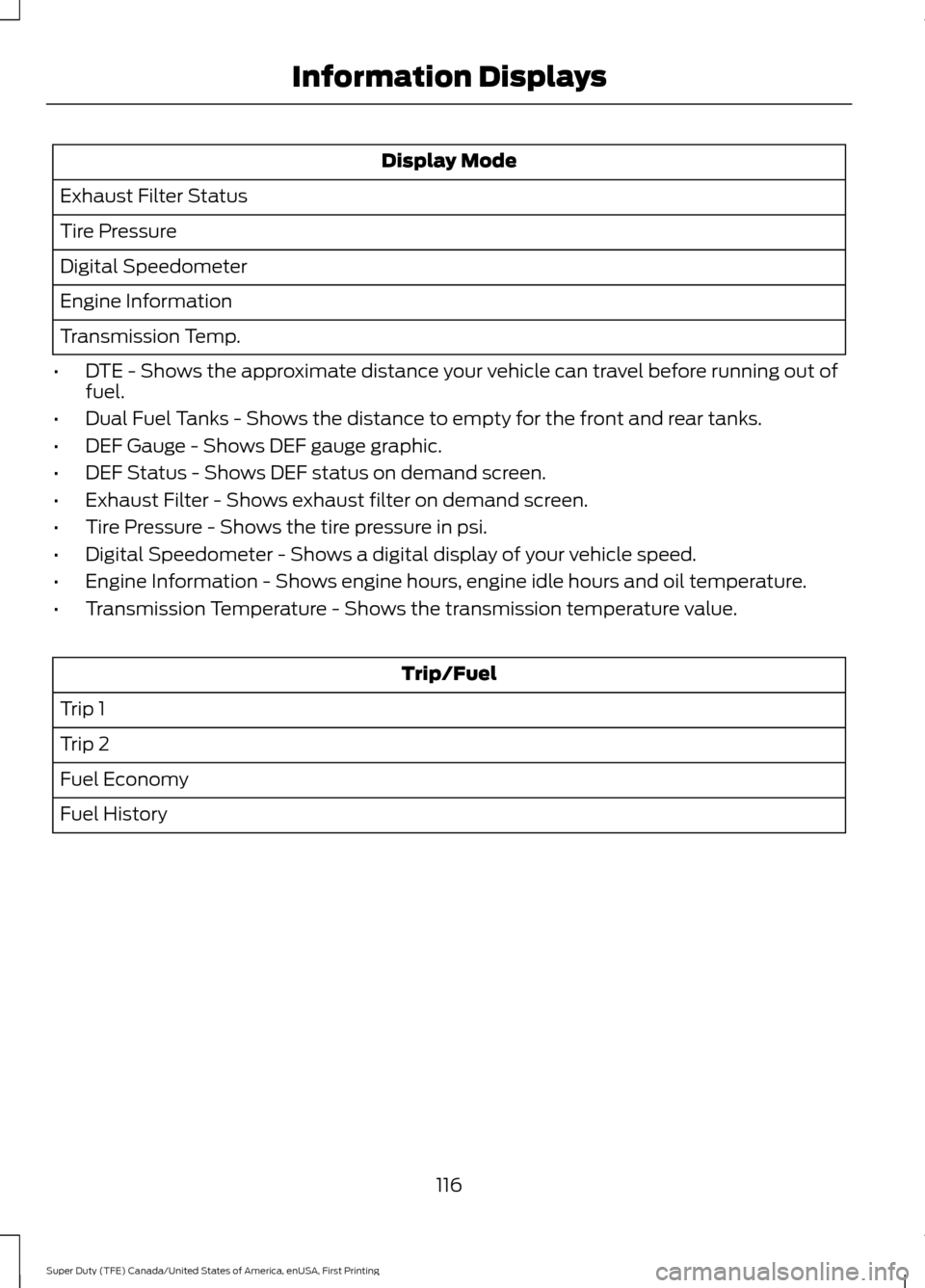
Display Mode
Exhaust Filter Status
Tire Pressure
Digital Speedometer
Engine Information
Transmission Temp.
• DTE - Shows the approximate distance your vehicle can travel before running out of
fuel.
• Dual Fuel Tanks - Shows the distance to empty for the front and rear tanks.
• DEF Gauge - Shows DEF gauge graphic.
• DEF Status - Shows DEF status on demand screen.
• Exhaust Filter - Shows exhaust filter on demand screen.
• Tire Pressure - Shows the tire pressure in psi.
• Digital Speedometer - Shows a digital display of your vehicle speed.
• Engine Information - Shows engine hours, engine idle hours and oil temperature.
• Transmission Temperature - Shows the transmission temperature value. Trip/Fuel
Trip 1
Trip 2
Fuel Economy
Fuel History
116
Super Duty (TFE) Canada/United States of America, enUSA, First Printing Information Displays
Page 120 of 636
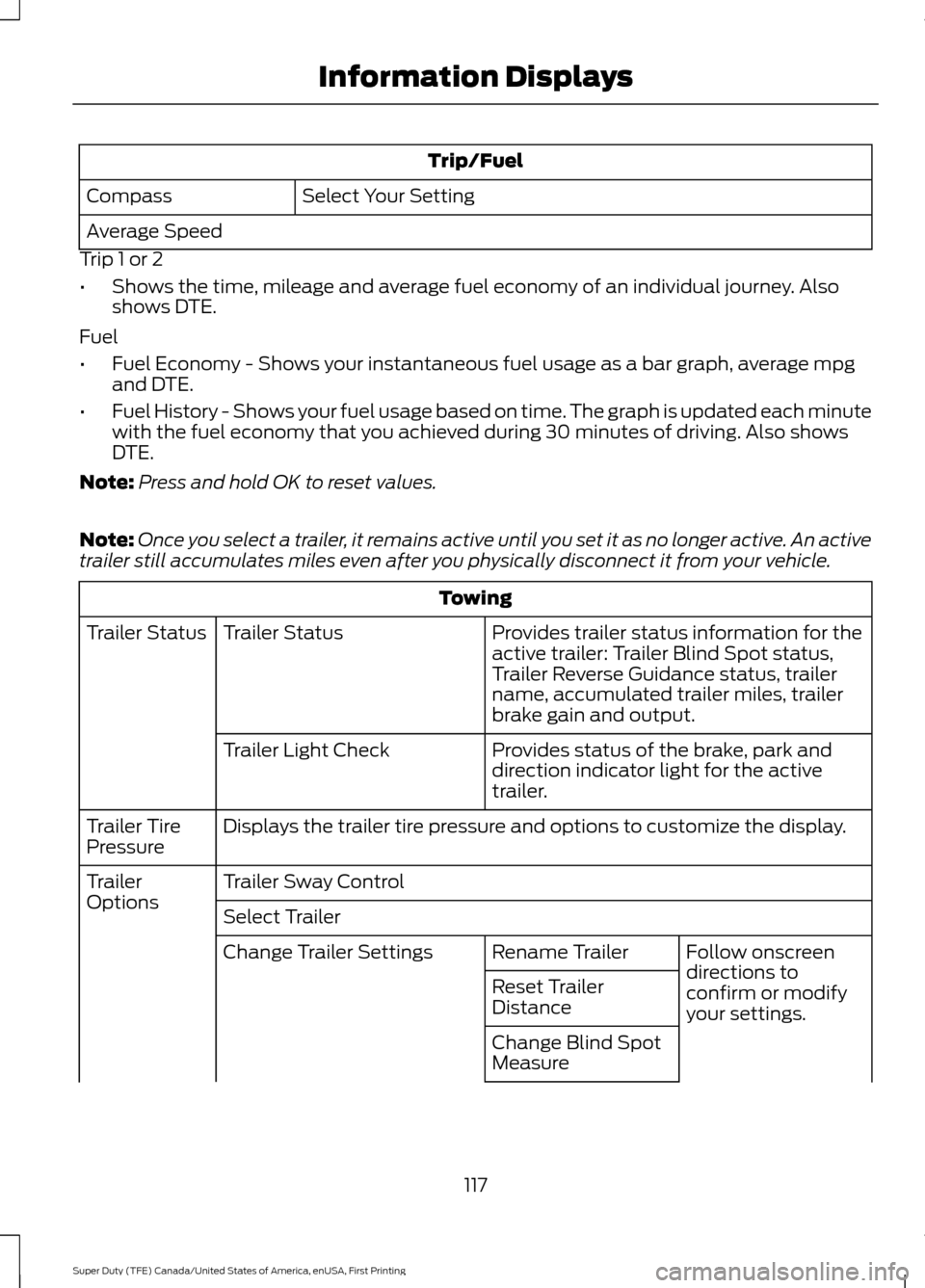
Trip/Fuel
Select Your Setting
Compass
Average Speed
Trip 1 or 2
• Shows the time, mileage and average fuel economy of an individual journey. Also
shows DTE.
Fuel
• Fuel Economy - Shows your instantaneous fuel usage as a bar graph, average mpg
and DTE.
• Fuel History - Shows your fuel usage based on time. The graph is updated each minute
with the fuel economy that you achieved during 30 minutes of driving. Also shows
DTE.
Note: Press and hold OK to reset values.
Note: Once you select a trailer, it remains active until you set it as no longer active. An active
trailer still accumulates miles even after you physically disconnect it from your vehicle. Towing
Provides trailer status information for the
active trailer: Trailer Blind Spot status,
Trailer Reverse Guidance status, trailer
name, accumulated trailer miles, trailer
brake gain and output.
Trailer Status
Trailer Status
Provides status of the brake, park and
direction indicator light for the active
trailer.
Trailer Light Check
Displays the trailer tire pressure and options to customize the display.
Trailer Tire
Pressure
Trailer Sway Control
Trailer
Options
Select Trailer
Follow onscreen
directions to
confirm or modify
your settings.
Rename Trailer
Change Trailer Settings
Reset Trailer
Distance
Change Blind Spot
Measure
117
Super Duty (TFE) Canada/United States of America, enUSA, First Printing Information Displays
Page 125 of 636
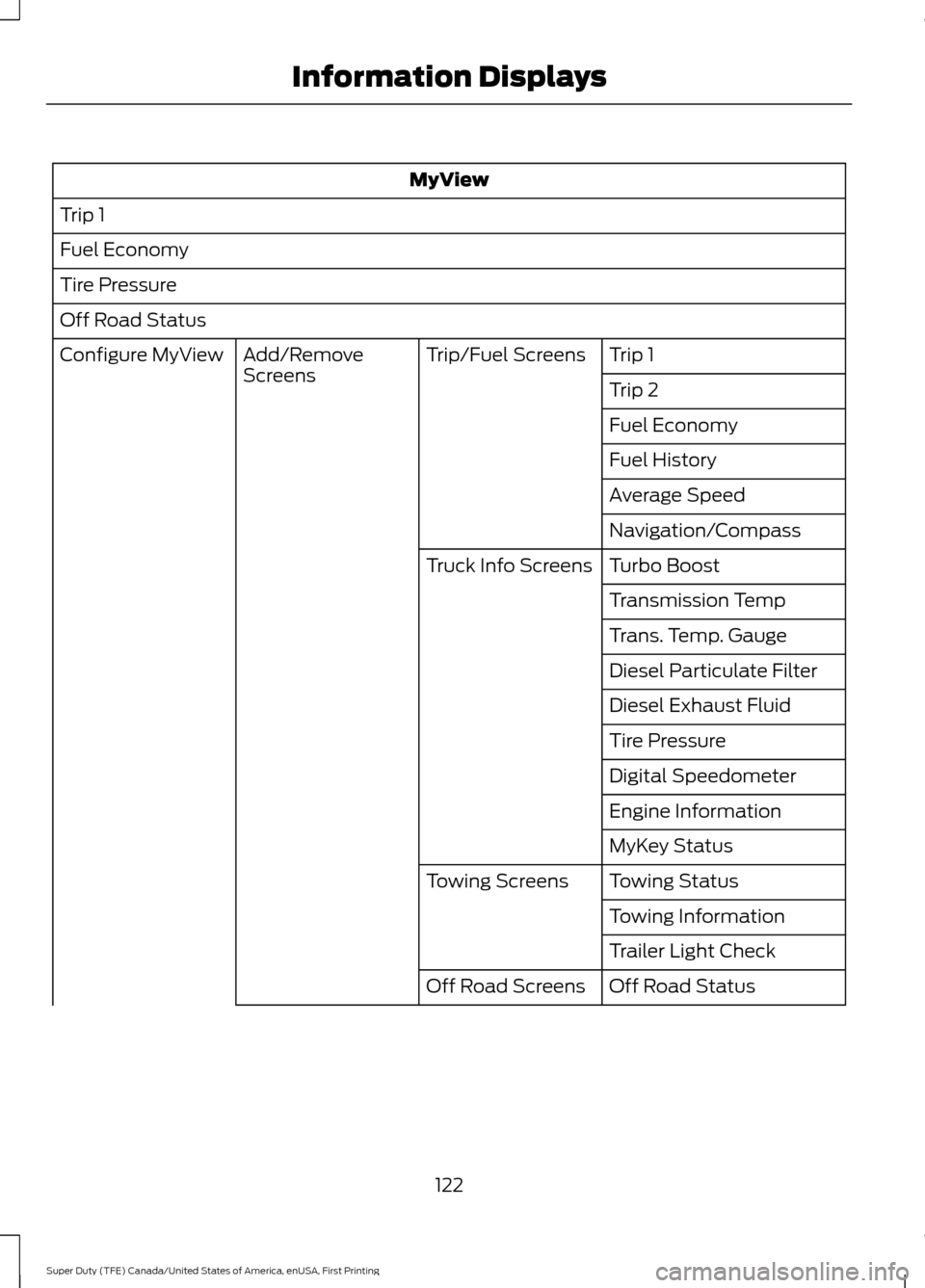
MyView
Trip 1
Fuel Economy
Tire Pressure
Off Road Status Trip 1
Trip/Fuel Screens
Add/Remove
Screens
Configure MyView
Trip 2
Fuel Economy
Fuel History
Average Speed
Navigation/Compass
Turbo Boost
Truck Info Screens
Transmission Temp
Trans. Temp. Gauge
Diesel Particulate Filter
Diesel Exhaust Fluid
Tire Pressure
Digital Speedometer
Engine Information
MyKey Status
Towing Status
Towing Screens
Towing Information
Trailer Light Check
Off Road Status
Off Road Screens
122
Super Duty (TFE) Canada/United States of America, enUSA, First Printing Information Displays
Page 126 of 636
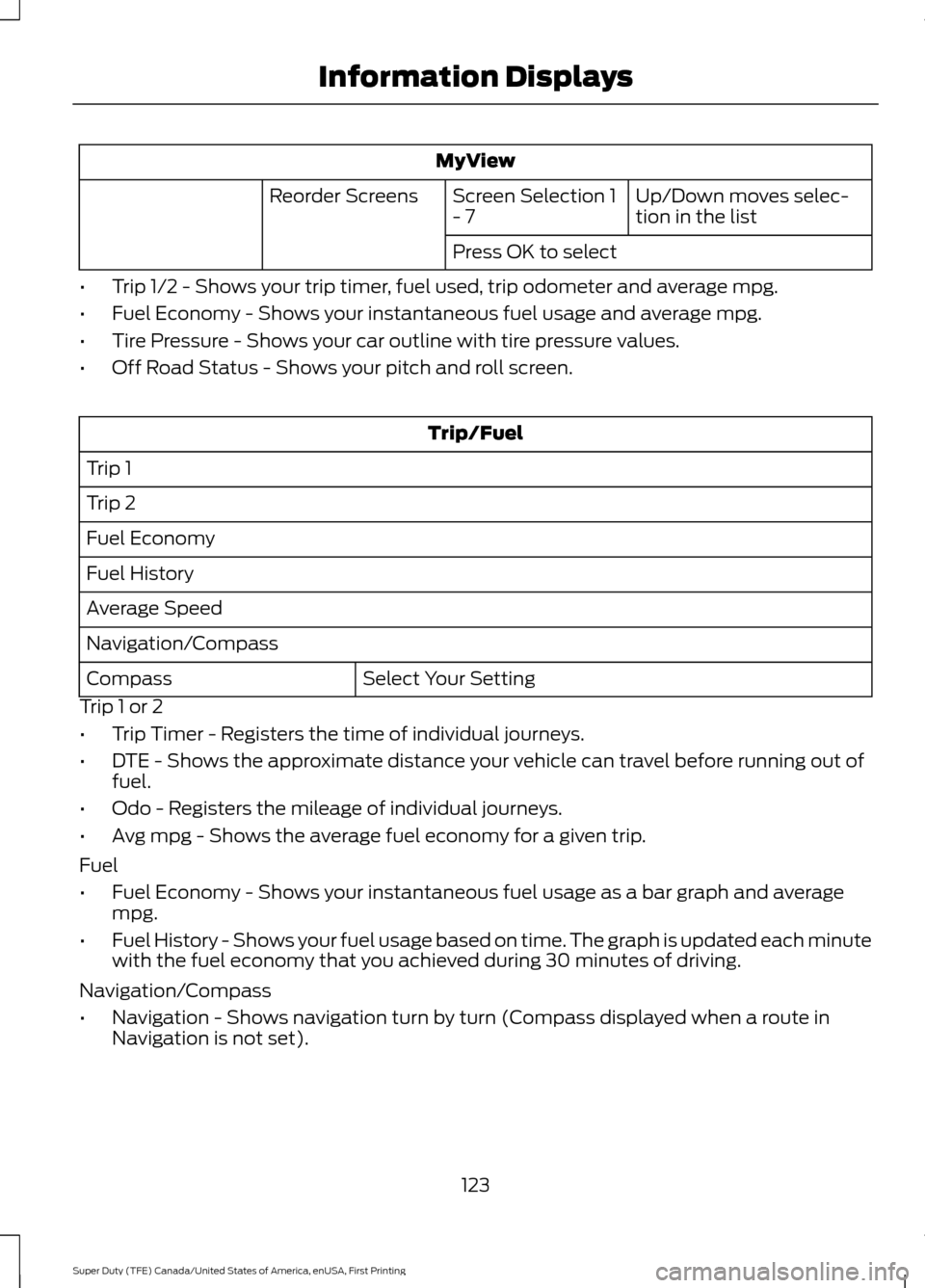
MyView
Up/Down moves selec-
tion in the list
Screen Selection 1
- 7
Reorder Screens
Press OK to select
• Trip 1/2 - Shows your trip timer, fuel used, trip odometer and average mpg.
• Fuel Economy - Shows your instantaneous fuel usage and average mpg.
• Tire Pressure - Shows your car outline with tire pressure values.
• Off Road Status - Shows your pitch and roll screen. Trip/Fuel
Trip 1
Trip 2
Fuel Economy
Fuel History
Average Speed
Navigation/Compass Select Your Setting
Compass
Trip 1 or 2
• Trip Timer - Registers the time of individual journeys.
• DTE - Shows the approximate distance your vehicle can travel before running out of
fuel.
• Odo - Registers the mileage of individual journeys.
• Avg mpg - Shows the average fuel economy for a given trip.
Fuel
• Fuel Economy - Shows your instantaneous fuel usage as a bar graph and average
mpg.
• Fuel History - Shows your fuel usage based on time. The graph is updated each minute
with the fuel economy that you achieved during 30 minutes of driving.
Navigation/Compass
• Navigation - Shows navigation turn by turn (Compass displayed when a route in
Navigation is not set).
123
Super Duty (TFE) Canada/United States of America, enUSA, First Printing Information Displays
Page 127 of 636
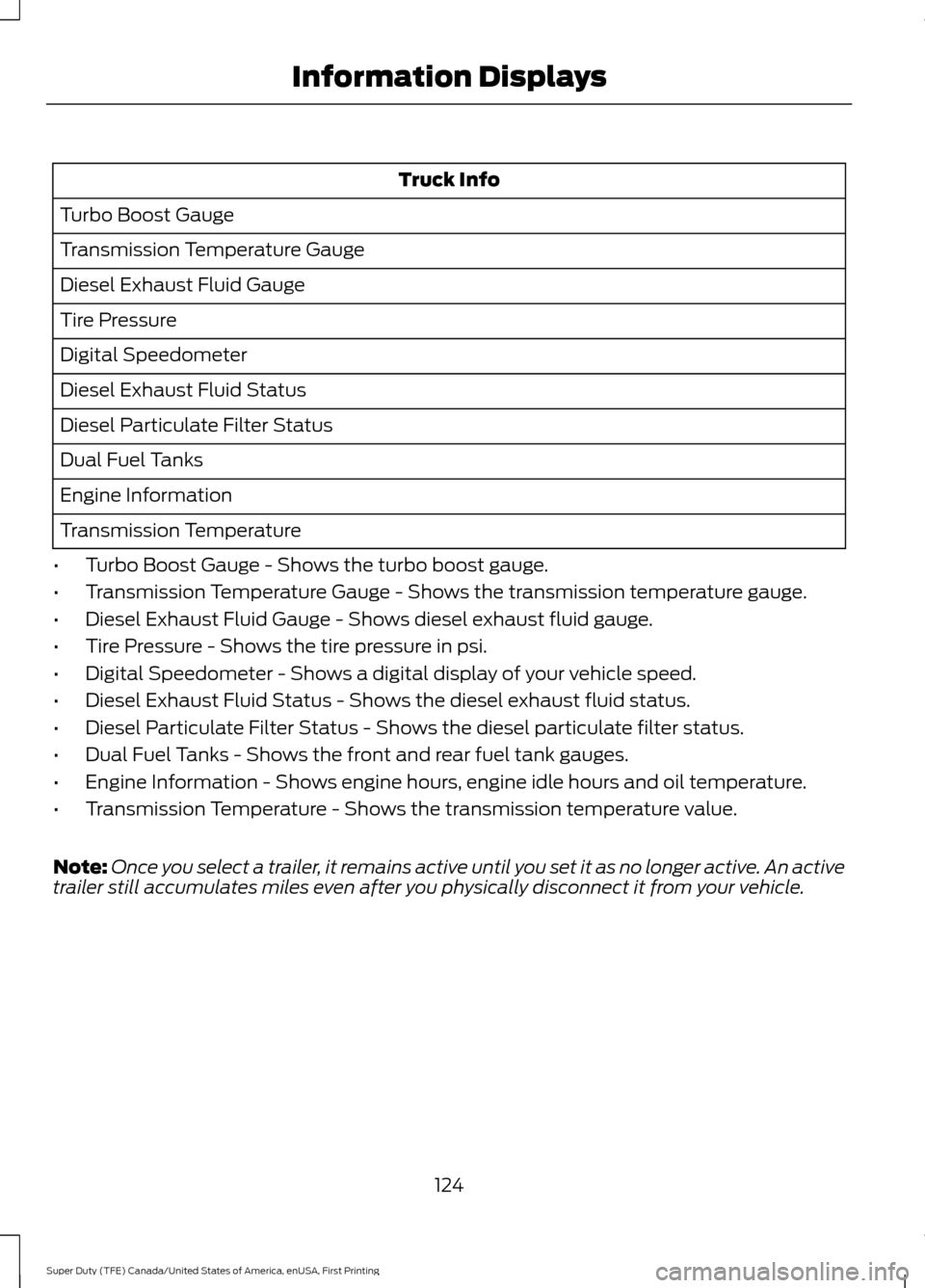
Truck Info
Turbo Boost Gauge
Transmission Temperature Gauge
Diesel Exhaust Fluid Gauge
Tire Pressure
Digital Speedometer
Diesel Exhaust Fluid Status
Diesel Particulate Filter Status
Dual Fuel Tanks
Engine Information
Transmission Temperature
• Turbo Boost Gauge - Shows the turbo boost gauge.
• Transmission Temperature Gauge - Shows the transmission temperature gauge.
• Diesel Exhaust Fluid Gauge - Shows diesel exhaust fluid gauge.
• Tire Pressure - Shows the tire pressure in psi.
• Digital Speedometer - Shows a digital display of your vehicle speed.
• Diesel Exhaust Fluid Status - Shows the diesel exhaust fluid status.
• Diesel Particulate Filter Status - Shows the diesel particulate filter status.
• Dual Fuel Tanks - Shows the front and rear fuel tank gauges.
• Engine Information - Shows engine hours, engine idle hours and oil temperature.
• Transmission Temperature - Shows the transmission temperature value.
Note: Once you select a trailer, it remains active until you set it as no longer active. An active
trailer still accumulates miles even after you physically disconnect it from your vehicle.
124
Super Duty (TFE) Canada/United States of America, enUSA, First Printing Information Displays
Page 138 of 636
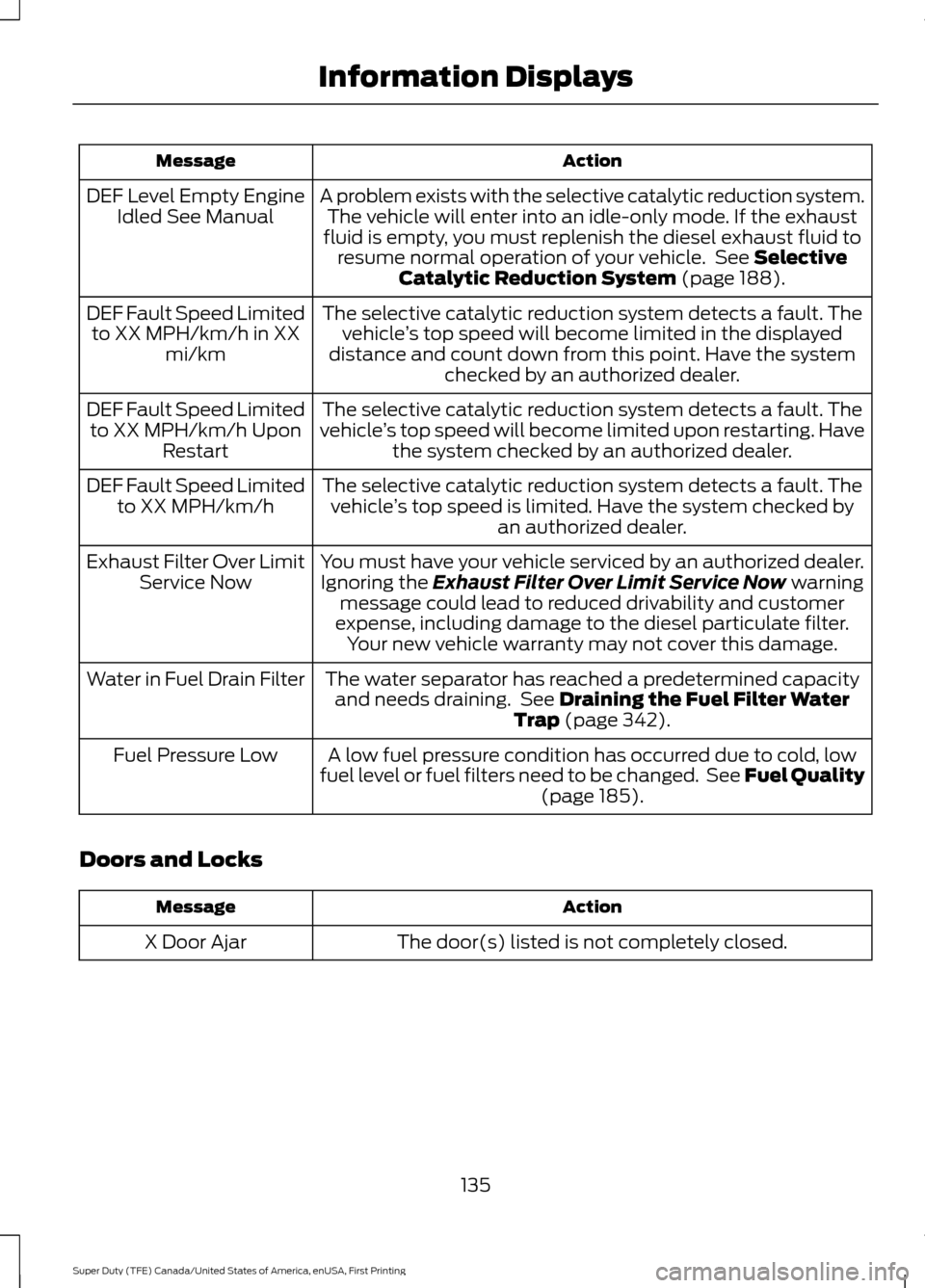
Action
Message
A problem exists with the selective catalytic reduction system.The vehicle will enter into an idle-only mode. If the exhaust
fluid is empty, you must replenish the diesel exhaust fluid to resume normal operation of your vehicle. See Selective
Catalytic Reduction System (page 188).
DEF Level Empty Engine
Idled See Manual
The selective catalytic reduction system detects a fault. Thevehicle ’s top speed will become limited in the displayed
distance and count down from this point. Have the system checked by an authorized dealer.
DEF Fault Speed Limited
to XX MPH/km/h in XX mi/km
The selective catalytic reduction system detects a fault. The
vehicle ’s top speed will become limited upon restarting. Have
the system checked by an authorized dealer.
DEF Fault Speed Limited
to XX MPH/km/h Upon Restart
The selective catalytic reduction system detects a fault. Thevehicle ’s top speed is limited. Have the system checked by
an authorized dealer.
DEF Fault Speed Limited
to XX MPH/km/h
You must have your vehicle serviced by an authorized dealer.Ignoring the
Exhaust Filter Over Limit Service Now warning
message could lead to reduced drivability and customer
expense, including damage to the diesel particulate filter. Your new vehicle warranty may not cover this damage.
Exhaust Filter Over Limit
Service Now
The water separator has reached a predetermined capacityand needs draining. See
Draining the Fuel Filter Water
Trap (page 342).
Water in Fuel Drain Filter
A low fuel pressure condition has occurred due to cold, low
fuel level or fuel filters need to be changed. See Fuel Quality (page
185).
Fuel Pressure Low
Doors and Locks Action
Message
The door(s) listed is not completely closed.
X Door Ajar
135
Super Duty (TFE) Canada/United States of America, enUSA, First Printing Information Displays
Page 180 of 636
Note:
Do not press the accelerator during
starting.
Diesel Engine Fast Start Glow Plug
System
The diesel engine glow system consists of:
• Eight glow plugs (one per cylinder)
• Glow Plug Control Module
• Engine Coolant Temperature sensor
• Barometric pressure sensor
• Environmental temperature sensor
The powertrain and glow plug control
modules electronically control the glow
plug system. After you switch the ignition
on, the glow plug control module
immediately energizes the glow plugs. The
glow plug control module uses the engine
coolant temperature, barometric pressure
sensor and environmental temperature
sensor to determine how long the glow
plugs stay energized. The required time for
the glow plugs to be energized decreases
as the coolant temperature, barometric
pressure and environmental temperature
increase.
Cold Weather Starting WARNINGS
Do not use starting fluid, for example
ether, in the air intake system. Such
fluid could cause immediate
explosive damage to the engine and
possible personal injury. Do not add gasoline, gasohol, alcohol
or kerosene to diesel fuel. This
creates a serious fire hazard and
causes engine performance problems. We recommend that the engine block
heater be used for starting when the
temperature is -9°F (-23°C) or colder. See
Engine Block Heater (page 181). When operating in cold weather, you may
use Motorcraft® cetane improvers or
non-alcohol-based cetane improvers from
a reputable manufacturer as needed.
Do not crank the engine for more than 10
seconds as starter damage may occur. If
the engine does not start, switch the
ignition off and wait 30 seconds before
trying again.
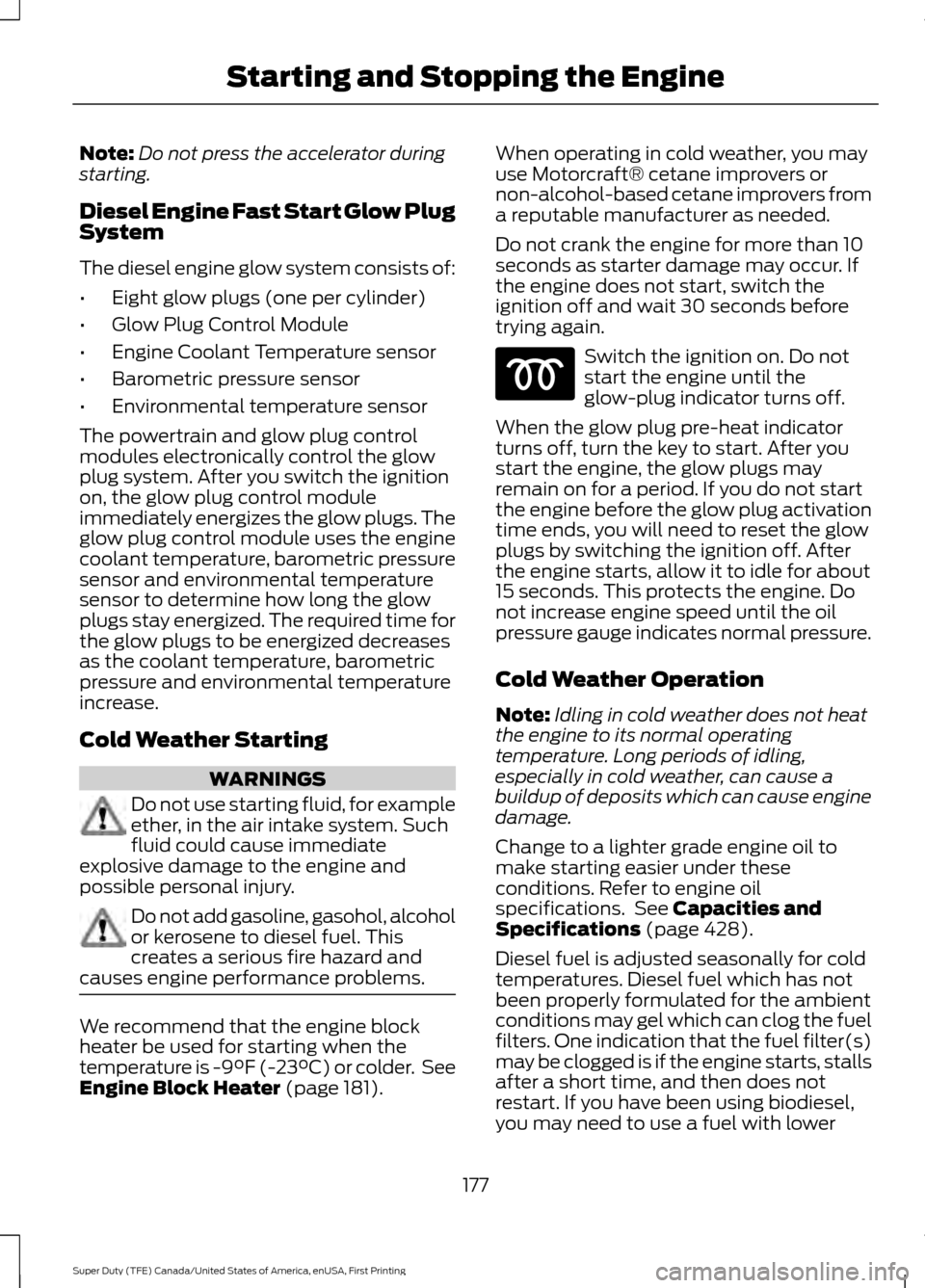
Switch the ignition on. Do not
start the engine until the
glow-plug indicator turns off.
When the glow plug pre-heat indicator
turns off, turn the key to start. After you
start the engine, the glow plugs may
remain on for a period. If you do not start
the engine before the glow plug activation
time ends, you will need to reset the glow
plugs by switching the ignition off. After
the engine starts, allow it to idle for about
15 seconds. This protects the engine. Do
not increase engine speed until the oil
pressure gauge indicates normal pressure.
Cold Weather Operation
Note: Idling in cold weather does not heat
the engine to its normal operating
temperature. Long periods of idling,
especially in cold weather, can cause a
buildup of deposits which can cause engine
damage.
Change to a lighter grade engine oil to
make starting easier under these
conditions. Refer to engine oil
specifications. See
Capacities and
Specifications (page 428).
Diesel fuel is adjusted seasonally for cold
temperatures. Diesel fuel which has not
been properly formulated for the ambient
conditions may gel which can clog the fuel
filters. One indication that the fuel filter(s)
may be clogged is if the engine starts, stalls
after a short time, and then does not
restart. If you have been using biodiesel,
you may need to use a fuel with lower
177
Super Duty (TFE) Canada/United States of America, enUSA, First Printing Starting and Stopping the Engine