2017 FORD POLICE INTERCEPTOR SEDAN pairing phone
[x] Cancel search: pairing phonePage 7 of 358

Brake Fluid Check.........................................184
Power Steering Fluid Check.....................184
Washer Fluid Check.....................................184
Fuel Filter.........................................................185
Changing the 12V Battery..........................185
Checking the Wiper Blades
.......................187
Changing the Wiper Blades
......................187
Adjusting the Headlamps..........................187
Changing a Bulb
...........................................189
Bulb Specification Chart...........................190
Changing the Engine Air Filter.................192
Vehicle Care
General Information
....................................193
Cleaning Products
........................................193
Cleaning the Exterior
...................................193
Waxing..............................................................194
Cleaning the Engine.....................................195
Cleaning the Windows and Wiper Blades...........................................................195
Cleaning the Interior....................................196
Cleaning the Instrument Panel and Instrument Cluster Lens
........................196
Cleaning Leather Seats
..............................197
Repairing Minor Paint Damage................197
Cleaning the Wheels
...................................197
Vehicle Storage
.............................................198
Wheels and Tires
General Information
..................................200
Tire Care.........................................................200
Using Snow Chains
......................................214
Tire Pressure Monitoring System............215
Changing a Road Wheel............................218
Technical Specifications...........................222
Capacities and Specific- ations
Engine Specifications - 2.0L EcoBoost™................................................224 Engine Specifications - 3.5L
Duratec
........................................................224
Engine Specifications - 3.5L Ecoboost™................................................225
Engine Specifications - 3.7L
.....................226
Motorcraft Parts - 2.0L EcoBoost™......226
Motorcraft Parts - 3.5L Duratec.............228
Motorcraft Parts - 3.5L Ecoboost™
......229
Motorcraft Parts - 3.7L
...............................230
Vehicle Identification Number.................231
Vehicle Certification Label
.......................232
Transmission Code Designation............232
Capacities and Specifications - 2.0L EcoBoost™................................................233
Capacities and Specifications - 3.5L Duratec.........................................................237
Capacities and Specifications - 3.5L Ecoboost™.................................................241
Capacities and Specifications - 3.7L.....246
Audio System
General Information
....................................251
Audio Unit - Vehicles With: AM/FM/ CD..................................................................252
Audio Input Jack...........................................256
USB Port..........................................................257
Media Hub
.......................................................257
SYNC™
General Information
...................................258
Using Voice Recognition...........................260
Using SYNC™ With Your Phone............263
SYNC™ Applications and Services......276
SYNC™ AppLink ™
......................................278
Using SYNC™ With Your Media Player...........................................................280
SYNC™ Troubleshooting
.........................290
Ford Protect
Ford Protect
..................................................299
4
Taurus (CPH) Police, Canada/United States of America, enUSA, First Printing Table of Contents
Page 266 of 358

USING SYNC™ WITH YOUR
PHONE
Hands-free calling is one of the main
features of SYNC. While the system
supports a variety of features, many are
dependent on your cell phone's
functionality. At a minimum, most cell
phones with Bluetooth wireless technology
support the following functions:
•
Answering an incoming call.
• Ending a call.
• Using privacy mode.
• Dialing a number.
• Redialing.
• Call waiting notification.
• Caller ID. Other features, such as text messaging
using Bluetooth and automatic phonebook
download, are cell phone-dependent
features. To check your cell phone's
compatibility, see your cell phone's manual
and visit www.SYNCMyRide.com,
www.SYNCMyRide.ca or
www.syncmaroute.ca.
Pairing a Cell Phone for the First
Time
Note:
SYNC can support downloading up
to approximately 1000 entries per
Bluetooth-enabled cell phone.
Note: Make sure to switch on the ignition
and the radio. Put the transmission in
position park (P) (automatic transmission)
or neutral with the parking brake applied
(manual transmission).
Note: To scroll through the menus, press
the up and down arrows on your audio
system.
Wirelessly pairing your cell phone with
SYNC allows you to make and receive
hands-free calls.
Press the phone button. When the display indicates there is no cell phone paired,
do the following: Action and Description
Message
Press the
OK button.
NO PHONE
FIND SYNC 1. Press the
OK button.
2. Put your cell phone into Bluetooth discovery mode. See your device's manual if necessary.
3. When prompted on your cell phone's display, enter the six-digit PIN provided by SYNC in the radio display. The
display indicates when the pairing is successful.
263
Taurus (CPH) Police, Canada/United States of America, enUSA, First Printing SYNC™
Page 267 of 358

Depending on your cell phone's capability
and your market, the system may prompt
you with questions, such as setting the
current cell phone as the primary cell
phone (the cell phone SYNC automatically
tries to connect with first upon vehicle
start-up) and downloading your
phonebook.
Pairing Subsequent Cell Phones
Note:
To scroll through the menus, press
the up and down arrows on your audio
system.
Note: Make sure to switch on the ignition
and the radio. Put the transmission in
position park (P) (automatic transmission)
or neutral with the parking brake applied
(manual transmission).
Press the phone button, then scroll to: Action
Message
Press the
OK button.
PHONE SETNGS
Press the
OK button.
BT DEVICES
Press the
OK button. When the following message appears
in the display.
ADD DEVICE
FIND SYNC
1. Press the
OK button.
2. Put your cell phone into Bluetooth discovery mode. See your device's manual if necessary.
3. When prompted on your cell phone's display, enter the six-digit PIN provided by SYNC in the radio display. The
display indicates when the pairing is successful.
The system then prompts with questions, such as if you would like to set the current cell
phone as the primary cell phone (the cell phone SYNC automatically tries to connect
with first upon vehicle start-up) or download your phonebook.
Phone Voice Commands
Press the voice icon and say: Voice Commands
Phone
You can then say any of the following
commands.
Call History Incoming
Call History Missed
Call History Outgoing Voice Commands
Phonebook ___
Phonebook ___ at Home
Phonebook ___ at Work
Phonebook ___ in Office
Phonebook ___ on Cell
___ is a dynamic listing that should be the
name of a contact in your phonebook. For
example you could say "Call Mom".
264
Taurus (CPH) Police, Canada/United States of America, enUSA, First Printing SYNC™
Page 296 of 358
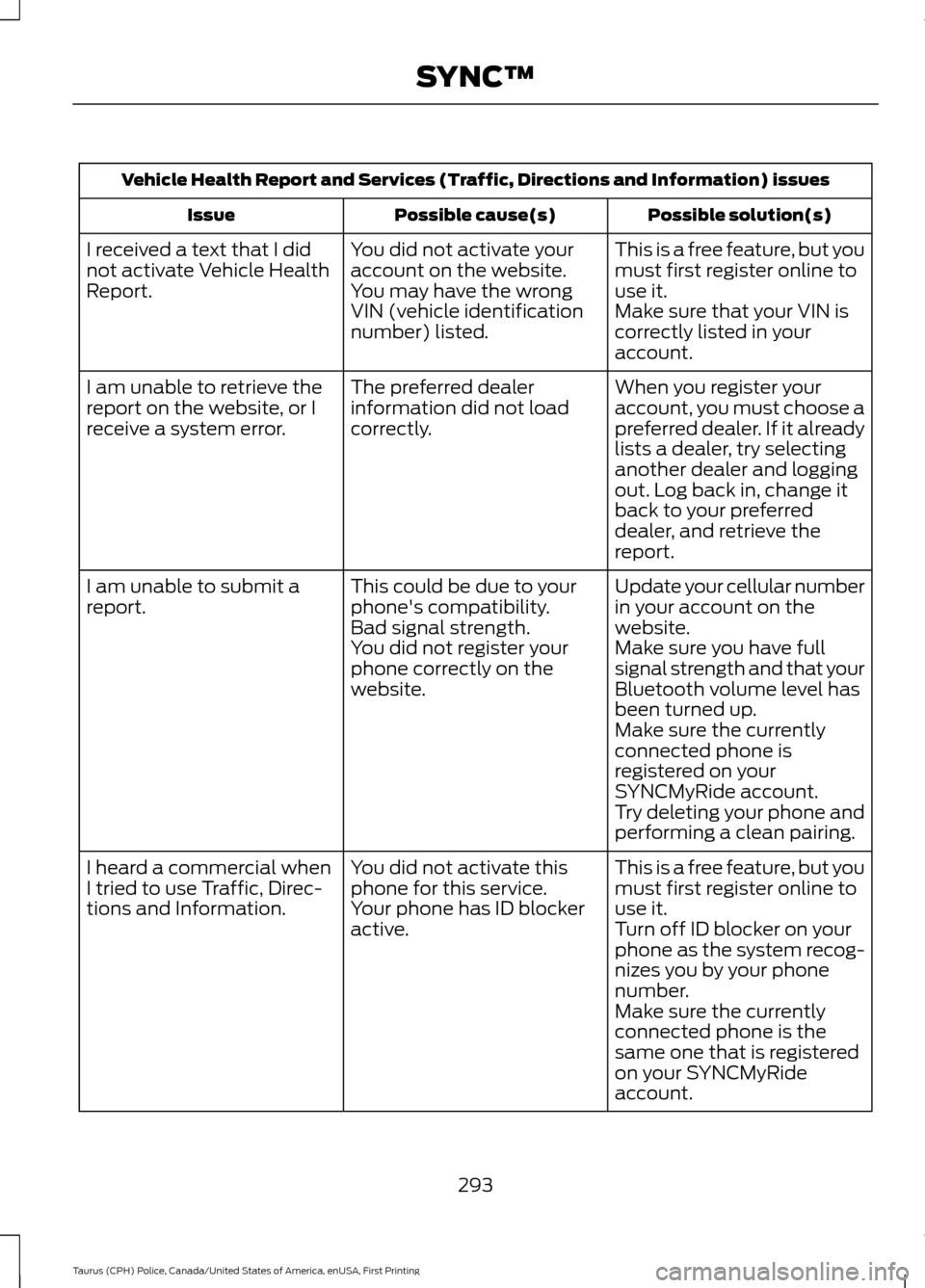
Vehicle Health Report and Services (Traffic, Directions and Information) issues
Possible solution(s)
Possible cause(s)
Issue
This is a free feature, but you
must first register online to
use it.
You did not activate your
account on the website.
You may have the wrong
VIN (vehicle identification
number) listed.
I received a text that I did
not activate Vehicle Health
Report.
Make sure that your VIN is
correctly listed in your
account.
When you register your
account, you must choose a
preferred dealer. If it already
lists a dealer, try selecting
another dealer and logging
out. Log back in, change it
back to your preferred
dealer, and retrieve the
report.
The preferred dealer
information did not load
correctly.
I am unable to retrieve the
report on the website, or I
receive a system error.
Update your cellular number
in your account on the
website.
This could be due to your
phone's compatibility.
Bad signal strength.
I am unable to submit a
report.
Make sure you have full
signal strength and that your
Bluetooth volume level has
been turned up.
You did not register your
phone correctly on the
website.
Make sure the currently
connected phone is
registered on your
SYNCMyRide account.
Try deleting your phone and
performing a clean pairing.
This is a free feature, but you
must first register online to
use it.
You did not activate this
phone for this service.
Your phone has ID blocker
active.
I heard a commercial when
I tried to use Traffic, Direc-
tions and Information.
Turn off ID blocker on your
phone as the system recog-
nizes you by your phone
number.
Make sure the currently
connected phone is the
same one that is registered
on your SYNCMyRide
account.
293
Taurus (CPH) Police, Canada/United States of America, enUSA, First Printing SYNC™
Page 357 of 358
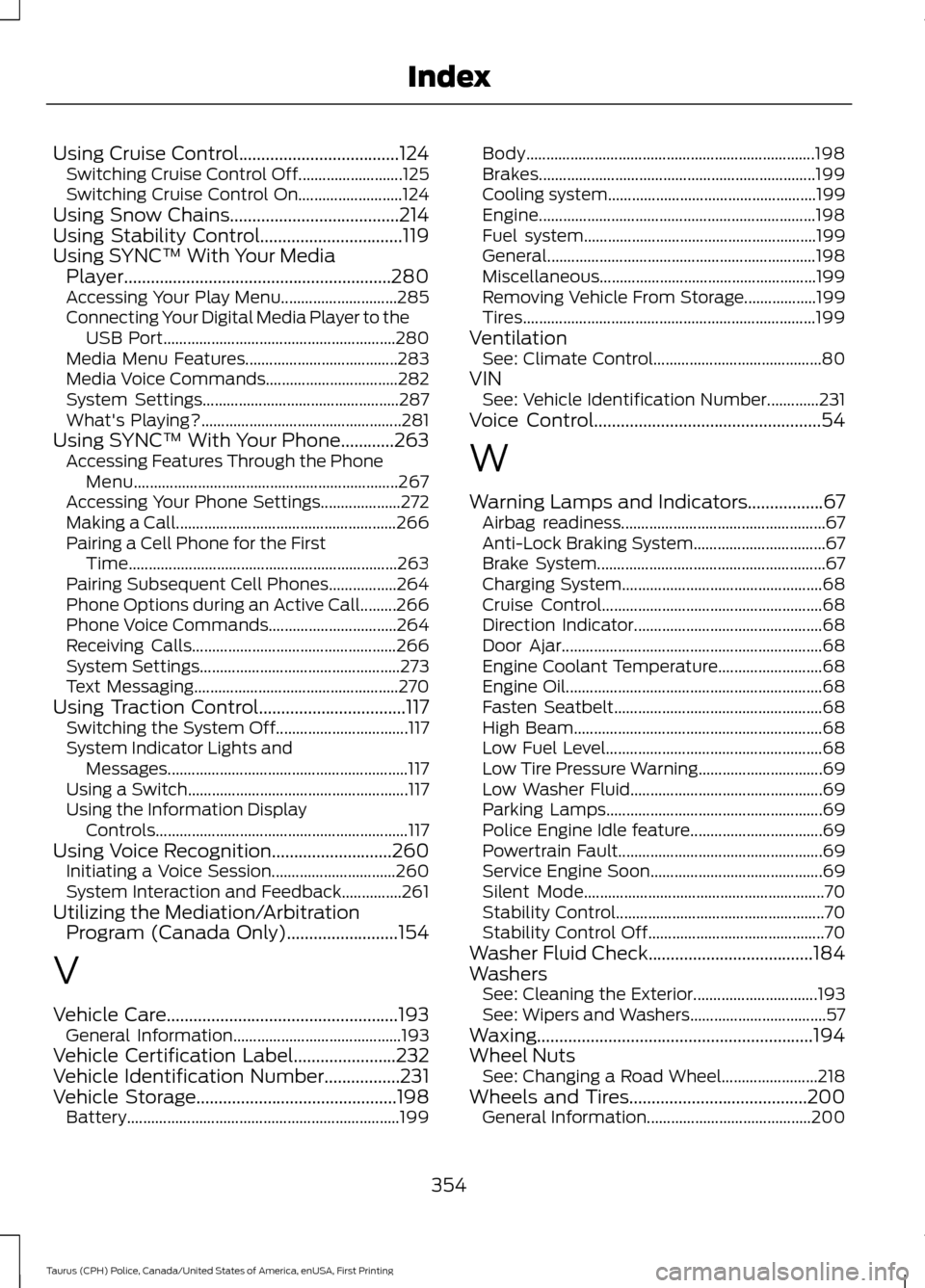
Using Cruise Control....................................124
Switching Cruise Control Off.......................... 125
Switching Cruise Control On.......................... 124
Using Snow Chains......................................214
Using Stability Control................................119
Using SYNC™ With Your Media Player............................................................280
Accessing Your Play Menu............................. 285
Connecting Your Digital Media Player to the USB Port.......................................................... 280
Media Menu Features...................................... 283
Media Voice Commands................................. 282
System Settings................................................. 287
What's Playing?.................................................. 281
Using SYNC™ With Your Phone............263 Accessing Features Through the Phone
Menu.................................................................. 267
Accessing Your Phone Settings.................... 272
Making a Call....................................................... 266
Pairing a Cell Phone for the First Time................................................................... 263
Pairing Subsequent Cell Phones.................264
Phone Options during an Active Call.........266
Phone Voice Commands................................ 264
Receiving Calls................................................... 266
System Settings.................................................. 273
Text Messaging................................................... 270
Using Traction Control.................................117 Switching the System Off................................. 117
System Indicator Lights and Messages............................................................ 117
Using a Switch....................................................... 117
Using the Information Display Controls ............................................................... 117
Using Voice Recognition...........................260
Initiating a Voice Session............................... 260
System Interaction and Feedback...............261
Utilizing the Mediation/Arbitration Program (Canada Only)
.........................154
V
Vehicle Care
....................................................193
General Information.......................................... 193
Vehicle Certification Label
.......................232
Vehicle Identification Number.................231
Vehicle Storage
.............................................198
Battery.................................................................... 199Body........................................................................\
198
Brakes..................................................................... 199
Cooling system.................................................... 199
Engine..................................................................... 198
Fuel system.......................................................... 199
General................................................................... 198
Miscellaneous...................................................... 199
Removing Vehicle From Storage.................. 199
Tires........................................................................\
. 199
Ventilation See: Climate Control.......................................... 80
VIN See: Vehicle Identification Number.............231
Voice Control
...................................................54
W
Warning Lamps and Indicators.................67 Airbag readiness................................................... 67
Anti-Lock Braking System................................. 67
Brake System......................................................... 67
Charging System.................................................. 68
Cruise Control....................................................... 68
Direction Indicator............................................... 68
Door Ajar................................................................. 68
Engine Coolant Temperature.......................... 68
Engine Oil................................................................ 68
Fasten Seatbelt.................................................... 68
High Beam.............................................................. 68
Low Fuel Level...................................................... 68
Low Tire Pressure Warning............................... 69
Low Washer Fluid................................................ 69
Parking Lamps...................................................... 69
Police Engine Idle feature................................. 69
Powertrain Fault................................................... 69
Service Engine Soon........................................... 69
Silent Mode............................................................ 70
Stability Control.................................................... 70
Stability Control Off............................................ 70
Washer Fluid Check.....................................184
Washers See: Cleaning the Exterior............................... 193
See: Wipers and Washers.................................. 57
Waxing..............................................................194
Wheel Nuts See: Changing a Road Wheel........................ 218
Wheels and Tires........................................200 General Information......................................... 200
354
Taurus (CPH) Police, Canada/United States of America, enUSA, First Printing Index