2017 FORD FUSION ENERGI change time
[x] Cancel search: change timePage 2 of 526

The information contained in this publication was correct at the time of going to print. In the interest ofcontinuous development, we reserve the right to change specifications, design or equipment at any timewithout notice or obligation. No part of this publication may be reproduced, transmitted, stored in aretrieval system or translated into any language in any form by any means without our written permission.Errors and omissions excepted.© Ford Motor Company 2016
All rights reserved.Part Number: 201602 20160806144426
Page 57 of 526

PRINCIPLE OF OPERATION
MyKey allows you to program keys withrestricted driving modes to promote gooddriving habits. You can program therestrictions to all keys but one. Any keysthat you did not program are administratorkeys or admin keys.
You can use admin keys to:
•Create a MyKey with certain vehiclerestrictions.
•Program certain MyKey settings.
•Clear all MyKey restrictions.
After you program a MyKey, you can viewthe following information through theinformation display:
•The total number of admin keys andMyKeys for your vehicle.
•The total distance a MyKey drivertraveled with your vehicle.
Note:Every MyKey receives the samerestrictions and settings. You cannotprogram them individually.
Note:For vehicles equipped with apush-button start switch: When both aMyKey and an admin key are present whenyou start your vehicle, the system recognizesthe admin key only.
Standard Settings
Not every vehicle includes the featureslisted below. If your vehicle has thisequipment, then you cannot change thefollowing settings when using a MyKey:
•Seatbelt reminder or Belt-Minder™.MyKey mutes the audio system untildrivers, and in some instances,passengers, fasten their seatbelts.Note: If your vehicle includes anAM/FM radio or a very basic audiosystem, then the radio may not mute.
•Earlier low-fuel warning. The low-fuelwarning activates earlier for MyKeydrivers, giving them more time to refuel.
•Certain driver alerts, stability systemsor parking aids turn on automaticallywhen you use the MyKey system. Forexample, Blind Spot InformationSystem (BLIS), cross traffic alert, lanedeparture warning or forward collisionwarning.Note: MyKey drivers may beable to turn the lane departure warningfeature off, but this feature turns backon automatically with every new keycycle.
•Restricted touchscreen operation insome markets. For example, MyKeymay prevent manual navigationdestination input while the vehicle is inany gear other than park (P) or whenthe vehicle reaches a certain rate ofspeed.
•Satellite radio adult contentrestrictions, if this feature is availablein your market.
Optional Settings
You can configure certain vehicle featuresettings when you first create a MyKey. Youcan also change the settings afterwardwith an admin key.
54
Fusion Energi / Fusion Hybrid (CC7) Hybrid Electric Vehicle (HEV)/Plug-In Hybrid Electric Vehicle (PHEV), Canada/United States of America, enUSA, Edition date: 201602, Second Printing
MyKey™
Page 59 of 526

You can also program the optional MyKeysettings.
Programming or ChangingConfigurable Settings
Use the information display to program orchange your optional MyKey settings.
1. Switch the ignition on using the key orthe transmitter you want to program.
2. Access the main menu in theinformation display and then scrollthrough the menus to change thesettings of your MyKey. SeeInformation Displays (page 94).
3. Follow the instructions in the display.
4.A confirmation message appears in thedisplay after you finish programmingyour MyKey. The programmedrestrictions apply when you restart yourvehicle with the programmed key ortransmitter.
Note:You can clear or change your MyKeysettings at any time during the same keycycle as you created the MyKey. If youswitch the engine off, you must use anadmin key to change or clear your optionalMyKey settings.
CLEARING ALL MYKEYS
When you clear your MyKeys, you removeall restrictions and return all MyKeys totheir original admin key status at once. Toclear all MyKeys of all MyKey settings, usethe information display.
1. Switch the ignition on using an adminkey.
2. Access the main menu in theinformation display and then scrollthrough the menus to begin clearingyour MyKey programming. SeeInformation Displays (page 94).
3. Follow the instructions in the display.
4.A confirmation message appears in thedisplay after you finish clearing yourMyKeys.
Note:When you clear your MyKeys, youremove all restrictions and return all MyKeysto their original admin key status. Youcannot remove the MyKey restrictionsindividually.
CHECKING MYKEY SYSTEM
STATUS
You can find information about yourprogrammed MyKeys by using theinformation display. See InformationDisplays (page 94).
MyKey Distance
Tracks the distance when drivers use aMyKey. The only way to delete theaccumulated distance is by using an adminkey to clear all MyKeys. If the distance doesnot accumulate as expected, then theintended user is not using the MyKey, or anadmin key user recently cleared and thenrecreated a MyKey.
Number of MyKeys
Indicates the number of MyKeysprogrammed to your vehicle. Use thisfeature to detect how many MyKeys youhave for your vehicle and determine whenall MyKeys have been deleted.
Number of Admin Keys
Indicates how many admin keys areprogrammed to your vehicle. Use thisfeature to determine how many adminkeys you have for your vehicle, and detectif an additional MyKey has beenprogrammed.
56
Fusion Energi / Fusion Hybrid (CC7) Hybrid Electric Vehicle (HEV)/Plug-In Hybrid Electric Vehicle (PHEV), Canada/United States of America, enUSA, Edition date: 201602, Second Printing
MyKey™
Page 61 of 526
LOCKING AND UNLOCKING
You can use the power door lock controlor the remote control to lock and unlockyour vehicle.
Power Door Locks
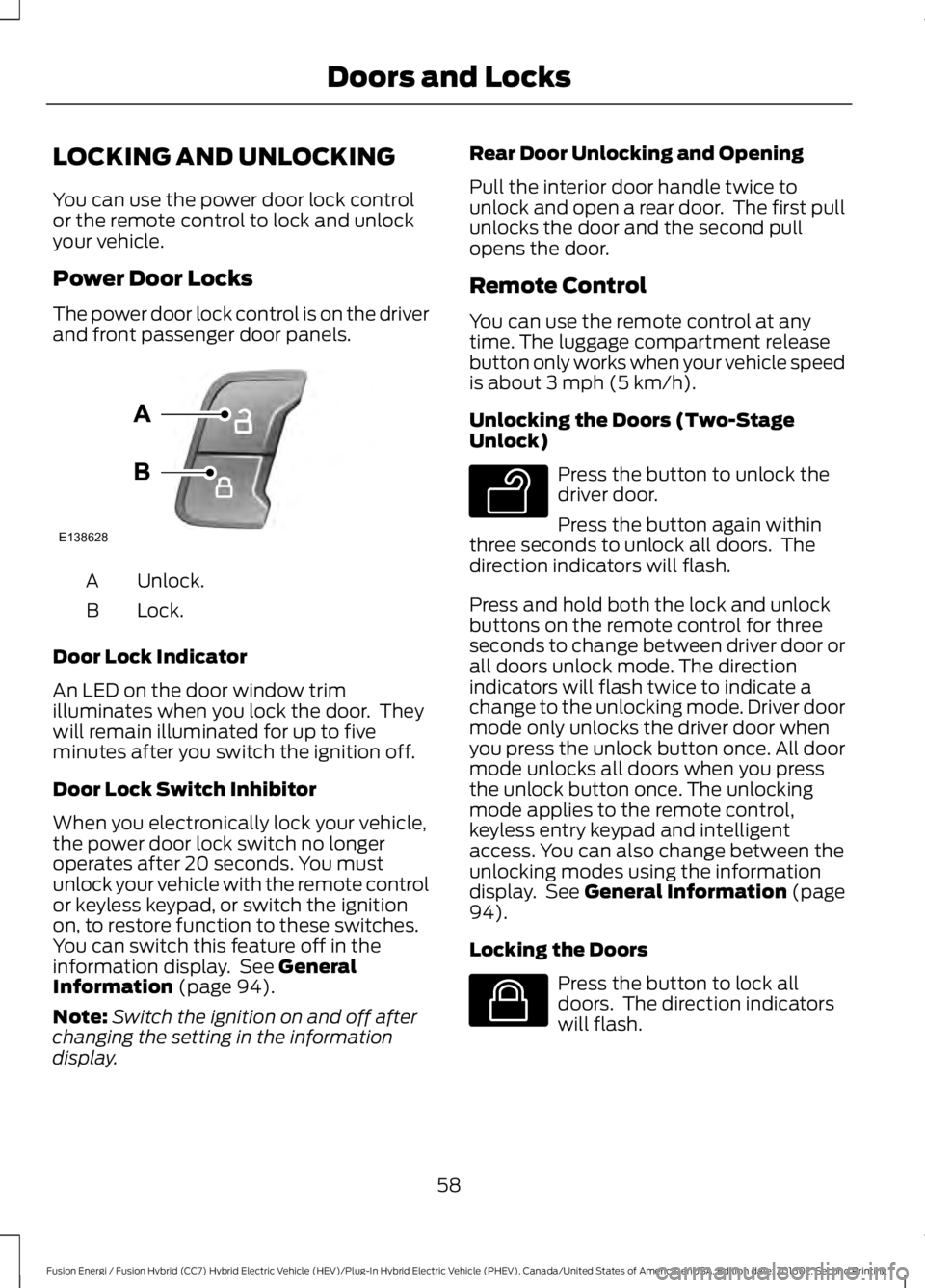
The power door lock control is on the driverand front passenger door panels.
Unlock.A
Lock.B
Door Lock Indicator
An LED on the door window trimilluminates when you lock the door. Theywill remain illuminated for up to fiveminutes after you switch the ignition off.
Door Lock Switch Inhibitor
When you electronically lock your vehicle,the power door lock switch no longeroperates after 20 seconds. You mustunlock your vehicle with the remote controlor keyless keypad, or switch the ignitionon, to restore function to these switches.You can switch this feature off in theinformation display. See GeneralInformation (page 94).
Note:Switch the ignition on and off afterchanging the setting in the informationdisplay.
Rear Door Unlocking and Opening
Pull the interior door handle twice tounlock and open a rear door. The first pullunlocks the door and the second pullopens the door.
Remote Control
You can use the remote control at anytime. The luggage compartment releasebutton only works when your vehicle speedis about 3 mph (5 km/h).
Unlocking the Doors (Two-StageUnlock)
Press the button to unlock thedriver door.
Press the button again withinthree seconds to unlock all doors. Thedirection indicators will flash.
Press and hold both the lock and unlockbuttons on the remote control for threeseconds to change between driver door orall doors unlock mode. The directionindicators will flash twice to indicate achange to the unlocking mode. Driver doormode only unlocks the driver door whenyou press the unlock button once. All doormode unlocks all doors when you pressthe unlock button once. The unlockingmode applies to the remote control,keyless entry keypad and intelligentaccess. You can also change between theunlocking modes using the informationdisplay. See General Information (page94).
Locking the Doors
Press the button to lock alldoors. The direction indicatorswill flash.
58
Fusion Energi / Fusion Hybrid (CC7) Hybrid Electric Vehicle (HEV)/Plug-In Hybrid Electric Vehicle (PHEV), Canada/United States of America, enUSA, Edition date: 201602, Second Printing
Doors and LocksE138628 E138629 E138623
Page 76 of 526

GENERAL INFORMATION
Condensation in Lamp Assemblies
Exterior lamps have vents toaccommodate normal changes in airpressure.
Condensation can be a natural by-productof this design. When moist air enters thelamp assembly through the vents, there isa possibility that condensation can occurwhen the temperature is cold. Whennormal condensation occurs, a fine mistcan form on the interior of the lens. Thefine mist eventually clears and exitsthrough the vents during normal operation.
Clearing time may take as long as 48 hoursunder dry weather conditions.
Examples of acceptable condensation are:
•The presence of a fine mist (no streaks,drip marks or large droplets).
•A fine mist covers less than 50% of thelens.
Examples of unacceptable condensationare:
•A water puddle inside the lamp.
•Streaks, drip marks or large dropletspresent on the interior of the lens.
If you see any unacceptable condensation,have your vehicle checked by an authorizeddealer.
LIGHTING CONTROL
OffA
Parking lamps, instrument panellamps, license plate lamps andtail lamps
B
HeadlampsC
High Beams
Push the lever forward to switch the highbeams on.
Push the lever forward again or pull thelever toward you to switch the high beamsoff.
73
Fusion Energi / Fusion Hybrid (CC7) Hybrid Electric Vehicle (HEV)/Plug-In Hybrid Electric Vehicle (PHEV), Canada/United States of America, enUSA, Edition date: 201602, Second Printing
LightingE142449 E162679
Page 81 of 526
FRONT FOG LAMPS (If Equipped)
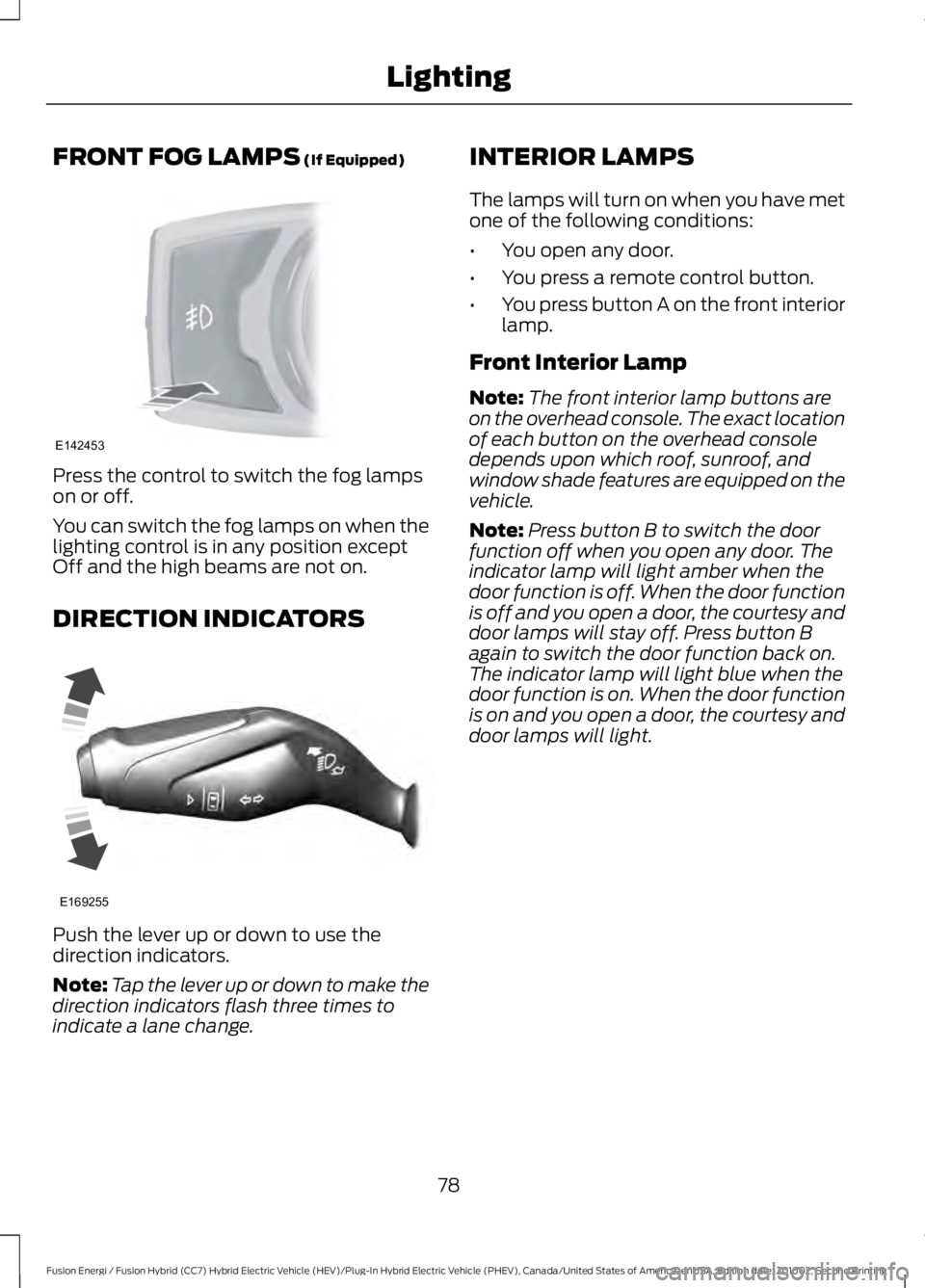
Press the control to switch the fog lampson or off.
You can switch the fog lamps on when thelighting control is in any position exceptOff and the high beams are not on.
DIRECTION INDICATORS
Push the lever up or down to use thedirection indicators.
Note:Tap the lever up or down to make thedirection indicators flash three times toindicate a lane change.
INTERIOR LAMPS
The lamps will turn on when you have metone of the following conditions:
•You open any door.
•You press a remote control button.
•You press button A on the front interiorlamp.
Front Interior Lamp
Note:The front interior lamp buttons areon the overhead console. The exact locationof each button on the overhead consoledepends upon which roof, sunroof, andwindow shade features are equipped on thevehicle.
Note:Press button B to switch the doorfunction off when you open any door. Theindicator lamp will light amber when thedoor function is off. When the door functionis off and you open a door, the courtesy anddoor lamps will stay off. Press button Bagain to switch the door function back on.The indicator lamp will light blue when thedoor function is on. When the door functionis on and you open a door, the courtesy anddoor lamps will light.
78
Fusion Energi / Fusion Hybrid (CC7) Hybrid Electric Vehicle (HEV)/Plug-In Hybrid Electric Vehicle (PHEV), Canada/United States of America, enUSA, Edition date: 201602, Second Printing
LightingE142453 E169255
Page 92 of 526

The amount of energy being used whiledriving is affected by:
•Mild or aggressive acceleration orbraking.
•Your vehicle speed.
•Your use of accessories such as climatecontrol.
•The ambient temperature and otherweather conditions.
•City or highway driving.
•Road grades.
Note: It is normal for vehicle rangeestimates to vary due to changes in averageenergy usage. This is why you typically seedifferent range estimates each time you fillup your fuel tank or fully charge your battery.
Trip Efficiency Leaves
Trip Efficiency Leaves display uponshutting off your Hybrid vehicle. For Energivehicles, the trip efficiency leaves displayonly when the vehicle operates in HybridMode for the entire trip. The number ofleaves represent the average for the lasttrip. A new trip begins each time you startyour vehicle (when the Ready to Drivemessage comes on). Corresponding TripSummary data displays on the leftinformation display.
Next Full Charge
The Next Full Charge display is shownupon shutting off your Energi vehiclewhenever your vehicle operates in Plug-inPower Mode for a portion of your trip.
Miles or kilometers per full charge
This is an estimate of the EV Range youwould see if you plugged in and fullycharged your vehicle right now. Theestimate is based on your energy usagewhile driving. Energy usage is affected byyour driving style and route, climate controluse, outside temperature and other factors.
Energy usage effects (+/-)
A green bar indicates a positive effect onyour EV range per full charge estimate. Anamber bar indicates a negative effect. Thebigger the bar the bigger the effect on yourestimate.
•Driving style/route – This includesenergy used to propel your vehiclebased on your driving style and route.Your driving style includes how fast youdrive and whether your accelerationand braking is mild or aggressive. Yourroute includes factors such as theamount of city or highway driving androad grades.
•Climate control use – This includesenergy used by your vehicle’s highvoltage climate control componentssuch as the electric A/C compressorand the electric heater.
•Outside temp./other – This includesenergy losses due to outsidetemperature and other conditionswhich reduce vehicle system efficiency.Energy used for low voltageaccessories such as cabin fans, heatedseats, headlights, etc. is also included.
WARNING LAMPS AND
INDICATORS
The following warning lamps andindicators will alert you to a vehiclecondition that may become serious. Somelamps will light when you start your vehicleto make sure they work. If any lampsremain on after starting your vehicle, referto the respective system warning lamp forfurther information.
Note:Some warning indicators appear inthe information display and function thesame as a warning lamp but do not displaywhen you start your vehicle.
89
Fusion Energi / Fusion Hybrid (CC7) Hybrid Electric Vehicle (HEV)/Plug-In Hybrid Electric Vehicle (PHEV), Canada/United States of America, enUSA, Edition date: 201602, Second Printing
Instrument Cluster
Page 97 of 526
GENERAL INFORMATION
WARNING
Driving while distracted can result inloss of vehicle control, crash andinjury. We strongly recommend thatyou use extreme caution when using anydevice that may take your focus off theroad. Your primary responsibility is the safeoperation of your vehicle. We recommendagainst the use of any handheld devicewhile driving and encourage the use ofvoice-operated systems when possible.Make sure you are aware of all applicablelocal laws that may affect the use ofelectronic devices while driving.
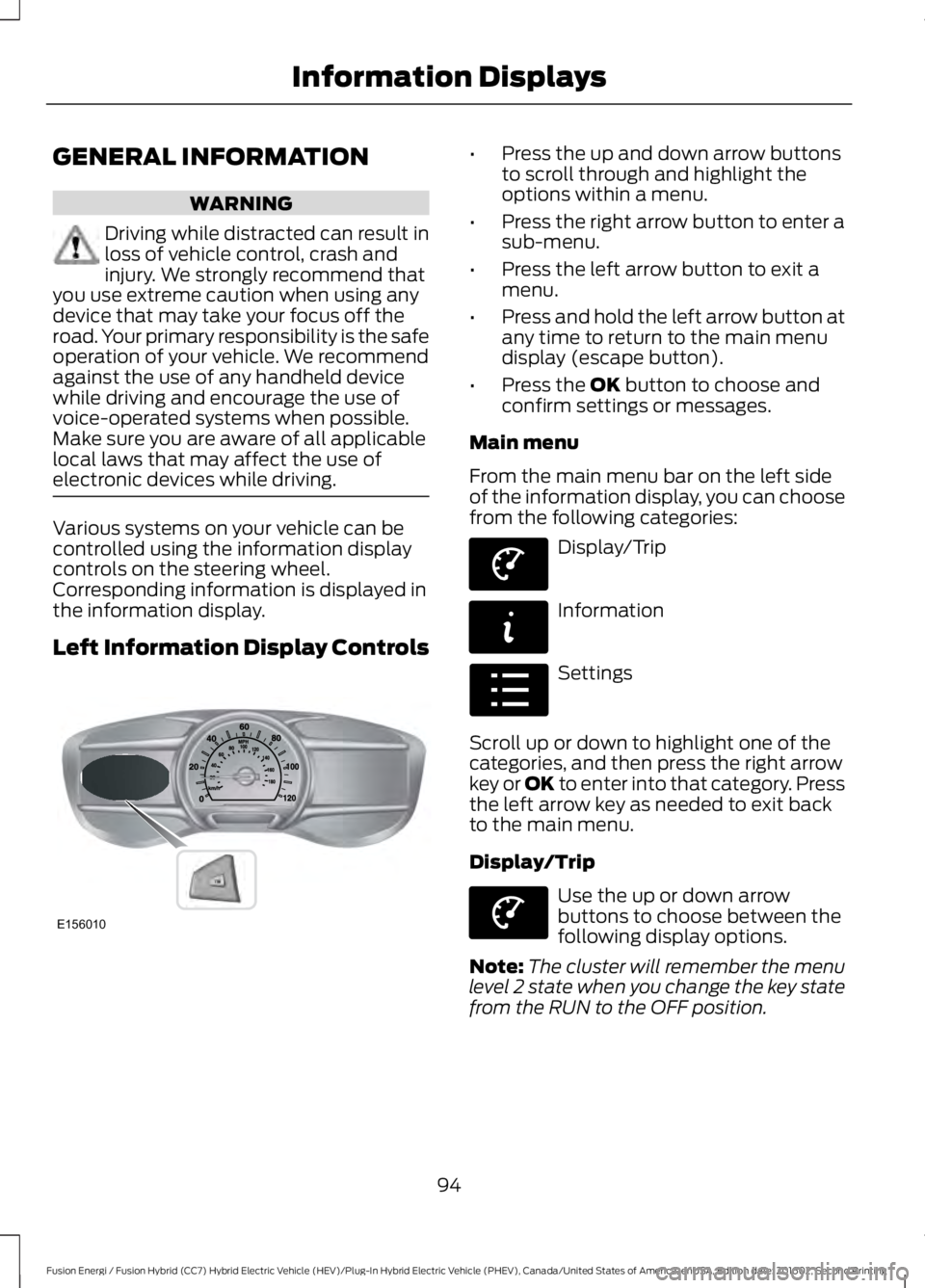
Various systems on your vehicle can becontrolled using the information displaycontrols on the steering wheel.Corresponding information is displayed inthe information display.
Left Information Display Controls
•Press the up and down arrow buttonsto scroll through and highlight theoptions within a menu.
•Press the right arrow button to enter asub-menu.
•Press the left arrow button to exit amenu.
•Press and hold the left arrow button atany time to return to the main menudisplay (escape button).
•Press the OK button to choose andconfirm settings or messages.
Main menu
From the main menu bar on the left sideof the information display, you can choosefrom the following categories:
Display/Trip
Information
Settings
Scroll up or down to highlight one of thecategories, and then press the right arrowkey or OK to enter into that category. Pressthe left arrow key as needed to exit backto the main menu.
Display/Trip
Use the up or down arrowbuttons to choose between thefollowing display options.
Note:The cluster will remember the menulevel 2 state when you change the key statefrom the RUN to the OFF position.
94
Fusion Energi / Fusion Hybrid (CC7) Hybrid Electric Vehicle (HEV)/Plug-In Hybrid Electric Vehicle (PHEV), Canada/United States of America, enUSA, Edition date: 201602, Second Printing
Information DisplaysE156010 E144639 E144642 E100023 E144639