2017 FORD F450 SUPER DUTY display
[x] Cancel search: displayPage 77 of 642
PASSIVE ANTI-THEFT
SYSTEM
Note: The system is not compatible withnon-Ford aftermarket remote start systems.Use of these systems may result in enginestarting problems and a loss of securityprotection.
Note: Metallic objects, electronic devicesor a second coded key on the same keychain may result in vehicle startingproblems, especially if they are too close tothe key when starting your vehicle. Preventthese objects from touching the coded keywhen starting your vehicle. Switch theignition off, move all objects on the keychain away from the coded key and restartyour vehicle if a problem occurs.
Note: Do not leave a duplicate coded keyin your vehicle. Always take your keys andlock all doors when leaving your vehicle.
SecuriLock®
The system helps prevent the engine fromstarting unless you use a coded keyprogrammed to your vehicle. Using thewrong key may prevent your vehicle fromstarting. A message may appear in theinformation display.
If you are unable to start your vehicle witha coded key, it is not operating correctly.A message may appear in the informationdisplay.
Automatic Arming
The system arms when you switch theignition off.
Automatic Disarming
The system disarms when you switch theignition on with a coded key.
Replacement Keys
Note:Your vehicle comes with two keys.
The integrated keyhead transmitterfunctions as a programmed ignition keythat operates all the locks and starts yourvehicle, as well as a remote control.
The intelligent access key functions as aprogrammed key that operates the driverdoor lock and turns on the intelligentaccess with push button start system, aswell as a remote control.
If your coded keys are lost or stolen andyou do not have an extra coded key, youneed to erase the key codes from yourvehicle and program new coded keys.Contact an authorized dealer.
Store an extra programmed key away fromyour vehicle in a safe place. You canpurchase replacement keys or remotecontrols from an authorized dealer.
Programming a Spare IntegratedKeyhead Transmitter
Note:You can program a maximum of sixkeys to your vehicle. All six can be integratedkeyhead transmitters.
You can program your own integratedkeyhead transmitter or standardSecuriLock coded keys to your vehicle.This procedure programs both the vehicleimmobilizer keycode and the remotecontrol to your vehicle.
Only use integrated keyhead transmittersor standard SecuriLock keys.
You must have two previouslyprogrammed coded keys and the newunprogrammed key readily accessible.Contact an authorized dealer to have thespare key programmed if two previouslyprogrammed keys are not available.
Read and understand the entire procedurebefore you begin.
1.Insert the first previously programmedcoded key into the ignition.
74
Super Duty (TFE) Canada/United States of America, enUSA, Edition date: 201710, Second Printing
Security
Page 79 of 642
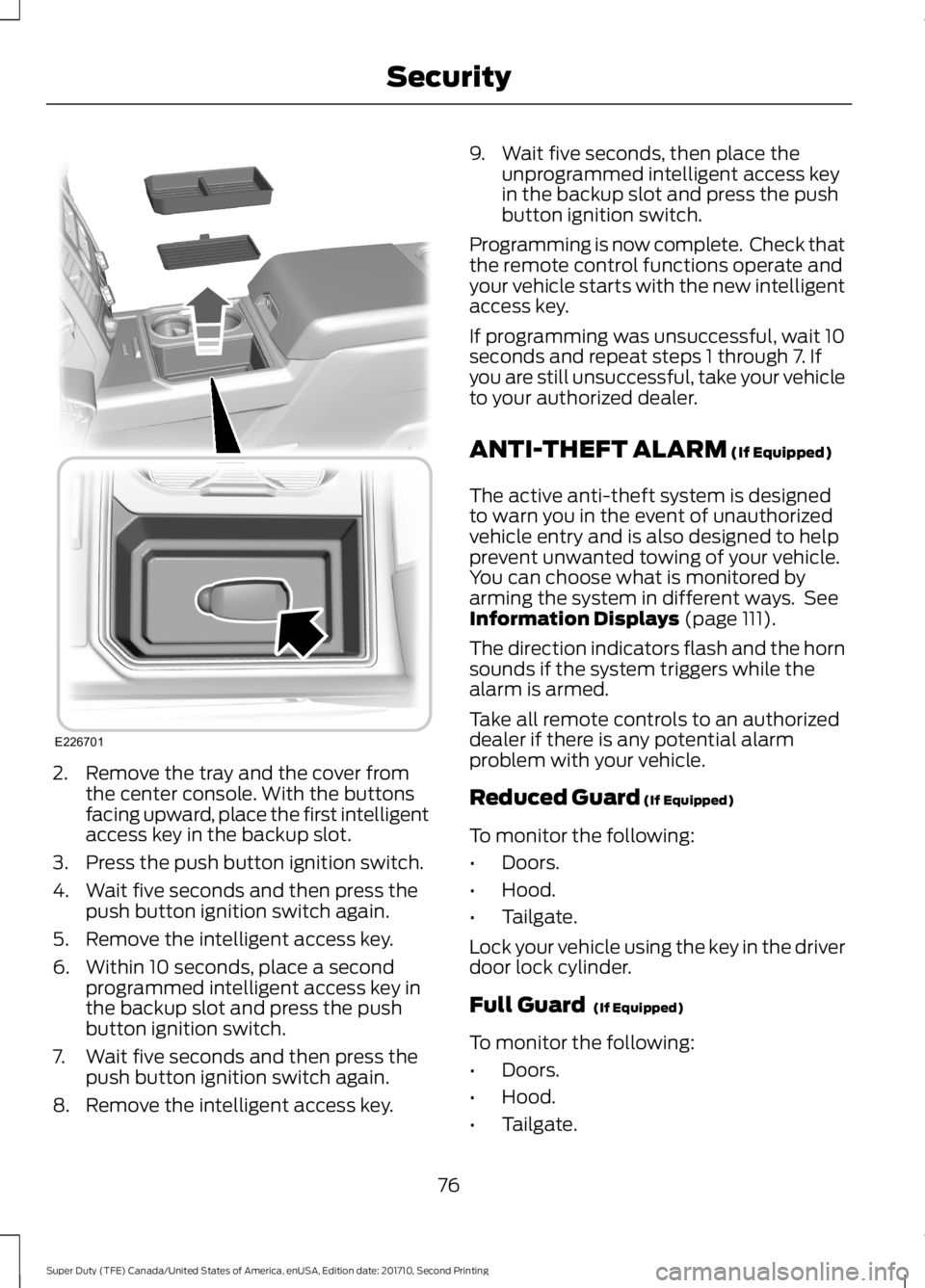
2. Remove the tray and the cover fromthe center console. With the buttonsfacing upward, place the first intelligentaccess key in the backup slot.
3. Press the push button ignition switch.
4. Wait five seconds and then press thepush button ignition switch again.
5. Remove the intelligent access key.
6. Within 10 seconds, place a secondprogrammed intelligent access key inthe backup slot and press the pushbutton ignition switch.
7. Wait five seconds and then press thepush button ignition switch again.
8. Remove the intelligent access key.
9. Wait five seconds, then place theunprogrammed intelligent access keyin the backup slot and press the pushbutton ignition switch.
Programming is now complete. Check thatthe remote control functions operate andyour vehicle starts with the new intelligentaccess key.
If programming was unsuccessful, wait 10seconds and repeat steps 1 through 7. Ifyou are still unsuccessful, take your vehicleto your authorized dealer.
ANTI-THEFT ALARM (If Equipped)
The active anti-theft system is designedto warn you in the event of unauthorizedvehicle entry and is also designed to helpprevent unwanted towing of your vehicle.You can choose what is monitored byarming the system in different ways. SeeInformation Displays (page 111).
The direction indicators flash and the hornsounds if the system triggers while thealarm is armed.
Take all remote controls to an authorizeddealer if there is any potential alarmproblem with your vehicle.
Reduced Guard (If Equipped)
To monitor the following:
•Doors.
•Hood.
•Tailgate.
Lock your vehicle using the key in the driverdoor lock cylinder.
Full Guard (If Equipped)
To monitor the following:
•Doors.
•Hood.
•Tailgate.
76
Super Duty (TFE) Canada/United States of America, enUSA, Edition date: 201710, Second Printing
SecurityE226701
Page 81 of 642
USING POWER RUNNING
BOARDS
WARNINGS
In extreme climates, excessive icebuildup may occur, causing therunning boards not to deploy. Makesure that the running boards havedeployed, and have finished moving beforeattempting to step on them. The runningboards will resume normal function oncethe blockage is cleared.
Switch off the running boards beforejacking or placing any object underyour vehicle. Never place your handbetween the extended running board andyour vehicle. A moving running board maycause injury.
Note:Do not use the running boards, frontand rear hinge assemblies, running boardmotors, or the running board underbodymounts to lift your vehicle when jacking.Always use proper jacking points.
Note:The running boards may operatemore slowly in cool temperatures.
Note:The running board mechanism maytrap debris such as mud, dirt, snow, ice andsalt. This may cause unwanted noise. If thishappens, manually set the running boardsto the deployed position. Then, wash thesystem, in particular the front and rear hingearms, with a high-pressure car wash wand.
Automatic Power Deploy
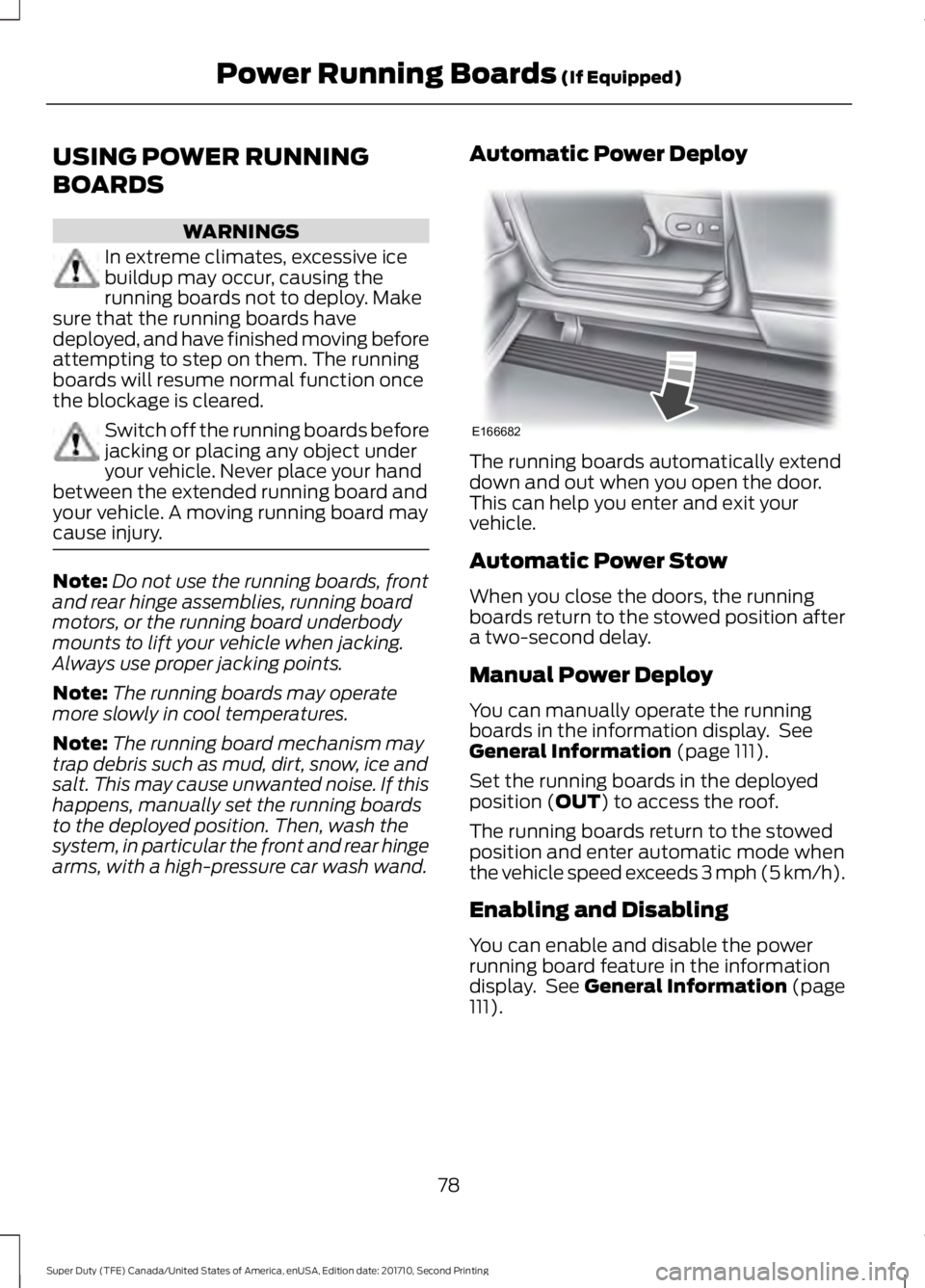
The running boards automatically extenddown and out when you open the door.This can help you enter and exit yourvehicle.
Automatic Power Stow
When you close the doors, the runningboards return to the stowed position aftera two-second delay.
Manual Power Deploy
You can manually operate the runningboards in the information display. SeeGeneral Information (page 111).
Set the running boards in the deployedposition (OUT) to access the roof.
The running boards return to the stowedposition and enter automatic mode whenthe vehicle speed exceeds 3 mph (5 km/h).
Enabling and Disabling
You can enable and disable the powerrunning board feature in the informationdisplay. See General Information (page111).
78
Super Duty (TFE) Canada/United States of America, enUSA, Edition date: 201710, Second Printing
Power Running Boards (If Equipped)E166682
Page 84 of 642
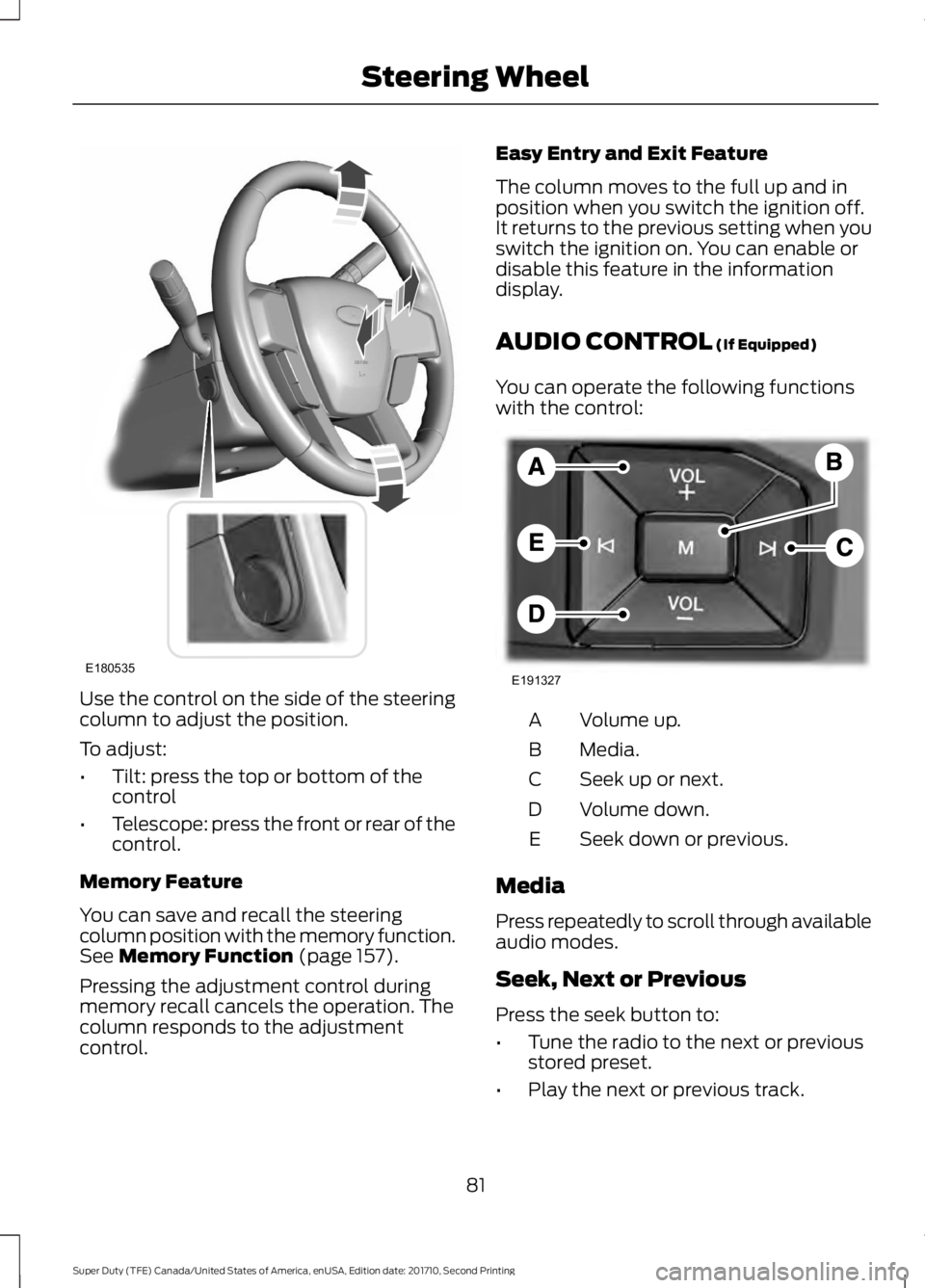
Use the control on the side of the steeringcolumn to adjust the position.
To adjust:
•Tilt: press the top or bottom of thecontrol
•Telescope: press the front or rear of thecontrol.
Memory Feature
You can save and recall the steeringcolumn position with the memory function.See Memory Function (page 157).
Pressing the adjustment control duringmemory recall cancels the operation. Thecolumn responds to the adjustmentcontrol.
Easy Entry and Exit Feature
The column moves to the full up and inposition when you switch the ignition off.It returns to the previous setting when youswitch the ignition on. You can enable ordisable this feature in the informationdisplay.
AUDIO CONTROL (If Equipped)
You can operate the following functionswith the control:
Volume up.A
Media.B
Seek up or next.C
Volume down.D
Seek down or previous.E
Media
Press repeatedly to scroll through availableaudio modes.
Seek, Next or Previous
Press the seek button to:
•Tune the radio to the next or previousstored preset.
•Play the next or previous track.
81
Super Duty (TFE) Canada/United States of America, enUSA, Edition date: 201710, Second Printing
Steering WheelE180535 E191327
Page 85 of 642
Press and hold the seek button to:
•Tune the radio to the next station upor down the frequency band.
•Seek through a track.
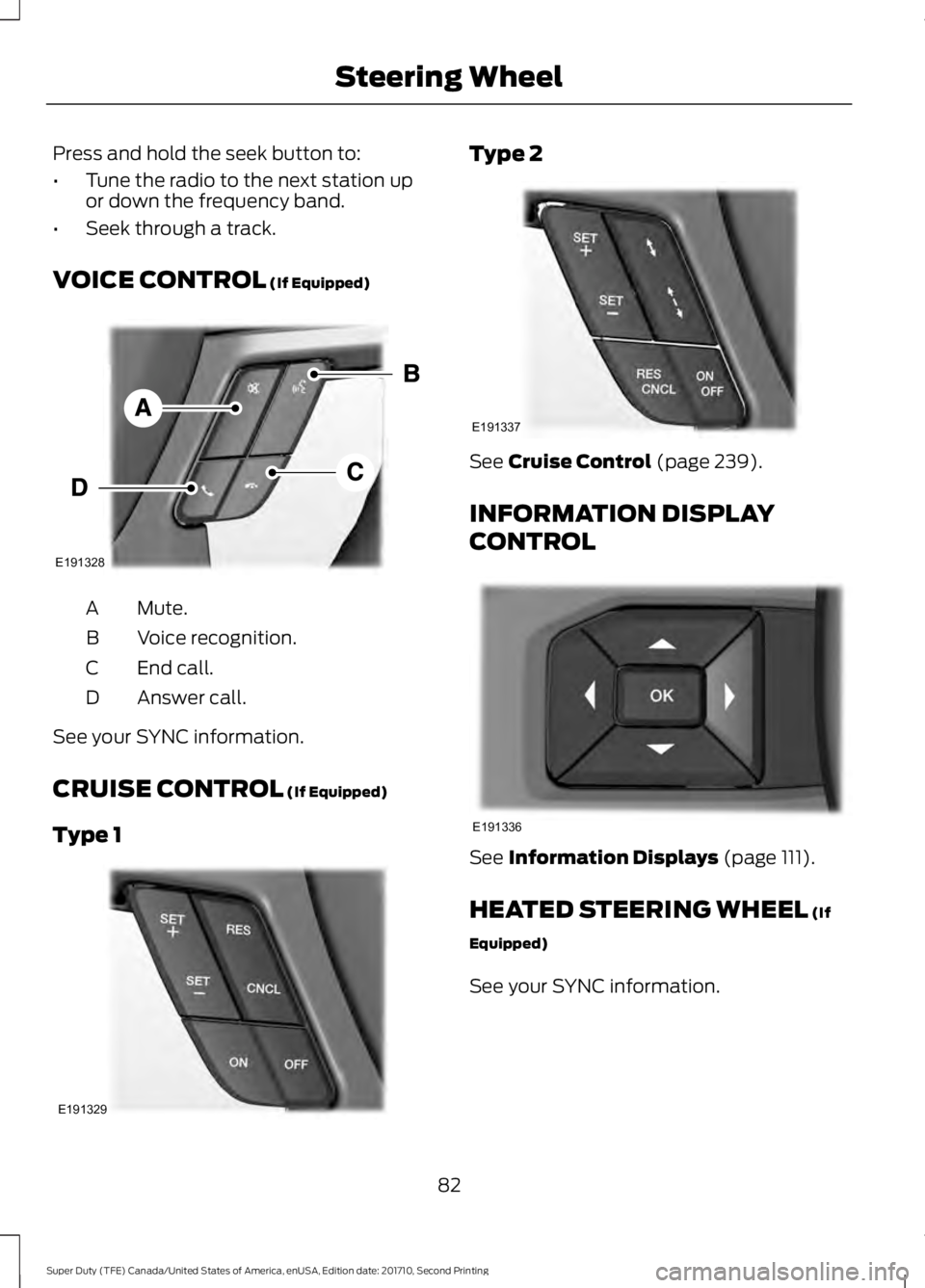
VOICE CONTROL (If Equipped)
Mute.A
Voice recognition.B
End call.C
Answer call.D
See your SYNC information.
CRUISE CONTROL (If Equipped)
Type 1
Type 2
See Cruise Control (page 239).
INFORMATION DISPLAY
CONTROL
See Information Displays (page 111).
HEATED STEERING WHEEL (If
Equipped)
See your SYNC information.
82
Super Duty (TFE) Canada/United States of America, enUSA, Edition date: 201710, Second Printing
Steering WheelE191328 E191329 E191337 E191336
Page 87 of 642

WINDSHIELD WIPERS
Note:Fully defrost the windshield beforeswitching on the windshield wipers.
Note:Make sure you switch off thewindshield wipers before entering a carwash.
Note:Clean the windshield and wiperblades if they begin to leave streaks orsmears. If that does not resolve the issue,install new wiper blades.
Note:Do not operate the wipers on a drywindshield. This may scratch the glass,damage the wiper blades or cause the wipermotor to burn out. Always use thewindshield washers before wiping a drywindshield.
Rotate the end of the control:
•Away from you to increase the wiperspeed.
•Toward you to decrease the wiperspeed.
Speed dependent wipers (ifequipped)
When your vehicle speed increases, theinterval between wipes decreases.
AUTOWIPERS (If Equipped)
Note:Make sure you switch off the wipersbefore entering a car wash.
Note:Wet or winter driving conditions withice, snow or salty road mist can causeinconsistent and unexpected wiping orsmearing.
In these conditions, you can do thefollowing to help keep your windshieldclear:
•Lower the sensitivity of the autowipers.
•Change the wiper speed to normal orhigh-speed wipe as necessary.
•Switch the autowipers off.
The autowipers feature uses a rain sensor,located in the area around the interiormirror. The rain sensor monitors theamount of moisture on the windshield andautomatically turns on the wipers. It willadjust the wiper speed by the amount ofmoisture that the sensor detects on thewindshield. You can switch this feature onor off in the information display. SeeInformation Displays (page 111).
84
Super Duty (TFE) Canada/United States of America, enUSA, Edition date: 201710, Second Printing
Wipers and WashersE172816 E172817
Page 88 of 642

Use the rotary control to adjust thesensitivity of the rain sensor. With lowsensitivity, the wipers will operate whenthe sensor detects a large amount ofmoisture on the windshield. With highsensitivity, the wipers will operate whenthe sensor detects a small amount ofmoisture on the windshield. Adjust therotary control toward the windshield toincrease the moisture sensitivity.
Keep the outside of the windshield cleanbecause the rain sensor is very sensitive. Ifthe area around the interior mirror is dirty,then the wipers may turn on, for example,if dirt, mist or insects hit the windshield.
The courtesy wipe feature turns on afterusing the windshield washers to removeany excess washer fluid and debris.
Note:You can adjust the courtesy wipesettings in the instrument cluster. SeeInformation Displays (page 111).
WINDSHIELD WASHERS
Note:Do not operate the wipers on a drywindshield. This may scratch the glass,damage the wiper blades or cause the wipermotor to burn out. Always use thewindshield washer before wiping a drywindshield.
Note:Do not operate the washers whenthe washer reservoir is empty. This maycause the washer pump to overheat.
•A brief press causes a single wipewithout washer fluid.
•A brief press and hold causes thewipers to swipe three times withwasher fluid.
•A long press and hold will turn on thewipers and washer fluid for up to 10seconds.
A wipe will occur a few seconds afterwashing to clear any remaining washerfluid. You can switch this feature on or offin the information display. SeeInformation Displays (page 111).
85
Super Duty (TFE) Canada/United States of America, enUSA, Edition date: 201710, Second Printing
Wipers and WashersE172818
Page 90 of 642
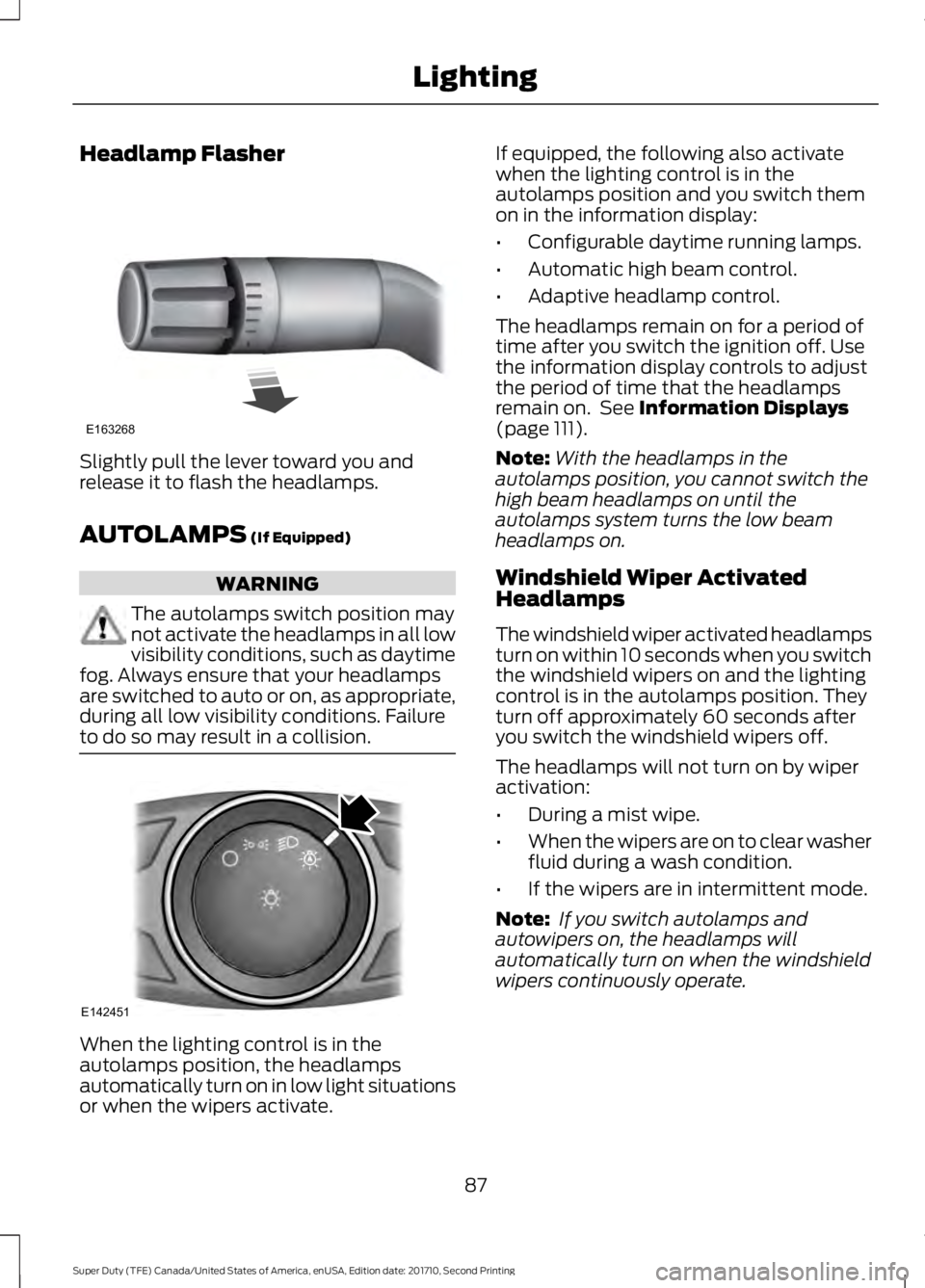
Headlamp Flasher
Slightly pull the lever toward you andrelease it to flash the headlamps.
AUTOLAMPS (If Equipped)
WARNING
The autolamps switch position maynot activate the headlamps in all lowvisibility conditions, such as daytimefog. Always ensure that your headlampsare switched to auto or on, as appropriate,during all low visibility conditions. Failureto do so may result in a collision.
When the lighting control is in theautolamps position, the headlampsautomatically turn on in low light situationsor when the wipers activate.
If equipped, the following also activatewhen the lighting control is in theautolamps position and you switch themon in the information display:
•Configurable daytime running lamps.
•Automatic high beam control.
•Adaptive headlamp control.
The headlamps remain on for a period oftime after you switch the ignition off. Usethe information display controls to adjustthe period of time that the headlampsremain on. See Information Displays(page 111).
Note:With the headlamps in theautolamps position, you cannot switch thehigh beam headlamps on until theautolamps system turns the low beamheadlamps on.
Windshield Wiper ActivatedHeadlamps
The windshield wiper activated headlampsturn on within 10 seconds when you switchthe windshield wipers on and the lightingcontrol is in the autolamps position. Theyturn off approximately 60 seconds afteryou switch the windshield wipers off.
The headlamps will not turn on by wiperactivation:
•During a mist wipe.
•When the wipers are on to clear washerfluid during a wash condition.
•If the wipers are in intermittent mode.
Note: If you switch autolamps andautowipers on, the headlamps willautomatically turn on when the windshieldwipers continuously operate.
87
Super Duty (TFE) Canada/United States of America, enUSA, Edition date: 201710, Second Printing
LightingE163268 E142451