2017 FORD F150 clock
[x] Cancel search: clockPage 413 of 599
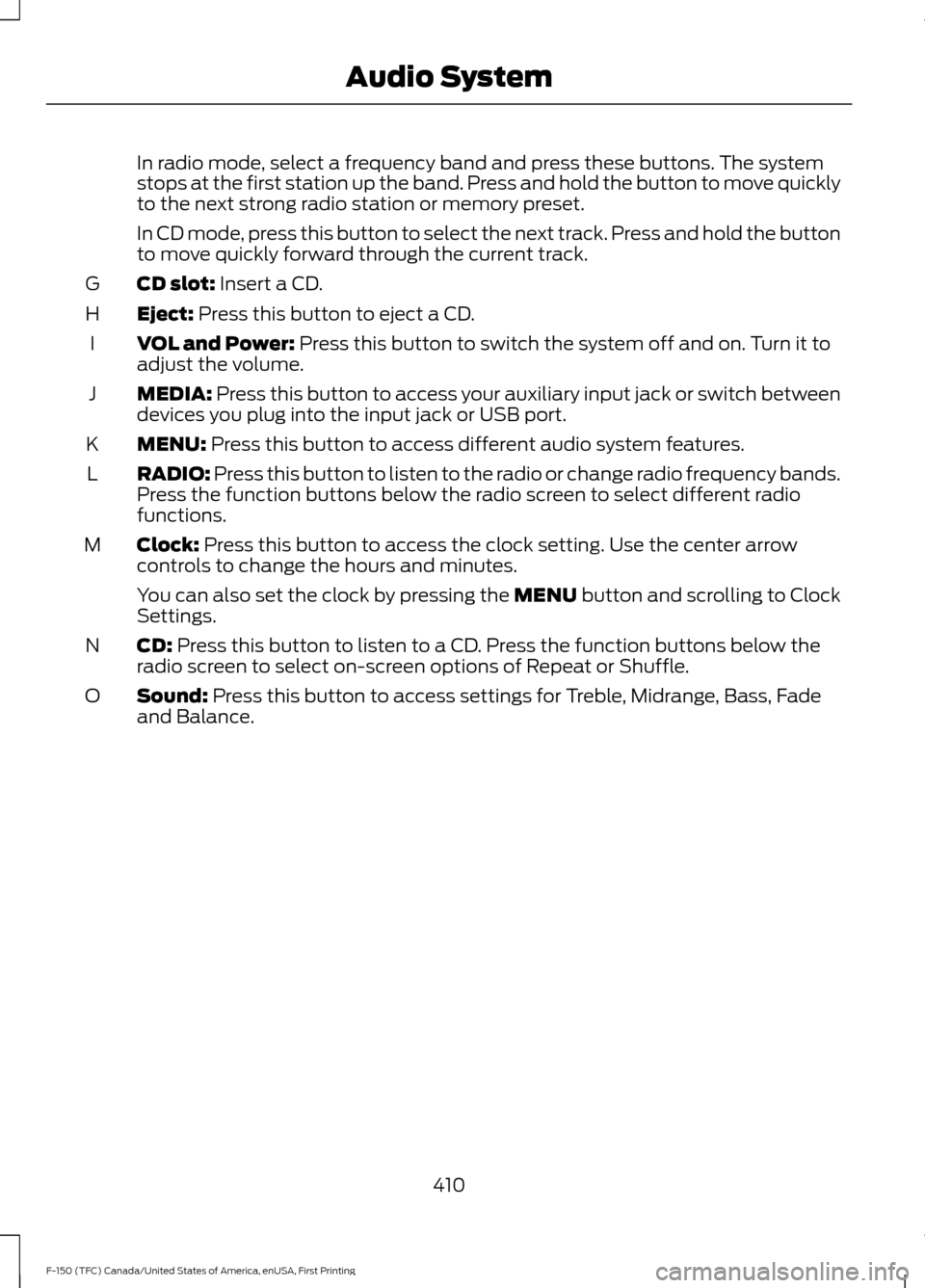
In radio mode, select a frequency band and press these buttons. The system
stops at the first station up the band. Press and hold the button to move quickly
to the next strong radio station or memory preset.
In CD mode, press this button to select the next track. Press and hold the button
to move quickly forward through the current track.
CD slot: Insert a CD.
G
Eject:
Press this button to eject a CD.
H
VOL and Power:
Press this button to switch the system off and on. Turn it to
adjust the volume.
I
MEDIA:
Press this button to access your auxiliary input jack or switch between
devices you plug into the input jack or USB port.
J
MENU:
Press this button to access different audio system features.
K
RADIO:
Press this button to listen to the radio or change radio frequency bands.
Press the function buttons below the radio screen to select different radio
functions.
L
Clock:
Press this button to access the clock setting. Use the center arrow
controls to change the hours and minutes.
M
You can also set the clock by pressing the MENU button and scrolling to Clock
Settings.
CD:
Press this button to listen to a CD. Press the function buttons below the
radio screen to select on-screen options of Repeat or Shuffle.
N
Sound:
Press this button to access settings for Treble, Midrange, Bass, Fade
and Balance.
O
410
F-150 (TFC) Canada/United States of America, enUSA, First Printing Audio System
Page 415 of 599
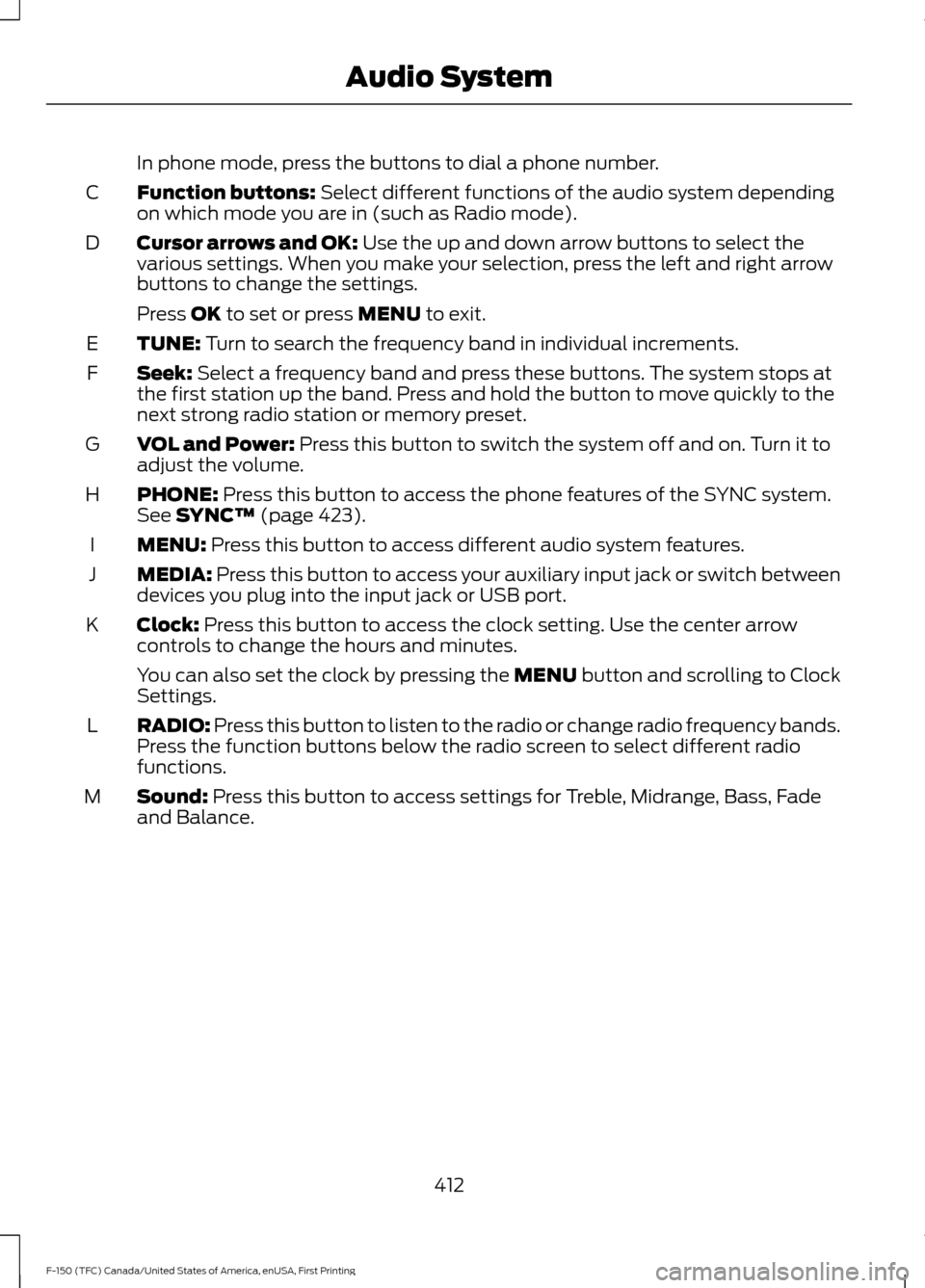
In phone mode, press the buttons to dial a phone number.
Function buttons: Select different functions of the audio system depending
on which mode you are in (such as Radio mode).
C
Cursor arrows and OK:
Use the up and down arrow buttons to select the
various settings. When you make your selection, press the left and right arrow
buttons to change the settings.
D
Press
OK to set or press MENU to exit.
TUNE:
Turn to search the frequency band in individual increments.
E
Seek:
Select a frequency band and press these buttons. The system stops at
the first station up the band. Press and hold the button to move quickly to the
next strong radio station or memory preset.
F
VOL and Power:
Press this button to switch the system off and on. Turn it to
adjust the volume.
G
PHONE:
Press this button to access the phone features of the SYNC system.
See SYNC™ (page 423).
H
MENU:
Press this button to access different audio system features.
I
MEDIA:
Press this button to access your auxiliary input jack or switch between
devices you plug into the input jack or USB port.
J
Clock:
Press this button to access the clock setting. Use the center arrow
controls to change the hours and minutes.
K
You can also set the clock by pressing the MENU button and scrolling to Clock
Settings.
RADIO:
Press this button to listen to the radio or change radio frequency bands.
Press the function buttons below the radio screen to select different radio
functions.
L
Sound:
Press this button to access settings for Treble, Midrange, Bass, Fade
and Balance.
M
412
F-150 (TFC) Canada/United States of America, enUSA, First Printing Audio System
Page 417 of 599
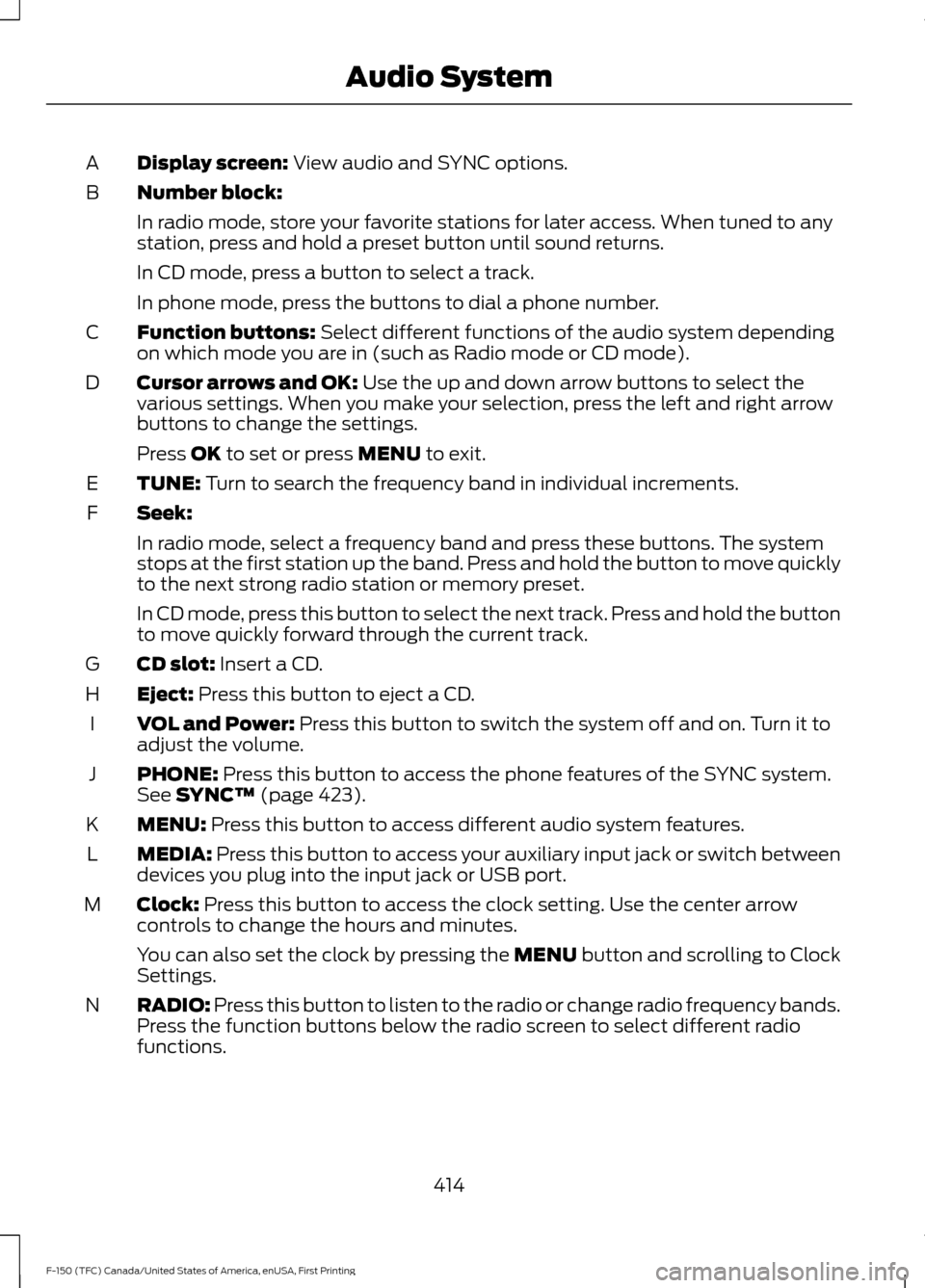
Display screen: View audio and SYNC options.
A
Number block:
B
In radio mode, store your favorite stations for later access. When tuned to any
station, press and hold a preset button until sound returns.
In CD mode, press a button to select a track.
In phone mode, press the buttons to dial a phone number.
Function buttons:
Select different functions of the audio system depending
on which mode you are in (such as Radio mode or CD mode).
C
Cursor arrows and OK:
Use the up and down arrow buttons to select the
various settings. When you make your selection, press the left and right arrow
buttons to change the settings.
D
Press
OK to set or press MENU to exit.
TUNE:
Turn to search the frequency band in individual increments.
E
Seek:
F
In radio mode, select a frequency band and press these buttons. The system
stops at the first station up the band. Press and hold the button to move quickly
to the next strong radio station or memory preset.
In CD mode, press this button to select the next track. Press and hold the button
to move quickly forward through the current track.
CD slot:
Insert a CD.
G
Eject:
Press this button to eject a CD.
H
VOL and Power:
Press this button to switch the system off and on. Turn it to
adjust the volume.
I
PHONE:
Press this button to access the phone features of the SYNC system.
See SYNC™ (page 423).
J
MENU:
Press this button to access different audio system features.
K
MEDIA:
Press this button to access your auxiliary input jack or switch between
devices you plug into the input jack or USB port.
L
Clock:
Press this button to access the clock setting. Use the center arrow
controls to change the hours and minutes.
M
You can also set the clock by pressing the MENU button and scrolling to Clock
Settings.
RADIO:
Press this button to listen to the radio or change radio frequency bands.
Press the function buttons below the radio screen to select different radio
functions.
N
414
F-150 (TFC) Canada/United States of America, enUSA, First Printing Audio System
Page 465 of 599
Action and Description
Menu Item
Item
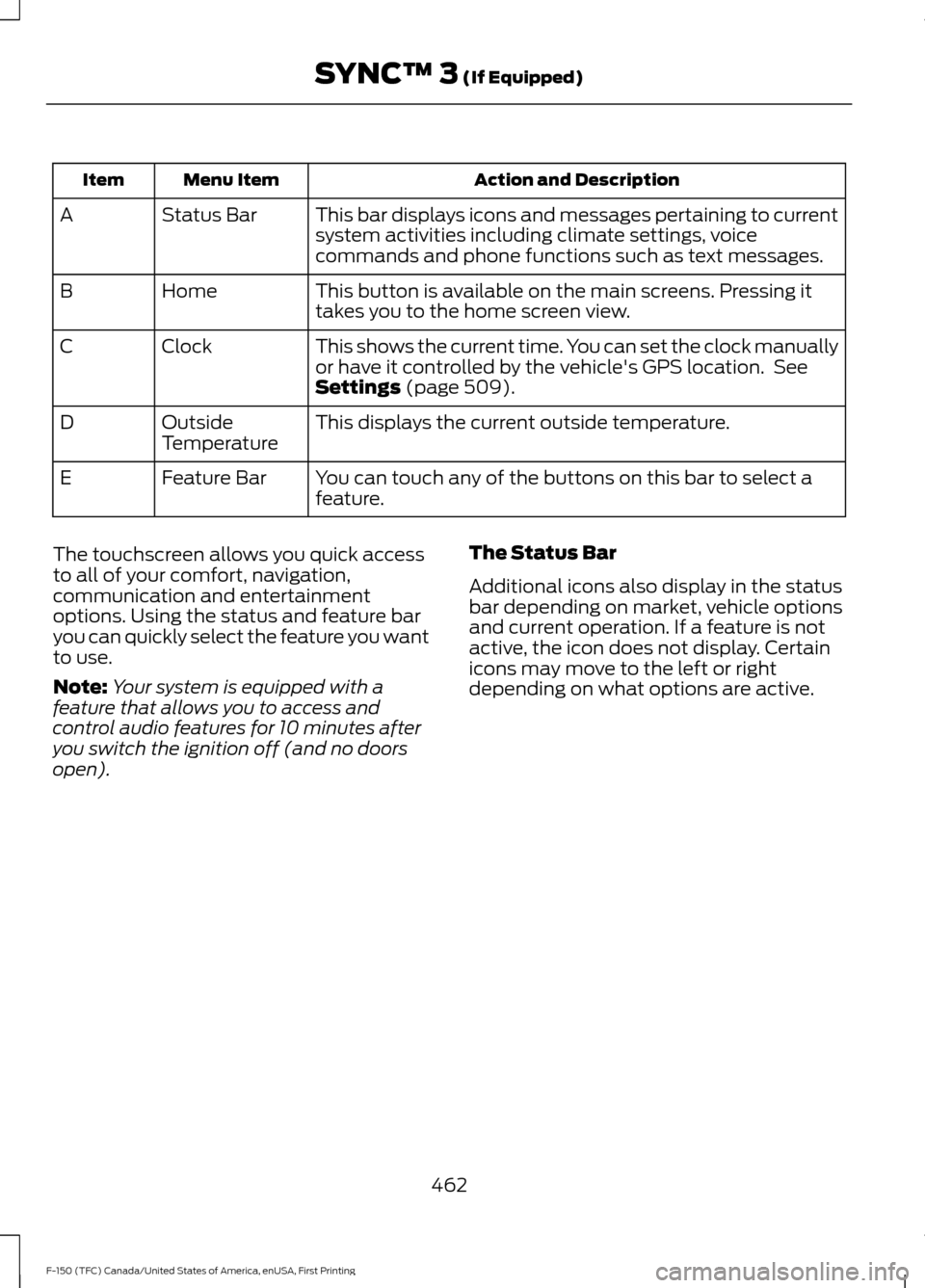
This bar displays icons and messages pertaining to current
system activities including climate settings, voice
commands and phone functions such as text messages.
Status Bar
A
This button is available on the main screens. Pressing it
takes you to the home screen view.
Home
B
This shows the current time. You can set the clock manually
or have it controlled by the vehicle's GPS location. See
Settings (page 509).
Clock
C
This displays the current outside temperature.
Outside
Temperature
D
You can touch any of the buttons on this bar to select a
feature.
Feature Bar
E
The touchscreen allows you quick access
to all of your comfort, navigation,
communication and entertainment
options. Using the status and feature bar
you can quickly select the feature you want
to use.
Note: Your system is equipped with a
feature that allows you to access and
control audio features for 10 minutes after
you switch the ignition off (and no doors
open). The Status Bar
Additional icons also display in the status
bar depending on market, vehicle options
and current operation. If a feature is not
active, the icon does not display. Certain
icons may move to the left or right
depending on what options are active.
462
F-150 (TFC) Canada/United States of America, enUSA, First Printing SYNC™ 3
(If Equipped)
Page 494 of 599
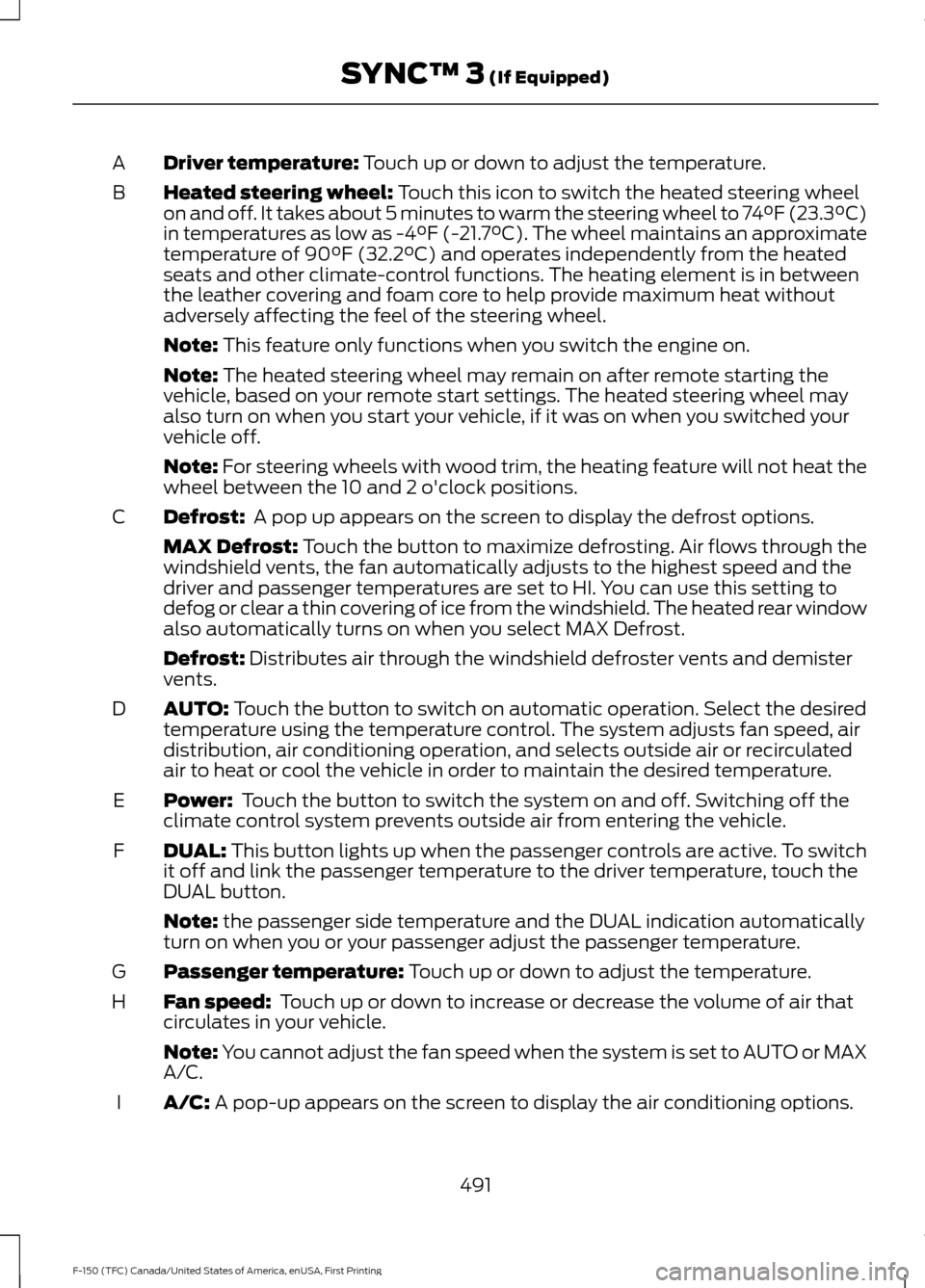
Driver temperature: Touch up or down to adjust the temperature.
A
Heated steering wheel:
Touch this icon to switch the heated steering wheel
on and off. It takes about 5 minutes to warm the steering wheel to 74°F (23.3°C)
in temperatures as low as -4°F (-21.7°C). The wheel maintains an approximate
temperature of 90°F (32.2°C) and operates independently from the heated
seats and other climate-control functions. The heating element is in between
the leather covering and foam core to help provide maximum heat without
adversely affecting the feel of the steering wheel.
B
Note:
This feature only functions when you switch the engine on.
Note:
The heated steering wheel may remain on after remote starting the
vehicle, based on your remote start settings. The heated steering wheel may
also turn on when you start your vehicle, if it was on when you switched your
vehicle off.
Note:
For steering wheels with wood trim, the heating feature will not heat the
wheel between the 10 and 2 o'clock positions.
Defrost:
A pop up appears on the screen to display the defrost options.
C
MAX Defrost: Touch the button to maximize defrosting. Air flows through the
windshield vents, the fan automatically adjusts to the highest speed and the
driver and passenger temperatures are set to HI. You can use this setting to
defog or clear a thin covering of ice from the windshield. The heated rear window
also automatically turns on when you select MAX Defrost.
Defrost:
Distributes air through the windshield defroster vents and demister
vents.
AUTO:
Touch the button to switch on automatic operation. Select the desired
temperature using the temperature control. The system adjusts fan speed, air
distribution, air conditioning operation, and selects outside air or recirculated
air to heat or cool the vehicle in order to maintain the desired temperature.
D
Power:
Touch the button to switch the system on and off. Switching off the
climate control system prevents outside air from entering the vehicle.
E
DUAL:
This button lights up when the passenger controls are active. To switch
it off and link the passenger temperature to the driver temperature, touch the
DUAL button.
F
Note:
the passenger side temperature and the DUAL indication automatically
turn on when you or your passenger adjust the passenger temperature.
Passenger temperature:
Touch up or down to adjust the temperature.
G
Fan speed:
Touch up or down to increase or decrease the volume of air that
circulates in your vehicle.
H
Note:
You cannot adjust the fan speed when the system is set to AUTO or MAX
A/C.
A/C:
A pop-up appears on the screen to display the air conditioning options.
I
491
F-150 (TFC) Canada/United States of America, enUSA, First Printing SYNC™ 3
(If Equipped)
Page 513 of 599
Media Player
This button is available when a media
device such as a Bluetooth Stereo or USB
device is the active audio source. Pressing
the button allows you to access the
following options for active devices only.Action and Description
Menu Item
For some Apple devices, SYNC 3 can adjust the playback speed of
podcasts. When a podcast is playing, you can choose:
Podcast Speed
Faster
Normal
Slower
For some Apple devices, SYNC 3 can adjust the playback speed of
audiobooks. When an audiobook is playing, you can choose:
Audiobook Speed
Faster
Normal
Slower
Cover art displays from your device ’s music
files. If no cover art for the files exists on the
device, then the Gracenote Database provides
cover art.
Media Player
Cover Art Priority
The Gracenote Database supplied cover art is
used for your music files. This overrides any
cover art from your device.
Gracenote®
Switches on and off Gracenote® to provide metadata information
such as genre, artist, album.
Gracenote®
Management
This allows you to view the version level of the Gracenote Database.
Gracenote® Data-
base Info
This allows you to view the manufacturer and model number of your
media device.
Device Informa-
tion
Erase the stored in media information in order to re-index.
Update Media
Index
Clock
To adjust the time, select the up and down
arrows on either side of the screen. The
arrows on the left adjust the hour and
arrows on the right adjust the minute. You
can then select AM or PM. You can adjust the following features:
510
F-150 (TFC) Canada/United States of America, enUSA, First Printing SYNC™ 3 (If Equipped)
Page 514 of 599
Action and Description
Menu Item
Select how time displays.
Clock Format
When active, the clock adjusts to time zone changes.
Auto Time Zone
Update This feature is only available in vehicles with navigation.
When selected, the vehicle clock resets to GPS satellite time.
Reset Clock to
GPS Time
The system automatically saves any
updates you make to the settings. Bluetooth
Pressing this button allows you to access
the following: Action
Menu Item
Turning Bluetooth off disconnects all devices and does not permit
new connections.
Bluetooth
You must activate Bluetooth to pair a
Bluetooth-enabled device.
The processes of pairing a Bluetooth
device is the same as pairing a phone. See
Pairing a Device in Phone settings for how
to pair a device and the available options.
Phone
Pair your Bluetooth-enabled phone with
the system before using the functions in
hands-free mode.
Switch on Bluetooth on your device to
begin pairing. See your phone ’s manual if
necessary.
To add a phone, select: Menu Item
Add Phone
1. Follow the on-screen instructions.
2. A prompt alerts you to search for the system on your phone. 3. Select your vehicle's make and model
as it displays on your phone.
4. Confirm that the six-digit number appearing on your phone matches the
six-digit number on the touchscreen.
5. The touchscreen indicates when the pairing is successful.
6. Your phone may prompt you to give the system permission to access
information. To check your phone ’s
compatibility, see your phone ’s manual
or visit the website.
Alternatively, to add a phone, select: Menu Item
Add Phone
Then select:
Discover Other Bluetooth Devices
1. Follow the on-screen instructions.
2. Select your phone's name when it appears on the touchscreen.
511
F-150 (TFC) Canada/United States of America, enUSA, First Printing SYNC™ 3 (If Equipped)
Page 596 of 599

Vehicles Sold in the United States: Using
Roadside Assistance................................... 293
Roadside Emergencies..............................293
Running-In See: Breaking-In................................................. 288
Running Out of Fuel.....................................179 Adding Fuel From a Portable Fuel
Container........................................................... 179
Filling a Portable Fuel Container................... 179
S
Safety Canopy ™
............................................50
Safety Precautions.......................................176
Satellite Radio
...............................................419
Satellite Radio Electronic Serial Number
(ESN)................................................................ 420
Satellite Radio Reception Factors..............420
SIRIUS® Satellite Radio Service.................420
Troubleshooting.................................................. 421
Scheduled Maintenance Record...........548
Scheduled Maintenance
..........................539
Seatbelt Extension........................................42
Seatbelt Height Adjustment......................39
Seatbelt Reminder
........................................40
Belt-Minder™....................................................... 40
Seatbelts...........................................................34 Principle of Operation........................................ 34
Seatbelt Warning Lamp and Indicator Chime
..............................................................39
Conditions of operation.................................... 40
Seats.................................................................149
Security...............................................................74
Settings...........................................................509 911 Assist................................................................ 514
Ambient Lighting................................................ 519
Bluetooth................................................................ 511
Clock....................................................................... 510
Display................................................................... 520
General................................................................... 518
Media Player......................................................... 510
Mobile Apps.......................................................... 517
Navigation............................................................. 515
Phone....................................................................... 511
Radio....................................................................... 514
Sound.................................................................... 509
Valet Mode............................................................ 521
Vehicle.................................................................... 519Voice Control........................................................
521
Wi-Fi........................................................................\
519
Side Airbags.....................................................49
Sitting in the Correct Position..................149
Sliding Windows..........................................100 Power Sliding Back Window......................... 100
Snow Chains See: Using Snow Chains................................. 366
Snowplowing................................................290 Engine Temperature while Plowing............292
Installing the Snowplow................................. 290
Operating the Vehicle with the Snowplow Attached........................................................... 291
Outside Air Temperature While Plowing............................................................. 292
Snowplowing with your Airbag Equipped Vehicle............................................................... 291
Snowplow Mode................................................. 291
Transmission Operation while Plowing............................................................. 292
Special Notices................................................12 New Vehicle Limited Warranty......................... 12
Special Instructions.............................................. 12
Special Operating Conditions Scheduled Maintenance..............................................545
Exceptions............................................................ 547
Speed Control See: Cruise Control............................................ 224
Spot Lamps.......................................................91
Cargo and Trailer Hookup Lamps.................. 92
Stability Control...........................................209 Principle of Operation..................................... 209
Starter Switch See: Ignition Switch........................................... 168
Starting a Gasoline Engine.......................169 Automatic Engine Shutdown.......................... 171
Failure to Start....................................................... 171
Guarding Against Exhaust Fumes................172
Important Ventilating Information...............172
Stopping the Engine When Your Vehicle is Moving................................................................ 172
Stopping the Engine When Your Vehicle is Stationary ........................................................... 171
Vehicles with an Ignition Key.......................... 170
Vehicles with Keyless Start............................. 170
Starting and Stopping the Engine.........168 General Information.......................................... 168
593
F-150 (TFC) Canada/United States of America, enUSA, First Printing Index