2017 FORD F150 Sirius
[x] Cancel search: SiriusPage 502 of 599

3D city models are complete 3D models
of entire city areas including navigable
roads, parks, rivers and rendered buildings.
3D landmarks and city models appear in
3D map mode only. Coverage of these
varies and improves with updated map
releases.
Select the zoom in icon to see a
closer view of the map.
Select the zoom out icon to see
a farther away view of the map.
You can adjust the view in preset
increments. You can also pinch to zoom in
or out of the map.
The information bar tells you the names
of streets, cities or landmarks as you hover
over them with the crosshair curser.
You can change your view of the map by
tapping on the location indicator icon on
the right hand side of the screen. You can
choose from the following options: Heading up (2D map) This
always shows the direction of
forward travel to be upward on
the screen. This view is available
for map scales up to
3 mi (5 km). North up (2D map)
always
shows the northern direction to
be upward on the screen. 3D map mode
provides an
elevated perspective of the map.
Adjust this viewing angle and
rotate the map 180 degrees by
touching the map twice, and
then dragging your finger along the shaded
bar with arrows at the bottom of the map. Re-center the map by pressing
this icon whenever you scroll the
map away from your vehicle
’s
current location. Points of Interest (POI)
grouping icon: You can choose
up to three POI icons to display
on the map. If the chosen POIs
are located close together or are
at the same location a box is used to
display a single category icon instead of
repeating the same icon, in order to reduce
clutter. When you select the box on the
map, a pop-up appears indicating how
many POIs are in this location. Select the
pop up to see a list of the available POIs.
You can scroll through and select POIs
from this list.
If your vehicle is low on charge or fuel,
station icons automatically display on the
map.
If you have subscribed to SiriusXM Traffic
and Travel Link (where available), traffic
flow will be indicated on the map by green
(clear), yellow (slowing), and red
(stopped) road highlights. Traffic flow is
indicated where the information is
available and varies across the US.
You can choose to display traffic icons on
the map representing twelve different
types of incidents. See
Settings (page
509).
You can set a destination by hovering
above a location and selecting: Button
Start
499
F-150 (TFC) Canada/United States of America, enUSA, First Printing SYNC™ 3
(If Equipped)E207752 E207753 E207750 E207749 E207748 E207751 E207754
Page 506 of 599
Action and Description
Menu Item
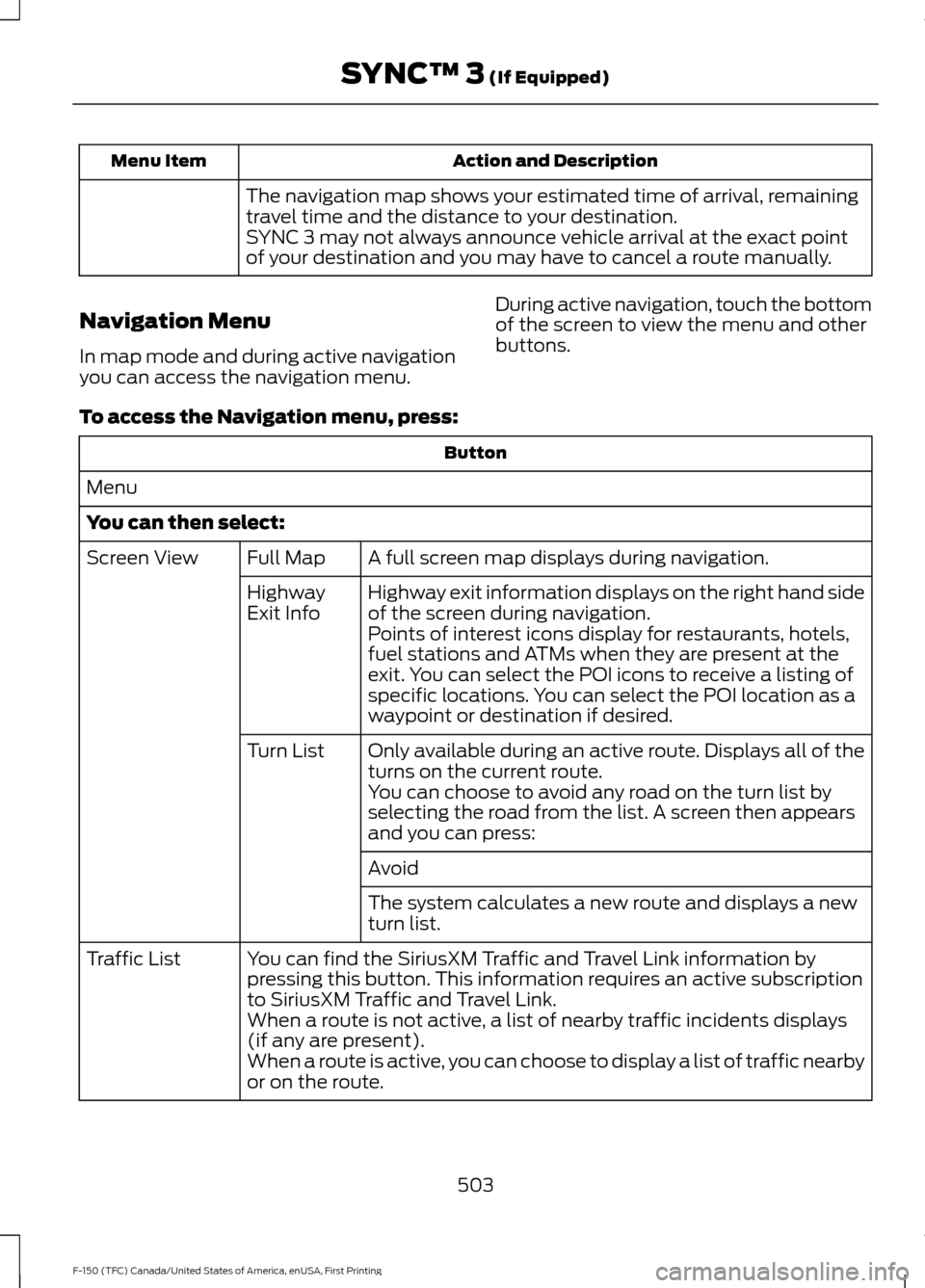
The navigation map shows your estimated time of arrival, remaining
travel time and the distance to your destination.
SYNC 3 may not always announce vehicle arrival at the exact point
of your destination and you may have to cancel a route manually.
Navigation Menu
In map mode and during active navigation
you can access the navigation menu. During active navigation, touch the bottom
of the screen to view the menu and other
buttons.
To access the Navigation menu, press: Button
Menu
You can then select: A full screen map displays during navigation.
Full Map
Screen View
Highway exit information displays on the right hand side
of the screen during navigation.
Highway
Exit Info
Points of interest icons display for restaurants, hotels,
fuel stations and ATMs when they are present at the
exit. You can select the POI icons to receive a listing of
specific locations. You can select the POI location as a
waypoint or destination if desired.
Only available during an active route. Displays all of the
turns on the current route.
Turn List
You can choose to avoid any road on the turn list by
selecting the road from the list. A screen then appears
and you can press:
Avoid
The system calculates a new route and displays a new
turn list.
You can find the SiriusXM Traffic and Travel Link information by
pressing this button. This information requires an active subscription
to SiriusXM Traffic and Travel Link.
Traffic List
When a route is not active, a list of nearby traffic incidents displays
(if any are present).
When a route is active, you can choose to display a list of traffic nearby
or on the route.
503
F-150 (TFC) Canada/United States of America, enUSA, First Printing SYNC™ 3 (If Equipped)
Page 509 of 599
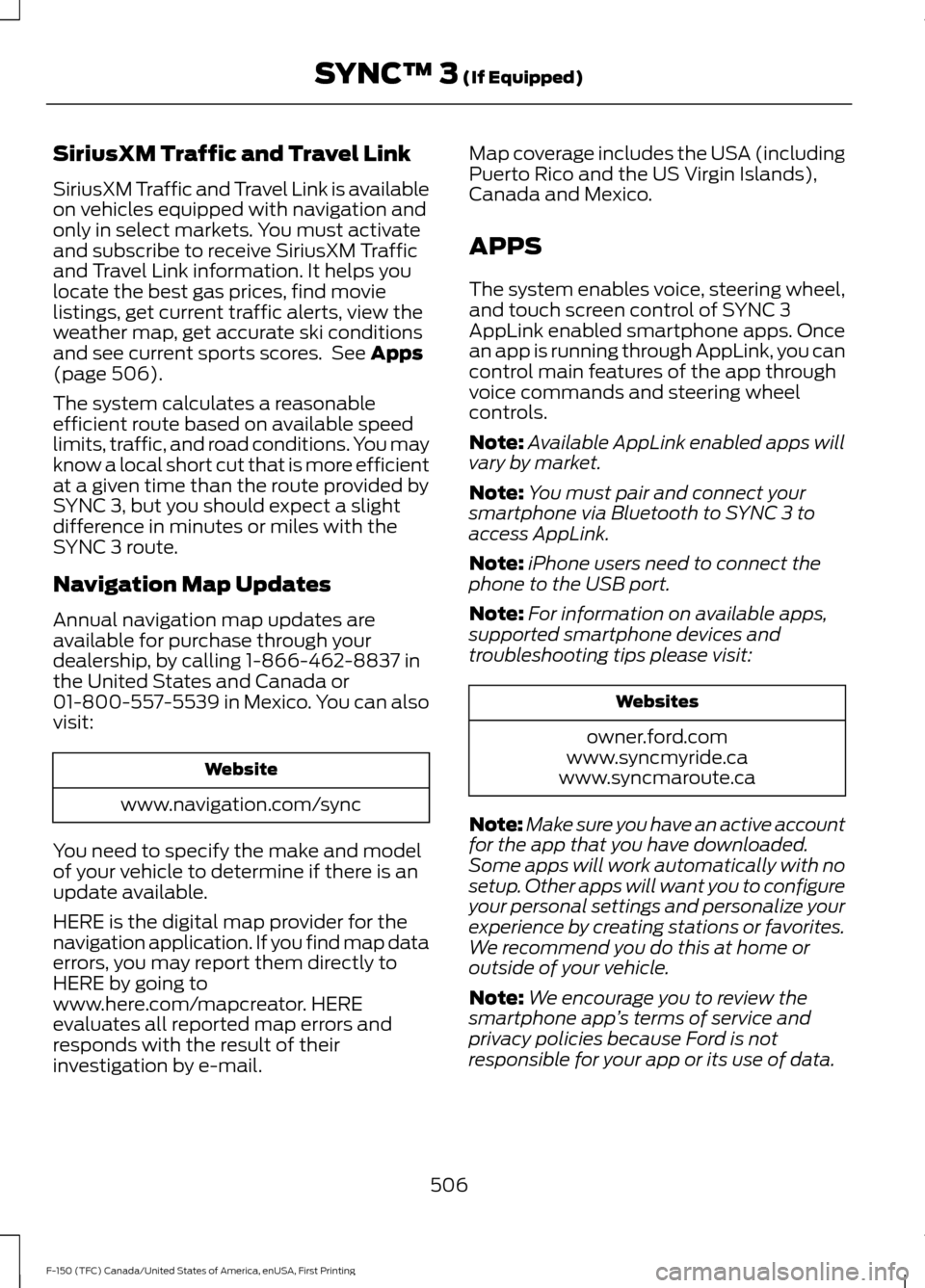
SiriusXM Traffic and Travel Link
SiriusXM Traffic and Travel Link is available
on vehicles equipped with navigation and
only in select markets. You must activate
and subscribe to receive SiriusXM Traffic
and Travel Link information. It helps you
locate the best gas prices, find movie
listings, get current traffic alerts, view the
weather map, get accurate ski conditions
and see current sports scores. See Apps
(page 506).
The system calculates a reasonable
efficient route based on available speed
limits, traffic, and road conditions. You may
know a local short cut that is more efficient
at a given time than the route provided by
SYNC 3, but you should expect a slight
difference in minutes or miles with the
SYNC 3 route.
Navigation Map Updates
Annual navigation map updates are
available for purchase through your
dealership, by calling 1-866-462-8837 in
the United States and Canada or
01-800-557-5539 in Mexico. You can also
visit: Website
www.navigation.com/sync
You need to specify the make and model
of your vehicle to determine if there is an
update available.
HERE is the digital map provider for the
navigation application. If you find map data
errors, you may report them directly to
HERE by going to
www.here.com/mapcreator. HERE
evaluates all reported map errors and
responds with the result of their
investigation by e-mail. Map coverage includes the USA (including
Puerto Rico and the US Virgin Islands),
Canada and Mexico.
APPS
The system enables voice, steering wheel,
and touch screen control of SYNC 3
AppLink enabled smartphone apps. Once
an app is running through AppLink, you can
control main features of the app through
voice commands and steering wheel
controls.
Note:
Available AppLink enabled apps will
vary by market.
Note: You must pair and connect your
smartphone via Bluetooth to SYNC 3 to
access AppLink.
Note: iPhone users need to connect the
phone to the USB port.
Note: For information on available apps,
supported smartphone devices and
troubleshooting tips please visit: Websites
owner.ford.com
www.syncmyride.ca
www.syncmaroute.ca
Note: Make sure you have an active account
for the app that you have downloaded.
Some apps will work automatically with no
setup. Other apps will want you to configure
your personal settings and personalize your
experience by creating stations or favorites.
We recommend you do this at home or
outside of your vehicle.
Note: We encourage you to review the
smartphone app ’s terms of service and
privacy policies because Ford is not
responsible for your app or its use of data.
506
F-150 (TFC) Canada/United States of America, enUSA, First Printing SYNC™ 3
(If Equipped)
Page 511 of 599
SiriusXM Traffic and Travel Link (If
Equipped)
WARNING
Driving while distracted can result in
loss of vehicle control, crash and
injury. We strongly recommend that
you use extreme caution when using any
device that may take your focus off the
road. Your primary responsibility is the safe
operation of your vehicle. We recommend
against the use of any hand-held device
while driving and encourage the use of
voice-operated systems when possible.
Make sure you are aware of all applicable
local laws that may affect the use of
electronic devices while driving. Note:
SiriusXM Traffic and Travel Link may
not be available in all markets. Note:
In order to use SiriusXM Traffic and
Travel Link, your vehicle must have
navigation.
Note: A paid subscription is required to
access and use these features. Go to
www.siriusxm.com/travellink for more
information.
Note: Visit www.siriusxm.com/traffic and
click on Coverage map and details for a
complete listing of all traffic areas covered
by SiriusXM Traffic and Travel Link.
Note: Neither Sirius nor Ford is responsible
for any errors or inaccuracies in the SiriusXM
Traffic and Travel Link services or its use in
vehicles.
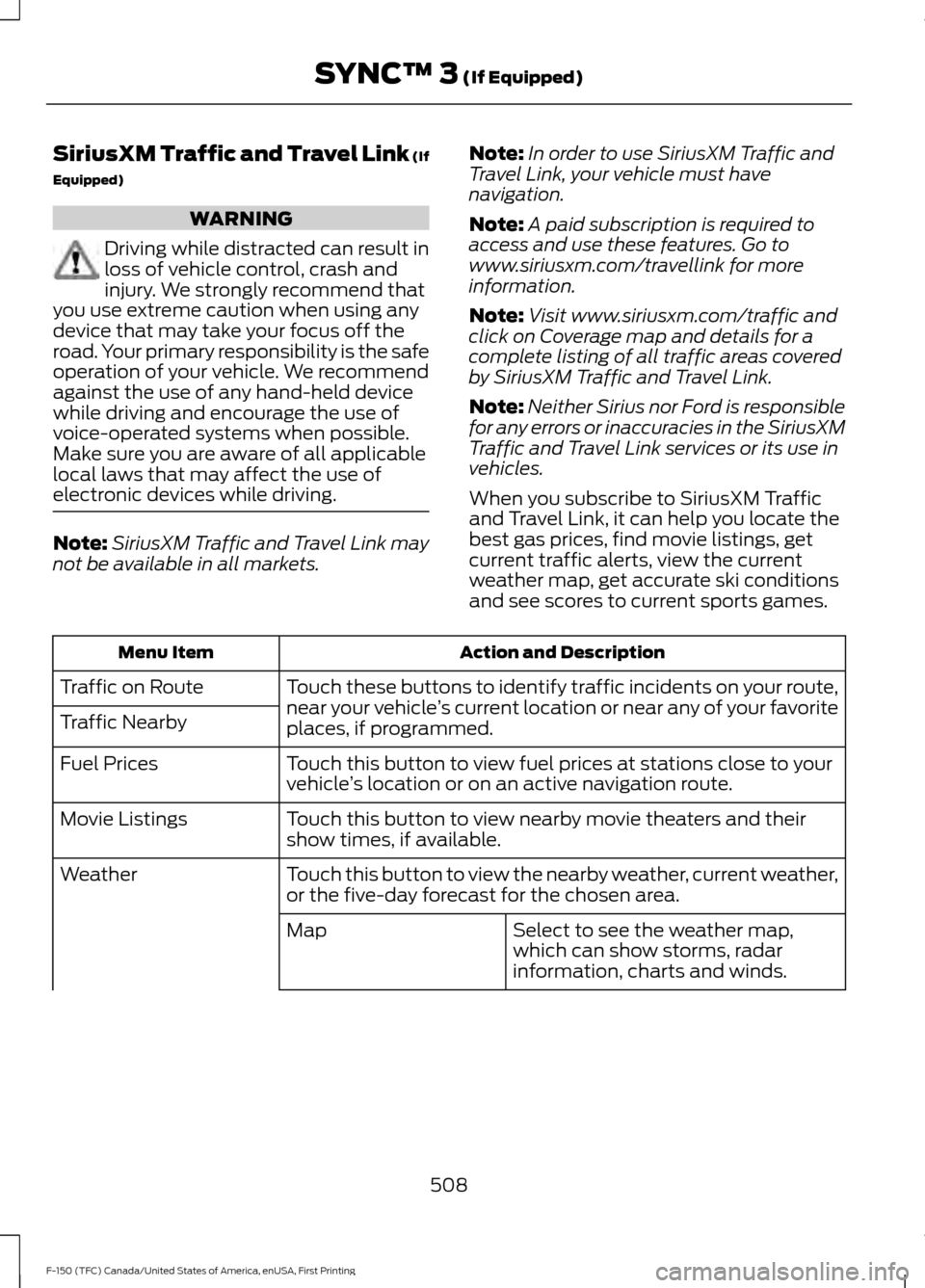
When you subscribe to SiriusXM Traffic
and Travel Link, it can help you locate the
best gas prices, find movie listings, get
current traffic alerts, view the current
weather map, get accurate ski conditions
and see scores to current sports games. Action and Description
Menu Item
Touch these buttons to identify traffic incidents on your route,
near your vehicle’s current location or near any of your favorite
places, if programmed.
Traffic on Route
Traffic Nearby
Touch this button to view fuel prices at stations close to your
vehicle’s location or on an active navigation route.
Fuel Prices
Touch this button to view nearby movie theaters and their
show times, if available.
Movie Listings
Touch this button to view the nearby weather, current weather,
or the five-day forecast for the chosen area.
Weather
Select to see the weather map,
which can show storms, radar
information, charts and winds.
Map
508
F-150 (TFC) Canada/United States of America, enUSA, First Printing SYNC™ 3 (If Equipped)
Page 588 of 599
3
360 Degree Camera....................................221
Camera Views...................................................... 221
Front Camera....................................................... 222
Side Camera........................................................ 222
4
4WD See: Four-Wheel Drive...................................... 193
A
A/C See: Climate Control.......................................... 141
About This Manual
...........................................7
ABS See: Brakes.......................................................... 203
ABS driving hints See: Hints on Driving With Anti-Lock
Brakes............................................................... 203
Accessories....................................................534 Exterior style........................................................ 534
Interior style......................................................... 534
Lifestyle................................................................. 534
Peace of mind..................................................... 534
Accessories See: Replacement Parts
Recommendation............................................ 12
ACC See: Using Adaptive Cruise Control............225
Active Park Assist
.........................................214
Automatic Steering into Parking
Space................................................................. 216
Deactivating the Park Assist Feature..........216
Troubleshooting the System........................... 217
Using Active Park Assist................................... 215
Adjusting the Headlamps.........................332 Horizontal Aim Adjustment........................... 333
Vertical Aim Adjustment................................. 332
Adjusting the Pedals....................................84
Adjusting the Steering Wheel...................80 Power Tilt and Telescope Steering
Column............................................................... 80
Airbag Disposal
...............................................52
Air Conditioning See: Climate Control.......................................... 141Air Filter
See: Changing the Engine Air Filter.............339
Alarm See: Anti-Theft Alarm........................................ 76
Ambient Lighting
...........................................94
Anti-Theft Alarm............................................76
Arming the Alarm.................................................. 77
Disarming the Alarm............................................ 77
Full Guard ................................................................ 77
Reduced Guard...................................................... 76
Appendices....................................................558
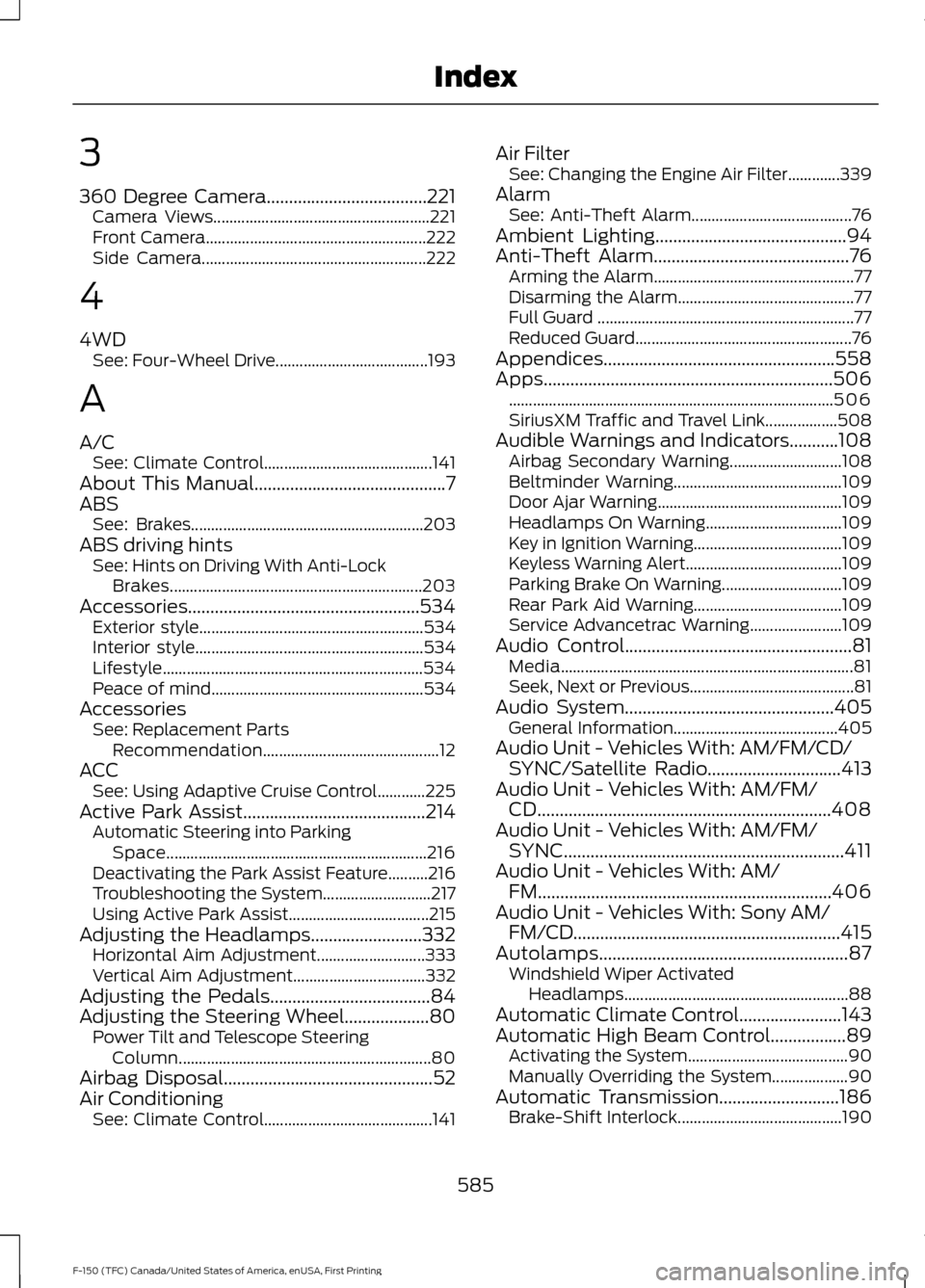
Apps
.................................................................506
........................................................................\
......... 506
SiriusXM Traffic and Travel Link.................. 508
Audible Warnings and Indicators...........108 Airbag Secondary Warning............................ 108
Beltminder Warning.......................................... 109
Door Ajar Warning.............................................. 109
Headlamps On Warning.................................. 109
Key in Ignition Warning..................................... 109
Keyless Warning Alert....................................... 109
Parking Brake On Warning.............................. 109
Rear Park Aid Warning..................................... 109
Service Advancetrac Warning....................... 109
Audio Control
...................................................81
Media........................................................................\
. 81
Seek, Next or Previous......................................... 81
Audio System
...............................................405
General Information......................................... 405
Audio Unit - Vehicles With: AM/FM/CD/ SYNC/Satellite Radio
..............................413
Audio Unit - Vehicles With: AM/FM/ CD..................................................................408
Audio Unit - Vehicles With: AM/FM/ SYNC...............................................................411
Audio Unit - Vehicles With: AM/ FM..................................................................406
Audio Unit - Vehicles With: Sony AM/ FM/CD............................................................415
Autolamps........................................................87 Windshield Wiper Activated
Headlamps........................................................ 88
Automatic Climate Control.......................143
Automatic High Beam Control.................89 Activating the System........................................ 90
Manually Overriding the System................... 90
Automatic Transmission
...........................186
Brake-Shift Interlock......................................... 190
585
F-150 (TFC) Canada/United States of America, enUSA, First Printing Index
Page 591 of 599

Electric Parking Brake................................204
Applying the Electric Parking Brake...........204
Applying the Electric Parking Brake When
the Vehicle is Moving................................... 205
Battery With No Charge.................................. 206
Releasing the Electric Parking Brake..........205
Electronic Locking Differential................201 Activating the Electronic Locking
Differential....................................................... 201
Electronic Tailgate.........................................69
With the Outside Control Button................... 69
With the Remote Control.................................. 69
Emission Control System..........................183 On-Board Diagnostics (OBD-II)................... 184
Readiness for Inspection and Maintenance (I/M) Testing................................................... 185
End User License Agreement.................558 VEHICLE SOFTWARE END USER LICENSE
AGREEMENT (EULA) ................................. 558
Engine Block Heater
.....................................172
Using the Engine Block Heater....................... 173
Engine Coolant Check................................323 Adding Coolant................................................... 324
Coolant Change................................................. 326
Engine Coolant Temperature Management................................................... 327
Fail-Safe Cooling............................................... 326
Recycled Coolant............................................... 325
Severe Climates................................................. 325
Engine Immobilizer See: Passive Anti-Theft System..................... 74
Engine Oil Check..........................................322 Adding Engine Oil............................................... 322
Engine Oil Dipstick.......................................322
Engine Specifications - 2.7L EcoBoost™..................................................381
Drivebelt Routing................................................ 381
Engine Specifications - 3.5L Ecoboost™.................................................382
Drivebelt Routing............................................... 382
Engine Specifications - 3.5L.....................381 Drivebelt Routing............................................... 382
Engine Specifications - 5.0L...................383 Drivebelt Routing............................................... 383
Entertainment..............................................480 AM/FM Radio....................................................... 481
Apps....................................................................... 489
Bluetooth Stereo or USB................................ 488CD (If equipped)................................................
487
HD Radio ™ Information (If
Available)........................................................ 484
SIRIUS® Satellite Radio (If Activated)........................................................ 482
Sources................................................................. 480
Supported Media Players, Formats and Metadata Information................................ 489
USB Ports............................................................. 489
Environment
......................................................15
EPB See: Electric Parking Brake............................ 204
Essential Towing Checks..........................278 Before Towing a Trailer.................................... 283
Hitches................................................................... 279
Launching or Retrieving a Boat or Personal Watercraft (PWC)........................................ 284
Safety Chains...................................................... 279
Trailer Brakes...................................................... 280
Trailer Lamps....................................................... 283
Trailer Towing Connector................................ 278
Using a Step Bumper....................................... 283
When Towing a Trailer..................................... 283
Event Data Recording See: Data Recording.............................................. 9
Export Unique Options.................................14
Exterior Mirrors
................................................96
360-Degree Camera.......................................... 98
Auto-dimming Feature...................................... 98
Blind Spot Information System...................... 99
Clearance Lamps ................................................ 98
Direction Indicator Mirrors ............................... 98
Fold-Away Exterior Mirrors............................... 96
Heated Exterior Mirrors ..................................... 98
Integrated Blind Spot Mirror............................ 98
Memory Mirrors ................................................... 98
Power Exterior Mirrors........................................ 96
Power-Folding Mirrors........................................ 97
PowerScope ™ Power Telescoping
Mirrors.................................................................. 97
Puddle Lamps....................................................... 98
Spot Lamps........................................................... 98
Telescoping Mirrors.............................................. 97
F
Fastening the Seatbelts...............................35 Fastening the Cinch Tongue............................ 36
588
F-150 (TFC) Canada/United States of America, enUSA, First Printing Index
Page 594 of 599

L
Lane Keeping System.................................232
Switching the System On and Off...............233
System Display................................................... 234
System Settings................................................. 233
Troubleshooting................................................. 235
Lighting Control..............................................87
Headlamp Flasher................................................ 87
High Beam............................................................... 87
Lighting...............................................................87
Load Carrying
.................................................247
Load Limit......................................................248
Special Loading Instructions for Owners of
Pick-up Trucks and Utility-type
Vehicles............................................................. 252
Vehicle Loading - with and without a Trailer................................................................ 248
Load Retaining Fixtures.............................247 BoxLink ™ Cleats................................................. 247
Locking and Unlocking
................................64
Activating Intelligent Access........................... 64
Autolock and Autounlock................................. 66
Battery Saver......................................................... 66
Illuminated Entry.................................................. 66
Power Door Locks................................................ 64
Remote Control.................................................... 64
Smart Unlock......................................................... 65
Smart Unlocks for Intelligent Access Keys...................................................................... 65
Lug Nuts See: Changing a Road Wheel........................ 372
M
Maintenance...................................................317 General Information........................................... 317
Manual Climate Control
..............................141
Manual Seats..................................................151
Manual Lumbar .................................................. 152
Moving the Seat Backward and Forward.............................................................. 151
Recline Adjustment........................................... 152
Manual Tailgate..............................................69
Media Hub......................................................422
Memory Function
.........................................154
Easy Entry and Exit Feature............................ 155Linking a PreSet Position to your Remote
Control or Intelligent Access Key.............155
Saving a PreSet Position.................................. 155
Message Center See: Information Displays................................ 110
Mirrors See: Heated Windows and Mirrors...............147
See: Windows and Mirrors................................ 95
Mobile Communications Equipment.......13
Moonroof........................................................100 Bounce-Back
........................................................ 101
Opening and Closing the Moonroof.............101
Motorcraft Parts - 2.7L EcoBoost™.................................................383
Motorcraft Parts - 3.5L Ecoboost™.................................................385
Motorcraft Parts - 3.5L..............................384
Motorcraft Parts - 5.0L
.............................385
MyKey Troubleshooting...............................62
MyKey ™.............................................................59
Principle of Operation........................................ 59
N
Navigation......................................................498 cityseeker............................................................. 505
Destination Mode............................................. 500
Map Mode............................................................ 498
Navigation Map Updates............................... 506
Navigation Menu............................................... 503
SiriusXM Traffic and Travel Link.................. 506
Waypoints............................................................ 504
Normal Scheduled Maintenance..........542 Intelligent Oil-Life Monitor............................. 542
Normal Maintenance Intervals..................... 543
O
Oil Change Indicator Reset.......................323
Oil Check See: Engine Oil Check....................................... 322
Opening and Closing the Hood................317
Ordering Additional Owner's Literature.....................................................304
Obtaining a French Owner ’s Manual.........305
Overhead Console
........................................167
591
F-150 (TFC) Canada/United States of America, enUSA, First Printing Index
Page 596 of 599

Vehicles Sold in the United States: Using
Roadside Assistance................................... 293
Roadside Emergencies..............................293
Running-In See: Breaking-In................................................. 288
Running Out of Fuel.....................................179 Adding Fuel From a Portable Fuel
Container........................................................... 179
Filling a Portable Fuel Container................... 179
S
Safety Canopy ™
............................................50
Safety Precautions.......................................176
Satellite Radio
...............................................419
Satellite Radio Electronic Serial Number
(ESN)................................................................ 420
Satellite Radio Reception Factors..............420
SIRIUS® Satellite Radio Service.................420
Troubleshooting.................................................. 421
Scheduled Maintenance Record...........548
Scheduled Maintenance
..........................539
Seatbelt Extension........................................42
Seatbelt Height Adjustment......................39
Seatbelt Reminder
........................................40
Belt-Minder™....................................................... 40
Seatbelts...........................................................34 Principle of Operation........................................ 34
Seatbelt Warning Lamp and Indicator Chime
..............................................................39
Conditions of operation.................................... 40
Seats.................................................................149
Security...............................................................74
Settings...........................................................509 911 Assist................................................................ 514
Ambient Lighting................................................ 519
Bluetooth................................................................ 511
Clock....................................................................... 510
Display................................................................... 520
General................................................................... 518
Media Player......................................................... 510
Mobile Apps.......................................................... 517
Navigation............................................................. 515
Phone....................................................................... 511
Radio....................................................................... 514
Sound.................................................................... 509
Valet Mode............................................................ 521
Vehicle.................................................................... 519Voice Control........................................................
521
Wi-Fi........................................................................\
519
Side Airbags.....................................................49
Sitting in the Correct Position..................149
Sliding Windows..........................................100 Power Sliding Back Window......................... 100
Snow Chains See: Using Snow Chains................................. 366
Snowplowing................................................290 Engine Temperature while Plowing............292
Installing the Snowplow................................. 290
Operating the Vehicle with the Snowplow Attached........................................................... 291
Outside Air Temperature While Plowing............................................................. 292
Snowplowing with your Airbag Equipped Vehicle............................................................... 291
Snowplow Mode................................................. 291
Transmission Operation while Plowing............................................................. 292
Special Notices................................................12 New Vehicle Limited Warranty......................... 12
Special Instructions.............................................. 12
Special Operating Conditions Scheduled Maintenance..............................................545
Exceptions............................................................ 547
Speed Control See: Cruise Control............................................ 224
Spot Lamps.......................................................91
Cargo and Trailer Hookup Lamps.................. 92
Stability Control...........................................209 Principle of Operation..................................... 209
Starter Switch See: Ignition Switch........................................... 168
Starting a Gasoline Engine.......................169 Automatic Engine Shutdown.......................... 171
Failure to Start....................................................... 171
Guarding Against Exhaust Fumes................172
Important Ventilating Information...............172
Stopping the Engine When Your Vehicle is Moving................................................................ 172
Stopping the Engine When Your Vehicle is Stationary ........................................................... 171
Vehicles with an Ignition Key.......................... 170
Vehicles with Keyless Start............................. 170
Starting and Stopping the Engine.........168 General Information.......................................... 168
593
F-150 (TFC) Canada/United States of America, enUSA, First Printing Index