2017 FORD F150 trailer
[x] Cancel search: trailerPage 7 of 599

Load Carrying
Load Retaining Fixtures.............................247
Load Limit......................................................248
Bed Access
.....................................................252
Bed Ramps
.....................................................253
Towing
Towing a Trailer
............................................256
Trailer Reversing Aids..................................257
Trailer Sway Control....................................267
Recommended Towing Weights............267
Essential Towing Checks..........................278
Towing the Vehicle on Four Wheels
......285
Driving Hints
Breaking-In....................................................288
Economical Driving
.....................................288
Driving Through Water
..............................289
Floor Mats
......................................................289
Snowplowing................................................290
Roadside Emergencies
Roadside Assistance..................................293
Hazard Warning Flashers.........................294
Fuel Shutoff...................................................294
Jump Starting the Vehicle........................295
Post-Crash Alert System
..........................297
Transporting the Vehicle...........................297
Towing Points
...............................................298
Customer Assistance
Getting the Services You Need..............300
In California (U.S. Only).............................301
The Better Business Bureau (BBB) Auto Line Program (U.S. Only).....................302
Utilizing the Mediation/Arbitration Program (Canada Only).......................303
Getting Assistance Outside the U.S. and Canada
........................................................303 Ordering Additional Owner's
Literature....................................................304
Reporting Safety Defects (U.S. Only)............................................................305
Reporting Safety Defects (Canada Only)............................................................305
Fuses
Fuse Specification Chart..........................307
Changing a Fuse............................................315
Maintenance
General Information
.....................................317
Opening and Closing the Hood...............317
Under Hood Overview - 2.7L EcoBoost™.................................................318
Under Hood Overview - 3.5L
....................319
Under Hood Overview - 3.5L Ecoboost™................................................320
Under Hood Overview - 5.0L....................321
Engine Oil Dipstick.......................................322
Engine Oil Check..........................................322
Oil Change Indicator Reset.......................323
Engine Coolant Check................................323
Automatic Transmission Fluid Check............................................................327
Transfer Case Fluid Check........................328
Brake Fluid Check
........................................328
Power Steering Fluid Check.....................328
Washer Fluid Check
....................................329
Fuel Filter........................................................329
Changing the 12V Battery.........................329
Checking the Wiper Blades.......................331
Changing the Wiper Blades......................331
Adjusting the Headlamps.........................332
Changing a Bulb
...........................................333
Bulb Specification Chart...........................337
Changing the Engine Air Filter................339
Vehicle Care
General Information
...................................340
4
F-150 (TFC) Canada/United States of America, enUSA, First Printing Table of Contents
Page 95 of 599
Once switched on, the spot lamps light the
area in front of and to the side of your
vehicle.
Adjust the aim of the spot lamps by
moving the position of the exterior mirrors.
For manual folding mirrors, adjust the aim
of the lamps by folding the exterior mirrors
into or away from the windows. For
power-folding mirrors, use the switch
located on the driver-side door. See
Exterior Mirrors (page 96).
Note: The spot lamps turn off
automatically when you reach a speed of
6 mph (10 km/h)
.
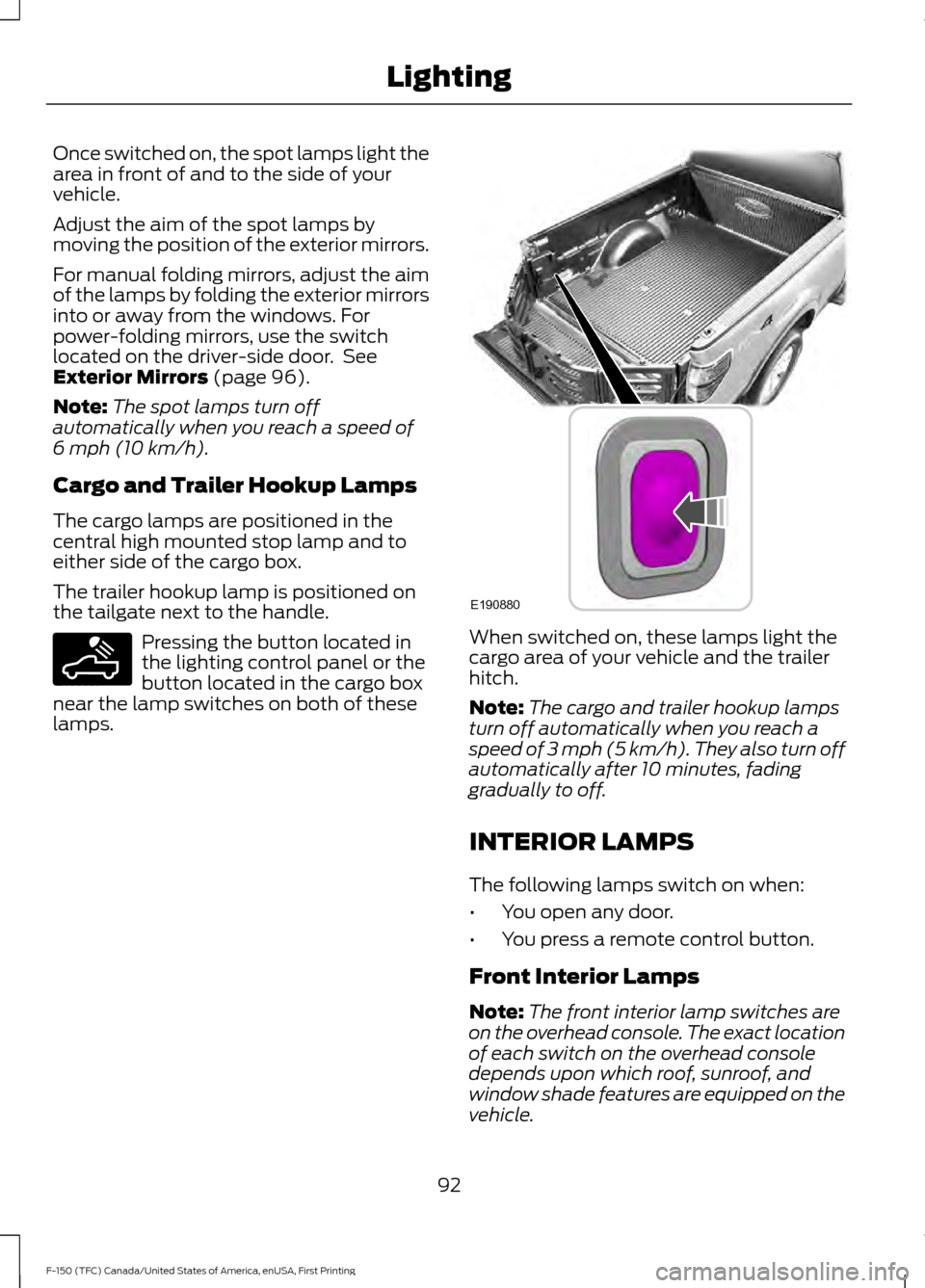
Cargo and Trailer Hookup Lamps
The cargo lamps are positioned in the
central high mounted stop lamp and to
either side of the cargo box.
The trailer hookup lamp is positioned on
the tailgate next to the handle. Pressing the button located in
the lighting control panel or the
button located in the cargo box
near the lamp switches on both of these
lamps. When switched on, these lamps light the
cargo area of your vehicle and the trailer
hitch.
Note:
The cargo and trailer hookup lamps
turn off automatically when you reach a
speed of
3 mph (5 km/h). They also turn off
automatically after 10 minutes, fading
gradually to off.
INTERIOR LAMPS
The following lamps switch on when:
• You open any door.
• You press a remote control button.
Front Interior Lamps
Note: The front interior lamp switches are
on the overhead console. The exact location
of each switch on the overhead console
depends upon which roof, sunroof, and
window shade features are equipped on the
vehicle.
92
F-150 (TFC) Canada/United States of America, enUSA, First Printing LightingE189587 E190880
Page 100 of 599
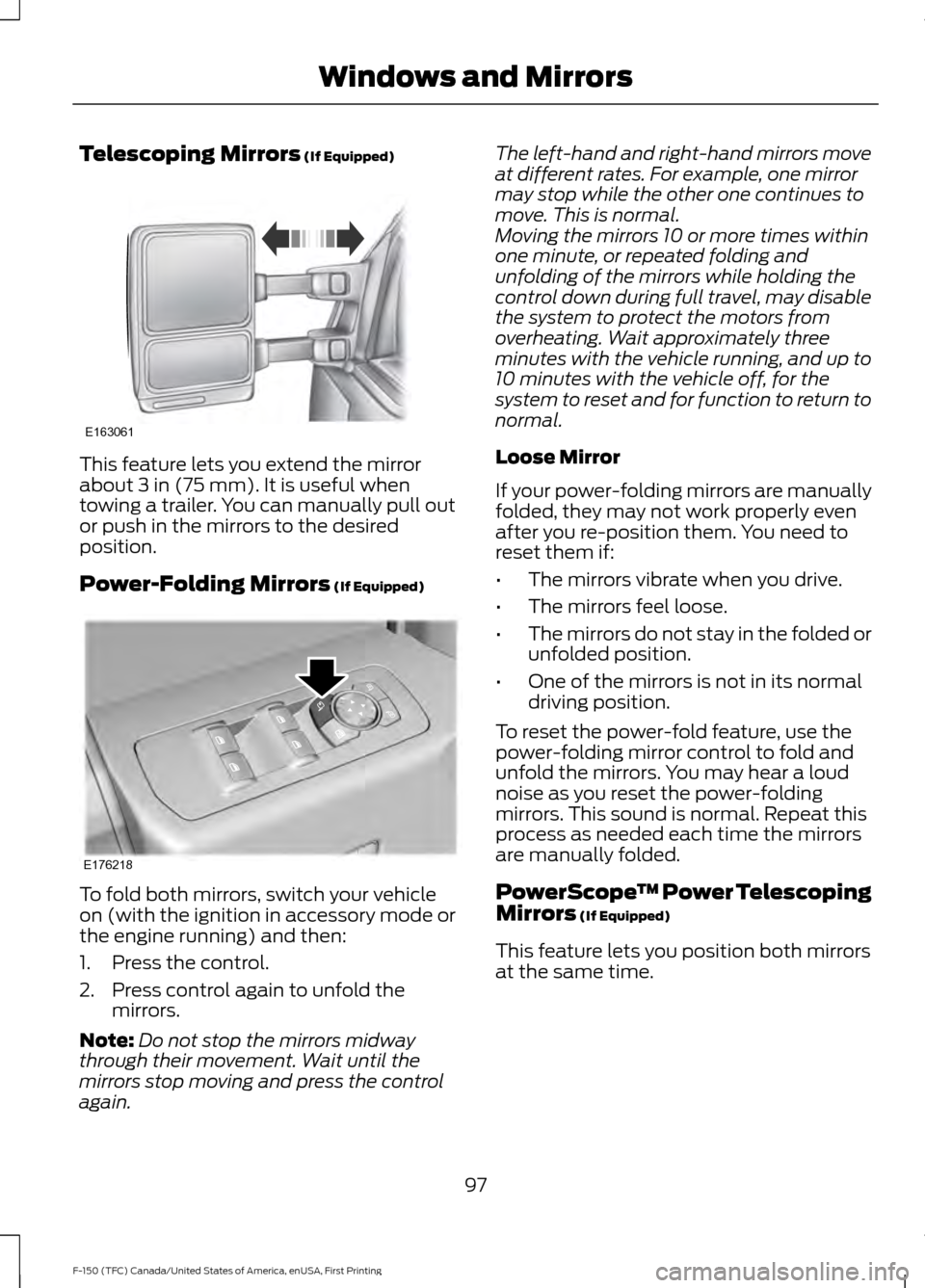
Telescoping Mirrors (If Equipped)
This feature lets you extend the mirror
about
3 in (75 mm). It is useful when
towing a trailer. You can manually pull out
or push in the mirrors to the desired
position.
Power-Folding Mirrors
(If Equipped) To fold both mirrors, switch your vehicle
on (with the ignition in accessory mode or
the engine running) and then:
1. Press the control.
2. Press control again to unfold the
mirrors.
Note: Do not stop the mirrors midway
through their movement. Wait until the
mirrors stop moving and press the control
again. The left-hand and right-hand mirrors move
at different rates. For example, one mirror
may stop while the other one continues to
move. This is normal.
Moving the mirrors 10 or more times within
one minute, or repeated folding and
unfolding of the mirrors while holding the
control down during full travel, may disable
the system to protect the motors from
overheating. Wait approximately three
minutes with the vehicle running, and up to
10 minutes with the vehicle off, for the
system to reset and for function to return to
normal.
Loose Mirror
If your power-folding mirrors are manually
folded, they may not work properly even
after you re-position them. You need to
reset them if:
•
The mirrors vibrate when you drive.
• The mirrors feel loose.
• The mirrors do not stay in the folded or
unfolded position.
• One of the mirrors is not in its normal
driving position.
To reset the power-fold feature, use the
power-folding mirror control to fold and
unfold the mirrors. You may hear a loud
noise as you reset the power-folding
mirrors. This sound is normal. Repeat this
process as needed each time the mirrors
are manually folded.
PowerScope ™ Power Telescoping
Mirrors
(If Equipped)
This feature lets you position both mirrors
at the same time.
97
F-150 (TFC) Canada/United States of America, enUSA, First Printing Windows and MirrorsE163061 E176218
Page 113 of 599
GENERAL INFORMATION
WARNING
Driving while distracted can result in
loss of vehicle control, crash and
injury. We strongly recommend that
you use extreme caution when using any
device that may take your focus off the
road. Your primary responsibility is the safe
operation of your vehicle. We recommend
against the use of any hand-held device
while driving and encourage the use of
voice-operated systems when possible.
Make sure you are aware of all applicable
local laws that may affect the use of
electronic devices while driving. Various systems on your vehicle can be
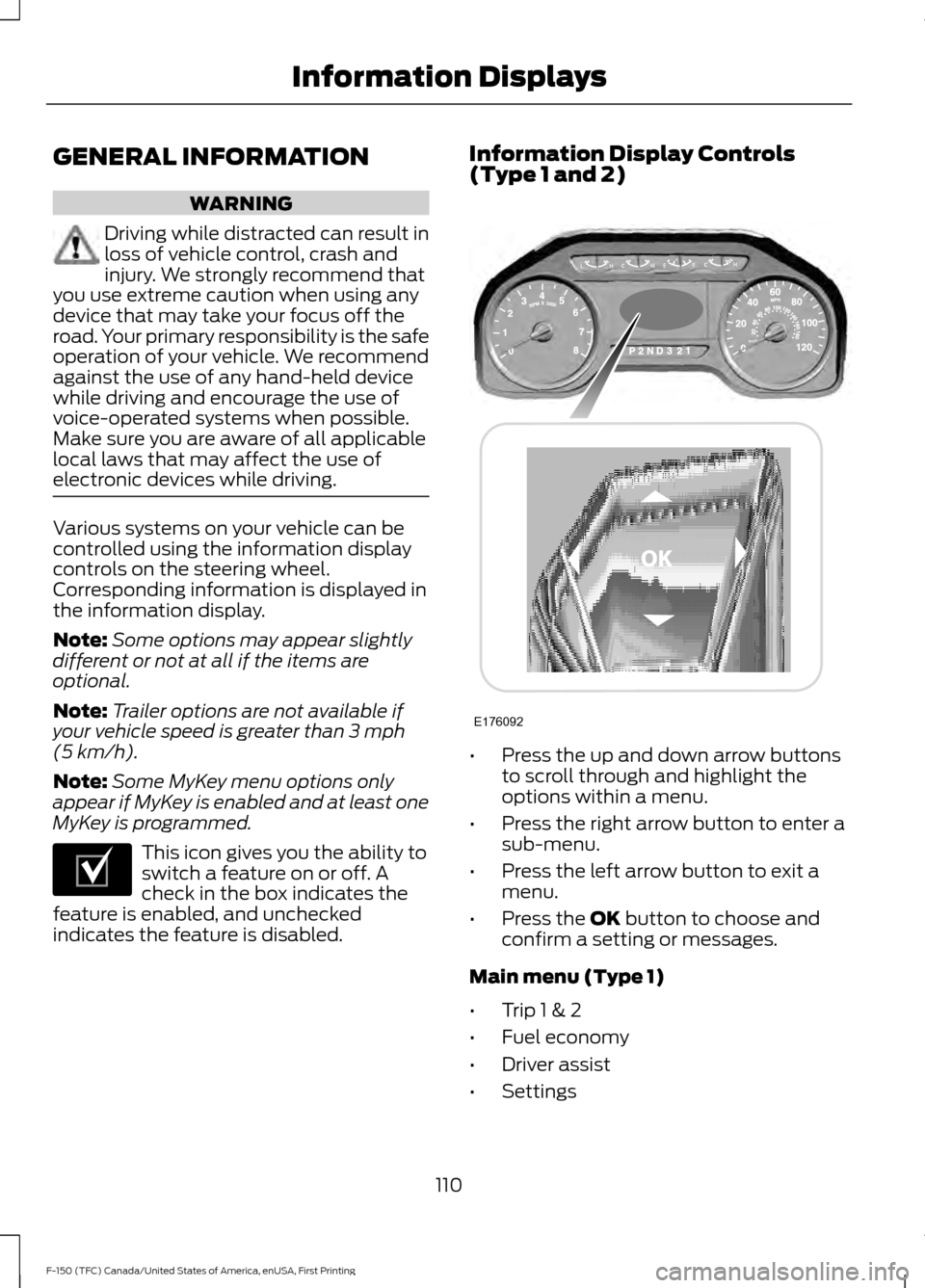
controlled using the information display
controls on the steering wheel.
Corresponding information is displayed in
the information display.
Note:
Some options may appear slightly
different or not at all if the items are
optional.
Note: Trailer options are not available if
your vehicle speed is greater than 3 mph
(5 km/h).
Note: Some MyKey menu options only
appear if MyKey is enabled and at least one
MyKey is programmed. This icon gives you the ability to
switch a feature on or off. A
check in the box indicates the
feature is enabled, and unchecked
indicates the feature is disabled. Information Display Controls
(Type 1 and 2)
•
Press the up and down arrow buttons
to scroll through and highlight the
options within a menu.
• Press the right arrow button to enter a
sub-menu.
• Press the left arrow button to exit a
menu.
• Press the
OK button to choose and
confirm a setting or messages.
Main menu (Type 1)
• Trip 1 & 2
• Fuel economy
• Driver assist
• Settings
110
F-150 (TFC) Canada/United States of America, enUSA, First Printing Information DisplaysE204495 E176092
Page 115 of 599
Driver Assist
Note:
Use the arrow buttons to configure different driver setting choices. Driver Assist
Engine Hours XXXXXX
Engine Hours
Driver Assist
Engine Idle Hours XXXXXX
Shows the current gear the
transmission is in and what the
range is set to.
Prog Range Sel
Vehicle graphic with tire pres-
sures. See Tire Pressure
Monitoring System (page 367).
Tire Pressure
Rear Park Aid
Select Your Setting
Brake Type
Trailer Sway
Settings Settings
Select Your Setting
DTE Calculate
Vehicle
Select Your Setting
Autolamp Delay
Lighting
Daytime Light
Autolock
Locks
Autounlock Select Your Setting
Remote Unlock
Remaining Life XX% - Hold OK to reset
Oil Life Reset
Select Your Setting
Climate Control
Remote Start
Duration
System
Courtesy Wipe
Wiper
Controls
Admin Keys and MyKeys
MyKey Status
MyKey
112
F-150 (TFC) Canada/United States of America, enUSA, First Printing Information Displays
Page 118 of 599
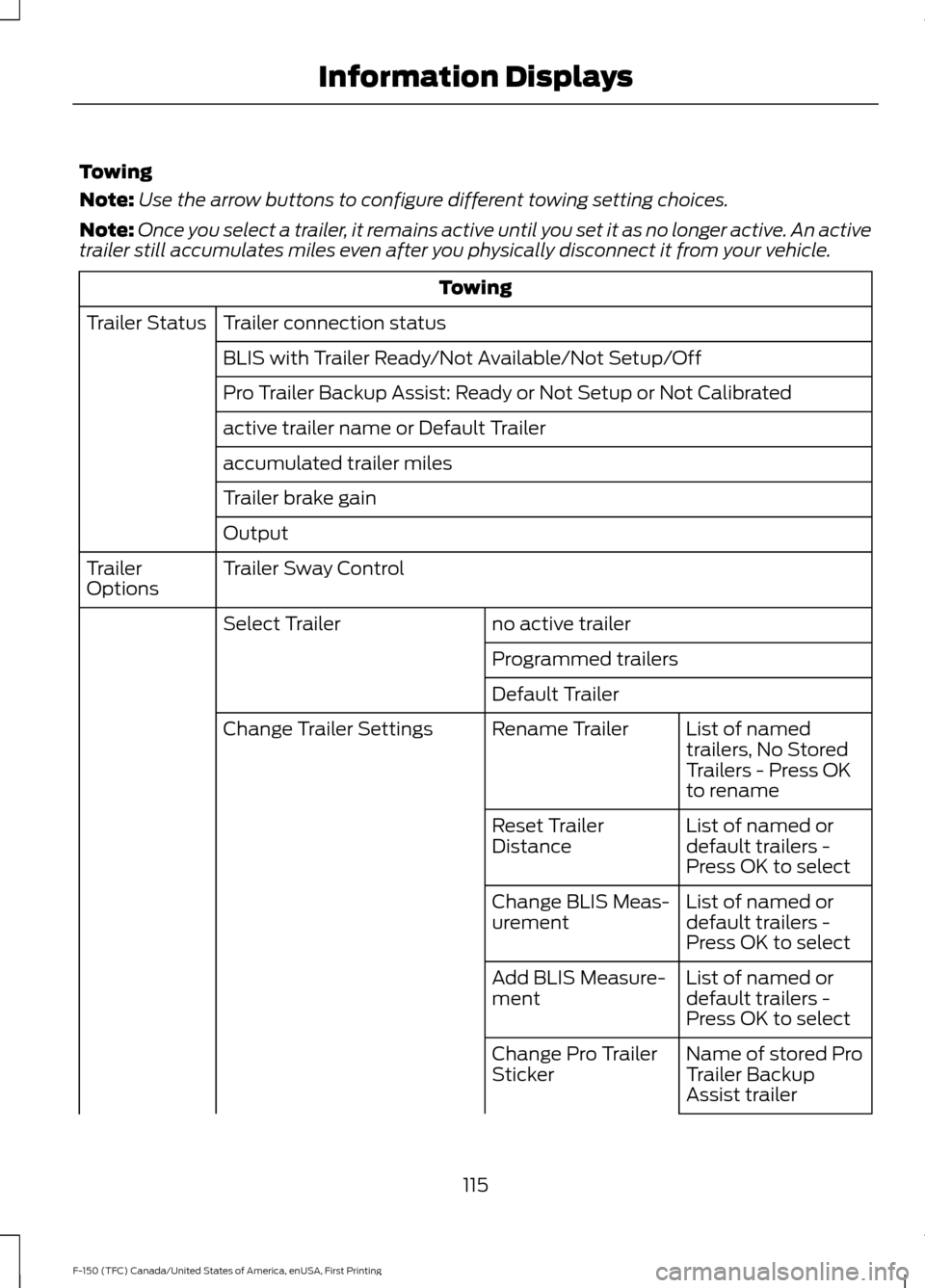
Towing
Note:
Use the arrow buttons to configure different towing setting choices.
Note: Once you select a trailer, it remains active until you set it as no longer active. An active
trailer still accumulates miles even after you physically disconnect it from your vehicle. Towing
Trailer connection status
Trailer Status
BLIS with Trailer Ready/Not Available/Not Setup/Off
Pro Trailer Backup Assist: Ready or Not Setup or Not Calibrated
active trailer name or Default Trailer
accumulated trailer miles
Trailer brake gain
Output
Trailer Sway Control
Trailer
Options
no active trailer
Select Trailer
Programmed trailers
Default TrailerList of named
trailers, No Stored
Trailers - Press OK
to rename
Rename Trailer
Change Trailer Settings
List of named or
default trailers -
Press OK to select
Reset Trailer
Distance
List of named or
default trailers -
Press OK to select
Change BLIS Meas-
urement
List of named or
default trailers -
Press OK to select
Add BLIS Measure-
ment
Name of stored Pro
Trailer Backup
Assist trailer
Change Pro Trailer
Sticker
115
F-150 (TFC) Canada/United States of America, enUSA, First Printing Information Displays
Page 119 of 599
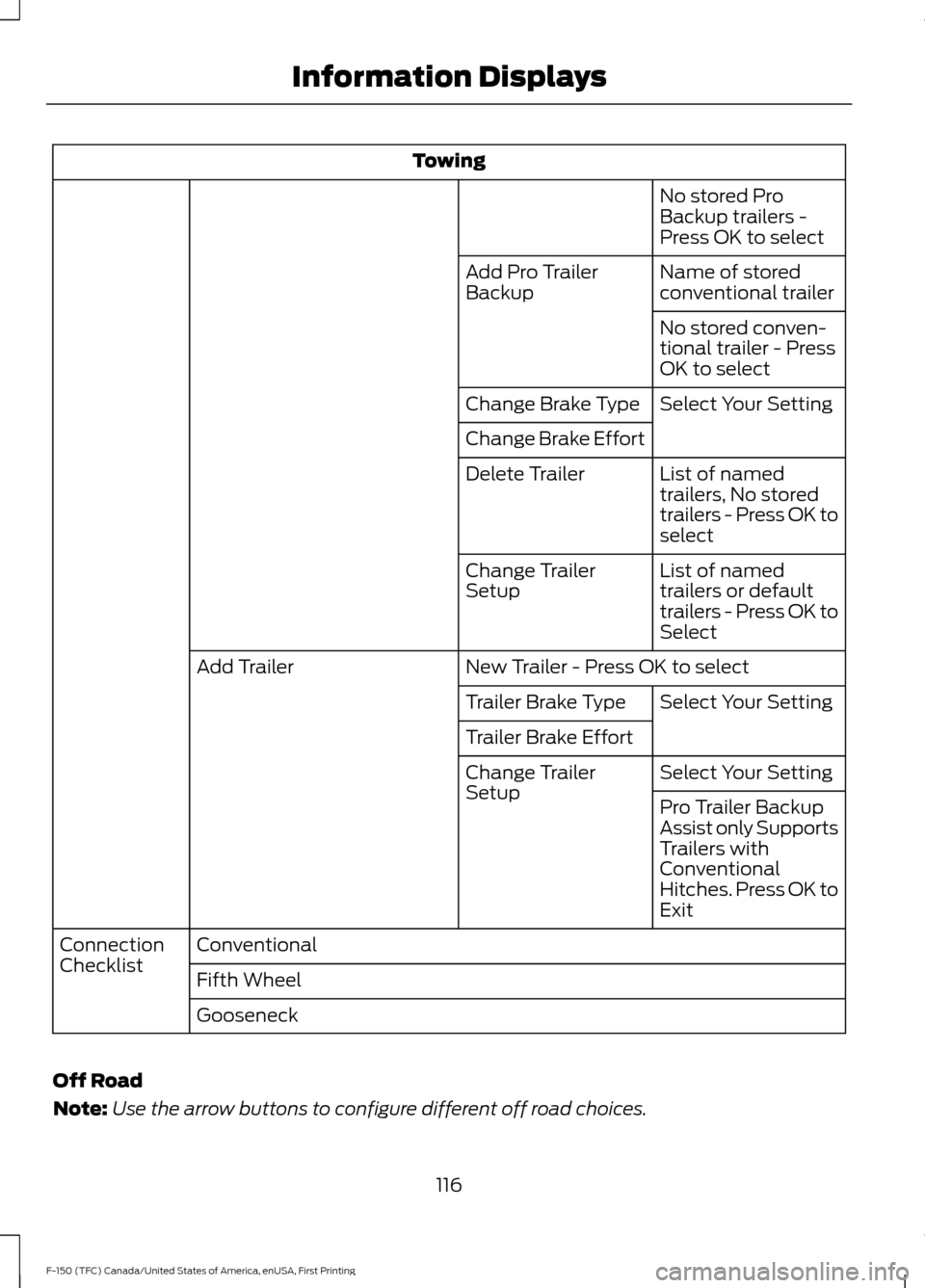
Towing
No stored Pro
Backup trailers -
Press OK to select
Name of stored
conventional trailer
Add Pro Trailer
Backup
No stored conven-
tional trailer - Press
OK to select
Select Your Setting
Change Brake Type
Change Brake Effort
List of named
trailers, No stored
trailers - Press OK to
select
Delete Trailer
List of named
trailers or default
trailers - Press OK to
Select
Change Trailer
Setup
New Trailer - Press OK to select
Add Trailer
Select Your Setting
Trailer Brake Type
Trailer Brake Effort
Select Your Setting
Change Trailer
Setup
Pro Trailer Backup
Assist only Supports
Trailers with
Conventional
Hitches. Press OK to
Exit
Conventional
Connection
Checklist
Fifth Wheel
Gooseneck
Off Road
Note: Use the arrow buttons to configure different off road choices.
116
F-150 (TFC) Canada/United States of America, enUSA, First Printing Information Displays
Page 120 of 599
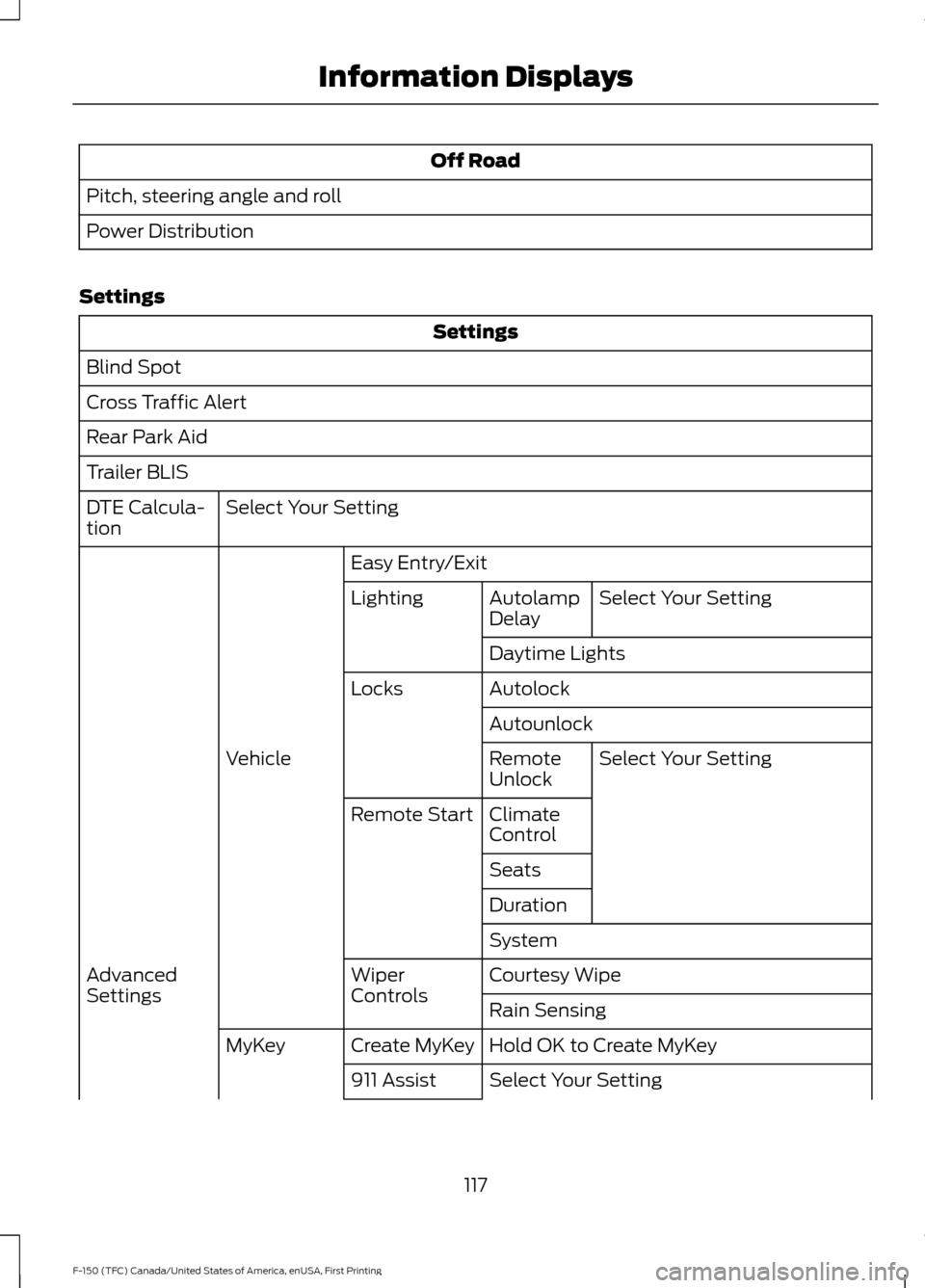
Off Road
Pitch, steering angle and roll
Power Distribution
Settings Settings
Blind Spot
Cross Traffic Alert
Rear Park Aid
Trailer BLIS Select Your Setting
DTE Calcula-
tion
Easy Entry/ExitSelect Your Setting
Autolamp
Delay
Lighting
Daytime Lights
Autolock
Locks
AutounlockSelect Your Setting
Remote
Unlock
Vehicle
Climate
Control
Remote Start
Seats
Duration
System
Courtesy Wipe
Wiper
Controls
Advanced
Settings
Rain Sensing
Hold OK to Create MyKey
Create MyKey
MyKey
Select Your Setting
911 Assist
117
F-150 (TFC) Canada/United States of America, enUSA, First Printing Information Displays