2017 FORD EXPEDITION EL ECO mode
[x] Cancel search: ECO modePage 317 of 500
•MP3 and WMA folder mode representsa folder structure consisting of onelevel of folders. The CD player numbersall MP3 and WMA tracks on the disc(noted by the MP3 or WMA fileextension) and all folders containingMP3 and WMA files, from F001 (folder)T001 (track) to F253 T255.
•Creating discs with only one level offolders helps with navigation throughthe disc files.
If you are burning your own MP3 and WMAdiscs, it is important to understand howthe system reads the structures you create.While various files may be present (fileswith extensions other than MP3 andWMA), only files with the MP3 and WMAextension are played; other files areignored by the system. This enables you touse the same MP3 and WMA disc for avariety of tasks on your work computer,home computer and your in-vehiclesystem.
In track mode, the system displays andplays the structure as if it were only onelevel deep (all MP3 and WMA files play,regardless of being in a specific folder). Infolder mode, the system only plays theMP3 and WMA files in the current folder.
AUDIO UNIT - VEHICLES WITH:
AM/FM/CD/SYNC/SATELLITE
RADIO
WARNING
Driving while distracted can result inloss of vehicle control, crash andinjury. We strongly recommend thatyou use extreme caution when using anydevice that may take your focus off theroad. Your primary responsibility is the safeoperation of your vehicle. We recommendagainst the use of any hand-held devicewhile driving and encourage the use ofvoice-operated systems when possible.Make sure you are aware of all applicablelocal laws that may affect the use ofelectronic devices while driving.
Note:The touchscreen system controlsmost of the audio features. See your SYNCinformation.
314
Expedition (TB7) Canada/United States of America, enUSA, Edition date: 03/2016, First Printing
Audio System
Page 321 of 500
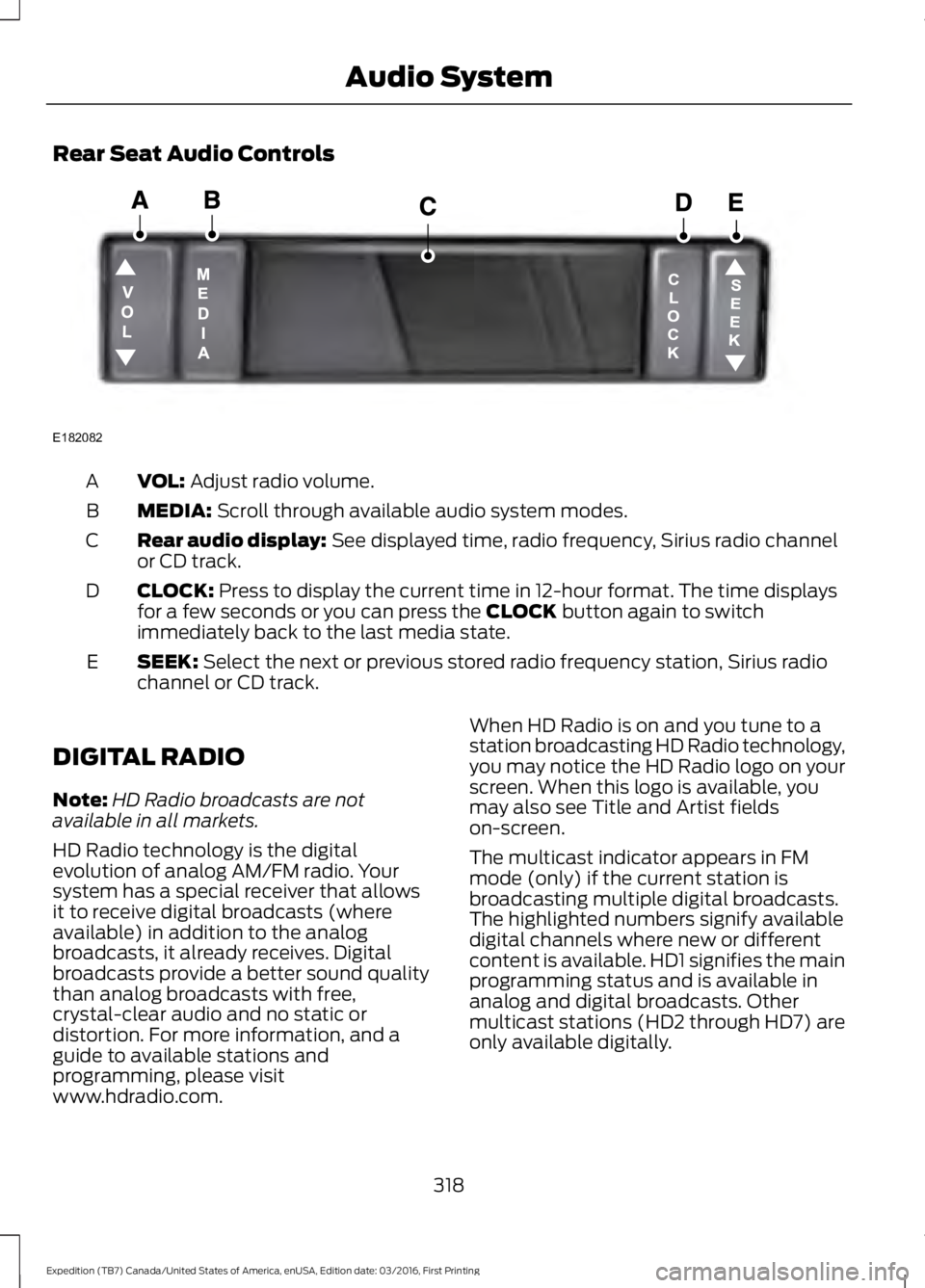
Rear Seat Audio Controls
VOL: Adjust radio volume.A
MEDIA: Scroll through available audio system modes.B
Rear audio display: See displayed time, radio frequency, Sirius radio channelor CD track.C
CLOCK: Press to display the current time in 12-hour format. The time displaysfor a few seconds or you can press the CLOCK button again to switchimmediately back to the last media state.
D
SEEK: Select the next or previous stored radio frequency station, Sirius radiochannel or CD track.E
DIGITAL RADIO
Note:HD Radio broadcasts are notavailable in all markets.
HD Radio technology is the digitalevolution of analog AM/FM radio. Yoursystem has a special receiver that allowsit to receive digital broadcasts (whereavailable) in addition to the analogbroadcasts, it already receives. Digitalbroadcasts provide a better sound qualitythan analog broadcasts with free,crystal-clear audio and no static ordistortion. For more information, and aguide to available stations andprogramming, please visitwww.hdradio.com.
When HD Radio is on and you tune to astation broadcasting HD Radio technology,you may notice the HD Radio logo on yourscreen. When this logo is available, youmay also see Title and Artist fieldson-screen.
The multicast indicator appears in FMmode (only) if the current station isbroadcasting multiple digital broadcasts.The highlighted numbers signify availabledigital channels where new or differentcontent is available. HD1 signifies the mainprogramming status and is available inanalog and digital broadcasts. Othermulticast stations (HD2 through HD7) areonly available digitally.
318
Expedition (TB7) Canada/United States of America, enUSA, Edition date: 03/2016, First Printing
Audio SystemE182082
Page 324 of 500
Note:This receiver includes the eCosreal-time operating system. eCos ispublished under the eCos License.
Satellite Radio Reception Factors
Potential satellite radio reception issues
For optimal reception performance, keep the antennaclear of snow and ice build-up and keep luggage and othermaterial as far away from the antenna as possible.
Antenna obstructions
Hills, mountains, tall buildings, bridges, tunnels, freewayoverpasses, parking garages, dense tree foliage andthunderstorms can interfere with your reception.
Terrain
When you pass a ground-based broadcast-repeatingtower, a stronger signal may overtake a weaker one andthe audio system may mute.
Station overload
Your display may show ACQUIRING . . . to indicate theinterference and the audio system may mute.Satellite radio signal interfer-ence
SIRIUS® Satellite Radio Service
Note:SIRIUS reserves the unrestricted rightto change, rearrange, add or deleteprogramming including canceling, movingor adding particular channels, and its prices,at any time, with or without notice to you.Ford Motor Company shall not beresponsible for any such programmingchanges.
SIRIUS satellite radio is asubscription-based satellite radio servicethat broadcasts a variety of music, sports,news, weather, traffic and entertainmentprogramming. Your factory-installedSIRIUS satellite radio system includeshardware and a limited subscription term,which begins on the date of sale or leaseof your vehicle. See an authorized dealerfor availability.
For more information on extendedsubscription terms (a service fee isrequired), the online media player and acomplete list of SIRIUS satellite radiochannels, and other features, please visitwww.siriusxm.com in the United States,www.siriusxm.ca in Canada, or call SIRIUSat 1-888-539-7474.
Satellite Radio Electronic SerialNumber (ESN)
You need your ESN to activate, modify ortrack your satellite radio account. When insatellite radio mode, tune to channel 0.
321
Expedition (TB7) Canada/United States of America, enUSA, Edition date: 03/2016, First Printing
Audio SystemE208625
Page 330 of 500
System Interaction and Feedback
The system provides feedback throughaudible tones, prompts, questions andspoken confirmations depending on thesituation and the chosen level ofinteraction. You can customize the voicerecognition system to provide more or lessinstruction and feedback.
The default setting is to a higher level ofinteraction in order to help you learn to usethe system. You can change these settingsat any time.
Adjusting the Interaction Level
Press the voice button. Whenprompted, say:
Action and DescriptionVoice Command
voice settings
Then either of the following:
Provides more detailed interaction andguidance. (Recommended for first timeusers.)
interaction mode novice
Provides less audible interaction and guid-ance.interaction mode advanced
Confirmation Prompts
Confirmation prompts are short questionsthe system asks when it is not sure of yourrequest or when there is more than onepossible response to your request.
To adjust this setting press the voice button, when prompted say:
Action and DescriptionVoice Command
voice settings
Then either of the following:
Make a best guess from the command; youmay still occasionally be asked to confirmsettings.
confirmation prompts off
Clarify your voice command with a shortquestion.confirmation prompts on
Phone Confirmation
Using phone confirmations the systemasks you to verify before placing any calls.
327
Expedition (TB7) Canada/United States of America, enUSA, Edition date: 03/2016, First Printing
SYNC™ (If Equipped)E142599
Page 331 of 500
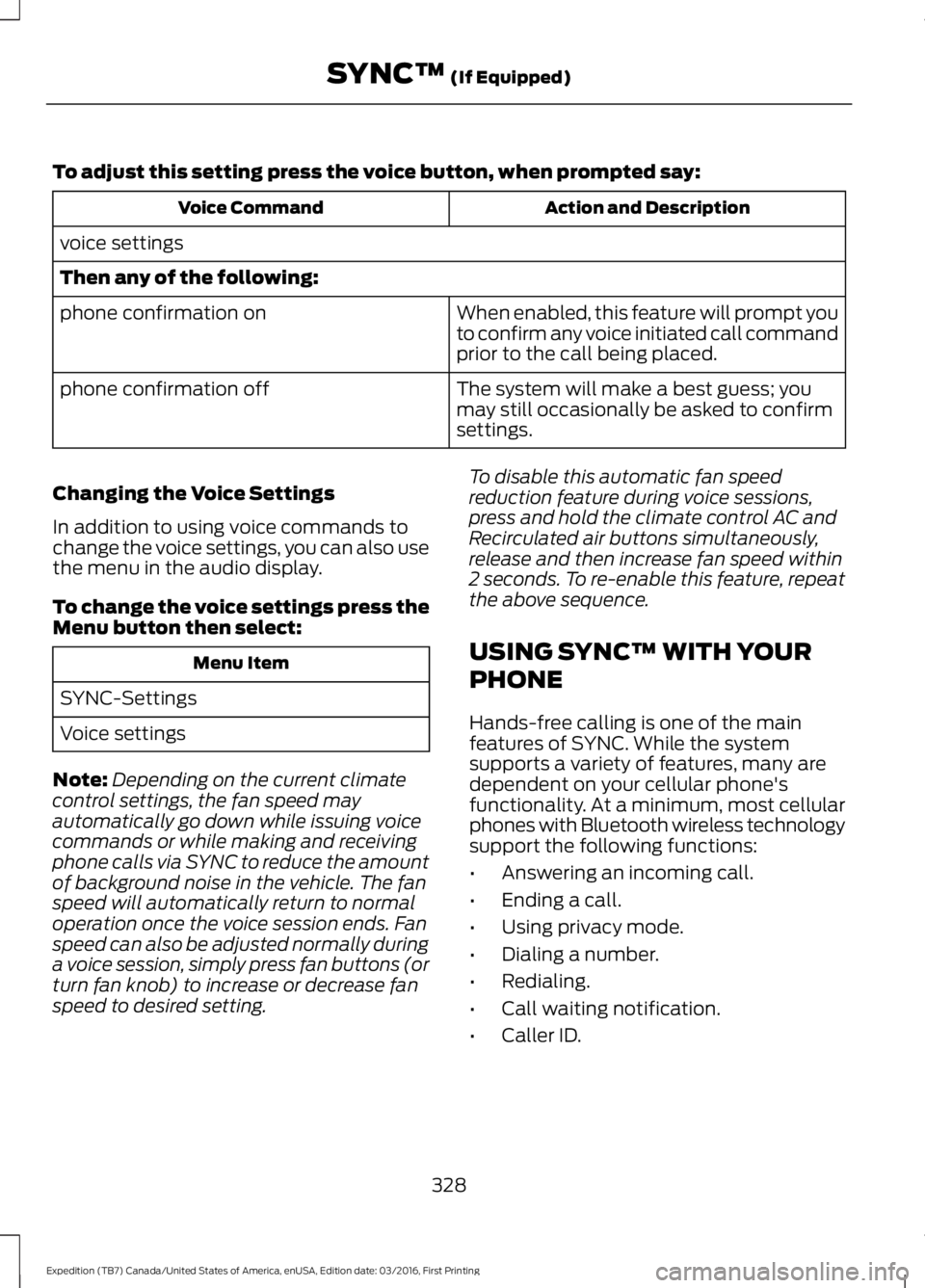
To adjust this setting press the voice button, when prompted say:
Action and DescriptionVoice Command
voice settings
Then any of the following:
When enabled, this feature will prompt youto confirm any voice initiated call commandprior to the call being placed.
phone confirmation on
The system will make a best guess; youmay still occasionally be asked to confirmsettings.
phone confirmation off
Changing the Voice Settings
In addition to using voice commands tochange the voice settings, you can also usethe menu in the audio display.
To change the voice settings press theMenu button then select:
Menu Item
SYNC-Settings
Voice settings
Note:Depending on the current climatecontrol settings, the fan speed mayautomatically go down while issuing voicecommands or while making and receivingphone calls via SYNC to reduce the amountof background noise in the vehicle. The fanspeed will automatically return to normaloperation once the voice session ends. Fanspeed can also be adjusted normally duringa voice session, simply press fan buttons (orturn fan knob) to increase or decrease fanspeed to desired setting.
To disable this automatic fan speedreduction feature during voice sessions,press and hold the climate control AC andRecirculated air buttons simultaneously,release and then increase fan speed within2 seconds. To re-enable this feature, repeatthe above sequence.
USING SYNC™ WITH YOUR
PHONE
Hands-free calling is one of the mainfeatures of SYNC. While the systemsupports a variety of features, many aredependent on your cellular phone'sfunctionality. At a minimum, most cellularphones with Bluetooth wireless technologysupport the following functions:
•Answering an incoming call.
•Ending a call.
•Using privacy mode.
•Dialing a number.
•Redialing.
•Call waiting notification.
•Caller ID.
328
Expedition (TB7) Canada/United States of America, enUSA, Edition date: 03/2016, First Printing
SYNC™ (If Equipped)
Page 334 of 500
![FORD EXPEDITION EL 2017 Owners Manual Voice Command
3[text] (messages | message)
help
___ is a dynamic listing that should be thename of a contact in your phonebook. Forexample you could say "Call Home".1 See Dial table below.2 Th](/manual-img/11/58755/w960_58755-333.png "FORD EXPEDITION EL 2017 Owners Manual Voice Command
3[text] (messages | message)
help
___ is a dynamic listing that should be thename of a contact in your phonebook. Forexample you could say \"Call Home\".1 See Dial table below.2 Th")
Voice Command
3[text] (messages | message)
help
___ is a dynamic listing that should be thename of a contact in your phonebook. Forexample you could say "Call Home".1 See Dial table below.2 These commands are only valid while ina phone call.3 See the text message table below.
Dial Commands
Press the voice button and when promptedsay any of the following commands:
Voice Commands
411 (four-one-one), 911 (nine-one-one)
700 (seven hundred)
800 (eight hundred)
900 (nine hundred)
Clear (deletes all entered digits)
Delete (deletes last set of digits entered)
Number <0-9>
Plus
Pound (#)
Star (*)
Note:To exit dial mode, press and hold thephone button or press any button on theaudio system.
To access text messages say:
Voice Command
[text] (messages | message)
Then say any of the following:
(listen to | read) ([text] message)
forward (text | [text] message)
reply to (text | [text] message)
call [sender]
Phonebook Hints
To hear how the SYNC system speaks aname browse phonebook, select a contactand press:
Menu Item
Hear it
Changing Devices Using VoiceCommands
Using SYNC, you can easily access multiplephones, ipods, or USB devices. to switchdevices say:
331
Expedition (TB7) Canada/United States of America, enUSA, Edition date: 03/2016, First Printing
SYNC™ (If Equipped)
Page 355 of 500
Description and ActionMessage
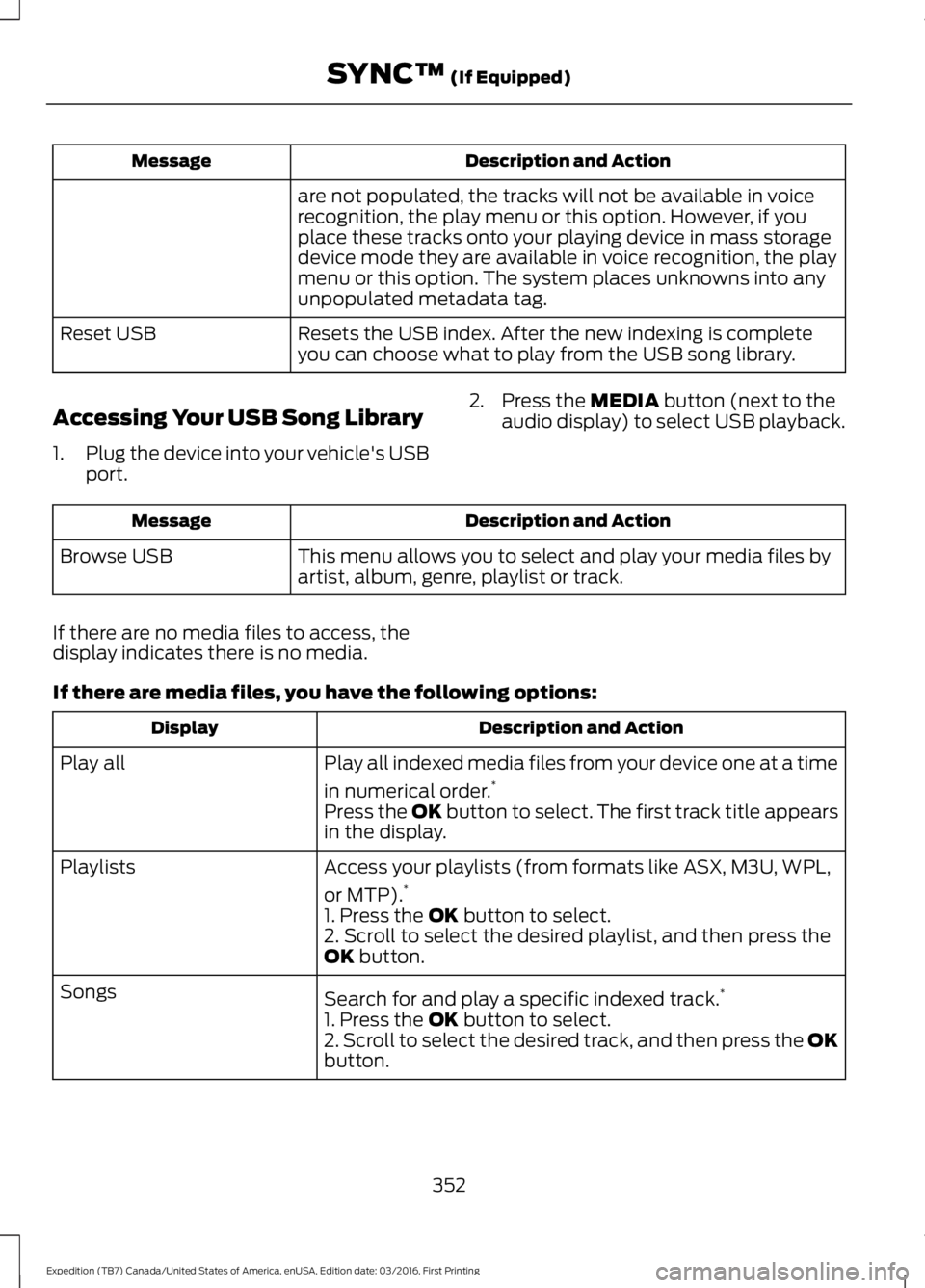
are not populated, the tracks will not be available in voicerecognition, the play menu or this option. However, if youplace these tracks onto your playing device in mass storagedevice mode they are available in voice recognition, the playmenu or this option. The system places unknowns into anyunpopulated metadata tag.
Resets the USB index. After the new indexing is completeyou can choose what to play from the USB song library.Reset USB
Accessing Your USB Song Library
1.Plug the device into your vehicle's USBport.
2. Press the MEDIA button (next to theaudio display) to select USB playback.
Description and ActionMessage
This menu allows you to select and play your media files byartist, album, genre, playlist or track.Browse USB
If there are no media files to access, thedisplay indicates there is no media.
If there are media files, you have the following options:
Description and ActionDisplay
Play all indexed media files from your device one at a time
in numerical order.*Play all
Press the OK button to select. The first track title appearsin the display.
Access your playlists (from formats like ASX, M3U, WPL,
or MTP).*Playlists
1. Press the OK button to select.2. Scroll to select the desired playlist, and then press theOK button.
Search for and play a specific indexed track.*Songs
1. Press the OK button to select.2. Scroll to select the desired track, and then press the OKbutton.
352
Expedition (TB7) Canada/United States of America, enUSA, Edition date: 03/2016, First Printing
SYNC™ (If Equipped)
Page 372 of 500
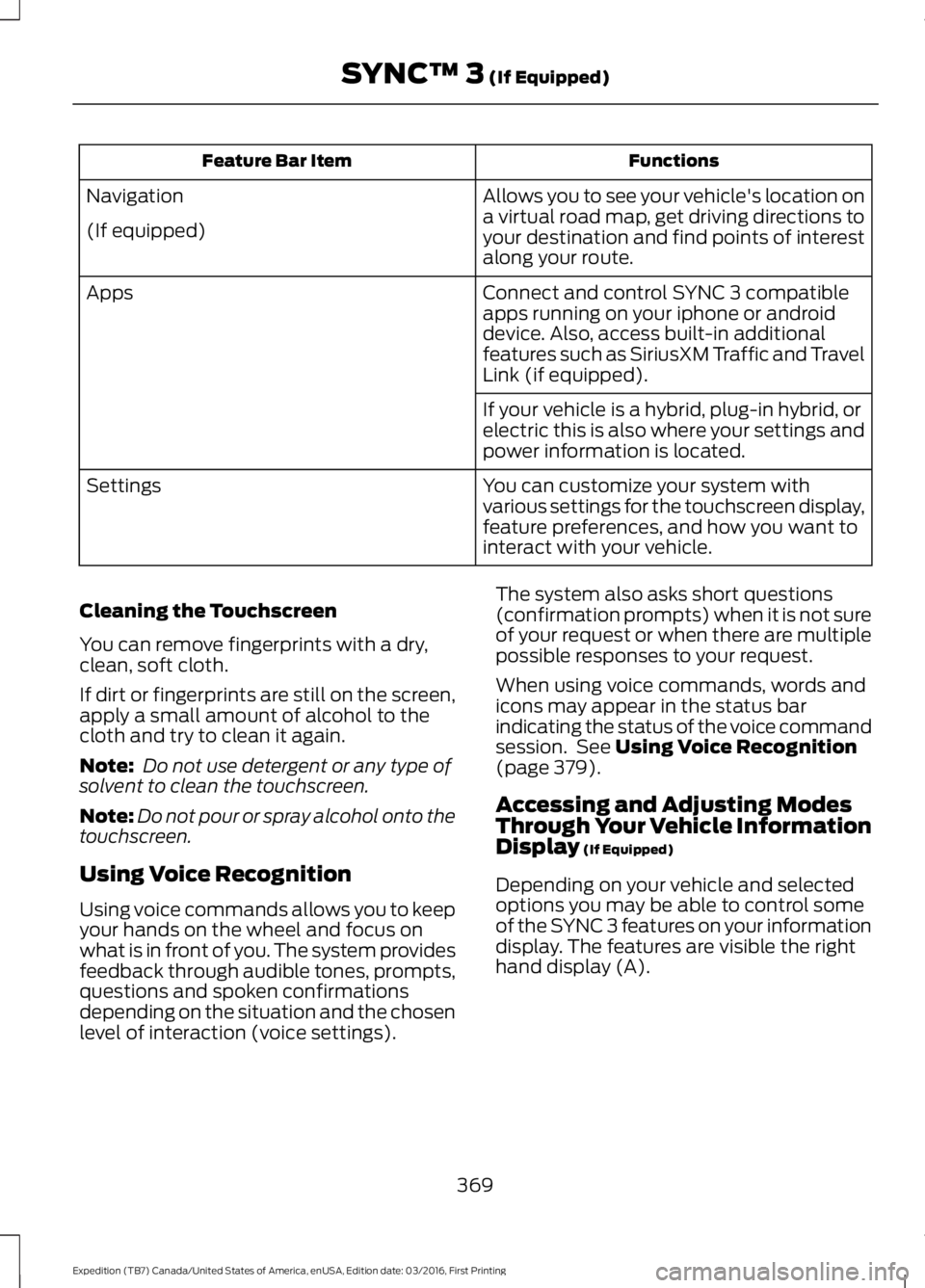
FunctionsFeature Bar Item
Allows you to see your vehicle's location ona virtual road map, get driving directions toyour destination and find points of interestalong your route.
Navigation
(If equipped)
Connect and control SYNC 3 compatibleapps running on your iphone or androiddevice. Also, access built-in additionalfeatures such as SiriusXM Traffic and TravelLink (if equipped).
Apps
If your vehicle is a hybrid, plug-in hybrid, orelectric this is also where your settings andpower information is located.
You can customize your system withvarious settings for the touchscreen display,feature preferences, and how you want tointeract with your vehicle.
Settings
Cleaning the Touchscreen
You can remove fingerprints with a dry,clean, soft cloth.
If dirt or fingerprints are still on the screen,apply a small amount of alcohol to thecloth and try to clean it again.
Note: Do not use detergent or any type ofsolvent to clean the touchscreen.
Note:Do not pour or spray alcohol onto thetouchscreen.
Using Voice Recognition
Using voice commands allows you to keepyour hands on the wheel and focus onwhat is in front of you. The system providesfeedback through audible tones, prompts,questions and spoken confirmationsdepending on the situation and the chosenlevel of interaction (voice settings).
The system also asks short questions(confirmation prompts) when it is not sureof your request or when there are multiplepossible responses to your request.
When using voice commands, words andicons may appear in the status barindicating the status of the voice commandsession. See Using Voice Recognition(page 379).
Accessing and Adjusting ModesThrough Your Vehicle InformationDisplay (If Equipped)
Depending on your vehicle and selectedoptions you may be able to control someof the SYNC 3 features on your informationdisplay. The features are visible the righthand display (A).
369
Expedition (TB7) Canada/United States of America, enUSA, Edition date: 03/2016, First Printing
SYNC™ 3 (If Equipped)