2017 FORD EXPEDITION EL ECO mode
[x] Cancel search: ECO modePage 95 of 500
Display Mode
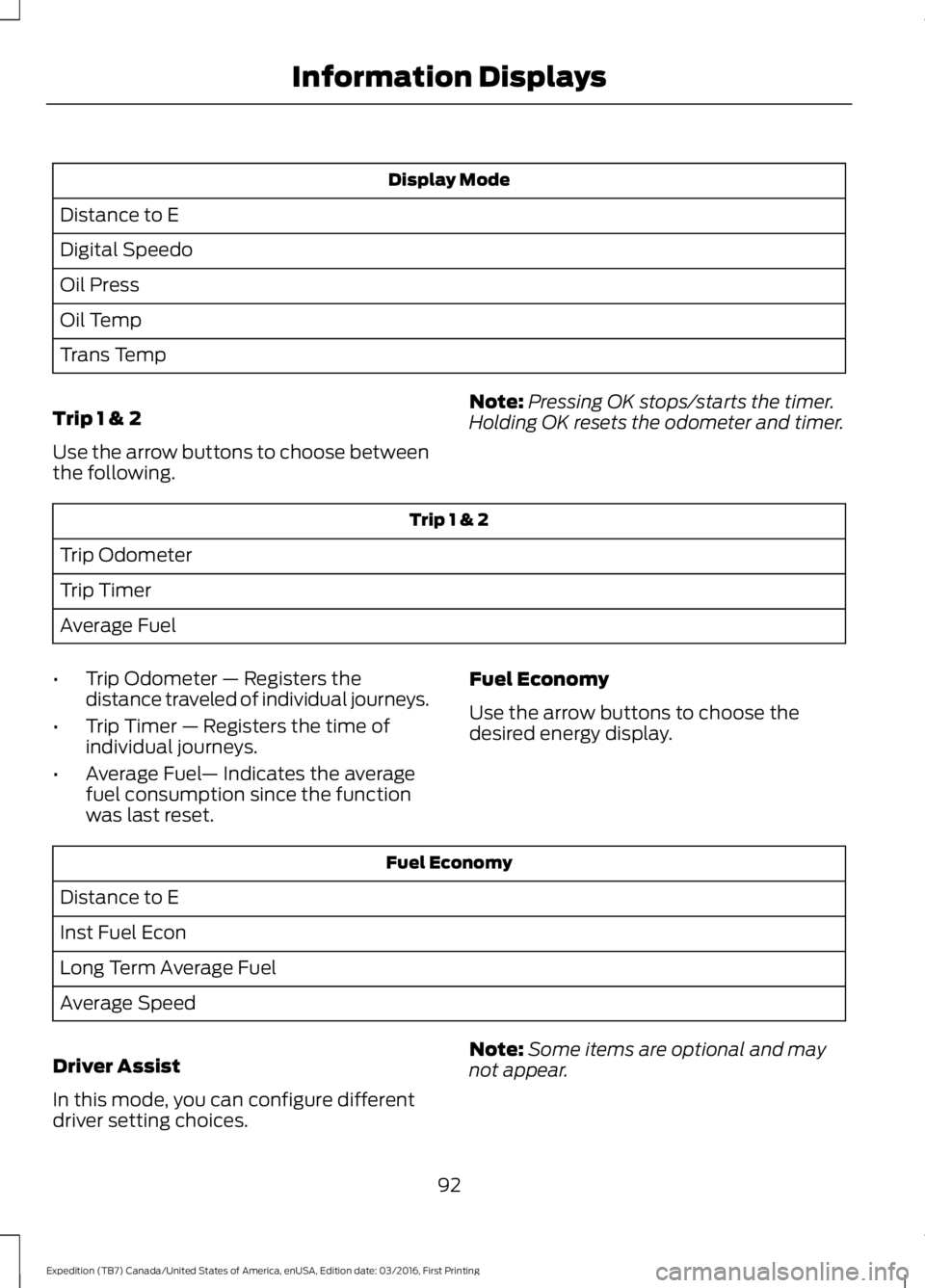
Distance to E
Digital Speedo
Oil Press
Oil Temp
Trans Temp
Trip 1 & 2
Use the arrow buttons to choose betweenthe following.
Note:Pressing OK stops/starts the timer.Holding OK resets the odometer and timer.
Trip 1 & 2
Trip Odometer
Trip Timer
Average Fuel
•Trip Odometer — Registers thedistance traveled of individual journeys.
•Trip Timer — Registers the time ofindividual journeys.
•Average Fuel— Indicates the averagefuel consumption since the functionwas last reset.
Fuel Economy
Use the arrow buttons to choose thedesired energy display.
Fuel Economy
Distance to E
Inst Fuel Econ
Long Term Average Fuel
Average Speed
Driver Assist
In this mode, you can configure differentdriver setting choices.
Note:Some items are optional and maynot appear.
92
Expedition (TB7) Canada/United States of America, enUSA, Edition date: 03/2016, First Printing
Information Displays
Page 98 of 500
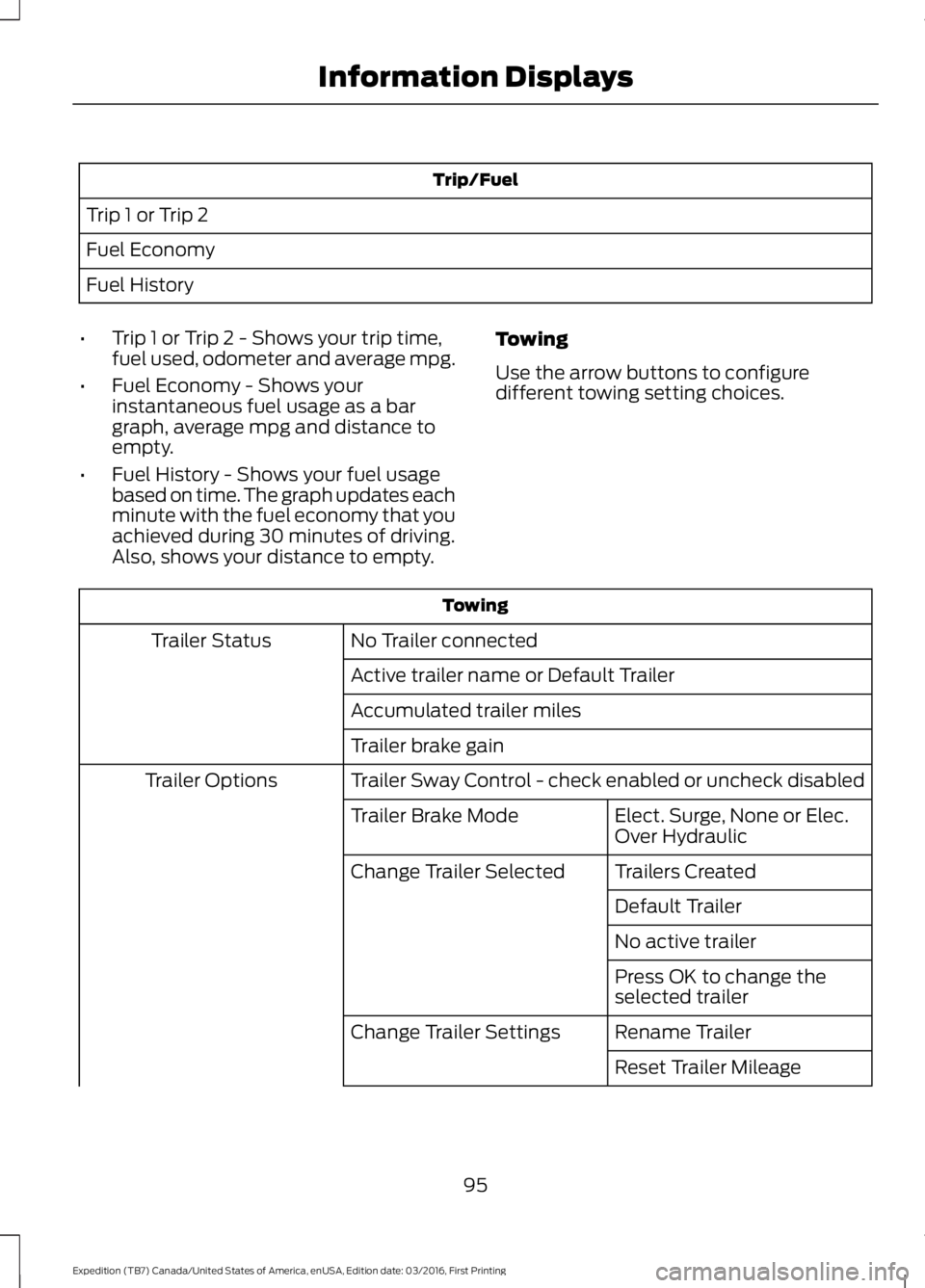
Trip/Fuel
Trip 1 or Trip 2
Fuel Economy
Fuel History
•Trip 1 or Trip 2 - Shows your trip time,fuel used, odometer and average mpg.
•Fuel Economy - Shows yourinstantaneous fuel usage as a bargraph, average mpg and distance toempty.
•Fuel History - Shows your fuel usagebased on time. The graph updates eachminute with the fuel economy that youachieved during 30 minutes of driving.Also, shows your distance to empty.
Towing
Use the arrow buttons to configuredifferent towing setting choices.
Towing
No Trailer connectedTrailer Status
Active trailer name or Default Trailer
Accumulated trailer miles
Trailer brake gain
Trailer Sway Control - check enabled or uncheck disabledTrailer Options
Elect. Surge, None or Elec.Over HydraulicTrailer Brake Mode
Trailers CreatedChange Trailer Selected
Default Trailer
No active trailer
Press OK to change theselected trailer
Rename TrailerChange Trailer Settings
Reset Trailer Mileage
95
Expedition (TB7) Canada/United States of America, enUSA, Edition date: 03/2016, First Printing
Information Displays
Page 102 of 500
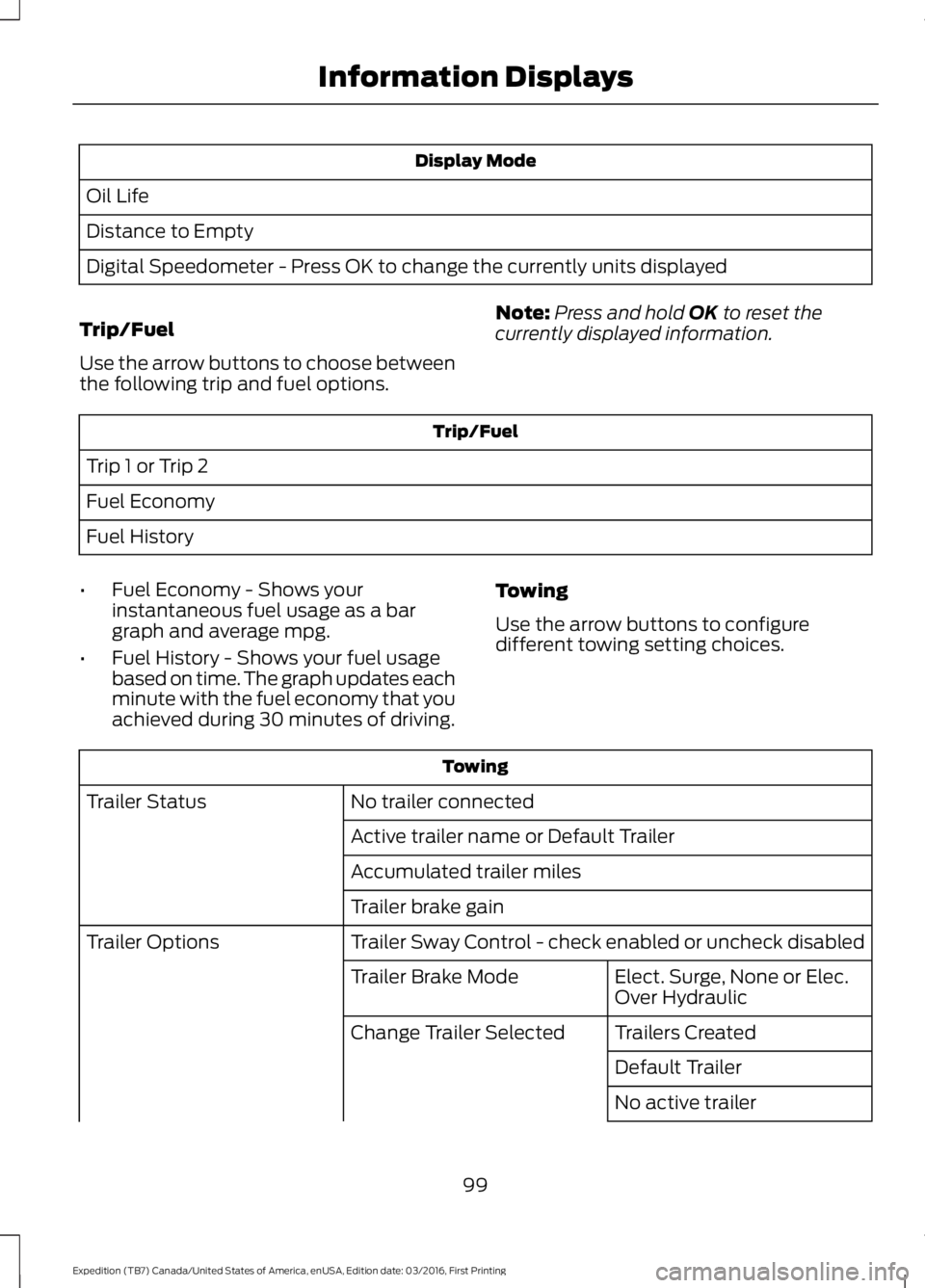
Display Mode
Oil Life
Distance to Empty
Digital Speedometer - Press OK to change the currently units displayed
Trip/Fuel
Use the arrow buttons to choose betweenthe following trip and fuel options.
Note:Press and hold OK to reset thecurrently displayed information.
Trip/Fuel
Trip 1 or Trip 2
Fuel Economy
Fuel History
•Fuel Economy - Shows yourinstantaneous fuel usage as a bargraph and average mpg.
•Fuel History - Shows your fuel usagebased on time. The graph updates eachminute with the fuel economy that youachieved during 30 minutes of driving.
Towing
Use the arrow buttons to configuredifferent towing setting choices.
Towing
No trailer connectedTrailer Status
Active trailer name or Default Trailer
Accumulated trailer miles
Trailer brake gain
Trailer Sway Control - check enabled or uncheck disabledTrailer Options
Elect. Surge, None or Elec.Over HydraulicTrailer Brake Mode
Trailers CreatedChange Trailer Selected
Default Trailer
No active trailer
99
Expedition (TB7) Canada/United States of America, enUSA, Edition date: 03/2016, First Printing
Information Displays
Page 110 of 500
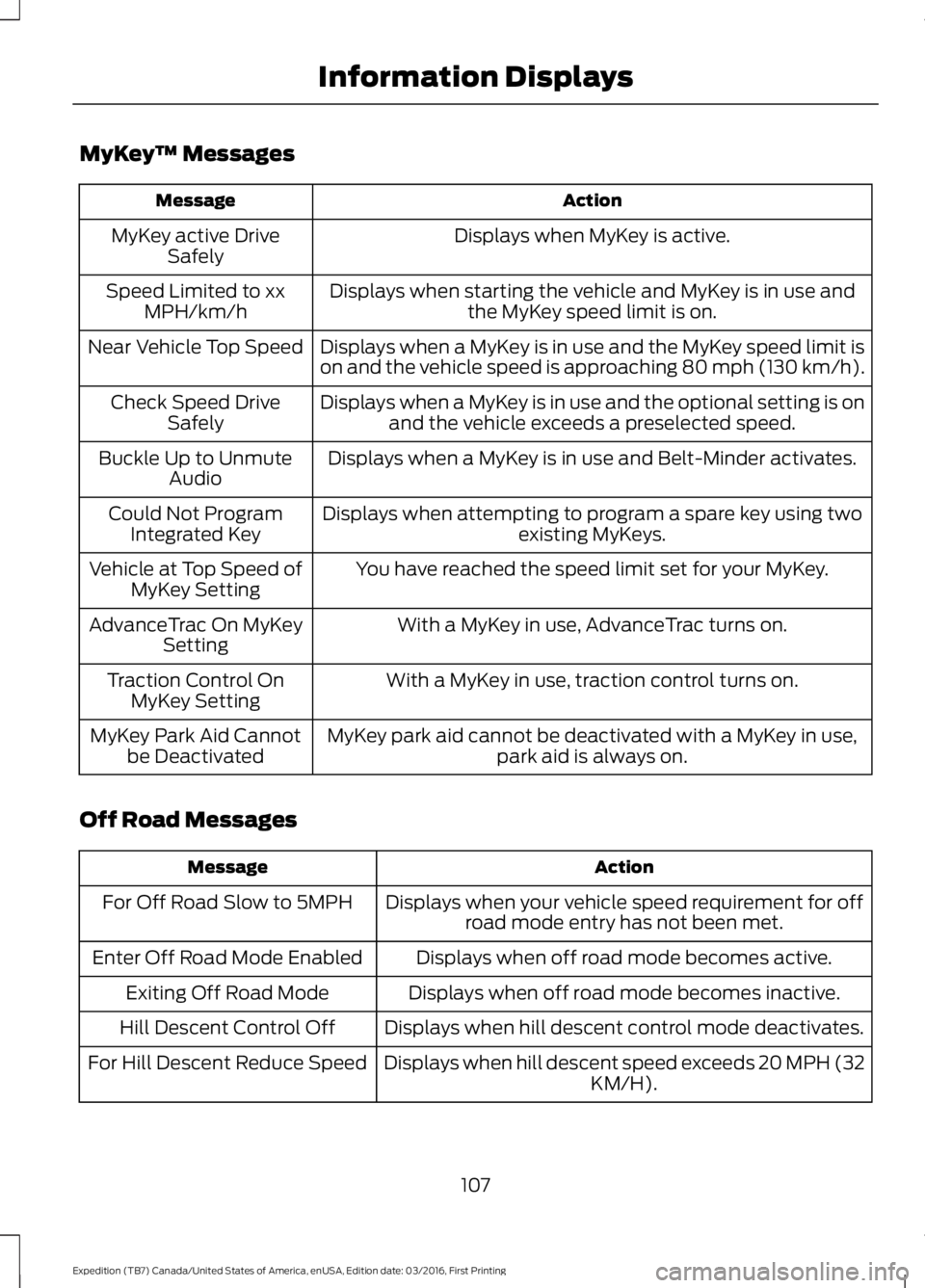
MyKey™ Messages
ActionMessage
Displays when MyKey is active.MyKey active DriveSafely
Displays when starting the vehicle and MyKey is in use andthe MyKey speed limit is on.Speed Limited to xxMPH/km/h
Displays when a MyKey is in use and the MyKey speed limit ison and the vehicle speed is approaching 80 mph (130 km/h).Near Vehicle Top Speed
Displays when a MyKey is in use and the optional setting is onand the vehicle exceeds a preselected speed.Check Speed DriveSafely
Displays when a MyKey is in use and Belt-Minder activates.Buckle Up to UnmuteAudio
Displays when attempting to program a spare key using twoexisting MyKeys.Could Not ProgramIntegrated Key
You have reached the speed limit set for your MyKey.Vehicle at Top Speed ofMyKey Setting
With a MyKey in use, AdvanceTrac turns on.AdvanceTrac On MyKeySetting
With a MyKey in use, traction control turns on.Traction Control OnMyKey Setting
MyKey park aid cannot be deactivated with a MyKey in use,park aid is always on.MyKey Park Aid Cannotbe Deactivated
Off Road Messages
ActionMessage
Displays when your vehicle speed requirement for offroad mode entry has not been met.For Off Road Slow to 5MPH
Displays when off road mode becomes active.Enter Off Road Mode Enabled
Displays when off road mode becomes inactive.Exiting Off Road Mode
Displays when hill descent control mode deactivates.Hill Descent Control Off
Displays when hill descent speed exceeds 20 MPH (32KM/H).For Hill Descent Reduce Speed
107
Expedition (TB7) Canada/United States of America, enUSA, Edition date: 03/2016, First Printing
Information Displays
Page 111 of 500
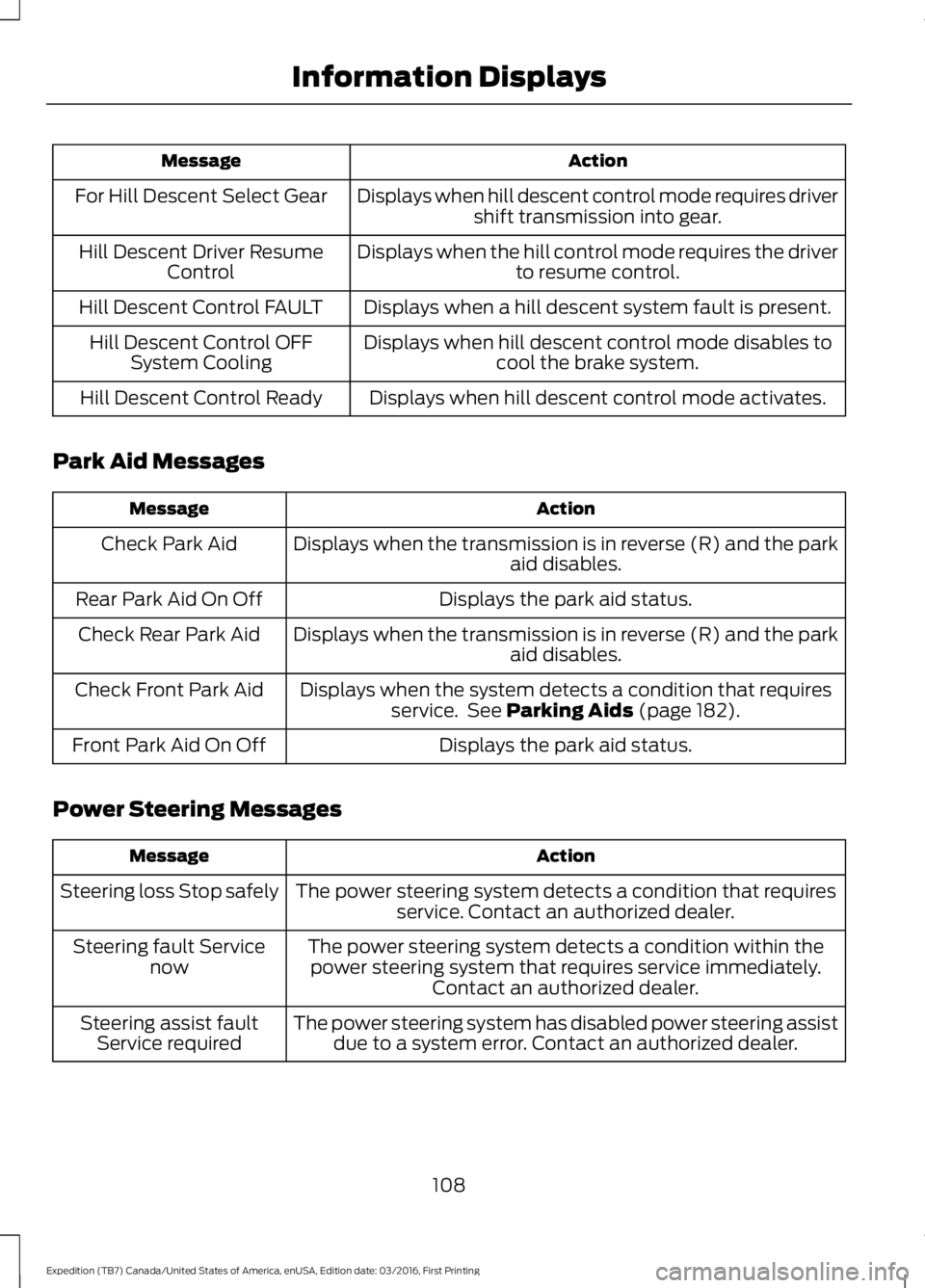
ActionMessage
Displays when hill descent control mode requires drivershift transmission into gear.For Hill Descent Select Gear
Displays when the hill control mode requires the driverto resume control.Hill Descent Driver ResumeControl
Displays when a hill descent system fault is present.Hill Descent Control FAULT
Displays when hill descent control mode disables tocool the brake system.Hill Descent Control OFFSystem Cooling
Displays when hill descent control mode activates.Hill Descent Control Ready
Park Aid Messages
ActionMessage
Displays when the transmission is in reverse (R) and the parkaid disables.Check Park Aid
Displays the park aid status.Rear Park Aid On Off
Displays when the transmission is in reverse (R) and the parkaid disables.Check Rear Park Aid
Displays when the system detects a condition that requiresservice. See Parking Aids (page 182).Check Front Park Aid
Displays the park aid status.Front Park Aid On Off
Power Steering Messages
ActionMessage
The power steering system detects a condition that requiresservice. Contact an authorized dealer.Steering loss Stop safely
The power steering system detects a condition within thepower steering system that requires service immediately.Contact an authorized dealer.
Steering fault Servicenow
The power steering system has disabled power steering assistdue to a system error. Contact an authorized dealer.Steering assist faultService required
108
Expedition (TB7) Canada/United States of America, enUSA, Edition date: 03/2016, First Printing
Information Displays
Page 116 of 500
Note: Recirculated air may also turn on and off automatically in instrumentpanel or instrument panel and floor airflow modes during hot weather to improvecooling efficiency.
A/C: Press the button to switch the air conditioning on or off. Air conditioningcools your vehicle using outside air. To improve the time to reach a comfortabletemperature in hot weather, drive with the windows open until you feel cold airthrough the air vents.
I
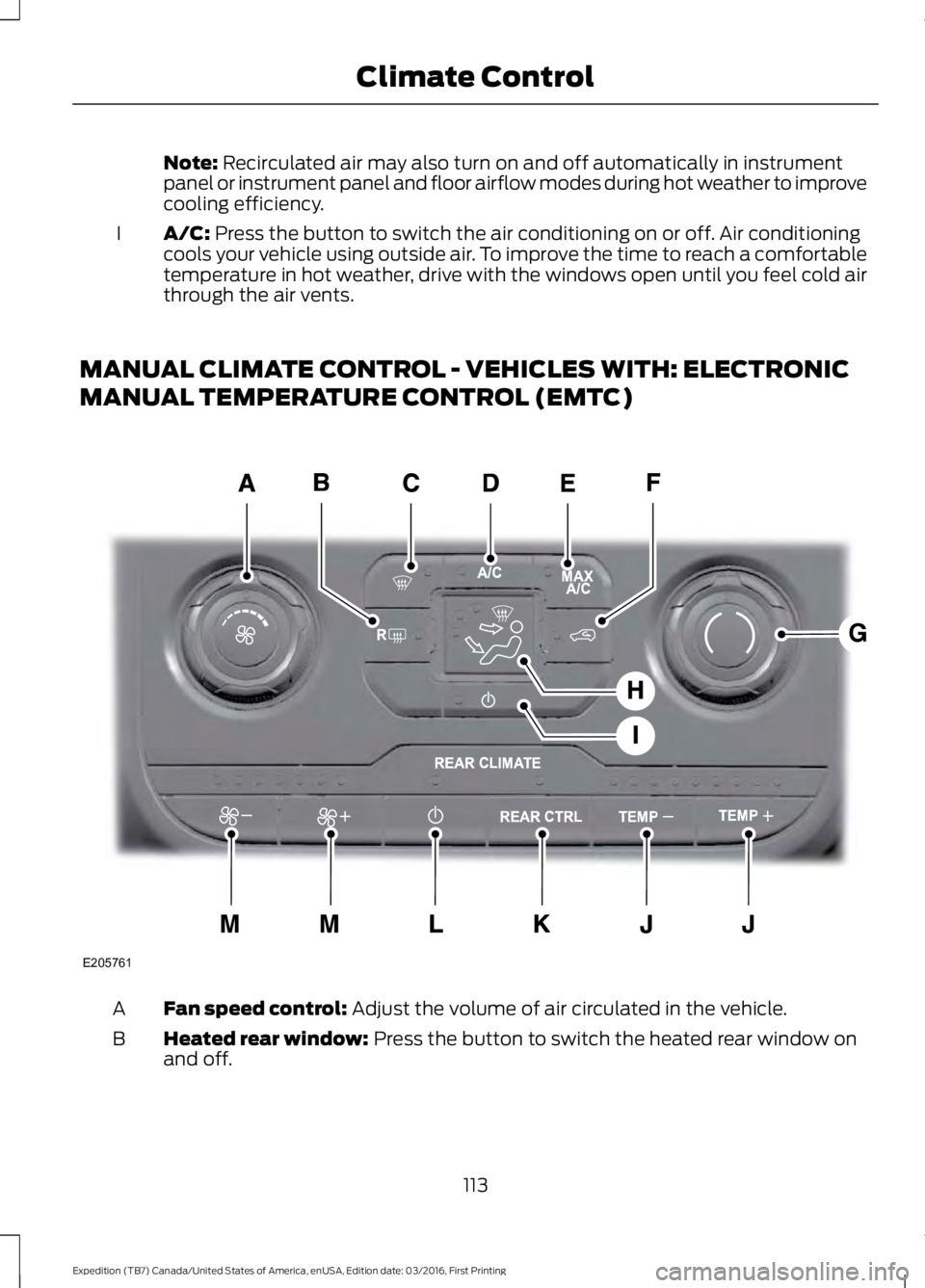
MANUAL CLIMATE CONTROL - VEHICLES WITH: ELECTRONIC
MANUAL TEMPERATURE CONTROL (EMTC)
Fan speed control: Adjust the volume of air circulated in the vehicle.A
Heated rear window: Press the button to switch the heated rear window onand off.B
113
Expedition (TB7) Canada/United States of America, enUSA, Edition date: 03/2016, First Printing
Climate ControlE205761
Page 117 of 500
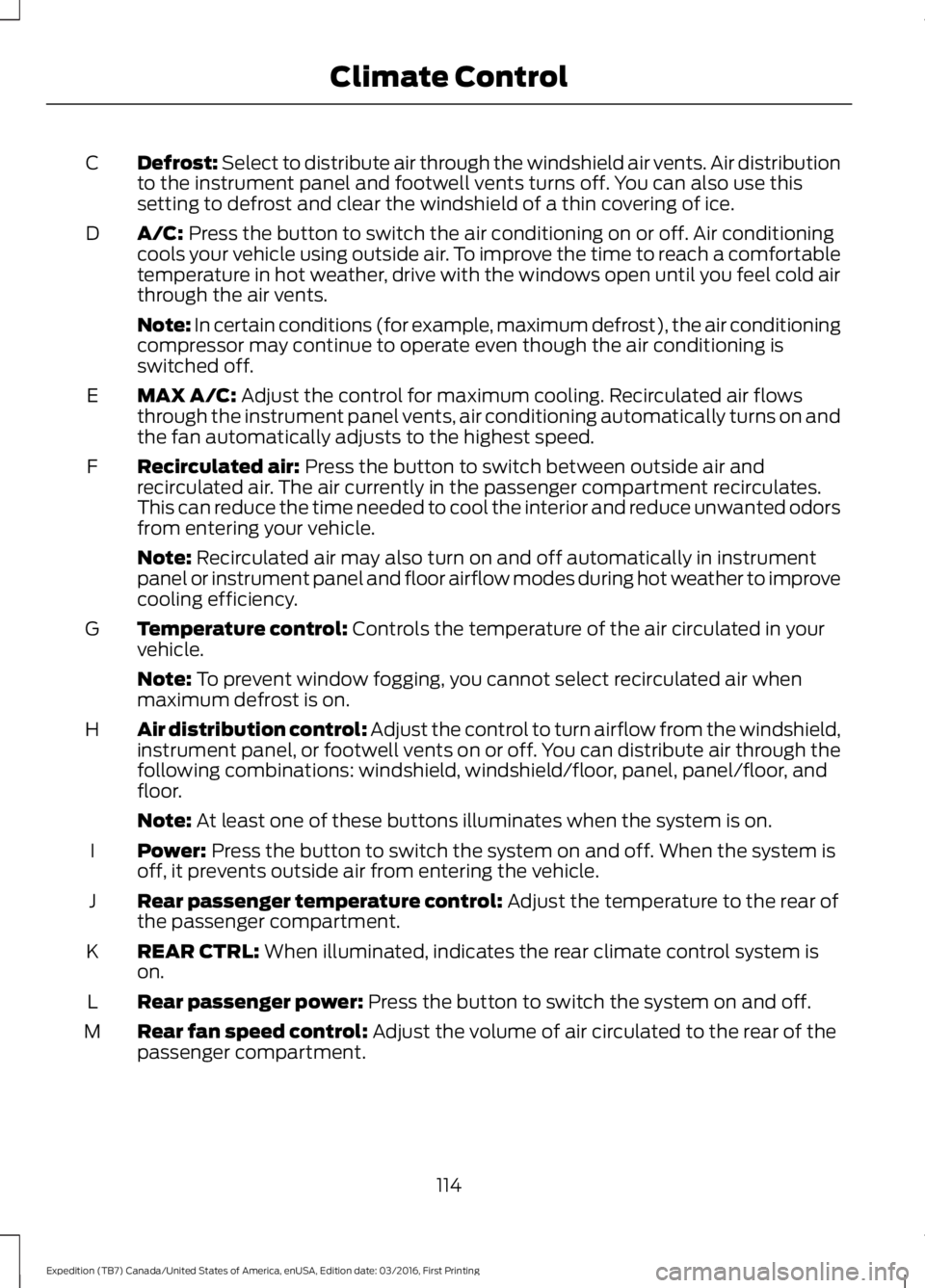
Defrost: Select to distribute air through the windshield air vents. Air distributionto the instrument panel and footwell vents turns off. You can also use thissetting to defrost and clear the windshield of a thin covering of ice.
C
A/C: Press the button to switch the air conditioning on or off. Air conditioningcools your vehicle using outside air. To improve the time to reach a comfortabletemperature in hot weather, drive with the windows open until you feel cold airthrough the air vents.
D
Note: In certain conditions (for example, maximum defrost), the air conditioningcompressor may continue to operate even though the air conditioning isswitched off.
MAX A/C: Adjust the control for maximum cooling. Recirculated air flowsthrough the instrument panel vents, air conditioning automatically turns on andthe fan automatically adjusts to the highest speed.
E
Recirculated air: Press the button to switch between outside air andrecirculated air. The air currently in the passenger compartment recirculates.This can reduce the time needed to cool the interior and reduce unwanted odorsfrom entering your vehicle.
F
Note: Recirculated air may also turn on and off automatically in instrumentpanel or instrument panel and floor airflow modes during hot weather to improvecooling efficiency.
Temperature control: Controls the temperature of the air circulated in yourvehicle.G
Note: To prevent window fogging, you cannot select recirculated air whenmaximum defrost is on.
Air distribution control: Adjust the control to turn airflow from the windshield,instrument panel, or footwell vents on or off. You can distribute air through thefollowing combinations: windshield, windshield/floor, panel, panel/floor, andfloor.
H
Note: At least one of these buttons illuminates when the system is on.
Power: Press the button to switch the system on and off. When the system isoff, it prevents outside air from entering the vehicle.I
Rear passenger temperature control: Adjust the temperature to the rear ofthe passenger compartment.J
REAR CTRL: When illuminated, indicates the rear climate control system ison.K
Rear passenger power: Press the button to switch the system on and off.L
Rear fan speed control: Adjust the volume of air circulated to the rear of thepassenger compartment.M
114
Expedition (TB7) Canada/United States of America, enUSA, Edition date: 03/2016, First Printing
Climate Control
Page 119 of 500
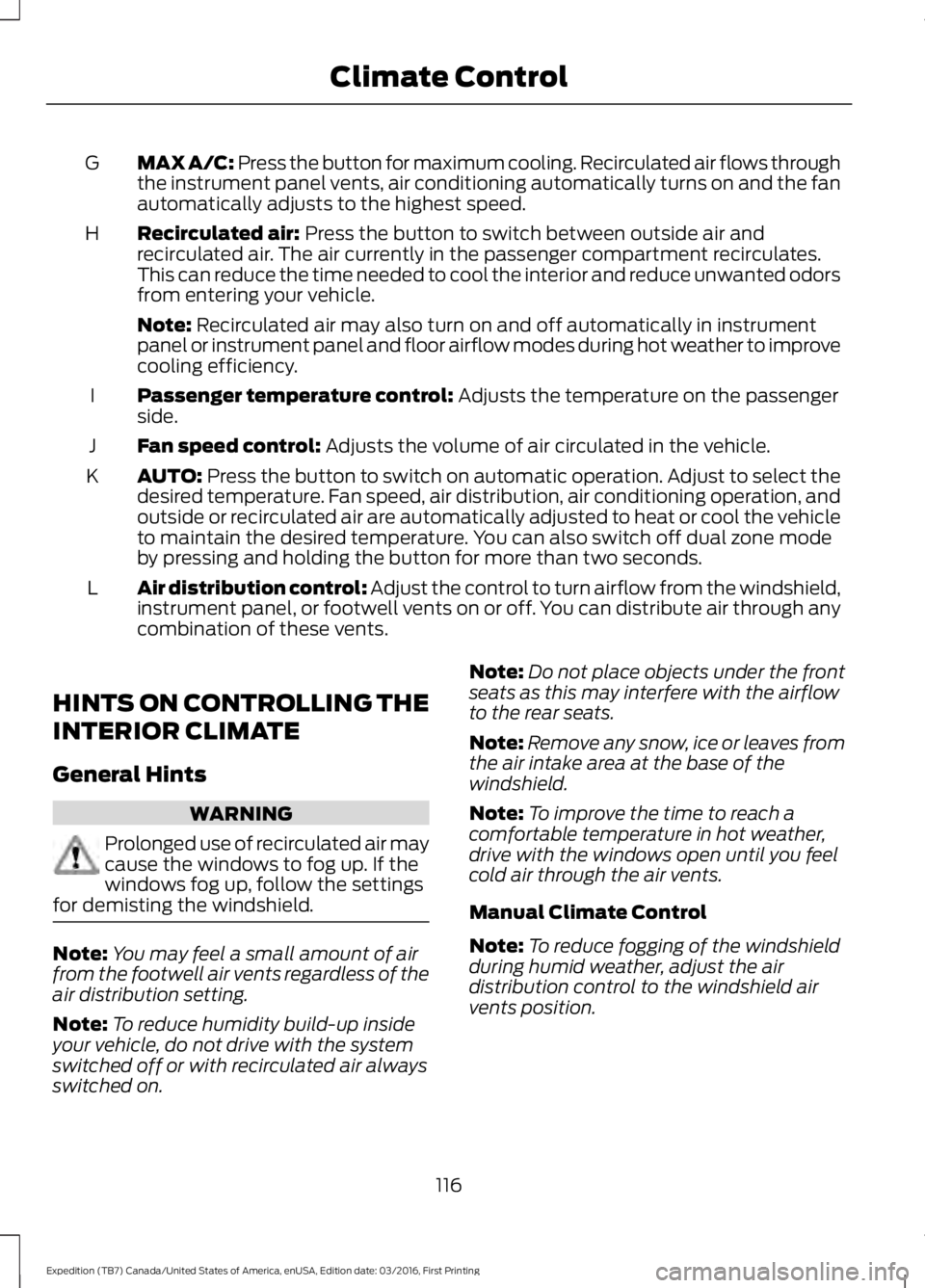
MAX A/C: Press the button for maximum cooling. Recirculated air flows throughthe instrument panel vents, air conditioning automatically turns on and the fanautomatically adjusts to the highest speed.
G
Recirculated air: Press the button to switch between outside air andrecirculated air. The air currently in the passenger compartment recirculates.This can reduce the time needed to cool the interior and reduce unwanted odorsfrom entering your vehicle.
H
Note: Recirculated air may also turn on and off automatically in instrumentpanel or instrument panel and floor airflow modes during hot weather to improvecooling efficiency.
Passenger temperature control: Adjusts the temperature on the passengerside.I
Fan speed control: Adjusts the volume of air circulated in the vehicle.J
AUTO: Press the button to switch on automatic operation. Adjust to select thedesired temperature. Fan speed, air distribution, air conditioning operation, andoutside or recirculated air are automatically adjusted to heat or cool the vehicleto maintain the desired temperature. You can also switch off dual zone modeby pressing and holding the button for more than two seconds.
K
Air distribution control: Adjust the control to turn airflow from the windshield,instrument panel, or footwell vents on or off. You can distribute air through anycombination of these vents.
L
HINTS ON CONTROLLING THE
INTERIOR CLIMATE
General Hints
WARNING
Prolonged use of recirculated air maycause the windows to fog up. If thewindows fog up, follow the settingsfor demisting the windshield.
Note:You may feel a small amount of airfrom the footwell air vents regardless of theair distribution setting.
Note:To reduce humidity build-up insideyour vehicle, do not drive with the systemswitched off or with recirculated air alwaysswitched on.
Note:Do not place objects under the frontseats as this may interfere with the airflowto the rear seats.
Note:Remove any snow, ice or leaves fromthe air intake area at the base of thewindshield.
Note:To improve the time to reach acomfortable temperature in hot weather,drive with the windows open until you feelcold air through the air vents.
Manual Climate Control
Note:To reduce fogging of the windshieldduring humid weather, adjust the airdistribution control to the windshield airvents position.
116
Expedition (TB7) Canada/United States of America, enUSA, Edition date: 03/2016, First Printing
Climate Control