2017 FORD EXPEDITION EL oil reset
[x] Cancel search: oil resetPage 249 of 500
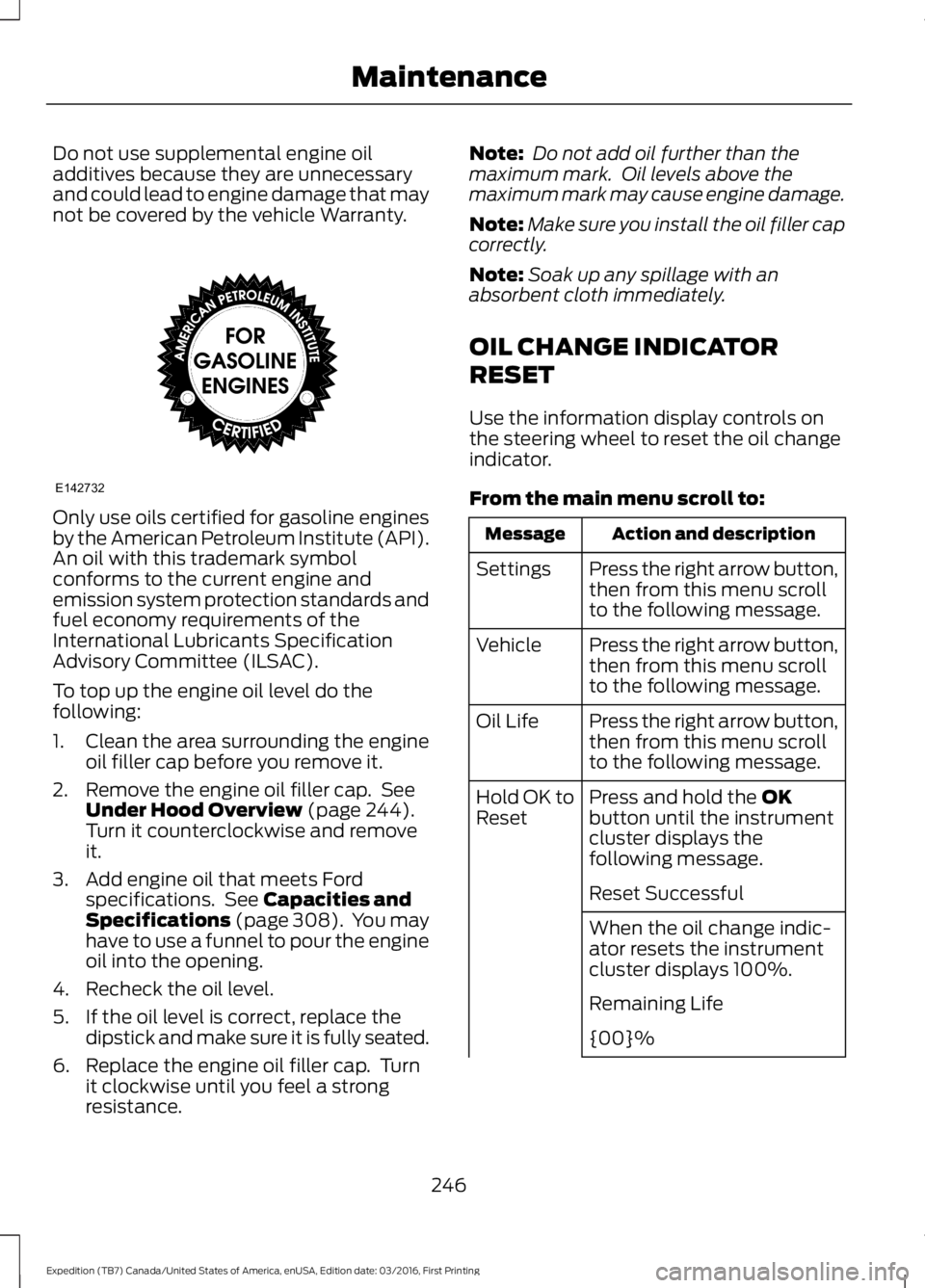
Do not use supplemental engine oiladditives because they are unnecessaryand could lead to engine damage that maynot be covered by the vehicle Warranty.
Only use oils certified for gasoline enginesby the American Petroleum Institute (API).An oil with this trademark symbolconforms to the current engine andemission system protection standards andfuel economy requirements of theInternational Lubricants SpecificationAdvisory Committee (ILSAC).
To top up the engine oil level do thefollowing:
1. Clean the area surrounding the engineoil filler cap before you remove it.
2. Remove the engine oil filler cap. SeeUnder Hood Overview (page 244).Turn it counterclockwise and removeit.
3. Add engine oil that meets Fordspecifications. See Capacities andSpecifications (page 308). You mayhave to use a funnel to pour the engineoil into the opening.
4. Recheck the oil level.
5. If the oil level is correct, replace thedipstick and make sure it is fully seated.
6. Replace the engine oil filler cap. Turnit clockwise until you feel a strongresistance.
Note: Do not add oil further than themaximum mark. Oil levels above themaximum mark may cause engine damage.
Note:Make sure you install the oil filler capcorrectly.
Note:Soak up any spillage with anabsorbent cloth immediately.
OIL CHANGE INDICATOR
RESET
Use the information display controls onthe steering wheel to reset the oil changeindicator.
From the main menu scroll to:
Action and descriptionMessage
Press the right arrow button,then from this menu scrollto the following message.
Settings
Press the right arrow button,then from this menu scrollto the following message.
Vehicle
Press the right arrow button,then from this menu scrollto the following message.
Oil Life
Press and hold the OKbutton until the instrumentcluster displays thefollowing message.
Hold OK toReset
Reset Successful
When the oil change indic-ator resets the instrumentcluster displays 100%.
Remaining Life
{00}%
246
Expedition (TB7) Canada/United States of America, enUSA, Edition date: 03/2016, First Printing
MaintenanceE142732
Page 274 of 500

•Touch-up exposed or primed metal toprevent rust.
•Cover chrome and stainless steel partswith a thick coat of auto wax to preventdiscoloration. Re-wax as necessarywhen you wash your vehicle.
•Lubricate all hood, door and luggagecompartment hinges and latches witha light grade oil.
•Cover interior trim to prevent fading.
•Keep all rubber parts free from oil andsolvents.
Engine
•Change the engine oil and filter prior tostorage because used engine oilcontains contaminates which maycause engine damage.
•Start the engine every 15 days for aminimum of 15 minutes. Run at fast idlewith the climate controls set to defrostuntil the engine reaches normaloperating temperature.
•With your foot on the brake, shiftthrough all the gears while the engineis running.
•We recommend that you change theengine oil before you use your vehicleagain.
Fuel system
•Fill the fuel tank with high-quality fueluntil the first automatic shutoff of thefuel pump nozzle.
Cooling system
•Protect against freezing temperatures.
•When removing your vehicle fromstorage, check coolant fluid level.Confirm that there are no coolingsystem leaks and that fluid is at therecommended level.
Battery
•Check and recharge as necessary. Keepconnections clean.
•If storing your vehicle for more than 30days without recharging the battery,we recommend that you disconnectthe battery cables to maintain batterycharge for quick starting.
Note:It is necessary to reset memoryfeatures if battery cables are disconnected.
Brakes
•Make sure the brakes and parking brakerelease fully.
Tires
•Maintain recommended air pressure.
Miscellaneous
•Make sure all linkages, cables, leversand pins under your vehicle are coveredwith grease to prevent rust.
•Move vehicles at least 25 ft (7.5 m)every 15 days to lubricate working partsand prevent corrosion.
Removing Vehicle From Storage
When your vehicle is ready to come out ofstorage, do the following:
•Wash your vehicle to remove any dirtor grease film build-up on windowsurfaces.
•Check windshield wipers for anydeterioration.
•Check under the hood for any foreignmaterial that may have collectedduring storage such as mice or squirrelnests.
•Check the exhaust for any foreignmaterial that may have collectedduring storage.
271
Expedition (TB7) Canada/United States of America, enUSA, Edition date: 03/2016, First Printing
Vehicle Care
Page 447 of 500
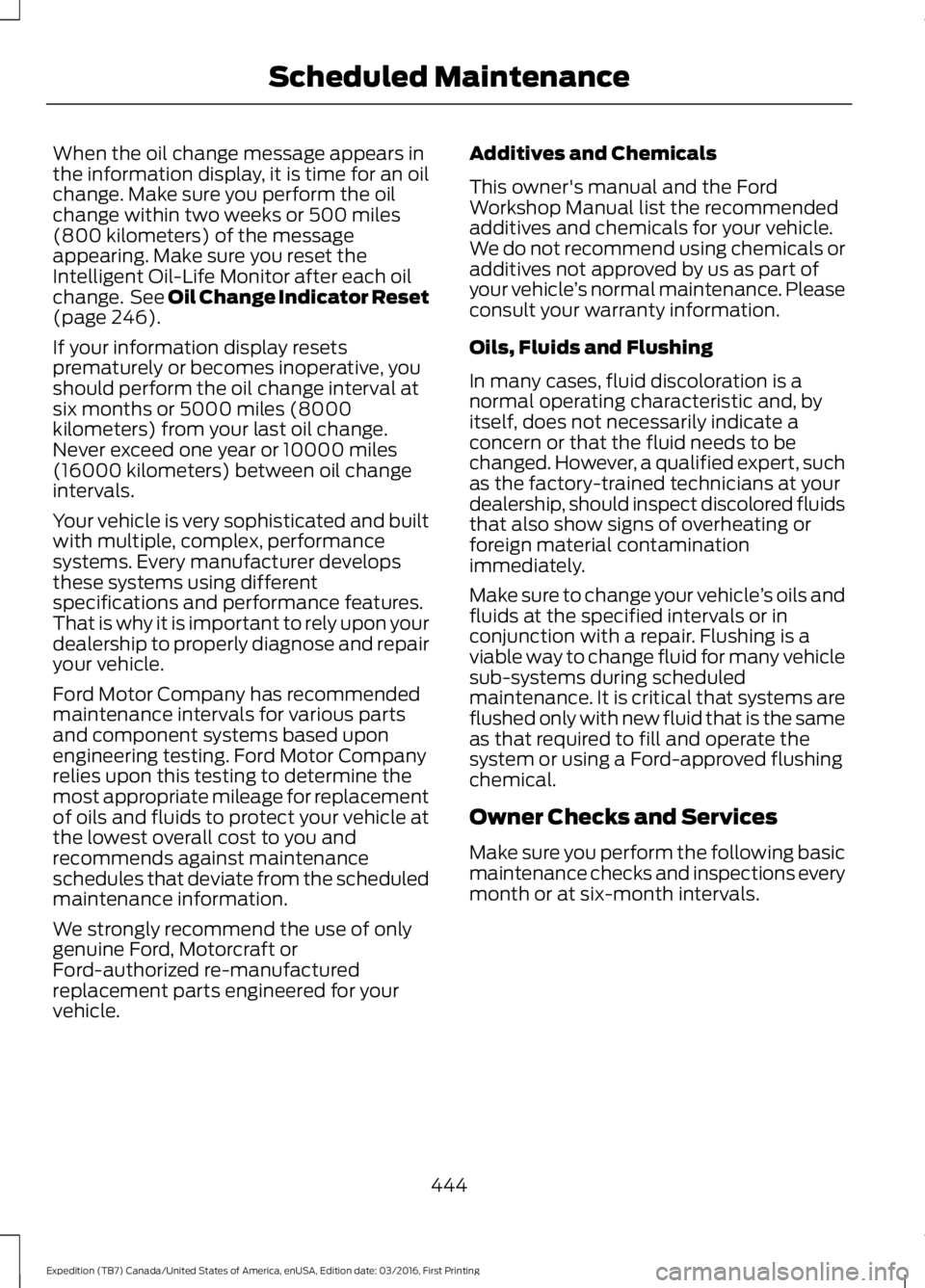
When the oil change message appears inthe information display, it is time for an oilchange. Make sure you perform the oilchange within two weeks or 500 miles(800 kilometers) of the messageappearing. Make sure you reset theIntelligent Oil-Life Monitor after each oilchange. See Oil Change Indicator Reset(page 246).
If your information display resetsprematurely or becomes inoperative, youshould perform the oil change interval atsix months or 5000 miles (8000kilometers) from your last oil change.Never exceed one year or 10000 miles(16000 kilometers) between oil changeintervals.
Your vehicle is very sophisticated and builtwith multiple, complex, performancesystems. Every manufacturer developsthese systems using differentspecifications and performance features.That is why it is important to rely upon yourdealership to properly diagnose and repairyour vehicle.
Ford Motor Company has recommendedmaintenance intervals for various partsand component systems based uponengineering testing. Ford Motor Companyrelies upon this testing to determine themost appropriate mileage for replacementof oils and fluids to protect your vehicle atthe lowest overall cost to you andrecommends against maintenanceschedules that deviate from the scheduledmaintenance information.
We strongly recommend the use of onlygenuine Ford, Motorcraft orFord-authorized re-manufacturedreplacement parts engineered for yourvehicle.
Additives and Chemicals
This owner's manual and the FordWorkshop Manual list the recommendedadditives and chemicals for your vehicle.We do not recommend using chemicals oradditives not approved by us as part ofyour vehicle’s normal maintenance. Pleaseconsult your warranty information.
Oils, Fluids and Flushing
In many cases, fluid discoloration is anormal operating characteristic and, byitself, does not necessarily indicate aconcern or that the fluid needs to bechanged. However, a qualified expert, suchas the factory-trained technicians at yourdealership, should inspect discolored fluidsthat also show signs of overheating orforeign material contaminationimmediately.
Make sure to change your vehicle’s oils andfluids at the specified intervals or inconjunction with a repair. Flushing is aviable way to change fluid for many vehiclesub-systems during scheduledmaintenance. It is critical that systems areflushed only with new fluid that is the sameas that required to fill and operate thesystem or using a Ford-approved flushingchemical.
Owner Checks and Services
Make sure you perform the following basicmaintenance checks and inspections everymonth or at six-month intervals.
444
Expedition (TB7) Canada/United States of America, enUSA, Edition date: 03/2016, First Printing
Scheduled Maintenance
Page 451 of 500
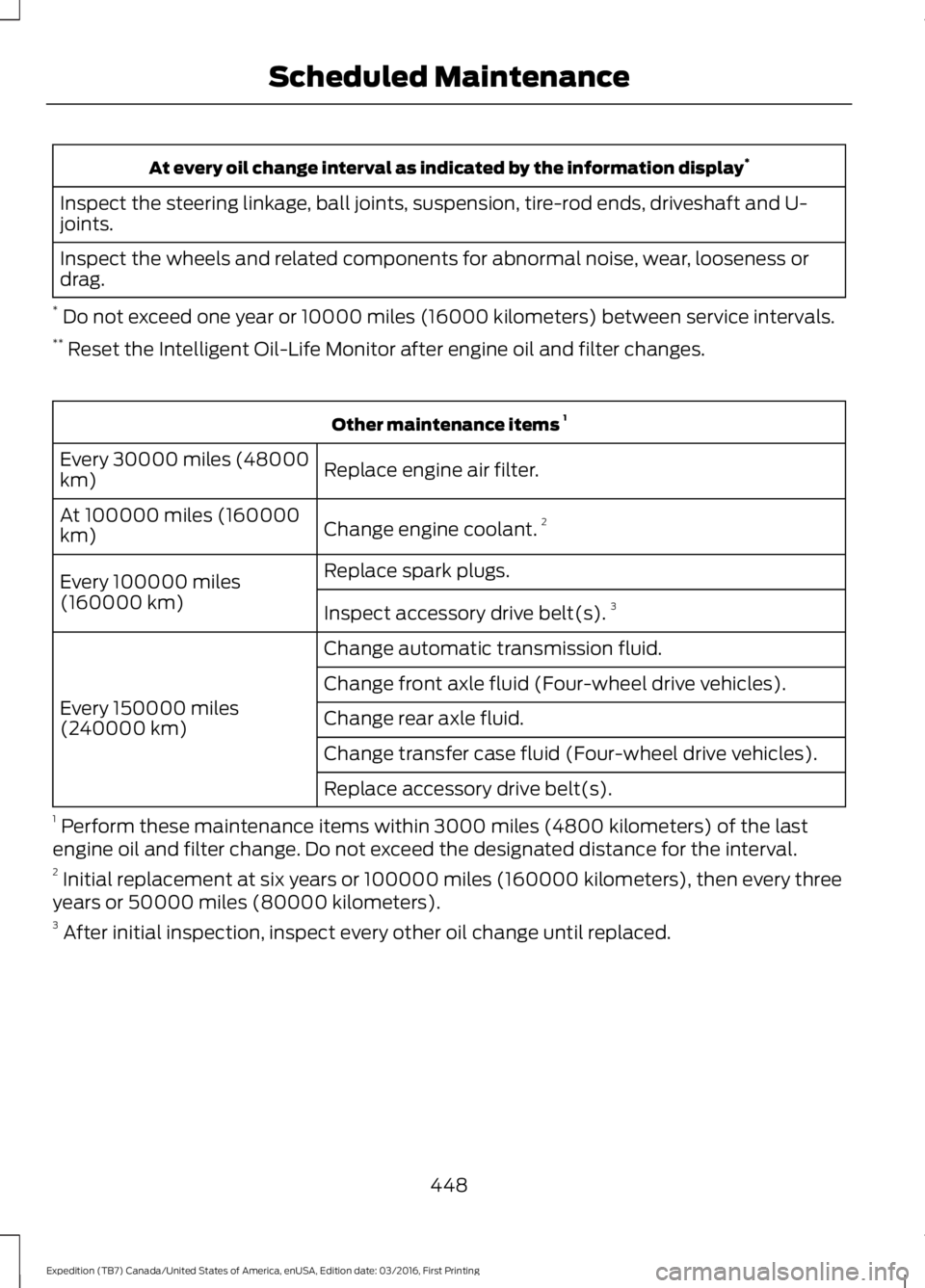
At every oil change interval as indicated by the information display*
Inspect the steering linkage, ball joints, suspension, tire-rod ends, driveshaft and U-joints.
Inspect the wheels and related components for abnormal noise, wear, looseness ordrag.
* Do not exceed one year or 10000 miles (16000 kilometers) between service intervals.** Reset the Intelligent Oil-Life Monitor after engine oil and filter changes.
Other maintenance items 1
Replace engine air filter.Every 30000 miles (48000km)
Change engine coolant.2At 100000 miles (160000km)
Replace spark plugs.Every 100000 miles(160000 km)Inspect accessory drive belt(s).3
Change automatic transmission fluid.
Every 150000 miles(240000 km)
Change front axle fluid (Four-wheel drive vehicles).
Change rear axle fluid.
Change transfer case fluid (Four-wheel drive vehicles).
Replace accessory drive belt(s).
1 Perform these maintenance items within 3000 miles (4800 kilometers) of the lastengine oil and filter change. Do not exceed the designated distance for the interval.2 Initial replacement at six years or 100000 miles (160000 kilometers), then every threeyears or 50000 miles (80000 kilometers).3 After initial inspection, inspect every other oil change until replaced.
448
Expedition (TB7) Canada/United States of America, enUSA, Edition date: 03/2016, First Printing
Scheduled Maintenance
Page 452 of 500
SPECIAL OPERATING
CONDITIONS SCHEDULED
MAINTENANCE
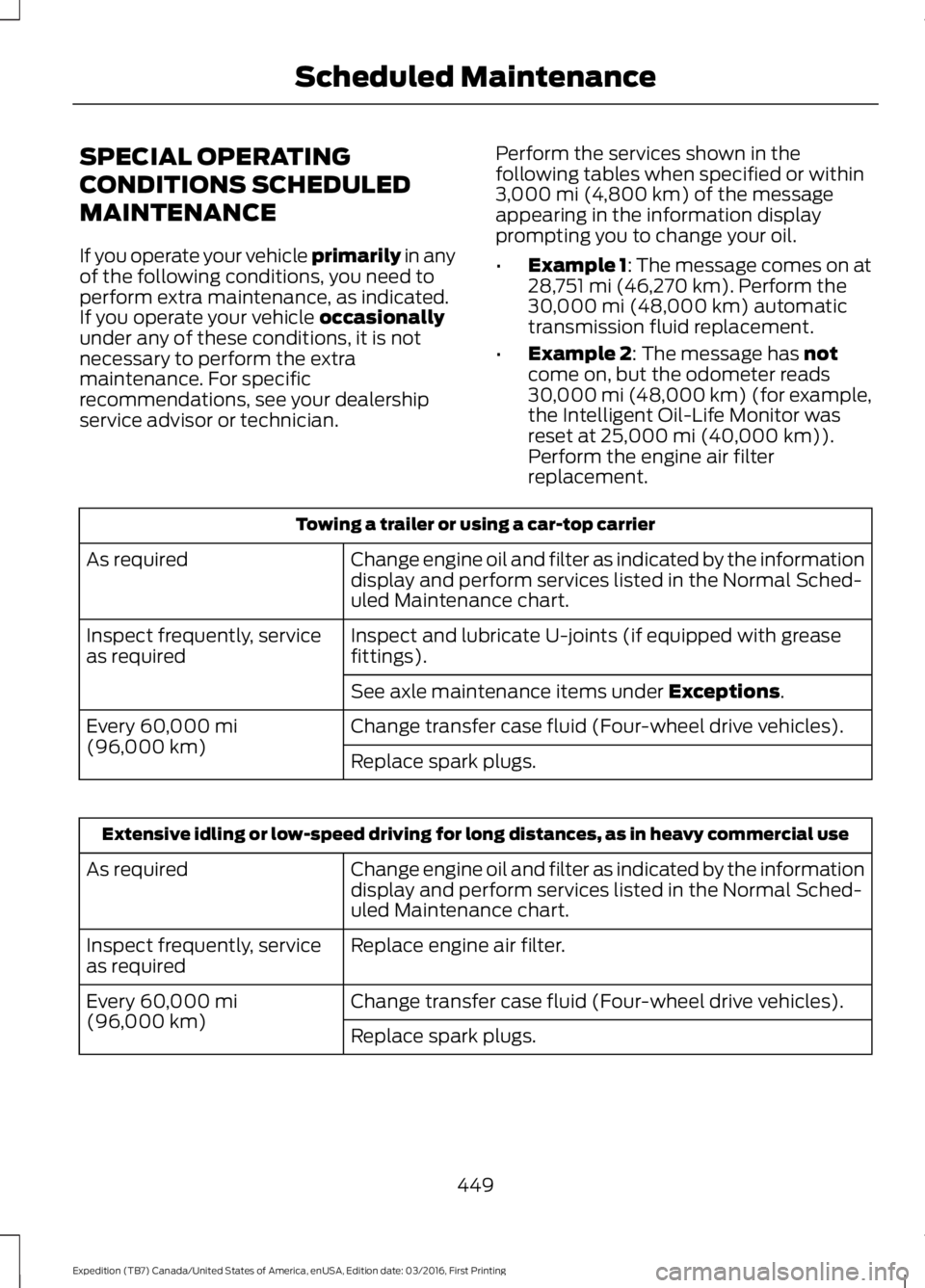
If you operate your vehicle primarily in anyof the following conditions, you need toperform extra maintenance, as indicated.If you operate your vehicle occasionallyunder any of these conditions, it is notnecessary to perform the extramaintenance. For specificrecommendations, see your dealershipservice advisor or technician.
Perform the services shown in thefollowing tables when specified or within3,000 mi (4,800 km) of the messageappearing in the information displayprompting you to change your oil.
•Example 1: The message comes on at28,751 mi (46,270 km). Perform the30,000 mi (48,000 km) automatictransmission fluid replacement.
•Example 2: The message has notcome on, but the odometer reads30,000 mi (48,000 km) (for example,the Intelligent Oil-Life Monitor wasreset at 25,000 mi (40,000 km)).Perform the engine air filterreplacement.
Towing a trailer or using a car-top carrier
Change engine oil and filter as indicated by the informationdisplay and perform services listed in the Normal Sched-uled Maintenance chart.
As required
Inspect and lubricate U-joints (if equipped with greasefittings).Inspect frequently, serviceas required
See axle maintenance items under Exceptions.
Change transfer case fluid (Four-wheel drive vehicles).Every 60,000 mi(96,000 km)Replace spark plugs.
Extensive idling or low-speed driving for long distances, as in heavy commercial use
Change engine oil and filter as indicated by the informationdisplay and perform services listed in the Normal Sched-uled Maintenance chart.
As required
Replace engine air filter.Inspect frequently, serviceas required
Change transfer case fluid (Four-wheel drive vehicles).Every 60,000 mi(96,000 km)Replace spark plugs.
449
Expedition (TB7) Canada/United States of America, enUSA, Edition date: 03/2016, First Printing
Scheduled Maintenance
Page 453 of 500
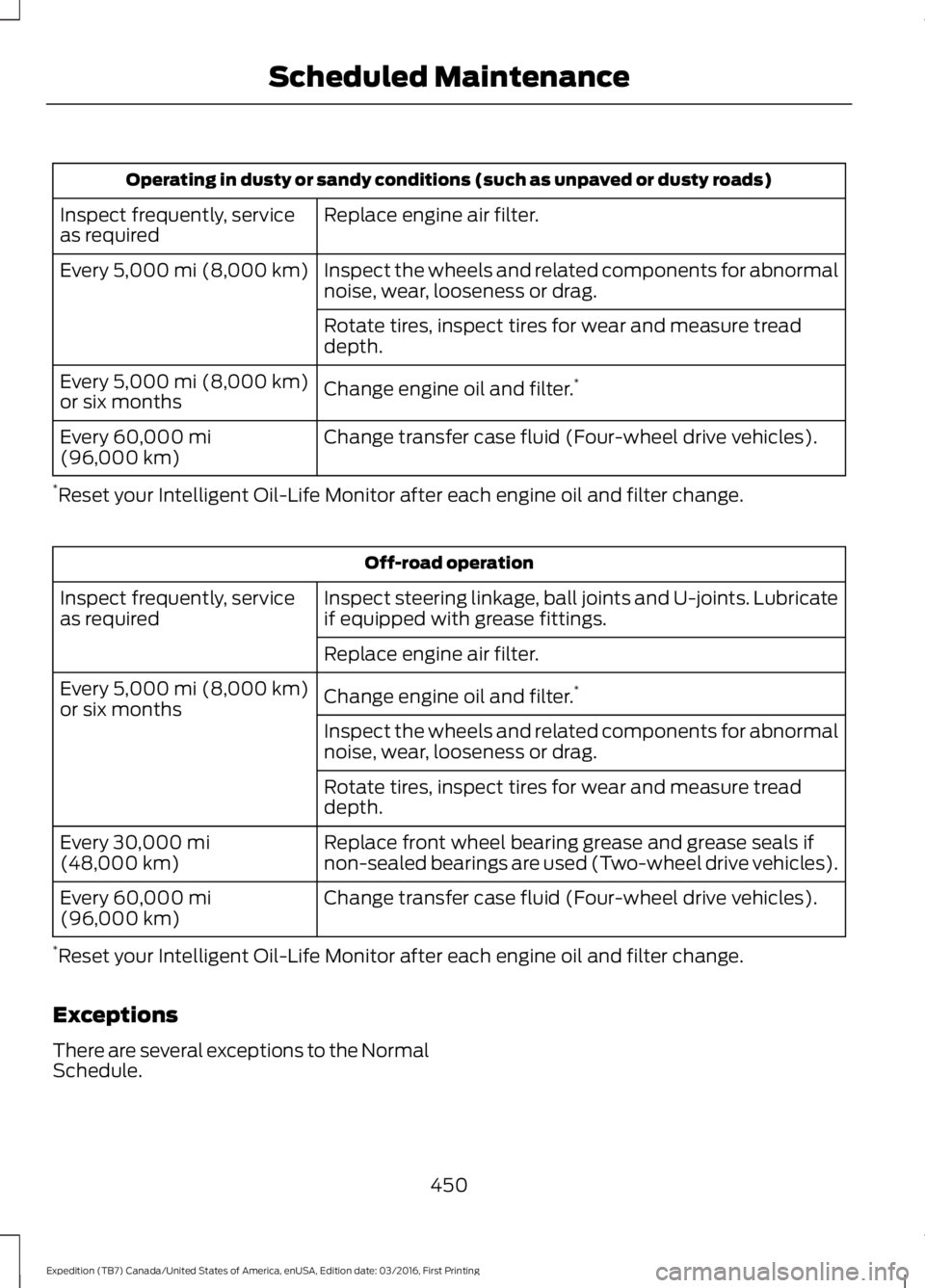
Operating in dusty or sandy conditions (such as unpaved or dusty roads)
Replace engine air filter.Inspect frequently, serviceas required
Inspect the wheels and related components for abnormalnoise, wear, looseness or drag.Every 5,000 mi (8,000 km)
Rotate tires, inspect tires for wear and measure treaddepth.
Change engine oil and filter.*Every 5,000 mi (8,000 km)or six months
Change transfer case fluid (Four-wheel drive vehicles).Every 60,000 mi(96,000 km)
*Reset your Intelligent Oil-Life Monitor after each engine oil and filter change.
Off-road operation
Inspect steering linkage, ball joints and U-joints. Lubricateif equipped with grease fittings.Inspect frequently, serviceas required
Replace engine air filter.
Change engine oil and filter.*Every 5,000 mi (8,000 km)or six monthsInspect the wheels and related components for abnormalnoise, wear, looseness or drag.
Rotate tires, inspect tires for wear and measure treaddepth.
Replace front wheel bearing grease and grease seals ifnon-sealed bearings are used (Two-wheel drive vehicles).Every 30,000 mi(48,000 km)
Change transfer case fluid (Four-wheel drive vehicles).Every 60,000 mi(96,000 km)
*Reset your Intelligent Oil-Life Monitor after each engine oil and filter change.
Exceptions
There are several exceptions to the NormalSchedule.
450
Expedition (TB7) Canada/United States of America, enUSA, Edition date: 03/2016, First Printing
Scheduled Maintenance
Page 495 of 500
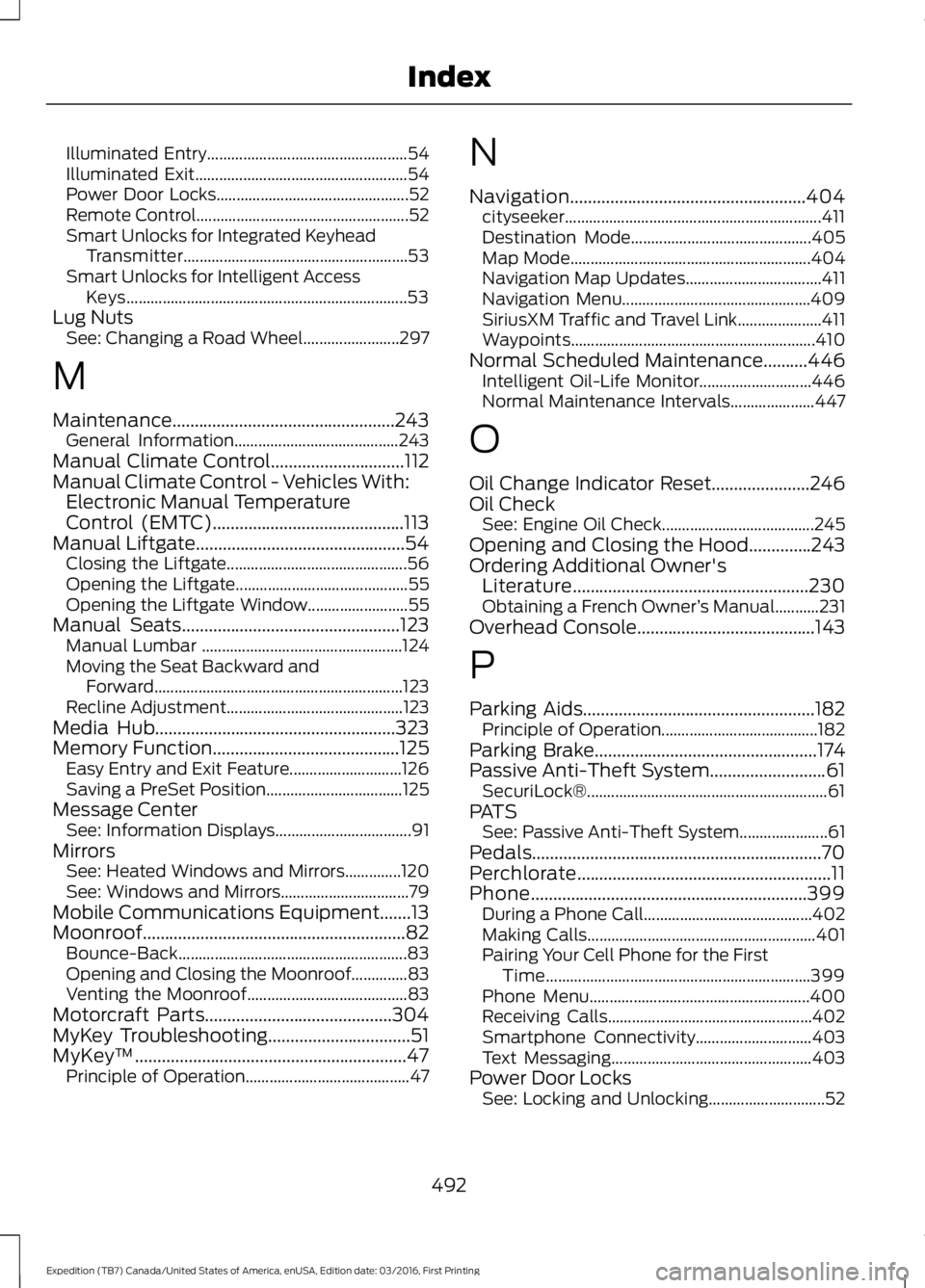
Illuminated Entry..................................................54Illuminated Exit.....................................................54Power Door Locks................................................52Remote Control.....................................................52Smart Unlocks for Integrated KeyheadTransmitter........................................................53Smart Unlocks for Intelligent AccessKeys......................................................................53Lug NutsSee: Changing a Road Wheel........................297
M
Maintenance..................................................243General Information.........................................243Manual Climate Control..............................112Manual Climate Control - Vehicles With:Electronic Manual TemperatureControl (EMTC)...........................................113Manual Liftgate...............................................54Closing the Liftgate.............................................56Opening the Liftgate...........................................55Opening the Liftgate Window.........................55Manual Seats.................................................123Manual Lumbar ..................................................124Moving the Seat Backward andForward..............................................................123Recline Adjustment............................................123Media Hub......................................................323Memory Function..........................................125Easy Entry and Exit Feature............................126Saving a PreSet Position..................................125Message CenterSee: Information Displays..................................91MirrorsSee: Heated Windows and Mirrors..............120See: Windows and Mirrors................................79Mobile Communications Equipment.......13Moonroof...........................................................82Bounce-Back.........................................................83Opening and Closing the Moonroof..............83Venting the Moonroof........................................83Motorcraft Parts..........................................304MyKey Troubleshooting................................51MyKey™.............................................................47Principle of Operation.........................................47
N
Navigation.....................................................404cityseeker................................................................411Destination Mode.............................................405Map Mode............................................................404Navigation Map Updates..................................411Navigation Menu...............................................409SiriusXM Traffic and Travel Link.....................411Waypoints.............................................................410Normal Scheduled Maintenance..........446Intelligent Oil-Life Monitor............................446Normal Maintenance Intervals.....................447
O
Oil Change Indicator Reset......................246Oil CheckSee: Engine Oil Check......................................245Opening and Closing the Hood..............243Ordering Additional Owner'sLiterature.....................................................230Obtaining a French Owner’s Manual...........231Overhead Console........................................143
P
Parking Aids....................................................182Principle of Operation.......................................182Parking Brake..................................................174Passive Anti-Theft System..........................61SecuriLock®............................................................61PATSSee: Passive Anti-Theft System......................61Pedals.................................................................70Perchlorate.........................................................11Phone..............................................................399During a Phone Call..........................................402Making Calls.........................................................401Pairing Your Cell Phone for the FirstTime..................................................................399Phone Menu.......................................................400Receiving Calls...................................................402Smartphone Connectivity.............................403Text Messaging..................................................403Power Door LocksSee: Locking and Unlocking.............................52
492
Expedition (TB7) Canada/United States of America, enUSA, Edition date: 03/2016, First Printing
Index