2017 Citroen GRAND C4 PICASSO page 14
[x] Cancel search: page 14Page 417 of 527
64
Audio and Telematics
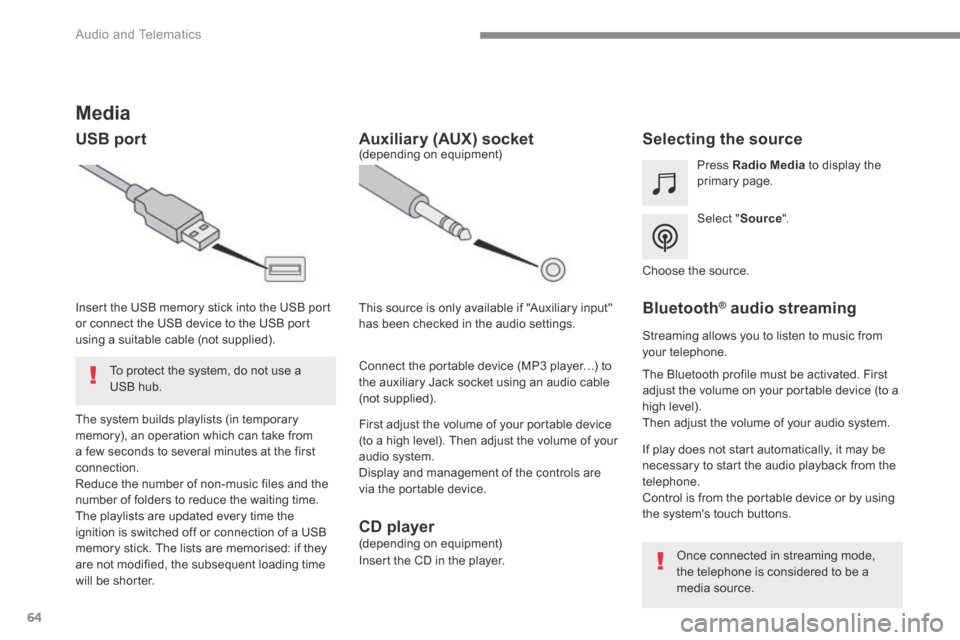
Media
USB port Selecting the source
Select " Source ".
Press Radio Media to display the primary page.
The system builds playlists (in temporary memory), an operation which can take from a few seconds to several minutes at the first connection. Reduce the number of non-music files and the number of folders to reduce the waiting time. The playlists are updated every time the ignition is switched off or connection of a USB memory stick. The lists are memorised: if they are not modified, the subsequent loading time will be shorter.
Insert the USB memory stick into the USB port or connect the USB device to the USB port using a suitable cable (not supplied).
Auxiliary (AUX) socket
First adjust the volume of your portable device (to a high level). Then adjust the volume of your audio system. Display and management of the controls are via the portable device.
This source is only available if "Auxiliary input" has been checked in the audio settings.
(depending on equipment)
Connect the portable device (MP3 player…) to the auxiliary Jack socket using an audio cable (not supplied).
Choose the source.
Bluetooth ® Bluetooth ® Bluetooth audio streaming ® audio streaming ®
Streaming allows you to listen to music from your telephone.
The Bluetooth profile must be activated. First adjust the volume on your portable device (to a high level). Then adjust the volume of your audio system.
If play does not start automatically, it may be necessary to start the audio playback from the telephone. Control is from the portable device or by using the system's touch buttons.
Once connected in streaming mode, the telephone is considered to be a media source.
To protect the system, do not use a USB hub.
CD player (depending on equipment)
Insert the CD in the player.
Page 425 of 527
72
Audio and Telematics
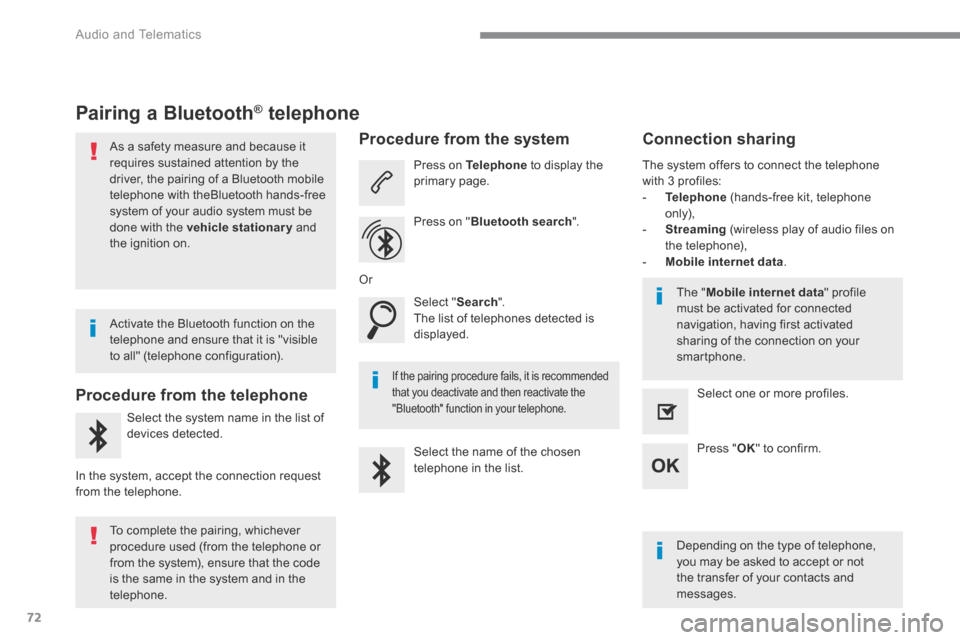
Pairing a Bluetooth ® Pairing a Bluetooth ® Pairing a Bluetooth telephone ® telephone ®
As a safety measure and because it requires sustained attention by the driver, the pairing of a Bluetooth mobile telephone with theBluetooth hands-free system of your audio system must be
done with the vehicle stationary and the ignition on.
Procedure from the telephone
Select the system name in the list of
devices detected.
In the system, accept the connection request from the telephone.
Procedure from the system
Press on Telephone to display the primary page.
Press on " Bluetooth search ".
Select " Search ". The list of telephones detected is displayed.
If the pairing procedure fails, it is recommended that you deactivate and then reactivate the "Bluetooth" function in your telephone.
The system offers to connect the telephone with 3 profiles: - Telephone (hands-free kit, telephone only), - Streaming (wireless play of audio files on the telephone), - Mobile internet data .
Depending on the type of telephone, you may be asked to accept or not the transfer of your contacts and messages.
Select the name of the chosen telephone in the list.
Press " OK " to confirm.
Select one or more profiles.
Or
Activate the Bluetooth function on the telephone and ensure that it is "visible to all" (telephone configuration).
To complete the pairing, whichever procedure used (from the telephone or from the system), ensure that the code is the same in the system and in the
telephone.
The " Mobile internet data " profile must be activated for connected navigation, having first activated sharing of the connection on your smartphone.
Connection sharing
Page 426 of 527
73
.
1
Audio and Telematics
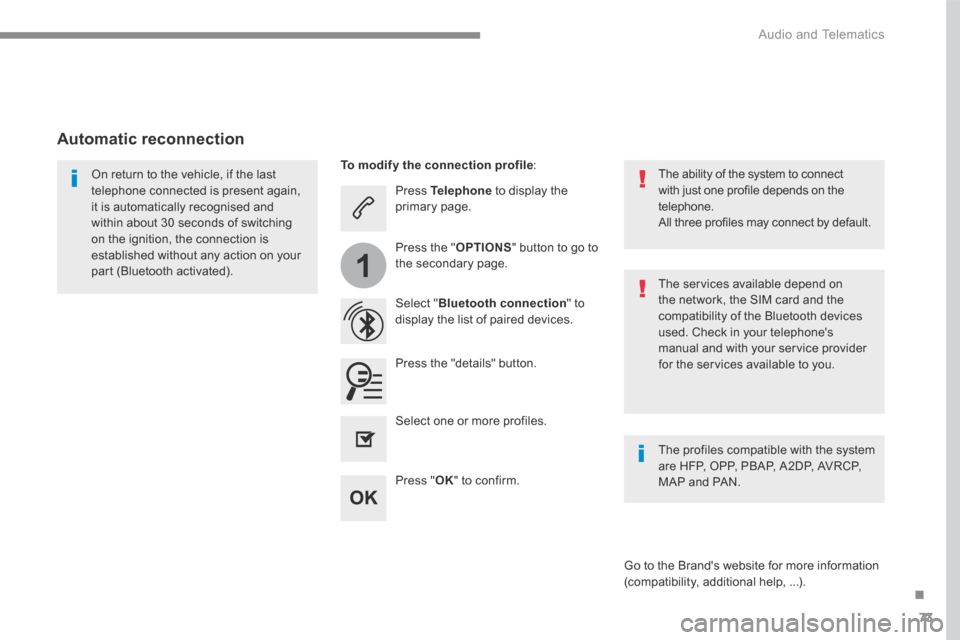
Press Telephone to display the primary page.
Select " Bluetooth connection " to display the list of paired devices.
On return to the vehicle, if the last telephone connected is present again, it is automatically recognised and within about 30 seconds of switching on the ignition, the connection is established without any action on your part (Bluetooth activated). The services available depend on the network, the SIM card and the compatibility of the Bluetooth devices used. Check in your telephone's manual and with your service provider for the services available to you.
The ability of the system to connect with just one profile depends on the telephone. All three profiles may connect by default.
Go to the Brand's website for more information (compatibility, additional help, ...).
To modify the connection profile :
Automatic reconnection
Press the "details" button.
Press the " OPTIONS " button to go to the secondary page.
Press " OK " to confirm.
Select one or more profiles.
The profiles compatible with the system are HFP, OPP, PBAP, A2DP, AVRCP, MAP and PAN.
Page 427 of 527

74
1
Audio and Telematics
Receiving a call
An incoming call is announced by a ring and a superimposed display in the screen.
Make a short press on the steering mounted TEL button to accept an incoming call.
Make a long press
on the steering mounted TEL button to reject the call.
Or
And
Select " End call ".
Press on the name of the telephone chosen in the list to disconnect it. Press again to connect it.
Select the basket at top right of the screen to display a basket alongside the telephone chosen.
Press the basket alongside the telephone chosen to delete it.
Managing paired telephones
This function allows the connection or disconnection of a peripheral device as well as the deletion of a pairing.
Press Telephone to display the primary page.
Press the " OPTIONS " button to go to the secondary page.
Select " Bluetooth connection " to display the list of paired peripheral devices.
Deleting a telephone
Page 428 of 527

75
.
2
3
Audio and Telematics
on the steering mounted button.
Using the telephone is not recommended while driving. Park the vehicle. Make the call using the steering
mounted controls.
Making a call
Calling a new number
Press Telephone to display the primary page.
Enter the phone number using the digital keypad.
Press " Call " to start the call.
Calling a contact
Press Telephone to display the primary page.
Or make a long press
on the steering mounted TEL button.
Select " Contact ".
Select the desired contact from the list offered.
Select " Call ".
Calling a recently used number
Press Telephone to display the primary page.
Make a long press
Select " Calls ".
Select the desired contact from the list offered.
It is always possible to make a call directly from the telephone; as a safety measure, first park the vehicle.
Or
Page 429 of 527
76
2
12
13
14
1
Audio and Telematics
The access to " Messages " depends on the compatibility of the smartphone and the integral system. Depending on the smartphone, access to your messages or email may be
slow.
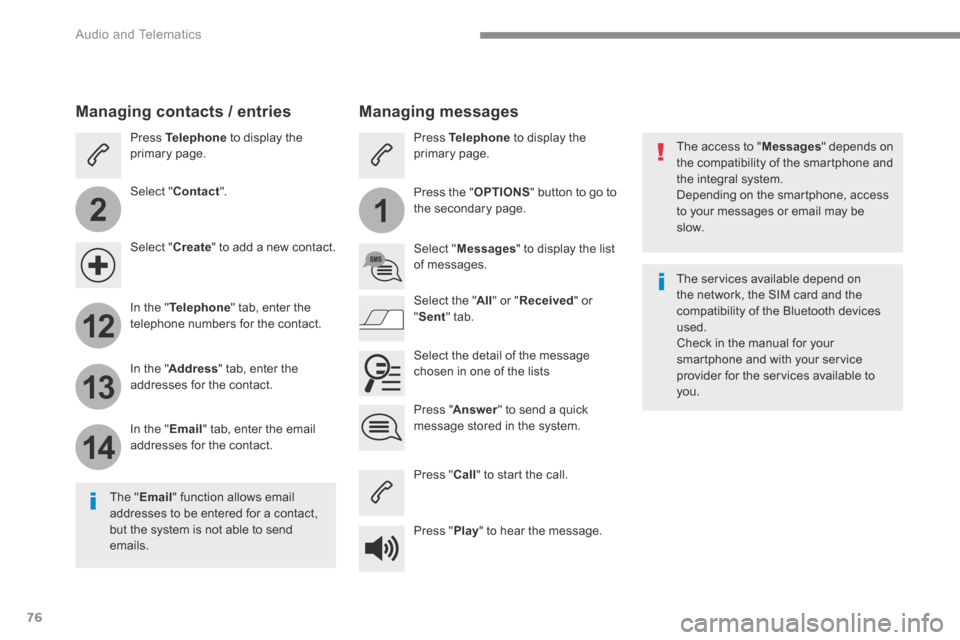
Managing messages
The " Email " function allows email addresses to be entered for a contact, but the system is not able to send emails.
Managing contacts / entries
Press Telephone to display the primary page.
Select " Contact ".
Select " Create " to add a new contact.
In the " Telephone " tab, enter the telephone numbers for the contact.
In the " Address " tab, enter the addresses for the contact.
In the " Email " tab, enter the email addresses for the contact.
Pres s " Answer " to send a quick message stored in the system.
Press Telephone to display the primary page.
Press the " OPTIONS " button to go to the secondary page.
Select " Messages " to display the list of messages.
Select the " All " or " Received " or " Sent " tab.
Select the detail of the message chosen in one of the lists
Press " Call " to start the call.
Press " Play " to hear the message.
The services available depend on the network, the SIM card and the compatibility of the Bluetooth devices used. Check in the manual for your smartphone and with your service provider for the services available to you.
Page 430 of 527

77
.
11
Audio and Telematics
Managing email
Press Telephone to display the primary page.
Press the " OPTIONS " button to go to the secondary page.
Select " Email " to display the list of messages.
Select the " Received " or " Sent " or " Not read " tab.
Select the email chosen in the list.
Press " Play " to start playing the email.
Access to " Email " depends on the compatibility of the smartphone and the integral system.
Managing quick messages
Press Telephone to display the primary page.
Press on the " OPTIONS " button to go to the secondary page.
Select " Quick messages " to display the list of messages.
Select the " Delayed " or " My arrival " or " Not available " or " Other " tab with the possibility of creating new messages.
Select the message chosen in one of the lists.
Press " Create " to write a new message.
Press " Transfer " to select the addressee(s).
Press " Play " to start playing the m e s s a g e .
Page 437 of 527

84
3
4
5
6
7
1
19
Audio and Telematics
Press Settings to display the primary page.
Profile settings Audio settings
Press Settings to display the primary page.
Select " Audio settings ".
Select " Ambience ".
Or
" Position ".
Or " Sound ".
Or " Voice ".
Or
" Ringtone ".
On-board audio: Arkamys © Sound © Sound ©
Staging optimises the distribution of sound in the passenger compartment.
The settings for " Position " (All passengers, Driver and Front only) are common to all sources.
Activate or Deactivate " Touch tones ", " Volume linked to speed " and " Auxiliary input ".
The sound distribution (or spatialisation with the Arkamys © system) is audio © system) is audio ©
processing that allows the quality of the sound to be adapted according to the number of passengers in the vehicle.
Available only with the front and rear speakers configuration.
The audio Ambience settings (6 ambiences available) as well as the Bass , Medium and Tr e b l e settings are different and independent for each sound source. Activate or Deactivate " Loudness ".
Press " OK " to save the settings.
Press " OK " to confirm.
Press the " OPTIONS " button to go to the secondary page.
Select " Profile 1 ", " Profile 2 ",
" Profile 3 " or " Common profile ".
Select " Setting of the profiles ".
Press this button to enter a name for the profile using the virtual keypad.
As a safety measure and because it requires the sustained attention of the driver, changes to settings must only be done with the vehicle stationary . vehicle stationary . vehicle stationary