Page 468 of 828

The ParkSense Active Park Assist system will turn off
automatically for any of the following conditions:
•The parking maneuver is completed.
• Vehicle speed greater than 18 mph (30 km/h) when
searching for a parking space.
• Vehicle speed greater than 5 mph (7 km/h) during
active steering guidance into the parking space.
• Touching the steering wheel during active steering
guidance into the parking space.
• Pushing the ParkSense Front and Rear Park Assist
switch.
• The Driver ’s door is opened.
• The liftgate is opened.
• Electronic Stability Control/Anti-lock Braking System
intervention. •
The ParkSense Active Park Assist system will allow a
maximum of six shifts between DRIVE and REVERSE.
If the maneuver cannot be completed within six shifts,
the system will cancel and the DID will instruct the
driver to complete the maneuver manually.
The ParkSense Active Park Assist system will only oper-
ate and search for a parking space when the following
conditions are present:
• The gear position is in DRIVE.
• The ignition is in the RUN position.
• The ParkSense Active Park Assist switch is activated.
• The Driver ’s door is closed.
• The liftgate is closed.
• Vehicle speed is less than 15 mph (25 km/h).
466 STARTING AND OPERATING
Page 469 of 828

NOTE:If the vehicle is driven above approximately
15 mph (25 km/h), the DID will instruct the driver to
slow down. If the vehicle is driven above approximately
18 mph (30 km/h), the system will cancel. The driver
must then reactivate the system by pushing the
ParkSense Active Park Assist switch.
• The outer surface and the underside of the front and
rear fascias/bumpers are clean and clear of snow, ice,
mud, dirt or other obstruction.
When pushed, the LED on the ParkSense Active Park
Assist switch will blink momentarily, and then the LED
will turn OFF if any of the above conditions are not
present.Parallel Parking Space Assistance Operation/
Display
When the ParkSense Active Park Assist system is enabled
the “Active ParkSense Searching - Press OK for Perpen-
dicular Park” message will appear in the Driver Informa-
tion Display (DID). You may switch to perpendicular
parking if you desire. Push the OK button on the left side
steering wheel switch to change your parking space
setting.
NOTE:
• When searching for a parking space, use the turn
signal indicator to select which side of the vehicle you
want to perform the parking maneuver. The ParkSense
Active Park Assist system will automatically search for
a parking space on the passenger’s side of the vehicle
if the turn signal is not activated.
6
STARTING AND OPERATING 467
Page 471 of 828
Once the vehicle is in position, you will be instructed to
stop the vehicle’s movement and remove your hands
from the steering wheel.Once the vehicle is at a standstill with your hands
removed from the steering wheel, you will be instructed
to place the gear selector into the REVERSE position.
Parking Space Found — Keep Moving ForwardParking Space Found — Stop And Remove Hands From
Wheel
6
STARTING AND OPERATING 469
Page 472 of 828
When the driver places the gear selector into the RE-
VERSE position, the system may instruct the driver to
wait for steering to complete.The system will then instruct the driver to check their
surroundings and move backward.
Parking Space Found — Shift To ReverseCheck Surroundings — Wait For Steering To Complete
470 STARTING AND OPERATING
Page 473 of 828

NOTE:
•It is the driver ’s responsibility to use the brake and
accelerator during the semi-automatic parking maneu-
ver. •
When the system instructs the driver to remove their
hands from the steering wheel, the driver should check
their surroundings and begin to back up slowly.
• The ParkSense Active Park Assist system will allow a
maximum of six shifts between DRIVE or REVERSE. If
the maneuver cannot be completed within six shifts,
the system will cancel and the DID will instruct the
driver to complete the maneuver manually.
• The system will cancel the maneuver if the vehicle
speed exceeds 5 mph (7 km/h) during active steering
guidance into the parking space. The system will
provide a warning to the driver at 3 mph (5 km/h) that
tells them to slow down. The driver is then responsible
for completing the maneuver if the system is canceled.
• If the system is canceled during the maneuver for any
reason, the driver must take full control of the vehicle.
Check Surroundings — Move Backward
6
STARTING AND OPERATING 471
Page 475 of 828
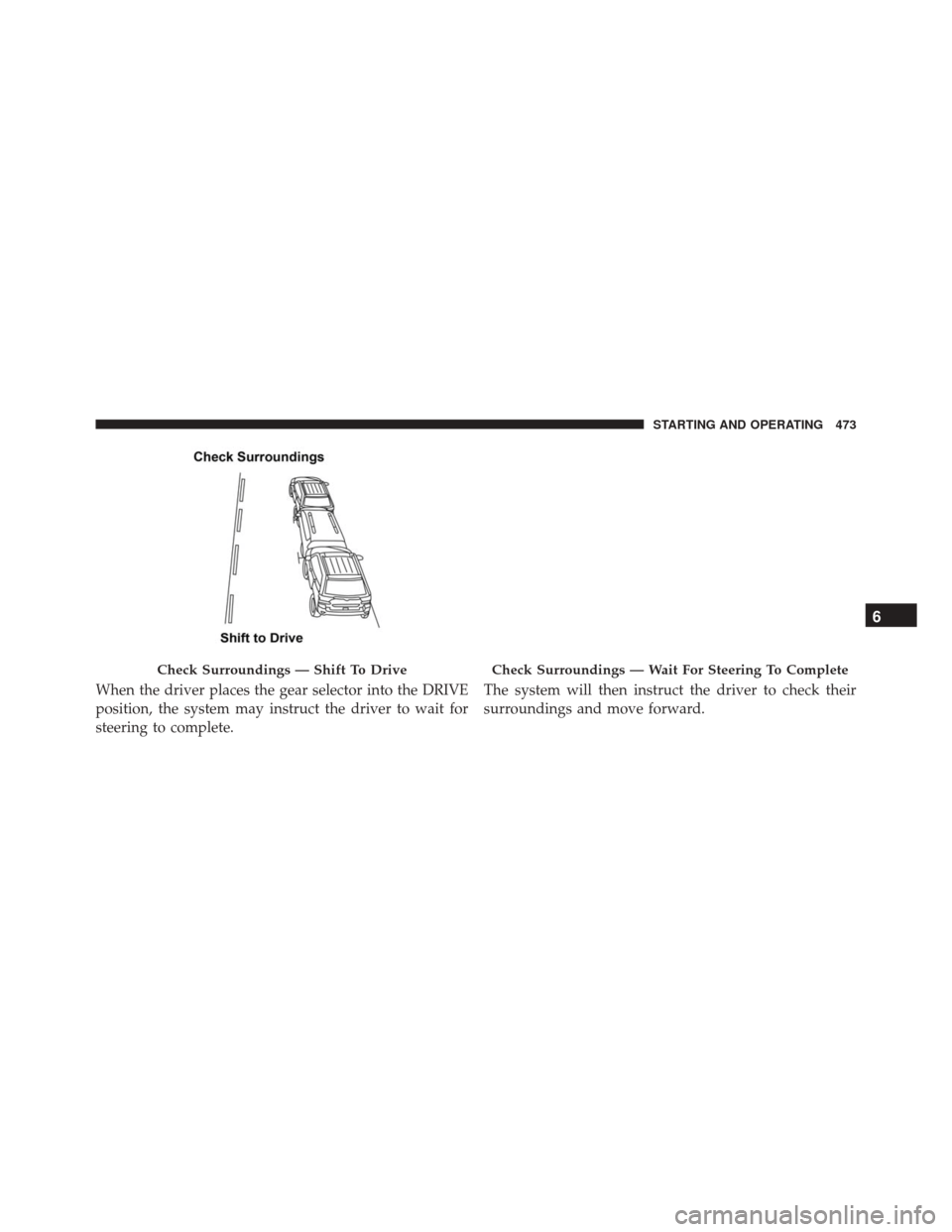
When the driver places the gear selector into the DRIVE
position, the system may instruct the driver to wait for
steering to complete.The system will then instruct the driver to check their
surroundings and move forward.
Check Surroundings — Shift To DriveCheck Surroundings — Wait For Steering To Complete
6
STARTING AND OPERATING 473
Page 477 of 828
Once the vehicle is in a standstill condition, the driver
will be instructed to place the gear selector into the
REVERSE position.When the driver places the gear selector into the RE-
VERSE position, the system may instruct the driver to
wait for steering to complete.
Check Surroundings — Shift To ReverseCheck Surroundings — Wait For Steering To Complete
6
STARTING AND OPERATING 475
Page 479 of 828
Perpendicular Parking Space Assistance
Operation/Display
When the ParkSense Active Park Assist system is en-
abled, the “Active ParkSense Searching - Press OK for
Perpendicular Park” message will show in the DID
display. Push the OK button on the left side steering
wheel switch to change your parking space setting to a
perpendicular maneuver. You may switch back to paral-
lel parking if you desire.
Once the driver pushes OK for a perpendicular parking
maneuver, the “Active ParkSense Searching - Press OK
for Parallel Park” message will appear in the DID display.
Active ParkSense Searching Display
6
STARTING AND OPERATING 477