Page 481 of 828
Once the vehicle is in position, you will be instructed to
stop the vehicle’s movement and remove your hands
from the steering wheel.Once the vehicle is at a standstill with your hands
removed from the steering wheel, you will be instructed
to place the gear selector into the REVERSE position.
Parking Space Found — Keep Moving ForwardParking Space Found — Stop And Remove Hands From
Wheel
6
STARTING AND OPERATING 479
Page 482 of 828
When the driver places the gear selector into the RE-
VERSE position, the system may instruct the driver to
wait for steering to complete.The system will then instruct the driver to check their
surroundings and move backward.
Parking Space Found — Shift To ReverseCheck Surroundings — Wait For Steering To Complete
480 STARTING AND OPERATING
Page 483 of 828

NOTE:
•It is the driver ’s responsibility to use the brake and
accelerator during the semi-automatic parking maneu-
ver. •
When the system instructs the driver to remove their
hands from the steering wheel, the driver should check
their surroundings and begin to back up slowly.
• The ParkSense Active Park Assist system will allow a
maximum of six shifts between DRIVE or REVERSE. If
the maneuver cannot be completed within six shifts,
the system will cancel and the DID will instruct the
driver to complete the maneuver manually.
• The system will cancel the maneuver if the vehicle
speed exceeds 5 mph (7 km/h) during active steering
guidance into the parking space. The system will
provide a warning to the driver at 3 mph (5 km/h) that
tells them to slow down. The driver is then responsible
for completing the maneuver if the system is canceled.
• If the system is canceled during the maneuver for any
reason, the driver must take control of the vehicle.
Check Surroundings — Move Backwards
6
STARTING AND OPERATING 481
Page 485 of 828
When the driver places the gear selector into the DRIVE
position, the system may instruct the driver to wait for
steering to complete.The system will then instruct the driver to check their
surroundings and move forward.
Check Surroundings — Shift To DriveCheck Surroundings — Wait For Steering To Complete
6
STARTING AND OPERATING 483
Page 487 of 828
Once the vehicle is in a standstill condition, the driver
will be instructed to place the gear selector into the
REVERSE position.
When the driver places the gear selector into the RE-
VERSE position, the system may instruct the driver to
wait for steering to complete.The system will then instruct the driver to check their
surroundings and move backward.
Check Surroundings — Shift To Reverse
Check Surroundings — Wait For Steering To Complete
6
STARTING AND OPERATING 485
Page 490 of 828

uses a forward looking camera to detect lane markings
and measure vehicle position within the lane boundaries.
When both lane markings are detected and the driver
unintentionally drifts out of the lane (no turn signal
applied), the LaneSense system provides a haptic warn-
ing in the form of torque applied to the steering wheel to
prompt the driver to remain within the lane boundaries.
If the driver continues to unintentionally drift out of the
lane, the LaneSense system provides a visual warning
through the Driver Information Display (DID) to prompt
the driver to remain within the lane boundaries.
The driver may manually override the haptic warning by
applying torque into the steering wheel at any time.
When only a single lane marking is detected and the
driver unintentionally drifts across the lane marking (noturn signal applied), the LaneSense system provides a
visual warning through the DID to prompt the driver to
remain within the lane. When only a single lane marking
is detected, a haptic (torque) warning will not be pro-
vided.
NOTE:
When operating conditions have been met, the
LaneSense system will monitor if the driver ’s hands are
on the steering wheel and provides an audible warning
to the driver when the driver ’s hands are not detected on
the steering wheel. The system will cancel if the driver
does not return their hands to the wheel.
488 STARTING AND OPERATING
Page 493 of 828
•When the LaneSense system senses the lane has been
approached and is in a lane departure situation, the
left thick lane line flashes yellow (on/off), the left thin
line remains solid yellow and the LaneSense indicator
changes from solid white to flashing yellow. NOTE:
The LaneSense system operates with the similar
behavior for a right lane departure when only the right
lane marking has been detected.
Left Lane Departure — Both Lane Lines Detected
•
When the LaneSense system is ON, the lane lines turn
from gray to white to indicate that both of the lane
markings have been detected. The LaneSense indicator
is solid green when both lane markings have been
detected and the system is “armed” to provide visual
warnings in the DID and a torque warning in the
steering wheel if an unintentional lane departure occurs.
Lane Approached (Flashing Yellow Thick Line, Solid
Yellow Thin Line/Flashing Yellow Indicator)
6
STARTING AND OPERATING 491
Page 494 of 828
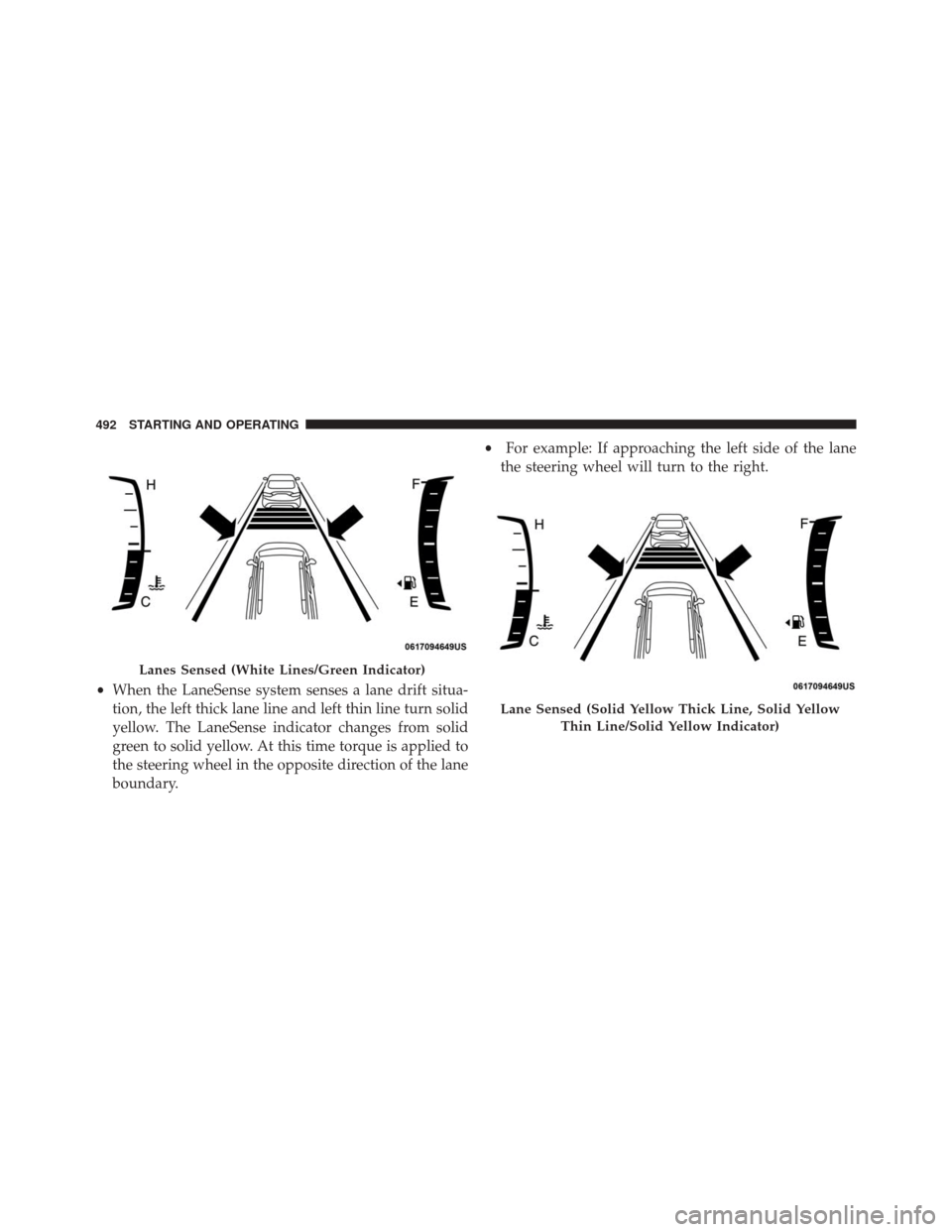
•When the LaneSense system senses a lane drift situa-
tion, the left thick lane line and left thin line turn solid
yellow. The LaneSense indicator changes from solid
green to solid yellow. At this time torque is applied to
the steering wheel in the opposite direction of the lane
boundary. •
For example: If approaching the left side of the lane
the steering wheel will turn to the right.
Lanes Sensed (White Lines/Green Indicator)
Lane Sensed (Solid Yellow Thick Line, Solid Yellow
Thin Line/Solid Yellow Indicator)
492 STARTING AND OPERATING