2017 CHEVROLET MALIBU ECU
[x] Cancel search: ECUPage 356 of 419
Chevrolet Malibu Owner Manual (GMNA-Localizing-U.S./Canada/Mexico-10122664) - 2017 - crc - 5/23/16
Vehicle Care 355
10. Start the vehicle with the goodbattery and run the engine atidle speed for at leastfour minutes.
11 . Tr y t o s t a r t t h e v e h i c l e t h a t h a dthe dead battery. If it will notstart after a few tries, itprobably needs service.
For hybrid vehicles, the engine willonly start if needed after pressingON/RUN/START. The vehicle readylight will come on when thepropulsion system is on and ready.In cold temperatures, the engine willnot run with the hood open. Closethe hood.
Caution
If the jumper cables are
connected or removed in the
wrong order, electrical shorting
may occur and damage the
vehicle. The repairs would not be
covered by the vehicle warranty.
Always connect and remove the
jumper cables in the correct order,
(Continued)
Caution (Continued)
making sure that the cables do
not touch each other or other
metal.
Jumper Cable Removal
Reverse the sequence exactly whenremoving the jumper cables.
After starting the disabled vehicleand removing the jumper cables,allow it to idle for several minutes.
Towing the Vehicle
Caution
Incorrectly towing a disabled
vehicle may cause damage. The
damage would not be covered by
the vehicle warranty.
Do not lash or hook to
suspension components. Use the
proper straps around the tires to
secure the vehicle.
Have the vehicle towed on a wheellift tow truck. A flatbed car carriercould damage the vehicle. Thewheel lift tow truck must raise therear of the vehicle and wheel dolliesmust be used to lift the front wheelsoff the ground.
Consult your dealer or aprofessional towing service if thedisabled vehicle must be towed.
Page 357 of 419
Chevrolet Malibu Owner Manual (GMNA-Localizing-U.S./Canada/Mexico-10122664) - 2017 - crc - 5/23/16
356 Vehicle Care
Recreational Vehicle
Towing
Recreational vehicle towing meanstowing the vehicle behind anothervehicle–such as behind a motorhome. The two most common typesof recreational vehicle towing areknown as dinghy towing and dollytowing. Dinghy towing is towing thevehicle with all four wheels on theground. Dolly towing is towing thevehicle with two wheels on theground and two wheels up on adevice known as a dolly.
Here are some important things toconsider before recreational vehicletowing:
.What is the towing capacity ofthe towing vehicle? Be sure toread the tow vehiclemanufacturer'srecommendations.
.How far will the vehicle betowed? Some vehicles haverestrictions on how far and howlong they can tow.
.Does the vehicle have theproper towing equipment? Seeyour dealer or traileringprofessional for additional adviceand equipmentrecommendations.
.Is the vehicle ready to betowed? Just as preparing thevehicle for a long trip, make surethe vehicle is prepared to betowed.
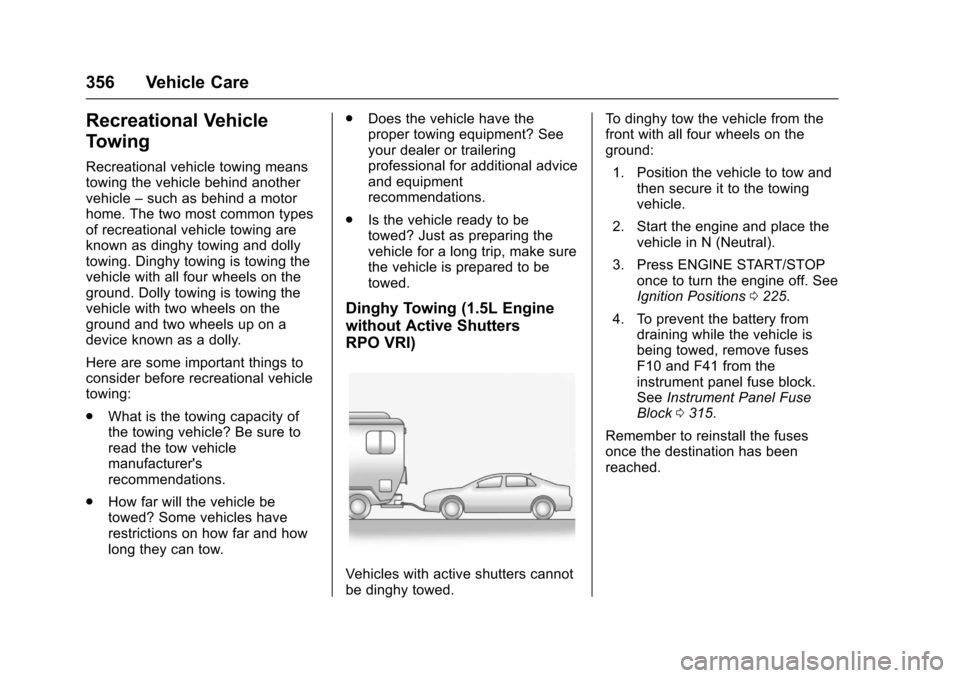
Dinghy Towing (1.5L Engine
without Active Shutters
RPO VRI)
Vehicles with active shutters cannotbe dinghy towed.
To d i n g h y t o w t h e v e h i c l e f r o m t h efront with all four wheels on theground:
1. Position the vehicle to tow andthen secure it to the towingvehicle.
2. Start the engine and place thevehicle in N (Neutral).
3. Press ENGINE START/STOPonce to turn the engine off. SeeIgnition Positions0225.
4. To prevent the battery fromdraining while the vehicle isbeing towed, remove fusesF10 and F41 from theinstrument panel fuse block.SeeInstrument Panel FuseBlock0315.
Remember to reinstall the fusesonce the destination has beenreached.
Page 358 of 419
Chevrolet Malibu Owner Manual (GMNA-Localizing-U.S./Canada/Mexico-10122664) - 2017 - crc - 5/23/16
Vehicle Care 357
Caution
If 105 km/h (65 mph) is exceeded
while towing the vehicle, it could
be damaged. Never exceed
105 km/h (65 mph) while towing
the vehicle.
Caution
Use of a shield mounted in front
of the vehicle grille could restrict
airflow and cause damage to the
transmission. The repairs would
not be covered by the vehicle
warranty. If using a shield, only
use one that attaches to the
towing vehicle.
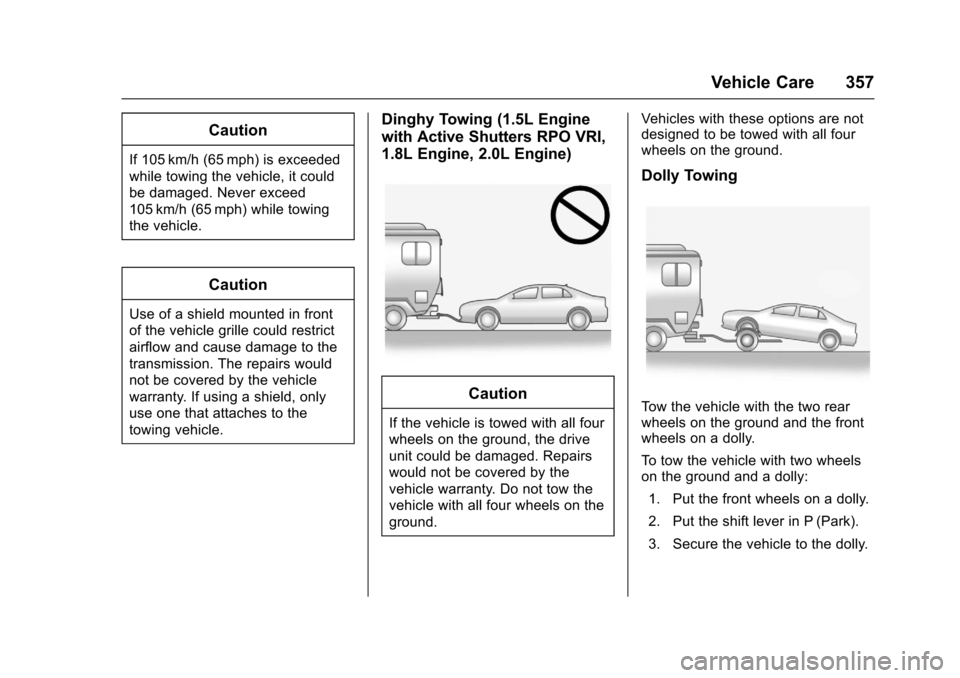
Dinghy Towing (1.5L Engine
with Active Shutters RPO VRI,
1.8L Engine, 2.0L Engine)
Caution
If the vehicle is towed with all four
wheels on the ground, the drive
unit could be damaged. Repairs
would not be covered by the
vehicle warranty. Do not tow the
vehicle with all four wheels on the
ground.
Vehicles with these options are notdesigned to be towed with all fourwheels on the ground.
Dolly Towing
To w t h e v e h i c l e w i t h t h e t w o r e a rwheels on the ground and the frontwheels on a dolly.
To t o w t h e v e h i c l e w i t h t w o w h e e l son the ground and a dolly:
1. Put the front wheels on a dolly.
2. Put the shift lever in P (Park).
3. Secure the vehicle to the dolly.
Page 368 of 419
Chevrolet Malibu Owner Manual (GMNA-Localizing-U.S./Canada/Mexico-10122664) - 2017 - crc - 5/23/16
Vehicle Care 367
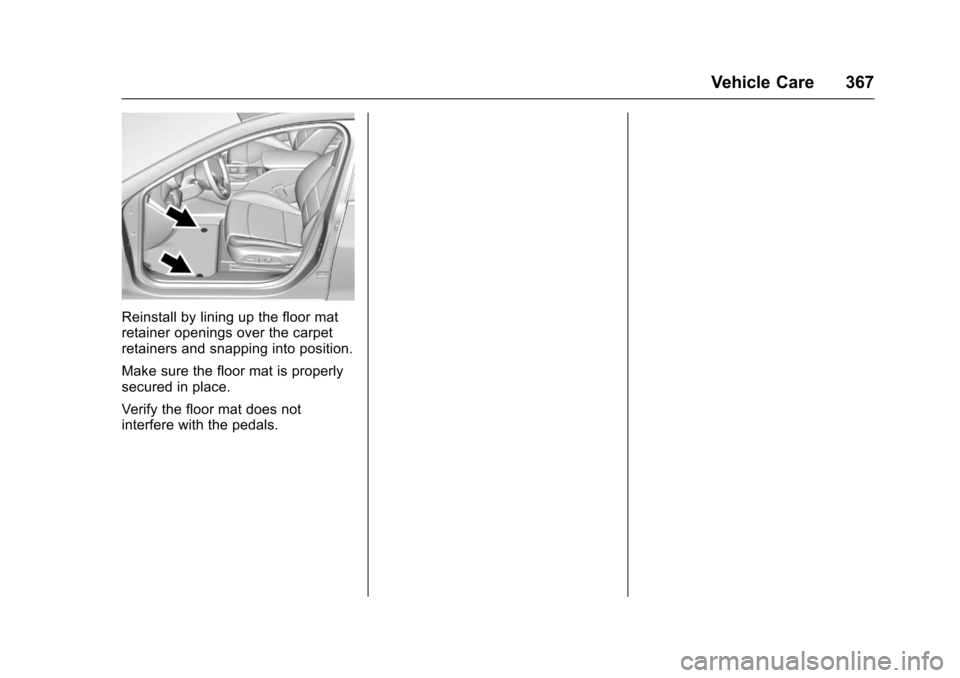
Reinstall by lining up the floor matretainer openings over the carpetretainers and snapping into position.
Make sure the floor mat is properlysecured in place.
Verify the floor mat does notinterfere with the pedals.
Page 389 of 419
Chevrolet Malibu Owner Manual (GMNA-Localizing-U.S./Canada/Mexico-10122664) - 2017 - crc - 5/23/16
388 Customer Information
Services Provided
.Emergency Fuel Delivery:Delivery of enough fuel for thevehicle to get to the nearestservice station.
.Lock-Out Service:Service tounlock the vehicle if you arelocked out. A remote unlock maybe available if you have OnStar.For security reasons, the drivermust present identificationbefore this service is given.
.Emergency Tow from a PublicRoad or Highway:To w t o t h enearest Chevrolet dealer forwarranty service, or if the vehiclewas in a crash and cannot bedriven. Assistance is not givenwhen the vehicle is stuck in thesand, mud, or snow.
.Flat Tire Change:Service tochange a flat tire with the sparetire. The spare tire, if equipped,must be in good condition andproperly inflated. It is the owner'sresponsibility for the repair orreplacement of the tire if it is notcovered by the warranty.
.Battery Jump Start:Service tojump start a dead battery.
.Tr i p I n t e r r u p t i o n B e n e f i t s a n dAssistance:If your trip isinterrupted due to a warrantyevent, incidental expenses maybe reimbursed within thePowertrain warranty period.Items considered are reasonableand customary hotel, meals,rental car, or a vehicle beingdelivered back to the customer,up to 805 km (500 mi).
Services Not Included in
Roadside Assistance
.Impound towing caused byviolation of any laws.
.Legal fines.
.Mounting, dismounting,or changing of snow tires,chains, or other traction devices.
Service is not provided if a vehicleis in an area that is not accessibleto the service vehicle or is not aregularly traveled or maintainedpublic road, which includes ice andwinter roads. Off-road use is notcovered.
Services Specific to
Canadian-Purchased Vehicles
.Fuel Delivery:Reimbursementis up to 7 liters. If available,diesel fuel delivery may berestricted. Propane and otherfuels are not provided throughthis service.
.Lock-Out Service:Vehicleregistration is required.
.Tr i p I n t e r r u p t i o n B e n e f i t s a n dAssistance:Must be over150 km from where your trip wasstarted to qualify.Pre-authorization, originaldetailed receipts, and a copy ofthe repair orders are required.Once authorization has beenreceived, the RoadsideAssistance advisor will help tomake arrangements and explainhow to receive payment.
.Alternative Service:Ifassistance cannot be providedright away, the RoadsideAssistance advisor may givepermission to get localemergency road service. You willreceive payment, up to $100,
Page 398 of 419
Chevrolet Malibu Owner Manual (GMNA-Localizing-U.S./Canada/Mexico-10122664) - 2017 - crc - 5/23/16
OnStar 397
OnStar
OnStar Overview
OnStar Overview . . . . . . . . . . . . . 397
OnStar Services
Emergency . . . . . . . . . . . . . . . . . . . 398Security . . . . . . . . . . . . . . . . . . . . . . 398Navigation . . . . . . . . . . . . . . . . . . . . 399Connections . . . . . . . . . . . . . . . . . . 399Diagnostics . . . . . . . . . . . . . . . . . . . 401
OnStar Additional Information
OnStar AdditionalInformation . . . . . . . . . . . . . . . . . . 402
OnStar Overview
=Voice Command Button
QBlue OnStar Button
>Red Emergency Button
This vehicle may be equipped with acomprehensive, in-vehicle systemthat can connect to an OnStarAdvisor for Emergency, Security,Navigation, Connections, andDiagnostics Services. OnStarservices may require a paidsubscription and data plan. OnStarrequires the vehicle battery andelectrical system, cellular service,and GPS satellite signals to beavailable and operating. OnStar actsas a link to existing emergencyservice providers. OnStar maycollect information about you andyour vehicle, including locationinformation. See OnStar User
Te r m s , P r i v a c y S t a t e m e n t , a n dSoftware Terms for more detailsincluding system limitations atwww.onstar.com (U.S.) orwww.onstar.ca (Canada).
The OnStar system status light isnext to the OnStar buttons. If thestatus light is:
.Solid Green: System is ready.
.Flashing Green: On a call.
.Red: Indicates a problem.
.Off: System is active. PressQ
twice to speak with an OnStarAdvisor.
PressQor call 1-888-4ONSTAR
(1-888-466-7827) to speak to anAdvisor.
Press=to:
.Make a call, end a call,or answer an incoming call.
.Give OnStar Hands-Free Callingvoice commands.
.Give OnStar Turn-by-TurnNavigation voice commands.
Page 399 of 419
Chevrolet Malibu Owner Manual (GMNA-Localizing-U.S./Canada/Mexico-10122664) - 2017 - crc - 5/23/16
398 OnStar
.Obtain and customize the Wi-Fi®
hotspot name or SSID andpassword, if equipped.
PressQto connect to an
Advisor to:
.Verify account information orupdate contact information.
.Get driving directions.
.Receive a Diagnostic check ofthe vehicle's key operatingsystems.
.Receive Roadside Assistance.
.Manage Wi-Fi Settings,if equipped.
Press>to get a priority connection
to an OnStar Advisor available 24/7to:
.Get help for an emergency.
.Be a Good Samaritan orrespond to an AMBER Alert.
.Get assistance in severeweather or other crisis situationsand find evacuation routes.
OnStar Services
Emergency
Emergency Services require anactive, OnStar service plan(excludes Basic Plan). WithAutomatic Crash Response, built-insensors can automatically alert aspecially trained OnStar Advisorwho is immediately connected in tothe vehicle to help.
Press>for a priority connection to
an OnStar Advisor who can contactemergency service providers, directthem to your exact location, andrelay important information.
With OnStar Crisis Assist, speciallytrained Advisors are available24 hours a day, 7 days a week, toprovide a central point of contact,assistance, and information during acrisis.
With Roadside Assistance, Advisorscan locate a nearby service providerto help with a flat tire, a batteryjump, or an empty gas tank.
Security
If equipped, OnStar provides theseservices:
.With Stolen Vehicle Assistance,OnStar Advisors can use GPS topinpoint the vehicle and helpauthorities quickly recover it.
.With Remote Ignition Block™,if equipped, OnStar can blockthe engine from being restarted.
.With Stolen Vehicle Slowdown®,if equipped, OnStar can workwith law enforcement togradually slow the vehicle down.
Theft Alarm Notification
If equipped, if the doors are lockedand the vehicle alarm sounds, anotification by text, e-mail, or phonecall will be sent. If the vehicle isstolen, an OnStar Advisor can workwith authorities to recover thevehicle.
Page 400 of 419
Chevrolet Malibu Owner Manual (GMNA-Localizing-U.S./Canada/Mexico-10122664) - 2017 - crc - 5/23/16
OnStar 399
Navigation
OnStar navigation requires aspecific OnStar service plan.
PressQto receive Turn-by-Turn
directions or have them sent to thevehicle’snavigationscreen,if equipped.
Turn-by-Turn Navigation
1. PressQto connect to an
Advisor.
2. Request directions to bedownloaded to the vehicle.
3. Follow the voice-guidedcommands.
Using Voice Commands
During a Planned Route
Cancel Route
1. Press=.Systemresponds:
“OnStar ready,”then a tone.
2. Say“Cancel route.”Systemresponds:“Do you want tocancel directions?”
3. Say“Ye s .”System responds:“OK, request completed, thankyou, goodbye.”
Route Preview
1. Press=.Systemresponds:
“OnStar ready,”then a tone.
2. Say“Route preview.”Systemresponds with the next threemaneuvers.
Repeat
1. Press=.Systemresponds:
“OnStar ready,”then a tone.
2. Say“Repeat.”Systemresponds with the last directiongiven, then responds with“OnStar ready,”then a tone.
Get My Destination
1. Press=.Systemresponds:
“OnStar ready,”then a tone.
2. Say“Get my destination.”System responds with theaddress and distance to thedestination, then responds with“OnStar ready,”then a tone.
Send Destination to Vehicle
Subscribers can have directionssent to the vehicle’snavigationscreen, if equipped.
PressQ,thenasktheAdvisorto
download directions to the vehicle’snavigation system, if equipped. Afterthe call ends, the navigation screenwill provide prompts to begin drivingdirections. Routes that are sent tothe navigation screen can only becanceled through the navigationsystem.
See www.onstar.com (U.S.) orwww.onstar.ca (Canada).
Connections
The following OnStar services helpwith staying connected.
For coverage maps, seewww.onstar.com (U.S.) orwww.onstar.ca (Canada).
Ensuring Security
.Change the default passwordsfor the Wi-Fi hotspot andRemoteLink mobile application.Make these passwords different