2017 CHEVROLET EXPRESS CARGO VAN ECU
[x] Cancel search: ECUPage 86 of 346
Chevrolet Express Owner Manual (GMNA-Localizing-U.S./Canada/Mexico-9967827) - 2017 - crc - 5/2/16
Storage 85
Storage
Storage Compartments
Storage Compartments . . . . . . . . 85Front Storage . . . . . . . . . . . . . . . . . . 85
Additional Storage Features
Cargo Tie-Downs . . . . . . . . . . . . . . 85
Storage
Compartments
{Warning
Do not store heavy or sharp
objects in storage compartments.
In a crash, these objects may
cause the cover to open and
could result in injury.
Front Storage
This vehicle may have a frontstorage compartment. It is located atthe center of the instrument panelextension, by the floor. To open thecompartment, pull up on the latch.The compartment will openautomatically.
Storage compartments may also beincluded on the inside of eachfront door.
Additional Storage
Features
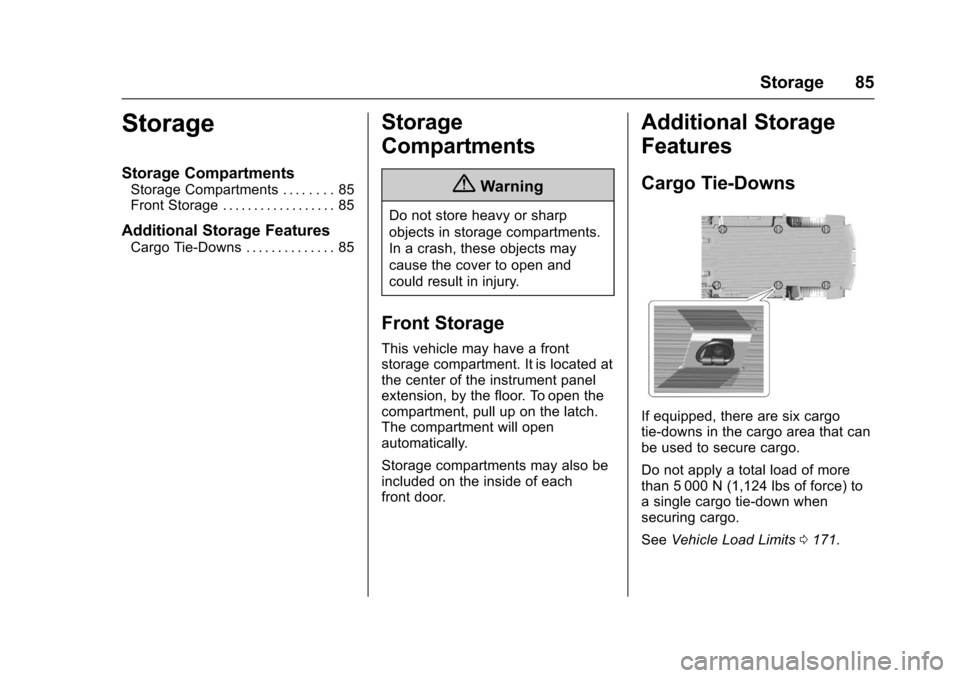
Cargo Tie-Downs
If equipped, there are six cargotie-downs in the cargo area that canbe used to secure cargo.
Do not apply a total load of morethan 5 000 N (1,124 lbs of force) toasinglecargotie-downwhensecuring cargo.
SeeVehicle Load Limits0171.
Page 87 of 346
Chevrolet Express Owner Manual (GMNA-Localizing-U.S./Canada/Mexico-9967827) - 2017 - crc - 5/2/16
86 Storage
{Warning
The child restraint top tether strap
may be damaged by contact with
items in the cargo area. Your child
could be seriously injured or killed
in a collision if the top tether strap
is damaged. Properly secure all
cargo.
{Warning
Properly secure all cargo with
ropes or straps to help prevent it
from sliding or shifting. Do not
place cargo higher than the
seatbacks. In a sudden stop or
collision, unsecured cargo could
cause personal injury. Use
suitable ropes or straps to secure
cargo.
{Warning
Never allow anyone to ride in the
cargo area. It is extremely
dangerous to ride in the cargo
area of a vehicle. In a collision,
people riding in these areas are
more likely to be seriously injured
or killed.
Do not allow people to ride in any
area of the vehicle that is not
equipped with seats and safety
belts. Be sure everyone in the
vehicle is in a seat and using a
safety belt properly.
Page 88 of 346

Chevrolet Express Owner Manual (GMNA-Localizing-U.S./Canada/Mexico-9967827) - 2017 - crc - 5/2/16
Instruments and Controls 87
Instruments and
Controls
Controls
Steering Wheel Adjustment . . . . 88Steering Wheel Controls . . . . . . . 88Horn . . . . . . . . . . . . . . . . . . . . . . . . . . . 89Windshield Wiper/Washer . . . . . . 89Compass . . . . . . . . . . . . . . . . . . . . . . 90Clock . . . . . . . . . . . . . . . . . . . . . . . . . . 92Power Outlets . . . . . . . . . . . . . . . . . 93Cigarette Lighter . . . . . . . . . . . . . . . 94Ashtrays . . . . . . . . . . . . . . . . . . . . . . . 94
Warning Lights, Gauges, and
Indicators
Warning Lights, Gauges, andIndicators . . . . . . . . . . . . . . . . . . . . 94Instrument Cluster . . . . . . . . . . . . . 95Speedometer . . . . . . . . . . . . . . . . . . 96Odometer . . . . . . . . . . . . . . . . . . . . . . 96Trip Odometer . . . . . . . . . . . . . . . . . 96Fuel Gauge . . . . . . . . . . . . . . . . . . . . 96Engine Oil Pressure Gauge . . . . 97Engine Coolant TemperatureGauge . . . . . . . . . . . . . . . . . . . . . . . . 98Voltmeter Gauge . . . . . . . . . . . . . . . 99Safety Belt Reminders . . . . . . . . . 99Airbag Readiness Light . . . . . . . . 99
Airbag On-Off Light . . . . . . . . . . . 100Charging System Light . . . . . . . 101Malfunction Indicator Lamp(Check Engine Light) . . . . . . . . 102Brake System WarningLight . . . . . . . . . . . . . . . . . . . . . . . . 104Antilock Brake System (ABS)Warning Light . . . . . . . . . . . . . . . 104To w / H a u l M o d e L i g h t . . . . . . . . . 1 0 5StabiliTrak®OFF Light . . . . . . . . 105Traction Control System (TCS)/StabiliTrak®Light . . . . . . . . . . . 105Tire Pressure Light . . . . . . . . . . . 106Engine Oil Pressure Light . . . . 106Low Fuel Warning Light . . . . . . 107Security Light . . . . . . . . . . . . . . . . . 107High-Beam On Light . . . . . . . . . . 107Cruise Control Light . . . . . . . . . . 107
Information Displays
Driver InformationCenter (DIC) . . . . . . . . . . . . . . . . 108
Vehicle Messages
Vehicle Messages . . . . . . . . . . . . 112Battery Voltage and ChargingMessages . . . . . . . . . . . . . . . . . . . 112Brake System Messages . . . . . 112Compass Messages . . . . . . . . . . 113Door Ajar Messages . . . . . . . . . . 113
Engine Cooling SystemMessages . . . . . . . . . . . . . . . . . . . 113Engine Oil Messages . . . . . . . . . 114Engine Power Messages . . . . . 114Fuel System Messages . . . . . . . 115Key and Lock Messages . . . . . . 115Lamp Messages . . . . . . . . . . . . . . 115Object Detection SystemMessages . . . . . . . . . . . . . . . . . . . 115Ride Control SystemMessages . . . . . . . . . . . . . . . . . . . 116Airbag System Messages . . . . . 117Security Messages . . . . . . . . . . . 117Service Vehicle Messages . . . . 117Tire Messages . . . . . . . . . . . . . . . . 118Transmission Messages . . . . . . 118Vehicle ReminderMessages . . . . . . . . . . . . . . . . . . . 119
Vehicle Personalization
Vehicle Personalization . . . . . . . 119
Page 93 of 346
Chevrolet Express Owner Manual (GMNA-Localizing-U.S./Canada/Mexico-9967827) - 2017 - crc - 5/2/16
92 Instruments and Controls
Clock
The clock can be set with either theradio turned on or off.
AM-FM Radio
To s e t t h e t i m e :
1. PressHuntil the hour begins
flashing on the display. Pressthis button a second time andthe minutes begin flashing ondisplay.
PressHathirdtimeandthe
12HR or 24HR time formatbegins flashing.
2. While either the hour or the
minutes are flashing, turn thef
knob, on the upper right side ofthe radio, clockwise orcounterclockwise to increase ordecrease the time. While the12HR or 24HR time format is
flashing, turn thefknob
clockwise or counterclockwiseto select the default timesettings.
3. PressHagain until the clock
display stops flashing to set thecurrently displayed time;otherwise, the flashing stopsafter five seconds and thecurrent time displayed isautomatically set.
Radio with CD/MP3
To s e t t h e t i m e a n d d a t e :
1. PressHand the HR, MIN, MM,
DD, and YYYY (hour, minute,month, day, and year) display.
2. Press the softkey under anyone of the tabs to be changed.Every time the softkey ispressed again, the time or thedate if selected, increasesby one.
Another way to increase the
time or date is to press¨
SEEK or\FWD (forward).
3. To decrease, press©SEEK or
sREV. Turn thefknob, onthe upper right side of theradio, to adjust the selectedsetting.
Changing the Time and DateDefault Settings
To c h a n g e t h e t i m e o r d a t e d e f a u l tsettings:
1. PressHand then the softkey
under the forward arrow that iscurrently displayed on the radioscreen until the time 12H(hour) and 24H (hour), and thedate MM/DD (month and day)and DD/MM (day and month)are displayed.
2. Press the softkey under thedesired option.
3. PressHagain to apply the
selected default, or let thescreen time out.
Page 108 of 346
Chevrolet Express Owner Manual (GMNA-Localizing-U.S./Canada/Mexico-9967827) - 2017 - crc - 5/2/16
Instruments and Controls 107
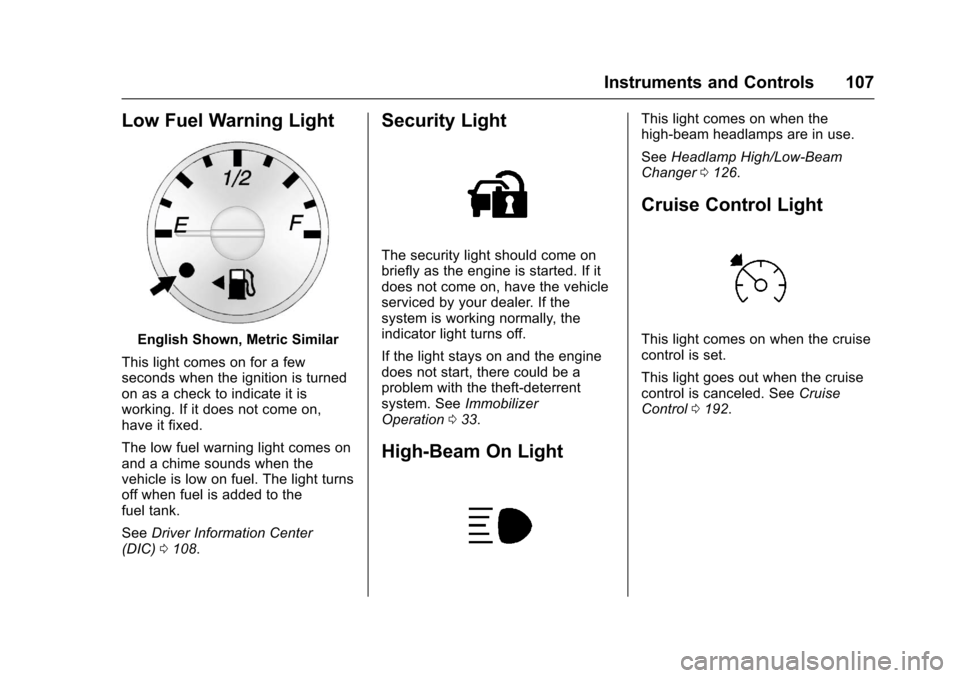
Low Fuel Warning Light
English Shown, Metric Similar
This light comes on for a fewseconds when the ignition is turnedon as a check to indicate it isworking. If it does not come on,have it fixed.
The low fuel warning light comes onand a chime sounds when thevehicle is low on fuel. The light turnsoff when fuel is added to thefuel tank.
SeeDriver Information Center(DIC)0108.
Security Light
The security light should come onbriefly as the engine is started. If itdoes not come on, have the vehicleserviced by your dealer. If thesystem is working normally, theindicator light turns off.
If the light stays on and the enginedoes not start, there could be aproblem with the theft-deterrentsystem. SeeImmobilizerOperation033.
High-Beam On Light
This light comes on when thehigh-beam headlamps are in use.
SeeHeadlamp High/Low-BeamChanger0126.
Cruise Control Light
This light comes on when the cruisecontrol is set.
This light goes out when the cruisecontrol is canceled. SeeCruiseControl0192.
Page 111 of 346
Chevrolet Express Owner Manual (GMNA-Localizing-U.S./Canada/Mexico-9967827) - 2017 - crc - 5/2/16
110 Instruments and Controls
Average Economy
Press3until AVG ECONOMY
displays. This display shows theapproximate average liters per100 kilometers (L/100 km) or milesper gallon (mpg). This number iscalculated based on the number ofL/100 km (mpg) recorded since thelast time this menu item was reset.To r e s e t AV G E C O N O M Y, p r e s s a n d
holdV.Thedisplaywillreturn
to zero.
Fuel Used
Press3until FUEL USED
displays. This display shows thenumber of liters (L) or gallons (gal)of fuel used since the last reset ofthis menu item. To reset the fuel
used information, press and holdV
while FUEL USED is displayed.
Timer
Press3until TIMER displays.
This display can be used as a timer.
To s t a r t t h e t i m e r , p r e s sVwhile
TIMER is displayed. The display willshow the amount of time that has
passed since the timer was lastreset, not including time the ignitionis off. Time will continue to becounted as long as the ignition ison, even if another display is beingshown on the DIC. The timer willrecord up to 99 hours, 59 minutesand 59 seconds (99:59:59) afterwhich the display will return to zero.
To s t o p t h e t i m e r, p r e s sVbriefly
while TIMER is displayed.
To r e s e t t h e t i m e r t o z e r o , p r e s s a n d
holdVwhile TIMER is displayed.
Average Speed
Press3until AVERAGE SPEED
displays. This display shows theaverage speed of the vehicle inkilometers per hour (km/h) or milesper hour (mph). This average iscalculated based on the variousvehicle speeds recorded since thelast reset of this value. To reset the
value, press and holdV.The
display will return to zero.
Digital Tachometer
Press3until
Ta c h o m e t e r # # 0 0 R P M d i s p l a y s .This display shows the enginespeed in revolutions perminute (RPM).
Blank Display
This display shows no information.
Vehicle Information Menu
Items
T:Press this button to scrollthrough the following menu items:
Oil Life
PressTuntil OIL LIFE
REMAINING displays. This displayshows an estimate of the oil'sremaining useful life. If you see99% OIL LIFE REMAINING on thedisplay, that means 99% of thecurrent oil life remains. The engineoil life system will alert you tochange the oil on a scheduleconsistent with your drivingconditions.
Page 118 of 346
Chevrolet Express Owner Manual (GMNA-Localizing-U.S./Canada/Mexico-9967827) - 2017 - crc - 5/2/16
Instruments and Controls 117
.The message could display if thestability system takes longerthan usual to complete itsdiagnostic checks due to drivingconditions.
.The message displays if anengine or vehicle relatedproblem has been detected andthe vehicle needs service. Seeyour dealer.
The message turns off as soon asthe conditions that caused themessage to be displayed are nolonger present.
Airbag System Messages
SERVICE AIRBAG
This message displays if there is aproblem with the airbag system.Ta k e t h e v e h i c l e t o y o u r d e a l e r f o rservice.
Security Messages
SERVICE THEFT DETERRENT
SYSTEM
This message displays when thereis a problem with the theft-deterrentsystem. The vehicle may or may notrestart so you may want to take thevehicle to your dealer before turningoff the engine. SeeImmobilizerOperation033for more information.
WAIT TO START
This message displays briefly whenthe theft-deterrent system hasinitially found incorrect conditionswithin the vehicle and is making adouble check. If your vehicle doesnot start soon after, try to start itagain. If it still does not start, haveyour vehicle serviced by yourdealer.
Service Vehicle Messages
SERVICE A/C SYSTEM
This message displays when theelectronic sensors that control theair conditioning and heatingsystems are no longer working.
Have the climate control systemserviced by your dealer if you noticeadropinheatingandairconditioning efficiency.
SERVICE VEHICLE SOON
This message displays when anon-emissions related malfunctionoccurs. Have the vehicle servicedby your dealer as soon as possible.
STARTING DISABLED
SERVICE THROTTLE
This message displays if the startingof the engine is disabled due to theelectronic throttle control system.Have the vehicle serviced by yourdealer immediately.
This message only appears whilethe ignition is in ON/RUN, and willnot disappear until the problem isresolved.
This message cannot beacknowledged.
Page 120 of 346
Chevrolet Express Owner Manual (GMNA-Localizing-U.S./Canada/Mexico-9967827) - 2017 - crc - 5/2/16
Instruments and Controls 119
GRADE BRAKING ON
This message displays when thegrade braking has been activatedwhile driving on downhill grades.This message will only appear thefirst time the feature is activated inan ignition cycle. SeeTo w / H a u lMode0187,AutomaticTr a n s m i s s i o n0183,andCruiseControl0192.
SERVICE TRANSMISSION
This message displays when thereis a problem with the transmission.See your dealer for service.
TRANSMISSION HOT IDLE
ENGINE
Caution
Do not drive the vehicle while the
transmission fluid is overheating,
or the transmission can be
damaged. This could lead to
costly repairs that would not be
covered by the warranty.
This message displays along with achime if the transmission fluid in thevehicle gets hot. Driving with thetransmission fluid temperature highcan cause damage to the vehicle.Stop the vehicle and let it idle toallow the transmission to cool. Thismessage clears and the chimestops when the fluid temperaturereaches a safe level.
Vehicle Reminder
Messages
ICE POSSIBLE DRIVE
WITH CARE
This message displays when theoutside air temperature is coldenough to create icy roadconditions. Adjust your drivingaccordingly.
Vehicle
Personalization
This vehicle may havecustomization capabilities that allowyou to program certain features toone preferred setting. Customizationfeatures can only be programmed toone setting on the vehicle andcannot be programmed to apreferred setting for two differentdrivers.
All of the customization options maynot be available on your vehicle.Only the options available will bedisplayed on the DIC.
The default settings for thecustomization features were setwhen the vehicle left the factory, butmay have been changed from theirdefault state since then.
The customization preferences areautomatically recalled.
To c h a n g e c u s t o m i z a t i o npreferences, use the followingprocedure.