2017 CHEVROLET EXPRESS CARGO VAN ESP
[x] Cancel search: ESPPage 153 of 346
Chevrolet Express Owner Manual (GMNA-Localizing-U.S./Canada/Mexico-9967827) - 2017 - crc - 5/2/16
152 Infotainment System
can be used while the key is in theON/RUN or ACC/ACCESSORYposition. The range of the Bluetoothsystem can be up to 9.1 m (30 ft).Not all phones support all functions,and not all phones work with thein-vehicle Bluetooth system. Seewww.gm.com/bluetooth for moreinformation on compatible phones inU.S. and Canada only.
Voice Recognition
The Bluetooth system uses voicerecognition to interpret voicecommands to dial phone numbersand name tags.
For additional information, say“Help”while you are in a voicerecognition menu.
Noise :Keep interior noise levels toaminimum.Thesystemmaynotrecognize voice commands if thereis too much background noise.
When to Speak :Ashorttonesounds after the system respondsindicating when it is waiting for avoice command. Wait until the toneand then speak.
How to Speak :Speak clearly in acalm and natural voice.
Audio System
When using the in-vehicle Bluetoothsystem, sound comes through thevehicle's front audio systemspeakers and overrides the audiosystem. Use the audio systemvolume knob, during a call, tochange the volume level. Theadjusted volume level remains inmemory for later calls. To preventmissed calls, a minimum volumelevel is used if the volume is turneddown too low.
Bluetooth Controls
Use the buttons on the steeringwheel to operate the in-vehicleBluetooth system. SeeSteeringWheel Controls088.
b/g:Press to answer incomingcalls, confirm system information,and start speech recognition.
c/x:Press to end a call, rejectacall,orcancelanoperation.
Pairing
ABluetooth-enabledcellphonemust be paired to the Bluetoothsystem and then connected to thevehicle before it can be used. Seethe cell phone manufacturer's userguide for Bluetooth functions beforepairing the cell phone. If a Bluetoothphone is not connected, calls will bemade using OnStar Hands-FreeCalling, if equipped. See OnStar,if equipped.
Pairing Information
.ABluetoothphonewithMP3capability cannot be paired tothe vehicle as a phone and anMP3 player at the same time.
.Up to five cell phones can bepaired to the Bluetooth system.
.The pairing process is disabledwhen the vehicle is moving.
.Pairing only needs to becompleted once, unless thepairing information on the cellphone changes or the cell phoneis deleted from the system.
Page 154 of 346
Chevrolet Express Owner Manual (GMNA-Localizing-U.S./Canada/Mexico-9967827) - 2017 - crc - 5/2/16
Infotainment System 153
.Only one paired cell phone canbe connected to the Bluetoothsystem at a time.
.If multiple paired cell phones arewithin range of the system, thesystem connects to the firstavailable paired cell phone in theorder that they were first pairedto the system. To connect to adifferent paired phone, see“Connecting to a DifferentPhone”later in this section.
Pairing a Phone
1. Press and holdb/gfor
two seconds.
2. Say“Bluetooth.”This commandcan be skipped.
3. Say“Pair.”The systemresponds with instructions andafour-digitPersonalIdentification Number (PIN).The PIN is used in Step 5.
4. Start the pairing process on thecell phone that you want topair. For help with this process,see the cell phonemanufacturer's user guide.
5. Locate the device named“Yo u rVehicle”in the list on the cellphone. Follow the instructionson the cell phone to enter thePIN provided in Step 3. Afterthe PIN is successfully entered,the system prompts you toprovide a name for the pairedcell phone. This name will beused to indicate which phonesare paired and connected tothe vehicle. The systemresponds with“
6. Repeat Steps 1–5topairadditional phones.
Listing All Paired and ConnectedPhones
The system can list all cell phonespaired to it. If a paired cell phone isalso connected to the vehicle, thesystem responds with“is connected”after that phone name.
1. Press and holdb/gfor
two seconds.
2. Say“Bluetooth.”
3. Say“List.”
Deleting a Paired Phone
If the phone name you want todelete is unknown, see“Listing AllPaired and Connected Phones.”
1. Press and holdb/gfor
two seconds.
2. Say“Bluetooth.”
3. Say“Delete.”The system askswhich phone to delete.
4. Say the name of the phone youwant to delete.
Connecting to a Different Phone
To c o n n e c t t o a d i f f e r e n t c e l l p h o n e ,the Bluetooth system looks for thenext available cell phone in theorder in which all the available cellphones were paired. Depending onwhich cell phone you want toconnect to, you may have to usethis command several times.
1. Press and holdb/gfor
two seconds.
2. Say“Bluetooth.”
Page 155 of 346
Chevrolet Express Owner Manual (GMNA-Localizing-U.S./Canada/Mexico-9967827) - 2017 - crc - 5/2/16
154 Infotainment System
3. Say“Change phone.”
.If another cell phone isfound, the response will be“
.If another cell phone is notfound, the original phoneremains connected.
Storing and Deleting Phone
Numbers
The system can store up to 30phone numbers as name tags in theHands-Free Directory that is sharedbetween the Bluetooth and OnStarsystems, if equipped.
The following commands are usedto delete and store phone numbers.
Store :This command will store aphone number, or a group ofnumbers as a name tag.
Digit Store :This command allowsaphonenumbertobestoredasaname tag by entering the digits oneat a time.
Delete :This command is used todelete individual name tags.
Delete All Name Tags :Thiscommand deletes all stored nametags in the Hands-Free CallingDirectory and the OnStarTurn-by-Turn Destinations Directory,if equipped.
Using the“Store”Command
1. Press and holdb/gfor
two seconds.
2. Say“Store.”
3. Say the phone number orgroup of numbers you want tostore all at once with nopauses, then follow thedirections given by the systemto save a name tag for thisnumber.
Using the“Digit Store”Command
If an unwanted number isrecognized by the system, say“Clear”at any time to clear the lastnumber.
To h e a r a l l o f t h e n u m b e r srecognized by the system, say“Ve r i f y”at any time.
1. Press and holdb/gfor
two seconds.
2. Say“Digit Store.”
3. Say each digit, one at a time,that you want to store. Aftereach digit is entered, thesystem repeats back the digit itheard followed by a tone. Afterthe last digit has been entered,say“Store,”and then follow thedirections given by the systemto save a name tag for thisnumber.
Using the“Delete”Command
1. Press and holdb/gfor
two seconds.
2. Say“Delete.”
3. Say the name tag you want todelete.
Using the“Delete All Name Tags”Command
This command deletes all storedname tags in the Hands-FreeCalling Directory and the OnStarTurn-by-Turn Destinations Directory,if equipped.
Page 156 of 346
Chevrolet Express Owner Manual (GMNA-Localizing-U.S./Canada/Mexico-9967827) - 2017 - crc - 5/2/16
Infotainment System 155
To d e l e t e a l l n a m e t a g s :
1. Press and holdb/gfor
two seconds.
2. Say“Delete all name tags.”
Listing Stored Numbers
The list command will list all storednumbers and name tags.
Using the“List”Command
1. Press and holdb/gfor
two seconds.
2. Say“Directory.”
3. Say“Hands-Free Calling.”
4. Say“List.”
Making a Call
Calls can be made using thefollowing commands.
Dial or Call :The dial or callcommand can be usedinterchangeably to dial a phonenumber or a stored name tag.
Digit Dial :This command allows aphone number to be dialed byentering the digits one at a time.
Re-dial :This command is used todial the last number used on the cellphone.
Using the“Dial”or“Call”Command
1. Press and holdb/gfor
two seconds.
2. Say“Dial”or“Call.”
3. Say the entire number withoutpausing, or say the name tag.
Once connected, the person calledwill be heard through the audiospeakers.
Calling Emergency
1. Press and holdb/gfor
two seconds. The systemresponds“Ready,”followed byatone.
2. Say“Dial”or“Call.”
3. Say [emergency number].
4. Say“Dial”or“Call.”
Once connected, the person calledwill be heard through the audiospeakers.
Using the“Digit Dial”Command
The digit dial command allows aphone number to be dialed byentering the digits one at a time.After each digit is entered, thesystem repeats back the digit itheard followed by a tone.
If an unwanted number isrecognized by the system, say“Clear”at any time to clear the lastnumber.
To h e a r a l l o f t h e n u m b e r srecognized by the system, say“Ve r i f y”at any time.
1. Press and holdb/gfor
two seconds.
2. Say“Digit Dial.”
3. Say each digit, one at a time,that you want to dial. Aftereach digit is entered, thesystem repeats back the digit itheard followed by a tone. Afterthe last digit has been entered,say“Dial.”
Once connected, the person calledwill be heard through the audiospeakers.
Page 158 of 346
Chevrolet Express Owner Manual (GMNA-Localizing-U.S./Canada/Mexico-9967827) - 2017 - crc - 5/2/16
Infotainment System 157
Transferring Audio to theBluetooth System from a CellPhone
During a call with the audio on the
cell phone, pressb/g.Theaudio
transfers to the vehicle. If the audiodoes not transfer to the vehicle, usethe audio transfer feature on the cellphone. See your cell phonemanufacturer's user guide for moreinformation.
Voice Pass-Thru
Voice pass-thru allows access to thevoice recognition commands on thecell phone. See your cell phonemanufacturer's user guide to see ifthe cell phone supports this feature.
To a c c e s s c o n t a c t s s t o r e d i n t h e c e l lphone:
1. Press and holdb/gfor
two seconds.
2. Say“Bluetooth.”This commandcan be skipped.
3. Say“Vo i c e .”The systemresponds“OK, accessing
The cell phone's normal promptmessages will go through their cycleaccording to the phone's operatinginstructions.
Dual Tone Multi-Frequency
(DTMF) Tones
The Bluetooth system can sendnumbers and the numbers stored asname tags during a call. You canuse this feature when calling amenu-driven phone system.Account numbers can also bestored for use.
Sending a Number or Name TagDuring a Call
1. Pressb/g.Thesystem
responds“Ready,”followed byatone.
2. Say“Dial.”
3. Say the number or name tagto send.
Clearing the System
Unless information is deleted out ofthe in-vehicle Bluetooth system, itwill be retained indefinitely. Thisincludes all saved name tags in the
phone book and phone pairinginformation. For information on howto delete this information, see theprevious section“Deleting a PairedPhone”and the previous sectionson deleting name tags.
Other Information
The Bluetooth®word mark andlogos are owned by the Bluetooth®
SIG, Inc. and any use of such marksby General Motors is under license.Other trademarks and trade namesare those of their respective owners.
SeeRadio FrequencyStatement0322.
Page 168 of 346
Chevrolet Express Owner Manual (GMNA-Localizing-U.S./Canada/Mexico-9967827) - 2017 - crc - 5/6/16
Driving and Operating 167
Curve Tips
.Ta k e c u r v e s a t a r e a s o n a b l espeed.
.Reduce speed before entering acurve.
.Maintain a reasonable steadyspeed through the curve
.Wait until the vehicle is out ofthe curve before acceleratinggently into the straightaway.
Steering in Emergencies
.There are some situations whensteering around a problem maybe more effective than braking.
.Holding both sides of thesteering wheel allows you to turn180 degrees without removingahand.
.Antilock Brake System (ABS)allows steering while braking.
Off-Road Recovery
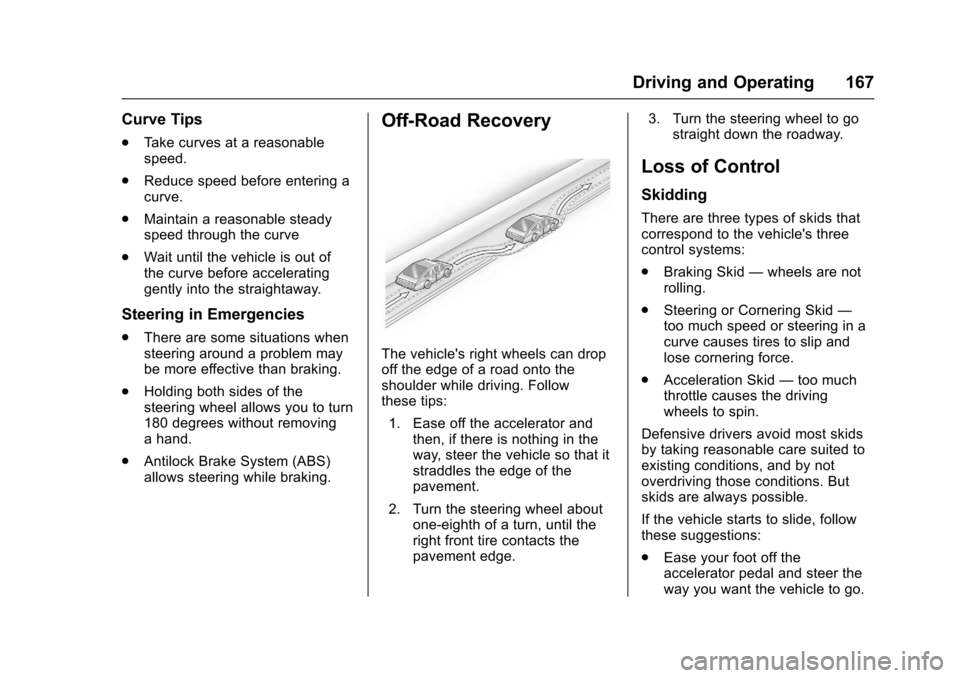
The vehicle's right wheels can dropoff the edge of a road onto theshoulder while driving. Followthese tips:
1. Ease off the accelerator andthen, if there is nothing in theway, steer the vehicle so that itstraddles the edge of thepavement.
2. Turn the steering wheel aboutone-eighth of a turn, until theright front tire contacts thepavement edge.
3. Turn the steering wheel to gostraight down the roadway.
Loss of Control
Skidding
There are three types of skids thatcorrespond to the vehicle's threecontrol systems:
.Braking Skid—wheels are notrolling.
.Steering or Cornering Skid—too much speed or steering in acurve causes tires to slip andlose cornering force.
.Acceleration Skid—too muchthrottle causes the drivingwheels to spin.
Defensive drivers avoid most skidsby taking reasonable care suited toexisting conditions, and by notoverdriving those conditions. Butskids are always possible.
If the vehicle starts to slide, followthese suggestions:
.Ease your foot off theaccelerator pedal and steer theway you want the vehicle to go.
Page 171 of 346
Chevrolet Express Owner Manual (GMNA-Localizing-U.S./Canada/Mexico-9967827) - 2017 - crc - 5/6/16
170 Driving and Operating
when on dry pavement. SeeAntilock Brake System(ABS)0188.
.Allow greater following distanceand watch for slippery spots. Icypatches can occur on otherwiseclear roads in shaded areas.The surface of a curve or anoverpass can remain icy whenthe surrounding roads are clear.Avoid sudden steeringmaneuvers and braking whileon ice.
.Turn off cruise control.
Blizzard Conditions
Stop the vehicle in a safe place andsignal for help. Stay with the vehicleunless there is help nearby.If possible, use RoadsideAssistance. SeeRoadsideAssistance Program0316.Togethelp and keep everyone in thevehicle safe:
.Turn on the hazard warningflashers.
.Tie a red cloth to an outsidemirror.
{Warning
Snow can trap engine exhaust
under the vehicle. This may
cause exhaust gases to get
inside. Engine exhaust contains
carbon monoxide (CO), which
cannot be seen or smelled. It can
cause unconsciousness and even
death.
If the vehicle is stuck in snow:
.Clear snow from the base ofthe vehicle, especially anyblocking the exhaust pipe.
.Open a window about 5 cm(2 in) on the vehicle sidethat is away from the wind,to bring in fresh air.
.Fully open the air outlets onor under the instrumentpanel.
.Adjust the climate controlsystem to circulate the airinside the vehicle and set
(Continued)
Warning (Continued)
the fan speed to the highestsetting. See“ClimateControl Systems.”
For more information about CO,
seeEngine Exhaust0182.
To s a v e f u e l , r u n t h e e n g i n e f o rshort periods to warm the vehicleand then shut the engine off andpartially close the window. Movingabout to keep warm also helps.
If it takes time for help to arrive,when running the engine, push theaccelerator pedal slightly so theengine runs faster than the idlespeed. This keeps the batterycharged to restart the vehicle and tosignal for help with the headlamps.Do this as little as possible, tosave fuel.
Page 173 of 346
Chevrolet Express Owner Manual (GMNA-Localizing-U.S./Canada/Mexico-9967827) - 2017 - crc - 5/6/16
172 Driving and Operating
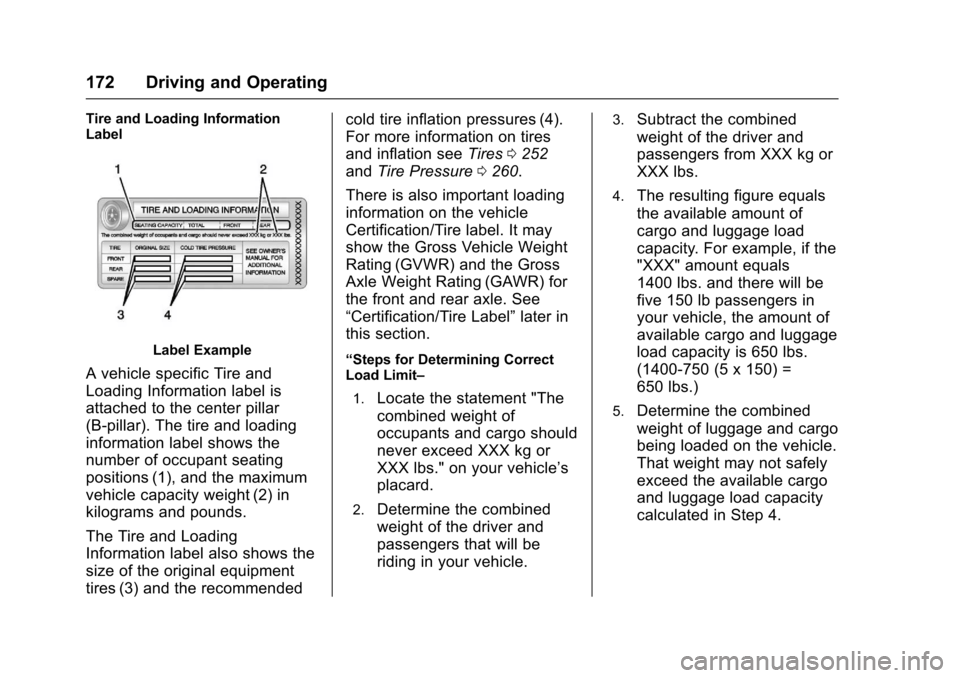
Tire and Loading InformationLabel
Label Example
AvehiclespecificTireand
Loading Information label is
attached to the center pillar
(B-pillar). The tire and loading
information label shows the
number of occupant seating
positions (1), and the maximum
vehicle capacity weight (2) in
kilograms and pounds.
The Tire and Loading
Information label also shows the
size of the original equipment
tires (3) and the recommended
cold tire inflation pressures (4).
For more information on tires
and inflation seeTires0252
andTire Pressure0260.
There is also important loading
information on the vehicle
Certification/Tire label. It may
show the Gross Vehicle Weight
Rating (GVWR) and the Gross
Axle Weight Rating (GAWR) for
the front and rear axle. See
“Certification/Tire Label”later in
this section.
“Steps for Determining CorrectLoad Limit–
1.Locate the statement "The
combined weight of
occupants and cargo should
never exceed XXX kg or
XXX lbs." on your vehicle’s
placard.
2.Determine the combined
weight of the driver and
passengers that will be
riding in your vehicle.
3.Subtract the combined
weight of the driver and
passengers from XXX kg or
XXX lbs.
4.The resulting figure equals
the available amount of
cargo and luggage load
capacity. For example, if the
"XXX" amount equals
1400 lbs. and there will be
five 150 lb passengers in
your vehicle, the amount of
available cargo and luggage
load capacity is 650 lbs.
(1400-750 (5 x 150) =
650 lbs.)
5.Determine the combined
weight of luggage and cargo
being loaded on the vehicle.
That weight may not safely
exceed the available cargo
and luggage load capacity
calculated in Step 4.