2017 CHEVROLET EXPRESS CARGO VAN ESP
[x] Cancel search: ESPPage 97 of 346
Chevrolet Express Owner Manual (GMNA-Localizing-U.S./Canada/Mexico-9967827) - 2017 - crc - 5/2/16
96 Instruments and Controls
If the vehicle has a diesel engine,see the Duramax diesel supplementfor more information.
Speedometer
The speedometer shows the vehiclespeed in kilometers per hour (km/h)and miles per hour (mph).
Odometer
The odometer shows how far thevehicle has been driven, in eitherkilometers or miles.
Trip Odometer
The trip odometer shows how farthe vehicle has been driven sincethe trip odometer was last reset.
The trip odometer is accessed andreset through the Driver InformationCenter (DIC). SeeDriverInformation Center (DIC)0108.
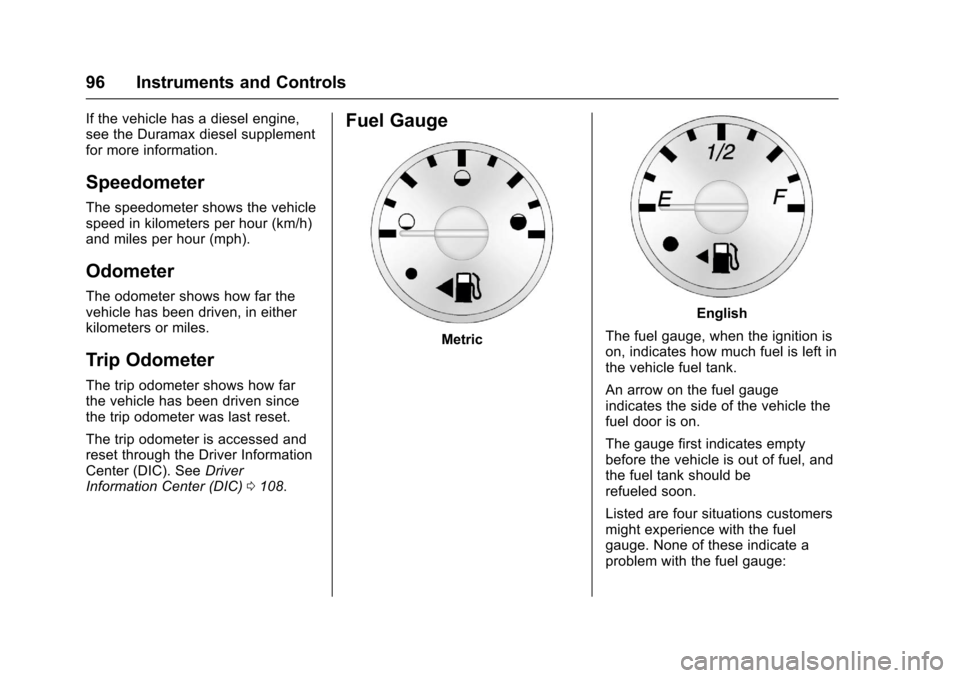
Fuel Gauge
Metric
English
The fuel gauge, when the ignition ison, indicates how much fuel is left inthe vehicle fuel tank.
An arrow on the fuel gaugeindicates the side of the vehicle thefuel door is on.
The gauge first indicates emptybefore the vehicle is out of fuel, andthe fuel tank should berefueled soon.
Listed are four situations customersmight experience with the fuelgauge. None of these indicate aproblem with the fuel gauge:
Page 98 of 346
Chevrolet Express Owner Manual (GMNA-Localizing-U.S./Canada/Mexico-9967827) - 2017 - crc - 5/2/16
Instruments and Controls 97
.At the gas station, the fuel pumpshuts off before the gaugereads full.
.It takes a little more or less fuelto fill up than the fuel gaugeindicated. For example, thegauge may have indicated thetank was half full, but it actuallytook a little more or less thanhalf the tank's capacity to fillthe tank.
.The gauge moves a little whileturning a corner or speeding up.
.The gauge does not go back toempty when the ignition isturned off.
If the vehicle has a diesel engine,see the Duramax dieselsupplement.
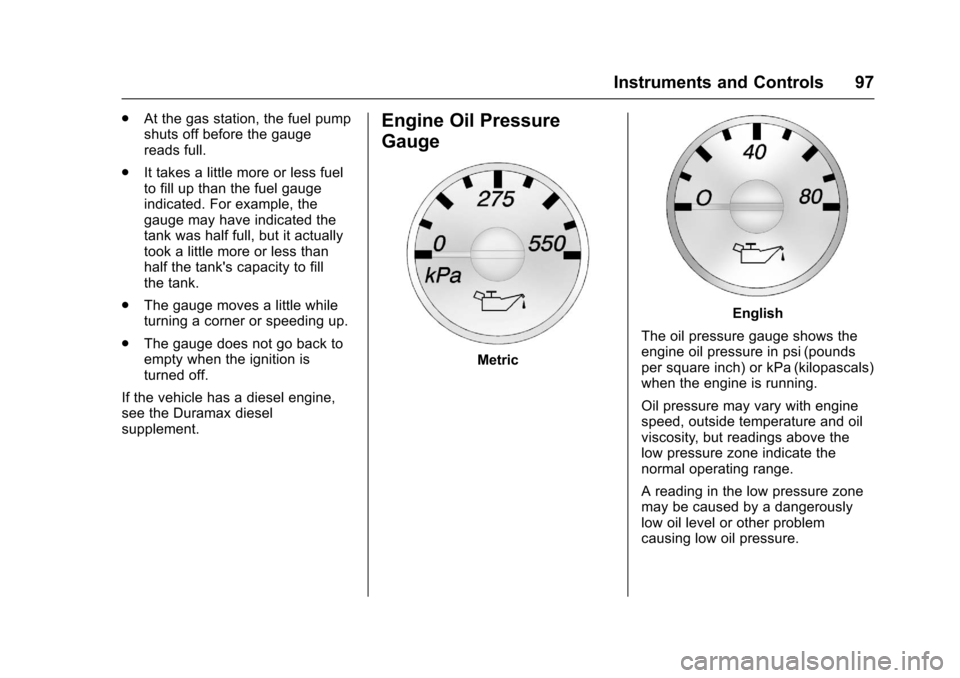
Engine Oil Pressure
Gauge
Metric
English
The oil pressure gauge shows theengine oil pressure in psi (poundsper square inch) or kPa (kilopascals)when the engine is running.
Oil pressure may vary with enginespeed, outside temperature and oilviscosity, but readings above thelow pressure zone indicate thenormal operating range.
Areadinginthelowpressurezonemay be caused by a dangerouslylow oil level or other problemcausing low oil pressure.
Page 111 of 346
Chevrolet Express Owner Manual (GMNA-Localizing-U.S./Canada/Mexico-9967827) - 2017 - crc - 5/2/16
110 Instruments and Controls
Average Economy
Press3until AVG ECONOMY
displays. This display shows theapproximate average liters per100 kilometers (L/100 km) or milesper gallon (mpg). This number iscalculated based on the number ofL/100 km (mpg) recorded since thelast time this menu item was reset.To r e s e t AV G E C O N O M Y, p r e s s a n d
holdV.Thedisplaywillreturn
to zero.
Fuel Used
Press3until FUEL USED
displays. This display shows thenumber of liters (L) or gallons (gal)of fuel used since the last reset ofthis menu item. To reset the fuel
used information, press and holdV
while FUEL USED is displayed.
Timer
Press3until TIMER displays.
This display can be used as a timer.
To s t a r t t h e t i m e r , p r e s sVwhile
TIMER is displayed. The display willshow the amount of time that has
passed since the timer was lastreset, not including time the ignitionis off. Time will continue to becounted as long as the ignition ison, even if another display is beingshown on the DIC. The timer willrecord up to 99 hours, 59 minutesand 59 seconds (99:59:59) afterwhich the display will return to zero.
To s t o p t h e t i m e r, p r e s sVbriefly
while TIMER is displayed.
To r e s e t t h e t i m e r t o z e r o , p r e s s a n d
holdVwhile TIMER is displayed.
Average Speed
Press3until AVERAGE SPEED
displays. This display shows theaverage speed of the vehicle inkilometers per hour (km/h) or milesper hour (mph). This average iscalculated based on the variousvehicle speeds recorded since thelast reset of this value. To reset the
value, press and holdV.The
display will return to zero.
Digital Tachometer
Press3until
Ta c h o m e t e r # # 0 0 R P M d i s p l a y s .This display shows the enginespeed in revolutions perminute (RPM).
Blank Display
This display shows no information.
Vehicle Information Menu
Items
T:Press this button to scrollthrough the following menu items:
Oil Life
PressTuntil OIL LIFE
REMAINING displays. This displayshows an estimate of the oil'sremaining useful life. If you see99% OIL LIFE REMAINING on thedisplay, that means 99% of thecurrent oil life remains. The engineoil life system will alert you tochange the oil on a scheduleconsistent with your drivingconditions.
Page 112 of 346

Chevrolet Express Owner Manual (GMNA-Localizing-U.S./Canada/Mexico-9967827) - 2017 - crc - 5/2/16
Instruments and Controls 111
When the remaining oil life is low,the CHANGE ENGINE OIL SOONmessage will appear on the display.SeeEngine Oil Messages011 4.Yo u s h o u l d c h a n g e t h e o i l a s s o o nas possible. SeeEngine Oil0219.In addition to the engine oil lifesystem monitoring the oil life,additional maintenance isrecommended in the MaintenanceSchedule in this manual. SeeMaintenance Schedule0297.
Remember, you must reset the OILLIFE yourself after each oil change.It will not reset itself. Also, becareful not to reset the OIL LIFEaccidentally at any time other thanwhen the oil has just been changed.It cannot be reset accurately untilthe next oil change. To reset theengine oil life system, seeEngineOil Life System0221.
Park Assist
If the vehicle has the Rear Parking
Assist (RPA) system, pressTuntil
PA R K A S S I S T d i s p l a y s . T h i sdisplay allows the system to beturned on or off. Once in thisdisplay, press to select between ON
or OFF. The RPA systemautomatically turns back on aftereach vehicle start. When the RPAsystem is turned off and the vehicleis shifted out of P (Park), the DICwill display the PARK ASSIST OFFmessage as a reminder that thesystem has been turned off. SeeObject Detection System Messages011 5andParking Assist0197.
Units
PressTuntil UNITS displays. This
display allows you to select betweenmetric or English units ofmeasurement. Once in this display,
pressVto select between METRIC
or ENGLISH units.
Tire Pressure
If the vehicle has the Tire PressureMonitor System (TPMS), thepressure for each tire can be viewedin the DIC. The tire pressure will beshown in either kilopascals (kPa) orpounds per square inch (psi).
PressTuntil the DIC displays
FRONT TIRES PSI (kPa) LEFT ##
RIGHT ##. PressTagain until the
DIC displays REAR TIRESPSI (kPa) LEFT ## RIGHT ##.
If a low tire pressure condition isdetected by the system whiledriving, a message advising you tocheck the pressure in a specific tirewill appear in the display. SeeTirePressure011 8andTireMessages011 8.
If the tire pressure display showsdashes instead of a value, theremay be a problem with the vehicle.If this consistently occurs, see yourdealer for service.
Engine Hours
PressTuntil ENGINE HOURS
displays. This display shows thetotal number of hours the enginehas run.
Relearn Tire Positions
The vehicle may have this display.To a c c e s s t h i s d i s p l a y, t h e v e h i c l emust be in P (Park). If the vehiclehas the Tire Pressure MonitorSystem (TPMS), after rotating thetires or after replacing a tire or
Page 121 of 346
Chevrolet Express Owner Manual (GMNA-Localizing-U.S./Canada/Mexico-9967827) - 2017 - crc - 5/2/16
120 Instruments and Controls
Entering the Feature
Settings Menu
1. Turn the ignition on and placethe vehicle in P (Park).
To a v o i d e x c e s s i v e d r a i n o nthe battery, it is recommendedthat the headlamps areturned off.
2. PressUto enter the feature
settings menu.
If the menu is not available,FEATURE SETTINGSAVA I L A B L E I N PA R K w i l ldisplay. Before entering themenu, make sure the vehicle isin P (Park).
Feature Settings Menu Items
The following are customizationfeatures that allow you to programsettings to the vehicle:
DISPLAY IN ENGLISH
This feature will only display if alanguage other than English hasbeen set. This feature allows you tochange the language in which theDIC messages appear to English.
PressUuntil the PRESSVTO
DISPLAY IN ENGLISH screenappears on the DIC display. Pressthe set/reset button once to displayall DIC messages in English.
LANGUAGE
This feature allows you to select thelanguage in which the DICmessages will appear.
PressUuntil the LANGUAGE
screen appears on the DIC display.
PressVonce to access the settings
for this feature. Then pressUto
scroll through the following settings:
ENGLISH (default) :All messageswill appear in English.
FRANCAIS :All messages willappear in French.
ESPANOL :All messages willappear in Spanish.
ARABIC :All messages will appearin Arabic.
NO CHANGE :No change will bemade to this feature. The currentsetting will remain.
To s e l e c t a s e t t i n g , p r e s sVwhile
the desired setting is displayed onthe DIC. A beep will sound once alanguage has been selected.
AUTO DOOR LOCK
This feature allows you to selectwhen the doors willautomatically lock.
PressUuntil AUTO DOOR LOCK
appears on the DIC display.
PressVonce to access the settings
for this feature. Then pressUto
scroll through the following settings:
SHIFT OUT OF PARK (default) :The doors will automatically lockwhen the vehicle is shifted out ofP(Park).
AT V E H I C L E S P E E D :The doorswill automatically lock when thevehicle speed is above 13 km/h(8 mph) for three seconds.
NO CHANGE :No change will bemade to this feature. The currentsetting will remain.
Page 133 of 346
Chevrolet Express Owner Manual (GMNA-Localizing-U.S./Canada/Mexico-9967827) - 2017 - crc - 5/2/16
132 Infotainment System
Infotainment
System
Introduction
Infotainment . . . . . . . . . . . . . . . . . . 132Theft-Deterrent Feature . . . . . . 133Overview (AM-FM Radio) . . . . . 133Overview (Radio withCD/MP3) . . . . . . . . . . . . . . . . . . . . 135Operation . . . . . . . . . . . . . . . . . . . . . 136
Radio
AM-FM Radio . . . . . . . . . . . . . . . . 138Satellite Radio . . . . . . . . . . . . . . . . 139Radio Reception . . . . . . . . . . . . . . 140Multi-Band Antenna . . . . . . . . . . 141
Audio Players
Avoiding Untrusted MediaDevices . . . . . . . . . . . . . . . . . . . . . 141CD Player . . . . . . . . . . . . . . . . . . . . 141Auxiliary Devices . . . . . . . . . . . . . 146
OnStar System
OnStar System . . . . . . . . . . . . . . . 150
Phone
Bluetooth . . . . . . . . . . . . . . . . . . . . . 151
Introduction
Infotainment
Base radio information is included inthis manual. See the infotainmentmanual for information on otheravailable infotainment systems.
Read the following pages tobecome familiar with the BaseRadio features.
{Warning
Ta k i n g y o u r e y e s o f f t h e r o a d f o r
too long or too often while using
any infotainment feature can
cause a crash. You or others
could be injured or killed. Do not
give extended attention to
infotainment tasks while driving.
Limit your glances at the vehicle
displays and focus your attention
on driving. Use voice commands
whenever possible.
The infotainment system has built-infeatures intended to help avoiddistraction by disabling some
functions when driving. Thesefunctions may gray out when theyare unavailable. Many infotainmentfeatures are also available throughthe instrument cluster and steeringwheel controls.
Before driving:
.Become familiar with theoperation, faceplate buttons, andscreen buttons.
.Set up the audio by presettingfavorite stations, setting thetone, and adjusting thespeakers.
.Set up phone numbers inadvance so they can be calledeasily by pressing a singlebutton or by using a single voicecommand if equipped withBluetooth phone capability.
SeeDefensive Driving0165.
To p l a y t h e i n f o t a i n m e n t s y s t e m w i t hthe ignition off, seeRetainedAccessory Power (RAP)0180.
Page 137 of 346
Chevrolet Express Owner Manual (GMNA-Localizing-U.S./Canada/Mexico-9967827) - 2017 - crc - 5/2/16
136 Infotainment System
10. CD/AUX
.Press to scroll throughselecting the CD or anauxiliary device.
11 .\FWD
.Press and hold to fastforward through a track.
12.sREV
.Press and hold to gobackward fast through atrack.
13.P
.Press to turn theinfotainment system onor off.
.Turn to adjust the volume.
14.¨SEEK
.Seeks or scans to the nextstation.
15.©SEEK
.Seeks or scans to theprevious station.
16. BAND
.Press to scroll through theavailable bands FM1, FM2,AM, or SXM if equipped.
17.H
.Press to set the clockand date.
Operation
Using the Radio
O:Press to turn the system onand off.
Turn clockwise or counterclockwiseto increase or decrease the volume.
4:Press to switch the displaybetween the radio station frequencyand the time. While the ignition isoff, press this button to display thetime. Press to display additional textinformation related to the currentFM-RDS station or MP3 song.Achoiceofadditionalinformationsuch as Channel, Song, Artist, andCAT (category) can display.Continue pressing to highlight the
desired tab, or press the softkeyunder any one of the tabs and theinformation about that tab displays.
Speed Compensated Volume(SCV) :SCV automatically adjustthe radio volume to compensate forroad and wind noise as the vehiclespeed changes while driving, so thatthe volume level stays consistent.
To a c t i v a t e S C V :
1. Set the radio volume to thedesired level.
2. Press the MENU button todisplay the radio setup menu.
3. Press the softkey under theAUTO VOLUM (automaticvolume) tab on the radiodisplay.
4. Press the softkey under thedesired SCV setting (OFF, Low,Med, or High) to select thelevel of radio volumecompensation. The displaytimes out after approximately10 seconds. Each highersetting allows for more radiovolume compensation at fastervehicle speeds.
Page 141 of 346
Chevrolet Express Owner Manual (GMNA-Localizing-U.S./Canada/Mexico-9967827) - 2017 - crc - 5/2/16
140 Infotainment System
button, and steering wheel controls,if the vehicle has this feature. SeeDefensive Driving0165.
FAV :If the vehicle has a FAVbutton, a maximum of 36 stationscan be programmed as favoritesusing the six softkeys below theradio station frequency tabs and byusing the radio favorites pagebutton (FAV button). Press FAV togo through up to six pages offavorites, each having six favoritestations available per page. Eachpage of favorites can contain anycombination of AM, FM, or SXMstations.
The balance/fade and tone settingsthat were previously adjusted, arestored with the favorite stations.
To s t o r e a s t a t i o n a s a f a v o r i t e :
1. Tune to the desired radiostation.
2. Press FAV to display the pagewhere the station is to bestored.
3. Press and hold one of thesix softkeys until a beepsounds. When that softkey ispressed and released, thestation that was set, returns.
4. Repeat the steps for eachsoftkey radio station to bestored as a favorite.
The number of favorites pages canbe set up using the MENU button.To s e t u p t h e n u m b e r o f f a v o r i t e spages:
1. Press MENU to display theradio setup menu.
2. Press the softkey below theFAV 1 - 6 t a b .
3. Select the desired number offavorites pages by pressing thesoftkey below the displayedpage numbers.
4. Press FAV , or let the menutime out, to return to theoriginal main radio screenshowing the radio stationfrequency tabs and to beginthe process of programmingfavorites for the chosennumber of numbered pages.
Radio Reception
Frequency interference and staticcan occur during normal radioreception if items such as cell phonechargers, vehicle convenienceaccessories, and external electronicdevices are plugged into theaccessory power outlet. If there isinterference or static, unplug theitem from the accessory poweroutlet.
AM
The range for most AM stations isgreater than for FM, especially atnight. The longer range can causestation frequencies to interfere witheach other. For better radioreception, most AM radio stationsboost the power levels during theday, and then reduce these levelsduring the night. Static can alsooccur when things like storms andpower lines interfere with radioreception. When this happens, tryreducing the treble on the radio.