2017 CHEVROLET EXPRESS CARGO VAN fuel
[x] Cancel search: fuelPage 98 of 346
Chevrolet Express Owner Manual (GMNA-Localizing-U.S./Canada/Mexico-9967827) - 2017 - crc - 5/2/16
Instruments and Controls 97
.At the gas station, the fuel pumpshuts off before the gaugereads full.
.It takes a little more or less fuelto fill up than the fuel gaugeindicated. For example, thegauge may have indicated thetank was half full, but it actuallytook a little more or less thanhalf the tank's capacity to fillthe tank.
.The gauge moves a little whileturning a corner or speeding up.
.The gauge does not go back toempty when the ignition isturned off.
If the vehicle has a diesel engine,see the Duramax dieselsupplement.
Engine Oil Pressure
Gauge
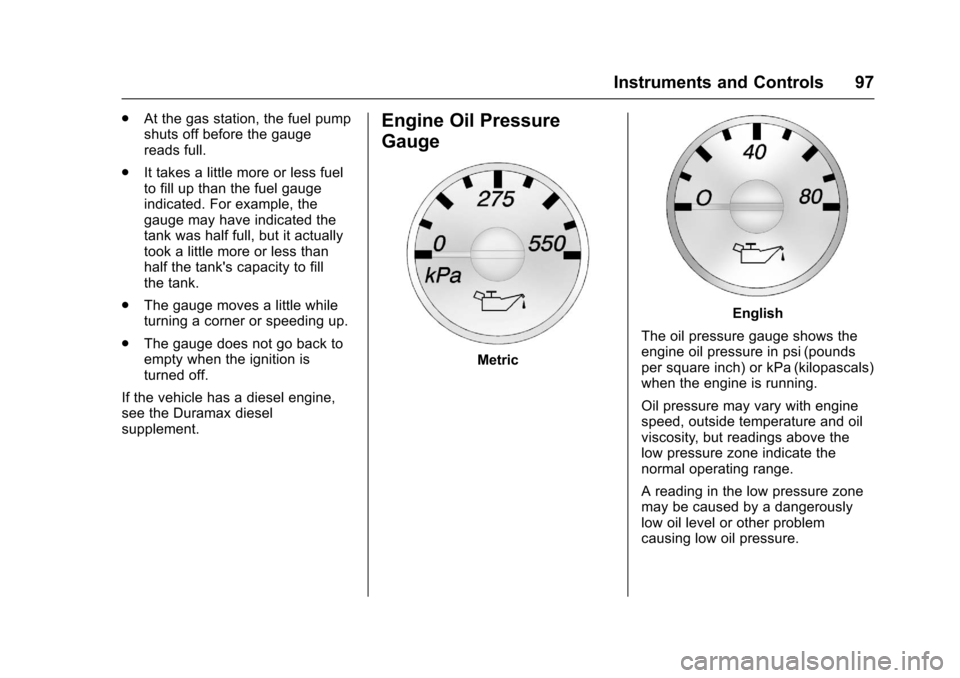
Metric
English
The oil pressure gauge shows theengine oil pressure in psi (poundsper square inch) or kPa (kilopascals)when the engine is running.
Oil pressure may vary with enginespeed, outside temperature and oilviscosity, but readings above thelow pressure zone indicate thenormal operating range.
Areadinginthelowpressurezonemay be caused by a dangerouslylow oil level or other problemcausing low oil pressure.
Page 103 of 346

Chevrolet Express Owner Manual (GMNA-Localizing-U.S./Canada/Mexico-9967827) - 2017 - crc - 5/2/16
102 Instruments and Controls
Center (DIC) can also appear. SeeBattery Voltage and ChargingMessages011 2for moreinformation. This light could indicatethat there are problems with agenerator drive belt, or that there isan electrical problem. Have itchecked right away. If the vehiclemust be driven a short distance withthe light on, turn off accessories,such as the radio and airconditioner.
Malfunction Indicator
Lamp (Check Engine
Light)
This light is part of the vehicle’semission control on-boarddiagnostic system. If this light is onwhile the engine is running, amalfunction has been detected andthe vehicle may require service. Thelight should come on to show that itis working when the ignition is inON/RUN and the engine is notrunning. SeeIgnitionPositions0176.
Malfunctions are often indicated bythe system before any problem isnoticeable. Being aware of the lightand seeking service promptly whenit comes on may prevent damage.
Caution
If the vehicle is driven continually
with this light on, the emission
control system may not work as
well, the fuel economy may be
lower, and the vehicle may not
run smoothly. This could lead to
costly repairs that might not be
covered by the vehicle warranty.
Caution
Modifications to the engine,
transmission, exhaust, intake,
or fuel system, or the use of
replacement tires that do not
meet the original tire
specifications, can cause this light
to come on. This could lead to
costly repairs not covered by the
vehicle warranty. This could also
affect the vehicle’sabilitytopass
an Emissions Inspection/
Maintenance test. See
Accessories and
Modifications0216.
If the light is flashing :Amalfunction has been detected thatcould damage the emission controlsystem and increase vehicleemissions. Diagnosis and servicemay be required.
To h e l p p r e v e n t d a m a g e , r e d u c evehicle speed and avoid hardaccelerations and uphill grades.
Page 104 of 346

Chevrolet Express Owner Manual (GMNA-Localizing-U.S./Canada/Mexico-9967827) - 2017 - crc - 5/2/16
Instruments and Controls 103
If towing a trailer, reduce theamount of cargo being hauled assoon as possible.
If the light continues to flash, find asafe place to park. Turn the vehicleoff and wait at least 10 secondsbefore restarting the engine. If thelight is still flashing, follow theprevious guidelines and see yourdealer for service as soon aspossible.
If the light is on steady :Amalfunction has been detected.Diagnosis and service may berequired.
Check the following:
.Alooseormissingfuelcapmaycause the light to come on. SeeFilling the Tank0200.Afewdriving trips with the capproperly installed may turn thelight off.
.Poor fuel quality can causeinefficient engine operation andpoor driveability, which may goaway once the engine is warmedup. If this occurs, change thefuel brand. It may require at
least one full tank of the properfuel to turn the light off. SeeFuel0198.
If the light remains on, see yourdealer.
Emissions Inspection and
Maintenance Programs
If the vehicle requires an EmissionsInspection/Maintenance test, thetest equipment will likely connect tothe vehicle's Data LinkConnector (DLC).
The DLC is under the instrumentpanel to the left of the steeringwheel. Connecting devices that arenot used to perform an EmissionsInspection/Maintenance test or toservice the vehicle may affectvehicle operation. SeeAdd-OnElectrical Equipment0212.Seeyour dealer if assistance is needed.
The vehicle may not passinspection if:
.The light is on when the engineis running.
.The light does not come onwhen the ignition is in ON/RUNwhile the engine is off.
.Critical emission control systemshave not been completelydiagnosed. If this happens, thevehicle would not be ready forinspection and might requireseveral days of routine drivingbefore the system is ready forinspection. This can happen ifthe 12-volt battery has recentlybeen replaced or run down, or ifthe vehicle has been recentlyserviced.
See your dealer if the vehicle willnot pass or cannot be made readyfor the test.
Page 108 of 346
Chevrolet Express Owner Manual (GMNA-Localizing-U.S./Canada/Mexico-9967827) - 2017 - crc - 5/2/16
Instruments and Controls 107
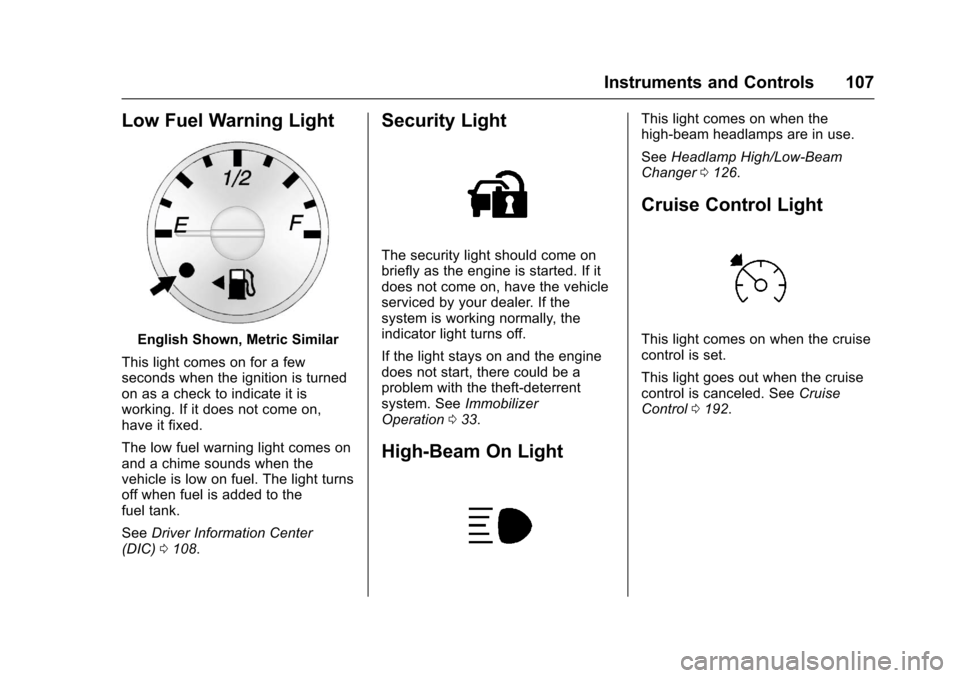
Low Fuel Warning Light
English Shown, Metric Similar
This light comes on for a fewseconds when the ignition is turnedon as a check to indicate it isworking. If it does not come on,have it fixed.
The low fuel warning light comes onand a chime sounds when thevehicle is low on fuel. The light turnsoff when fuel is added to thefuel tank.
SeeDriver Information Center(DIC)0108.
Security Light
The security light should come onbriefly as the engine is started. If itdoes not come on, have the vehicleserviced by your dealer. If thesystem is working normally, theindicator light turns off.
If the light stays on and the enginedoes not start, there could be aproblem with the theft-deterrentsystem. SeeImmobilizerOperation033.
High-Beam On Light
This light comes on when thehigh-beam headlamps are in use.
SeeHeadlamp High/Low-BeamChanger0126.
Cruise Control Light
This light comes on when the cruisecontrol is set.
This light goes out when the cruisecontrol is canceled. SeeCruiseControl0192.
Page 109 of 346

Chevrolet Express Owner Manual (GMNA-Localizing-U.S./Canada/Mexico-9967827) - 2017 - crc - 5/2/16
108 Instruments and Controls
Information Displays
Driver Information
Center (DIC)
This vehicle has a DIC.
All messages will appear in the DICdisplay at the bottom of theinstrument cluster.
The DIC comes on when the ignitionis on. After a short delay, the DICwill display the information that waslast displayed before the enginewas turned off.
The DIC displays trip, fuel, andvehicle system information, andwarning messages if a systemproblem is detected.
If the vehicle has these features, theDIC also displays the compassdirection and the outside airtemperature when viewing the tripand fuel information. The compassdirection appears on the top rightcorner of the DIC display. Theoutside air temperatureautomatically appears in the bottomright corner of the DIC display.
If there is a problem with the systemthat controls the temperaturedisplay, the numbers will bereplaced with dashes. If this occurs,have the vehicle serviced by yourdealer.
If the vehicle has a diesel engine,see the Duramax dieselsupplement.
DIC Operation and Displays
The DIC has different displayswhich can be accessed by pressingthe DIC buttons on the instrumentpanel, next to the instrument cluster.
DIC Buttons
The buttons are the trip/fuel, vehicleinformation, customization, and set/reset buttons. The button functionsare detailed in the following pages.
3:Press this button to displaythe odometer, trip odometers, fuelrange, average economy, fuel used,timer, average speed, and digitaltachometer.
T:Press this button to display theoil life, rear park assist, units, tirepressure readings for vehicles withthe Tire Pressure MonitorSystem (TPMS), engine hours, TirePressure Monitor System (TPMS)programming for vehicles with theTPMS and without a RemoteKeyless Entry (RKE) transmitter, andcompass zone and compasscalibration on vehicles with thisfeature.
U:Press this button to customizethe feature settings on the vehicle.SeeVehicle Personalization011 9for more information.
V:Press this button to set or resetcertain functions and to turn off oracknowledge messages on the DIC.
Page 110 of 346
Chevrolet Express Owner Manual (GMNA-Localizing-U.S./Canada/Mexico-9967827) - 2017 - crc - 5/2/16
Instruments and Controls 109
Trip/Fuel Menu Items
3:Press this button to scrollthrough the following menu items:
Odometer
Press3until XX km (mi)
displays. This display shows thedistance the vehicle has beendriven in either kilometers (km) ormiles (mi).
Trip Odometers
Press3until A or B displays.
This display shows the currentdistance traveled in eitherkilometers (km) or miles (mi) sincethe last reset for each trip odometer.Both trip odometers can be used atthe same time.
Each trip odometer can be reset to
zero separately by pressingVwhile
the desired trip odometer isdisplayed.
The trip odometer has a featurecalled the retro-active reset. Thiscan be used to set the trip odometerto the number of kilometers (miles)driven since the ignition was last
turned on. This can be used if thetrip odometer is not reset at thebeginning of the trip.
To u s e t h e r e t r o - a c t i v e r e s e t f e a t u r e ,
press and holdVfor at least
four seconds. The trip odometer willdisplay the number ofkilometers (km) or miles (mi) drivensince the ignition was last turned onand the vehicle was moving. Oncethe vehicle begins moving, the tripodometer will accumulate mileage.For example, if the vehicle wasdriven 8 km (5 miles) before it isstarted again, and then theretro-active reset feature isactivated, the display will show 8 km(5 miles). As the vehicle beginsmoving, the display will thenincrease to 8.1 km (5.1 miles),8.2 km (5.2 miles), etc.
If the retro-active reset feature isactivated after the vehicle is started,but before it begins moving, thedisplay will show the number ofkilometers (km) or miles (mi) thatwere driven during the last ignitioncycle.
Fuel Range
Press3until FUEL RANGE
displays. This display shows theapproximate number of remainingkilometers (km) or miles (mi) thevehicle can be driven withoutrefueling. The display will showLOW if the fuel level is low.
The fuel range estimate is based onan average of the fuel economyover recent driving history and theamount of fuel remaining in the fueltank. This estimate will change ifdriving conditions change. Forexample, if driving in traffic andmaking frequent stops, this displaymay read one number, but if thevehicle is driven on a freeway, thenumber may change even thoughthe same amount of fuel is in thefuel tank. This is because differentdriving conditions produce differentfuel economies. Generally, freewaydriving produces better fueleconomy than city driving.
If the vehicle is low on fuel, theFUEL LEVEL LOW message will bedisplayed. SeeFuel SystemMessages011 5.
Page 111 of 346
Chevrolet Express Owner Manual (GMNA-Localizing-U.S./Canada/Mexico-9967827) - 2017 - crc - 5/2/16
110 Instruments and Controls
Average Economy
Press3until AVG ECONOMY
displays. This display shows theapproximate average liters per100 kilometers (L/100 km) or milesper gallon (mpg). This number iscalculated based on the number ofL/100 km (mpg) recorded since thelast time this menu item was reset.To r e s e t AV G E C O N O M Y, p r e s s a n d
holdV.Thedisplaywillreturn
to zero.
Fuel Used
Press3until FUEL USED
displays. This display shows thenumber of liters (L) or gallons (gal)of fuel used since the last reset ofthis menu item. To reset the fuel
used information, press and holdV
while FUEL USED is displayed.
Timer
Press3until TIMER displays.
This display can be used as a timer.
To s t a r t t h e t i m e r , p r e s sVwhile
TIMER is displayed. The display willshow the amount of time that has
passed since the timer was lastreset, not including time the ignitionis off. Time will continue to becounted as long as the ignition ison, even if another display is beingshown on the DIC. The timer willrecord up to 99 hours, 59 minutesand 59 seconds (99:59:59) afterwhich the display will return to zero.
To s t o p t h e t i m e r, p r e s sVbriefly
while TIMER is displayed.
To r e s e t t h e t i m e r t o z e r o , p r e s s a n d
holdVwhile TIMER is displayed.
Average Speed
Press3until AVERAGE SPEED
displays. This display shows theaverage speed of the vehicle inkilometers per hour (km/h) or milesper hour (mph). This average iscalculated based on the variousvehicle speeds recorded since thelast reset of this value. To reset the
value, press and holdV.The
display will return to zero.
Digital Tachometer
Press3until
Ta c h o m e t e r # # 0 0 R P M d i s p l a y s .This display shows the enginespeed in revolutions perminute (RPM).
Blank Display
This display shows no information.
Vehicle Information Menu
Items
T:Press this button to scrollthrough the following menu items:
Oil Life
PressTuntil OIL LIFE
REMAINING displays. This displayshows an estimate of the oil'sremaining useful life. If you see99% OIL LIFE REMAINING on thedisplay, that means 99% of thecurrent oil life remains. The engineoil life system will alert you tochange the oil on a scheduleconsistent with your drivingconditions.
Page 116 of 346
Chevrolet Express Owner Manual (GMNA-Localizing-U.S./Canada/Mexico-9967827) - 2017 - crc - 5/2/16
Instruments and Controls 115
stays on, the vehicle should betaken to your dealer for service assoon as possible.
Fuel System Messages
FUEL LEVEL LOW
This message displays and a chimesounds if the fuel level is low. Refuelas soon as possible. SeeFuelGauge096andFuel0198formore information.
TIGHTEN GAS CAP
This message may display alongwith the check engine light on theinstrument cluster if the fuel cap isnot tightened properly. SeeMalfunction Indicator Lamp (CheckEngine Light)0102.Reinstallthefuel cap fully. SeeFilling the Tank0200.Thediagnosticsystemcandetermine if the fuel cap has beenleft off or improperly installed.Alooseormissingfuelcapallowsfuel to evaporate into theatmosphere. A few driving trips withthe cap properly installed shouldturn this light and message off.
Key and Lock Messages
REPLACE BATTERY IN
REMOTE KEY
This message displays if a RemoteKeyless Entry (RKE) transmitterbattery is low. The battery needs tobe replaced in the transmitter. See“Battery Replacement”underRemote Keyless Entry (RKE)System Operation025.
Lamp Messages
AUTOMATIC LIGHT
CONTROL OFF
This message displays when theautomatic headlamps are turned off.SeeExterior Lamp Controls0125.
AUTOMATIC LIGHT
CONTROL ON
This message displays when theautomatic headlamps are turned on.SeeExterior Lamp Controls0125.
TURN SIGNAL ON
This message displays and a chimesounds if a turn signal is left on for1.2 km (0.75 mi). Move the turnsignal lever to the off position.
Object Detection System
Messages
PARK ASST BLOCKED SEE
OWNERS MANUAL
This message displays if there issomething interfering with the RearParking Assist (RPA) system. SeeParking Assist0197.
PARK ASSIST OFF
After the vehicle has been started,this message displays to remind thedriver that the Rear Parking Assist(RPA) system has been turned off.Press the set/reset button or the tripodometer reset stem toacknowledge this message andclear it from the DIC display. To turnthe RPA system back on, seeParking Assist0197.