2017 CHEVROLET COLORADO ECU
[x] Cancel search: ECUPage 126 of 419
Chevrolet Colorado Owner Manual (GMNA-Localizing-U.S./Canada/Mexico-10122675) - 2017 - crc - 8/22/16
Instruments and Controls 125
Security Light
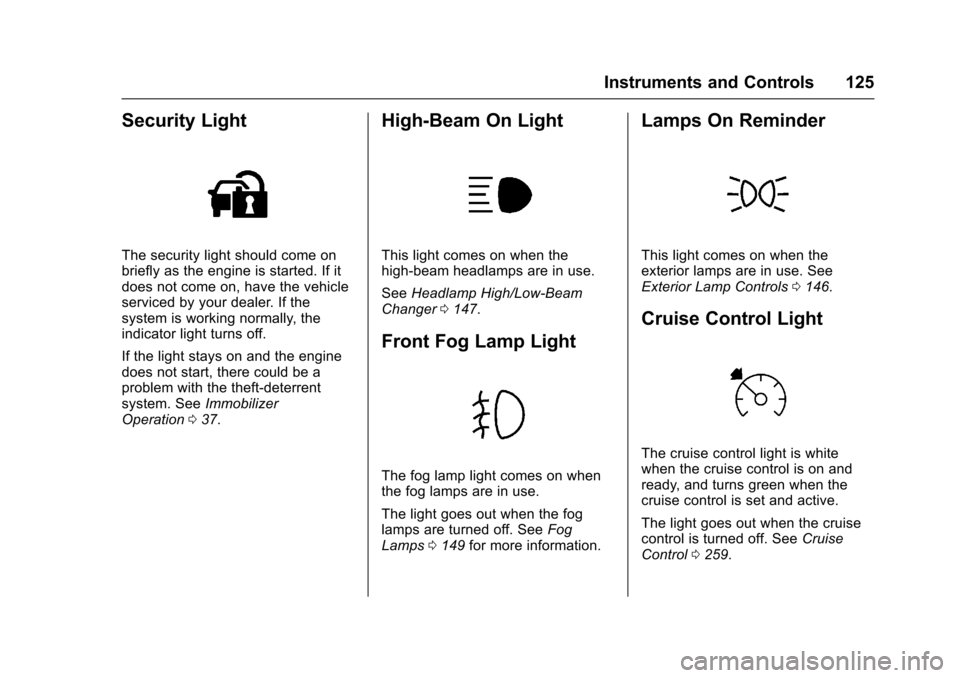
The security light should come onbriefly as the engine is started. If itdoes not come on, have the vehicleserviced by your dealer. If thesystem is working normally, theindicator light turns off.
If the light stays on and the enginedoes not start, there could be aproblem with the theft-deterrentsystem. SeeImmobilizerOperation037.
High-Beam On Light
This light comes on when thehigh-beam headlamps are in use.
SeeHeadlamp High/Low-BeamChanger0147.
Front Fog Lamp Light
The fog lamp light comes on whenthe fog lamps are in use.
The light goes out when the foglamps are turned off. SeeFogLamps0149for more information.
Lamps On Reminder
This light comes on when theexterior lamps are in use. SeeExterior Lamp Controls0146.
Cruise Control Light
The cruise control light is whitewhen the cruise control is on andready, and turns green when thecruise control is set and active.
The light goes out when the cruisecontrol is turned off. SeeCruiseControl0259.
Page 127 of 419

Chevrolet Colorado Owner Manual (GMNA-Localizing-U.S./Canada/Mexico-10122675) - 2017 - crc - 8/22/16
126 Instruments and Controls
Door Ajar Light (Uplevel
Cluster)
This light comes on when a door isopen or not securely latched. Beforedriving, check that all doors areproperly closed.
Information Displays
Driver Information Center
(DIC) (Base Level)
The DIC displays information aboutyour vehicle. It also displayswarning messages if a systemproblem is detected. SeeVehicleMessages0132.Allmessagesappear in the DIC display in thecenter of the instrument cluster.
DIC Operation and Displays
The DIC has different displayswhich can be accessed by using theDIC buttons on the turn signal lever.
DIC Buttons
1.SET/CLR:Press to set,or press and hold to clear, themenu item displayed.
2.wx:Use the band to scroll
through the items ineach menu.
3.MENU:Press to display theTrip/Fuel Menu, the VehicleInformation Menu, and theECO Menu. This button is alsoused to return to or exit the lastscreen displayed on the DIC.
If the vehicle has a diesel engine,see the Duramax diesel supplementfor additional DIC pages.
Trip/Fuel Menu (TRIP) Items
Press MENU on the turn signallever until the TRIP menu displays.
Usewxto scroll through the
menu items. Not all items areavailable on every vehicle. Thefollowing is a list of all possiblemenu items:
Digital Speed :Displays how fastthe vehicle is moving in eitherkilometers per hour (km/h) or milesper hour (mph). The speedometercannot be reset.
Page 128 of 419
Chevrolet Colorado Owner Manual (GMNA-Localizing-U.S./Canada/Mexico-10122675) - 2017 - crc - 8/22/16
Instruments and Controls 127
Tr i p 1 o r Tr i p 2 , Av e r a g e F u e lEconomy :Displays the currentdistance traveled, in eitherkilometers (km) or miles (mi), fromthe last reset for the trip odometer.The trip odometer can be reset tozero by pressing and holding theSET/CLR button while the tripodometer display is showing.
Also displays the approximateaverage liters per 100 kilometers(L/100 km) or miles per gallon(mpg). This number is based on thenumber of L/100 km (mpg) recordedsince the last time this menu itemwas reset. This number reflects onlythe approximate average fueleconomy that the vehicle has rightnow, and will change as drivingconditions change. Reset theaverage consumption by pressingSET/CLR when it is displayed.
Fuel Range :Displays theapproximate distance the vehiclecan be driven without refueling. Thefuel range estimate is based on anaverage of the vehicle's fueleconomy over recent driving history
and the amount of fuel remaining inthe fuel tank. Fuel range cannot bereset.
Average Vehicle Speed :Displaysthe average vehicle speed of thevehicle in kilometers per hour (km/h)or miles per hour (mph). Thisaverage is based on the variousvehicle speeds recorded since thelast reset. Reset the average speedby pressing SET/CLR when it isdisplayed.
Timer :To s t a r t t h e t i m e r , p r e s sSET/CLR while Timer is displayed.The display will show the amount oftime that has passed since the timerwas last reset, not including time theignition is off. Time will continue tobe counted as long as the ignition ison, even if another display is beingshown on the DIC. The timer willrecord up to 99 hours, 59 minutes,and 59 seconds (99:59:59) afterwhich the display will return to zero.To s t o p t h e t i m e r, p r e s s S E T / C L Rbriefly while Timer is displayed. Toreset the timer to zero, press andhold SET/CLR.
Navigation :Used for the OnStarTurn-by-Turn guidance. SeeOnStarOverview0397.
Blank Display :Displays noinformation.
Vehicle Information Menu
(VEHICLE) Items
Press MENU on the turn signallever until the VEHICLE menu is
displayed. Usewxto scroll
through the menu items. Not allitems are available on every vehicle.The following is a list of all possiblemenu items:
Remaining Oil Life :Displays anestimate of the oil's remaining usefullife. If REMAINING OIL LIFE 99% isdisplayed, that means 99% of thecurrent oil life remains.
When the remaining oil life is low,the CHANGE ENGINE OIL SOONmessage will appear on the display.SeeEngine Oil Messages0134.The oil should be changed as soonas possible. SeeEngine Oil0286.In addition to the engine oil lifesystem monitoring the oil life,additional maintenance is
Page 129 of 419
Chevrolet Colorado Owner Manual (GMNA-Localizing-U.S./Canada/Mexico-10122675) - 2017 - crc - 8/22/16
128 Instruments and Controls
recommended in the MaintenanceSchedule in this manual. SeeMaintenance Schedule0366.
The Oil Life display must be resetafter each oil change. Do not resetthe Oil Life display accidentally atany time other than when the oil hasjust been changed. It cannot bereset accurately until the next oilchange. To reset the engine oil lifesystem, seeEngine Oil LifeSystem0288.
Oil Pressure :Oil pressure isdisplayed in either kilopascal (kPa)or in pounds per square inch (psi).
Tire Pressure :Displays a vehiclewith the approximate pressures ofall four tires. Tire pressure isdisplayed in either kilopascal (kPa)or in pounds per square inch (psi).SeeTire Pressure Monitor System0325andTire Pressure MonitorOperation0326.
Battery Voltage :Displays thecurrent battery voltage, if equipped.Battery voltage changes are normalwhile driving. SeeCharging SystemLight011 8.Ifthereisaproblemwith the battery charging system,
the DIC will display a message. SeeBattery Voltage and ChargingMessages0132.
Engine Hours :Shows the totalnumber of hours the engine has run.
Tr a n s m i s s i o n F l u i dTe m p e r a t u r e :Shows thetemperature of the automatictransmission fluid in either degreesCelsius (°C) or degreesFahrenheit (°F).
Tr a i l e r B r a k e ( I f E q u i p p e d ) :TRAILER GAIN shows the trailergain setting. This setting can beadjusted from 0.0 to 10.0 with eitheratrailerconnectedordisconnected.
OUTPUT shows the power output tothe trailer anytime a trailer withelectric brakes is connected. Outputis displayed as a bar graph. Dashesmay appear in the OUTPUT displayif a trailer is not connected.
Units :Movewxto change
between Metric or US when the Unitdisplay is active. Press SET/CLR toconfirm the setting. This will changethe displays on the DIC to the typeof measurements you select.
ECO Drive Assist Menu (ECO)
Items
This menu is only available on somevehicles. Press MENU on the turnsignal lever until the ECO menu is
displayed. Usewxto scroll
through the menu items. Not allitems are available on every vehicle.The following is a list of all possiblemenu items:
Best Average Fuel Economy :Thebottom displays the best averagefuel economy (AFE) that is achievedfor a selected distance. The topdisplays a running average of fueleconomy for the most recentlytraveled selected distance. Thecenter bar graph displays theinstantaneous fuel economy.Quickly press the SET/CLR buttonto change the settings for thedistance options.
When viewing best AFE, a severalsecond press and hold of SET/CLRwill reset the best value. The bestvalue will show“---“until theselected distance has beentraveled.
Page 131 of 419
Chevrolet Colorado Owner Manual (GMNA-Localizing-U.S./Canada/Mexico-10122675) - 2017 - crc - 8/22/16
130 Instruments and Controls
Speed :Shows the vehicle speed ineither kilometers per hour (km/h) ormiles per hour (mph).
Tr i p A o r Tr i p B :Shows thecurrent distance traveled, in eitherkilometers (km) or miles (mi), sincethe trip odometer was last reset.
This also shows the approximateaverage liters per 100 kilometers(L/100 km) or miles pergallon (mpg). This number iscalculated based on the number ofL/100 km (mpg) recorded since thelast time this menu item was reset.This number reflects only theapproximate average fuel economythat the vehicle has right now, andwill change as driving conditionschange.
Press and holdVwhile this display
is active to reset the trip odometerand the average fuel economy. TripAandTripBcanalsoberesetby
pressingpand choosing reset.
Fuel Range :Shows theapproximate distance the vehiclecan be driven without refueling.LOW will be displayed when the
vehicle is low on fuel. The fuelrange estimate is based on anaverage of the vehicle's fueleconomy over recent driving historyand the amount of fuel remaining inthe fuel tank.
Oil Life :Shows an estimate of theoil's remaining useful life.If REMAINING OIL LIFE 99% isdisplayed, that means 99% of thecurrent oil life remains.
When the remaining oil life is low,the CHANGE ENGINE OIL SOONmessage will appear on the display.SeeEngine Oil Messages0134.The oil should be changed as soonas possible. SeeEngine Oil0286.In addition to the engine oil lifesystem monitoring the oil life,additional maintenance isrecommended in the MaintenanceSchedule. SeeMaintenanceSchedule0366.
The Oil Life display must be resetafter each oil change. It will notreset itself. Do not to reset the OilLife display at any time other thanwhen the oil has just been changed.It cannot be reset accurately until
the next oil change. To reset theengine oil life system, press and
holdVfor several seconds while
the Oil Life display is active. SeeEngine Oil Life System0288.
Tire Pressure :Shows theapproximate pressures of all fourtires. Tire pressure is displayed ineither kilopascal (kPa) or in poundsper square inch (psi). If the pressureis low, the value for that tire isshown in amber. SeeTire PressureMonitor System0325andTirePressure Monitor Operation0326.
Instantaneous Fuel Economy :Displays the current fuel economy inliters per 100 kilometers (L/100 km)or miles per gallon (mpg). Thisnumber reflects only theapproximate fuel economy that thevehicle has right now and changesfrequently as driving conditionschange. This display cannot bereset.
Average Vehicle Speed :Displaysthe average vehicle speed of thevehicle in kilometers per hour (km/h)or miles per hour (mph). Thisaverage is based on the various
Page 132 of 419

Chevrolet Colorado Owner Manual (GMNA-Localizing-U.S./Canada/Mexico-10122675) - 2017 - crc - 8/22/16
Instruments and Controls 131
vehicle speeds recorded since thelast reset. Reset the average speed
by pressingVwhen it is displayed.
Fuel Economy :The centerdisplays the approximateinstantaneous fuel economy as anumber and bar graph. Displayedabove the bar graph is a runningaverage of fuel economy for themost recently traveled selecteddistance. Displayed below the bargraph is the best average fueleconomy that has been achieved forthe selected distance. The selecteddistance is displayed at the top ofthe page as“last xxx mi/km.”
Presspto select the distance or
reset best value. Usewandxto
choose the distance and pressV.
Presswandxto select“Reset
Best Score.”PressVto reset the
best average fuel economy. Afterreset, the best value displays“-,-”until the selected distance has beentraveled.
The display provides information onhow current driving behavior affectsthe running average and how wellrecent driving compares to the bestthat has been achieved for theselected distance.
Timer :This display can be used as
atimer.Tostartthetimer,pressV
while this display is active. Thedisplay will show the amount of timethat has passed since the timer was
last reset. To stop the timer, pressV
briefly while this display is activeand the timer is running. To reset
the timer to zero, press and holdV
while this display is active, or presspand select reset.
Speed Limit :Shows signinformation, which comes from aroadway database in the onboardnavigation, if equipped.
Battery Voltage :Displays thecurrent battery voltage, if equipped.Battery voltage changes are normalwhile driving. SeeCharging SystemLight011 8.Ifthereisaproblemwith the battery charging system,
the DIC will display a message. SeeBattery Voltage and ChargingMessages0132.
Oil Pressure :Oil pressure isdisplayed in either kilopascal (kPa)or in pounds per square inch (psi).
Engine Hours :Shows the totalnumber of hours the engine has run.
Tr a n s m i s s i o n F l u i dTe m p e r a t u r e :Shows thetemperature of the automatictransmission fluid in either degreesCelsius (°C) or degreesFahrenheit (°F).
Tr a i l e r B r a k e ( I f E q u i p p e d ) :TRAILER GAIN shows the trailergain setting. This setting can beadjusted from 0.0 to 10.0 with eitheratrailerconnectedordisconnected.
OUTPUT shows the power output tothe trailer anytime a trailer withelectric brakes is connected. Outputis displayed as a bar graph. Dashesmay appear in the OUTPUT displayif a trailer is not connected.
Blank Page :Shows noinformation.
Page 138 of 419

Chevrolet Colorado Owner Manual (GMNA-Localizing-U.S./Canada/Mexico-10122675) - 2017 - crc - 8/22/16
Instruments and Controls 137
Restraints”in the Index forinformation about the importance ofproper restraint use.
This system may not functionproperly if the airbag readiness lightis on. SeeAirbag ReadinessLight011 7.
Security Messages
SERVICE THEFT DETERRENT
SYSTEM
This message displays when thereis a problem with the theft-deterrentsystem. The vehicle may or may notrestart, so you may want to take thevehicle to your dealer before turningoff the engine. SeeImmobilizerOperation037.
Steering System
Messages
STEERING ASSIST IS
REDUCED DRIVE WITH CARE
This message may display if aproblem occurs with the electricpower steering system. If thismessage appears, steering effort
may be slightly higher than normal.The vehicle is still safe to drive. Usecaution while in reduced assistmode. If this message is persistentor appears repeatedly, take thevehicle to your dealer for service.SeeSteering0216.
SERVICE POWER STEERING
This message displays when thereis a problem with electric powersteering. If this message displaysand a reduction in steeringperformance or loss of powersteering assistance is noticed, seeyour dealer. SeeSteering0216.
Starting the Vehicle
Messages
PRESS BRAKE TO START or
PRESS CLUTCH TO START
This message displays whenattempting to start the vehiclewithout first pressing the brake orclutch pedal.
Tire Messages
SERVICE TIRE MONITOR
SYSTEM
If equipped with the Tire PressureMonitor System (TPMS), thismessage displays if a part on thesystem is not working properly. Thetire pressure light also flashes andthen remains on during the sameignition cycle. SeeTire PressureLight0123.Severalconditionsmaycause this message to appear. SeeTire Pressure Monitor Operation0326.Ifthewarningcomesonandstays on, there may be a problemwith the TPMS. See your dealer.
TIRE LEARNING ACTIVE
If equipped with the Tire PressureMonitor System (TPMS), thismessage displays when the systemis relearning the tire positions onyour vehicle. The tire positions mustbe relearned after rotating the tiresor after replacing a tire or sensor.SeeTire Inspection0329,TireRotation0329,Tire PressureMonitor System0325,andTirePressure0323.
Page 161 of 419

Chevrolet Colorado Owner Manual (GMNA-Localizing-U.S./Canada/Mexico-10122675) - 2017 - crc - 8/22/16
160 Infotainment System
displays stating all vehiclecustomization settings will berestored to the factory settings.Select Cancel or Confirm.
Clear All Private Data (IfEquipped) :This option clears allprivate information from the vehicle.Select Clear All Private Data. SelectCancel or Confirm.
Restore Radio Settings :Thisoption will restore factory radiosettings. Select Restore RadioSettings. A screen displays statingall personalized radio settings willbe restored back to the factorysettings. Select Cancel or Confirm.
English and Metric Unit
Conversion
To c h a n g e t h e d i s p l a y u n i t s b e t w e e nEnglish and metric units, seeDriverInformation Center (DIC) (BaseLevel)0126orDriver InformationCenter (DIC) (Uplevel)0129orInstrument Cluster (Base Level)011 0orInstrument Cluster(Uplevel)011 2.
Home Page (Base Radio
with Touchscreen)
Touchscreen Buttons
To u c h s c r e e n b u t t o n s s h o w o n t h escreen when available. When afunction is unavailable, the buttonmay gray out. When a function isselected, the button may highlight.
Home Page Features
Press{to go to the Home Page.
Audio :To u c h t o s e l e c t A M , F M ,SXM (if equipped), USB/iPod/Bluetooth Audio, or AUX. SeeAM-FM Radio (Base Radio)0161orAM-FM Radio (Base Radio withTo u c h s c r e e n )0163,Satellite Radio(Base Radio)0164orSatelliteRadio (Base Radio withTo u c h s c r e e n )0165,USB Port(Base Radio)0170orUSB Port(Base Radio with Touchscreen)0173,Bluetooth Audio0180,orAuxiliary Jack0179.
Gallery :To u c h t o v i e w a p i c t u r e .SeeUSB Port (Base Radio)0170orUSB Port (Base Radio withTo u c h s c r e e n )0173.
Phone :To u c h t o a c t i v a t e t h ephone features (if equipped). SeeBluetooth (Overview)0187orBluetooth (Infotainment Controls -Base Radio)0188orBluetooth(Voice Recognition)0192orBluetooth (Infotainment Controls -Base Radio withTo u c h s c r e e n )0197.