2017 CHEVROLET COLORADO turn signal
[x] Cancel search: turn signalPage 8 of 419

Chevrolet Colorado Owner Manual (GMNA-Localizing-U.S./Canada/Mexico-10122675) - 2017 - crc - 8/22/16
In Brief 7
1.Air Vents0212.
2. Turn Signal Lever. SeeTu r nand Lane-ChangeSignals0149.
Driver Information Center (DIC)Controls. SeeDriverInformation Center (DIC) (BaseLevel)0126orDriverInformation Center (DIC)(Uplevel)0129.
3.Instrument Cluster (BaseLevel)011 0orInstrumentCluster (Uplevel)011 2.
4.Windshield Wiper/Washer0104.
5. Light Sensor. SeeAutomaticHeadlamp System0148.
Vehicle Alarm System Indicator(If Equipped). SeeVehicleAlarm System036.
6.Infotainment0153.
7.Climate Control Systems0208(If Equipped).
Automatic Climate ControlSystem0210(If Equipped).
8.Heated Front Seats048(IfEquipped).
9.Power Outlets0107(IfEquipped).
10. Shift Lever. SeeAutomaticTr a n s m i s s i o n0241orManualTr a n s m i s s i o n0246.
11 .Auxiliary Jack0179.
USB Port (Base Radio)0170orUSB Port (Base Radio withTo u c h s c r e e n )0173.
12.Hazard WarningFlashers0149.
Tr a c t i o n C o n t r o l / E l e c t r o n i cStability Control0256.
Cargo Lamp0150.
Lane Departure Warning(LDW)0264(If Equipped).
Hill Descent Control (HDC)0258(If Equipped).
To w / H a u l M o d e0245(IfEquipped).
13.Steering Wheel Controls0104(If Equipped).
14.Horn0104.
15.Steering Wheel Adjustment0103(Out of View).
16.Cruise Control0259.
Forward Collision Alert (FCA)System0263(If Equipped).
17. Transfer Case Knob (IfEquipped). SeeFour-WheelDrive0247.
18. Hood Release. SeeHood0282.
19.Parking Brake0254.
20. Data Link Connector (DLC)(Out of View). SeeMalfunctionIndicator Lamp (Check EngineLight)011 8.
21.Exterior Lamp Controls0146.
Fog Lamps0149(IfEquipped).
22.Instrument Panel IlluminationControl0150.
Page 9 of 419
Chevrolet Colorado Owner Manual (GMNA-Localizing-U.S./Canada/Mexico-10122675) - 2017 - crc - 8/22/16
8 In Brief
Initial Drive
Information
This section provides a briefoverview about some of theimportant features that may or maynot be on your specific vehicle.
For more detailed information, referto each of the features which can befound later in this owner’smanual.
Remote Keyless Entry
(RKE) System
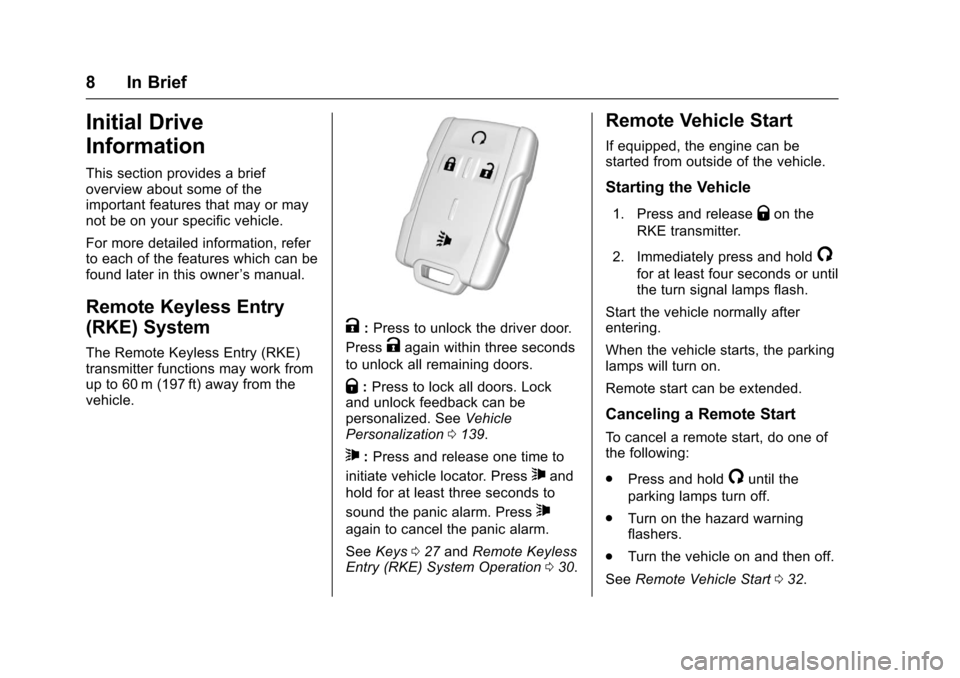
The Remote Keyless Entry (RKE)transmitter functions may work fromup to 60 m (197 ft) away from thevehicle.
K:Press to unlock the driver door.
PressKagain within three seconds
to unlock all remaining doors.
Q:Press to lock all doors. Lockand unlock feedback can bepersonalized. SeeVehiclePersonalization0139.
7:Press and release one time to
initiate vehicle locator. Press7and
hold for at least three seconds to
sound the panic alarm. Press7
again to cancel the panic alarm.
SeeKeys027andRemote KeylessEntry (RKE) System Operation030.
Remote Vehicle Start
If equipped, the engine can bestarted from outside of the vehicle.
Starting the Vehicle
1. Press and releaseQon the
RKE transmitter.
2. Immediately press and hold/
for at least four seconds or untilthe turn signal lamps flash.
Start the vehicle normally afterentering.
When the vehicle starts, the parkinglamps will turn on.
Remote start can be extended.
Canceling a Remote Start
To c a n c e l a r e m o t e s t a r t , d o o n e o fthe following:
.Press and hold/until the
parking lamps turn off.
.Turn on the hazard warningflashers.
.Turn the vehicle on and then off.
SeeRemote Vehicle Start032.
Page 22 of 419
Chevrolet Colorado Owner Manual (GMNA-Localizing-U.S./Canada/Mexico-10122675) - 2017 - crc - 8/22/16
In Brief 21
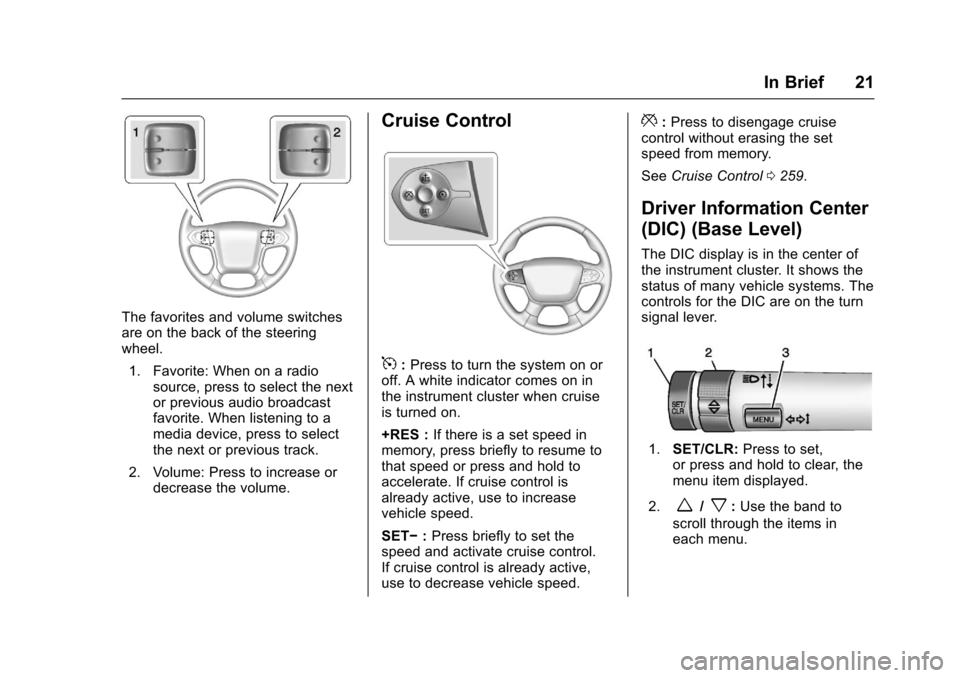
The favorites and volume switchesare on the back of the steeringwheel.
1. Favorite: When on a radiosource, press to select the nextor previous audio broadcastfavorite. When listening to amedia device, press to selectthe next or previous track.
2. Volume: Press to increase ordecrease the volume.
Cruise Control
5:Press to turn the system on oroff. A white indicator comes on inthe instrument cluster when cruiseis turned on.
+RES :If there is a set speed inmemory, press briefly to resume tothat speed or press and hold toaccelerate. If cruise control isalready active, use to increasevehicle speed.
SET✓:Press briefly to set thespeed and activate cruise control.If cruise control is already active,use to decrease vehicle speed.
*:Press to disengage cruisecontrol without erasing the setspeed from memory.
SeeCruise Control0259.
Driver Information Center
(DIC) (Base Level)
The DIC display is in the center ofthe instrument cluster. It shows thestatus of many vehicle systems. Thecontrols for the DIC are on the turnsignal lever.
1.SET/CLR:Press to set,or press and hold to clear, themenu item displayed.
2.w/x:Use the band to
scroll through the items ineach menu.
Page 24 of 419

Chevrolet Colorado Owner Manual (GMNA-Localizing-U.S./Canada/Mexico-10122675) - 2017 - crc - 8/22/16
In Brief 23
Lane Departure
Warning (LDW)
If equipped, LDW may help avoidunintentional lane departures atspeeds of 56 km/h (35 mph) orgreater. LDW uses a camera sensorto detect the lane markings. The
LDW light,@,isgreenifalane
marking is detected. If the vehicledeparts the lane without using a turnsignal in that direction, the light willchange to amber and flash. Inaddition, beeps will sound.
SeeLane Departure Warning(LDW)0264.
Rear Vision
Camera (RVC)
If equipped, RVC displays a view ofthe area behind the vehicle, on theinfotainment display, when thevehicle is shifted into R (Reverse).
SeeRear Vision Camera(RVC)0261.
Power Outlets
Accessory power outlets can beused to plug in electrical equipment,such as a cell phone, MP3player, etc.
The vehicle may have accessorypower outlets:
.On the center stack below theclimate control system,if equipped.
.On the center floor console,if equipped.
.On the rear of the center storageconsole.
Lift the cover to access and replacewhen not in use.
SeePower Outlets0107.
Performance and
Maintenance
Traction Control/
Electronic Stability
Control
The Traction Control System (TCS)limits wheel spin. The system is onwhen the vehicle is started.
The StabiliTrak system assists withdirectional control of the vehicle indifficult driving conditions. Thesystem is on when the vehicle isstarted.
.To t u r n o f f T C S , p r e s s a n drelease the TCS/StabiliTrak
buttongon the center stack.i
illuminates in the instrumentcluster.
.To t u r n o f f b o t h T C S a n d
StabiliTrak, press and holdgon
the center stack, untiliandg
illuminate in the instrumentcluster.
Page 26 of 419
Chevrolet Colorado Owner Manual (GMNA-Localizing-U.S./Canada/Mexico-10122675) - 2017 - crc - 8/22/16
In Brief 25
Engine Oil Life System
The engine oil life system calculatesengine oil life based on vehicle useand, on most vehicles, displays aDriver Information Center (DIC)message when it is necessary tochange the engine oil and filter. Theoil life system should be reset to100% only following an oil change.
Resetting the Oil Life System
To r e s e t t h e e n g i n e o i l l i f e s y s t e m :
1. Display OIL LIFE REMAININGon the DIC. SeeDriverInformation Center (DIC) (BaseLevel)0126orDriverInformation Center (DIC)(Uplevel)0129.Ifthevehicledoes not have DIC buttons, thevehicle must be in P (Park) toaccess this display.
2. Press and holdVon the DIC,
or SET/CLR on the turn signallever if the vehicle does nothave DIC buttons, for severalseconds. The oil life willchange to 100%.
The oil life system can also be resetas follows:
1. Display OIL LIFE REMAININGon the DIC. SeeDriverInformation Center (DIC) (BaseLevel)0126orDriverInformation Center (DIC)(Uplevel)0129.
2. Fully press the acceleratorpedal slowly three times withinfive seconds. If the displayshows 100%, the system isreset.
SeeEngine Oil Life System0288.
Driving for Better Fuel
Economy
Driving habits can affect fuelmileage. Here are some driving tipsto get the best fuel economypossible.
.Avoid fast starts and acceleratesmoothly.
.Brake gradually and avoidabrupt stops.
.Avoid idling the engine for longperiods of time.
.When road and weatherconditions are appropriate, usecruise control.
.Always follow posted speedlimits or drive more slowly whenconditions require.
.Keep vehicle tires properlyinflated.
.Combine several trips into asingle trip.
.Replace the vehicle's tires withthe same TPC Spec numbermolded into the tire's sidewallnear the size.
.Follow recommended scheduledmaintenance.
Page 31 of 419
Chevrolet Colorado Owner Manual (GMNA-Localizing-U.S./Canada/Mexico-10122675) - 2017 - crc - 8/22/16
30 Keys, Doors, and Windows
and all previously known keyswill no longer work with thevehicle.
6. To learn the second key, turn toOFF. Insert the second key tobe learned and turn toON/RUN.
After two keys are learned, theremaining keys can be learned byfollowing the procedure in“Programming with TwoRecognized Keys.”
The key has a bar-coded key tagthat the dealer or qualified locksmithcan use to make new keys. Storethis information in a safe place, notin the vehicle.
See your dealer if a replacementkey or additional key is needed.
If it becomes difficult to turn a key,inspect the key blade for debris.Periodically clean with a brushor pick.
With an active OnStar subscription,an OnStar Advisor may remotelyunlock the vehicle. SeeOnStarOverview0397.
Remote Keyless Entry
(RKE) System
SeeRadio FrequencyStatement0393.
If there is a decrease in the RemoteKeyless Entry (RKE) operatingrange:
.Check the distance. Thetransmitter may be too far fromthe vehicle.
.Check the location. Othervehicles or objects may beblocking the signal.
.Check the transmitter's battery.See“Battery Replacement”laterin this section.
.If the transmitter is still notworking correctly, see yourdealer or a qualified technicianfor service.
Remote Keyless Entry
(RKE) System Operation
The RKE transmitter functions maywork up to 60 m (197 ft) away fromthe vehicle.
Other conditions can affect theperformance of the transmitter. SeeRemote Keyless Entry (RKE)System030.
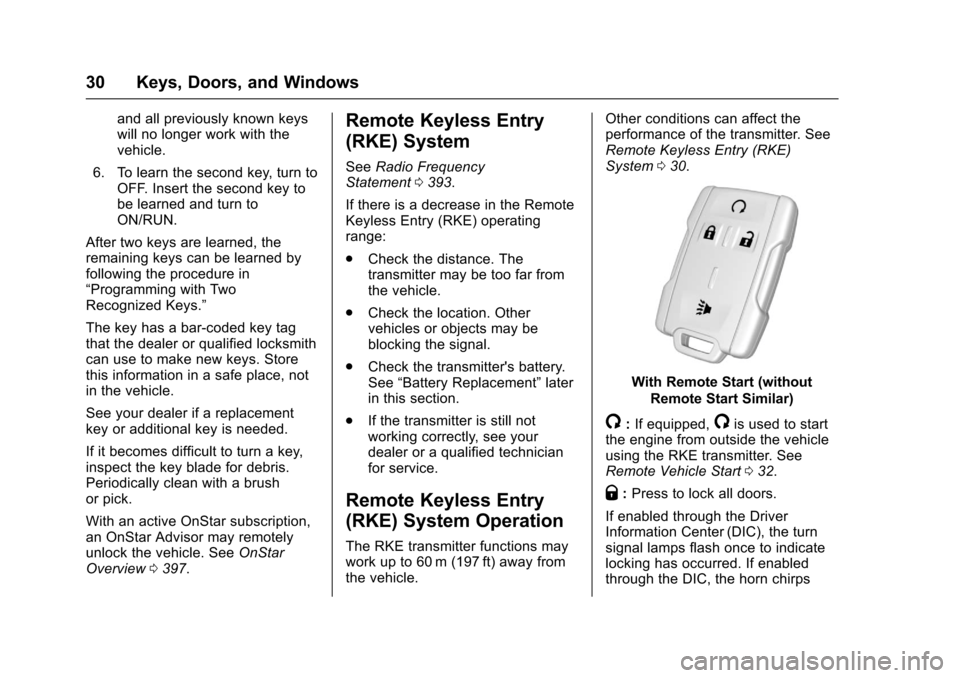
With Remote Start (without
Remote Start Similar)
/:If equipped,/is used to startthe engine from outside the vehicleusing the RKE transmitter. SeeRemote Vehicle Start032.
Q:Press to lock all doors.
If enabled through the DriverInformation Center (DIC), the turnsignal lamps flash once to indicatelocking has occurred. If enabledthrough the DIC, the horn chirps
Page 32 of 419
Chevrolet Colorado Owner Manual (GMNA-Localizing-U.S./Canada/Mexico-10122675) - 2017 - crc - 8/22/16
Keys, Doors, and Windows 31
whenQis pressed again within
three seconds. SeeVehiclePersonalization0139.
PressingQarms the vehicle alarm
system. SeeVehicle AlarmSystem036.
K:Press once to unlock only the
driver door. IfKis pressed again
within three seconds, all remainingdoors unlock. The interior lampsmay come on and stay on for20 seconds or until the ignition isturned on.
If enabled through the DIC, the turnsignal lamps flash twice to indicateunlocking has occurred. SeeVehiclePersonalization0139.Ifenabledthrough the DIC, the exterior lampsmay turn on. SeeVehiclePersonalization0139.
PressingKon the RKE transmitter
disarms the vehicle alarm system.SeeVehicle Alarm System036.
7:Press and release one time toinitiate vehicle locator. The turnsignal lamps flash and the hornsounds three times.
Press and hold7for at least
three seconds to sound the panicalarm. The turn signal lamps flashand the horn sounds repeatedly for30 seconds. The alarm turns offwhen the ignition is moved to ON/
RUN or7is pressed again. The
ignition must be in LOCK/OFF forthe panic alarm to work.
Programming Transmitters to
the Vehicle
Only RKE transmitters programmedto this vehicle will work. If atransmitter is lost or stolen, areplacement can be purchased andprogrammed through your dealer.Each vehicle can have up toeight transmitters programmed to it.See your dealer for transmitterprogramming.
Battery Replacement
Replace the battery in thetransmitter soon if the REPLACEBATTERY IN REMOTE KEYmessage displays in the DIC.
Caution
When replacing the battery, do
not touch any of the circuitry on
the transmitter. Static from your
body could damage the
transmitter.
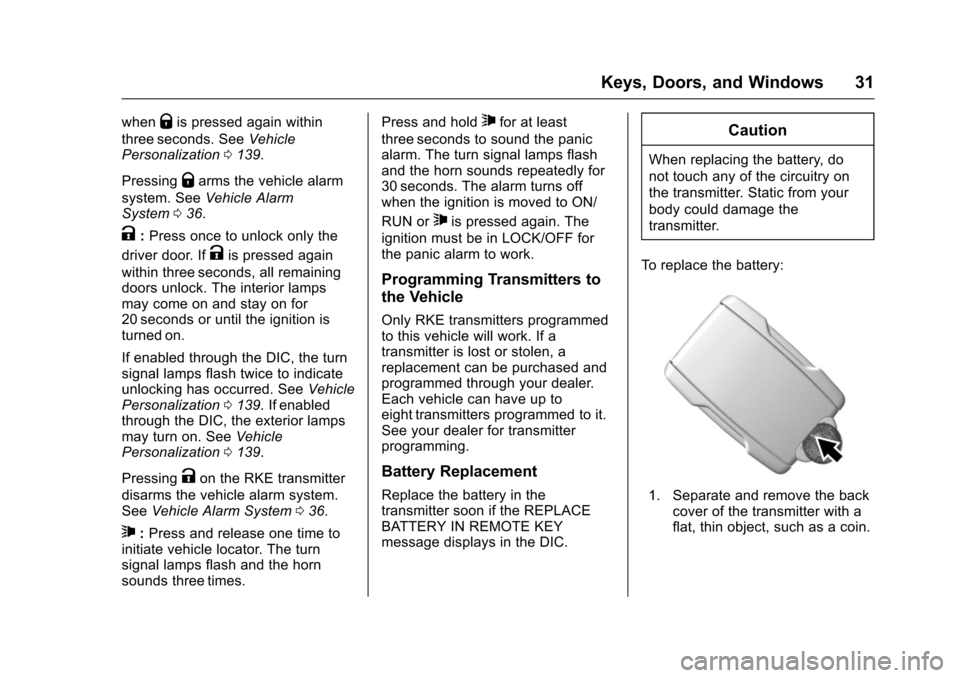
To r e p l a c e t h e b a t t e r y :
1. Separate and remove the backcover of the transmitter with aflat, thin object, such as a coin.
Page 33 of 419

Chevrolet Colorado Owner Manual (GMNA-Localizing-U.S./Canada/Mexico-10122675) - 2017 - crc - 8/22/16
32 Keys, Doors, and Windows
2. Press and slide the batterydown toward the pocket of thetransmitter in the direction ofthe key ring. Do not use ametal object.
3. Remove the battery.
4. Insert the new battery, positiveside facing up. Replace with aCR2032 or equivalent battery.
5. Push together the transmitterback cover top side first, andthen the bottom toward thekey ring.
Remote Vehicle Start
If equipped, the engine can bestarted from outside of the vehicle.The climate controls and rearwindow defogger may alsocome on.
If the vehicle has heated seats andthe feature is turned on in vehiclepersonalization, the heated seatswill turn on during colder outsidetemperatures and will shut off whenthe key is turned to ON/RUN. SeeHeated Front Seats048.
Laws in some communities mayrestrict the use of remote starters.Check local regulations for anyrequirements on remote starting ofvehicles.
Do not use remote start if thevehicle is low on fuel.
The vehicle cannot be remotestarted if:
.The key is in the ignition.
.The hood is not closed.
.There is an emission controlsystem malfunction and themalfunction indicator lamp is on.
The engine will turn off during aremote vehicle start if:
.The coolant temperature getstoo high.
.The oil pressure gets low.
The RKE transmitter range may beless while the vehicle is running.
Other conditions can affect theperformance of the transmitter. SeeRemote Keyless Entry (RKE)System030orVehiclePersonalization0139.
Starting the Engine Using RemoteStart
1. Press and releaseQ.
2. Immediately press and hold/
until the turn signal lamps flashor for at least four seconds.
When the vehicle starts, theparking lamps will turn on. Thedoors will be locked and theclimate control system maycome on.