2017 CHEVROLET COLORADO turn signal
[x] Cancel search: turn signalPage 136 of 419

Chevrolet Colorado Owner Manual (GMNA-Localizing-U.S./Canada/Mexico-10122675) - 2017 - crc - 8/22/16
Instruments and Controls 135
accelerate. If this message is on,but there is no reduction inperformance, proceed to yourdestination. The performance maybe reduced the next time the vehicleis driven. The vehicle may be drivenat a reduced speed while thismessage is on, but acceleration andspeed may be reduced. Anytimethis message stays on, or displaysrepeatedly, the vehicle should betaken to your dealer for service assoon as possible.
Fuel System Messages
FUEL LEVEL LOW
This message displays when thevehicle is low on fuel. Refuel assoon as possible.
Key and Lock Messages
REPLACE BATTERY IN
REMOTE KEY
This message displays if a RemoteKeyless Entry (RKE) transmitterbattery is low. The battery needs tobe replaced in the transmitter. See
“Battery Replacement”underRemote Keyless Entry (RKE)System Operation030.
Lamp Messages
TURN SIGNAL ON
This message displays and a chimesounds if a turn signal is left on for1.2 km (0.75 mi). Move the turnsignal lever to the off position.
Object Detection System
Messages
FORWARD COLLISION
ALERT OFF
If your vehicle has the ForwardCollision Alert (FCA) system, thismessage may display if the FCAsystem cannot activate due to atemporary condition. SeeForwardCollision Alert (FCA) System0263.
FRONT CAMERA BLOCKED,
CLEAN WINDSHIELD
This message displays when theLane Departure Warning (LDW) andForward Collision Alert (FCA)
systems are disabled because thecamera view is blocked and cannotoperate properly. It may alsoactivate during heavy rain or due toroad spray. To clean the system,clean the outside of the windshieldarea in front of the LDW/FCAcamera sensor.
LANE DEPARTURE SYSTEM
UNAVAILABLE
If your vehicle has the LaneDeparture Warning (LDW) system,this message may display if theLDW system cannot activate due toatemporarycondition.SeeLaneDeparture Warning (LDW)0264formore information.
SERVICE FRONT CAMERA
This message displays when theLane Departure Warning (LDW) andForward Collision Alert (FCA)systems are disabled and needservice. See your dealer.
Page 147 of 419
Chevrolet Colorado Owner Manual (GMNA-Localizing-U.S./Canada/Mexico-10122675) - 2017 - crc - 8/22/16
146 Lighting
Lighting
Exterior Lighting
Exterior Lamp Controls . . . . . . . 146Exterior Lamps OffReminder . . . . . . . . . . . . . . . . . . . 147Headlamp High/Low-BeamChanger . . . . . . . . . . . . . . . . . . . . 147Flash-to-Pass . . . . . . . . . . . . . . . . 147Daytime RunningLamps (DRL) . . . . . . . . . . . . . . . 147Automatic HeadlampSystem . . . . . . . . . . . . . . . . . . . . . . 148Hazard Warning Flashers . . . . . 149Turn and Lane-ChangeSignals . . . . . . . . . . . . . . . . . . . . . . 149Fog Lamps . . . . . . . . . . . . . . . . . . . 149
Interior Lighting
Instrument Panel IlluminationControl . . . . . . . . . . . . . . . . . . . . . . 150Cargo Lamp . . . . . . . . . . . . . . . . . . 150Dome Lamps . . . . . . . . . . . . . . . . . 151Reading Lamps . . . . . . . . . . . . . . 151
Lighting Features
Entry Lighting . . . . . . . . . . . . . . . . 151Exit Lighting . . . . . . . . . . . . . . . . . . 151Battery Load Management . . . 152Battery Power Protection . . . . . 152
Exterior Lighting
Exterior Lamp Controls
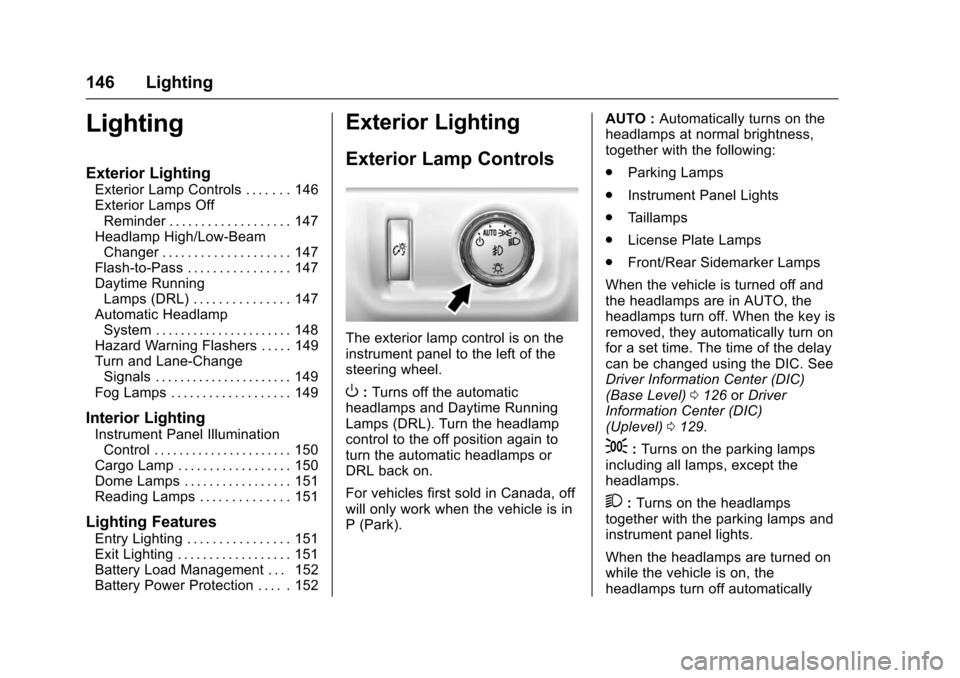
The exterior lamp control is on theinstrument panel to the left of thesteering wheel.
O:Turns off the automaticheadlamps and Daytime RunningLamps (DRL). Turn the headlampcontrol to the off position again toturn the automatic headlamps orDRL back on.
For vehicles first sold in Canada, offwill only work when the vehicle is inP(Park).
AUTO :Automatically turns on theheadlamps at normal brightness,together with the following:
.Parking Lamps
.Instrument Panel Lights
.Ta i l l a m p s
.License Plate Lamps
.Front/Rear Sidemarker Lamps
When the vehicle is turned off andthe headlamps are in AUTO, theheadlamps turn off. When the key isremoved, they automatically turn onfor a set time. The time of the delaycan be changed using the DIC. SeeDriver Information Center (DIC)(Base Level)0126orDriverInformation Center (DIC)(Uplevel)0129.
;:Turns on the parking lampsincluding all lamps, except theheadlamps.
2:Turns on the headlampstogether with the parking lamps andinstrument panel lights.
When the headlamps are turned onwhile the vehicle is on, theheadlamps turn off automatically
Page 148 of 419
Chevrolet Colorado Owner Manual (GMNA-Localizing-U.S./Canada/Mexico-10122675) - 2017 - crc - 8/22/16
Lighting 147
10 minutes after the ignition isturned off. When the headlamps areturned on while the vehicle is off,the headlamps will stay on for10 minutes before turning off toprevent the battery from beingdrained. Turn the headlamp controloff and then back to the headlampon position to make the headlampsstay on for an additional 10 minutes.To k e e p t h e l a m p s o n f o r m o r e t h a n10 minutes, the ignition must be inthe ACC/ACCESSORY or ON/RUNposition.
#:If equipped, it turns on the foglamps. SeeFog Lamps0149.
Exterior Lamps Off
Reminder
Areminderchimesoundswhentheheadlamps or parking lamps aremanually turned on, the ignition isoff, and a door is open. To disablethe chime, turn the lamps off.
Headlamp High/
Low-Beam Changer
Push the turn signal lever towardthe instrument panel to change theheadlamps from low to high beam.
Pull the turn signal lever toward youand release it to return to low-beamheadlamps.
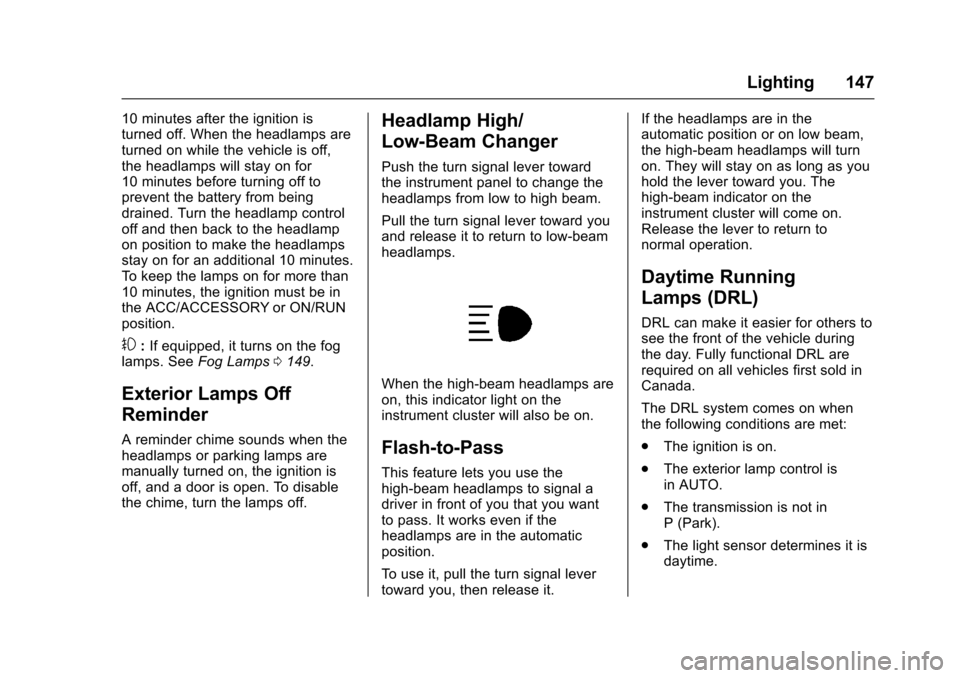
When the high-beam headlamps areon, this indicator light on theinstrument cluster will also be on.
Flash-to-Pass
This feature lets you use thehigh-beam headlamps to signal adriver in front of you that you wantto pass. It works even if theheadlamps are in the automaticposition.
To u s e i t , p u l l t h e t u r n s i g n a l l e v e rtoward you, then release it.
If the headlamps are in theautomatic position or on low beam,the high-beam headlamps will turnon. They will stay on as long as youhold the lever toward you. Thehigh-beam indicator on theinstrument cluster will come on.Release the lever to return tonormal operation.
Daytime Running
Lamps (DRL)
DRL can make it easier for others tosee the front of the vehicle duringthe day. Fully functional DRL arerequired on all vehicles first sold inCanada.
The DRL system comes on whenthe following conditions are met:
.The ignition is on.
.The exterior lamp control isin AUTO.
.The transmission is not inP(Park).
.The light sensor determines it isdaytime.
Page 150 of 419
Chevrolet Colorado Owner Manual (GMNA-Localizing-U.S./Canada/Mexico-10122675) - 2017 - crc - 8/22/16
Lighting 149
Hazard Warning Flashers
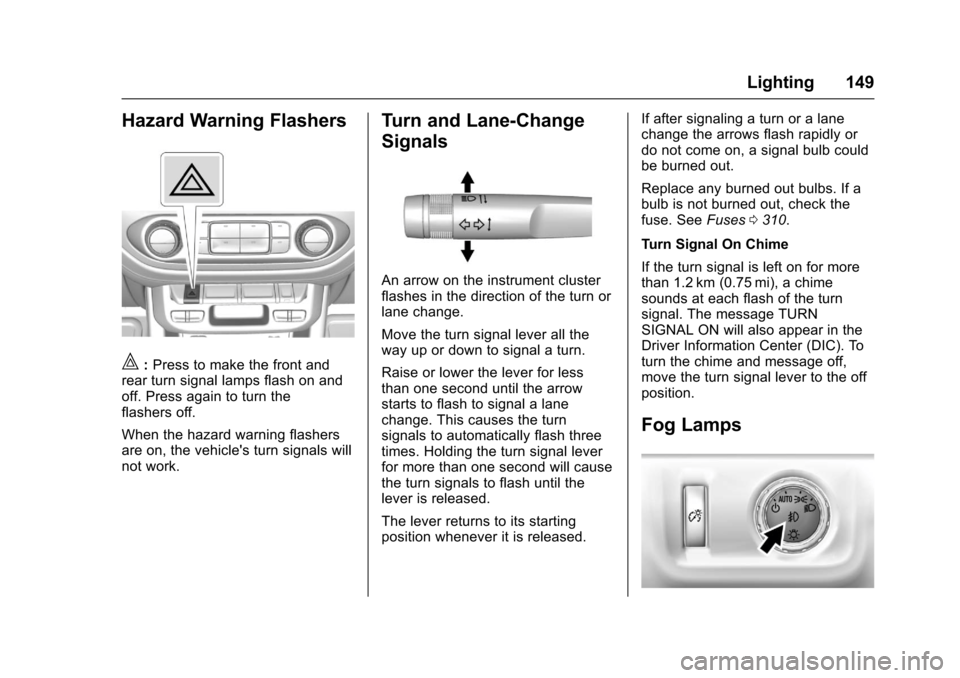
|:Press to make the front andrear turn signal lamps flash on andoff. Press again to turn theflashers off.
When the hazard warning flashersare on, the vehicle's turn signals willnot work.
Turn and Lane-Change
Signals
An arrow on the instrument clusterflashes in the direction of the turn orlane change.
Move the turn signal lever all theway up or down to signal a turn.
Raise or lower the lever for lessthan one second until the arrowstarts to flash to signal a lanechange. This causes the turnsignals to automatically flash threetimes. Holding the turn signal leverfor more than one second will causethe turn signals to flash until thelever is released.
The lever returns to its startingposition whenever it is released.
If after signaling a turn or a lanechange the arrows flash rapidly ordo not come on, a signal bulb couldbe burned out.
Replace any burned out bulbs. If abulb is not burned out, check thefuse. SeeFuses0310.
Turn Signal On Chime
If the turn signal is left on for morethan 1.2 km (0.75 mi), a chimesounds at each flash of the turnsignal. The message TURNSIGNAL ON will also appear in theDriver Information Center (DIC). Toturn the chime and message off,move the turn signal lever to the offposition.
Fog Lamps
Page 167 of 419
Chevrolet Colorado Owner Manual (GMNA-Localizing-U.S./Canada/Mexico-10122675) - 2017 - crc - 8/22/16
166 Infotainment System
2. Touch the preset button tolisten to the channel saved tothat button.
Using the SiriusXM Menu
Operation
1. Touch MENU on the SXMinfotainment display.
2. Touch the menu to select thedesired item or to display thedetail menu item.
3. Touch0to return to the
previous menu.
Channel List
1. Touch SXM Channel List fromthe SXM menu. The channellist is displayed.
2. TouchQorRto find the
desired channel. Tune to thechannel by selecting it.
Tone Settings
From the tone settings menu, thesound features can be set up forSiriusXM audio and each audioplayer’sfunctions.
1. Touch Tone Settings. The tonesettings screen is displayed.See“To n e S e t t i n g s”under“Base Radio with Touchscreen”inAM-FM Radio (Base Radio)0161orAM-FM Radio (BaseRadio withTo u c h s c r e e n )0163.
2. Touch OK.
Auto Volume
1. Touch Auto Volume. See“AutoVolume”under“Base Radiowith Touchscreen”inAM-FMRadio (Base Radio)0161orAM-FM Radio (Base Radio withTo u c h s c r e e n )0163.
2. Touch OK.
Categories
1. Touch Categories.
2. TouchQorRto find the
desired category. Touch thecategory to select it.
Explicit Content Filter
When on, only a filtered list ofchannels will be received. When off,all regular SXM programmingsubscribed to will be received.
1. Touch SXM Explicit Filter.
2. Select On or Off.
Radio Reception
Frequency interference and staticcan occur during normal radioreception if items such as cell phonechargers, vehicle convenienceaccessories, and external electronicdevices are plugged into theaccessory power outlet. If there isinterference or static, unplug theitem from the accessory poweroutlet.
FM
FM signals only reach about 16 to65 km (10 to 40 mi). Although theradio has a built-in electronic circuitthat automatically works to reduceinterference, some static can occur,especially around tall buildings orhills, causing the sound to fade inand out.
Page 168 of 419
Chevrolet Colorado Owner Manual (GMNA-Localizing-U.S./Canada/Mexico-10122675) - 2017 - crc - 8/22/16
Infotainment System 167
AM
The range for most AM stations isgreater than for FM, especially atnight. The longer range can causestation frequencies to interfere witheach other. Static can occur whenthings like storms and power linesinterfere with radio reception. Whenthis happens, try reducing the trebleon the radio.
SiriusXM Satellite Radio
Service
If equipped, SiriusXM SatelliteRadio Service provides digital radioreception. Tall buildings or hills caninterfere with satellite radio signals,causing the sound to fade in andout. In addition, traveling or standingunder heavy foliage, bridges,garages, or tunnels may cause lossof the SiriusXM signal for a periodof time.
Cell Phone Usage
Cell phone usage, such as makingor receiving phone calls, charging,or just having the phone on may
cause static interference with theradio. Unplug the phone or turn it offif this happens.
Multi-Band Antenna
The multi-band antenna is on theroof of the vehicle. The antenna isused for OnStar, the SiriusXMSatellite Radio Service System, andGPS (Global Positioning System),if the vehicle has these features.Keep the antenna clear ofobstructions for clear reception.
Items on the roof of the vehicle caninterfere with the performance of theradio system and OnStar (ifequipped). Make sure themulti-band antenna is notobstructed.
Pandora Internet Radio
If equipped, Pandora®is a freeInternet radio service that streamspersonalized radio stations basedon artists, tracks, genres, andcomedians. Create stations usingthe Pandora website or Smartphone
application, then use-or,to
personalize stations. To set up an
account, or for more information, goto www.pandora.com. Pandora maynot be available in Canada orMexico.
AphoneortabletwithInternetconnection and the Pandoraapplication installed is required.Personal cell phone data plans areused. Make sure the latest versionis installed on the device.
Launching Pandora
Connect an iPhone to the USB port,or connect Android®or BlackBerry®
through Bluetooth. SeeBluetooth(Overview)0187orBluetooth(Infotainment Controls - BaseRadio)0188orBluetooth (VoiceRecognition)0192orBluetooth(Infotainment Controls - Base Radiowith Touchscreen)0197.Forfirsttime use, set up the stations beforeconnecting to the vehicle. ThePandora icon will be available onthe Home Page.
When Pandora is chosen, thePandora logo will populate on thescreen and the system will display“Acquiring Pandora Radio Station.”Launch times can be significant.
Page 225 of 419

Chevrolet Colorado Owner Manual (GMNA-Localizing-U.S./Canada/Mexico-10122675) - 2017 - crc - 8/22/16
224 Driving and Operating
{Warning
Coasting downhill in N (Neutral)
or with the ignition off is
dangerous. This can cause
overheating of the brakes and
loss of steering. Always have the
engine running and the vehicle
in gear.
.Drive at speeds that keep thevehicle in its own lane. Do notswing wide or cross thecenter line.
.Be alert on top of hills;something could be in your lane(e.g., stalled car, accident).
.Pay attention to special roadsigns (e.g., falling rocks area,winding roads, long grades,passing or no-passing zones)and take appropriate action.
Winter Driving
Driving on Snow or Ice
Snow or ice between the tires andthe road creates less traction orgrip, so drive carefully. Wet ice canoccur at about 0 °C (32 °F) whenfreezing rain begins to fall. Avoiddriving on wet ice or in freezing rainuntil roads can be treated.
For Slippery Road Driving:
.Accelerate gently. Acceleratingtoo quickly causes the wheels tospin and makes the surfaceunder the tires slick.
.Turn on Traction Control. SeeTr a c t i o n C o n t r o l / E l e c t r o n i cStability Control0256.
.The Antilock Brake System(ABS) improves vehicle stabilityduring hard stops, but thebrakes should be applied soonerthan when on dry pavement.SeeAntilock Brake System(ABS)0254.
.Allow greater following distanceand watch for slippery spots. Icypatches can occur on otherwiseclear roads in shaded areas.The surface of a curve or anoverpass can remain icy whenthe surrounding roads are clear.Avoid sudden steeringmaneuvers and braking whileon ice.
.Turn off cruise control.
Blizzard Conditions
Stop the vehicle in a safe place andsignal for help. Stay with the vehicleunless there is help nearby.If possible, use RoadsideAssistance. SeeRoadsideAssistance Program0387.Togethelp and keep everyone in thevehicle safe:
.Turn on the hazard warningflashers.
.Tie a red cloth to an outsidemirror.
Page 266 of 419
Chevrolet Colorado Owner Manual (GMNA-Localizing-U.S./Canada/Mexico-10122675) - 2017 - crc - 8/22/16
Driving and Operating 265
the vehicle is crossing a lanemarking without using a turn signalin that direction. LDW uses acamera sensor to detect the lanemarkings at speeds of 56 km/h(35 mph) or greater.
{Warning
The LDW system does not steer
the vehicle. The LDW system
may not:
.Provide enough time toavoid a crash.
.Detect lane markings underpoor weather or visibilityconditions. This can occur ifthe windshield orheadlamps are blocked bydirt, snow, or ice; if they arenot in proper condition; or ifthe sun shines directly intothe camera.
.Detect road edges.
.Detect lanes on winding orhilly roads.
(Continued)
Warning (Continued)
If LDW only detects lane
markings on one side of the road,
it will only warn you when
departing the lane on the side
where it has detected a lane
marking. Always keep your
attention on the road and
maintain proper vehicle position
within the lane, or vehicle
damage, injury, or death could
occur. Always keep the
windshield, headlamps, and
camera sensors clean and in
good repair. Do not use LDW in
bad weather conditions.
How the System Works
The LDW camera sensor is on thewindshield ahead of the rearviewmirror.
To t u r n L D W o n a n d o f f , p r e s s@on
the center stack. The controlindicator will light when LDW is on.
When LDW is on,@is green if
LDW is available to warn of a lanedeparture. If the vehicle crosses adetected lane marking without using
the turn signal in that direction,@
changes to amber and flashes.Additionally, there will be threebeeps on the right or left, dependingon the lane departure direction.
When the System Does Not
Seem to Work Properly
The system may not detect lanes aswell when there are:
.Close vehicles ahead.
.Sudden lighting changes, suchas when driving through tunnels.
.Banked roads.
If the LDW system is not functioningproperly when lane markings areclearly visible, cleaning thewindshield may help.