2017 CHEVROLET COLORADO service indicator
[x] Cancel search: service indicatorPage 235 of 419
Chevrolet Colorado Owner Manual (GMNA-Localizing-U.S./Canada/Mexico-10122675) - 2017 - crc - 8/22/16
234 Driving and Operating
Caution
Using a tool to force the key to
turn in the ignition could cause
damage to the switch or break the
key. Use the correct key, make
sure it is all the way in, and turn it
only with your hand. If the key
cannot be turned by hand, see
your dealer.
1(ACC/ACCESSORY):Thisposition lets things like the radioand the windshield wipers operatewhile the engine is off. It alsounlocks the steering wheel. Use thisposition if the vehicle must bepushed or towed.
2(ON/RUN):This position can beused to operate the electricalaccessories and to display someinstrument cluster warning andindicator lights. This position canalso be used for service anddiagnostics, and to verify the properoperation of the malfunctionindicator lamp as may be requiredfor emission inspection purposes.The switch stays in this position
when the engine is running. Thetransmission is also unlocked in thisposition on automatic transmissionvehicles.
If the key is left in the ACC/ACCESSORY or ON/RUN positionwith the engine off, the battery couldbe drained. The vehicle may notstart if the battery is allowed to drainfor an extended period of time.
3(START):This is the position thatstarts the engine. When the enginestarts, release the key. The ignitionswitch returns to ON/RUN fordriving.
Awarningtonewillsoundwhenthedriver door is opened, the ignition isin ACC/ACCESSORY or LOCK/OFF, and the key is in the ignition.
Starting the Engine
If the vehicle has a diesel engine,see the Duramax dieselsupplement.
Caution
If you add electrical parts or
accessories, you could change
the way the engine operates. Any
resulting damage would not be
covered by the vehicle warranty.
SeeAdd-On Electrical
Equipment0278.
Place the transmission in theproper gear.
Automatic Transmission
Move the shift lever to P (Park) orN(Neutral). The engine will not startin any other position. To restart theengine when the vehicle is alreadymoving, use N (Neutral) only.
Caution
Do not try to shift to P (Park) if the
vehicle is moving. If you do, you
could damage the transmission.
Shift to P (Park) only when the
vehicle is stopped.
Page 249 of 419
Chevrolet Colorado Owner Manual (GMNA-Localizing-U.S./Canada/Mexico-10122675) - 2017 - crc - 8/22/16
248 Driving and Operating
.Cause tires to wear faster.
.Cause additional driveline noise.
{Warning
Shifting the transfer case to
N(Neutral) can cause the vehicle
to roll even if the transmission is
in P (Park). You or someone else
could be seriously injured. Be
sure to set the parking brake
before placing the transfer case in
N(Neutral). SeeParking
Brake0254.
Caution
Extended high-speed operation in
4nmay damage or shorten the
life of the drivetrain.
Engagement noise and bump when
shifting between 4nand 4mor from
N(Neutral), with the engine running,is normal.
Shifting into 4nwill turn Traction
Control and StabiliTrak®off. SeeTr a c t i o n C o n t r o l / E l e c t r o n i c S t a b i l i t yControl0256.
Electronic Transfer Case
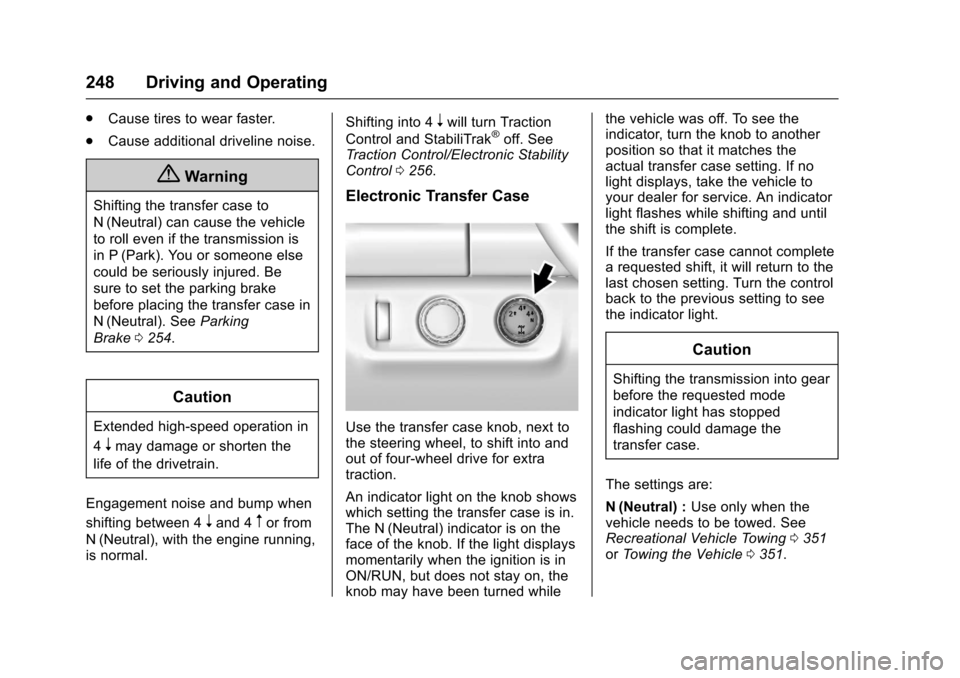
Use the transfer case knob, next tothe steering wheel, to shift into andout of four-wheel drive for extratraction.
An indicator light on the knob showswhich setting the transfer case is in.The N (Neutral) indicator is on theface of the knob. If the light displaysmomentarily when the ignition is inON/RUN, but does not stay on, theknob may have been turned while
the vehicle was off. To see theindicator, turn the knob to anotherposition so that it matches theactual transfer case setting. If nolight displays, take the vehicle toyour dealer for service. An indicatorlight flashes while shifting and untilthe shift is complete.
If the transfer case cannot completearequestedshift,itwillreturntothelast chosen setting. Turn the controlback to the previous setting to seethe indicator light.
Caution
Shifting the transmission into gear
before the requested mode
indicator light has stopped
flashing could damage the
transfer case.
The settings are:
N(Neutral) :Use only when thevehicle needs to be towed. SeeRecreational Vehicle Towing0351orTo w i n g t h e V e h i c l e0351.
Page 252 of 419
Chevrolet Colorado Owner Manual (GMNA-Localizing-U.S./Canada/Mexico-10122675) - 2017 - crc - 8/22/16
Driving and Operating 251
Automatic Transfer Case
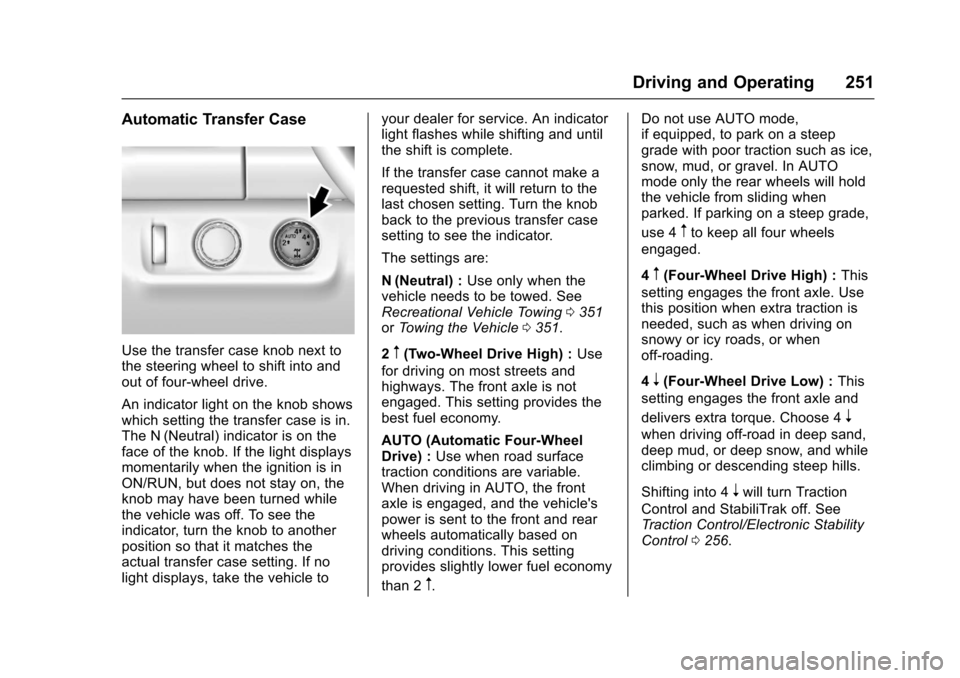
Use the transfer case knob next tothe steering wheel to shift into andout of four-wheel drive.
An indicator light on the knob showswhich setting the transfer case is in.The N (Neutral) indicator is on theface of the knob. If the light displaysmomentarily when the ignition is inON/RUN, but does not stay on, theknob may have been turned whilethe vehicle was off. To see theindicator, turn the knob to anotherposition so that it matches theactual transfer case setting. If nolight displays, take the vehicle to
your dealer for service. An indicatorlight flashes while shifting and untilthe shift is complete.
If the transfer case cannot make arequested shift, it will return to thelast chosen setting. Turn the knobback to the previous transfer casesetting to see the indicator.
The settings are:
N(Neutral) :Use only when thevehicle needs to be towed. SeeRecreational Vehicle Towing0351orTo w i n g t h e V e h i c l e0351.
2m(Two-Wheel Drive High) :Use
for driving on most streets andhighways. The front axle is notengaged. This setting provides thebest fuel economy.
AUTO (Automatic Four-WheelDrive) :Use when road surfacetraction conditions are variable.When driving in AUTO, the frontaxle is engaged, and the vehicle'spower is sent to the front and rearwheels automatically based ondriving conditions. This settingprovides slightly lower fuel economy
than 2m.
Do not use AUTO mode,if equipped, to park on a steepgrade with poor traction such as ice,snow, mud, or gravel. In AUTOmode only the rear wheels will holdthe vehicle from sliding whenparked. If parking on a steep grade,
use 4mto keep all four wheels
engaged.
4m(Four-Wheel Drive High) :This
setting engages the front axle. Usethis position when extra traction isneeded, such as when driving onsnowy or icy roads, or whenoff-roading.
4n(Four-Wheel Drive Low) :This
setting engages the front axle and
delivers extra torque. Choose 4n
when driving off-road in deep sand,deep mud, or deep snow, and whileclimbing or descending steep hills.
Shifting into 4nwill turn Traction
Control and StabiliTrak off. SeeTr a c t i o n C o n t r o l / E l e c t r o n i c S t a b i l i t yControl0256.
Page 265 of 419

Chevrolet Colorado Owner Manual (GMNA-Localizing-U.S./Canada/Mexico-10122675) - 2017 - crc - 8/22/16
264 Driving and Operating
Warning (Continued)
or ice, or if the windshield is
damaged. It may also not detect a
vehicle on winding or hilly roads,
or in conditions that can limit
visibility such as fog, rain,
or snow, or if the headlamps or
windshield are not cleaned or in
proper condition. Keep the
windshield, headlamps, and FCA
sensors clean and in good repair.
Collision Alert
When your vehicle approachesanother detected vehicle too rapidly,the red lights will flash on thewindshield. Also, eight rapidhigh-pitched beeps will sound fromthe front. When this Collision Alertoccurs, the brake system mayprepare for driver braking to occur
more rapidly which can cause abrief, mild deceleration. Continue toapply the brake pedal as needed.Cruise control may be disengagedwhen the Collision Alert occurs.
Tailgating Alert
The vehicle ahead indicator willdisplay amber when you arefollowing a detected vehicle aheadmuch too closely.
Selecting the Alert Timing
The Collision Alert control is on the
steering wheel. Press[to set the
FCA timing to Far, Medium, Near,or Off. The first button press showsthe current setting on the DIC.Additional button presses willchange this setting. The chosensetting will remain until it is changedand will affect the timing of both theCollision Alert and the TailgatingAlert features. The timing of both
alerts will vary based on vehiclespeed. The faster the vehicle speed,the farther away the alert will occur.Consider traffic and weatherconditions when selecting the alerttiming. The range of selectable alerttiming may not be appropriate for alldrivers and driving conditions.
Unnecessary Alerts
FCA may provide unnecessaryalerts for turning vehicles, vehiclesin other lanes, objects that are notvehicles, or shadows. These alertsare normal operation and thevehicle does not need service.
Cleaning the System
If the FCA system does not seem tooperate properly, cleaning theoutside of the windshield in front ofthe rearview mirror, and cleaning theheadlamps, may correct the issue.
Lane Departure
Warning (LDW)
If equipped, LDW may help avoidcrashes due to unintentional lanedepartures. It may provide an alert if
Page 279 of 419
Chevrolet Colorado Owner Manual (GMNA-Localizing-U.S./Canada/Mexico-10122675) - 2017 - crc - 8/22/16
278 Driving and Operating
{Warning
Even if the vehicle is equipped
with TSC, trailer sway could result
in loss of control and the vehicle
could crash. If excessive trailer
sway is detected, slow down to a
safe speed. Check the trailer and
vehicle to help correct possible
causes. These could include an
improperly or overloaded trailer,
unrestrained cargo, improper
trailer hitch configuration,
excessive vehicle-trailer speed,
or improperly inflated or incorrect
vehicle or trailer tires. SeeTo w i n g
Equipment0275for trailer ratings
and hitch setup
recommendations.
Adding non-dealer accessories canaffect the vehicle performance. SeeAccessories andModifications0281.
Conversions and
Add-Ons
Add-On Electrical
Equipment
{Warning
The Data Link Connector (DLC) is
used for vehicle service and
Emission Inspection/Maintenance
testing. SeeMalfunction Indicator
Lamp (Check Engine Light)011 8.
AdeviceconnectedtotheDLC—
such as an aftermarket fleet or
driver-behavior tracking device—
may interfere with vehicle
systems. This could affect vehicle
operation and cause a crash.
Such devices may also access
information stored in the vehicle’s
systems.
Caution
Some electrical equipment can
damage the vehicle or cause
components to not work and
would not be covered by the
vehicle warranty. Always check
with your dealer before adding
electrical equipment.
Add-on equipment can drain thevehicle's 12-volt battery, even if thevehicle is not operating.
The vehicle has an airbag system.Before attempting to add anythingelectrical to the vehicle, seeServicing the Airbag-EquippedVehicle068andAdding Equipmentto the Airbag-EquippedVehicle068.
Page 299 of 419

Chevrolet Colorado Owner Manual (GMNA-Localizing-U.S./Canada/Mexico-10122675) - 2017 - crc - 8/22/16
298 Vehicle Care
everyday driving. The fans may turnoff if no cooling is required. Underheavy vehicle loading, trailer towing,high outside temperatures,or operation of the air conditioningsystem, the fans may change tohigh speed and an increase in fannoise may be heard. This is normaland indicates that the coolingsystem is functioning properly. Thefans will change to low speed whenadditional cooling is no longerrequired.
The electric engine cooling fansmay run after the engine has beenturned. off. This is normal and noservice is required.
Washer Fluid
What to Use
When windshield washer fluid needsto be added, be sure to read themanufacturer's instructions beforeuse. Use a fluid that has sufficientprotection against freezing in anarea where the temperature may fallbelow freezing.
Adding Washer Fluid
Open the cap with the washersymbol on it. Add washer fluid untilthe tank is full. SeeEngineCompartment Overview0283forreservoir location.
Caution
.Do not use washer fluid thatcontains any type of waterrepellent coating. This cancause the wiper blades tochatter or skip.
.Do not use engine coolant(antifreeze) in thewindshield washer. It candamage the windshieldwasher system and paint.
(Continued)
Caution (Continued)
.Do not mix water withready-to-use washer fluid.Water can cause thesolution to freeze anddamage the washer fluidtank and other parts of thewasher system.
.When using concentratedwasher fluid, follow themanufacturer instructions foradding water.
.Fill the washer fluid tankonly three-quarters full whenit is very cold. This allowsfor fluid expansion iffreezing occurs, which coulddamage the tank if it iscompletely full.
Brakes
Disc brake pads have built-in wearindicators that make a high-pitchedwarning sound when the brake padsare worn and new pads are needed.The sound can come and go or be
Page 375 of 419
Chevrolet Colorado Owner Manual (GMNA-Localizing-U.S./Canada/Mexico-10122675) - 2017 - crc - 8/22/16
374 Service and Maintenance
of leaking, blown seals,or damage, and can advisewhen service is needed.
Tires
Tires need to be properly inflated,rotated, and balanced. Maintainingthe tires can save money and fuel,and can reduce the risk of tirefailure.
.Signs that the tires need to bereplaced include three or morevisible treadwear indicators; cordor fabric showing through therubber; cracks or cuts in thetread or sidewall; or a bulge orsplit in the tire.
.Trained dealer technicians caninspect and recommend the righttires. Your dealer can alsoprovide tire/wheel balancingservices to ensure smoothvehicle operation at all speeds.Yo u r d e a l e r s e l l s a n d s e r v i c e sname brand tires.
Vehicle Care
To h e l p k e e p t h e v e h i c l e l o o k i n g l i k enew, vehicle care products areavailable from your dealer. For
information on how to clean andprotect the vehicle’sinteriorandexterior, seeInterior Care0361andExterior Care0356.
Wheel Alignment
Wheel alignment is critical forensuring that the tires deliveroptimal wear and performance.
.Signs that the alignment mayneed to be adjusted includepulling, improper vehiclehandling, or unusual tire wear.
.Yo u r d e a l e r h a s t h e r e q u i r e dequipment to ensure properwheel alignment.
Windshield
For safety, appearance, and thebest viewing, keep the windshieldclean and clear.
.Signs of damage includescratches, cracks, and chips.
.Trained dealer technicians caninspect the windshield andrecommend proper replacementif needed.
Wiper Blades
Wiper blades need to be cleanedand kept in good condition toprovide a clear view.
.Signs of wear include streaking,skipping across the windshield,and worn or split rubber.
.Trained dealer technicians cancheck the wiper blades andreplace them when needed.
Page 410 of 419

Chevrolet Colorado Owner Manual (GMNA-Localizing-U.S./Canada/Mexico-10122675) - 2017 - crc - 8/22/16
Index 409
Check
Ignition Transmission Lock . . . 304
Malfunction Indicator
Engine Light . . . . . . . . . . . . . . . . .118
Child Restraints
Infants and Young Children . . . . . 71
Lower Anchors and Tethers
for Children . . . . . . . . . . . . . . . . . . . 77
Older Children . . . . . . . . . . . . . . . . . . 70
Securing . . . . . . . . . . . . . . . . . . . . 91, 96
Systems . . . . . . . . . . . . . . . . . . . . . . . . 74
Cleaning
Exterior Care . . . . . . . . . . . . . . . . . 356
Interior Care . . . . . . . . . . . . . . . . . . 361
Climate Control Systems . . . . . . . 208
Air Conditioning . . . . . . . . . . . . . . 208
Automatic . . . . . . . . . . . . . . . . . . . . . 210
Heating . . . . . . . . . . . . . . . . . . . . . . . 208
Clock . . . . . . . . . . . . . . . . . . . . . . . . . . . 106
Cluster, Instrument . . . . . . . . 110, 112
Clutch, Hydraulic . . . . . . . . . . . . . . . 290
Collision Damage Repair . . . . . . . 390
Compact Spare Tire . . . . . . . . . . . . 346
Compartments
Storage . . . . . . . . . . . . . . . . . . . . . . . 100
Compass . . . . . . . . . . . . . . . . . . . . . . . 105
Messages . . . . . . . . . . . . . . . . . . . . 133
Connections
OnStar®...................... 399
Control . . . . . . . . . . . . . . . . . . . . . . . . . 258
Traction and Electronic
Stability . . . . . . . . . . . . . . . . . . . . . 256
Control Light
Hill Descent . . . . . . . . . . . . . . . . . . 121
Control of a Vehicle . . . . . . . . . . . . . 216
Convex Mirrors . . . . . . . . . . . . . . . . . . 38
Coolant
Engine . . . . . . . . . . . . . . . . . . . . . . . . 294
Engine Temperature Gauge . . .115
Cooling . . . . . . . . . . . . . . . . . . . . 208, 210
Cooling System . . . . . . . . . . . . . . . . . 292
Engine Messages . . . . . . . . . . . . 133
Courtesy Transportation
Program . . . . . . . . . . . . . . . . . . . . . . . 389
Cruise Control . . . . . . . . . . . . . . . . . . 259
Light . . . . . . . . . . . . . . . . . . . . . . . . . . 125
Cupholders . . . . . . . . . . . . . . . . . . . . . 100
Customer Assistance . . . . . . . . . . . 386
Offices . . . . . . . . . . . . . . . . . . . . . . . . 385
Te x t Te l e p h o n e ( T T Y )
Users . . . . . . . . . . . . . . . . . . . . . . . 386
Customer Information
Service Publications
Ordering Information . . . . . . . . 392
Customer Satisfaction
Procedure . . . . . . . . . . . . . . . . . . . . . 383
D
Damage Repair, Collision . . . . . . . 390
Danger, Warning, and Caution . . . . 3
Data Collection
Infotainment System . . . . . . . . . . 396
OnStar . . . . . . . . . . . . . . . . . . . . . . . 395
Data Recorders, Event . . . . . . . . . 395
Daytime Running
Lamps (DRL) . . . . . . . . . . . . . . . . . . 147
Defensive Driving . . . . . . . . . . . . . . . 215
Delayed Locking . . . . . . . . . . . . . . . . . 34
Diagnostics
OnStar®...................... 401
Distracted Driving . . . . . . . . . . . . . . . 215
Dome Lamps . . . . . . . . . . . . . . . . . . . 151
Door
Ajar Light . . . . . . . . . . . . . . . . . . . . . 126
Ajar Messages . . . . . . . . . . . . . . . 133
Delayed Locking . . . . . . . . . . . . . . . . 34
Locks . . . . . . . . . . . . . . . . . . . . . . . . . . . 33
Power Locks . . . . . . . . . . . . . . . . . . . . 34
Drive Belt Routing, Engine . . . . . . 382
Driver Information
Center (DIC) . . . . . . . . . . . . . 126, 129