2017 CHEVROLET BOLT EV window
[x] Cancel search: windowPage 74 of 361

Chevrolet Bolt EV Owner Manual (GMNA-Localizing-U.S./Canada/Mexico-
10122739) - 2017 - CRC - 10/3/16
Seats and Restraints 73
How Does an Airbag
Restrain?
In moderate to severe frontal or
near frontal collisions, even belted
occupants can contact the steering
wheel or the instrument panel. In
moderate to severe side collisions,
even belted occupants can contact
the inside of the vehicle.
Airbags supplement the protection
provided by safety belts by
distributing the force of the impact
more evenly over the
occupant's body.
Rollover capable roof-rail airbags
are designed to help contain the
head and chest of occupants in the
outboard seating positions in the
first and second rows. The rollover
capable roof-rail airbags are
designed to help reduce the risk of
full or partial ejection in rollover
events, although no system can
prevent all such ejections.But airbags would not help in many
types of collisions, primarily
because the occupant's motion is
not toward those airbags. See
When
Should an Airbag Inflate? 071.
Airbags should never be regarded
as anything more than a supplement
to safety belts.
What Will You See after
an Airbag Inflates?
After the frontal, knee, and
seat-mounted side impact airbags
inflate, they quickly deflate, so
quickly that some people may not
even realize the airbags inflated.
Roof-rail airbags may still be at least
partially inflated for some time after
they inflate. Some components of
the airbag module may be hot for
several minutes. For location of the
airbags, see Where Are the
Airbags? 070.
The parts of the airbag that come
into contact with you may be warm,
but not too hot to touch. There may
be some smoke and dust coming
from the vents in the deflated
airbags. Airbag inflation does not prevent the driver from seeing out of
the windshield or being able to steer
the vehicle, nor does it prevent
people from leaving the vehicle.
{Warning
When an airbag inflates, there
may be dust in the air. This dust
could cause breathing problems
for people with a history of
asthma or other breathing trouble.
To avoid this, everyone in the
vehicle should get out as soon as
it is safe to do so. If you have
breathing problems but cannot
get out of the vehicle after an
airbag inflates, then get fresh air
by opening a window or a door.
If you experience breathing
problems following an airbag
deployment, you should seek
medical attention.
The vehicle has a feature that may
automatically unlock the doors, turn
on the interior lamps and hazard
warning flashers after the airbags
inflate. The feature may also
Page 104 of 361

Chevrolet Bolt EV Owner Manual (GMNA-Localizing-U.S./Canada/Mexico-
10122739) - 2017 - CRC - 10/3/16
Instruments and Controls 103
Instruments and
Controls
Controls
Steering Wheel Adjustment . . . 104
Steering Wheel Controls . . . . . . 104
Heated Steering Wheel . . . . . . . 105
Horn . . . . . . . . . . . . . . . . . . . . . . . . . . 105
Pedestrian Safety Signal . . . . . 105
Windshield Wiper/Washer . . . . 106
Rear Window Wiper/Washer . . . . . . . . . . . . . . . . . . . . . 107
Compass . . . . . . . . . . . . . . . . . . . . . 108
Clock . . . . . . . . . . . . . . . . . . . . . . . . . 108
Power Outlets . . . . . . . . . . . . . . . . 109
Wireless Charging . . . . . . . . . . . . 110
Warning Lights, Gauges, and
Indicators
Warning Lights, Gauges, and Indicators . . . . . . . . . . . . . . . . . . . . 111
Instrument Cluster . . . . . . . . . . . . 111
Speedometer . . . . . . . . . . . . . . . . . 114
Odometer . . . . . . . . . . . . . . . . . . . . . 114
Trip Odometer . . . . . . . . . . . . . . . . 114
Battery Gauge (High Voltage) . . . . . . . . . . . . . . . . . . . . . 115
Driver Efficiency Gauge . . . . . . . 115
Power Indicator Gauge . . . . . . . 116 Safety Belt Reminders . . . . . . . . 116
Airbag Readiness Light . . . . . . . 117
Passenger Airbag Status
Indicator . . . . . . . . . . . . . . . . . . . . . 117
Charging System Light (12-Volt
Battery) . . . . . . . . . . . . . . . . . . . . . 118
Service Vehicle Soon Light . . . 118
Brake System Warning Light . . . . . . . . . . . . . . . . . . . . . . . . 118
Electric Parking Brake Light . . . . . . . . . . . . . . . . . . . . . . . . 119
Service Electric Parking Brake Light . . . . . . . . . . . . . . . . . . . . . . . . 119
Antilock Brake System (ABS) Warning Light . . . . . . . . . . . . . . . 120
Sport Mode Light . . . . . . . . . . . . . 120
Lane Keep Assist (LKA) Light . . . . . . . . . . . . . . . . . . . . . . . . 120
Vehicle Ahead Indicator . . . . . . 120
Pedestrian Ahead Indicator . . . 121
Traction Off Light . . . . . . . . . . . . . 121
StabiliTrak®OFF Light . . . . . . . . 121
Traction Control System (TCS)/ StabiliTrak
®Light . . . . . . . . . . . 121
Tire Pressure Light . . . . . . . . . . . 122
Security Light . . . . . . . . . . . . . . . . . 122
Vehicle Ready Light . . . . . . . . . . 122
High-Beam On Light . . . . . . . . . . 123
Lamps On Reminder . . . . . . . . . 123
Cruise Control Light . . . . . . . . . . 123
Door Ajar Light . . . . . . . . . . . . . . . 123
Information Displays
Power Flows . . . . . . . . . . . . . . . . . 124
Programmable Charging . . . . . . 124
Energy Information . . . . . . . . . . . 131
Energy Settings . . . . . . . . . . . . . . 132
Driver Information Center (DIC) . . . . . . . . . . . . . . . . 133
Vehicle Messages
Vehicle Messages . . . . . . . . . . . . 135
Battery and ChargingMessages . . . . . . . . . . . . . . . . . . . 135
Brake System Messages . . . . . 136
Compass Messages . . . . . . . . . . 136
Cruise Control Messages . . . . . 136
Door Ajar Messages . . . . . . . . . . 136
Electric Drive Unit Messages . . . . . . . . . . . . . . . . . . . 137
Key and Lock Messages . . . . . 137
Lamp Messages . . . . . . . . . . . . . . 138
Object Detection System Messages . . . . . . . . . . . . . . . . . . . 138
Propulsion Power Messages . . . . . . . . . . . . . . . . . . . 139
Ride Control System Messages . . . . . . . . . . . . . . . . . . . 140
Airbag System Messages . . . . 140
Security Messages . . . . . . . . . . . 140
Service Vehicle Messages . . . . 140
Starting the Vehicle Messages . . . . . . . . . . . . . . . . . . . 141
Page 108 of 361
Chevrolet Bolt EV Owner Manual (GMNA-Localizing-U.S./Canada/Mexico-
10122739) - 2017 - CRC - 10/3/16
Instruments and Controls 107
The wipers will continue until the
lever is released or the maximum
wash time is reached. When the
lever is released, additional wipes
may occur depending on how long
the windshield washer had been
activated. SeeWasher Fluid0255
for information on filling the
windshield washer fluid reservoir.
{Warning
In freezing weather, do not use
the washer until the windshield is
warmed. Otherwise the washer
fluid can form ice on the
windshield, blocking your vision.
Rear Window Wiper/
Washer
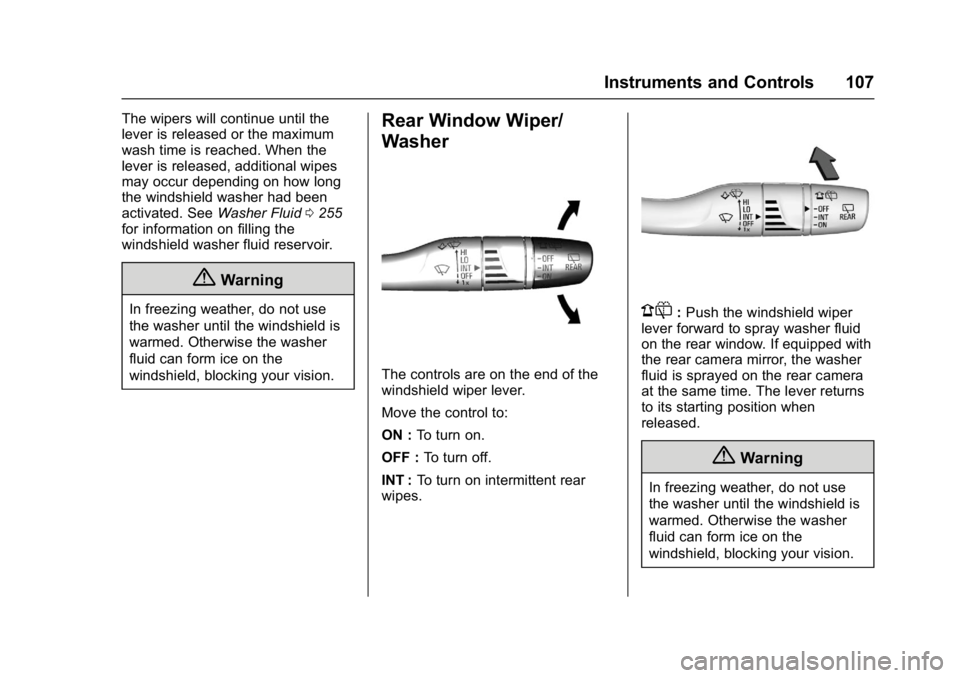
The controls are on the end of the
windshield wiper lever.
Move the control to:
ON : To turn on.
OFF : To turn off.
INT : To turn on intermittent rear
wipes.
1: Push the windshield wiper
lever forward to spray washer fluid
on the rear window. If equipped with
the rear camera mirror, the washer
fluid is sprayed on the rear camera
at the same time. The lever returns
to its starting position when
released.
{Warning
In freezing weather, do not use
the washer until the windshield is
warmed. Otherwise the washer
fluid can form ice on the
windshield, blocking your vision.
Page 109 of 361
Chevrolet Bolt EV Owner Manual (GMNA-Localizing-U.S./Canada/Mexico-
10122739) - 2017 - CRC - 10/3/16
108 Instruments and Controls
Auto Wipe in Reverse Gear
If the rear wiper control is off, the
rear wiper will automatically operate
continuously when the shift lever is
in R (Reverse), and the front
windshield wiper is performing low
or high speed wipes. If the rear
wiper control is off, the shift lever is
in R (Reverse), and the front
windshield wiper is performing
intermittent wipes, then the rear
wiper automatically performs
intermittent wipes.
This feature can be turned on or off.
SeeVehicle Personalization 0142.
The windshield washer reservoir is
used for the windshield and the rear
window. Check the fluid level in the
reservoir if either washer is not
working.
Compass
The vehicle has a compass display
in the instrument cluster above the
speedometer. The compass
receives its heading and other
information from the Global
Positioning System (GPS) antenna
and vehicle speed information. The compass system has automatic
calibration and zone adjustment
features.
Avoid covering the GPS antenna for
long periods of time with objects
that may interfere with the antenna's
ability to receive a satellite signal.
The compass system is designed to
operate for a certain number of
miles or degrees of turn before
needing a signal from the GPS
satellites. The compass system will
automatically determine when a
GPS signal is restored and provide
a heading.
Clock
The infotainment system controls
are used to access the time and
date settings through the menu.
This can also be changed by
touching the clock, then touch
8to
go to the Time and Date
Settings menu.
D: Press to access the
Home Page.
T: Touch to access the Icon View.
Y: Drag the scroll bar to navigate
the list.
RorQ: Touch to set up
items.
0: Touch to exit or return to the
previous screen or menu.
Setting the Time
When Auto Set is enabled, the time
cannot be manually set.
1. Touch
D, then touchT.
2. Touch Settings.
3. Touch Time and Date, then touch Set Time.
4. Touch + or −to adjust the
value.
5. Touch
RorQto adjust
AM or PM for 12 hour format.
6. Touch
0.
Setting the Date
1. TouchD, then touchT.
2. Touch Settings.
3. Touch Time and Date, then touch Set Date.
Page 144 of 361

Chevrolet Bolt EV Owner Manual (GMNA-Localizing-U.S./Canada/Mexico-
10122739) - 2017 - CRC - 10/3/16
Instruments and Controls 143
Radio Settings
To manage the radio features, see
“Radio Settings”underSettings
0 177.
Vehicle
Select and the following may
display:
.
Climate and Air Quality
. Comfort and Convenience
. Collision / Detection Systems
. Lighting
. Power Door Locks
. Remote Lock / Unlock / Start
Climate and Air Quality
Select and the following may
display:
. Auto Fan Speed
. Auto Heated Seats
. Auto Defog
Auto Fan Speed
This feature will set the maximum
auto fan speed.
Select Low, Medium, or High. Auto Heated Seats
When set to On, the heated seats
will automatically come on when the
vehicle is started. See
Automatic
Climate Control System 0184.
Select Off or On.
Auto Defog
When set to On, the front defog will
automatically come on when the
vehicle is started. See Automatic
Climate Control System 0184.
Select Off or On.
Comfort and Convenience
Select and the following may
display:
. Chime Volume
. Auto Wipe in Reverse Gear
Chime Volume
This allows the selection of the
chime volume level.
Select + or −to adjust the volume. Auto Wipe in Reverse Gear
This allows the feature to be turned
on or off. See
Rear Window Wiper/
Washer 0107.
Select Off or On.
Collision / Detection Systems
Select and the following may
display:
. Forward Collision System
. Front Pedestrian Detection
. Park Assist
. Rear Cross Traffic Alert
. Lane Change Alert
Forward Collision System
This feature will turn on or off the
Forward Collision Alert (FCA) and
Forward Automatic Braking (FAB).
The Off setting disables all FCA and
FAB functions. With the Alert and
Brake setting, both FCA and FAB
are available. The Alert setting
disables FAB. See Forward
Automatic Braking (FAB) 0224.
Select Off, Alert, or Alert and Brake.
Page 165 of 361
Chevrolet Bolt EV Owner Manual (GMNA-Localizing-U.S./Canada/Mexico-
10122739) - 2017 - CRC - 10/3/16
164 Infotainment System
Audio Players
USB Port
The USB ports are in the center
console and are for data and
charging. If equipped, there are two
USB charge ports in the rear of the
center console. The infotainment
system can play the music files
contained in the USB storage
device or a device that supports
MTP or iPod/iPhone devices.
Before Using the Audio
System
Supported Audio File Formats
.MP3 (MPEG-1 Layer 3,
MPEG-2 Layer 3)
Constant Bit Rate (CBR)
between 8 and 320 kbps
Variable Bit Rate (VBR)
Sampling frequencies of 8,
11.025, 12, 16, 22.05, 24, 32,
44.1, and 48 kHz .
Windows Media Audio
Windows Media Audio 10
CBR between 32 and 768 kbps
VBR (Standard), Professional,
Lossless, or higher according to
Microsoft specifications
Sampling frequencies of 8, 12,
16, 22, 32, 44.1, and 48 kHz
. AAC (MPEG-4 AAC, Low
Complexity Profile) and AAC+
CBR between 8 and 320 kbps
. OGG Vorbis
. Waveform (WAV –PCM
Windows format)
. Audio Interchange File
Format (AIFF)
. 3GPP (Generally used for
mobile devices)
. Audio Books (MP3, WMA,
AAC, AA)
Guidelines for Using a USB
Storage Device and iPod/iPhone
. Operation cannot be guaranteed
if the HDD built-in USB mass
storage device or CF or SD memory card is connected by
using a USB adaptor. Use a
USB or flash memory type
storage device.
. Avoid static electricity discharge
when connecting or
disconnecting the USB.
If connection and disconnection
are repeated many times in a
short time, this may cause a
problem in using the device.
. Operation is not guaranteed if
the connecting terminal of the
USB device is not metal.
. Connection with i-Stick Type
USB storage devices may be
faulty due to vehicle vibration.
. Do not touch the USB
connecting terminal with an
object or any part of your body.
. The USB storage device can
only be recognized when it is
formatted in FAT16/32, NTFS,
HFS+. exFAT and other file
systems cannot be recognized.
Page 185 of 361

Chevrolet Bolt EV Owner Manual (GMNA-Localizing-U.S./Canada/Mexico-
10122739) - 2017 - CRC - 10/3/16
184 Climate Controls
Climate Controls
Climate Control Systems
Automatic Climate ControlSystem . . . . . . . . . . . . . . . . . . . . . . 184
Air Vents
Air Vents . . . . . . . . . . . . . . . . . . . . . 188
Maintenance
Air Intake . . . . . . . . . . . . . . . . . . . . . 189
Passenger Compartment AirFilter . . . . . . . . . . . . . . . . . . . . . . . . 189
Air Conditioning Regular Operation . . . . . . . . . . . . . . . . . . . 190
Service . . . . . . . . . . . . . . . . . . . . . . . 190
Climate Control
Systems
Automatic Climate
Control System
The climate control buttons on the
center stack and the touch screen
are used to adjust the heating,
cooling, and ventilation.
Climate Control Buttons
1. Defrost/Defog
2. Air Delivery Mode Controls
3. Max Defrost
4. Manual Fan Control Buttons 5. Temperature Control Knob
6. AUTO (Automatic Operation)
7. Rear Window Defogger
Climate Touch Screen Controls
1. Driver and Passenger Heated Seats (If Equipped)
2. Climate On-Off
3. Recirculation
4. Heat & A/C (Air Conditioning) Power
5. Fan Speed and Temperature Status
Page 187 of 361

Chevrolet Bolt EV Owner Manual (GMNA-Localizing-U.S./Canada/Mexico-
10122739) - 2017 - CRC - 10/3/16
186 Climate Controls
When the button is pressed again,
the system returns to the previous
mode setting.
For best results, clear all snow and
ice from the windshield before
defrosting.
L:Touch to turn on
recirculation.
An indicator light comes on. Air is
recirculated to quickly cool the
inside of the vehicle or to reduce the
entry of outside air and odors. Using
the recirculation mode for extended
periods may cause the windows to
fog. If this happens, select the
defrost mode.
Using air conditioning and
recirculation together for long
periods of time may cause the air
inside the vehicle to become too
dry. To prevent this from happening,
after the air in the vehicle has
cooled, turn the recirculation
mode off. Touching this button cancels
automatic recirculation. Press AUTO
to return to automatic operation;
recirculation runs automatically as
needed.
vHEAT & A/C :
Touch to turn the
air conditioning and heater on when
the fan is on.
Auto Defog : The system will
monitor high humidity inside the
vehicle. When high humidity is
detected, the climate control system
may adjust to outside air supply and
turn on the air conditioner or the
heater. The fan speed may slightly
increase to help prevent fogging.
When high humidity is no longer
detected, the system will return to
its prior operation. To turn Auto
Defog off or on, see “Climate and
Air Quality” underVehicle
Personalization 0142.
Auto Heated Seats : If equipped,
when the vehicle is on, this feature
will automatically activate the
heated seats at the level required by
the vehicle’ s interior temperature. In
auto mode, the AUTO text is
displayed without any indications. Use the manual heated seat buttons
on the infotainment display to turn
auto heated seats off. Once this
feature is turned off, the auto heated
seats will be activated the next time
the vehicle is turned on.
In manual mode, the controls can
be accessed while the vehicle is on
by touching
(orMwith three level
indicators high, medium, low or off
on the infotainment display. If the
passenger seat is unoccupied, the
auto heated seats feature will not
activate that seat.
See Heated Front Seats 058 and
Vehicle Personalization 0142.
Rear Window Defogger
K:Press to turn the rear window
defogger on or off. An indicator light
on the button comes on to show that
the rear window defogger is on.
The defogger only works when the
vehicle is on. The defogger will turn
off if the vehicle is turned off.