2017 CHEVROLET BOLT EV horn
[x] Cancel search: hornPage 106 of 361

Chevrolet Bolt EV Owner Manual (GMNA-Localizing-U.S./Canada/Mexico-
10122739) - 2017 - CRC - 10/3/16
Instruments and Controls 105
oorp:Press to move between
the interactive display zones in the
cluster.
@: Press to select a highlighted
menu option.
yFAV or FAVz: Press to display
a list of favorites and select the next
or previous favorite when listening
to the radio.
The volume switches are on the
right rear side of the steering wheel.
Press to increase or decrease the
volume.
There is a paddle on the left rear
side of the steering wheel for
regenerative braking. See
Regenerative Braking 0212.
Heated Steering Wheel
(:If equipped, press to turn on or
off. A light on the button displays
when the feature is turned on.
The steering wheel takes about
three minutes to start heating.
Horn
Pressaon the steering wheel pad
to sound the horn.
Pedestrian Safety Signal
The vehicle is equipped with
automatic sound generation.
Page 133 of 361
Chevrolet Bolt EV Owner Manual (GMNA-Localizing-U.S./Canada/Mexico-
10122739) - 2017 - CRC - 10/3/16
132 Instruments and Controls
.Outside Temperature includes
the effect that hot or cold air has
on vehicle aerodynamics.
. Score is the sum of the
individual scores.
The individual scores provide an
understanding of how energy usage
is different from day to day, even
when traveling the same route.
All values are reset after a complete
charge and may not be stable until
approximately 16 km (10 mi) have
been driven.
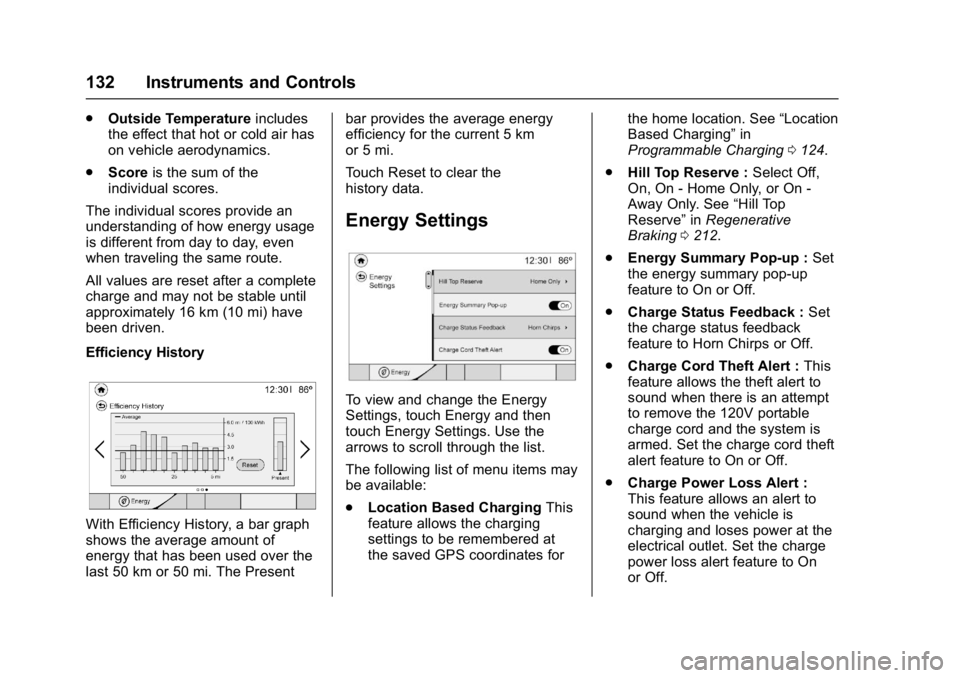
Efficiency History
With Efficiency History, a bar graph
shows the average amount of
energy that has been used over the
last 50 km or 50 mi. The Present bar provides the average energy
efficiency for the current 5 km
or 5 mi.
Touch Reset to clear the
history data.
Energy Settings
To view and change the Energy
Settings, touch Energy and then
touch Energy Settings. Use the
arrows to scroll through the list.
The following list of menu items may
be available:
.
Location Based Charging This
feature allows the charging
settings to be remembered at
the saved GPS coordinates for the home location. See
“Location
Based Charging” in
Programmable Charging 0124.
. Hill Top Reserve : Select Off,
On, On - Home Only, or On -
Away Only. See “Hill Top
Reserve” inRegenerative
Braking 0212.
. Energy Summary Pop-up : Set
the energy summary pop-up
feature to On or Off.
. Charge Status Feedback : Set
the charge status feedback
feature to Horn Chirps or Off.
. Charge Cord Theft Alert : This
feature allows the theft alert to
sound when there is an attempt
to remove the 120V portable
charge cord and the system is
armed. Set the charge cord theft
alert feature to On or Off.
. Charge Power Loss Alert :
This feature allows an alert to
sound when the vehicle is
charging and loses power at the
electrical outlet. Set the charge
power loss alert feature to On
or Off.
Page 146 of 361

Chevrolet Bolt EV Owner Manual (GMNA-Localizing-U.S./Canada/Mexico-
10122739) - 2017 - CRC - 10/3/16
Instruments and Controls 145
.Remote Start Auto Heat Seats
. Passive Door Unlock
. Passive Door Lock
. Remote Left in Vehicle Alert
Remote Unlock Light Feedback
When on, the exterior lamps will
flash when unlocking the vehicle
with the RKE transmitter.
Select Off or Flash Lights
Remote Lock Feedback
This allows selection of what type of
feedback is given when locking the
vehicle with the RKE transmitter.
Select Off, Lights and Horn, Lights
Only, or Horn Only.
Remote Door Unlock
This allows selection of which doors
will unlock when pressing
Kon the
RKE transmitter.
Select All Doors or Driver Door. Remote Start Auto Heat Seats
If equipped and turned on, this
feature will turn the heated seats on
when using remote start on
cold days.
Select Off or On.
Passive Door Unlock
This allows the selection of what
doors will unlock when using the
button on the outside driver door
handle to unlock the vehicle.
Select All Doors or Driver
Door Only.
Passive Door Lock
This allows passive locking to be
turned on or off and selects
feedback.
Select Off, On with Horn
Chirp, or On.
Remote Left in Vehicle Alert
This feature sounds an alert when
the RKE transmitter is left in the
vehicle.
Select Off or On.
Devices
This shows status of the connected
device.
Touch Add Device if a device needs
to be added.
Device Remote Access
This will allow devices to control
system functionality and
access data.
Select Off or On.
Bluetooth Phone
This allows the connected Bluetooth
phone to be configured. See
“Bluetooth Phone”
inSettings 0177.
. My Number
. Privacy
. Sort Contacts
. Resync Device Contacts
My Number
This displays the phone number of
the connected Bluetooth device.
Page 240 of 361

Chevrolet Bolt EV Owner Manual (GMNA-Localizing-U.S./Canada/Mexico-
10122739) - 2017 - CRC - 10/3/16
Driving and Operating 239
To disable this feature, see“Charge
Power Loss Alert” inEnergy
Information 0131.
To stop this alert, do one of the
following:
. Unplug the charge cord.
. Press
Kon the RKE transmitter.
. Press and hold
7on the RKE
transmitter, then press again to
stop the panic alarm.
. Press the horn pad.
Charge Cord
IMPORTANT SAFETY
INSTRUCTIONS
This symbol indicates risk of
electrical shock if misused.
See Radio Frequency Statement
0 336. A portable charge cord used to
charge the vehicle high voltage
battery is stored under the load floor
in the rear cargo area.
1. Wall Plug
2. Status Indicators
3. Vehicle Plug
4. Release Button
Important Information about
Portable Electric Vehicle Charging
.
Charging an electric vehicle can
stress a building’ s electrical
system more than a typical
household appliance.
. Before plugging into any
electrical outlet, have a qualified
electrician inspect and verify the
electrical system (electrical
outlet, wiring, junctions, and
protection devices) for
heavy-duty service at a 12 amp
continuous load.
. Electrical outlets may wear out
with normal usage or may be
damaged over time, making
them unsuitable for electric
vehicle charging.
. Check the electrical outlet/plug
while charging and discontinue
use if the electrical outlet/plug is
hot, then have the electrical
outlet serviced by a qualified
electrician.
Page 267 of 361

Chevrolet Bolt EV Owner Manual (GMNA-Localizing-U.S./Canada/Mexico-
10122739) - 2017 - CRC - 10/3/16
266 Vehicle Care
A fuse puller is in the underhood
compartment fuse block.
The vehicle may not be equipped
with all of the fuses, relays, and
features shown.Fuses Usage
1 –
2 Power window rear
3 –
4 Rechargeable energy
storage system 1
5 –
6 –
7 Left high-beam
headlamp
8 Right high-beam
headlamp
9 Left low-beam
headlamp
10 Right low-beam
headlamp
11 Horn
12 – Fuses Usage
13 Front wiper motor
driver
14 Liftgate
15 Front wiper motor
co-driver
16 Electronic brake
control module supply
electronics
17 Rear wiper
18 Liftgate
19 Seat module front
20 Washer
21 HID lamp
22 Linear power module
23 Electronic brake
control module supply
motor
24 Seat module rear
25 Powertrain
26 Transmission range
control module
27 Aeroshutter Fuses Usage
28 Auxiliary oil pump
29 Electric brake boost
motor source
30 Front power windows
31 In-panel bussed
electrical center
32 Rear window
defogger
33 Heated exterior
rearview mirror
34 Pedestrian friendly
alert function
35 –
36 –
37 Current sensor
38 Rain sensor
39 –
40 Electric brake
boost (ECU)
41 Power line
communication
module
Page 281 of 361

Chevrolet Bolt EV Owner Manual (GMNA-Localizing-U.S./Canada/Mexico-
10122739) - 2017 - CRC - 10/3/16
280 Vehicle Care
other than those recommended
could prevent the TPMS from
functioning properly. SeeBuying
New Tires 0283.
. Operating electronic devices or
being near facilities using radio
wave frequencies similar to the
TPMS could cause the TPMS
sensors to malfunction.
If the TPMS is not functioning
properly it cannot detect or signal a
low tire condition. See your dealer
for service if the TPMS malfunction
light and DIC message comes on
and stays on.
TPMS Sensor Matching
Process
Each TPMS sensor has a unique
identification code. The identification
code needs to be matched to a new
tire/wheel position after rotating the
vehicle’s tires or replacing one or
more of the TPMS sensors. The
TPMS sensor matching process
should also be performed after
replacing a spare tire with a road
tire containing the TPMS sensor.
The malfunction light and the DIC
message should go off at the next ignition cycle using POWER
O.
The sensors are matched to the tire/
wheel positions, using a TPMS
relearn tool, in the following
order: driver side front tire,
passenger side front tire, passenger
side rear tire, and driver side rear.
See your dealer for service or to
purchase a relearn tool. A TPMS
relearn tool can also be purchased.
See Tire Pressure Monitor
Sensor Activation Tool at
www.gmtoolsandequipment.com
or call 1-800-GM TOOLS
(1-800-468-6657).
There are two minutes to match the
first tire/wheel position, and
five minutes overall to match all four
tire/wheel positions. If it takes
longer, the matching process stops
and must be restarted.
The TPMS sensor matching
process is:
1. Set the parking brake.
2. Press POWER
Oto start the
vehicle. See Power Button
0 201. 3. Make sure the Tire Pressure
info page option is turned on.
The info pages on the DIC can
be turned on and off through
the Settings menu. See Driver
Information Center (DIC) 0133.
4. Use the DIC controls on the right side of the steering wheel
to scroll to the Tire Pressure
screen under the DIC
info page.
5. Press and hold
Vin the center
of the DIC controls.
The horn sounds twice to
signal the receiver is in relearn
mode and the TIRE
LEARNING ACTIVE message
displays on the DIC screen.
6. Start with the driver side front tire.
7. Place the relearn tool against the tire sidewall, near the valve
stem. Then press the button to
activate the TPMS sensor.
A horn chirp confirms that the
sensor identification code has
been matched to this tire and
wheel position.
Page 282 of 361

Chevrolet Bolt EV Owner Manual (GMNA-Localizing-U.S./Canada/Mexico-
10122739) - 2017 - CRC - 10/3/16
Vehicle Care 281
8. Proceed to the passenger sidefront tire, and repeat the
procedure in Step 7.
9. Proceed to the passenger side rear tire, and repeat the
procedure in Step 7.
10. Proceed to the driver side rear tire, and repeat the procedure
in Step 7. The horn sounds two
times to indicate the sensor
identification code has been
matched to the driver side rear
tire, and the TPMS sensor
matching process is no longer
active. The TIRE LEARNING
ACTIVE message on the DIC
display screen goes off.
11. Turn the vehicle off.
12. Set all four tires to the recommended air pressure
level as indicated on the Tire
and Loading Information label.Tire Inspection
We recommend that the tires,
including the spare tire, if the
vehicle has one, be inspected
for signs of wear or damage at
least once a month.
Replace the tire if:
.The indicators at three or
more places around the tire
can be seen.
.There is cord or fabric
showing through the tire's
rubber.
.The tread or sidewall is
cracked, cut, or snagged
deep enough to show cord or
fabric.
.The tire has a bump, bulge,
or split.
.The tire has a puncture, cut,
or other damage that cannot
be repaired well because of
the size or location of the
damage.
Tire Rotation
Tires should be rotated every
12 000 km (7,500 mi). See
Maintenance Schedule 0311.
Tires are rotated to achieve a
uniform wear for all tires. The
first rotation is the most
important.
Anytime unusual wear is
noticed, rotate the tires as soon
as possible, check for proper tire
inflation pressure, and check for
damaged tires or wheels. If the
unusual wear continues after the
rotation, check the wheel
alignment. See When It Is Time
for New Tires 0282 andWheel
Replacement 0286.
Page 344 of 361
Chevrolet Bolt EV Owner Manual (GMNA-Localizing-U.S./Canada/Mexico-
10122739) - 2017 - CRC - 10/3/16
OnStar 343
.Change the default name of the
SSID (Service Set Identifier).
This is your network’s name that
is visible to other wireless
devices. Choose a unique name
and avoid family names or
vehicle descriptions.
OnStar Wi-Fi
®Hotspot (If
Equipped)
The vehicle may have a built-in
Wi-Fi hotspot that provides access
to the Internet and web content at
4G LTE speed. Up to seven mobile
devices can be connected. A data
plan is required. Use the in-vehicle
controls only when it is safe to
do so.
1. To retrieve Wi-Fi hotspot information, press
=, wait for
the prompt, then say “Wi-Fi
settings.” On some vehicles,
touch Wi-Fi Settings on the
screen.
2. The Wi-Fi settings will display the Wi-Fi hotspot name (SSID),
password, and on some
vehicles, the connection type (no Internet connection, 3G,
4G, 4G LTE), and signal quality
(poor, good, excellent).
3. To change the SSID or password, press
Qor call
1-888-4ONSTAR to connect
with an Advisor.
After initial set-up, your vehicle’s
Wi-Fi hotspot will connect
automatically to your mobile
devices. Manage data usage by
turning Wi-Fi on or off on your
mobile device, using the
myChevrolet mobile App, or by
contacting an OnStar Advisor.
myChevrolet Mobile App (If
Available)
Download the myChevrolet mobile
App to compatible Apple
®iOS and
Android™ smartphones. OnStar®
Subscribers can access the
following services from a
smartphone:
.
Remotely start/stop the vehicle,
if factory-equipped.
. Lock/unlock doors, if equipped
with automatic locks. .
Activate the horn and lamps.
. Check the vehicle’s energy level,
range or tire pressure,
if factory-equipped with the Tire
Pressure Monitor System.
. Send destinations to the vehicle.
. Locate the vehicle on a map
(U.S. only).
. Turn the vehicle's Wi-Fi
®hotspot
on/off, manage settings, and
monitor data consumption,
if equipped.
. Locate a dealer and schedule
service.
. Request roadside assistance.
. Set a parking reminder with pin
drop, take a photo, make a note,
and set a timer.
. Connect with Chevrolet on social
media
An active OnStar service,
compatible device, factory-installed
remote start and power locks are
required. Data rates apply. Visit
onstar.com for details and system
limitations.