2017 AUDI TT ROADSTER ignition
[x] Cancel search: ignitionPage 115 of 314
Voice recognition system
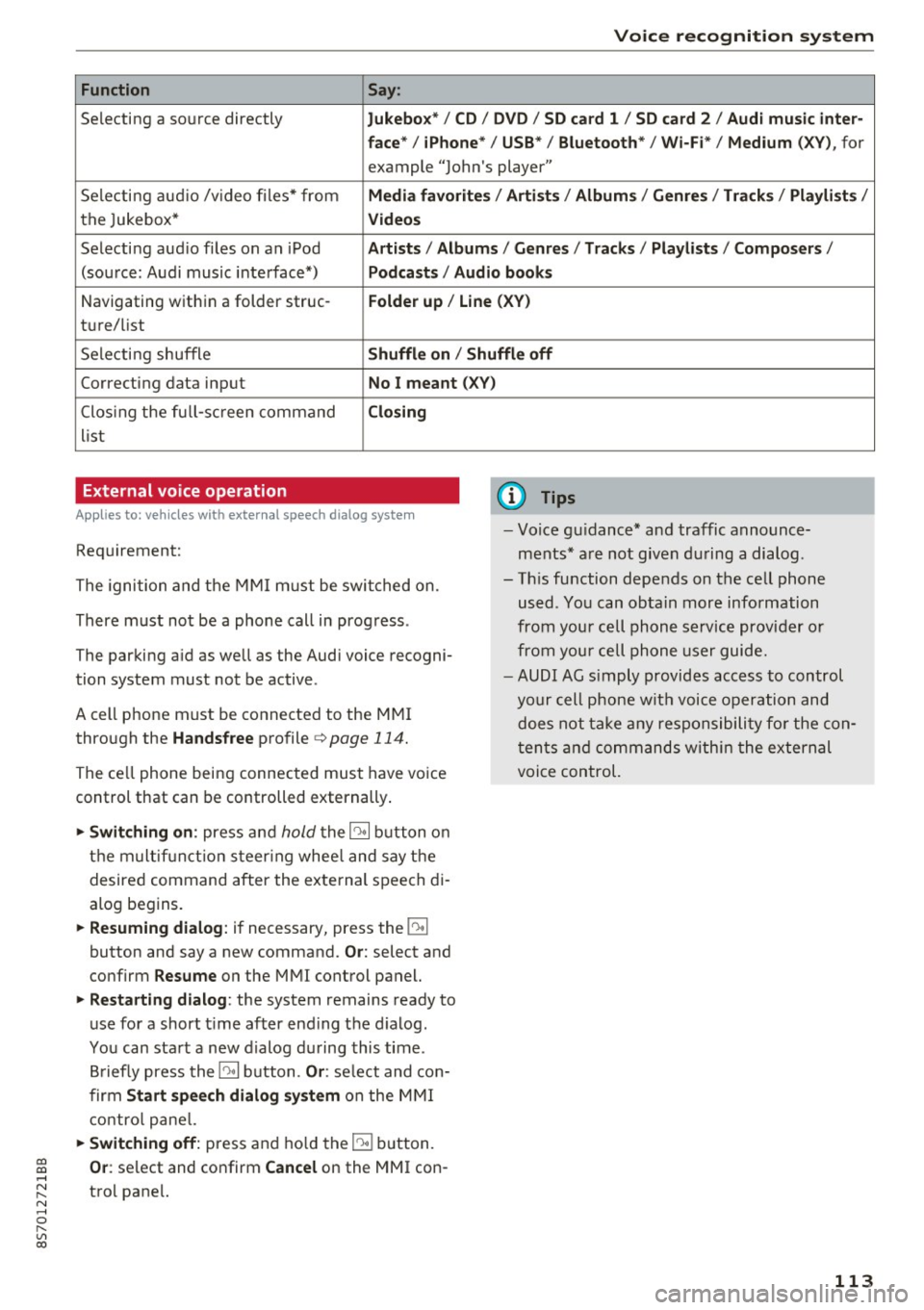
Function Say:
Selecting a so urce directly Jukebo x*/ CD/ DV D/ SD ca rd 1 / SD card 2 / Audi mu sic inter-
face * / iPhon e* / USB * / Bluetooth * / Wi -Fi * / Medium
(XV ), for
example "Jolhn's player"
Selecting aud io /v ideo files* from
Media favorite s/ Artists / Album s/ Genr es/ Track s/ Playli st s /
the Jukebox* Videos
Selecti ng aud io files on an iPod A rtists / Albums / Genre s/ Track s/ Playlists /Compos ers/
(sou rce: Audi music interface*) Podcast s / Audio books
Navigating w ith in a folder struc-Folder up / Line (XV )
tu re/list
Selecti ng shuffle
Shuffl e on / Shuffle off
Correcting data input No I meant (X V)
Clos ing the fu ll- sc reen command Closing
list
External voice operation
Applies to: veh icles with external speech dialog system
Requirement:
The ignition and the MMI m ust be swi tched on.
There must not be a phone call in progress .
The parki ng aid as well as the Audi voice recogni
tion system must not be active.
A cell phone must be connected to the MMI through the
Handsfree profile ¢page 114.
The ce ll phone being connected must have vo ice
control that can be controlled externally .
... Switching on : press and hold the 10• 1 button o n
the m ult if u nct ion s teer ing whee l and say the
desired command after the external speech di
alog begins .
... Resuming dialog : if necessary, press the 10•1
button and say a new command. Or: select and
confirm
R esume on the MMI control panel.
... Restarting dialog : the system remains ready to
use for a short t ime after end ing the d ialog.
You can sta rt a new dialog du ring this time .
B riefly press the
10• 1 button. Or : select and con
firm
Start sp eec h dialog sy stem on the M MI
contro l pane l.
... Switching off: press and ho ld the 51 b utton.
(D Tips
- Vo ice gu idance* and traffic announce
ments * are not given du ring a dialog .
- Th is function depends on the cell phone
used . You can obtain more information
from your cell phone service provider or
from your cell phone user guide.
- AUDI AG s imply provides access to control
your cell phone wit h voice opera tion and
does not take any responsibility fo r the con
t en ts and commands within the external
voice control.
~ Or : select and confirm Cancel on the MMI con-....
~ trol pane l. N ..... 0 r---
"' c:o
113
Page 116 of 314
Telephone
Telephone Introduction
Applies to: vehicles with telephone
To make phone coils in your vehicle using the
/11/111, connect your cell phone to the /11/111 via
Bluetooth.
Hand sfree
Afte r you have connected you r ce ll phone to the
MMI via Bluetooth , you can use the handsfree
system and operate telephone functions through
your MMI. You can make calls using the antenna
on your cell phone.
A WARNING
-Med ical experts warn that cell phones can
interfere w ith the funct ion of pacemakers .
Always mainta in a m inimum d istance of 20
c ent imeters between the cell phone anten
na and the pacemaker.
- Do not carry the cell phone in a pocket di
rectly over the pacemaker when the phone
is switched on.
- Sw itch the cell phone off immediately if
you suspect it may be interfering w ith the
pacemaker.
- Do not use the vo ice recognit ion sys-
tem* c>
page 108 in emergenc ies because
your vo ice may change in stressful situa
t ions. It may take longe r to dial the number
o r the system may not be able to dial it at
all. Dial the emergency n umbe r manually .
- Switch your cell phone off in areas where
there is a risk of an exp losion . These loca
tions are not always clea rly mar ked. This
may include gas stations, fuel and chemical
storage facilities or transport vehicles, or lo cations where fue l vapors (such as propane
or gaso line vapor in vehicles or bui ld ings),
chemicals or large quantities of dust parti
cles (such as flour, sawdust or metal) may
be present in the air. This also applies to all
other locations where you would normally
turn yo ur vehicle engine off .
- The demands of traffic requ ire yo ur full at
tent ion. Always read the chapter c>
page 96,
Traffic safety information.
114
-
(D Tips
- To learn which Bluetooth connections and
wh ich of the funct ions in your cell phone are
supported, check with your cell phone serv
ice provider or the database for mobile devi
ces at
www .audiu sa.com /bluetooth .
-The Bluetooth connection range is limited
to inside the vehicle . It can also be affected
by local condit ions and interference with
other devices .
Setup
Connecting a cell phone using Bluetooth
Applies to: vehicles with telephone
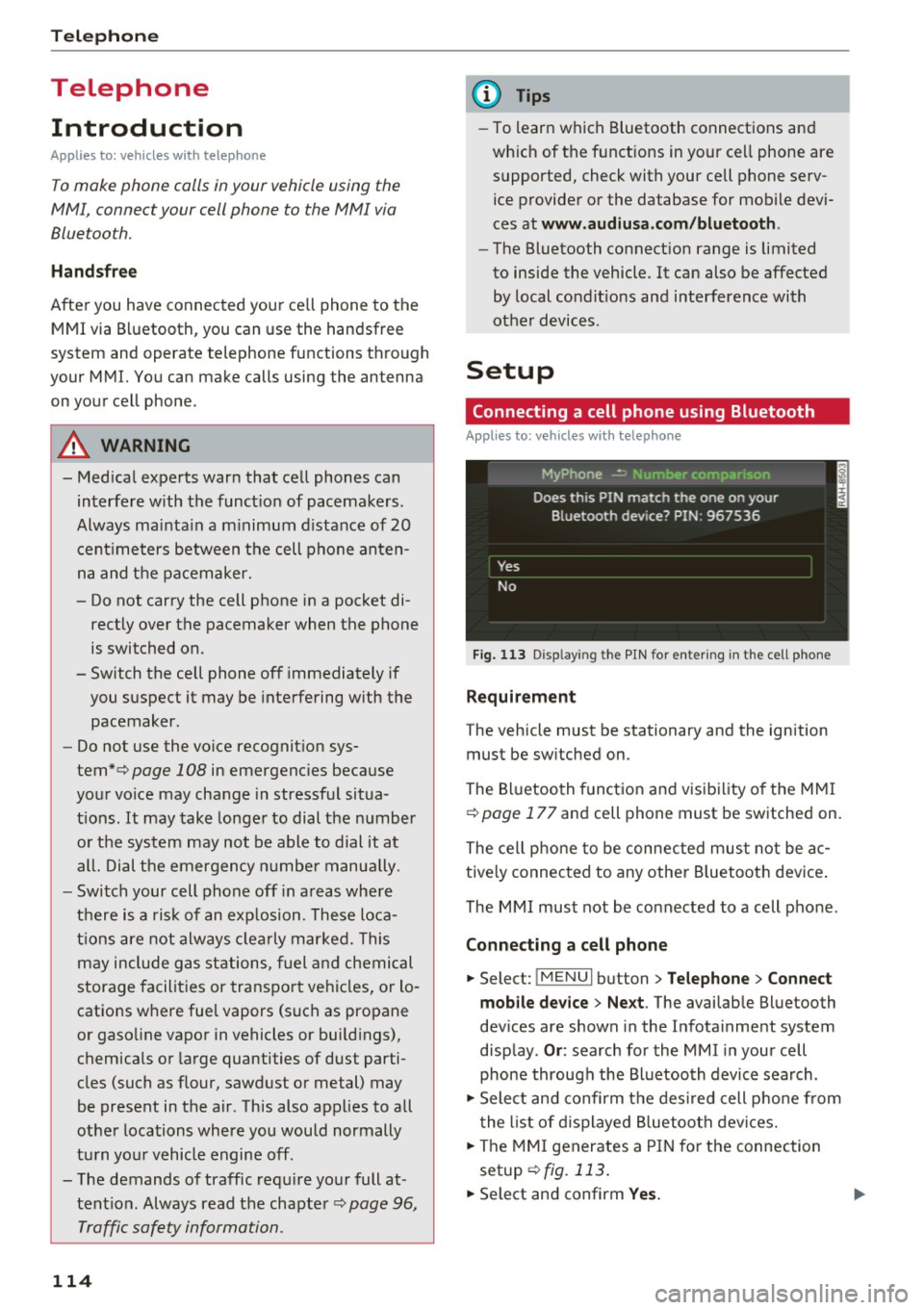
Fig. 11 3 Disp laying the PIN for entering in the cell phone
Requirement
The vehicle must be stationary and the ignition
must be sw itched on.
The Bluetooth funct ion and visibility of the MMI
c>
page 177 and cell phone must be switched on.
The cell phone to be connected must not be ac
tive ly connected to any othe r Bluetoot h dev ice .
The MMI must not be connected to a cell phone.
Connecting a cell phone
... Select: !MENUI button> Tel ephone > Connect
mob ile d ev ice > Ne xt .
The available Bluetooth
dev ices are shown in the Infotainment system
disp lay .
Or : search for the MMI in your cell
phone through the Bluetooth device search .
... Sele ct and confirm the des ired cell p hone from
the list of d isplayed B luetooth devices.
... The MMI generates a PIN for the connection
setup
c> fig. 113.
... Select and confirm Yes. .,..
Page 118 of 314
Telephone
Se e¢ pag e 114, Conn ecting a cell phone using
Bluetooth .
Example: you have connected yo ur business cell
phone to the MMI as the ma in phone and your
p rivate ce ll phone as the additiona l phone . To be
ab le to call contacts from your private c ell phone
directory , you must switch the ma in and addi
tional phone, since the directory from the main
phone is always displayed.
S wi tc h ing the ma in and add itional phone
Requirement: a main phone and an addit ional
phone must be connect ed.
Sw itc h main and additional ph one: select:
I MENU ! button >Telephone > right control but
ton >
S wi tch ma in and addit ional ph one.
(D Tips
-Please note that the directory from the
main phone is always displayed.
- You can see if a cell p hone is connected as
the main o r additional phone in the connec
tion manager ¢
page 176. Or: the device
name of the connected main phone is
shown in the
T elephone menu (s uch as My
Phone).
- If the main phone does not connect auto
matically to the MMI when the ignition is
switched on, for examp le because it is out
of the vehicle range or the B luetooth func
tion is switched off, then a previously paired
additional phone is automatically connected
as the main phone .
- You can send and receive messages on your
main phone as well as on your additional
phone
c> page 116, fig . 11 4. You do not
need to switch you r main phone and addi
tiona l phone for this.
- You can also make your connected cell
phone the default phone by selecting
S et a s
default telepho ne
in the Connection m an·
age r¢
page 177 .
116
Using the telephone
Opening the telephone
App lies to: vehicles with telepho ne
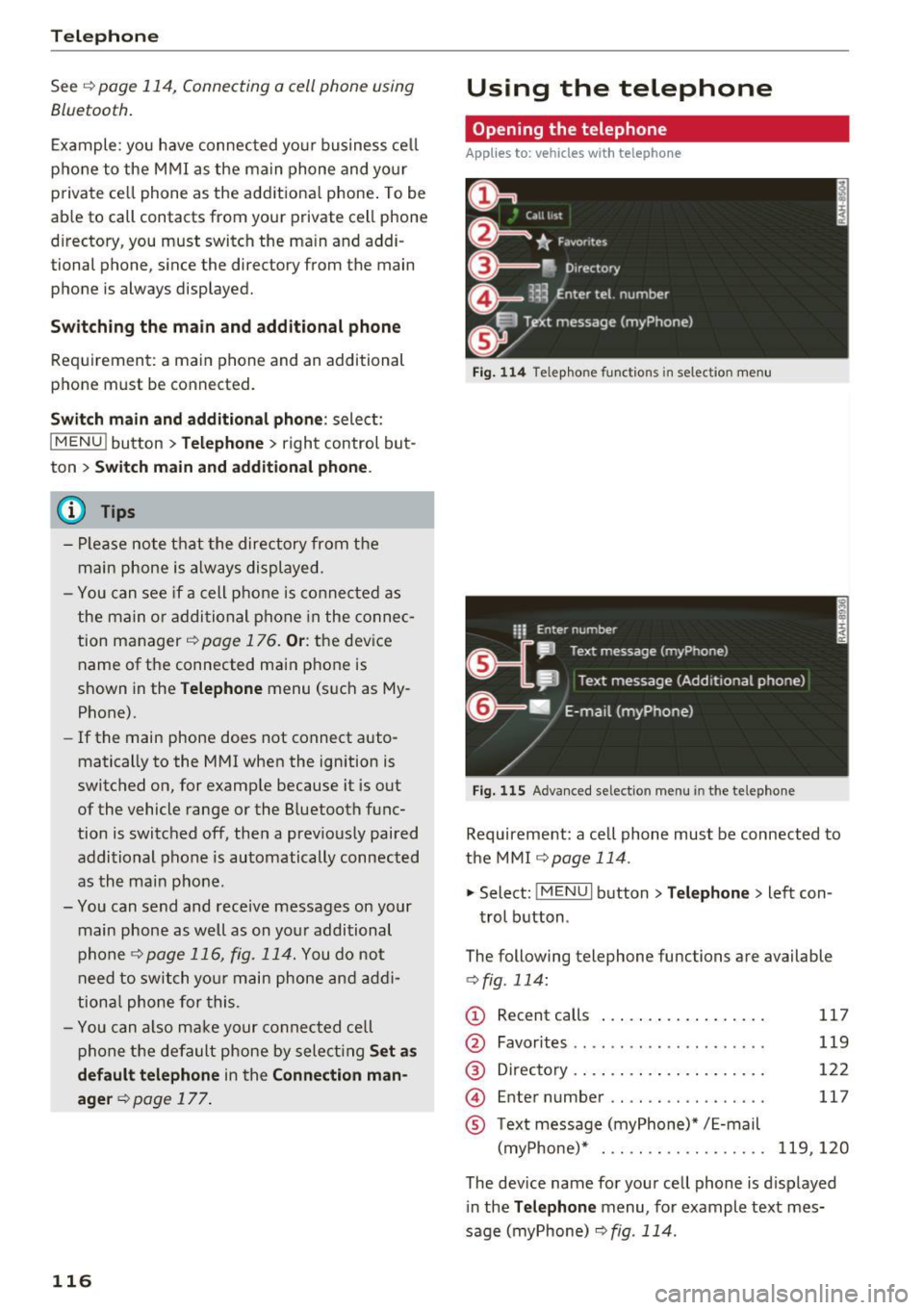
Fig . 11 4 Telep hone fu nctio ns in se lect ion me nu
Fig. 115 A dva nced selectio n menu in t he te le p hone
Requirement: a cell phone must be connected to
the MMI
r:::;, page 114 .
"'Select : !M ENUI button> Tele phone > left con
trol button .
The following telephone functions are available
c> fig. 114:
(!) Rec ent calls
@
®
©
®
Favorites .. .. .. .. .. .... .. .... .
D irectory .. .. .. .. .. ..... ..... .
Enter number .. .. .. .... .. .... .
Text message (myPhone)* / E-mail
(myPhone)* . .. .. .. ... .. . .... .
117
119
122
117
119,120
The device name for your cell phone is d isplayed
in the
Tel ephone menu, for example text mes
sage (myPhone)
r:::;, fig . 114.
Page 133 of 314
co
co
.... N
" N .... 0
" "' c:o
-Set up destinations in your MMI using your
m yA udi acc ount or online map view
¢ page 147.
-Onli ne traffic i nfo rmat ion: receive up-to-the
minute traffic information about accidents,
road construction and other incidents
¢ page 148.
-Map updates *: import navigation map updates
in your MMI using an SD card .
@ Tips
-For the Map update Audi connect service us
ing an SD card, check the current software
version in your vehicle and compare it with
my.aud iu sa. com to see if a new version is
available . You can also have the new naviga
tion data installed by an Audi dealer, which
can be done for an add itiona l charge.
- More information on
map updat es can be
found in the
Audi c onnect Operating Man
ual under
m y.audiusa .com .
Audi connect services on the phone
Applies to: vehicles with Audi connect
The follow ing Audi connect serv ices are currently
ava ilable:
Storing contacts on your computer using your
m yAudi Ac count and loading the contacts into
the MMI directory ¢page 123.
Audi connect services in the Media menu
Applies to: vehicles with Wi- Fi audio player and Audi connect
-Wi-Fi audi o play er: you can access the media
center through Wi-Fi connected media players
(such as smartphones)
¢ page 160.
- Online m edia : offers access to different online
med ia services and operation through the MMI
using the
Audi MMI connect app .
(D Tips
For mo re information on the Wi-Fi a udio p lay
er and supported devices, contact an author
ized Audi dealer or authorized Audi Service Facility.
Audi c onn ect
Additional options
Applies to: vehicles with Audi connect
., Select: !M ENUI button> Audi conn ect> right
cont rol button .
The following options are available in the Aud i
connect serv ices overv iew :
-Lo g in: see ¢ page 128, Logging into myAudi in
the vehicle .
-Connect ion manage r: see¢ page 176.
Wi-Fi hotspot
Applies to: vehicles with Wi-Fi hotspot
You can use the MMI as a Wi-Fi hotspot to con
nect up to eight Wi-Fi devices to the Internet.
Requirement: the ignition must be sw itched on .
.. Select:
!MENU I button> Telephone > right con-
trol button >
Wi-Fi setting s.
The following sett ings can be mod ified:
Wi -Fi
The MMI Wi-Fi hotspot is deactivated at the fac
tory . Sw itch the Wi-F i hotspot to
On before es
tab lishing an Internet connection between your
vehicle and you r Wi -Fi device.
- On : the MMI Wi-Fi hotspot is act ive and v is ible
to other dev ices. You can connect your W i-F i
dev ice w ith the MM I.
-Off : the MMI Wi-Fi hotspot is deactivated . An
Internet connect ion for W i- Fi dev ices is not
possible .
_&. WARNING
-As the driver, do not allow usage of the Wi
Fi hotspot to distract you from driving, as
this could increase the risk of an accident .
-It is only safe to use tablets, laptops, mo
bi le devices and other simi lar devices when
the vehicle is stationary because, like all loose objects, they could be thrown around
the inside of the vehicle in a crash and cause
serious injuries . Store these types of devices
securely while driving.
~
1 31
Page 175 of 314
co
co
.... N
" N .... 0
" "' c:o
Audi smartphone interface
Setup
App lies to: ve hicles with Audi smartpho ne interface
You can connect your smartphone to the MMI us
ing the Audi smartphone interface . Certain con
tent on your smartphone is adapted to the Info
tainment system display while driving and can
be operated through the MMI control panel.
Requirement:
The vehicle must be stationary and the ignition
must be switched on.
iPhone generation 5 or higher with Lightning
connector and iOS 7.1.2 operating system or
h igher.
O r:
Smartphone with Android Auto app and Android
5 .0 Loll ipop operating system or higher.
.,. Connect your smar tphone to the Audi music in
te rface
c:> page 162 using a USB adapter
¢page 162, fig. 142 .
.. Se lect and confirm A cti va te Apple CarPl ay or
Acti vate And roid Auto now.
.. Follow the system instruct ions.
.,. Pay attention to any add itional system prompts
on your smartphone if applicable.
If you chose not to use Apple CarPlay or Android
Auto when connecting your smartphone for the
first time, you can start the Audi smartphone in
terface later on using the
Connection m an ager .
.. Se lect: I MENU I button > Audi smartphone in·
terfa ce
> Change to connecti on manager .
.. Connect your smar tphone to the Audi music in
terface
c:>page 162 using a USB adapter
¢page 162, fig. 142 .
.. Se lect and confirm Audi smartphone : in the
Connection manager c:> page 176. You can se
lect your smartphone in the list of devices that
are already paired
c:> page 177.
.,. Follow the system instruct ions.
l ) In preparat io n at the t ime of pr inting.
Aud i smartphon e int erfac e
{!) Tips
-The functions that can be used depend on
the fo llow ing factors, among others:
- the brand of your smartphone
- the vers ion of the operating system in
your smartphone
- the software ve rsion of the app used
- the USB adapter cab le and correct connec-
tion
- your cell phone service provider
- the customized settings on your smart -
phone
- One of the factors
above or a combina tion
of any of them could cause your smartphone
to be incompatib le wit h the Audi smart
phone interface. Compatibility cannot be
guaranteed for all types of smartphones.
For more informat ion and assistance, refe r
to the use r guide and the manufactu rer of
your smartphone .
- If the connected smartphone has voice con
tr ol, you can operate your smartpho ne usi ng
the external voice recognition system*
c:>page 113.
-The menu language show n in the MMI is
based on the settings in you r smartphone .
- The time d isplayed in the MMI is based o n
t he settings in your smartphone.
- Several MMI functions are not avai lab le
when Apple Car Play or Andro id Auto is ac
tive.
- You cannot co nnect any mob ile dev ices via
Bl uetooth when an App le CarPlay connec
tion is act ive .
- Whe n the Apple CarPlay connection is ac
tive,
Tag this song for iTunes*1 ) is not ava il
able
¢page 152 .
Operating
Appl ies to: vehicles wit h Audi smartp hone interface
Opening a menu
App le CarPlay : you can go back to the Apple Ca r
Play main me nu regardless of the selected menu
item by p ressing and holding the
I BACKI button. Ill>-
173
Page 200 of 314
Airbag system
Standard 208 with which the Advanced Airbag
System in your vehicle was cert ified has been in
stalled on the front passenger seat. For a listing
of the child restraints that were used to certify
compliance with the US Safety Standard
¢page 220.
The PASSENGER AIR BAG OFF~; light in the
headliner tells you when the front Advanced Air
bag on the passenger side has been turned off by
the electronic control unit.
Each t ime you turn on the ignition, the
PASSEN·
GER AIR BAG OFF,-;; ON ~
light will come on
for a few seconds and:
- PASSENGER AIR BAG OFF~; will come on if
the front passenger seat is not occupied,
- PASSENGER AIR BAG OFF ~; will come on if
the e lectrical capacitance measured by the ca
pacitive passenger detection system for the
front passenger seat equals the combined ca pacitance of an infant up to about one year of
age and one of the rearward-facing or forward
facing child restraints listed in Federal Motor
Vehicle Safety Standard 208 with which the Ad
vanced Airbag System in your vehicle was certi
fied. For a listing of the child restraints that
were used to certify your vehicle's compliance
with the U.S. Safety Standard¢
page 220.
-PASSENGER AIR BAG OFF ~; will come on if
there is a small child or chi ld restraint on the
front passenger seat,
- PASSENGER AIR BAG ON @will go off if the
front passenger seat is occupied by an adult as
registered by the capacitive passenger detec
tion system ¢
page 20 7, Monitoring the Ad
vanced Airbag System.
The PASSENGER AIR BAG OFF~; light comes on
when electrical capacitance registered on the
front passenger seat is equa l to or less than the
comb ined capacitance of a typ ica l 1 year-old in
fant and one of the rearward-fac ing or forward
facing ch ild restraints listed in Federal Motor Ve
h icle Safety Standard 208 with wh ich the Ad
vanced Ai rbag System in your vehicle was cert i
fied.
If the total electrical capac itance registered on
the front passenger seat is more than that of a
198
typical 1 year -old chi ld but less than the weight
of a sma ll adult, the front airbag on the passen
ger side can deploy (the
PASSENGER AIR BAG
OFF ~;
light does not come on).
If the
PASSENGER AIR BAG OFF~; light does
not come on, the front airbag on the passenger
s ide has not been turned off by the e lectron ic
contro l unit and can deploy if the control unit
senses an impact that meets the conditions stor
ed in its memory .
For example, the airbag may deploy if :
-a small child that is heav ier than a typical 1
year -old child is on the front passenger seat
(regard less of whether the child is in one of the
child safety seats listed¢
page 220), or
- a child who has outgrown child restraints is on
the front passenger seat.
If the front passenger airbag is turned off, the
PASSENGER AIR BAG OFF,-;; light comes on in
the headliner and stays on .
If the front passenger airbag deploys, the Feder
al Standard requ ires the airbag to meet the " low
risk" deployment criteria to reduce the risk of in
jur y through interaction with the airbag. "Low
risk" deployment occurs in those crashes that
take place at lower decelerations as defined in
the electronic control unit¢
page 208, PASSEN
GER AIR BAG OFF~; ON~ light.
Always remember, a child seat or infant carrier
installed on the front seat may be struck and
knocked out of posit ion by the rapidly inflating
passenger's airbag in a frontal collision. The a ir
bag could greatly reduce the effectiveness of the
ch ild restraint and even ser iously injure the child
during inflation.
.&, WARNING
-
A child in a rearward-facing child seat instal
l ed on the front passenger seat will be seri
ously injured and can be killed if the front air
bag inflates - even with an Advanced Airbag
System.
- The inflating airbag will hit the ch ild seat or
infant carrier with great force and will .,.
Page 201 of 314
co
co
.... N
" N .... 0
" "' c:o
smash the child seat and child against the
backrest, center armrest, door or roof.
- Forward-facing child seats installed on the
front passenger's seat may interfere with
the deployment of the airbag and cause se
rious personal injury to the child.
A WARNING
If, in exceptional circumstances, you must in
stall a forward-facing child restraint on the
front passenger's seat:
- Always make sure the forward-facing seat
has been designed and certified by its man
ufacturer for use on a front seat with a pas
senger front and side airbag.
- Never put the forward-facing child restraint
up against or very near the instrument pan
el.
- Always move the front passenger seat to
the highest position in the up and down ad
justment range and move it back to the
rearmost position in the seat's fore and aft
adjustment range, as far away from the air
bag as possible, before installing the for·
ward-facing child restraint.
- Always make sure that the safety belt upper
anchorage is behind the child restraint and
not next to or in front of the child restraint
so that the safety belt will be properly posi
tioned.
- Make sure that the
PASSENGER AIR BAG
OFF~;
light comes on and stays on all the
time whenever the ignition is switched on.
A WARNING
To reduce the risk of serious injury, make sure
that the
PASSENGER AIR BAG OFF~; light
will be displayed whenever a child restraint is
installed on the front passenger seat and the
ignition is switched on.
- If the PASSENGER AIR BAG OFF~; light
does not stay on, perform the checks descri
bed
Q page 20 7, Monitoring the Advanced
Airbag System.
- Have the airbag system inspected by your
Audi dealer immediately.
Airbag system
-Always carefully follow instructions from
child restraint manufacturers when instal
ling child restraints.
A WARNING
If, in exceptional circumstances, you must in
stall a forward or rearward-facing child re
straint on the front passenger's seat:
- Improper installation of child restraints can
reduce their effectiveness or even prevent
them from providing any protection.
- An improperly installed child restraint can
interfere with the airbag as it deploys and
seriously injure or even kill the child -even
with an Advanced Airbag System.
- Always carefully follow the manufacturer's
instructions provided with the child seat or
earner.
-Always make sure that there is nothing on
the front passenger seat that will cause the
capacitive passenger detection system in
the seat to signal to the Airbag System that
the seat is occupied by a person when it is
not, or to signal that it is occupied by some ·
one who is heavier than the person actually
sitting on the seat. The presence of addi
tional objects could cause the passenger
front airbag to be turned on when it should
be off, or could cause the airbag to work in a
way that is different from the way it would have worked without the object on the seat.
199
Page 205 of 314
co
co
.... N
" N .... 0
" "' c:o
rearmost position in the seat's fore and aft
adjustment range, as far away from the air
bag as possible, before insta lling the for
ward-facing child restra int.
- lways make sure that the safety belt upper
anchorage is beh ind the child restraint and
not next to or in front of the child restraint
so that the safety belt will be properly pos i
tioned.
-Always make sure that there is nothing on the front passenger seat that w ill cause the
c apacit ive passenger detection system in
the seat to signa l to the Airbag Sys tem tha t
the seat is occupied by a person when it is
not, or to signa l that it is occ upied by some
one who is heavier than the person actua lly
sitting on the seat . The p resence of addi
t ional objects could cause the passenger
front airbag to be turned on when it shou ld
be off, or could cause the airbag to work in a
way that is different from the way it would
have worked witho ut the object on the seat.
- Make sure that the
PASSENGER AIR BAG
OFF ~;
light comes on and stays on a ll the
t ime whenever the ignition is switched on.
Advanced Airbag System components
The front passenger seat in yo ur vehicle has a lot
of
very important parts of the Advanced Airbag
Sys tem in it . These pa rts in cl ude the capacitive
passenger detection system, w iring, brackets,
and mo re. The control un it monitors the system
on the front passenger seat when the ign ition is
switched on and turns the airbag indicator light
on when a malfunct ion in the one of the system
components is detected
c::> page 208 . Because
the fro nt passenger seat contains important
pa rts of the Advanced Airbag System, you must
take ca re to preven t it from being damaged.
D amage to the seat may p revent the Advanced
Ai rbag System for the front passenger seat from
doi ng its job i n a crash.
The front Advanced Airbag System consists
of the follow ing :
- C rash sensors in the front of the vehicle that
measure vehicle accelerat ion/dece leration to
Airb ag sys tem
provide information to the Advanced A irbag
System about the severity of the cras h.
- An elect ronic contro l unit, with integrated
cras h sensors for front and side impacts . The
control un it "decides" whether to fire the front
airbags based on the information rece ived from
the crash sensors . The control unit also "de
cides" whether the safety belt pretensioners
should be activated.
- An Advanced A irbag w ith gas generator for the
driver inside the steeri ng wheel hub .
- An Advanced A irbag w ith gas generator inside
the instrument panel for the front passenger.
-A capacit ive passenger detection system under
neath the front passenger seat
cover. This sys
tem measures the e lectr ica l capacitance of the
person in the seat. The information registered
is sent continuously to the elect ronic contro l
un it to reg ulate dep loyment of the front Ad
vanced Airbag on the p assenger side.
- An airbag monitoring system and indicator
light
El in the inst rument cl uste r.
- A sensor in each front seat registe rs the d is
t ance betwee n the respective seat and the
steer ing whee l o r ins trumen t pa nel. The infor
mat ion registered is sent con tinuous ly to the
electronic contro l unit to regu late dep loyment
of the front Advanced Airbags .
- The
PASSENGER AIR BAG OFF~; lig ht comes
on and stays on in the headliner
c::> poge 208,
fig. 166 and tells you when the front Advanced
Airbag on the passenger side has been turned off.
- A sensor in the safety belt latch for the driver
and for the front seat passenger that senses
whether that safety be lt is latched or not and
transmits this information to t he electronic
cont rol un it .
A WARNING
Damage to the front passenge r seat can pre
vent the front airbag from working prope rly.
- Imp roper repair or d isassembly of the front
passenger and driver seat will p revent the
Advanced Airbag Sys tem from f unct ion ing
p roper ly. ...,
203