2017 AUDI TT ROADSTER service
[x] Cancel search: servicePage 18 of 314
Instruments and indicator lights
jj Tank system
D Please r efu el
If the indicator light turns on for the first time
a nd the message appears, there are about 1.9
ga l (7
L) of fue l left in the tank.
II] Plea se refuel immediately
If the indicator light turns on the message ap
pears , the fue l tank is almost empty . Refuel the
veh icle immediate ly.
D Tank s ystem: ma lfunction! Please contact
Service
If t h e ind icator lig ht tur ns on and th is mess age
appears, there is a mal func tion in the tank sys
tem .
D rive to an a uth o rized Aud i dea le r or authorized
Aud i Serv ice Facility immediately to have t he
malfunct ion cor re cted.
@ For the sake of the environment
Fue l sho uld never enter the sewe r system or
come into con ta ct w ith the gr ound.
(D Tips
More informat ion on refueling is ava ilable on
page
~ page 232.
~ Washer fluid level
(,-5 JJlea se add w asher fluid
F ill the washer fluid for the w indshield washer
system and the headlight washe r system* when
the ign ition is switc hed off ~
page 244.
"V! Windshield wipers
iii Windshield wipers : malfun ction ! Plea se
contact Service
There is a malfunction wi th the windshie ld w ip
e rs.
Dr ive to an autho rized Aud i dea ler or authorized
Aud i Serv ice Facility immediately to have the
malfunct io n corrected.
16
-:(f>:-Bulb failure indicator
If the II ind icator light tu rns on, a bulb has
failed . T he mess age indi cates the loc ation of the
bulb.
Replace the bu lb immediate ly .
Vehicle lights: malfunct ion! Please contact
S ervice
There is a ma lfunction in the headlights or the
li ght sw itch. Drive to an author iz ed Audi dealer or
authori zed Aud i Serv ice Facility immediately to
have the malfunction cor rected .
A WARNING
-Light bulbs a re under p ressure and can ex
plode when b ulbs are replaced, wh ich in
creases the risk of inju ry .
- With gas-discharge lamps* (xenon head
lights), the high-vo ltage component must
be handled appr opria tely. Ot he rw ise, there
is a risk of fatal injury.
~(D Headlight range control system
II Headlight range control : malfunction! See
owne r's manual
There is a ma lf u n ction in the headlight range
contro l system , which may cause gla re for o ther
drivers.
D rive to an author ized A udi dealer or autho rized
A udi Se rvice Fac il ity immed iate ly to have the
malfunction correc ted .
§0 Audi adaptive light
App lies to : vehicles wi th Audi ada ptive ligh t
II Audi adaptive light: malfunction! See own
er 's manual
-
The re is a ma lfunction in the adap tive lights. The
he adlig hts st ill func tion.
D rive to an au thorized A udi dealer or autho rized
A udi Se rvice Fac ility immediate ly to have the
malfunction cor rec ted .
Page 19 of 314
CD
CD
.... N
" N .... 0 r--. V, co
@:.D Light/rain sensor
l!I Automatic headlights: malfunction! See
owner' s manual
El Automatic wipers : malfun ction! See owner 's
manual
The light/ra in sensor is malf unct ion ing.
The low beams remain switched on at all times
for safety reasons when the light switch is in the
AUTO position. You can continue to turn the
lights on and off using the light switch . You can
still cont rol a ll wipe r functions that a re inde
pendent of the ra in se nsor.
Drive to an authorized Aud i dea ler or a ut horized
Audi Service Facility immediately to have t he
malfunction corrected .
; Adaptive dampers
Applies to: vehicles with Audi drive select
B Suspension : malfunction! You may continue
driving
There is an adaptive damper malf unct ion.
Drive to an aut horize d Aud i dea le r or a uthorized
Aud i Service Facility immediately to have t he
malfunct ion corrected.
¢i ¢ Turn signals
If t he B or Ill indicator light b links, a t urn sig
n a l is turned on. If both indicator lig hts are blink
i ng, the eme rgency flash ers a re on .
On-Board Diagnostic
system (OBD)
Malfunction indicator lamp (MIL)
The malfunction indica to r l amp (MIL) ¢.j in the
in str ument cluster is part of the O n Board Diag
n os tic Sys tem ( OBD II).
The warning/indicator light turns on w hen the ig
ni tion is switched o n and turns off once the e n
g ine is s tarted an d is runn ing in id le at a stab le
speed. This indica tes th at the MIL is functioning
cor re ct ly.
Instruments and indicator lights
If the light does not turn off after starting the
engine
or turns on while driving, this may in di
cate there is a malfunction in the engine.
If the
indicato r turns on, the cata lytic conve rter may be
damaged .
Drive
with reduced engine performan ce (avo id
high speeds for extended per io d s of t ime and/o r
fast acceleration) and have the ma lfunction cor
rected. See an author ized Audi dealer or author
ized Audi Service Facility.
The in dicator may turn on if the e lectron ic speed
li miter is faulty. For add it iona l information, see
¢ page 72, Electronic speed limiter.
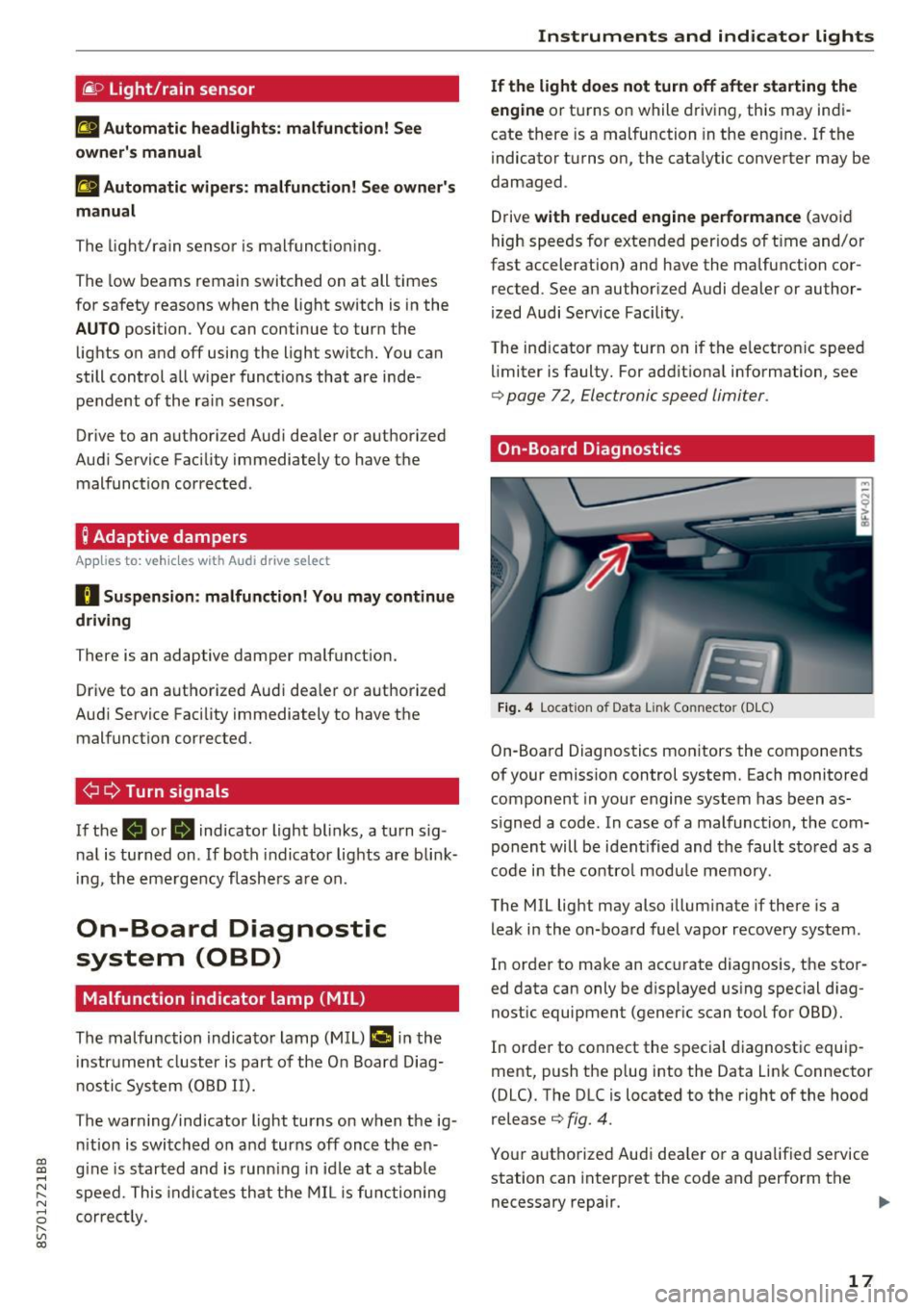
On-Board Diagnostics
Fig. 4 Location of Data Link Connector (DLC)
On-Boa rd Diagnostics mo nitors the components
of your emission control system. Each monitored
component in your engine system has been as
s igned a code. In case o f a malfunction, the com
ponent will be i dent ified and the faul t st o red as a
co de i n t he co ntro l mo dule mem ory.
The MIL lig ht may also illum inate if there is a
leak in the on-boa rd fuel vapor recovery system .
In or de r to ma ke an acc urate diagnosis, the sto r
ed data can only be d isplayed using special d iag
nostic equipment (gener ic scan to ol for OBD).
In order to co nnect the s pecial diagnost ic equi p
ment, push the p lug into the Data Link Connector
(DLC). T he DLC is located to the right of the hood
re lease
¢ fig. 4.
You r aut horize d Aud i dea le r or a qua lified se rvice
station can inte rpret the code and perform the
necessary repair.
IJJI,
17
Page 26 of 314
Opening and clo sin g
Opening and closing
Central locking
Description
You can lock and u nlock the veh icle centrally. You
have the following options:
- Remote control key
c::> page 26,
-Sensors in the door handles* c::> page 27,
- Lock cylinder on the driver 's door c::> page 29,
o r
- Central locking switch inside
c::> page 28.
Auto Lo ck
The A uto Lock f unct ion locks all doors and the
luggage compartment lid once the speed has ex
ceeded approx imately 9 mph (1S km/h) .
The vehicle can be unlocked if the openi ng func
tion in the centra l locking system sw itch is used
or one of the door handles is pulled. The A uto
L ock function can be switched on and off in the
Infotainment system
c::> page 28.
I n t he event of a crash with a irbag deployment ,
t he doors will a lso automat ically unlock to allow
access to the veh icle .
Selective unlocking
The doors and luggage compartment lid w ill lock
when they close. You can set in the Infotainment
system whether
only the driver's door or the en
tire veh icle should be unlocked when unlocking
c::> page 28 .
Turn signals
The turn s ignals flash tw ice when you unlock the
veh icle and flash once when you lock the vehicle .
I f the bli nking continues, one of the doo rs or the
luggage compartment lid is not closed or the ig
nition is still switched on .
Unintentionally locking yourself out
The follow ing cond itions prevent you from lock
ing your remo te contro l key in the vehicle :
- If the driver's door is open, the vehicle cannot
be locked by pressing the
I@ button on the re-
24
mote contro l key or touching the locking sen
sor* on a door.
- When lock ing using the
Im button in the central
locking switch, the vehicle will not lock if a door
is open
c::> page 28 .
-On veh icles with a convenience key *, the lug
gage compartment lid unlocks again after clos
ing if the most recent ly used key is in the lug
gage compartment. The emergency f lashers
blink four times.
Do not lock your vehicle with the remote cont rol
key or convenience key* until all doors and the
l uggage compartment lid are closed. This helps
to prevent you from locking yourself out acciden
tally .
¢j) Tips
- Do not leave va luables unattended in the ve
hicle. A locked veh icle is not a safe!
- The LED in the driver's door rail blinks when
you lock the vehicle. If the LED lights up for
approximate ly 30 seconds after locking,
there is a malfunction in the centra l locking
system . Have the problem corrected by an
authorized Audi dealer or au tho rized Aud i
Service Facili ty.
Key set
• J
-- --
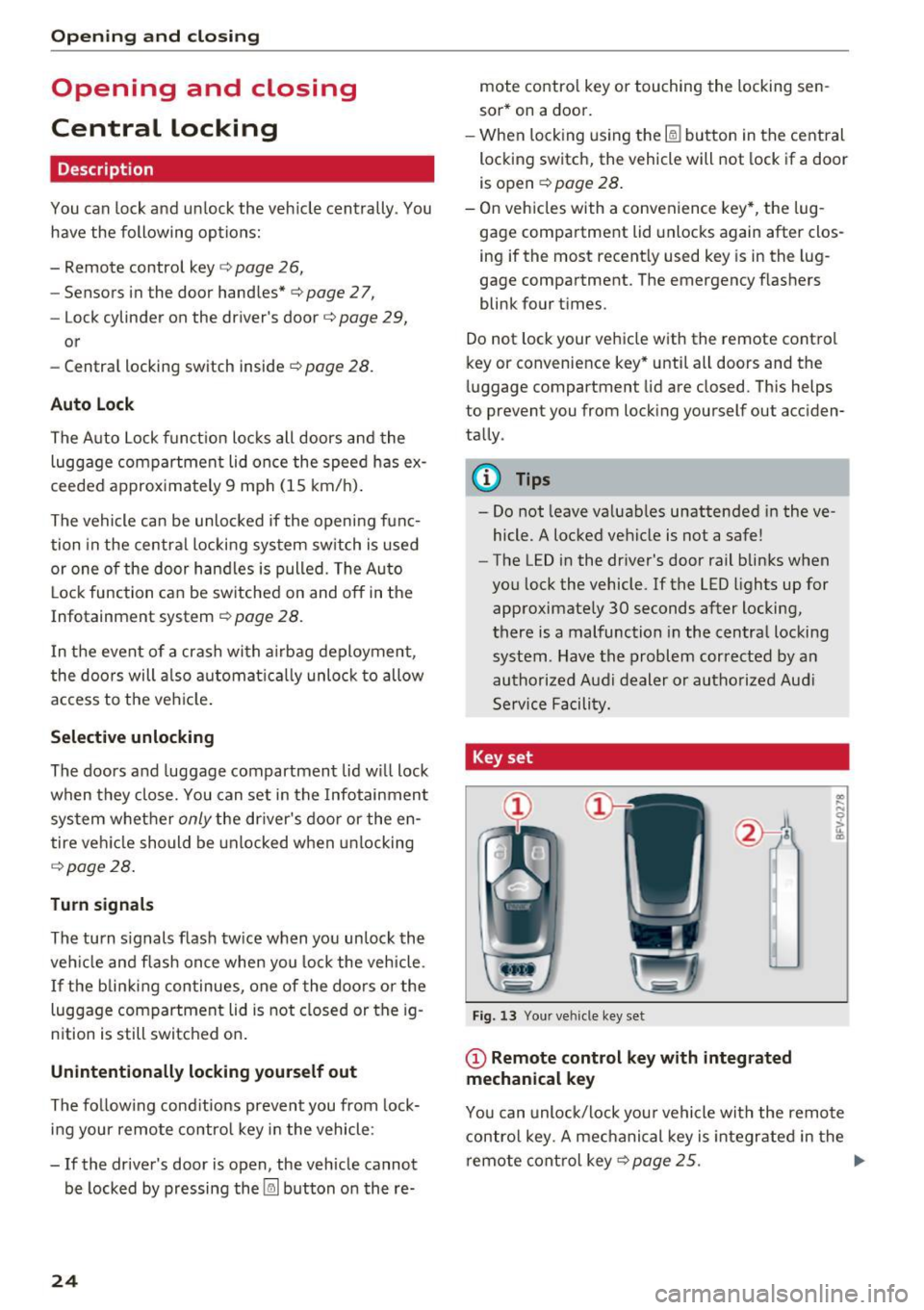
Fig. 13 Your ve hicle key set
(D Remote control key with integrated
mechanical key
.. .... N 0 :l, u. CD
You can unloc k/lock you r vehicle with the remo te
contro l key. A mechanical key is integr ated in the
remote cont rol key
c::>page 25 . ..,.
Page 27 of 314
CD
CD
.... N
" N .... 0 r--. V, co
@ Key tag with PIN
Only applies to vehicles with Connectivity serv
ice*: open the key fob and rub the PIN until it is
v isib le . You can activate the Connectivity service*
on your vehicle using th is PIN code.
Replacing a key
If a key is lost, see an au thorized A udi dealer or
authorized Audi Service Facility. Have
this key de
activated.
It is important to bring all keys with
you. If a key is lost, you should report it to your
insurance company.
Number of keys
You can check the number of keys ass igned to
your veh icle in the Infotainment system . To do
this, select: the
I MENU ! button >Vehicle > left
control b utton
> Service & checks > Vehicle in
formation.
This way, you can make sure that you
have all the keys when purchasing a used vehicle .
Electronic immobilizer
The immobilizer prevents unauthorized use of
the vehicle.
Unde r certain circumstances, the vehicle may not
be ab le to start if there is a key from a different
vehicle manufacturer on the key chain .
Data in the master key
When driving, service and maintenance-relevant
data is continuously stored in your remote con
tro l key. Your Aud i service adviso r ca n read o ut
this da ta and tell you about the wo rk your veh icle
needs. This applies also to vehicles with a con
venience key*.
Personal convenience settings
I f two people use one vehicle, it is recommended
that each person always uses "t heir own" master
key. When the ignition is turned off or when the
vehicle is lock ed, persona l conven ience settings
for the following systems are stored and as
signed to the remote master key.
- Climate control system
- Parking aid*
- Active lane assist*
- Side assist*
Open ing and closing
-Drive se lect
T he sto red settings a re automa tica lly recalled
when you unlock the vehicle, open the doors or
turn on the ign ition.
& WARNING ~
A lways take the vehicle key with you when
l eav ing the vehicle, even for a short period of
time. This applies particularly when chi ldren
remain in the vehicle. Otherwise the children
could start the engine or operate e lectr ica l
equipment such as power windows.
@ Tips
-
The operation of the remote control key can
be temporarily disrupted by interference from
transmitters near the veh icle work ing in the
same frequency range (such as a cell phone or
radio equipment). A lways check if your vehicle
i s locked!
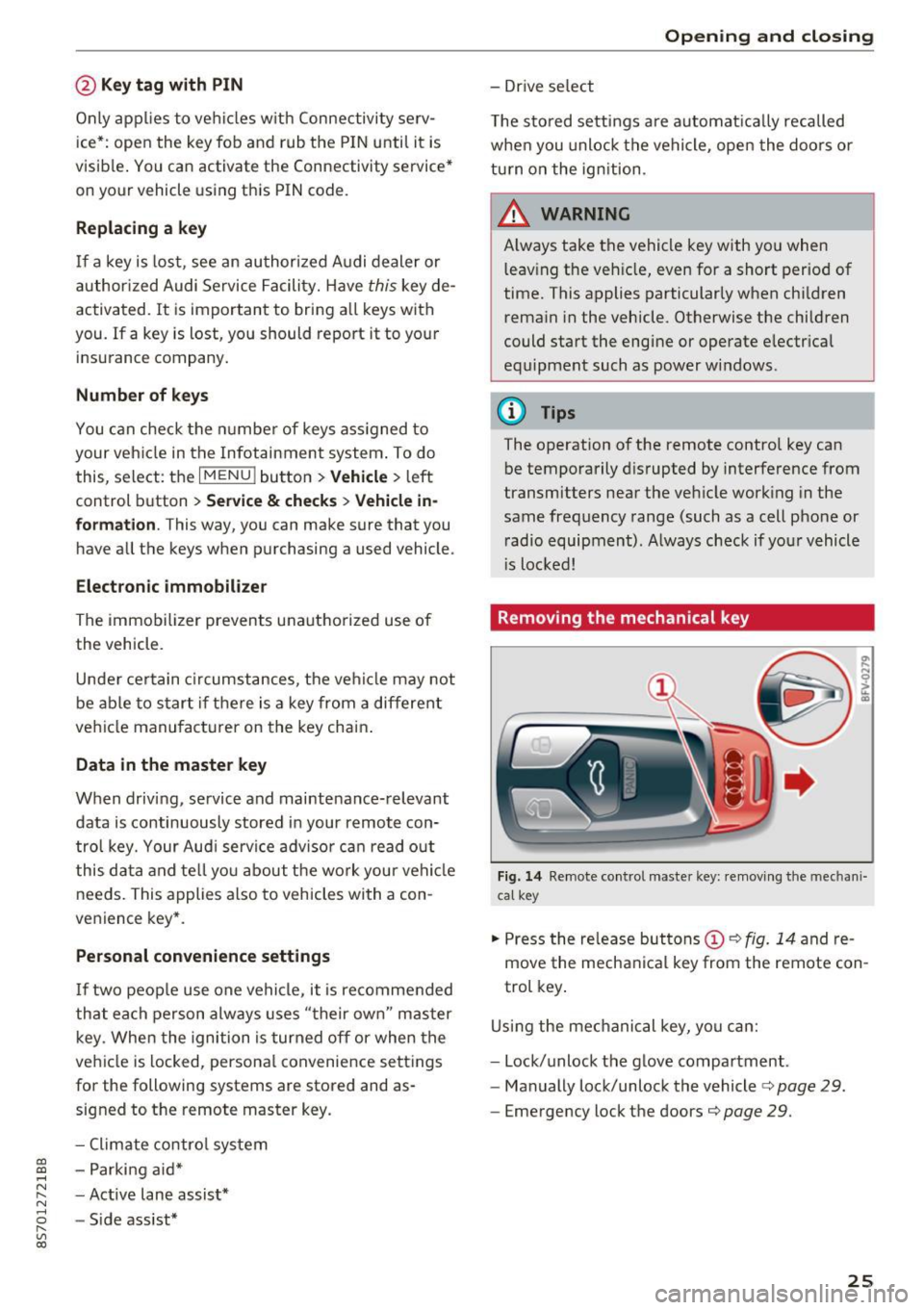
Removing the mechanical key
Fig . 14 Remote control mas ter key: remov ing the mechan i
ca l key
.,. Press the release but tons (D c::> fig. 14 and re
move the mechanical key from the remote con
trol key .
Using the mechanical key, you can:
- Lock/unlock the glove compartment.
- Manually lock/unlock the vehicle
c::> page 29.
-Eme rgency lock the doors c::> page 29.
25
Page 37 of 314
CD
CD
.... N
" N ...... 0 r--. V, co
-When operating the power top, visibility to
the rear is limited. Avoid operating the top
while driving in reverse.
(D Note
-To prevent damage to the power top:
- do not store any objects in the power top
storage compartment .
- make sure there is enough space above
the vehicle when opening or closing the
power top.
(D Tips
- To prevent the vehicle battery from draining
unnecessarily, do not open or close the pow
er top repeatedly when the engine is switch
ed off.
- A message will appear in the instrument cluster if there is a malfunction in the power
top
¢ page 35.
- The power top can also be operated manual
l y temporarily if there is a malfunction
¢ page 3 7, Power top emergency opera
tion.
An authori zed A udi dealer or au thor
i zed Audi Service Facility should diag nose
and correct the cause of the ma lfunction as
soon as possib le .
- If the vehicle is parked with the power top open, the vehicle interior is not p rotected
from damaging weather or unauthorized ac
cess. Lock any items you leave behind in the
l uggage compartment. Close the power top
before leaving the vehicle .
- The side windows automat ically lower
slight ly when opening or closing the power
top.
P owe r top
Power top convenience opening and closing
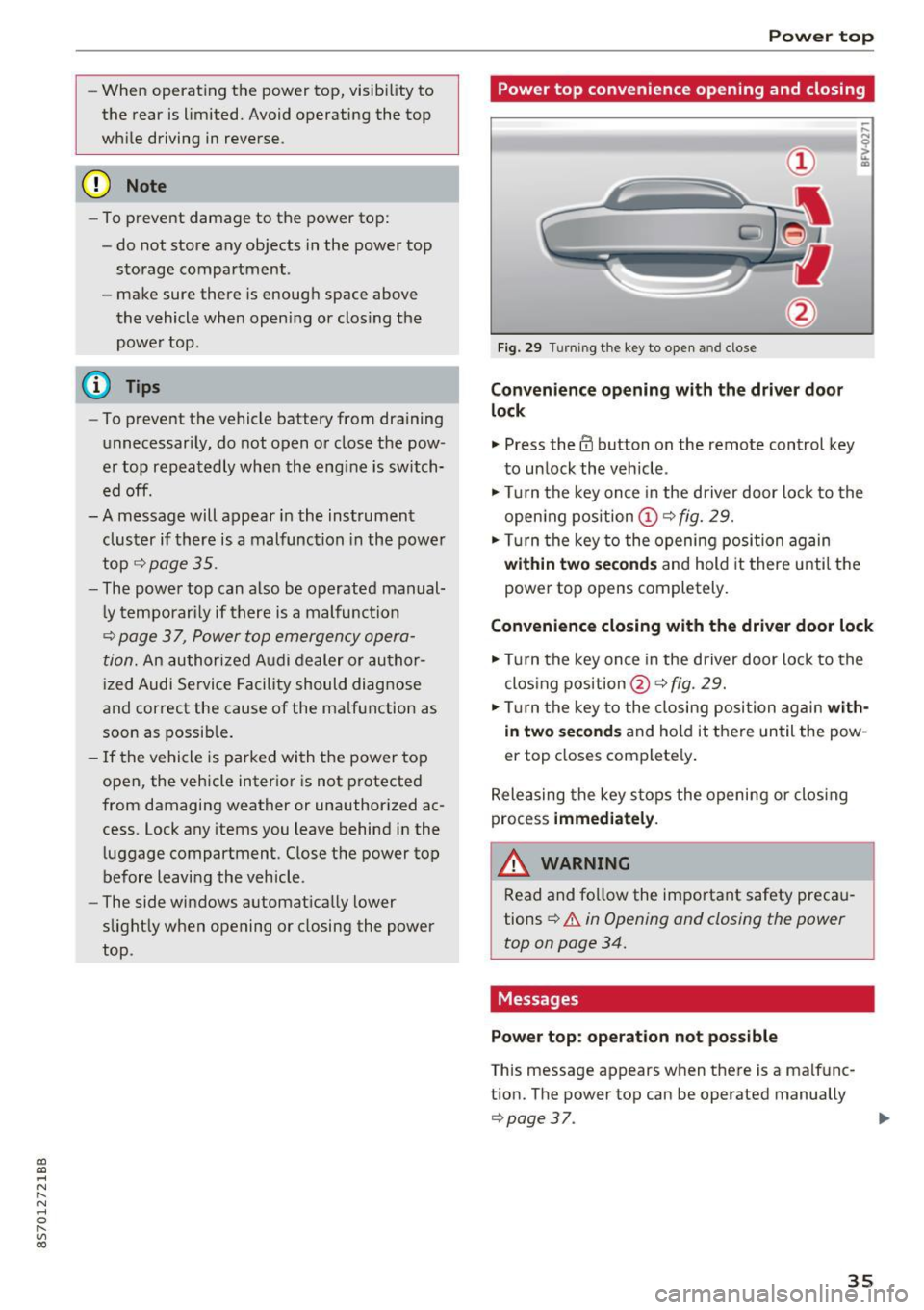
Fig. 29 Turning the key to open and close
Conven ience opening with the dri ver door
lock
.,. Press the 63 button on the remote control key
to un lock the vehicle .
.,. Turn the key once in the driver door lock to the
open ing pos ition
© ¢fig. 29.
.,. Turn the key to the opening posi tion again
within tw o second s and hold it there until the
power top opens completely.
Convenience closing with the driver door lock
.,. Turn the key once in the driver door lock to the
clos ing position @¢
fig. 29.
.,. Tur n the key to the closing position again
with
in two second s
and ho ld it there un til the pow
er top closes complete ly .
Releasing the key s tops the opening or clos ing
process
immedi ate ly.
A WARNING
-
Read and fo llow the important safety preca u
tions
¢ .&. in Opening and closing the power
top on page 34.
Messages
Pow er top : operation n ot pos sibl e
This message appears when there is a malfunc
t ion. The power top can be operated manually
¢ page 37. ..,.
35
Page 39 of 314
CD
CD
.... N
" N .... 0 r--. V, co
Power top emergency
operation
General information
The power top can be closed manually if there is
a malfunction .
• Set the parking brake .
• Open all windows.
• Switch the ignition off.
Only close the power top manually in an emer
gency. Have a second person assist. Drive to an
authorized Audi dealer or authorized Audi Service
F acility immediately to have the malfunction cor
rected.
A WARNING
- There is a risk of pinching the hands or other
people during all of the power top emergen
cy operation steps .
- Make sure all windows are lowered during
emergency operation.
- Do not reach into the power top supports
or other moving components.
- Never drive when the power top is not
locked correctly. The w ind from dr iving
cou ld cause the power top to open. This can
resu lt in injuries and damage to the vehicle.
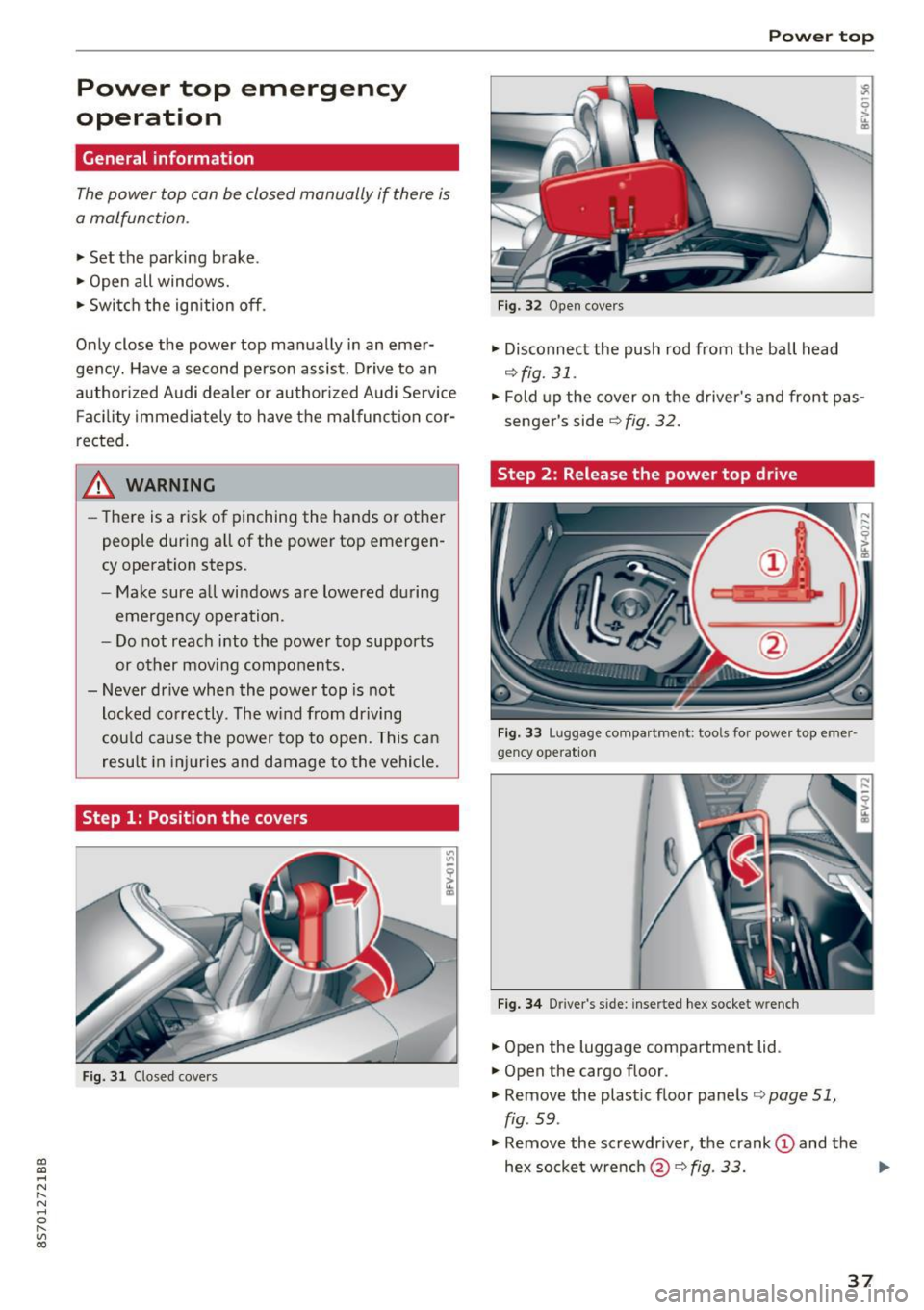
Step 1: Position the covers
Fig. 31 Closed covers
Power top
Fig. 32 Open covers
• Disconnect the push rod from the ball head
¢ fig. 31.
• Fold up the cover on the d river's and front pas
senger's side
r:::;, fig. 32 .
Step 2 : Release the power top drive
Fig. 33 Luggage compa rt me nt: t ools for power top eme r·
gency operat io n
Fig. 34 D river 's s ide: inserte d hex socket w re nch
• Open the luggage compartment lid .
• Open the cargo floor .
• Remove the plastic floor panels
r:::;, page 51,
fig . 59 .
• Remove the screwdr iver, the crank (D and the
hex socketwrench @r:::;,fig .
33. .,..
37
Page 42 of 314
Lights and Vision
-If the battery has been discharging for a
wh ile, the parking light may switch off auto
matically. Always make sure your vehicle is
parked and adequately lit according to the
laws. Avo id using the parking lights for sev
era l hours.
- Always observe legal regulations when us ing the light ing systems described.
(D Tips
- The light sensor for the automatic head
lights* is in the rearview m irror mount. Do
not place any stickers in th is area on the
windsh ield.
- Some exterior lighting functions can be ad
ju sted
c:::;, page 40.
-If you turn off the ignition wh ile the exter ior
lights are on and open the-door, a warning
tone so unds.
- In some markets, the tail lights will sw itch
on when the daytime runn ing lights sw itch
on .
- In cool or damp weather, the inside of the
headlights, turn s ignals and tail lights can
fog over due to the tempe rature d ifference
betwee n the inside and ou ts ide. They will
clea r short ly after sw itch ing them on. This
does not affect the service life o f the light
i ng.
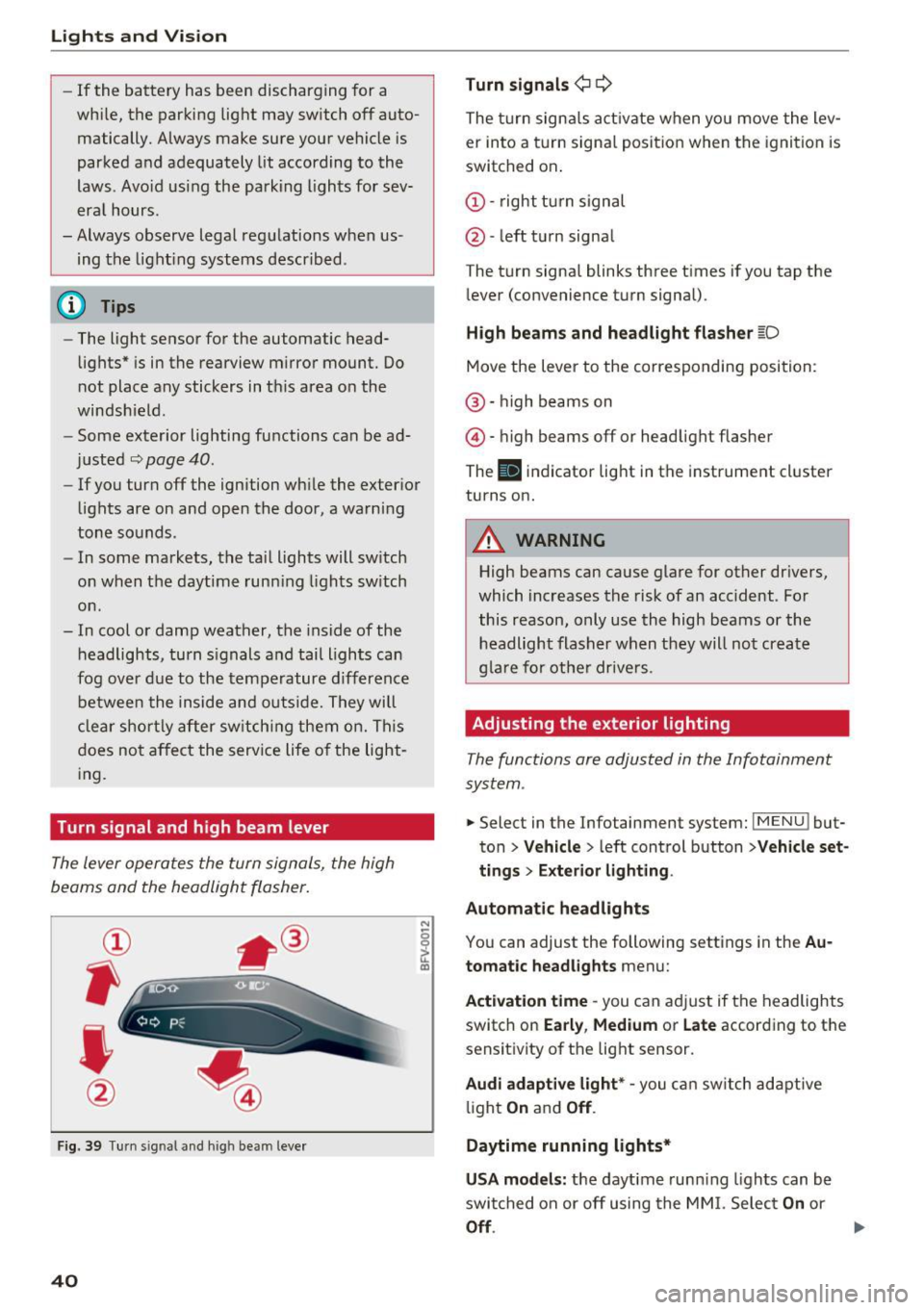
Turn signal and high beam lever
The lever operates the turn signals, the high
beams and the headlight flasher.
®
,
I
@
F ig . 39 Tu rn sig nal a nd high beam lever
40
N
c 0
ct a,
Turn signals ¢ Q
The turn sign als act ivate when yo u move the lev
er into a turn signa l posit ion when the igni tion is
switched on.
(D -right tu rn signal
@ -left t urn signa l
The tu rn signa l blinks three t imes i f you tap the
l ever (convenience t urn signal).
High beams and headlight fla sher l[D
Move the lever to the correspondin g position:
@ · high beams on
@ · high beams off or head light flasher
The
El i ndicator lig ht in the instrume nt cl uster
turns on.
_8 WARNING
High beams can cause glare for other dr ivers,
which inc reases the risk of an accident . Fo r
this reason, only use the high beams or the headlight flasher when t hey will no t create
g la re for ot he r drive rs.
Adjusting the exterior lighting
The functions are adjusted in the Infotainment
system .
.. Select in the Infotainment system: IMENU! but
ton>
Veh icle > left control button >Vehicle set
tings > Exterior light ing.
Automatic headlights
You can adjust the following sett ings in the Au
tomatic headlights
menu:
Act ivation time -you can a dju st if the headlights
switch on
Early , Medium or Late according to the
sensit ivity of th e lig ht sensor.
Audi adaptive light* -you c an switch adapt ive
li ght
On an d Off .
Daytime running lights*
USA models: the daytime runn ing lights can be
swi tched on or off using the MM I. Selec t
On or
Off.
Page 47 of 314
CD
CD
.... N
" N .... 0 r--. V, co
_& WARNING
Dirty windshield wiper blades can impair vi
sion, which increases the risk of a n accident.
Replacing windshield wiper blades
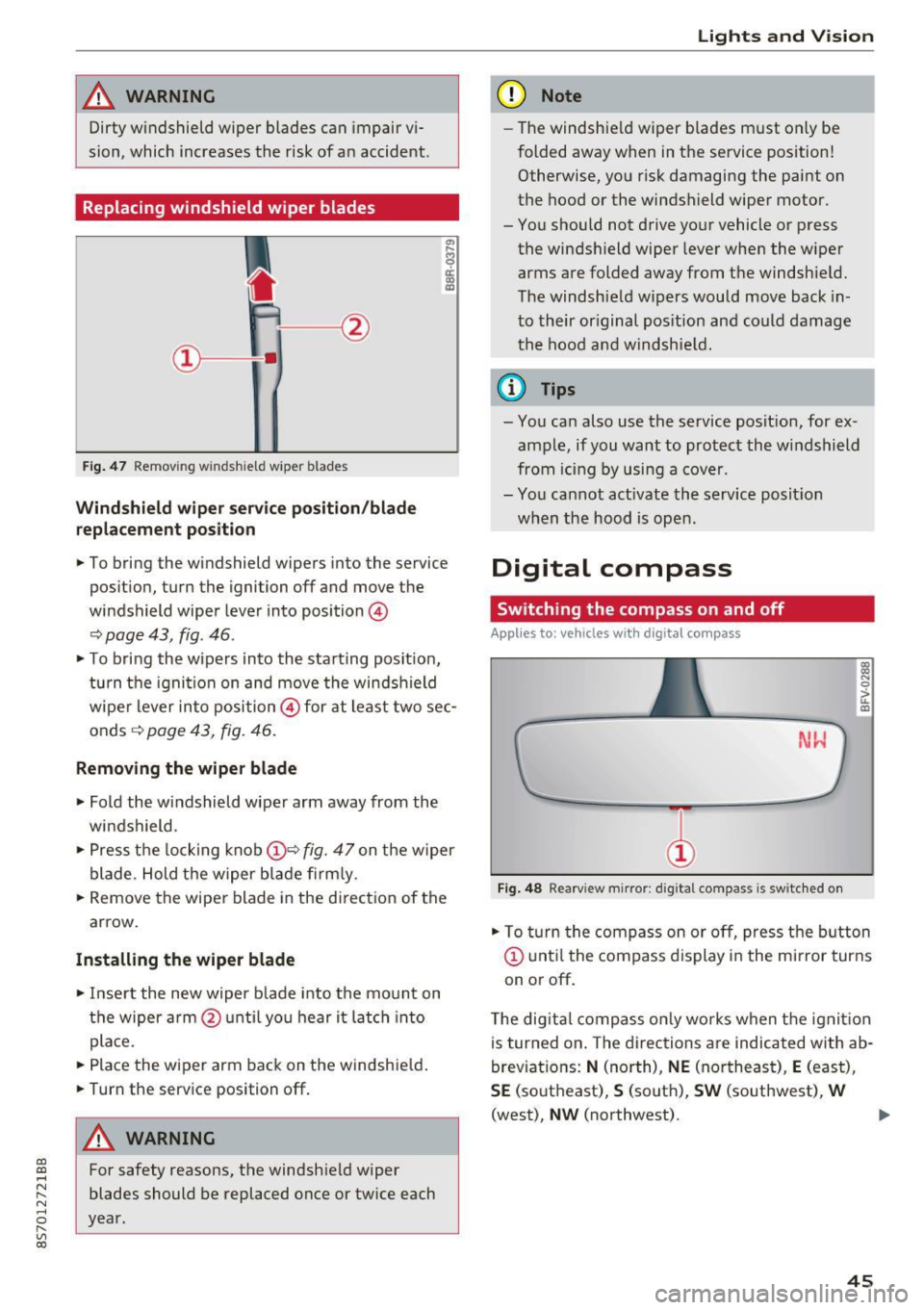
Fig . 47 Remov ing windshie ld wiper blades
Windshield wiper service position /blade
replacement position
"'
~ a: a) OJ
.. To bring the windshield wipers into the service
pos it ion, turn the ignition off and move the
windshield wiper lever into position @
~ page 43, fig. 46 .
.. To bring the wipers into the starting posit ion,
tu rn the ignition on and move the windshield
wiper lever into position@ for at least two sec
onds ~
page 43, fig. 46.
Removing the wiper blade
.. Fold the windshield wiper arm away from the
windshield .
.,. Press the locking knob@~
fig. 47 on the wiper
blade. Hold the wiper blade firmly.
.. Remove the wiper blade in the direct ion of the
arrow.
Installing the wiper blade
.. Insert the new wiper b lade into the mount on
the wiper arm @until you hear it latch into
place.
.. Place the wiper arm back on the windshie ld .
.. Turn the service position off.
A WARNING
-
For safety reasons, the windshield wiper
blades should be replaced once or twice each
year.
Lights and V ision
(D Note
-The windshie ld wiper blades must only be
folded away when in the service position!
Otherwise, you risk damaging the paint on
the hood or the windshield wiper motor.
- You should not drive your vehicle or press the windsh ield wiper lever when the wiper
arms are folded away from the windshield.
The windshield wipers would move back in
to their original pos ition and could damage
the hood and windshie ld.
(1} Tips
-You can also use the service posit ion, for ex
ample, if you want to protect the windshield
from icing by using a cover.
- You cannot act ivate the service posit ion
when the hood is open.
Digital compass
Switching the compass on and off
Applies to: vehicles wit h digita l compass
Fig. 48 Rearview mirror: digita l compass is switc hed on
::l
"' 0
> LL OJ
.. To turn the compass on or off, press the button
@ until the compass d isplay in the mirror turns
on or off .
The digita l compass only works when the ignit ion
is turned on . The directions are indicated with ab
breviations:
N (north), NE (northeast), E (east),
SE (southeast), S (south), SW (southwest), W
(west),
NW (northwest). ..,_
45