2017 AUDI Q7 transmission
[x] Cancel search: transmissionPage 94 of 402
Driving
Sel ector l ev e r lo ck
The se lector lever lock prevents you from se lect
ing a position unintentionally, causing the vehicle
to ro ll. When engaging some selector lever posi
tions, you must press th e locking button
CD on
the selecto r lever and/or press the brake pedal
¢fig. 92.
You must press the brake pedal to engage a se
lector lever position when the engine is running
and the vehicle is stationary.
You do not have to press the brake peda l if you
shift from a drive gear (D/S) to reverse gear
(R)
w ithin one second. This allows you to "rock" the
veh icle to free it when it is stuck .
P - Park
This se lector lever posi tion p revents the vehi cle
from rolling . Only shift into park when the vehi
cle is stationary ¢.&. . To select the P se lector lev
er position, press th e P button @on the selector
lever ¢
fig. 92. P appears next to the selector lev
er.
You can on ly shift out of park when the engine is
r u nning and you are pr ess ing the brake p edal. To
release the parking lock, press the brake peda l,
press the locking button
CD on the selector lever
and select the desired pos it ion ¢
fig. 92 .
P engag es automatically if you switch the engine
off while the selector lever is in D, E, S, R or man
ual mode.
If you switch the engine off when the N se lector
lever position is select ed, the transmission re
mains in N for approximately
30 minutes and
then Pis engaged. The vehicle is not secured
from rolling in the N selector lever position, so
you need to set the parking brake<®>¢
page 87.
You must use the parking lock emergency release
before towing the vehicle¢
page 96.
R- Reve rse
The reverse gear is engaged in this pos ition . On ly
select reverse gear when the vehicle is stationary
and the engine is running at idle speed¢.&. . To
engage the R selector lever pos ition, press the
92
brake peda l, press the locking button CD on the
se lector lever and select the R position ¢
fig. 92.
A confirm ation tone will sound when the reverse
gear is engaged.
N -Neutral (idle )
The transmission is in idle in th is position. To en
gage the
N selector lever position, press the lock
i ng button
CD on the selector lever and sh ift into
the
N pos ition ¢ fig. 92 .
If you switch the eng ine off when the N selector
l ever posit io n is selected, the transm iss ion re
mai ns in
N for approx imately 30 minutes and
then Pis engaged.
You cannot se lect the
N pos ition when the igni
tion is switched off . When dr iv ing through an au
tomat ic car wash, fi rst select the
N position and
then turn the eng ine off.
For safety reasons , the veh icle cannot be locked
when the t ransmiss ion is in the
N pos it ion .
D/S - Driving forward
When the transm ission is in the D/S posit ion, it
can be operated either in the normal D mode or
i n the S sport mode . Move the selector lever back
to engage the S sport mode. You ca n only select
the S selector lever position when the Dor E pos i
tion is se lected. To select the Dor E position
again w hen S is engaged, move the selector lever
ba ck ¢ .&. . To sh ift from N to D when traveling at
speeds below 1 mph (2 km/h), press the brake pedal and shift into the D position¢.&. .
In the
n o rmal mode D, the transmission auto
matically selects the suitable gear ratio. It de
pends on engine load, vehicle speed and driving
style.
Se lec t the
sport mode S for spo rty d riving. The
vehicle makes f ull use of the engine 's power.
Shifting may become noticeable when accelerat
ing .
The S se lec to r lever posit io n engages automat i
ca lly when you select
Dynamic mode in d rive se -
l ect* . .,.
Page 95 of 402

A WARNING ,~
Read and follow all WARNINGS.
- The vehicle can roll even if the ignition is switched off.
- Power is st ill transmitted to the wheels
when the engine is running at idle. To pre
vent the veh icle from "creeping", you must
keep your foot on the brake in all selector
lever positions (except P and N) when the
engine is running.
- Before opening the hood, select the P selec tor lever position and set the parking brake.
T his reduces the risk of an accident. Always
read and follow the applicable warnings
¢ page 322, Working in the engine com
partment.
@ Tips
If you accidentally se lect N while d riving, take
your foot off the acce le rator pedal and wa it
for the engine to slow down to idle before se
lect ing Dor S.
Driving tips
Starting the engine
.. Th e P or N position must be selected.
Starting from a stop
.. Press and hold the brake pedal.
.. Start the engine
c:> page 82.
.. Press the lock ing button @on the selector lev
er and select the D, E, Sor R position
¢page 91.
.. Wait a moment until the transmission shifts.
You wi ll notice a slight movement when the
gear engages .
.. Release the brake pedal and press the accelera-
tor pedal ¢
&-
Various convenience functions are avai lab le for
starting on hills
c:> page 88.
Stopping temporarily
~ .. Press the brake pedal to stop the vehicle, for
~ example at a traffic light. Do not press the ac-
~ celerator peda l when doing this. 0
0
:E: '
.. To prevent the vehicle from ro ll ing when you
start driving, set the parking brake when stop
ping on steep hills¢
A-
.. The parking brake will release automatically
and the vehicle will start moving once you press
the accelerator pedal.
Stopping/parking
If the selector lever is not in the P position when
you open the driver's door, the vehicle could roll.
.. Press and hold the brake pedal
c:> A-
.. Set the parking brake.
.. To select the P se lector lever position, press the
P button
@ on the selector lever c:> page 91 ,
fig. 92.
Under certain conditions, such as driving in the
mountains or when towing a trailer, it may be
helpful to switch to manua l mode temporarily
and shift
manually to adapt to the driving condi
tions
c:> page 94.
On hills, activate the parking brake first and then
shift into the P position
c:> page 87. This prevents
too much stress from being p laced on the lock ing
mechanism .
A WARNING
--The vehicle can roll even when the eng ine is
sw itched off.
- Unintended vehicle movement can lead to
serious injuries .
- To reduce the r isk of an accident, do not
press the accelerator pedal when changing
the selector lever position while the vehicle
is stationa ry and the engine is running .
- To reduce the r isk of an accident, never se
lect the R or P positions while dr iv ing.
- Do not inadvertently press the accelerator pedal when the vehicle is stationary . Other
wise the r is k of an accident increases be
cause the vehicle will start to move immedi
ately, even if the parking brake is set.
(D Tips
Fo r safety reasons, the park ing brake only re
leases automatically when the drive r's door is
closed.
93
Page 96 of 402

Driving
Hill descent control
The hill descent control system assists the driver
when driving down hills .
Hill descent control activates when the transmis
sion is in the Dor S position and you press the
brake pedal. The transmiss ion automatically se
lects a gear that is suitable for the hill . H ill de·
scent contro l tries to mainta in the speed ach
ieved at the time of braking, within phys ica l and
technical limita tions.
If may sti ll be nece ssary to
adjust the speed with the brake pedal.
Hi ll descen t co ntro l switches off o nce the hill lev
els out o r yo u press the ac celerator peda l.
W hen operating the c ruise contro l system*
~page 102, hill descent cont rol is also act ivated
when the speed is set.
,&. WARNING
H ill des cen t c ontrol cannot over come physi ca l
lim itation s, so it may no t be able to maint ain
a constant speed under all condit ions . Always
be ready to apply the brakes .
Shifting manually (tiptronic mode)
The tiptronic mode allows the driver to shif t the
gears manually .
Fig . 93 Cente r console: shifting manually w it h the se lector
lever
94
F ig . 94 Stee ring whee l: shifting manually
Shifting with the selector lever
You can shift into t iptronic mode while stat ionary
and wh ile dr iving .
.. To shift into tiptronic mode, push the selecto r
lever from the D/S position to the right . As
soon as the transm iss ion switches
over, the M
t ra nsmission setting w ill appea r in the instru
ment cl uste r display .
.,. To shift up a ge ar, tap the sele ctor lever fo r
ward
0 ~ fig. 93.
.,. To shift down a gear, tap the se lec tor lever back
0 .
.,. To switch tiptronic mode off, pus h the selector
lever back into the 0/S pos ition.
Shifting with the shift paddles
You can operate the shi ft paddles in the D/S or M
selector lever positions .
.,. To shift up a ge ar, tap the shift paddle
0
~fig. 94 .
.,. To shift down a gear, tap the 0 shift paddle .
.,. To engage the lowes t gear, hold t he
0 shift
padd le .
.,. If you do not press a shift button within a sho rt
time while in the D/S pos it ion, the transmission
w ill return to automat ic mode. To keep shifting
using the shift paddles, move the selector leve r
to the r ight out of the D/S position .
.,. When you want to shift o ut of tiptron ic mode,
press a nd ho ld the
0 shift padd le for a longer
pe riod of time or move the sele ctor lever back
and release it.
The tra nsmission automat ica lly shi fts up or down
before cr itical engi ne speed is reac hed . .,.
Page 97 of 402

u co ...... N r-... N ...... 0
0
:E: '
when the engine speed is wit hin the permitted
range .
(D Tips
-If you s hift to the next lowest gear, the
transm ission w ill only shift if the en gine w ill
not be over-rewed.
- With kick-down , th e tran smission shifts to a
l ower gear, dep end ing on vehicle s peed and
engine speed .
- tiptronic does not wo rk if the t ransmiss ion
i s r unning in eme rge ncy mo de.
Kick-down
Kick -down enables maximum acceler ation .
When you press the a ccele rator ped al down be
yon d the resis tance poin t, the au tom atic trans
miss ion downshifts into a lower gear and t he en
g ine utilizes its fu ll power, depend ing on veh icle
speed and engine RPM . It shifts up into t he next
h igher gea r once the maximum spec ified engine
RP M is reached .
A WARNING
Please note that the wheels could s pin o n
slic k or slippery roads when kick-down is ac
ti ve .
Transmission malfunction
-
• Transmission : malfunction! Please stop ve
hicle and shift to P
Do not cont inue driv ing. Select the P se lector lev
e r p osition and contact an autho rized Aud i dea le r
or author ized A udi Se rvice Fac ility for assistance .
rm Selector lever: malfunction! You may contin
ue driving. Please contact Service
There is a system malfunct ion in the t ransmis
sion. D rive to a n author ized Audi dealer or au
thor ized Audi Se rvice Fac ility immed iate ly to have
the ma lf u nction co rrected.
rm P button: malfunction! Auto P when engine
off. Please contact Service D
riving
T he re is a ma lf u n ct ion in the P but ton on these
l ector lever . The transmission automatically en
gages in P when yo u sw itch off the engine . Dr ive
to an autho rized Aud i dea le r or authori zed Aud i
Se rvice Facility immed iate ly to have the ma lfunc
t ion corrected .
rm Transmission: malfunction! Gear change on
ly possible using both paddle levers. Please con
tact Service
T he re is a system malfunction in the transmis
s io n. You can continue dr iv ing with restr icted
funct ion. The se lector lever is not work ing . Gea rs
can on ly be selected by tapping both shift pad
dles at t he same time whe n the vehicle is stat ion
ary ~
page 94, fig . 94. Pay atte ntion to these
l ected transmission position in t he i nstr um ent
cl uster d isp lay. The pa rking lo ck eng ages auto
m ati cally when yo u turn off the eng ine. Drive to
an a uth orize d Au di dealer o r auth orized Aud i
Se rvice Facility immed iate ly to have the ma lfunc
t ion corrected .
rm Transmission: Please pre ss brake pedal and
select gear again
Pr ess t he b rak e peda l and select the desired se
l ector lever position again. Yo u ca n then co nt inu e
dr iv ing.
rm Transmission: too hot . Please adapt driving
style
The transmission temperature has i ncreased sig
nificantly due to t he sporty dr iv ing ma nner . Drive
i n a less s port y m anne r unt il the tempera tu re re
tu rns to t he norma l ra nge and t he i ndi cator lig ht
swi tches of.
rm Transmission: malfunction! You can contin
ue driving. See owner's manual
There is a system malfunction in the transmis
s io n. You may contin ue d riving. Dr ive to an a u
t h orized Au di dea ler or a uthorized Audi Service
Fac ility soon to have the mal func tion corrected .
rm Transmission: malfunction! You can contin
ue driving in
D until engine off
T he re is a system malfu nction in the transmis -
s ion. The transmission is switc hing to eme rgency
mode. If you turn the engine off, you w ill not be ..,.
95
Page 98 of 402

Driving
ab le to select any other selecto r lever posit ions
after starting the engine again. Drive to an au
thor ized Audi dealer or authorized A udi Service
Facility immediately to have the malfunction cor
rected.
r;] Transmi ssion : malfunct ion ! You can contin
ue driving with limited function. Plea se conta ct
Service
There is a system mal function in the t ransmis
s ion. The transm ission is switching to emergency
mode . This mode on ly shifts into certain gears or
will no longer shift at all. The engine may stall.
Drive to an authorized Audi dealer or authori zed
Audi Serv ice Facility immediately to have the
malfunct io n corrected.
r;] Transmission : malfunct ion! You may contin
ue driving . No reverse gear
There is a system malfunction in the transmis
sion . The transmission is switching to emergency
mode. This mode only shifts into certain gears or
will no longer shift at all. The engine may stall.
You cannot engage the reverse gea r. Drive to an
author ized Audi dealer or author ized Audi Service
Facility immediately to have the malfunction cor
rected.
r;] Danger of rolling away! P not possible .
Ple ase apply parking brake
- The park ing lock was released using the emer
gency release ¢
page 96. Or
- The parking lock can no longer be engaged.
Drive to an authorized A udi dealer or author
i z ed Audi Service Facility immed iately to have
the malfunc tion corrected .
r;] Move selector le ve r to automati c position
There is a mal func tion in the tip tronic mode. End
tiptronic mode by pushi ng the selector lever to
the left i nto t he D/S position.
96
Parking lock emergency release
The parking lock must be released with the
emergency release when driving through moun
tains/maneuvering.
Fi g. 9 5 Driver 's s id e footwe ll: re leas ing the pa rk ing lock
us ing the e mergency release
The emergency release is located under the floor
mat on the dr iver's side .
Releasing the parking lock using the
emergency release
"' To preven t the vehicle from rol ling un intent ion
ally, set the parking brake ®l ¢
page 87 or
press the bra ke pedal.
"' There are two slits on the cover. Posit io n t he
s cr ewdr ive r from the veh icle tool kit in one of
the s lits on the cover and pry the cover off.
"' Insert the socket wrench (from the vehicle tool
kit) into the open ing
¢ fig. 95.
"'Turn the socket wrench all the way clockwise (D
and press it downward @until it locks into
place .
"' Leave the socket w rench inserted
i=:> &_ .
Resetting the parking lock
"'Press the brake pedal and start the engine.
"' Keep the brake peda l pressed and engage the
following selector lever pos it ions one after the
other: N, D and back to N .
"' Tu rn the engine off again.
"' Grasp the socket wrench with both ha nds and
pu ll it up and o ut caref ully to remove
i=:> (D.
"' In st all the cover.
When the parki ng loc k emergency release is
u sed, the
r;J in dicator light an d the N selec to r
l eve r posi tion tur n on in the i nstr ument cluster. ..,.
Page 138 of 402

Assistance systems
"'Se lect in the In fo tainment sys tem: I MENU I but-
ton
> Vehicle > Audi dri ve select.
"' Se lect and confirm the desired setting .
You can cha nge t he d riving mode when the vehi
cle is stat ionary or whi le d riving. If traffic per
mits, after changing modes, briefly take you r
foot off the accele rator peda l so that the recent ly
selected mode is a lso activated for the eng ine.
Offroad * or Lift/ Offroad* -activates offroad
functions to s upport dr iv in g o n ro ug h terra in.
The engine, transmission and steering adjust and
the Start/Stop system* switches off. Applies to
a ir suspe nsion*: t he vehicle also lifts for passing
over obstacles to maintain maximum ground
clearance.
Adjusting the Individual mode
Applies to: veh icles w ith Audi drive select
Allroad * -on ly for air suspension *: the vehicle
li fts to maintain hi ghe r g round clearance for d if
fic ult st retc hes of roa d.
Comfort -provides a c omfor t-or ien ted ve hicle
setu p and is s uit ed fo r long drives on hi ghw ays.
Auto -provides a n overa ll comfortab le yet dy
n amic driv in g feel a nd i s s uited f or everyd ay use.
Dynamic -gives the driver a sporty driving fee l
and is suited to a spo rty d rivi ng s tyle .
Individual -c::;, page 136.
A WARNING
Pay attention to traffic whe n ope rating t he
d rive select to reduce th e ris k of an accide nt.
-
You can adjust the vehicle settings to your personal preferences.
"'Se lect in the Infotainment system: IME NUI but
ton
> Vehicle > Audi drive select > Individual >
rig ht contro l button.
After you have close d the settings, you will a uto
mat ica lly dr ive i n the
Individual mode .
Systems comfort
Engine /transmission
ba lance d
Air suspension * comfortable
Steering comforta ble
All-wheel steering * comfortable
Sport differential * moderate
Engine sound * subtle
ACC* comforta ble
al Sub tle i n th e se lecto r leve r pos it ion D a nd sporty in S.
(D Tips
Y our sett ings a re automa tica lly saved in Indi
vidual
mode.
Raising/lowering the vehicle
Applies to: veh icles w ith air suspens ion
"' Press th e left or right ar row key c::;, page 135,
fig . 133
u nti l the desired mode app ea rs in the
136
The equi pment in you r vehi cle will determine
which sett ings you can adjust . T he fo llow ing ta
ble gives a n overview o f the characte ristics .
auto dynamic
ba
la nce d sporty
ba la nced sporty
ba la nce d sporty
ba la nced sporty
ba lanced sporty
sub tle/sportyal
sporty
ba lance d sporty
instrument cluster/I nfota inment system dis
play. Or
"' Select in the Infotainment system :
IMENU! but
ton
> Vehicle > Audi drive select.
"' Select and confirm the des ired se tting.
Page 205 of 402
u (0 ...... N r--. N ...... 0
0
:E
Introduction
The following functions may be available depend
ing on the vehicle and the market.
- Emergency call
¢ page 203.
- Online roads ide ass istance ¢ page 204 .
@ Tips
- The serv ices are provided through a SIM
card installed in the vehicle . The cost of the
call and data connections is included in the
price for the services . Services a re provided
assuming that the cell phone network re
quired for the installed S IM card is function
ing and ready to operate. The available serv
i ces set by Audi AG are only available within
the cell phone network coverage area for
the cell phone service provider selected by
Audi AG.
- You can find what data will be transferred
at www.aud iusa.com.
- These services cannot be deactivated using
the settings in the Infotainment system.
Emergency call
Description
Appl ies to: vehicles with emergency call function
You can request help when in an eme rgency or
dangerous situation using the emergency call
function
l) _ An emergency call is a combination
of data transmission and a phone call. The data
transmission from your vehicle forwards impor
tant information, such as the vehicle and position
data, to the emergency call center.
1l The av ailabilit y of the serv ices o ffere d d ep end s on t he
c o untry a nd may chang e over t ime.
Emergen cy call
Making an emergency call
App lies to: vehicles with emergency call function
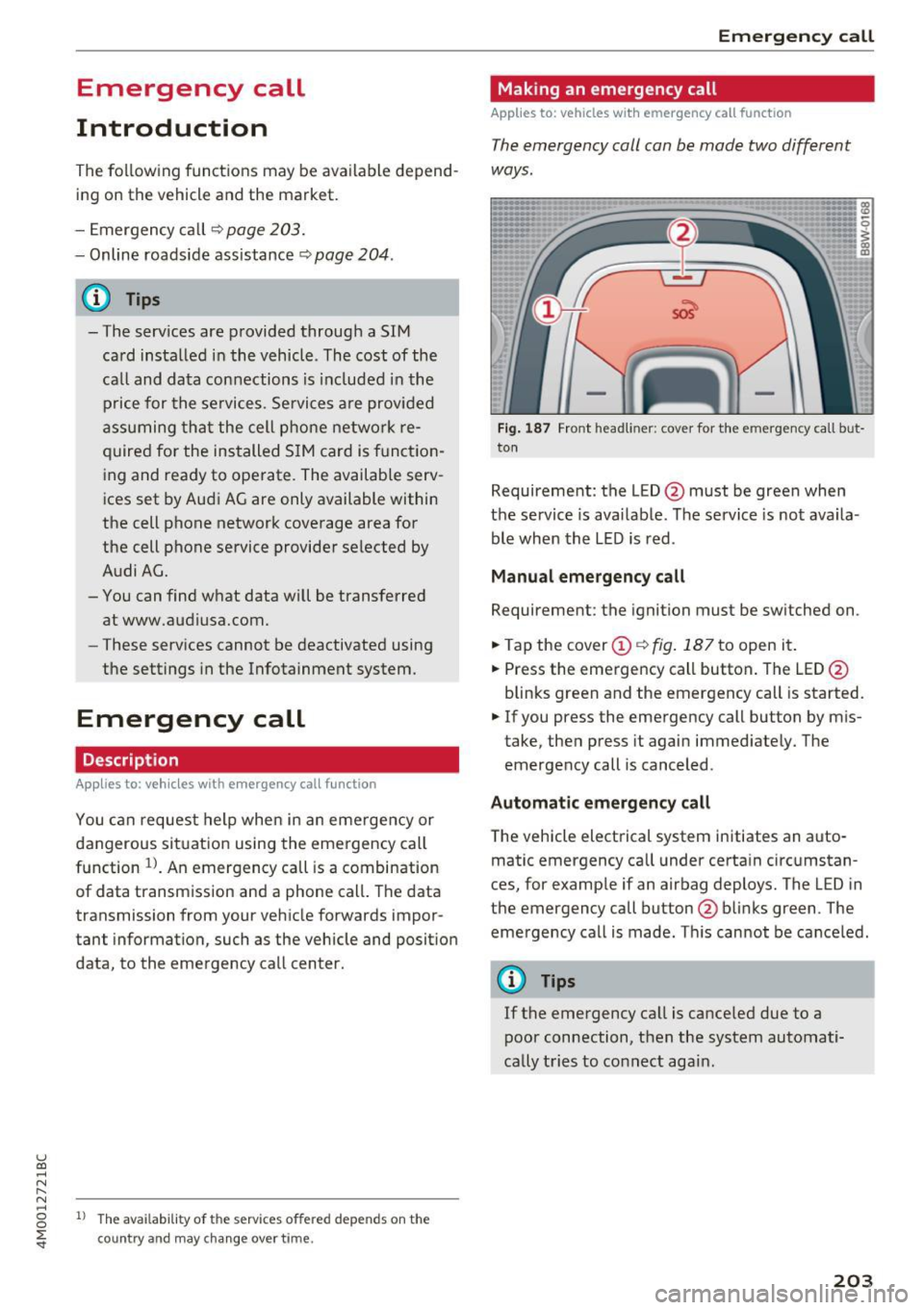
The emergency coll con be mode two different
ways .
Fig. 187 Front head liner: cover for the e mergency call b ut
ton
Requirement: the L ED @ must be green when
the service is available . The service is not availa
ble when the LED is red .
Manual emergency call
Requirement: the ignition must be switched on .
.. Tap the cover
(D ¢ fig . 187 to open it .
.. Press the emergency call button. The LED@
blinks green and the emergency call is started.
.. If you press the emergency call button by m is
take, then press it again immed iately. The
emergency call is canceled .
Automatic emergency call
The vehicle electrical system initiates an auto
matic emergency call under certa in circumstan
ces, for example if an airbag deploys. The LED in
the emergency call button@blinks green . The
emergency call is made . This cannot be cance led.
(D Tips
If the emergency call is canceled due to a
poor connection, then the system automati
cally tries to connect again.
203
Page 206 of 402
Emergency call
Messages
Applies to: vehicles with emergency call function
1!/1 Emergency call function: malfunction! Re
stricted functionality . Please conta ct Service
If the indicator lig ht t urns on and the message
appears, yo u can only make an emergency ca ll
wit h rest ric ted f un ct io n. For e xamp le, you ca nnot
call the emergen cy c all ce nte r, bu t da ta m ay st ill
be tra nsmi tted under certa in circ umst ances/
D rive to an a uthorized Audi dea le r or a uth orized
Aud i Service Facility immediately to have the
malfunct ion corrected.
II Emergency call function : malfunction! Fun c
tion unavailable. Please contact Service
I f t he indi cator lig ht tur ns on and the message
ap pears, yo u can not m ake an eme rge ncy call.
D rive to an a uth o rize d Aud i de aler or auth orized
Aud i Serv ice Facility immedia tely to have t he
malfunct io n corrected .
Online roadside
assistance
Description
Applies to: veh icles with online roadside ass istance
You can request help if you are in an accident or
b reakdow n situation using on line roadside ass is
tance
1> . A roads ide assistance call is a comb ina
tion of data transmission and a phone call. The
data transmission from your vehicle forwards im portant information to the A udi service cente r,
such as the veh icle and pos it io n data.
l ) Th e availab ili ty of th e services offered depe nds o n th e
country and may ch an ge over time.
204
· Calling online roadside ass istance
Applies to: vehicles with on line roadside assistance
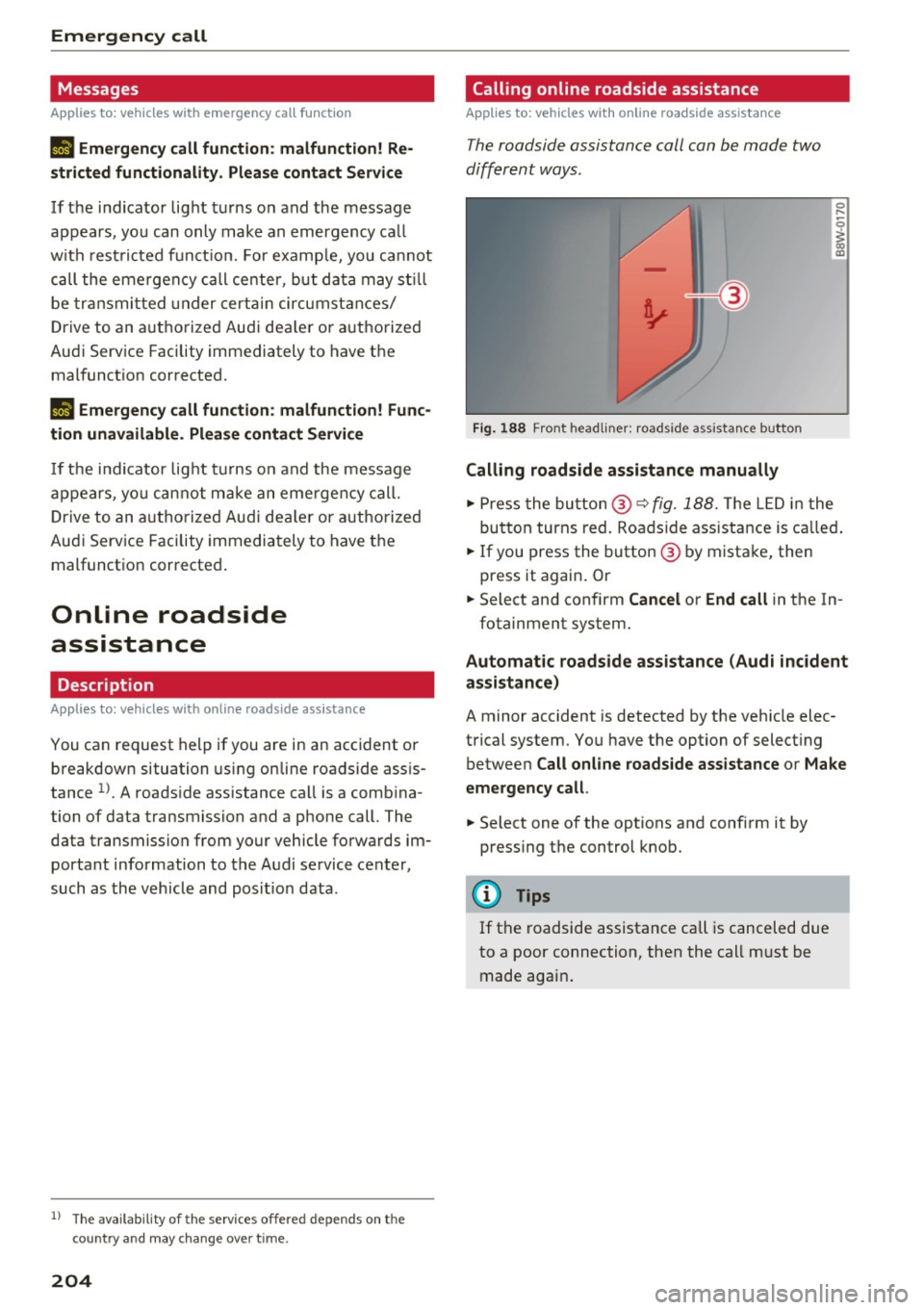
The roadside assistance call can be made two
differ ent ways.
Fig. 188 Front headliner: roadside assista nce button
Calling roadside assistance manually
0 ....
-0
I
.,. Press the bu tton @~ fig. 188. The LED in t he
but ton turns red. Ro adside ass istance is c alled.
.,. If you press the button @ by mista ke, then
press it again. Or
.,. Select and confirm
Cancel or End call in the In-
fotainment system.
Automat ic roadside assistance (Audi incident
assistance)
A minor accident is detected by the veh icle elec
trical system. You have the option of select ing
betwee n
Call online roadside assistance or Make
emergency call .
.,. Select one of the options and confi rm it by
press ing the control knob.
@ Tips
If t he roadside assistance call is canceled due
to a poor connection, then the call m ust be
made again .