2017 AUDI Q7 seats
[x] Cancel search: seatsPage 66 of 402

Sea ts and stor age
_& WARNING
- Always read and follow the applicable warn
ings
q pag e 259, Proper adjustm ent of
head restraints .
-Only remove the head restraints for the sec
ond row seats when it is necessary for in
sta lling a child safety seat~
page 295,
Child safety.
Install the head rest rai nt again
immediately once the child s afety seat is re
moved. Driv ing with the head res traints re
moved or not in the upright position in
creases the risk of serious injury .
Memory function
Description
Applies to: veh icles with memory function
Using the memory funct ion , you can qu ickly and
easi ly store a pe rsonal seat profile for the driver
and fron t passenger and recall the settings. The
memory function is controlled by t he remo te
control key and the memory buttons in the driv
er's/front passenger's* door .
The drive r's seat profile is stored aga in and as
signed to the remo te control key each time the
ve hicl e is locked. When you open the door, the
seat profi le is automatica lly recalled.
If two peo
p le use the ve hicle, it is recommended that each
person a lways uses their "own" remote contro l
key.
Two seat profiles can be stored each using the memory buttons . Once they are stored, these
seat profiles can be selected at any time.
The fo llowing settings are stored:
Remote Memory button
control
key
Driver Dri ver Front pas-
senger
Seat X X X
Steering
X X wheel*
Both exte rior
X X mirrors
*
64
Remote control key
Applies to: vehicles with memory function
The driver 's seat profile can be assigned to the
remote control key when the vehicle is locked .
.. Select in the Infotainment system: IMENUj but
ton
> Ve hicle > left control button > Vehicle
se tting s > Se ats > Driver 's seat> S tore se t
t ing s on remo te control k ey.
@ Tips
If you do not wish to have the seat profile for
another driver ass igned to the remote control
key, switch the memory f unction off in the In
fotainment system.
Memory buttons
Applies to: vehicles with memory funct ion
Fig . 67 D rive r's doo r: memory function b utto ns
The memory buttons are located in the driver's/
front passenger's * door .
Storing a sea t p rofile
.. Press the ISETI button . The LED in the button
turns on.
"' Press memory button
[I] or ~-
A signal tone will sound when it is s uccessfully
stored.
Acc essing a s eat profil e
"' If the driver's/front passenger's door is open
and the ignition is switched off, press the mem
ory button .
.. If the driver's/front passenger's door is closed
or the ignition is sw itched on, press and hold
the memory button until the seat profile is comp letely set. .,..
Page 67 of 402
u (0 .-I N r--. N .-I 0
0
:E
-For safety reasons, th e seat setting can only
be recalled when the veh icle is stationary to
red uce the risk of a n accident.
- I n an emergency, seat adjustment operation
can be stopped by press ing the
ISETI button
o r the buttons @or@
¢ pag e 59, fig. 55.
Adjusting the front passenger's seat in the
Infotainment system
Applies to: vehicles with memory function
The driver can move the front passeng er's seat
into various positions.
Adjusting the front passenger's seat from
the driver's seat
~ Se lect in the Info tainment sys tem: !MENU I but
ton
> Vehicle > left contro l butto n > Vehicle
s ettings > Seats
> Front pa ssenger' s seat > Ad
ju st seat position .
~ You can now adjust the front passenger's seat
u sing the d river 's seat buttons
¢ page 64,
fig .
67 .
Align with driver's seat
~ Select in the Info tainment sys tem: !MENUI bu t
ton
> Vehicle > left co ntro l bu tto n > Vehicle
settings
> Seats > Front pas senger' s seat >
Align with driver 's seat > Set now .
~ Press and hold the control knob until the ad
j ust ing process is complete.
@ Tips
The lumbar support an d upper t high s upport
sett ings are not transferred when a ligning
th e front passenger's seat with the driver's
seat.
Seats and storag e
Ashtray
Applies to: vehicles with ashtray
619
---
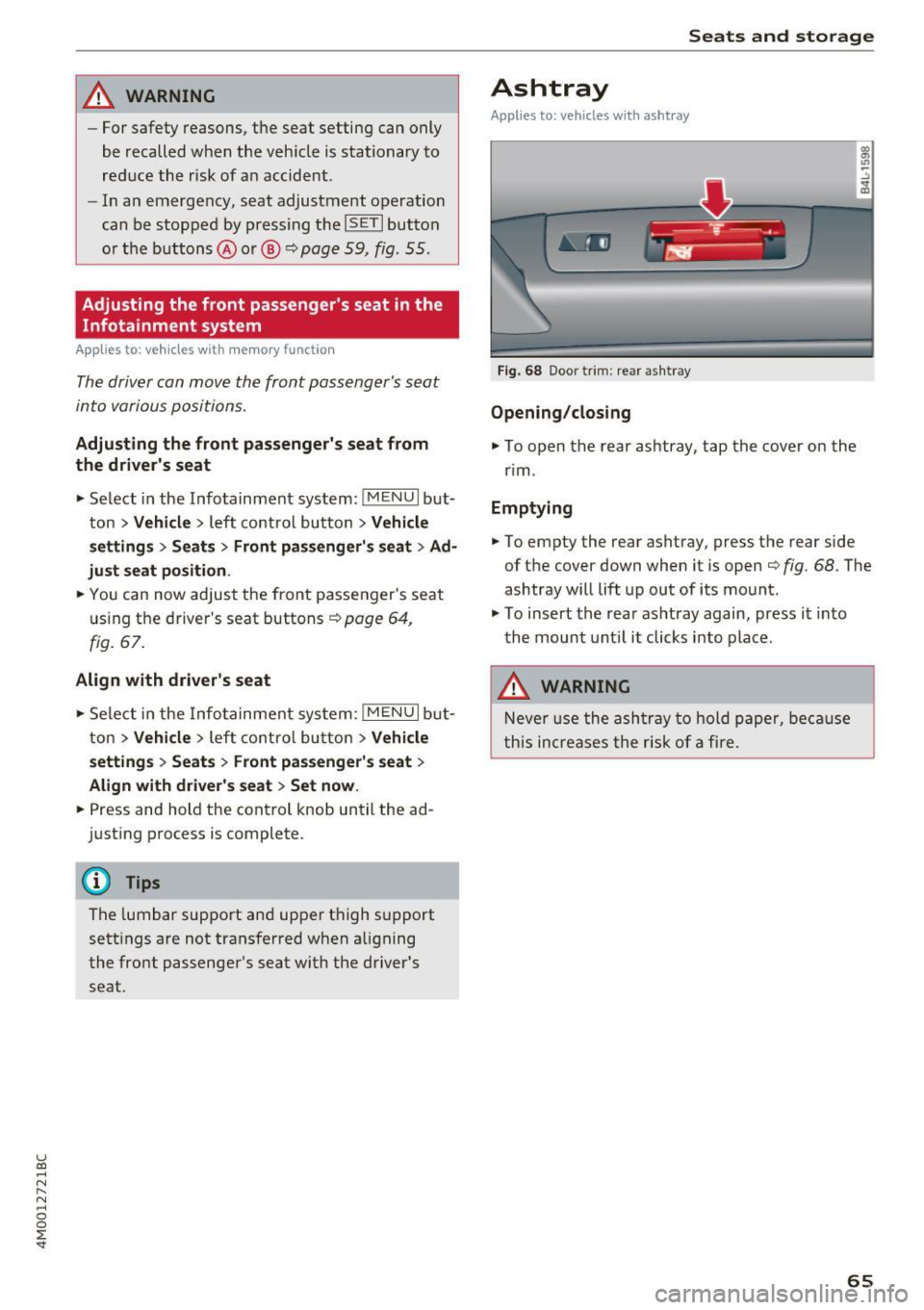
Fig. 68 Door trim: rear as htray
Opening /closing
~ To open the rear ashtray, tap the cover on the
r im .
Emptying
~ To empty the rear ashtray, press the rear side
of th e cover down when it is open
¢ fig. 68. The
ashtray will lift up out of its mo unt.
~ To insert the rear as htray again, press i t into
the mount unt il it clicks into place.
A WARNING
Neve r us e the a sh tra y to hold paper, be cause
t his increases the r isk of a fire.
65
Page 69 of 402

u (0 ...... N r--. N ...... 0
0
:E
Appl ies to: ve hicles with cooled glove compartme nt
The cooled glove compartment only functions
when the AIC system is switched on.
-.- !i:CI:!·
Fig. 72 G love compartment: switching cooling mode on/
off
~ Turn the knob @ counter-clockw ise to switch
the cooling on. The symbols on the knob must
appear as they do in
~ fig . 72 .
~ Turn the knob@ clockwise to switch the cool
ing off .
If the heating is switched on, switching the glove
compartment cooling mode off is recommended.
Additional storage compartments
You will find a variety of storage compartments
and holders at various locations in the vehicle.
- Glove compartment : the glove compartment
can be locked using the mechanical key
<=> page 35, Key set.
-In the door trim panels
- Safety vest compartment in the door trim pan-
els on the driver's side and front passenger's
side
- Storage compartment* in the center console
- Storage compartment under the front center
armrest
- Garment hooks above the rear doors
- Nets on the backrests of the front seats
- Net on the left luggage compartment trim pan-
el
Seats and storage
A WARNING
--Always keep the glove compartment lid
closed while dr iving to reduce the risk of in
jury .
- Only use the storage compartments in the
door trim panels to store small objects that
will not stick out of the compartment and
impair the range of the side airbags.
- Make sure that the view to the rear is not
obstructed by hanging garments.
- Hang only lightweight clothing and be sure
that there are no heavy or sharp-edged ob
jects in the pockets.
- Do not use coat hangers to hang the cloth
ing because this could impair the effective
ness of the side curtain airbags .
Luggage compartment
General information
A WARNING
Read and follow the important safety precau
tions in
r::!> page 261, Storing cargo correctly.
67
Page 70 of 402

Seats and storage
Luggage compartment cover
Fig. 73 Luggage compartment: cove r attached
Fig . 74 Luggage compar tment: removing and installing
the l uggage compartment cover
Attaching
., Pull the cover out and attach it in the mounting
eyelets in the side trim panel~
fig. 73.
Removing
., Pull the lever in the direction of the arrow
~fig. 74 and remove the cove r upward .
Installing
., Place the left and right s ides of the cover into
the mounts on the side trim panel.
., Push the cover downward until it clicks into
place.
A WARNING
The luggage compartment cover is not a sur
face for stor ing objects. Objects placed on the
cover could endanger all vehicle occupants
during sudden braking maneuvers or in a
crash .
68
(D Note
-Let the luggage compartment cover ro ll up
slowly to reduce the risk of damage.
- Also read and fo llow the applicab le warn
ings
~ (j) in Folding the backrest down/up
(third row seats) on page 62.
Increasing the size of the luggage
compartment
The backrests can be folded down individually*
or together.
Fig. 75 Second row seats: re lease strap on the center back ·
re st
Fig. 76 Luggage compartment : fol ding down the second
row seats
Folding the backrest down
., Pull the lever upward ~ page 60, fig. 58. The
backrest will swing forward. Or
., Pull the release strap at the rear side of the
seat ~
fig. 76.
., Let the backrest latch into the lowest position.
Folding the backrest upright
., Pull the lever up~ page 60, fig. 58 and fold the
backrest upright until it locks into place
~ _&. Ill>
Page 71 of 402

u (0 ...... N r--. N ...... 0
0
:E
• To rele ase the back rest, pull the release strap
at the front or rear side of the seat ¢
fig. 75 or
r::!>fig. 76.
• Fold the backrest forward .
Folding the center backrest upright *
• Fold the backrest upwa rd un til it locks i nto
pla ce ¢
A .
The center backrest may be folded down sepa
r ately* . This allows you to transport long obje cts
(such as skis) inside the vehicle.
_& WARNING
- T he backrest must be latched secure ly to
ensure that the safety belt is protecting the
center seating posit ion .
-
-The backrest must be securely latched so
objects cannot slide forward out of the lug
gage compartment dur ing sudden braking .
- To red uce the risk of injury in vehicles with
third row seats*, the center backrest must
be in the upright pos ition and locked into
place if there are passengers rid ing in the
third row*.
(D Note
Make sure the oute r safety belts are not
pinched or damaged when folding the seat
up.
- Read and follow the warnings¢.&.
in Entry/
exit assistance (second row seats) on
page 61
and ¢(Din Folding the backrest
down/up (third row seats) on page
62 .
-Move the rear head restraints down before
fo ld ing the rear backrests forward
¢ page 63. This is especia lly true if the Rear
Seat Entertainment (RSE)* is insta lled, be
cause it could be damaged .
Seats and storage
Luggage compartment net
Applies to: vehicles with luggage compartment net
The cargo net prevents small objects from slid
ing .
Fig. 77 Lu ggag e compar tment: ca rgo net stretched o ut
"" Attach the hooks for the l uggage comp artment
net in the tie-downs ¢
fig. 77.
Cargo floor
Fig. 7 8 Luggage co mpartme nt: inst all ing the ca rgo floor
Removing and installing the cargo floor
a, M
0
~ .. ID
"" To remove the cargo floor, pull the entire cargo
floor toward the back of the vehicle .
• To ins tall the cargo floor, insert the tabs at
both s ides into the openings and s lide the car
go floor a ll the way in toward the backrest
¢ fig. 78.
69
Page 76 of 402

Warm and cold
Vents
You can open or close the center and rear vents in
the cockpit and the vents in the rear center con
sole and door pillars using the ridged thumb
wheels. The levers adjust the direction of the air
flow from the vents.
Residual heat
You can activate the residual heat function when
the ignition is switched
off by pressing the knob
@ (left side). The residual heat from the coolant
is used to heat the vehicle inter ior. The residual
heat function switches
off automatically after
about 15 minutes.
A WARNING
- You should not use the recirculation mode
for an extended period of time, because no
fresh air is drawn in and the windows can
fog when coo ling mode is sw itched
off. This
increases the risk of an accident.
- Individuals with reduced sensitivity to pain
or temperature could develop burns when
using the seat heating function. To reduce
74
the risk of injury, these individuals should
not use seat heating.
(D Note
To avoid damage to the heating elements in
the seats, do not knee l on the seats or place
heavy loads on a small area of the seat .
Setup
Applies to : vehicles wit h 3-zo ne de luxe automatic climate
control
The climate control system basic settings are ac
cessed in the Infotainment system.
"'Select in the Infotainment system: IMENU ! but
ton
> Vehicle > l eft control button > Air condi
tioning
Seat heating/seat ventilation*
You can adjust the seat heating/ventilation bal
ance for the driver and front passenger.
Automatic auxiliary heater*
The aux iliary heater he lps to warm the vehicle in
terior more quickly.
Page 79 of 402

u co ...... N r-... N ...... 0
0
:E: '
Use the rocker switch(;) to select the funct io n.
When synchronization is switched on, the set
tings for the driver's side are applied to the front
passenger's side and the rear (except for seat
heating/ventilation*). When the settings on the
front passenger 's side or in the rear are changed,
the synchron izat ion is automatically sw itched off
and
4-zone appears in the display .
SET REAR
function
Use the rocker switch (D to select the funct ion .
When the function is switched on, you can adjust
all settings for the rear using the climate control
system controls in the cockpit . The rear climate
control system controls cannot be operated at
the same time. This function switches off auto
matically after a certain period of time or after
l eaving the menu.
Vents
You can open or close the center and rear vents in
the cockpit and the vents in the rear center con
sole and door pillars using the ridged thumb
wheels. The levers adjust the direct io n of the air
flow from the vents. The w ide ven t is opened and
closed using the~ button ~
page 8, fig. 2@ .
Residual heat
You can activate the residual heat funct ion when
the ignition is switched off by pressing the knob
@ (left side). The residual heat from the coolant
is used to heat the vehicle inter io r. The resid ual
heat function switches off automatically after
about 15 min utes.
& WARNING
- You should not use the recirculation mode
for an extended period of time, because no
fresh a ir is drawn in and the windows can
fog when coo ling mode is switched off . This
increases the risk of an accident .
- Individuals with reduced sensitivity to pain
or temperature could develop burns when
using the seat heating function . To reduce
the risk of injury, these ind iv iduals should
not use seat heating.
Warm and cold
(D Note
To avoid damage to the heating elements in
the seats, do not kneel on the seats or place
heavy loads on a small area of the seat.
(D Tips
It is not possible to operate the rear climate
control system controls when the power ch ild
safety lock is switched on. With With the
SET REAR function, you can apply all settings
to the rear using the climate control system
controls in the cockpit
~ page 43.
Setup
Applies to: vehicles with 4 -zone deluxe automat ic climate
contro l
The climate control system basic settings are ac
cessed in the Infotainment system .
.. Select in the Infotainment system: I MENU! but
ton
> Vehicle > l eft control b utton > Air condi
tioning
Seat heating/seat ventilation*
You can adjust the seat heating/ventilation bal
ance fo r the driver, front passenger and rear pas
sengers .
Footwell temperature
You can adjust the footwell temperature so that
it is cooler or warmer.
Auto recirculation
When switched on, automat ic rec irculat ion con
trols the recirculation mode automatically . You
must press the
® MAX button if fog forms on
the windows.
Automatic auxiliary heater*
The aux iliary heater he lps to warm the vehicle in
terior more quickly.
Steering wheel heating
Applies to: vehicles with stee ring wheel heating
The steering wheel rim can be heated .
.. Press the button on the multifunction steering
wheel to switch the steering wheel heating on ..,_
77
Page 84 of 402

Driving
Power steering wheel position adjustment
Applies to: ve hicles w ith power steering whee l adj ustment
The steering wheel position can be adjusted elec
trically up and down and forward and back.
F ig. 85 Steering co lumn: switch to adjust the steering
wheel position
.. To adjust the height, press the switch up/down.
The steer ing column w ill cont inue moving as
long as yo u are pressing the switch .
.. To move the steering whee l forward or back,
press the swi tc h forward/bac k. T he steer ing
column will con tinue moving as long as you a re
pressing the switch.
The stee ring wheel can also be adjusted when the
ign it ion is swit ched off .
In vehicles with memory function*, the steering
col umn se tt ings a re stored together wi th the
seat pos it ion.
Easy seat entry
App lies to: ve hicles with power steering whee l adjustment
Easy seat entry makes it easier to enter and exit
the vehicle by adjusting the steering column au
toma tically.
" Se lect in the Infota inment sys tem: I MENU I but
ton
> Vehi cle> left contro l button > Vehicle
settings > Seats > Driver 's seat > Ea sy e ntry
fun ction .
When easy seat entry is switched o n, the stee ring
col umn goes bac k up into the par k posi tion when
the ign ition is switched off. Afte r ente ring the ve
h icle, t he steering co lumn re turns to the stored
position once the ignition is switched on.
82
Starting and stopping
the engine
Starting the engine
The ! START ENGINE STOPI button switches the
ignition on and starts the engine.
F ig . 86 Cockp it: S TART ENGINE STOP but to n
St arting the engine
.. Press the brake pedal.
.. Press the
I START ENGINE STOP ! button
¢ fig. 86. The eng ine will start.
.. There may be a slight delay when starting the
eng ine in diesel vehicles in co lde r tempera
tures. The refore, you must ho ld the brake pedal
down unti l t h e engine sta rts. The
El ind icator
light tu rns on while the eng ine is preheating.
Switching the ignition on /off
If you would like to switch the ignition on w ith
out starting the engine, follow these steps:
.. Press the
I START ENGINE STOP ! button w ith
out pressing the brake peda l. Vehicles without
the Start/Stop system*: the needle in the tach
ometer moves into t he
READ Y position.
" To switch the ignit io n off, press the bu tton
aga in. The needle in t he tachomete r moves into
t he
OFF position.
The prewarming runs a utomat ically in diesel
vehicles when the igni tion is sw itched on.
Eq uipment that uses a lot of electricity is sw itch
ed off tempo rarily when you start the engine .
If the engine does not start immediately, the
start ing procedure stops automat ically after a
short time. Repeat the starting procedure .