2017 AUDI Q5 ignition
[x] Cancel search: ignitionPage 56 of 296

Lights and Vision
Windshield wipers
Switching the windshield w ipers on
F ig. 55 W indshield wiper lever
F ig. 56 Rear w iper actuat ion
Move the windshield wiper lever to the corre
spond ing pos ition:
@ -Windshield wiper off
(D -Interval mode. The windshie ld w iper auto
matica lly activates when you drive 2 mph (4 km/
h). The h igher the sensit ivity of the rain sensor is
set (switch @to the right), the earlier the wind
shield wipers react to moisture on the wind
shie ld. In some models, you can switch rain sen
sor mode off and sw itch intermittent mode on in
the MM!* . Select:
!CARI function button> Car
s y stem s*
control button > Driver a ssi st > Rain
s en sor .
In inte rm ittent mode, yo u can adjust the
i n terval time using the @switch.
@-Slow wipi ng
@ -Fast wiping
@-Sing le wipe
® -Clean the windshield . To elimin ate water
d roplets, the winds hield wipe r performs one af
terwipe operatio n afte r seve ral seconds while
driving . You can switch this f unction off by mov -
54
ing the leve r to pos ition ® within 10 seconds of
the afterwipe ope ration. The afterwipe function
i s react ivated the next time the ignition is sw itch
ed on.
The rear wiper automatica lly switches on when
the reverse gear is engaged and the front wind
shield wipers are on and in operation .
Cl eaning the headlig hts*. The headlight was he r
system * operates only when the headlights are
on . If you move the lever to position@, the
headlights are washed in intervals.
@ -Wipe the rear w indow. The rear w iper moves
a bout every 4 se conds .
(!)-Clean the rear w indow . T he number of wip
i ng operations depe nds on how long the lever is
held in position 7.
& WARNING
- Th e rain sensor is on ly inten ded to ass ist the
driver. The driver is st ill responsi ble for
manually switch ing the wipers on according
to the visibility cond itions.
- The windsh ield may not be t reated with wa
ter-repelling windshield coating agents. Un
favorable condit ions, such as wetness, dark
ness, low sun, can resu lt in i ncreased glare.
Wiper blade chatte r is also possib le.
- Properly functioning windshield wiper
blades are required for a clea r view and safe
driving.
@ Note
- In the case of frost, c heck whether the
windshield wiper blades are frozen to the
windshield . Switching on the w indshield
w ipers can damage the w iper blades!
- Pr ior to us ing a car wash, the w indshield
wiper system must be sw itched off (lever in
posit io n 0) . This helps to preven t un inte n
ti onal sw itchi ng on and damage to the
w indshield wipe r sy stem.
(D Tips
-The windshie ld w ipers are switched off
when the ig nitio n is turned off. Activate th e
w ind shield wipe rs a fter the igni tion is .,.
Page 57 of 296

CD
CD
.... N ,-... N ..... 0 0 C<'. 00
switched back on by moving the windshield
wiper lever to any position .
- Worn or dirty windshield wiper blades result
i n streaking. This can affect the rain sensor
funct ion . Check yo ur windshield wiper
blades regularly.
- The washer fluid nozzles of the windshield
washer system are heated at low tempera
tures when the ignition is on.
- When stopping temporarily, e .g . at a traffic
light, the set speed of the windsh ield wipers
i s automatically reduced by one speed.
Cleaning windshield wiper blades
Clean the windshield wiper blades when they be
g in to leave streaks . Use a soft cloth a nd glass
cleane r to clean the w indshield wiper blades .
Front w ipe r
.. Place the windshield wiper arms in the service
pos ition. Refer to
9 page 55 .
.. Lift the wiper arm away from the front window .
Rear wiper
.. Lift the wiper arm away from the rear window.
A WARNING
Dirty windshield wiper blades can impair your
view. This can lead to accidents.
Replacing windshield wiper blades
F ig. 57 Remov ing the w ipe r blade
Wiper s ervice position /blade replac em ent
posit ion
a,
ij
a: co
"'
.. Switch the ign ition off and move the windsh ield
wiper lever to position @
9 page 54, fig. 55.
Lights and Vision
The windshield wipers move into the service po
sition .
.. To br ing the wipers back into the orig ina l posi
tion, switch the ignition on and press the wind shie ld w iper lever.
You can also turn the service position on or off in
the radio or MMI*: .. Switch the windshie ld wipers
off (posit ion @
9page 54, fig. 55).
.. Select: !CAR ! function button > Wind shield
wiper s
> Servic e po sition > On /Off . Or
.. Select:
!CAR ! function button> Car syst em s*
cont rol button > Servicing & c heck s> Wiper
s ervi ce po sition
> On /Off .
Removing the wiper blade
.,. Lift the w indshield wiper arm up from the
w indshield .
.,. Press the locking knob
(D 9 fig. 57 on the wiper
b lade. Hold the wipe r blade firmly .
.. Remove the w iper blade in the direction of the
ar row .
Attaching the wiper blade
.. Insert t he new wipe r blade into the mount on
the wipe r arm @until you hear it latch into
p lace.
.. Place t he w iper arm back on the windshield.
.. Turn the se rvice pos ition off.
A WARNING ~ -
F or your safety, you should replace the wiper
b lades once or twice a year . See your author
i zed Audi dealer for replacement blades.
(D Note
- T he windshie ld wiper blades must on ly be
replaced when in the service position! Oth
erwise, you r isk damaging the paint on the
hood or the w indshield wiper motor .
- You should not move your vehicle or press
the windsh ield wiper lever when the wiper
arms a re folded away from the windshie ld.
The windshield wipers would move back in
t o their or iginal pos ition and could damage
the hood and w indshie ld .
55
Page 58 of 296
Lights and Vision
-To help prevent damage to the wiper sys
tem, a lways loosen blades which are frozen
to the windshie ld before operating w ipers .
- To help prevent damage to wiper blades, do
not use gasoline, kerose ne, paint thinner, or
other solvents on or near the wiper blades.
- To help prevent damage to the wiper arms
or other components, do not attempt to
move the wipers by hand.
@ Tips
- Comme rcial hot waxes applied by a utomat ic
car washes affect the how eas ily the glass
surface can be cleaned.
- You can also use the service position, fo r ex
ample, if you want to protect the windsh ield
from icing by using a cover.
Replacing the rear wiper blade
F ig. 58 Rea r wiper: Remov ing the w iper b lade
Removing the wiper blade
.. Fo ld the wi ndshield wipe r arm away from the
windshield.
.. Pu ll the wiper blade and holder out of t he
mount.
Attaching the wiper blade
~ M 0 a: a, (C
.. Press t he wiper b la d e holde r in the arrow dire c
tion
c:> fig. 58 into the mount.
.. Fo ld the windshield wiper arm bac k onto the
windshield.
A WARNING
-
For safety reasons, the windshield w iper
blades sho uld be replaced once or twice each
year .
56
Mirror
Adjusting the exterior mirrors
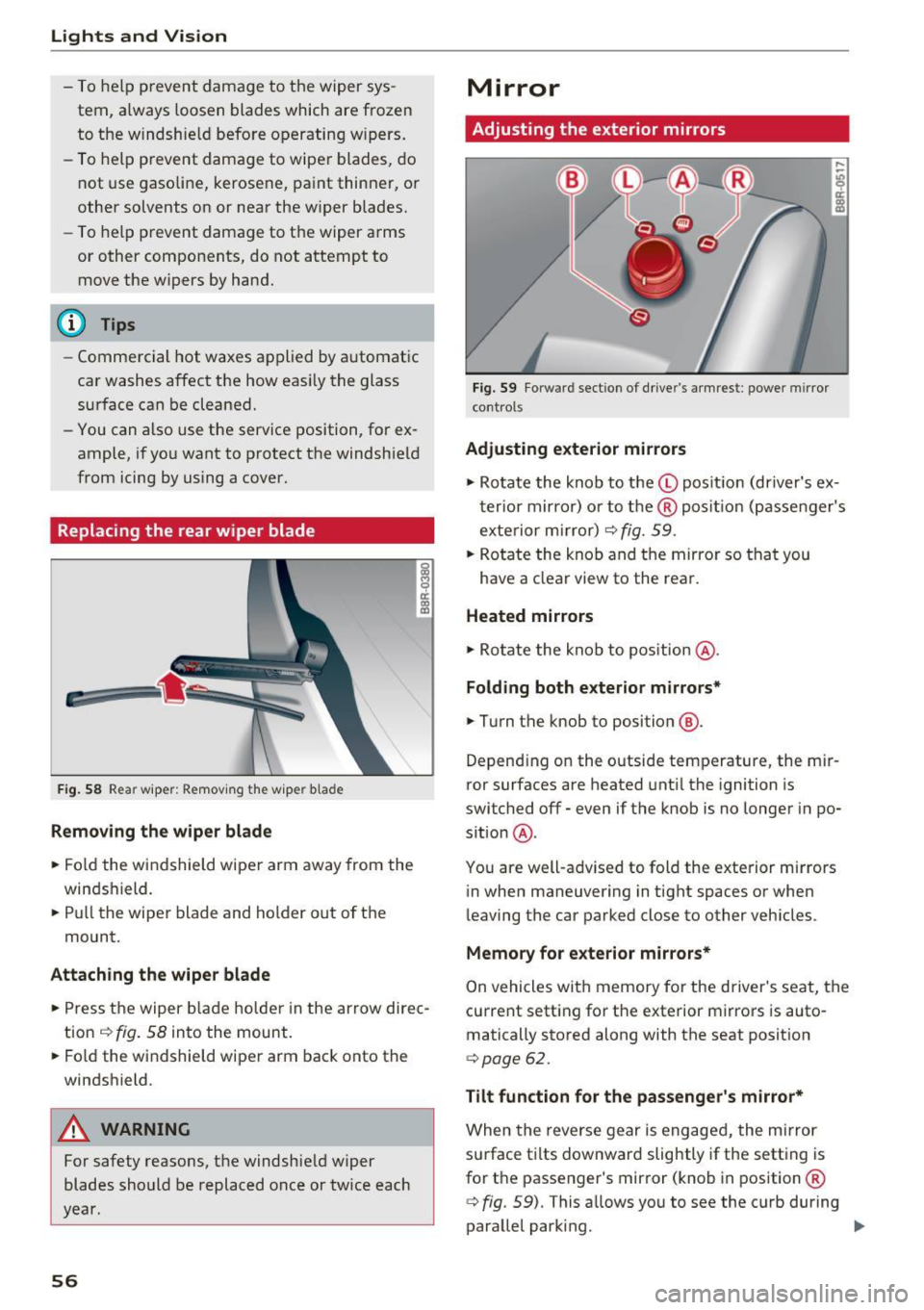
Fig. 59 Forwa rd sect ion of dr ive r's armrest : power mirror
cont rols
Adjusting exterior mirrors
,...
-"' 9 a: ::,:
• Ro tate the knob to the© pos it io n (dr iver's ex
t erior mirro r) o r to t he ® posi tion (passe nger's
exterior m irror)
c:> fig. 59.
.. Rotate the knob and the mirro r so that you
have a clear view to the rea r.
Heated mirrors
.,. Ro tate the knob to pos ition @.
Folding both exterior mirrors*
.,. Turn the knob to position @.
Depend ing o n the outside temperature, the mi r
ror surfaces are heated unt il the ignition is
switched
off -even if the knob is no longer in po
s it ion @.
You are well-adv ised to fold the exte rior m irrors
in when maneuvering in tight spaces or when
leaving the car parked close to other vehicles .
Memory for e xterior mirrors*
On vehicles with memory for the driver's seat, the
current sett ing fo r the exterior mirrors is auto
matically stored along with the seat posit ion
<=> page 62.
Tilt function for the passenger 's mirror*
When the reverse gear is engaged, the mirror
s u rface t ilts downwar d slightly if the setting is
for t he passenger's mirror (knob in position ®
c:> fig. 59). This allows you to see the curb during
parallel parking. ..,_
Page 60 of 296

Lights and Vision
-If swallowed and person is conscious, rinse
mouth with water for at least 15 minutes.
Do not induce vomiting unless instructed to
do so by medical professional. Get medical
attention immediately.
(D Note
Liquid electrolyte leaking from broken mirror
glass will damage any plastic surfaces it
comes in contact with . Clean up spilled elec
trolyte immediately with clean water and a
sponge.
{D) Tips
- Switching off the dimming function of the
inside rear view mirror also deactivates the
automatic dimming function of the exterior mirrors*.
- The automatic dimming mirrors do not dim
when the interior lighting is turned on or
the reverse gear is selected.
- Automatic dimming for the mirror only op
erates properly if the light striking the in
side mirror is not hindered by other objects.
Digital compass
Activating or deactivating the compass
Applies to: vehicles with digital compass
The direction is displayed on the interior rear
view mirror.
Fig. 61 Inside rea r view mirror: digi tal compass activated
~ To activate or deactivate, hold the @button
down until the red display appears or disap pears.
58
The digital compass only works with the ignition
turned on. The directions are displayed as initials:
N (North), NE (Northeast), E (East), SE (South
east),
S (South), SW (Southwest), W (West), NW
(Northwest).
(D Tips
To avoid inaccurate directions, do not allow any remote controls, electrical systems, or
metal parts close to the mirror.
Setting the magnetic deflection zone
Applies to : vehicles with digital compass
The correct magnetic deflection zone must be
set in order to display the directions correctly.
~
[mJ
®
Fig. 62 North America: magnetic deflection zone bounda
rie s
~ Hold the@c::> page 58, fig . 61 button down un
til the number of the set magnetic deflection
zone appears on the interior rear view mirror.
~ Adjust the magnetic deflection zone by repeat
edly pressing on the@button. The set mode
automatically deactivates after a few seconds.
Page 63 of 296

a,
a,
..... N ,....
N ..... 0 0
0:
co
Front passenger's seat
Always move the front pas senger seat into the
rearmost position .
To avoid contact with the airbag while it is de
ploying, do not sit any closer to the instrument
panel than necessary and always wear the three
point safety belt provided adjusted correctly . We
recommend that you adjust the passenger's seat
in the following manner:
.. Move the front passenger seat into the rear
most position of the fore and aft adjustment
range
c;> .&. in Why is your seat adjustment so
important? on page 60.
• Bring the backrest up to an (almost) upright
position.
Do not ride with the seat reclined .
.. Adjust the head restraint so the upper edge is
as even as possible with the top of your head. If
that is not possible, try to adjust the head re
straint so that it is as close to this position as
possible
c;> page 64 .
.. Place your feet on the floor in front of the pas
senger's seat .
Front seats
Power seat adjustment
Fig. 63 Fro nt seat: Contro ls fo r seat adjus tme nt
Controls
"' 0 ci: a, a,
@ -Adjusting the lumbar support: press the but
ton in the corresponding position¢
Le,..
@ -Moving the seat up/down : press the button
up/down . To adjust the front seat cushion, press
the front button up/down. To adjust the rear seat
cushion, press the rear button up/down¢
Le,. .
Seats and storage
@-Moving the seat forward/back: press the but
ton forward/back
~ & .
©-Adjusting the backrest angle: press the but
ton forward/back
c;> & .
@ -Lengthening/shortening the upper thigh
support*: lift the handle
c;> Le,. .
_&. WARNING
- Never adjust the driver's or front passeng
er 's seat while the vehicle is moving.
If you
do this while the vehicle is moving, you will
be out of position . Always adjust the driver's
or front passenger's seat when the vehicle is
not moving.
- Be careful when adjusting the seat height.
Check to see that no one is in the way, or se
rious injury could result!
- Because the seats can be electrically adjust
ed with the ignition off or with the ignition
key removed, never leave children unattend
ed in the vehicle . Unsupervised use of the
electric seat adjustments may cause serious injury .
- To reduce the risk of injury in the case of
sudden braking or accident, front passen
gers must never ride in a moving veh icle
with the backrest reclined. Safety belts and
the airbag system only offer maximum pro
tection when the backrest is upright and the
safety belts are properly positioned on the
body. The more the backrest is reclined, the
greater the risk of personal injury from an
incorrect seating position and improperly
positioned safety belts.
-
61
Page 64 of 296

Sea ts and stor age
Memory function
Memory for driver's seat
Applies to: vehicles with seat memory
The seat adjustment settings for two drivers can
be stored using the memory buttons in the driv
e r's door.
F ig . 64 Dr ive r's doo r: Sea t memory
i ci: co a,
In addition to the setting for the drive r's seat,
the exterior rear view mirror setting can be stor ed and recalled through seat memory if the vehi
cle is properly equipped .
Storing and re calling s ettings
With the help of the memory buttons 1 and 2
c> fig . 64 the settings for two different drivers
can be stored and recalled
¢ page 62.
The cu rrent se ttings are also automatically as
signed to the remote contro l key being used
when the vehicle is locked . When the vehicle is
un locked , the settings assigned to the remote
control key being used are automatically recal
led.
Tu rnin g se at memo ry on and off
If the IO FFI switch is depressed, the seat memory
is inoperative. When the Memory function is off,
the LED in the button lights up.
All t he s tored se tt ings are retai ned. We recom
mend using the
I O FF I sw itch and deactivating the
seat memory if the vehicle is on ly going to be
used
temporarily by a driver whose settings are
not going to be stored.
62
Stor ing and recalling settings
Applies to: vehicles with seat memory
Storing settings
.,. Adjust the driver's seat .
.,. Adjust the two exterior mirrors.
.,. Press the
ISETI button . The light in the button
w ill come o n.
.,. Now press a memory button
dII or I]]) . If the
storing procedu re is correct, a confirmation
tone will sound.
Recalling settings
"' If the driver's door is open and the ignition is
sw itched off, tap the corresponding memory
button briefly .
.,. If the driver's door is closed or the ignition is
switched on, press the appropriate memory
button until the stored position is reached .
Successful storage is confirmed audib ly and by
the light in the
ISE TI button illuminating
c> page 62, fig. 64 .
When the vehicle is locked , the current settings
are stored and assigned to the remote control
key . But the settings stored on memory buttons
1 to 2 are not de leted. They can be recalled at
any time . When the vehicle is
unlocked , the set
tings assigned to the remote control key a re re
stored .
If your vehicle is driven by other persons using
your remote control key, you should save your in dividual seat position on one of the memory but
tons . You can recall your settings again simply
and conveniently by p ressing the correspond ing
memory button. When the vehicle is locked,
these settings are automatically re-ass igned to
the remo te contro l key and stored.
A WARNING
- For safety reasons, the seat sett ing can only
be reca lled when the vehicle is stationary
otherwise yo u ris k having an accident.
- In an emergency the reca ll proced ure can be
cancelled by pressing the
! OF F! switch or by
tapping of the memory buttons.
Page 81 of 296
![AUDI Q5 2017 Owners Manual CD
CD
.... N ,-... N .... 0 0 C<. 00
[i] Adjusting seat heating*
Pressing the button switches the seat heating on
at the highest setting (level 3) . The LEDs indicate
the temperat](/manual-img/6/57633/w960_57633-80.png "AUDI Q5 2017 Owners Manual CD
CD
.... N ,-... N .... 0 0 C<. 00
[i] Adjusting seat heating*
Pressing the button switches the seat heating on
at the highest setting (level 3) . The LEDs indicate
the temperat")
CD
CD
.... N ,-... N .... 0 0 C<'. 00
[i] Adjusting seat heating*
Pressing the button switches the seat heating on
at the highest setting (level 3) . The LEDs indicate
the temperature level. To reduce the tempera
ture, press the button again. To switch the seat heating off, press the button repeatedly until the
LED turns off.
After 10 minutes, the seat heating automatically
switches from level 3 to level 2.
lil Adjusting seat ventilation*
Pressing the button switches the seat ventilation
on at the highest sett ing (level 3). The LEDs indi
cate the venti lation level. To reduce the ventila
tion level, press the button again. To switch the
seat v entilation off, press the button repeatedly
until the LED turns off.
I ..., FRONT I Switch the defroster on/off
The windshield and side windows are defrosted
or cleared of condensation as quickly as possib le.
The maximum amount of air flows mainly from
the vents below the windshield. Recirculation
mode switches off. The temperature should be
set to 72 °F (22 °() or higher. The temperature is
controlled automatically .
T he
IAUTOI button switches the defroster off.
llliil REARI Switching rear window heater on/
off
The rear window heater on ly operates when the
engine is running. It switches off automatica lly
after a few minutes, depending on the outs ide
temperature.
To prevent the rear window heater from switching off automatically, press and hold the
!llil> REAR I
button for more than 2 seconds . This remains
s tored until the ignition is switched off .
Air vents
You can open and close the center and rear air
vents using the thumbwheels . The levers adjust
the direction of the airflow from the vents.
You can adjust the air temperature in the rear by
turning the thumbwheel toward the red side to
Warm and cold
make it warmer or toward the blue s ide to make
it coo ler.
A WARNING
-~
- Do not use the recirculation for extended
periods of time. The windows could fog up
since no fresh air can enter the vehicle . If
the windows fog up, press the air rec ircula
tion button again immed iately to switch off
the air rec irculat ion function or select de
frost.
- Individuals with reduced sensit ivity to pain
or temperature could develop burns when
using the seat heating* function. To reduce
the risk of injury, these individua ls should
not use seat heating.
(D Note
To avoid damage to the heating elements* in
the seats, do not kneel on the seats or place heavy loads on a small area of the seat.
Setup
The basic climate control settings can be adjust
ed in the radio or MMI*.
"'Select: !CAR I function button> A/C control but
ton. Or
"' Select:
!CAR ! function button> Car systems*
control button >
A/C.
Automatic recirculation
When switched on, automat ic rec irculat ion con
trols the recirculation mode automatically. If the
windows fog up, press the
I@ F RON T I button.
Synchronization
When synchronization is switched on, the same
settings are appl ied to both the driver and front
passenger , except for the seat heating/ventila
t ion* . Synchronization switches off when you ad
just the settings on the front passenger's sid e.
You can also sw itch synchronizat ion on by press-
i ng and holding the knob on the driver's side. ..,.
79
Page 83 of 296

a,
a,
,...,
N l"N ,...,
0 0
0:
co
Driving
Steering
Manually adjustable steering wheel
The height and reach of the steering wheel can
be adjusted .
Fig. 97 Lever under the steering column
Fi rst, ad just t he driver 's sea t correct ly.
• Pull the lever ¢
fig. 97 -Arrow- ¢ A.
• Move the steer ing whee l to the desired posi
t ion.
• Push the lever against the steeri ng column un-
ti l it locks .
There must be at leas t 10 inches (25 cm) be
tween your chest and the center of the stee rin g
wheel. If yo u cannot sit mo re than 10 inches (25
cm) from the steering wheel, see if adaptive
equipment is available to help you reach the ped
a ls and increase the distance from the steering
wheel.
F or detailed information on how to adjust the
driver's seat, see
¢ page 61 .
.&_ WARNING
Improper use of steering wheel adjustment
and improper seating position can cause ser i
ous personal injury.
- Adjust the steering whee l co lumn on ly w hen
the vehicle is not mov ing to prevent loss of
vehicle control.
- Adjust the driver's seat or steering wheel so
that there is a min imum of 10 inches (25
cm) betwee n your chest and t he steer ing
w heel
¢page 132, fig. 150 . If you cannot
-
D rivi ng
maintain t his minim um distance, the airbag
system cannot p rotect yo u proper ly.
- If physical limitations prevent you from sit
ting 10 inches (25 cm) or more from the
steer ing whee l, check with your author ized
Audi dealer to see if adaptive equipment is
ava ilable.
- If the steer ing whee l is aligned w ith your
face, the supplementa l driver's a irbag can
not provide as much protect io n in an acc i
dent. Always ma ke sure that the steer ing
wheel is aligned with you r chest.
- Always hold the steering wheel with your
hands at the 9 o'clock and 3 o' clock posi
tions to reduce the risk of pe rso nal inju ry if
the dr iver's a irbag dep loys .
- Never ho ld the stee ring wheel at the 12
o'cl ock position or wi th you r hands inside
the stee rin g wheel rim or on t he s teer ing
wheel h ub. Holding the stee ring w heel the
wrong way can cause serious inj uries to the
hands, arms and head if the driver's airbag
deploys .
Ignition lock
Starting engine with the key
Th e ignition is switched on and the engine start
ed with the ignition key .
Fig . 9 8 Igh iti oh key
Starting the engine
• Insert the key into the ign ition lock .
• Hybrid drive*: re fer to the information for start
ing the vehicle under
¢ page 101.
• Step on the brake pedal an d move the selector
lever to the P or N position.
• Press the key¢
fig. 98 -the engine will start. II>
81