2017 AUDI Q5 ECU
[x] Cancel search: ECUPage 106 of 296

Hybrid
Start-Stop function
The combustion engine is operated on ly as need
ed . Generally, the combustion engine turns off
when the vehicle is stationary and the high volt
age battery powers the electrical vehicle sys
tems.
The purpose o f automatica lly shutting the com
bustion engine off in hybrid drive mode is to save
fuel. All of the important vehicle systems, such
as steering, brakes and the A/C system, continue
to remain active. In some cases , systems may re
qu ire the combustion eng ine to continue running
when the vehicle is stationary . When dr iv ing in
congested traff ic for long per iods of t ime, the
combustion eng ine will cycle on when the veh icle
is stationary to keep the high voltage battery
charged.
Gliding
If the gas pedal is not pressed and the D posit ion
is selected, the combustion engine remains
turned off up to speeds of approximately 99 mph
(160 km/h) . Driving conservative ly like th is can
reduce fuel con5umption .
Energy recovery (recuperation)
When braking, the electric motor will act as a
generator creating e lectr ic energy that is then
sto red in the high voltage battery. This also oc
curs when the vehicle is coasting or driving down
hi ll. The combustion engine is automat ica lly
turned off in this case .
Tips for Driving Efficiently with your Hybrid
Appl ies to: ve hicles w ith hyb rid drive
Driving situa- Conditions
tions
- Shift into the D position .
Starting from a -
Release the brake pedal. The vehicle is braked with
the electric motor by
applying early and even pressure to the brakes
and using short pedal movements
¢ page 101,
fig. 116 @. By doing this, a large amount of the
kinet ic energy is recovered and may be stored as
electric energy in the high voltage battery. Dur
i ng heavy brak ing , the conventional brakes are al
so act ivated
¢ page 101, fig . 116 @.
The energy recovery is shown in the MMI display
¢page 107 .
Automatic start of the combustion engine
Various operating conditions cause the combus
tion eng ine to start automatically:
- Th e high voltage battery charge level is low.
- Th e temperature of the combustion engine is
low .
- Th e temperature of the catalytic converter is
low .
- T he power output needed for the A/C system is
high.
- The vehicle speed is high .
- The vehicle acceleration is high .
- The incline is steep .
- High charge level for the high voltage battery
when coasting. In this case, the high voltage battery cannot absorb any more energy and so
the electric motor cannot slow down the veh i
cle. The combust ion engine turns o n (engine
brake) . In this situation the high voltage bat
t ery w ill show a Max charge.
Vehicle behavior
In the D posit ion, the hybrid system adapts
to the driving situat ion by automatically
stop -
Only press moderately on the ac- sw
itch ing between the combustion engine
and e lectr ic drive types or by combining
celerator pedal.
them.
104
...
Page 107 of 296

CD
CD
.... N ,-... N .... 0 0 C<'. 00
Driving situa -
tion s
Constant driving
and coasting
(gliding)
Energy recovery
(recupe ration)
Driving in city
traffic
Driving on high-
ways and ex- pressways
Driving in cold
weather
Cond itions
- Cautious driving and reserved ac-
celeration.
- Release the accelerator pedal early
and entirely .
- Brake early and evenly with short
pedal movements .
- Reserved acce leration and early
and even braking with short pedal
movements.
- Use the
!<=!VI button sparingly .
- Intentionally take your foot off of
the gas pedal to allow for lengthy
coast ing .
- Reduce the vehicle speed by re-
leasing the acce le rato r peda l and
not by b raking.
- Avoid vehicle speeds above ap-
proximately 99 mph (160 km/h).
- Use the 5 selector lever position
and tiptronic mode sparingly .
- Do not run the combustion erngine
while the vehicle is parked to warm
the engine.
- Use the rear window/exter ior mir-
ror defroster and the seat heating
sparingly .
- Park the vehicle in a garage over-
night.
H yb ri d
Vehicle behav ior
The kinetic energy of the vehicle is used to
move the vehicle .
When you release the accelerator pedal en-
tirely, the combustion engine turns off auto-
mat ica lly and is disengaged. The vehicle
g lides without being propelled .
The electric motor brakes the vehicle . By do-
ing this, a large amount of the kinetic energy
is recovered and may be stored in the h igh
voltage battery in the form of electric energy .
The kinetic energy of the vehicle is used to
move the vehicle .
The battery dra ins quickly when the
!<=!VI but -
ton is turned on, which can increase fuel con-
sumpt ion because electric driv ing is given
priority, even if driv ing with the combustion
engine on wo uld be more efficient.
When you release the accelerator pedal en-
tirely, the combustion engine turns off auto- mat ically and is disengaged . The vehicle
g lides without being propelled .
F ue l consumption can be reduced by coast-
i ng.
It is possible to coast up to a vehicle speed of
approximately 99 mph (160 km/h).
A sporty driving style increases fue l con-
sumption .
The temperature of the combustion engine
rises very s lowly and the fuel consumption in-
creases considerably.
This conserves the energy in the high voltage
battery so that it is available to run the vehi-
cle in electr ic mode .
This reduces exposure of the high voltage
battery to cold temperat ures . The required
temperature range for the high voltage bat-
tery will then be reached more quickly after
you sta rt driving .
105
Page 108 of 296

Hybrid Energy flow display
Applies to: ve hicles w ith hybri d drive
Fig. 118 Instrument cluster: energy flow display
The energy flow of the hybrid system is shown in
the instrument cluster display and in the MMI
d isplay. The image is animated in the MMI dis
play .
Image in the instrument cluster display
.. Press the I RESET I button in the windshie ld wip
er lever repeatedly until the energy flow display
r::> fig. 118 appears.
Component Color
@Combust ion engine orange
gray
@ Propshaft green
orange
green-orange
gray
@ H igh voltage battery green
green (animated in
MMI)
gray
@ Movement arrow green
orange green-orange
@ Movement arrow green
106
Fig. 119 MMI display: energy flow display
Image in the MMI display
.,. Select: !MENUI function button> Hybrid control
button
r::!) fig. 119 .
Meaning
The combustion engine is running
The combustion engine is off
Electric driving/recuperating
Driving with t he combustion engine
Driving w ith the combustion engine and electric
motor (boost)
Vehicle stationary/rolling in the N selector lever
position
High voltage battery charge level
High voltage battery is charging
Vehicl e is not in dr ive ready mode
Electric driving
Driving with the combustion engine
Driving with the combustion engine and electric
motor (boost)
Recuperating
Page 109 of 296

a,
a,
..... N ,-... N ..... 0 0
0:
co
@ Tips
The Energy flow display will not shown in the
MMI display when the reverse gear is engag
ed, due to safety reasons .
Consumption display
Applies to: vehicles with hybrid drive
Fig . 1 20 MMI displa y: co nsump tio n dis play
T he consumption d isplay shows the average en
ergy consumption and the rec uperation quantity
i n 5 minute interva ls .
Calling up the consumption display
... Select : I MENU I function button> Hybrid control
button .
... Turn the cont rol knob co unter -clockwise.
Resetting the consumption displ ay
... Se lect : I MENU I function button > Hybrid cont rol
button .
... Turn the control knob to
Reset consumpt ion
stat ist ics .
The orange bars show the average consumption
and the green bars show the recuperation quanti
ty . Each bar represents a measured
5 minute in
terval. The display covers a
60 m inute time peri
od .
The bar w ith the wh ite border on the outer right
shows the current average consumption or the
cur rent recupe ration q uantity. After 5 minutes,
this bar trave ls a step to the left and a new bar
a p pears in the outer right .
The filled bars show the values for the curren t
drive cycle . Once the ignition is sw itched off and
on aga in, all of the prev ious bars are display ed as
H ybrid
not fi lled and new fi lled bars a ppear on the right.
T his is so t hat the values from the previous t rips
and the current trip can be compared v isua lly.
Vehicle tool kit and tire repair set
Applies to: vehicles with hybrid drive
Fig. 121 L uggage compar tm ent: ve hicle too l bag an d tir e
r epa ir set
The veh icle tool k it is fou nd u nder a cover in the
cargo floor
c::> fig. 121 @ . The ti re repa ir set (T ire
Mobility System) is fo und in the storage com
partmen t in the r ight side trim p anel @.
Additional informat ion about t he vehicle too l kit
may be found under
c::> page 250 and about the
t ir e repa ir set un der
c::> page 253 .
@ Tips
The right sto rage compartment in t he lug
gage compartment and its co nte nts must al
w ays be kept in the vehicle. The vehicle must
not be o per ate d w it h ou t the tire repair set.
Charging the batteries
Applies to: vehicles with hybrid drive
The vehicle is eq uip ped w it h t wo 12 volt ba tteries
and a high vo ltage battery .
If the 12 vo lt batte ries are dead, they may be
ch arged wi th a charger or the vehicle may be
j u mp s tarted wi th assis tan ce from ano ther veh i
cl e in the same way as a conventional vehicle.
T he same app lies to the hig h vol tag e batte ry if it
is d isch arged. However, in this ca se, the ch ar gin g
proces s is ac compa nied wi th messages in t he in
strument cl uster d is p lay . T he ignition mus t be
switched on and a ll unnecessary e lectric compo-
nents must be turned off . ""
107
Page 118 of 296

Audi adaptive cruise control and braking guard
promptly detected or may not be detected
at all.
- Reflective surfaces including crash barriers
or tunnel entrances may impair the function
oftheradarsensor.
(D Tips
-You can cancel the braking that is initiated
by the system by braking yourself, by accel
erating noticeably or by swerving.
- Braking guard error messages
c:> page 116.
- Keep in mind that braking guard can brake
unexpectedly. Always secure any cargo or
objects that you are transporting to reduce
the risk of damage or injury.
Settings in the radio/MMI*
Applies to: vehicl es w ith Audi adaptive cruise control
.,. Select : ICARI function button> Audi braking
guard .
Or
.,. Select:
~I C~A~R~I function button > Car systems*
control button > Driver assist> Audi braking
guard .
System -
Switch braking guard On and Off. When
you switch the ignition on, the message
Braking
guard: Off
appears if the system is switched off .
Early warning -The distance and approach warn
ings in the display can be switched
On/Off .
(D Tips
-Your settings are automatically stored and
assigned to the remote control key being
used at the times the settings are made
r=;,page 33.
-If you restrict the ESC, the braking guard al
so switches itself off
c:> page 18 7.
- Switch braking guard
off when you are load
ing the vehicle onto a vehicle carrier, train,
ship or other type of transportation . This
can prevent undesired warnings from the
braking guard system.
Messages
Applies to: vehicles w ith Audi adaptive cruise contro l
Braking guard: Off
116
This driver message appears if the system is
turned
off via the radio/MM I*. Otherwise, if the
system is turned
off, the information appears ev
ery time shortly after the start of the trip.
The driver message also appears if the system is
not available due to a malfunction or if the ESC is
not switched on
c:> page 187. If this is the case,
the system will not provide warnings about a possible collision.
Braking guard: Activated
This driver message appears if sharp brake pres
sure was applied due to an acute warning.
•••
Three white dots appear if a setting cannot be se
lected with the operating lever . For example, this
happens if you want to raise/lower the speed
even though there was no previously saved
speed.
ACC: Sensor blocked
This message appears if the sensor view is ob
structed, for example by leaves, snow, heavy
spray or dirt. Clean the sensor
r=;, page 109,
fig. 122 .
ACC: Unavailable
The driver message appears if, for example, the
brake temperature is too high. The adaptive
cruise control is temporarily unavailable. A chime
sounds as a rem inder.
ACC: Not available
The driver message appears if there is a malfunc
tion. The adaptive cruise control turns off. A
chime sounds as a reminder. Have the system
checked by an authorized Audi dealer or author
ized Audi Service Facility.
Shift lever position!
The driver message appears if the selector lever
is shifted to the N position. The adaptive cruise
control is not available while in this position.
Stabilization control (ESC)
This message appears if the Electronic Stabiliza
tion Control (ESC) is taking action to stabilize the .,.
Page 133 of 296

CD
CD
.... N ,-... N ,....,
0 0 C<'. 00
Driving safety
Basics
Safe driving habits
Please remember -safety first!
This chapter contains important information,
tips, instructions and warnings that you need to
read and observe for your own safety, the safety
of your passengers and others . We have summar
ized here what you need to know about safety
belts, airbags, child restraints as well as child
safety. Your safety is for us
priority number 1. Al
ways observe the information and warnings in
this section - for your own safety as well as that
of your passengers.
The information in this section applies to all
model versions of your vehicle. Some of the fea
tures descr ibed in this sections may be standard
equipment on some models, or may be optional
equipment on others. If you are not sure, ask
your authorized Audi dealer.
A WARNING
- Always make sure that you follow the in
structions and heed the WARNINGS in this
Manual. It is in your interest and in the in
terest of your passengers .
-
-Always keep the complete Owner's Litera
ture in your Audi when you lend or sell your
vehicle so that this important information
will always be available to the driver and
passengers.
- Always keep the Owner's literature handy so
that you can find it easily if you have ques
tions.
Safety equipment
The safety features are part of the occupant re
straint system and work together to help reduce
the risk of injury in a wide variety of accident sit
uations.
Your safety and the safety of your passengers
should not be left to chance. Advances in tech
nology have made a var iety of features available
to help reduce the risk of injury in an accident.
Driving safety
The following is a list of just a few of the safety
features in your Audi:
- sophisticated safety belts for driver and all pas-
senger seat ing pos itions,
- be lt force limiters for the front seats,
- belt pretensioners for the seats,
- belt height adjustment for the front seats,
- head restraints for each seating position,
- front airbags,
- side airbags in the front seats and outer rear
seats *,
- side curtain airbags,
- special LATCH anchorages for child restraints,
- adjustab le steering column.
These individual safety features, can work to gether as a system to help protect you and your
passengers in a wide range of accidents . These
features cannot work as a system if they are not
always correctly adjusted and correctly used.
Safety is everybody's responsibility!
Important things to do before driving
Safety is everybody 's job! Vehicle and occupant
safety always depends on the informed and care
ful driver .
For your safety and the safety of your passen
gers,
before driving always:
.,. Make sure that all lights and signals are operat
ing correctly.
.,. Make sure that the tire pressure is correct .
.,. Make sure that all windows are clean and afford
good visibility to the outside .
.,. Secure all luggage and other items carefully
~page 74 .
.,. Make sure that nothing can interfere with the
pedals.
.,. Adjust front seat, head restraint and mirrors
correctly for your height.
.,. Instruct passengers to adjust the head re
straints according to their height.
.,. Make sure to use the right child restraint cor
rectly to protect children
¢ page 168, Child
safety. ..,.
131
Page 136 of 296
Driving sa fe ty
-Always keep your feet on the floor in front
of the seat. Never rest them on the seat, in
strument pane l, out of the window, etc. The
airbag system and safety belt will not be
able to protect you properly and can even in
c rease the risk of injury in a crash .
- Never dr ive with the backrest reclined or
t il ted far bac k! The farther the backrests are
t il ted back, the greater the risk of in ju ry due
to incorrect positioning of the safety belt and imp roper seating position.
- Children must always ride in child safety
seats r=;,
page 168 . Special pre caut ions ap
ply when installing a ch ild safety seat on the
front passenger seat r=;,
page 148.
Proper seating positions for passengers in
rear seats
Rear seat passengers must sit upright wi th both
feet on the floor consistent with their physical
size and be properly restrained whenever the ve
hicle is in use.
To reduce the risk of injury caused by an inco rrect
seating position in the event of a sudden braking maneuver or an accident, your passengers on the
rear bench seat must always observe the follow
ing :
~ If there is a passenger on the rear center seat
ing pos it ion, slide the center head restra int up
ward at least to the next notch r=;,
page 64.
~ Make sure that the seatback is securely latched
in the upright pos ition r=;,
page 66.
~ Keep both feet flat in the footwell i n front of
the rear seat.
~ Fasten and wea r safety be lts p roperly
r:=;, page 143.
~ Make s ure that children are always properly re
strained in a c hild rest raint t hat is appropriate
f or their size and age r=;,
page 168.
A WARNING
Passengers who are improperly seated on the
rear seat can be seriously injured in a crash.
- Each passenger must always sit on a seat of their own and properly fasten and wear the
safety belt belonging to that seat.
134
- Safety belts only offer maximum protect ion
when the seatback is securely latched in the upright pos ition and the safety belts are
properly posit ioned on the body . By not sit
ting upright, a rear seat passenger increases
the risk of personal injury from imprope rly
posi tioned safety belts!
- Always ad just the head restra int properly so
that it can give maximum p rotection.
Proper adjustment of head restraints
Correctly adjusted head restraints are an impor
tant part of your vehicle's occupant restraint sys
tem and can help to reduce the risk of injuries in
accident situations.
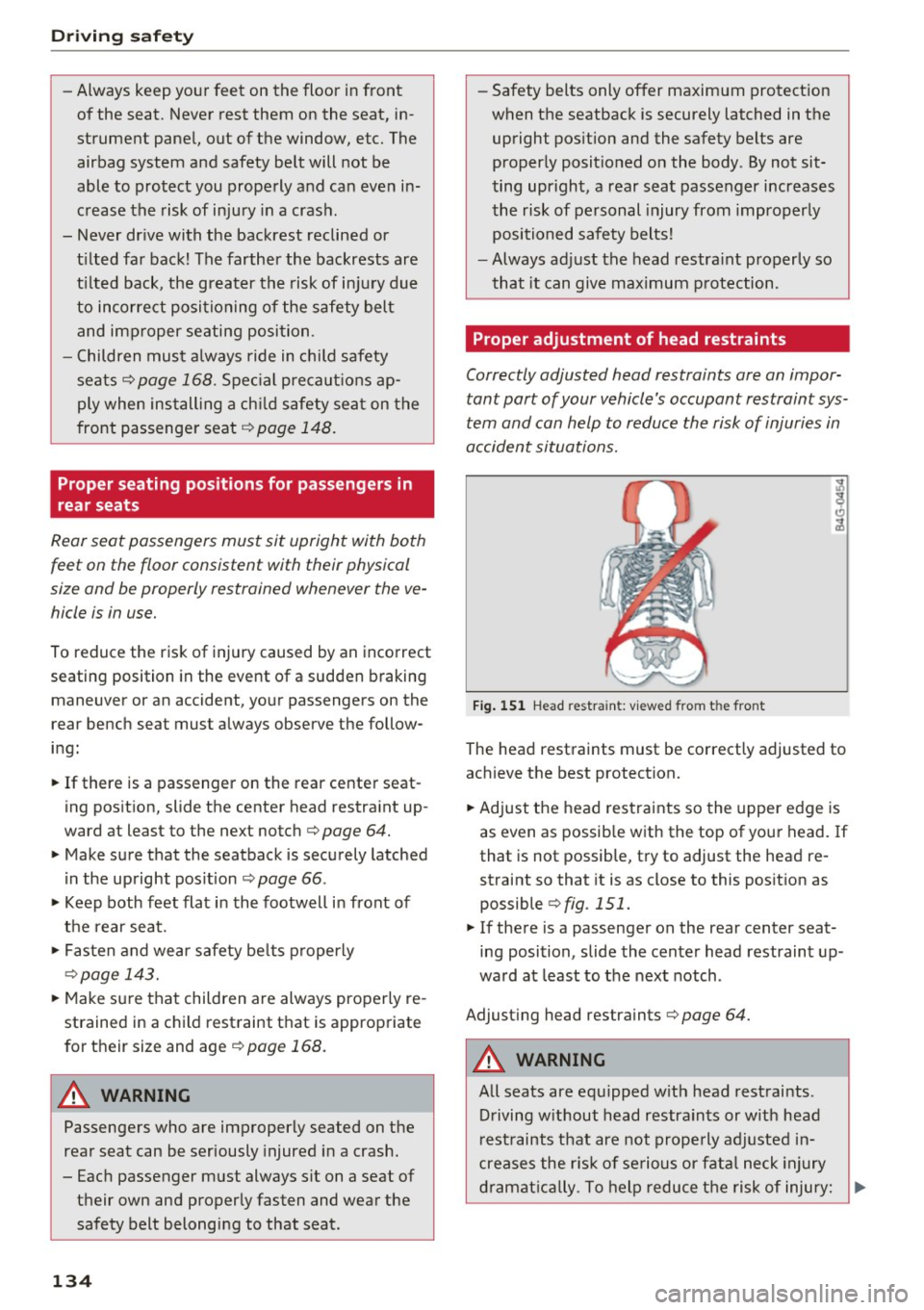
Fi g. 1 51 Head restra int: v iewed from t he front
The head restraints must be correctly adjusted to
achieve the best protection.
~ Adjust the head rest raints so the upper edge is
as even as possib le w ith the top of you r head. If
that is not possible, t ry to adjust the head re
straint so that it is as close to this pos it ion as
possible r=;,
fig. 151.
~ If there is a passenger on the rear center seat
ing position, slide the center head restraint up
wa rd at least to the nex t notch .
Adjust ing head restraints r=;,
page 64.
A WARNING -
All seats are equipped w ith head restraints.
Driving w ithout head restraints or w ith head
rest raints tha t are not prope rly adjusted in
creases the r isk of se rious or fata l neck injury
d ra mat ic al ly. To help reduce t he risk of injury:
Ill-
Page 137 of 296

CD
CD
.... N ,-... N .... 0 0 C<'. 00
-Always drive with the head restraints in
place and properly adjusted.
- Every person in the vehicle must have a
properly adjusted head restraint.
- Always make sure each person in the vehicle
properly adjusts their head restraint. Adjust
the head restraints so the upper edge is as
even as possible with the top of your head.
If that is not possible, try to adjust the head
restraint so that it is as close to th is position
as possible.
- Never attempt to adjust head restraint
while driving. If you have driven off and
must adjust the driver headrest for any rea·
son, first stop the vehicle safely before at·
tempting to adjust the head restraint.
- Children must always be properly restrained
in a ch ild restraint that is appropriate for
their age and size
q page 168.
Examples of improper seating positions
The occupant restraint system con only reduce
the risk of injury if vehicle occupants ore properly
seated.
Improper seating positions can cause serious in·
jury or death. Safety belts can only work when
they are properly positioned on the body . Im·
proper seating positions reduce the effectiveness
of safety belts and will even increase the risk of
injury and death by moving the safety belt to crit·
ical areas of the body. Improper seating posit ions
also increase the risk of serious injury and death
when an airbag deploys and strikes an occupant
who is not in the proper seating position. A driver
is responsible for the safety of all vehicle occu·
pants and especially for children . Therefore:
.. Never allow anyone to assume an incorrect
seat ing pos ition when the vehicle is being used
¢ ,&. .
The following bulletins list only some sample po·
sitions that will increase the risk of serious injury
and death. Our hope is that these examples will
make you more aware of seating posit ions that
are dangerous.
Driving safety
Therefore , whenever the vehicle is moving :
-never stand up in the vehicle
- never stand on the seats
- never kneel on the seats
- never ride with the seatback reclined
- never lie down on the rear seat
- never lean up against the instrument panel
- never sit on the edge of the seat
- never s it sideways
- never lean out the window
- never put your feet out the window
- never put your feet on the instrument panel
- never rest your feet on the seat cushion or back
of the seat
- never ride in the footwell
- never ride in the cargo area
A WARNING
Improper seating positions increase the risk
of serious personal injury and death whenever
a vehicle is being used.
-Always make sure that all vehicle occupants stay in a proper seating position and are
properly restrained whenever the vehicle is
be ing used .
Pedal area
Pedals
The pedals must always be free to move and
must never be interfered with by a floor mot or
any other object.
Make sure that all pedals move freely without in·
terference and that nothing prevents them from
returning to their original positions .
Only use floor mats that leave the pedal area free
and can be secured with floor mat fasteners .
If a brake circuit fails, increased brake pedal trav
el is required to bring the vehicle to a full stop .
A WARNING
-
Pedals that cannot move freely can cause loss
of vehicle control and increase the risk of seri·
ous injury. ""
135