2017 AUDI Q5 ECU
[x] Cancel search: ECUPage 71 of 296

a,
a,
..... N r-N ..... 0 0
0:
co
Removing the cargo floor , installing
• To remove, lift t he cargo floor folded together
and pull it toward the rear lid .
• To install, place the folded cargo floor into
both retainers and unfold it.
Grab the protective tray on the ha ndles and pu ll
it out. You can also install a divider to divide @
the storage area. Depending on the vehicle
equipment level, the protective tray can have dif
ferent sizes and shapes .
Cargo net and storage hooks
Fig. 78 Luggage compartment:
F ig . 79 Luggage compartment: Storage hooks
Storage net
The storage net on the right side trim can be
moved lower on the side guides, if needed
c:>fig. 78.
Storage hook s
The storage hooks can be used to secure shop
ping bags from falling over
c:> fig. 79.
A WARNING
Do not use the storage hooks to secure heavy
objects. Heavier objects are not adequately
secured. There is risk of pe rsonal injury.
Seats and storag e
Roof rack
Description
Additional cargo can be carried with a roof lug
gage rack .
If luggage or cargo is to be carried on the roof,
you must observe the following:
- On ly a specially designed roof rack may be used
on your vehicle roof. This is provided with your
veh icle .
- These roof racks are the basis for a complete
roof rack system . Additional attachments are
necessary if you want to transport luggage, bi
cycles, surf boards and skis. All these compo
nents are ava ilable at your a uthorized Aud i
dea le r.
(D Note
If you use other roof luggage rack systems or
do not install the racks as intended, any dam
age to the vehicle is not covered by the war
r anty. Always read the ma nufactu rer installa
tion ins tructions that came with yo ur roof
rack system when yo u install the atta ch
ments.
(D Tips
When ins tall ing a factory-supp lied roof rac k
system on the roof railing, the ESC will adapt
i tself to a differe nt center of gravity .
Attachment points
The roof rack can only be attached at the
marked locations .
Fig . 80 Roof rack attachment points
69
Page 72 of 296

Seats and storage
Attach the roof rack only at the attachment
points on the roof railing. On the inside of the
roof railing there are two holes for attaching the
rear end of the roof rack. To prevent confusing
the front and rear roof rack attachments, there
are three holes on the left and two holes on the
right for mounting the front part of the roof rack
~ fig . 80.
The roof racks have a sticker on the left side un
derneath to identify front and rear .
A WARNING
When installing the roof rack, make sure the
sticker is on the left side of the vehicle and
faces the stamped arrow in the drive direc
tion.
Installing a roof rack
Fig . 81 Roof ra iling : pos ition ing the roof rack
Fig . 82 Roof railing : installing a roof rack
The roof rack set consists of a front and rear roof
rack, the
cover profile and a socket wrench.
~ Open the cap (D c:> fig. 82.
~ Before mounting the roof rack, use the socket
wrench @and loosen the left and right screw
in the direction of@ .
70
~ Clean the attachment points on the roof railing
as well as the roof rack rubber washers@.
~ Carefully place the roof rack over the holes in
the roof railing
c:> fig. 81.
~ Place the pins@ into the holes. The claw®
must engage into the edge of the roof railing .
~ Make sure the rubber washer© lays flat on the
roof railing .
~ Tighten the left and right screws using the
socket wrench @ in direction @.
~ To reach the 4 ft lb (6 Nm) tightening specifi
cation needed, both arrows on the socket
wrench must align .
~ Repeat this procedure on the second roof rack.
A WARNING
Check all the roof rack connections each time
before each trip and re-tighten or re-adjust if
necessary .
If you are going to be driving or
rough terrain, you will have to check the at
tachments more often. If you do not do this,
the risk of your luggage coming loose and
falling off is greater.
(D Note
The pins and the roof rack claws must engage
securely into the holes and into the edge of
the roof railing when you tighten the screws!
(D Tips
You can adjust the width of the roof rack by
using a hexagon wrench and turning the
screws on the top. Let your authorized Audi
dealer help you with this.
Installing the attachments
Fig. 83 Roof railing: installing cove r profile into the roof
rack
co
"' ~ er co a,
Page 73 of 296
a,
a,
..... r-1 ,-... r-1 ..... 0 0
0:
co
Installing the attachments
• Remove the ca p @ q fig . 83 .
• Slide the attachment into the T-groove 0-
• Tighten the attachment according to the roof
rack installation inst ructions .
• Close the cap.
Install ing the cov er profile
• Seal the openings in the T-groove 0 with the
cover profile @ after hav ing installing the at
tachments.
• If you not want to use th e attachment, seal the
whole T-groove
0 with the cover profile @.
• Cut t he cover profile to the length needed, if
necessary .
Roof load
The cargo on the roof mus t be securely attached.
Handling charac teristics change when cargo is
transported .
The permissible roof load for your veh icle is
165 lbs (75 kg ). The roof load is the total of the
weight of the roof rack, the attachme nts and the
cargo you are carrying .
_&, WARNING
- The cargo m ust be sec urely attached on the
roof rack, otherwise yo u risk a n accide nt.
- Dist ribute the load as evenly as possible and
do not make the roof rack wider than the
m ax imum permitted.
- Yo u must unde r no circumstances exceed
t he perm iss ible roof load, the permiss ible
ax le loads and the pe rm issib le overa ll
we ight of yo ur vehicle -risk of an accident.
- M ount the a ttachments to the roof rack only
after you have placed the roof rack on the
vehicle .
- C onsider that whe n transpo rting heavy ob
je cts or one wi th a large s urf ac e, the han
dling characterist ics c hange due to shift in
the cente r of gravity or the greater s urface
exposed to the w ind. So adapt your driving
and your speed to prevailing conditions. We
recommend that you do not dr ive faster
than 80 mp h (130 km/h) .
Seats and storag e
-Mounting a roof rack changes the height of
your veh icle. Keep t his in m ind when parking
your veh icle in your garage, or when dr iving
through a tunnel o r under a n overpass.
(D Note
- Ma ke sure the rea r lid does not hit the cargo
on the roof rack when you open it. On
vehicles with automatic rear lid/trunk lid
operation* you may have to adjust the open
position of the rear lid
~ page 41.
- Remove the roof rack and attachment be
fore taking your vehicle th rough an auto
matic car wash to avoid damage .
@ For the sake of the environment
As a result of the increased wind res istance
created by a roof rack, your vehicle is using
fuel u nnecessarily . So remove the roof rack
aft er using it.
Beverage holders
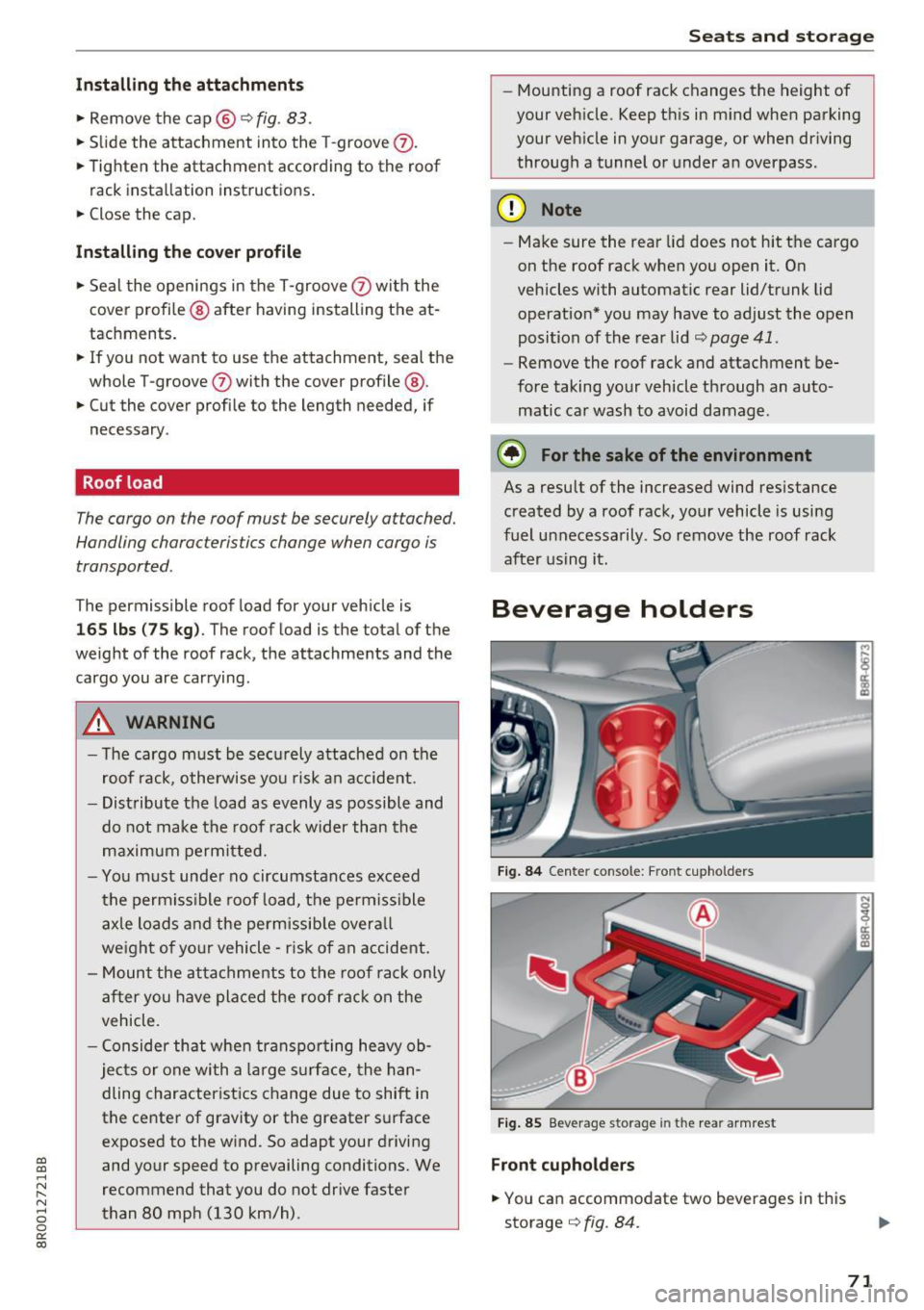
Fig . 84 Cente r conso le: Fro nt c upho lders
Fig. 85 Beverage storage in th e rea r arm rest
Front cupholders
• You ca n accommo date two beverages in this
storage
q fig . 84 .
71
Page 74 of 296

Sea ts and stor age
Open ing rear beve rag e hold ers
.. To open the rear c upholder, press on the sym
bol~ @~
fig. 85 .
Holding beverages at the rear
• To adju st the arm @, swing it in the direct ion
of the ar row .
• Place the beverage in the holde r and re lease
the a rm . T he arm swings back by itself and au
tomat ically secures the bev erage.
Clo sing the rear cupholders
• To close the rear cupholder, press on the center
section between the two arms and p ush the c u
pholder in the s lot as far as it will go.
The ho ld ing arm must be adjusted such that it
lies closely against the cupholder.
A max imum o f two beve rages can be pla ced in
the center armrest .
A WARNING
Spilled hot liquid can cause an accident and
personal inju ry .
- Never carry any beverage containers with
hot liquids, such as hot coffee or hot tea, in
the vehicle while it is moving . In case of an
acc ident, sudden braking or other vehicle
movement, hot liquid could spill, causing
sca ld ing burns . Spilled hot liquid can also
cause a n accident and personal in ju ry.
- U se only soft c ups in the cupholder. Hard
cups and g lasses can cause injury in an acci
dent.
- Never use the cupholder or adapter as an ashtray -risk of fire .
CD Note
Only dr ink con tainers with lids should be car
r ied in the cupholder. Liquid co uld sp ill out
and damage your vehicle's elec tronic equip
ment or stain the upho lstery, etc .
72
-
Climatized cupholders
Applies to: vehicles with climatized beverage holders
Th e dr iv e r sid e beve rag e hold er can k eep your
beverage warm or cold.
Fig. 8 6 Ce nter co nsole : cl im atize d cu pholder
• Press button @~ fig. 86 to keep your beverage
cold . The button will light up blue .
• Press button ©~
fig. 86 to keep you r beverage
warm . The button wi ll light up red.
• To switch between the two functio ns, press th e
appropr iate button .
• Press @ or© to sw itch off these fea ture . The
ligh t in the bu tton will go ou t.
When cooling, the temperature of the bev erage
holder base will go down to approximately 41
°F
(5 °C) . When warm ing , the temperatu re will be
a ppro ximately 136
°F (58 °(). At 104 °F (40 °()
the warming display will come on@. This is re
minder not to touch the base because it is hot .
The display goes out if the temperature falls be l ow this val ue.
A WARNING
- Never touch the beve rage holder base when
the warming d isplay is on. You can b urn
yourse lf!
- Do not use breakab le beve rage containers
(for examp le made out of g lass or porce
la in). Yo u could be injured by them in case
of an accident.
CD Note
M ake sure your beverage ho lder has a lid. If
not, your beverage could spill out and cause
damage to the veh icle electronic or stain the
seat covers .
Page 88 of 296

Driving
!I Is the key in the vehicle ?
This message appears in a veh icle with Conven
ience key* if the master key is removed from the
ve hicle w ith the engine r unning.
If the maste r
key is no longer in the vehicle, you cannot switch
on the ignition after stopping the engine and you
also cannot start the eng ine again. Moreover, you
cannot lock the veh icle from the outside with the
key.
Shift to P otherw ise vehicle can roll awa y. Door s
do not lo ck if le ver i s not in P.
This message appea rs fo r sa fe ty reasons a long
with a warning signal.
It appears i f the se lector
lever for the automatic transmission is not in the
P posit ion when switching off the ignition. Move
the selector lever to the P position, otherwise the
vehicle is not secured aga inst rolling away. You
also cannot lock the vehicle using the locking
button* on the door handle or using the remote
key .
Turn off ignition befo re lea ving car
This message appears if the driver's door is
opened while the ignit ion is switched on. A lways
switch off the ignition if you are leaving the vehi
cle . See also
c::> page 90.
Turn off ignition before lea ving car. Batte ry is
discha rging
This message appea rs if the d river's doo r is
opened while the ignition is sw itched on. A lways
switch off the ignition if you are leaving the vehi
cle . See also
c::> page 90.
Shift to P and turn off ignition, otherwi se vehi
cle can roll awa y
This message appea rs if the d river's door is
ope ned while t he igni tion is switched on and the
selec to r l ever is not in the P posi tion. Shift t he
selector lever in to the P position and switch off
the ignition when you exit the vehicle . Otherwise
the vehicle cou ld roll. See also¢
page 90.
Convenien ce key defective! Use ignition lock
This message appea rs if the eng ine must be
started or stopped using the ignit io n key and no t
t he !STAR T
ENGINE ST OPI* b utton .
86
Electromechanical
parking brake
Operation
The electromechanical parking brake replaces
t he hand brake.
Fig. 102 Center co nsole : Pa rk ing brake
.. Pull on the switch (®) c::> fig. 102 to apply the
park ing brake. The indicator lights in the switch
and . (USA models)/ . (Canada models) in
the inst rument cluste r illuminat e.
.. With the ignition switched on, step on the
brake pedal or the ac celerator peda l and press
t he swi tch(®) at the same time to release the
p arking brake . The indicator lights in the switch
and . (USA models)/ . (Canada models) in
the instrument cluster go out .
Y our vehicle is equipped wi th an ele ctromechan i
ca l park ing brake . The parking brake is desig ned
to prevent the vehicle from ro lling unintentional
ly and replaces the hand b rake.
In add ition to the no rmal functions of a trad i
tiona l hand b rake, the e lectromechanical parking
brake provides various convenience and safety
funct ions .
When starting from rest
-The integra l st art ing ass ist helps yo u when
dr iving by automati ca lly re leas ing t he pa rking
brake
c::> page 87, Starting from rest .
-When starting on inclines, the starti ng assis t
prevents the vehicle from unintentionally ro ll
ing back. The brak ing force of the park ing brake
is not re leased unti l su fficient dr iving force has
been bu ilt up at the whee ls. ..,.
Page 99 of 296

CD
CD
.... N ,-... N .... 0 0 C<'. 00
-Do not ride the brakes or press the brake
peda l too often or too long when driving
down a hill. Constant braking causes the
brakes to overheat and substantially re
duces braking performance, increases brak
ing distance or causes complete failure of
the b rake system.
- To prevent the vehicle from rolling back
when stopping on inclines, always ho ld it in
place wi th the brake pedal o r parking brake.
- Never hold the veh icle on an incl ine with a
slipping clutch. The clutch opens automati
cally when it becomes too hot from the
overload. An indicato r lamp
mJ illum inates
and a driver message appears ¢
page 98
when the clutch is overloaded.
- If the engine must remain running, neve r
have any driving pos ition engaged when
checking under the hood. Make sure these
lector lever has secure ly engaged and is
locked in P with the parking brake set
¢ page 217. Otherw ise, any increase in en
gine speed may set the vehicle in motion,
even with the parking brake applied.
(D Note
- When stopping on an incline, do not try to
ho ld the vehicle in place by press ing the ac
ce lerator pedal while a driv ing gear is se
l ected. T his can cause the t ransmission to
ove rheat and can damage it. Activate the
parking b rake or press the b rake peda l to
prevent the vehicle from ro lling.
- Al low ing the ve hicl e to ro ll when the eng ine
i s s topped and the se lector lever is in
N w ill
damage the transmission beca use it is not
l ubricated under those ci rcumstances.
(D Tips
F or safety reasons, the parking b rake is re
leased au tomatically only when the dr iver's
safety belt is engaged in the buckle.
D riv ing
Hill descent control
The hill descent control system assists the driver
when driving down declines .
Hill descent control is activated when the selec
tor lever is in D/S and you press the brake pedal.
T he transmission automat ically selects a gear
that is su itable for the incline . Hill descent con
t ro l tries to maintain t he speed ach ieved at the
t ime of b raking, w ith in phys ica l and te chnical
l imita tions.
It may still be necessary to adjust the
speed with the brakes.
Hill descent cont rol switches off once the decline
levels out or you press the acce lerator pedal.
When the speed is set in the cru ise control sys
tem ¢
page 92, hill descent control is also acti
vated.
,&. WARNING
H ill descent cont rol cannot over come physical
limitat ions, so it may not be able to ma intain
a constant speed under all conditions. A lways
be ready to app ly the brakes.
97
Page 103 of 296
Starting the vehicle
Applies to: vehicles with hybrid drive
The vehicle is started and turned off either wi th
the ign ition key <;>
page 81 or with the
IS TAR T ENG INE S TOPI button* 9 page 84 in t he
same way as a conventional vehicle .
W hen start ing the veh icle, the needles in the in
s trument clus ter move upward briefly . When the
ve hicle enters d rive ready mode, the s tatus mes
sage
hybrid ready appears briefly in t he instru
ment cluster display and the needle in the power
meter points to
READY 9 page 101.
Depending on the ope ration mode of the hybrid
sys tem, there are two possible drive ready modes
after the vehicle has been started:
Drive ready mode with combustion engine
If the ope rat ing req uiremen ts
r;!) page 103 for
e lectric dr ive mode are not met, the combust ion
Power meter overview
Applies to: vehicles with hybrid drive
Hybrid
engine starts the veh icle as usual. You can start
driving as usual.
Drive ready mode with the electric motor
If the operating requireme nts
9 page 103 for
the e lectr ic dr ive mode a re met, the comb ustion
engi ne rema ins off after starting the vehicle .
(j) Tips
To p revent the 12 vo lt batte ry from discha rg
i ng, never le ave the vehicle pa rked in the drive
ready mo de. Remove the key from the igni
tion or press the
I START E N GINE STOP ! but
ton* . When leaving the vehicle always take
the key with yo u.
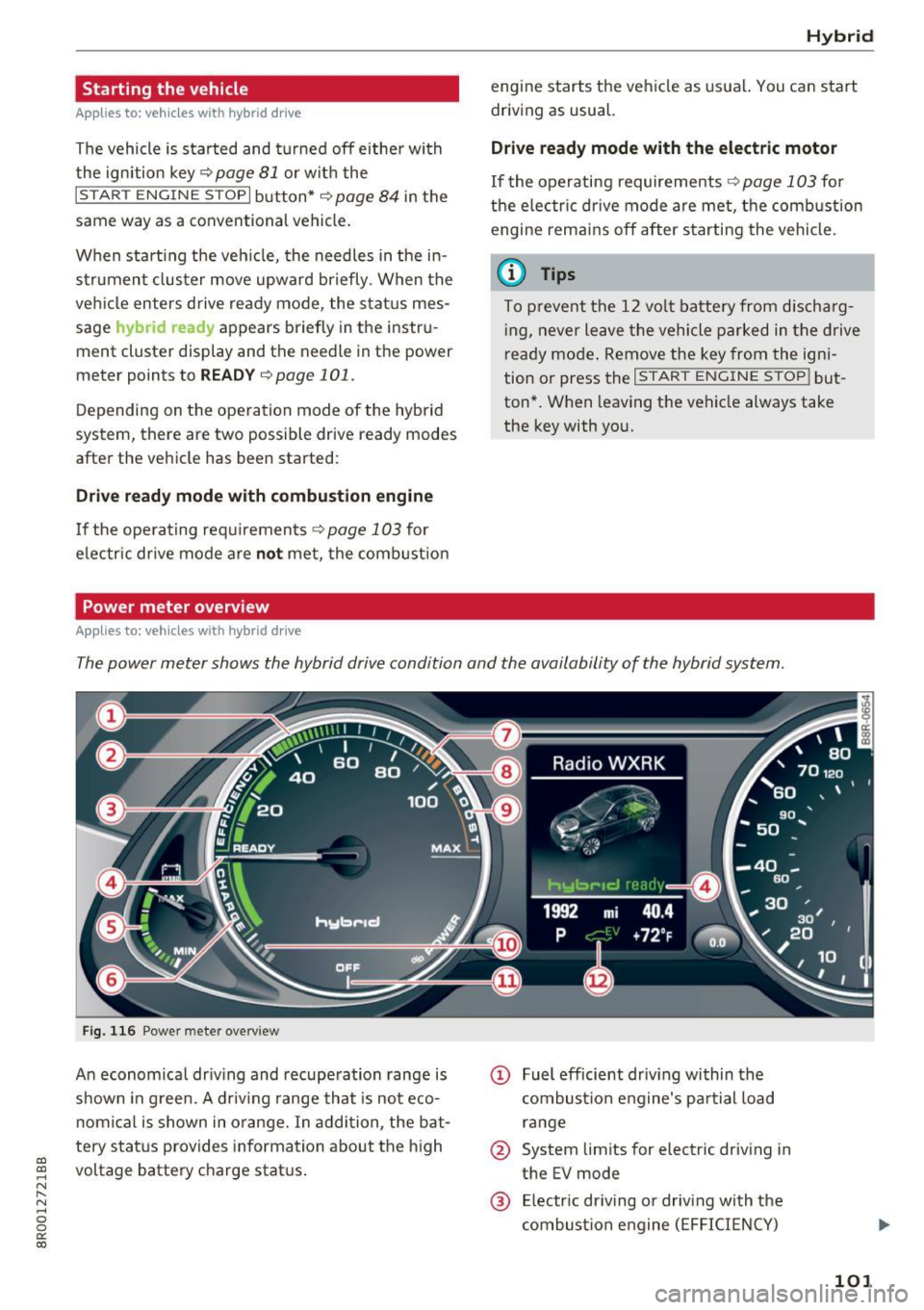
The power meter shows the hybrid drive condition and the availability of the hybrid system.
Fig . 116 Power mete r overv iew
An econom ica l dr iv ing and recupe ra tion range is
shown in g reen. A driv ing range that is no t
eco
nomi cal is shown in o range. In addition , the bat
tery s tat us provides informatio n about the high
a,
~ voltage batte ry c harge stat us.
N r-N ...... 0 0
0:
co
@ Fuel efficient driv ing wi thin the
c ombus tion engine's pa rtial load
r a nge
@ System limits for electric driving in
the EV mode
@ El ectr ic dr iving o r driv ing with the
c ombust ion engine ( EFFICI ENCY)
101
Page 104 of 296

Hybrid
© Vehicl e drive ready (READY)
® High voltage battery charge status
® Recuperation (CHARGE)
(j) Driving within the combustion en-
gine's full load range
® 100% combust ion engine
® Boosting -the electric engine as-
sists the combustion engine
(BOOST)
@ Engaging the conventional brakes
with recuperat ion
@ Vehicle not drive ready (OFF)
@ EV mode act ive
The needle remains at
OFF when the ignition is
turned on. When the vehicle enters drive ready
mode, the status message
hybrid ready appears
briefly in the instrument cluster display and the
needle in the power meter points to
READY.
Indicator lights and messages
App lies to: ve hicles w ith hyb rid drive
The indicator lights in the instrument cluster
b lin k or tu rn on. They indicate functions or mal
f unct ions.
With some indicator lights, messages may ap
pear and a warning tone may sound . Also note
the indicator l ights in
¢page 24.
Press brake pedal to start vehicle
This message appears if you do not press the
brake pedal when starting the vehicle .
Shift to N or P to start vehicle
This message appears if the selector lever for the
automatic transmission is not in the Nor P posi
tions when starting the vehicle.
- Hybrid drive: System fault! Power
brakes, steering malfunction possible
lfthe indicator light turns on and this message
appears, there is a malfunction in the hybrid sys
tem . The brake booster and the power steering
may stop working. Stop the vehicle in a safe loca
tion as soon as possible.
102
You may continue driving i f the i ndicator light
turns off after starting the vehicle several times .
Drive to an authorized repair facility immediate ly
to have the malfunction corrected .
Q/ij:@,j rlybrid drive: System fault! Contact
dealer
If the indicator light turns on and this message
appears, there is a malfunction in the hybrid sys
tem. Drive to an authorized repair fac ility imme
diately to have the malfunct ion corrected.
(II Hybrid system: Performance restricted.
Please contact dealer
If the indicator light turns on and this message
appears, there is an eng ine control malfunction .
The
ffa i ndicator light in the instrument cluster
also turns on. The engine output is reduced.
D rive to your authorized Audi dealer or qualified
r epa ir facility immediate ly to have the malfunc
tion corrected.
Hybrid drive deactivated. Please restart
engine manually.
This message appears if the high vo ltage battery
charge level has fallen below a certain range or if
the ignition key is no longer inside the vehicle for
vehicles with the convenience key* .
Start the engine wit h eithe r the ignition key
¢
page 81 or with the !START ENGINE STOPI
button* ¢ page 84.
Hybrid battery: Low battery charge. Battery
will be charged while driving.
This message appears if the high vo ltage battery
charge level has fallen below a certain range. If
this message turns off after a litt le while, the
high voltage battery charged enough while driv
i ng.
If the message does not turn off, have an author
ized repair facility correct the ma lfunction as
soon as possib le .
EV mode is currently unavailable .
This message appears if the conditions
¢ page 103 for enha nced elect ric driving are not
met. Try again at a la ter time .