2017 AUDI Q3 park assist
[x] Cancel search: park assistPage 4 of 236

Table of contents
About this Owner's Manual ... .. .
Cockpit ... .. ............... .... .. .
Cockpit overview ................ .
Controls at a glance ... .......... .. .. .
Instruments and indicator lights
Instruments .... ... .......... .. .. .. .
Indicator lights .. .. .......... .. .. .. .
On Board Diagnostic System (OBD) .. .. .
4
6
6
6
8
8
10
17
Driver information system . . . . . . 19
Overview . . . . . . . . . . . . . . . . . . . . . . . . . . . 19
Operation . . . . . . . . . . . . . . . . . . . . . . . . . . 19
On-board computer . . . . . . . . . . . . . . . . . 20
Efficiency program . . . . . . . . . . . . . . . . . . .
21
Starting and driving . . . . . . . . . . . . . 23
Opening and closing . . . . . . . . . . . . . 23
Central locking . . . . . . . . . . . . . . . . . . . . . . 23
L uggage compartment lid ......... ... .
Ch ild safety lock ... ........... .... .. .
Po wer wi ndows .. ............ .... .. .
Panorama gla ss roof .......... .... .. .
28
31
3 2
33
Lights and Vision . . . . . . . . . . . . . . . . . 35
E xterio r lighting . . . . . . . . . . . . . . . . . . . . . 35
I n terior lighting . . . . . . . . . . . . . . . . . . . . . 37
V1s1on . . . . . . . . . . . . . . . . . . . . . . . . . . . . . 38
Windshield wipers . . . . . . . . . . . . . . . . . . .
40
Dig ital compass . . . . . . . . . . . . . . . . . . . . . 42
Seats and storage . . . . . . . . . . . . . . . . 44
General information . . . . . . . . . . . . . . . . . 44
Front seats . . . . . . . . . . . . . . . . . . . . . . . . . 44
H ead restra ints . . . . . . . . . . . . . . . . . . . . . 45
Sockets . . . . . . . . . . . . . . . . . . . . . . . . . . . . 46
Storage . . . . . . . . . . . . . . . . . . . . . . . . . . . . 47
L uggage compartment . . . . . . . . . . . . . . . 48
Roof rack . . . . . . . . . . . . . . . . . . . . . . . . . .
51
Warm and cold . . . . . . . . . . . . . . . . . . . 53
Climate con trol system . . . . . . . . . . . . . . . 53
Driving .. .. .. .. ... .. .. ..... ... .. .. . 58
General information . . . . . . . . . . . . . . . . . 58
Steering . . . . . . . . . . . . . . . . . . . . . . . . . . . 60
2
Starting and stopping the eng ine
(vehicles with an ignition lock) . . . . . . . . . 60
Starting and stopping the eng ine
(vehicles with a convenience key) ..... . .
D river messages .. .. .. ............. . .
E le ctromechanical parking brake ...... .
Start ing from a stop .. ........ ..... . .
D rivi ng offroad . .. ... ...... ....... .. .
Automatic transmission
62
63
64
66
66
67
Trailer towing . . . . . . . . . . . . . . . . . . . . 74
Driving with a trailer . . . . . . . . . . . . . . . . . 74
T raile r towing information . . . . . . . . . . . . 76
Driver assistance . . . . . . . . . . . . . . . . . 78
Assist ........ .. .. .. .. ........... .. 78
Speed warning system . . . . . . . . . . . . . . . . 78
Cruise control system . . . . . . . . . . . . . . . . 78
Audi side assist . . . . . . . . . . . . . . . . . . . . . 80
Audi drive select . . . . . . . . . . . . . . . . . . . . . 83
Parking systems
General information
Rear parking system 85
85
85
Parking system plus . . . . . . . . . . . . . . . . . . 86
Rearv iew camera . . . . . . . . . . . . . . . . . . . . 87
Adjusting the display and the warning
tones ........ ... ... ...... ....... ... 90
Erro r messages . . . . . . . . . . . . . . . . . . . . . 90
T ra iler hitch . . . . . . . . . . . . . . . . . . . . . . . .
91
Intelligent Technology . . . . . . . . . . 92
El ectronic Stabilization Control (ESC ) . . . . 92
Brakes . . . . . . . . . . . . . . . . . . . . . . . . . . . . . 94
Electromechanical steering . . . . . . . . . . . . 96
A ll wheel drive (quattro) . . . . . . . . . . . . . . 97
Energy management . . . . . . . . . . . . . . . . . 97
Notice about data recorded by the Event
Data Recorder and vehicle control
modules . . . . . . . . . . . . . . . . . . . . . . . . . . . 98
Safety first . . . . . . . . . . . . . . . . . . . . . . . 100
Driving safety . . . . . . . . . . . . . . . . . . . . 100
Genera l notes . . . . . . . . . . . . . . . . . . . . . . . 100
Correct passenge r seat ing positions . . . . . 101
Pedal area . . . . . . . . . . . . . . . . . . . . . . . . . . 104
Storing cargo correctly . . . . . . . . . . . . . . . 105
Reporting Safety Defects . . . . . . . . . . . . . . 107
Page 9 of 236
00
00
......
"' ,....
"' ...... 0 0 :::,
00
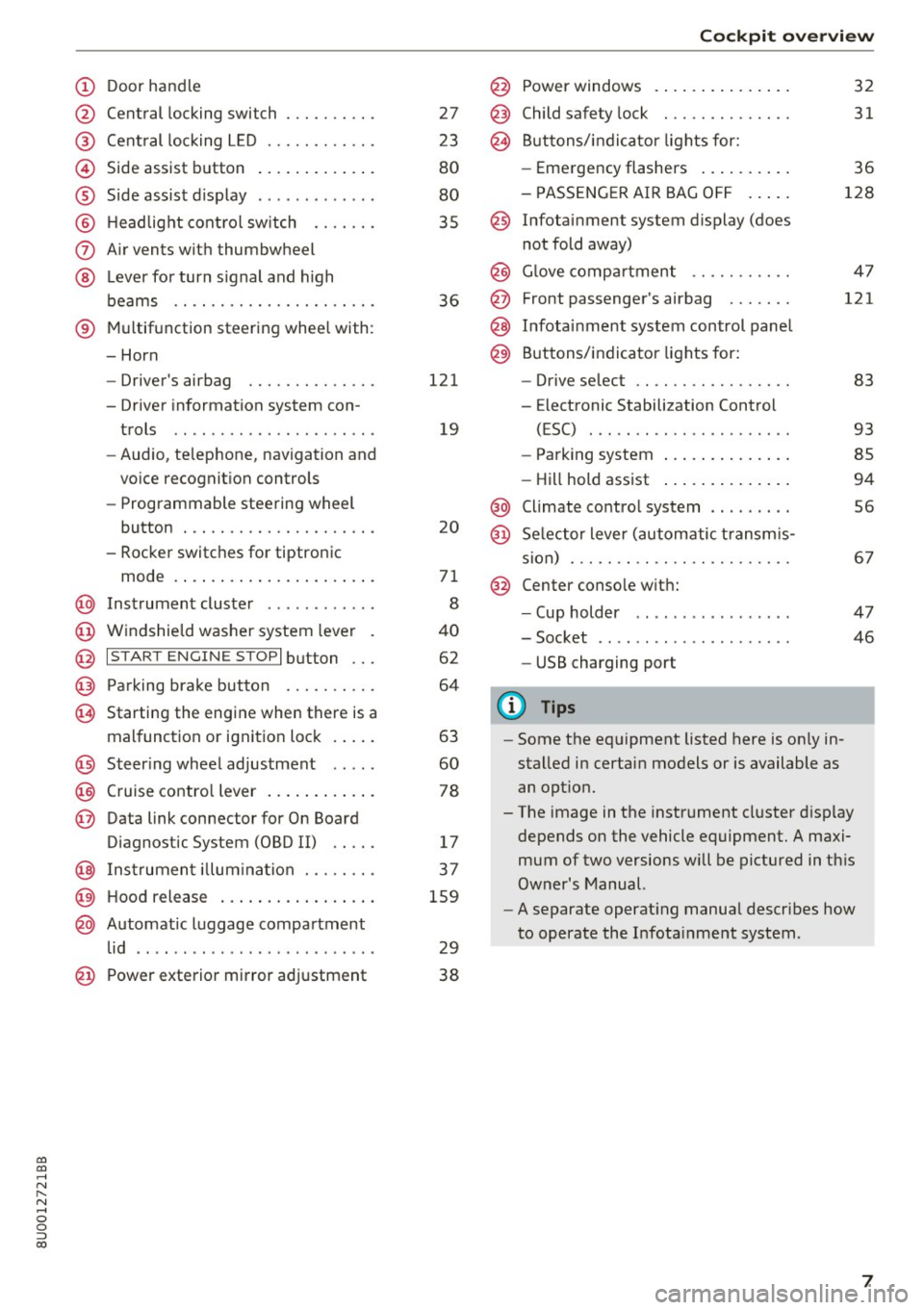
(!) Door handle
@
®
©
®
®
(J)
®
Central locking switch
Cent ral locking L ED ......... .. .
Side assist button
Side assist d isplay
H eadlight cont rol sw itch .... .. .
A ir vents with thumbwheel
L ever for turn s ignal and h igh
beams .. .. .... . .......... .. .
® Multifunction ste ering wheel with :
- Horn
- Driver's airbag ........... .. .
- Driver information system con-
trols .. .. ............... .. .
- Audio , te lephone, nav igation and
vo ice recognit ion controls
- Programmable steering wheel
button . .. .. ........... .. .. .
- Rocker switches for tiptronic
mode . ... .. ... ..... ... .. .. .
@ Instrument cluster ........... .
@ Windshield washer system lever
@ I S TART EN GIN E ST OPI button .. .
@ Pa rking brake button ....... .. .
~ Starting the engine when there is a
malfunction or ignition lock . ... .
@ Steer ing whee l adjustment .... .
@ Cruise contro l lever .... ... .. .. .
@ Data link connector for On Board
Diagnostic System (OBD II) .. .. .
@ Inst rument illum ination ... .. .. .
@ Hood r ele as e .... ..... ... .. .. .
@ Automat ic luggage compartment
lid .. .. ... ............. ..... .
27
23
80
80
35
36
121
19
20
71
8
40
62
64
63
60
78
17
37
159
29
@ Power exterior mirror adjustment 38
Coc kpit o ve rv iew
@ Power windows . .. .. .. ..... .. .
@ Child safety lock ............. .
@ Buttons/indi cator lights for:
- Eme rgency flashers .. ..... .. .
- PASSENG ER AIR BAG O FF .... .
@ Infotainment system display (does
not fold away)
@ G love compartment .......... .
@ Front passenger's airbag ...... .
@ Infota inment system control panel
@ Buttons/indicator lights for:
- Drive se lect .. .. ............ .
- E lectronic Stabilization Control
( E SC) . .. .. .. .. ....... ..... .
32
31
36
128
4 7
121
83
93
- Park ing system . . . . . . . . . . . . . . 85
- Hill hold ass ist . . . . . . . . . . . . . . 94
@ Climate contro l system . . . . . . . . . 56
@ Se lector lever (automatic transm is -
sion) . . . . . . . . . . . . . . . . . . . . . . . . 67
@ Center conso le w ith:
- Cup holder . . . . . . . . . . . . . . . . . 47
- Socket . . . . . . . . . . . . . . . . . . . . . 46
- USB charging port
(D Tips
-Some the eq uipment listed here is on ly in
sta lled in certain models or is available as
an opt ion.
- The image in the instrument cluster d isplay
depends on the vehicle equipment. A maxi
mum of two versions will be pictured in th is
Owner's Manual.
- A separate operat ing manua l describes how
to operate the Infota inment system .
7
Page 14 of 236

Instruments and indicator lights
y>))
Canada models:
C ruise contro l system
¢ page 78
Hill descent assist*
¢ page94
Remote control key*
¢page 63
High beams
¢page36
Door open
¢page 17
Hood open
¢ page 17
Luggage compartment lid open
¢ page 17
BRAKE/(©) Brake system
If this ind icator light turns on, there is a malfunc
tion in the brake system.
llll
Stop the vehicle and chec k the bra ke fluid level.
See an authorized Audi dea ler or authorize d Aud i
Serv ice Facility for assistance if necessary.
1111 ( USA models )/. (Canad a model s)
Brakes : malfunction! Please stop vehicle safely
If t he A BS indica to r l ight tu) (U SA mode ls) I
[I] (Canada mode ls), t he ESC indica to r li gh t Dl.
and the bra ke sys tem ind ic a tor light 1111 (USA
mo dels)
I. (Canada mode ls) all turn on and
this message appears, then the ABS, ESC and braking distrib ution are malfunct ioning ¢ ,&. .
D o not cont inue drivi ng . See an au thorized Aud i
dea ler or a utho rized Aud i Service Facili ty for as
sistance ¢
.&..
1111 (USA models) /. (Canada models ) Park
ing brake : System fault ! See owner's manual
- If the indica to r li ght and the message appear
when the vehi cle is stationary or aft er switch
ing the ignition on ,
check if you can release the
parkin g brake . If you cannot re lease the par k
ing brake, see yo ur au thorized Audi dea ler o r
12
authorized A udi Se rvice Faci lity . If you can re
lease the parking brake and the message still
appears, see an a uthorized Audi dea ler or au
thorized Audi Service Fac ility immediately to
have the malfunction corrected.
- If the ind icator light and message appear
while
driv ing ,
the h ill start assist or emergency brak
ing function may be ma lfunctioning. It may not
be poss ible to set the parking brake or release
i t once it has been set . Do not park your vehicle
on hills. See an a uth orized Audi dea le r or a u
thorized A ud i Servi ce Facili ty for assistan ce.
App lies to : USA mode ls
If the 1111 and EIJ tur n on at the same time, the
brake pads are wo rn out ¢
page 15 .
A WARNING
-Read a nd follow the warnings in
¢ page 1 59, Working in the engine com
partment
befo re o peni ng the hoo d and
checking the brake fluid level.
- If the brake system indi cator lig ht does not
turn off or it turns on wh ile driving, t he
brake fluid leve l in the reservoir is too low,
and this increases the risk of an accident.
Stop the vehicle and do not continue driv
ing. See an authorized Aud i dea le r or a u
thorized A udi Service Fac ility for assistance .
- If the brake system indicator light turns on
together w ith the ABS and ESC indicator
lights, the ABS/ESC regu lating function may
be malfunct ion ing . Fu nctions tha t stabilize
the vehicle a re no longer available . Th is
co uld cause the vehicle to swerve, which in
creases the risk t hat the vehicle will slide.
D o not contin ue driving . See an autho rized
Aud i dea le r o r a uthorized Audi Service Facili
ty for ass istance .
PARK/(®) Electromechanical parking brake
If the -(USA mode ls) I. (Canada models)
i ndicato r light turns on, the parking brake was
set.
- (USA models ) /. (Canada mode ls ) Press
brake pedal to relea se parking brake
Ill-
Page 15 of 236

00
00
.....,
"' ,....
"' .....,
0 0 :::,
00
To release the parking brake, press the brake
pedal and press the~ button at the same time
or start driving with hill start assist
¢ page 66,
S tar ting from a s top.
rlJ Parking brake system fault! See owner's
manual
There is a malfunction in the parking brake. Drive
to an authorized Audi dealer or authorized Audi
Service Facility immediately to have the malfunc
tion corrected.
@ Tips
For additional information on the parking
brake, see
¢ page 64.
- ~- Cooling system
• Turn off engine and check coolant level.
The coolant level is too low.
Do not continue driving and switch the engine
off. Check the coolant level¢
page 166.
-If the coolan t level is too low, add coolant
¢page 166. Only continue driving once the in
dicator light turns off.
• Coolant temperature! Let engine run with
vehicle stationary.
Let the engine run at idle for a few minutes to
cool off, until the indicator light turns off.
- If the indicator light does not turn off, do not
continue driving the vehicle. See an authorized
Audi dealer or authorized Audi Service Facility
for assistance.
.&_ WARNING
- Never open the hood if you can see or hear
steam or coolant escaping from the engine compartment . This increases the risk of
burns. Wait until you no longer see or hear
steam or coolant escaping .
- The engine compartment in any vehicle can
be a dangerous area. Stop the engine and
allow it to cool before working in the engine
compartment. Always follow the informa-
-
Instruments and indicator lights
tion found in ¢ page 159, Working in the
engine compartment.
@ Note
Do not continue driving if the . indicator
light turns on -this increases the risk of en
gine damage.
Stop the engine and do not continue driving.
Check the engine oil level
¢ page 164.
- If the engine oil level is too low, add engine oil
c:!;> page 164. Only continue driving once the in
dicator light turns off.
- If the engine oil level is correct and the indica
tor light still turns on, turn the engine off and
do not continue driving. See an authorized Audi
dealer or authorized Audi Service Facility for as
sistance.
(D Tips
The oil pressure warning is not an oil level in
dicator. Always check the oil level regularly .
0 Alternator/vehicle battery
• Alternator fault: Battery is not being charg
ed.
There is a malfunction in the alternator or the ve
hicle electrical system .
Drive to an authorized Audi dealer or authorized
Audi Service Facility immediately. Because the ve
hicle battery is discharging, turn off all unneces
sary electrical equipment such as the radio. See
your authori zed Audi dealer or authori zed Audi
Service Facility if the battery charge level is too
low .
r•j low battery charge: Battery will be charged
while driving.
The starting ability may be impaired.
If this message turns off after a little while, the
vehicle battery charged enough while driving. ..,_
13
Page 67 of 236

00
00
......
"' ,....
"' ...... 0 0 :::,
00
~ To prevent the parking brake from releasing au
tomatically, pull and hold the(®) switch and
press the accelerator pedal. The parking brake
remains set and prevents the vehicle from roll
ing backward .
~ You can release the(®) switch again once you
are sure that you are giving enough driving
force to the wheels by pressing the accelerator pedal.
Emergency braking function
You can use the emergency braking function in an
emergency situation, or if the standard brake op
eration malfunctions or is disabled.
~ Pull and hold the(®) switch.
~ As soon as you release the (®) switch or acceler-
ate, the braking stops .
Pulling and holding the(®) switch while driving
the vehicle activates the emergency braking func
tion . The vehicle is braked at all four wheels by
activating the hydraulic brake system. The brak
ing effect is similar to heavy braking
Q &_.
To reduce the risk of activating the emergency
braking by mistake, a warning tone (buzzer)
sounds when the(®) switch is pulled. Emergency
braking stops as soon as the (®) switch is released
or the accelerator pedal is pressed .
Parking
~ Press the brake pedal to stop the vehicle.
~ Pull the(®) switch to set the parking brake.
~ Place the selector lever in the P position .
~ Turn the engine off Q &_.
~ Turn the steering wheel when parking on in
clines so that the wheels will roll into the curb
if the vehicle starts moving.
WARNING
- Do not press the accelerator pedal inadver
tently if a gear is selected when the vehicle
is stationary and the engine is running. Oth
erwise, the vehicle will start to move imme
diately and this could result in an accident.
- Emergency braking should only be used in
an emergency, when the normal brake pedal
has failed or the brake pedal is obstructed .
Driving
During emergency braking, your vehicle will
brake similar to heavy braking. ESC and the
associated components (ABS, ASR, EDL)
cannot overcome the laws of physics . In cor
ners and when road or weather conditions
are bad, a full brake application can cause
the vehicle to skid or the rear end to swerve,
which increases the risk of an accident.
- If the power supply fails, you cannot set the
parking brake if it is released. In this case,
park the vehicle on level ground and secure
it by placing the selector lever in the P posi
tion. See an authorized Audi dealer or au
thorized Audi Service Facility for assistance.
- Always take the vehicle key with you when leaving your vehicle, even for a short period
of time. This applies particularly when chil
dren remain in the vehicle. Otherwise chil
dren could start the engine, release the
parking brake or operate electrical equip
ment such as power windows, which in
creases the risk of an accident .
- No one should remain in the vehicle when it
is locked -especially children . Locked doors
make it more difficult for emergency work
ers to get into the vehicle, which puts lives
at risk.
(D Tips
- When stopping at a traffic signal or stop
ping in city traffic, you can set the parking
brake manually . The vehicle does not have
to be held with the brake pedal. The parking
brake eliminates the tendency to creep
when a selector lever position is engaged.
As soon as you press the accelerator pedal,
the parking brake releases automatically
and your vehicle starts to move
Q poge
66 .
-Occasional noises when the parking brake is
set and released are normal and are not a
cause for concern .
- The parking brake goes through a self-test
cycle at regular intervals when the vehicle is
stopped . Any noises associated with this are
normal. .,.
65
Page 68 of 236

Driving
-If t here is a power fa ilure, the pa rking brake
will not set if it is re leased, and it will not
r elease i f it is set¢.&. . See an authorized
A udi dealer or authorized A udi Service Fa
cility for ass istance.
Starting from a stop
Vario us convenience and safety functions may be
ava ilable when the vehicle begins driving, de
pending on vehicle eq uipment .
Starting on hills with the parking brake set
R eq uir ement: the driver's door must be closed .
.,. To start dr iving co m fo rtab ly when o n a hill, set
t he parking brake and begin dr iv ing as usu al.
The brak ing force of the par king brake does not
release automatically until t he wheels build up
enough dr iv ing force .
Starting on hills with hill hold assist
Hill hold ass ist m akes i t ea sie r to st art on hills.
Re qui remen t: the driver's door must be closed
and the eng ine must be r unning .
.,. To activate hill ho ld assist, press a nd ho ld the
brake pedal for several seconds. The veh icle
must be i n an uph ill direction o f travel.
After releasing the brake peda l, the bra king pow
er is ma intained for a brief moment¢
A to pre
ve nt the vehicle from rolling back when starting.
D ur ing th is ti me, you can eas ily beg in to move
your ve hicle.
.8, WARNING
Appl ies to: ve hicles wit h hil l hol d ass ist
- If you do not begin dr iving immediately or
the engine sta lls after releas ing t he b rake
peda l, yo ur vehicle may begin to roll back
ward. P ress the brake pedal o r set the park
ing bra ke immed iate ly.
- The intelligent tec hno logy of hill hold assist
cannot overcome the lim itations imposed by
natura l phys ical laws . The incr eased comfo rt
of fered by h ill hold ass ist sho uld not cause
yo u to
ta ke safe ty risks.
66
- Hill hold ass ist cannot hold t he ve hicle in
place on a ll hills (for examp le, if the ground
is s lippery or icy).
- To reduce the r is k of an accident, always
make sure the veh icle is situated safely
w hile stationary .
Driving offroad
General information
Applies to: vehicles with offroad mode
The ele ct ronic st abiliz ation con trol ( ES C) f unc
tions we re enh ance d for driving off road. ESC o ff
road mode can be activated in driving sit uat ions
i n which a whee l lock o r a differential lock func
tion is needed ¢
page 93. The h ill descent as
s ist is a lso available , which automatically brakes
the ve hicle and main tains a constant speed as a
r esul t¢
pag e 94.
However , your Aud i is not an offroad vehicle .
Only drive in terrain that is suitable for the vehi
cle and your driving ability. Never take any un necessary risks!
After driving offroad
- After d riving off road, remove branches and
other deb ris from the rad iator g rille, under
body, and wheels. Look especially fo r fo reign
objects (such as stones) that may be st uck in
the t ire t read.
- Clean the vehicle body and u nderbody a nd i n
spect the veh icle for poss ible damage.
- Clean the windows, headlights, tail lights a nd
the license p late if they are dirty .
- Perform a brake test (espec ia lly after driving
throug h water) .
.8, WARNING
-Be especially aware a nd at tentive whe n driv
ing un der diff icu lt con ditions . Vehicl e dam
age a nd injuries may o ccur when driving at
e xc es sively high speed s or with i ncorr ec t
d riving maneuvers.
- Always a djust yo ur sp eed and drivi ng s ty le
to the roa ds, terr ain, tra ffi c and weat he r
condition s. Drive especi ally slowly if t here i s
low visibili ty when o ffroad .
~
Page 72 of 236

Driving
Under certain circumstances, (such as driving in
the mountains or towing a trailer), it may be use
ful to switch temporarily to the manual shift pro gram in order to manually adapt the gear to the
driving conditions
c::> page 71.
On inclines, activate the parking brake first and
then move the selector lever to the P position
c::> page 65. This prevents the locking mechanism
from being loaded too heavily and will make it
easier to move the selector lever out of the P po
sition .
_& WARNING
-The vehicle can also roll when the engine is
stopped.
- Unintended vehicle movement can cause se
rious injury.
- Never leave your vehicle with the engine
running while in gear. If you must leave
your vehicle when the engine is running, ac
tivate the parking brake and move the selec
tor lever to P.
- Power is still transmitted to the wheels
when the engine is running at idle. To pre
vent the vehicle from "creeping", you must
keep your foot on the brake when the en
gine is running and the selector lever is in D/
Sor R or "tiptronic" mode is selected.
- Do not press the accelerator pedal when
changing the selector lever position while
the vehicle is stationary and the engine is running .
- Never shift into R or P while driving.
- Before driving down a steep slope, reduce
your speed and shift into a lower gear with
"tiptron ic".
- Do not ride the brakes or press the brake
pedal too often or too long when driving
down a hill. Constant braking causes the
brakes to overheat and substantially re
duces braking performance, increases brak
ing distance or causes complete failure of
the brake system.
- To prevent the vehicle from rolling back
when stopping on inclines, always hold it in
place with the brake pedal or parking brake.
70
- Never hold the vehicle on an incline with a
slipping clutch. The clutch opens automati
cally when it becomes too hot from the
overload. An indicator lamp . illuminates
and a driver message appears
c::> page 72
when the clutch is overloaded.
- If the engine must remain running, never
have any driving position engaged when
checking under the hood. Make sure these
lector lever has securely engaged and is
locked in P with the parking brake set
c::> page 159. Otherwise, any increase in en
gine speed may set the vehicle in motion,
even with the parking brake applied.
(D Note
- When stopping on an incline, do not try to
hold the vehicle in place by pressing the ac
celerator pedal while a driving gear is se
lected. This can cause the automatic trans
mission to overheat and can damage it. Set
the parking brake or press the brake pedal
to prevent the vehicle from rolling.
- Allowing the vehicle to roll when th@ engine
is stopped while the selector lever is in the
N position will damage the automatic trans
mission, because it is not lubricated under
those circumstances
c::> page 211, Towing
with a tow truck.
- The transmission can overheat and be dam
aged under certain driving and traffic condi
tions such as frequent starts, creeping for a
long time, or stop-and-go traffic. If the.
indicator light turns on, stop the vehicle at
the next opportunity and let the transmis
sion cool down
c::> page 72.
Hill descent control
The hill descent control system assists the driver
when driving down hills.
Hill descent control is activated when the selec
tor lever is in the D or S position and you press
the brake pedal. The transmission automatically
selects a gear that is suitable for the hill. Hill de
scent control tries to maintain the speed ach- ieved at the time of braking, within physical and ..,.
Page 74 of 236

Driving Emergency mode
Applies to: ve hicles w ith a utomat ic t ransm iss io ns
In the event of a system malfunction, there is an
emergency program.
If all of the selector lever positions are highligh t
ed with a light background in the instrument
cluster display, there is a system malfunction and
the S tronic transmission is running in the emer
gency program. The vehicle can still be driven in
emergency mode, but only with reduced speed
and not in all gears. In some cases, the vehicle
cannot drive in reverse.
@) Note
If the transmission runs in emergency mode,
drive to an authorized Audi dealer or author
ized Audi Service Facility immediately to have
the malfunction corrected.
Transmission malfunction
A pp lies to: ve hicles w ith a uto mat ic t ra n smi ssio ns
• Transmission overheating! Please stop vehi
cle!
The transmission is too hot and can become dam
aged. Stop and let the transmission cool with the
engine running (at idle) in the P selector lever po
sition. Then the indicator light and the message
tur n off, drive to an authorized Audi dealer or au
thorized Audi Service Facility immediately to have
the malfunction corrected. If the indicator light
and the driver message do not turn off, do not
continue driving . See an authorized Audi dealer
or authorized Audi Service Facil ity for assistance.
72
Selector lever emergency release
App lies to : vehicles wi th automatic transm issions
If the vehicle's power supply fails, the selector
lever can be released in an emergency .
Fig. 77 Selector leve r: remov ing the cove r
Fig. 78 Selector leve r: emerge ncy release
To maneuver or tow the vehicle, the emergency
release must be used to move the selector lever
from the P position.
Using the emergency release can be complicated .
We r ecommend contacting an authorized Audi
dealer or authorized Audi Service Facility for as
sistance, if necessary .
A maintenance tool from the vehicle tool kit
must be used to release ¢
page 197.
Preparations
.,. To prevent your vehicle from rolling uninten
tionally , set the parking brake(®) or press the
brake pedal ¢
LD,. .
.,. Insert the flat side of the maintenance tool
sideways in the slot near the shift cover and pry
off the shift cover¢
fig. 77 .
.. Pull the frame and the cover upward. You can
fold the cover up over the shifter knob . ..,_