2017 AUDI A8 ABS
[x] Cancel search: ABSPage 91 of 354

C) C0 ....
"' " "' .... 0 0 :r
Gen eral information
Your Audi was designed primarily for passenger
transportation .
If you plan to tow a trailer, please remember that
the additional load will affect durability, econo
my and performance .
T ra iler towing not only p laces more stress on the
vehicle, it a lso calls for more concentration from
the driver.
For this reason, always follow the operating and
driving instr uctions provided and use common
sense.
(D Note
If you are going to tow a trailer, you must ac
tivate the tra iler operation mode
<=> page 89, Operating instructions.
Technical requirements
Tr ailer hitch
Use a weight-carrying hitch conforming to the
gross tra iler weight. The h itch must be suitab le
for your vehicle and tra iler and must be mounted
securely on the vehicle's chassis at a
technically
sound
location . Use on ly a trailer hitch with a re
movable ba ll mount . Always chec k w ith the t rail
er hitch manufac turer to make sure that you are
using the correct hitch .
Do not u se a bumper hitch .
The hitch must be installed in such a way that it
does not interfere with the impact -absorbing
bumper system . No mod ifications should be
made to the vehicle exhaust and b rake systems .
Fr om t ime to t ime, check that al l hitch mo un ting
bol ts rem ain securely fastened.
When you are not towing a trailer, remove the tra iler hi tch ba ll mount . This preven ts the hitch
from causing damage shou ld your vehicle be
struck from beh ind
C? _&. .
Tr ailer mod e
Trailer brakes
If your trai ler is equ ipped with a b raking system,
check to be sure that it conforms to a ll regu la
tions.
T he trai ler hydra ulic bra ke sys tem must not be
directly connected to the vehicle's hydra ulic
brake system.
Safety chains
Always use safety chains between your vehicle and the tra iler .
Tra iler lights
Trailer lights must meet all regulations. Be sure
to check w ith your Audi dealer for correct wir ing,
switches and relays .
Mirror s
If you are unable to see the traffic behind you us
ing the regular outside mirrors, then you
must in
stall extended mirrors . It is important that you
always have clear vision to the rear .
A WARNING ,~ -Afte r remov ing the tra ile r hitch, do not sto re
i t in you r vehicle. In case of sudden brak ing,
t he hitch could fly fo rward and inju re you or
your passengers.
Operating instruction s
Fig. 10 1 M MI displ ay: towing mode o n
Maximum tra iler weight
A trailer for your vehicle is lim ited to a typical
class 1 or class 2 trailer.
89
Page 93 of 354

0 co .... N ,..._
N .... 0 0 :c '
When driv ing with a trailer, activate the trailer
mode of the air suspension. Switch the air sus
pension trailer mode on when you are towing a
trailer. This will limit the regulation by the air
suspension while driving. Select in the MMI:
ICARI function button > (Ca r)* systems control
button
> Vehicle settings > Air susp.: towing >
On.
Coolant temperature
The coolant temperature gauge¢ page 9 must
be observed carefully . The coolant temperature
can increase if you drive on long inclines in a low
gear at high engine speeds. Reduce your speed
i mmed iately if the LEDs in the top part of the dis
p lay turn on.
For more information about indicator lights, re
fer to. ¢
page 20.
A WARNING
Anyone not properly restrained in a moving
vehicle is at a much greater risk in an acci
de nt. Never let anyone ride in you r car who is
not properly wearing the restraints p rovided
by Audi.
Trailer mode notes
Important to know -
Your veh
icle handles differently when tow ing a
tra iler because of the additional weight and d if
ferent weight distr ibut ion. Safety, performance
and economy will greatly depend on how careful
ly yo u load you r trailer and operate your rig.
Before you actually tow your trailer, practice
turning, stopp ing and back ing up in a n area away
from traffic. Keep practicing until you have be
come completely fami liar with the way your vehi
cle-trailer comb inat io n behaves and responds.
Backing up is difficult and requires pract ice.
Backing up with a trailer gene rally requires steer
ing action opposite to tha t when backing up your
ve hicl e without a trailer .
Maintain a greater d istance between your vehicle
and the one in front of you . You w ill need more
Trailer mode
room to stop . To compensate for the trailer, you
will need a larger than normal turning radius .
When passing, remember that you cannot accel
erate as fast as you normally wo uld because of
the added load. Make sure you have enough room
to pass. After passing, allow p lenty of room for
your trailer before changing lanes again .
Avo id jerky starts, sharp turns or rapid lane
changes.
(D Tips
- Do not tow a trailer during the break-in peri
od of your veh icle.
-If you tow a trailer, your Audi may requ ire
more frequent maintenance due to the ex
tra load ¢
page 336.
Parking on a slope
Do not park on a slope with a trailer. If it cannot
be avoided, do so only after doing the following:
When parking:
" Apply the foot brake .
" Have someone place chocks under both the ve
hicle and the trailer wheels.
"W ith chocks in place, slowly release the brakes
until the wheel chocks absorb the load.
" Tur n the whee ls towards the curb.
" App ly the parking brake.
" Select the P selector lever position.
When restarting after parking:
"App ly the foot brake.
" Start the engine .
"S elect the D selector lever position .
" Release the parking brake and slowly pull out
and away from the wheel chocks.
" Stop and have someone retrieve the wheel
chocks.
(D Tips
If you move the selector lever of the automat
i c transmission to P before applying the park
in g brake and before blocking the wheels, you
may have to use more force later to move the
lever out of the P posit ion.
91
Page 128 of 354

Intelligent Technology
Intelligent Technology
Electronic Stabilization
Control (ESC)
Description
The ESC increases driving safety . It reduces the
risk of s lipping and improves driving stabi lity.
ESC detects critical situations such as when the
veh icle is oversteer ing and understeering or the
wheels are spinning. The vehicle is stabilized by
apply ing the brakes or reducing eng ine torque .
When ESC engages, the
Ji] ind icator light blinks
in the inst rument cluste r.
The fo llow ing systems are integrated in the ESC:
Anti -lock b raking system (ABS)
ABS prevents the whee ls from locking when brak
i n g . The vehicle can sti ll be steered even d uring
hard brak ing. Apply steady press ure to the brake
pedal. Do not pump the pedal. A puls ing in the
brake pedal indicates that the system is acting to
stabilize the vehicle.
Brake a ssi st sy stem
The brake assist system can dec rease braking dis
tance. It increases brak ing power when the driver
presses the brake pedal quick ly in emergency sit
uations . You must press and hold the brake pedal
until the dangerous situat io n is over . In veh icles
w ith adapt ive c ruise control*, the bra ke assis t
system is more sensitive if the distance detected
to the veh icle dr iv ing ahead is too small. On
ve hicles w ith act ivated and functi oni ng night vi
sion assist*, the brake assist system can respond
more sensit ively if there is a warning .
Anti-slip regulation (ASR)
A SR red uces eng ine power when the d rive wheels
begin s pinning and ad apts the force to the road
conditions. This makes it easier to sta rt, acceler
ate and dr ive up hi lls.
Electronic differential lock (EDL )
EDL applies the brakes to a wheel that sta rts
sp inning and t ransfe rs t he d rive powe r to t he
o ther d riving w heels. This f unct ion is not av aila
b le at higher speeds .
126
In extreme cases, ED L automat ically switches off
to keep the b rake on the braked whee l from over
heating. The veh icle is still working correct ly. ED L
will switc h on again automatically when condi
tions have returned to normal.
Steering recommendat ion
The E SC he lps to stabili ze the vehicle by changing
the steering torque.
I n veh icles with dyna mic steer ing*, ESC a lso
helps to sta bilize the s teer ing in cr it ica l situa
tions.
Selective wheel torque control
Se lective wheel to rque cont rol is used when d riv
i ng on curves.
The fro nt wheel on the ins ide of the curve or bo th
whee ls on the inside of the curve are braked se
l ectively as needed. This allows more pre cise d riv
i ng in cu rves. The applicab le system may no t ac ti
vate when dr iv ing in we t or snowy condi tio ns.
Automatic post -collision braking system
The "automat ic post-coll is io n braking system"
can help to reduce the risk of sl iding and of addi
tiona l co llisions after an acc iden t. If the a irbag
c ontro l modu le detects a collision above a cer tain
vehicle speed, the ve hicle is braked by the ESC.
The veh icle does not b rake automatically if:
- the drive r presses the acce lerator pedal, or
- the bra king force generate d by the pressed
brake pedal is greater than the b raking force
that would be in itiated by the system, or
- the ESC, the bra ke system or the vehicle electri
cal system are not functioning.
A WARNING
- The ESC and its integ rated systems can not
overcome the lim its imposed by natura l
p hys ica l laws. Th is is es pec ially impor tan t
on s lippery or wet roads. If the system s be
g in a cting to stabilize yo ur vehicle, you
should immedi ately alte r your speed to
match the road and tra ffi c conditions. Do
not let t he i ncreased safety provi ded tempt
Page 129 of 354

0 co .... N ,..... N .... 0 0 :c '
your risk of a co llision.
- Please note the risk of a co llision increases
when driving fast, especially through curves
and on slippery or wet roads, and when driv
ing too close to objects ahead. The ESC and
its integrated systems cannot always pre
vent collisions - there is still a r is k of acci
dents!
- Press the accelerator pedal carefully whe n
accele rating on even, s lippery surfaces such
as ice and snow. The d rive wheels can spin
Switching on and off
Intellig ent Technology
even when these control systems a re insta l
led and this can affect driving stability and
increase the risk of a collision.
@ Tips
- The ABS and ASR only function correct ly
when a ll four wheels have a simi la r wear
condition. Different tire sizes can lead to a
reduction in engine power.
- You may hear noises when the systems de
scribed are working.
ESC turns on automatically when you start the engine .
Fig. 1 53 Center co nso le w it h ESC O FF button
ESC le vels
Sport mode on
The following examples are unusua l situations
where it may make sense to switch sport mode
on in order to allow the wheels to spin:
- Rock ing the vehicle to free it when it is stuck
- Driving in deep snow o r on loose g round
- Dr iving with snow chains
Sport mode off
Behavior
The ESC and ASR stabilization functions The full stabilization function of the ESC
are lim ited
¢ .&. . and ASR is ava ilable aga in .
Operation Press the [!I button. Press the [!I button again.
Indicator II tu rns on. II turns off .
lights
Messages Stabilization control (ESC ): Off. Warning! Stabilizat ion control (ESC ): On
Reduced stability
A WARNING
On ly switch spo rt mode on when yo ur driv ing
abilities and the traffic s ituation permit, be
cause t he re is a r is k of s lid ing .
- T he stabilization func tion is limited when
spo rt mode is sw itched on. The driving
w heels co uld sp in and the veh icle cou ld
swerve, espec ially on s lick o r slip pery roa d
su rf a ces .
(D Tips
Sport mode cannot be switched on if the
cruise control system* or adaptive cruise con
tro l* is switched on .
127
Page 187 of 354

C) C0 ....
"' " "' .... 0 0 :r
Introduction
Applies to: ve hicles with Audi music interface
You can connect a portable device (such as an
MP3 player) to the Audi music interface using a
special adapter cable* and operate the device through the MMI.
.,-.,.
F ig. 1 96 Adapter cables
® iPod adapter cable* /iPod adapter cab le plus*
® 3.5-mm stereo jack adapter c able*
© Mini USB adapte r cab le*
@ Micro USB adapter cab le*
© USB adapter cable *
® AV adapter cable*
@ Adapter cable for App le dev ices w ith Lightning
connector*
You can p urchase the adapter cable from an au
thor ized Audi or at specialty stores.
(D Note
- Han dle the adapter cab le carefully . Do not
a llow it to be pinched.
- Ext reme ly h igh or l ow temperatures that
can occ ur inside vehicles can damage porta
ble devices or affect their performance .
Never leave a portable audio dev ice in the
vehicle in extremely high or low tempera
tures .
(D Tips
Be sure to pay attent io n to a ny messages on
your cell p ho ne when connect ing it w it h the
USB / Mini USB / Micro USB a dapte r cable. In
Media drives and connections
some c ases, i t may not be possi ble to access
the au dio files on your cell phone.
Setup
Applies to : vehicles wi th Audi music interface
The Au di music interfa ce is located inside the
center armrest.
Fig. 19 7 Connecti ng t he po rtab le dev ice
Requireme nt: T he center a rmrest is fo lded open .
-Connecting the adapter cable: connect the
adapte r cable* @¢
fig. 197 to the port on the
Aud i mus ic interface
(D and then co nnect it to
the portable audio device ® (such as an iPod) .
-Disconnecting the adapter cable from the
Audi music interface :
disconnect the connector
from t he Aud i mus ic interface wh ile press ing
th e re lease tab @.
-Disconnecting the iPod adapter cable (plus)*
from the iPod :
disconnect the iPod connec tor
from the iPod while p ressing the release tabs
@ .
The media are started and operated through the
p ort able device or the MMI, depending on the de
vice being used
¢page 189.
Q) Note
Remove t he c onnector fro m the Aud i music
i nterface carefully so it is not damaged.
@ Tips
- Do not use USB extension cab les or adapt
ers. T hey may impa ir the fu nctionality .
- Functionality is not guaranteed for portable
devices that do not meet the USB 2.0 s peci
fication .
- USB hubs are not suppo rted.
185
Page 215 of 354

0 co .... N ,..._
N .... 0 0 :c '
floor coverings on top of already installed
floor mats. Additional floor mats and other
coverings will reduce the size of the pedal
area and interfere with the pedals .
- Always properly reinstall and secure floor
mats that have been taken out for cleaning.
- Always make sure that objects cannot fall
into the driver footwell while the vehicle is
moving . Objects can become trapped under
the brake pedal and accelerator pedal caus ing a loss of veh icle control.
Storing cargo correctly
Loading the luggage compartment
All luggage and other objects must be properly
stowed and secured in the luggage compart
ment.
L oose items in the luggage compartment can
shift suddenly, changing vehicle handling charac
teristics. Loose items can also increase the risk of
serious personal injury in a sudden vehicle ma
neuver or in a collision.
.. Distribute the load evenly in the luggage com
partment.
.. Always place and properly secure heavy items in
the luggage compartment as far forward as
possible.
.,. Secure luggage items using the tie-downs pro
vided
¢ page 65.
A WARNING
Improperly stored luggage or other items can
fly through the vehicle causing serious per sonal injury in the event of hard braking or an
accident. To help reduce the risk of serious
personal injury:
- Always put objects, for example, luggage or
other heavy items in the luggage compart
ment.
- Always secure objects in the luggage com
partment using the tie-down hooks and
suitable straps .
Driving safety
A WARNING
Heavy loads will influence the way your vehi
cle handles. To help reduce the risk of a loss
of control lead ing to serious personal injury:
- Always keep in m ind when transporting
heavy objects, that a change in the center of
gravity can also cause changes in vehicle handling:
- Always distribute the load as evenly as
possible .
- Place heavy objects as far forward in the
luggage compartment as possible.
- Never exceed the Gross Axle Weight Rating
or the Gross Vehicle Weight Rating specified
on the safety compliance sticker on the left
door jamb. Exceeding permissible weight
standards can cause the vehicle to slide and handle differently.
- Please observe information on safe driving
¢page 207.
A WARNING
To help prevent poisonous exhaust gas from
being drawn into the vehicle, always keep the
rear lid closed while driving .
- Never transport objects larger than those
f itting completely into the luggage area be
cause the rear lid cannot be fully closed.
- If you absolutely must drive with the rear lid open, observe the following notes to reduce
the risk of poisoning:
- Close all windows,
- Close the power roof,
- Open all air outlets in the instrument pan-
el,
- Switch off the air recirculation
,
- Set the fresh air fan to the highest speed .
A WARNING
Always make sure that the doors, all win
dows, the power roof and the rear lid are se
curely closed and locked to reduce the r isk of
in jury when the vehicle is not being used.
- After closing the rear lid, always make sure
that it is properly closed and locked.
-
213
Page 221 of 354
C) C0 ....
"' ,....
"' .... 0 0 :r
that come on, could lead to persona l injury.
Why use safety belts?
Frontal collisions and the law of physics
Frontal crashes create very strong forces for peo
ple riding in vehicles .
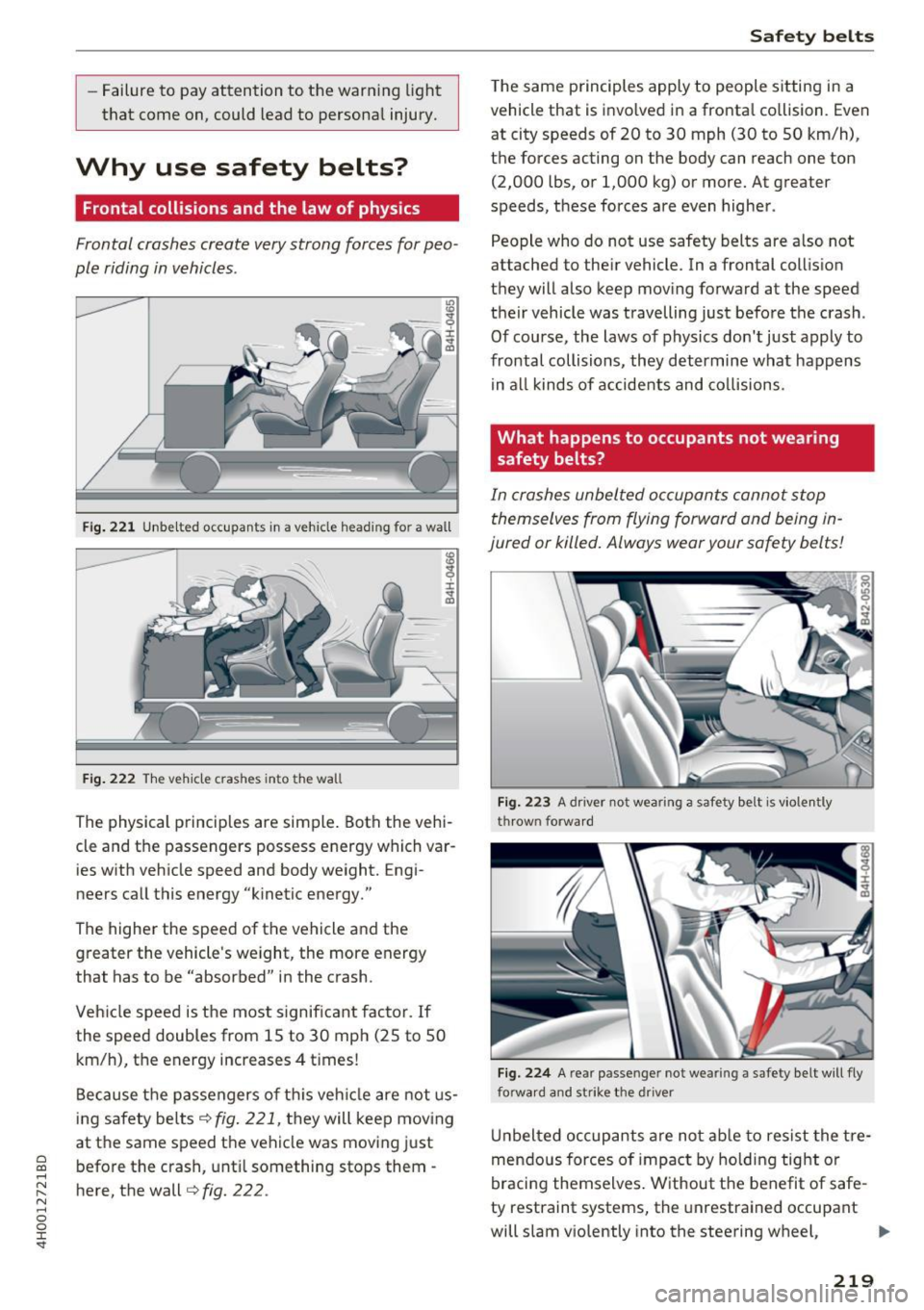
Fig. 221 Unbelted occupants in a vehicle heading for a wall
Fig. 222 The vehicle crashes into the wall
The physical principles are simple. Both the vehi
cle and the passengers possess energy which var ies with vehicle speed and body weight. Engi
neers call this energy "kinetic energy."
The higher the speed of the vehicle and the greater the vehicle's we ight, the more energy
that has to be "absorbed" in the crash.
Veh icle speed is the most significant factor. If
the speed doubles from 15 to 30 mph (25 to 50
km/h), the energy increases 4 t imes!
Because the passengers of this vehicle are not us
ing safety belts
¢fig. 221, they will keep moving
at the same speed the vehicle was moving just
before the crash, until something stops them -
here, the wall¢
fig. 222 .
Safety belts
The same p rinciples apply to people sitting in a
vehicle that is invo lved in a fronta l co llision. Even
at city speeds of 20 to 30 mph (30 to 50 km/h),
the forces acting on the body can reach one ton
(2,000 lbs, or 1,000 kg) or more. At greater
speeds, these forces are even higher.
People who do not use safety belts are a lso not
attached to the ir vehicle. In a frontal collis ion
they will also keep moving forward at the speed
their vehicle was travelling just before the crash .
Of course, the laws of physics don't just apply to
frontal collisions, they determine what happens in all kinds of accidents and collisions .
What happens to occupants not wea ring
safety belts?
In crashes unbelted occupants cannot stop
themselves from flying forward and being in
jured or killed. Always wear your safety belts!
Fig. 223 A dr iver not wearing a safety belt is violently
thrown forward
Fig . 224 A rear passe nger not wearing a safety belt will fly
forwa rd and strike the driver
Unbelted occupants are not able to resist the tre
mendous forces of impact by holding tight or
bracing themselves . Without the benefit of safe
ty restraint systems, the unrestrained occupant
will slam v iolently into the steering wheel,
Ill>-
219
Page 222 of 354

Safe ty belts
instrument panel, windshield, or whatever else is
in the way
r:!> fig. 223. This impact with the vehi
cle interior has all the energy they had just be
fore the crash.
Never rely on airbags alone for protection . Even
when they deploy, airbags provide only additional
protection. A irbags are not supposed to dep loy in
all kinds of accidents. A lthough your Audi is
equipped w ith airbags, all vehicle occupants, in
cluding the driver, must wear safety belts cor
rectly in order to minimize the risk of severe in
jury or death in a crash .
Remember too, that airbags will deploy only
once and that your safety belts are always there
to offer protect ion in those accidents in wh ic h
airbags are not supposed to deploy or when they
have a lready deployed . Unbel ted occupants can
also be thrown o ut of the veh icle where eve n
mo re severe or fatal injuries can occur .
It is also important for the rear pass engers to
wear safety belts correctly. Unbelted passengers
i n t he re ar seats endanger no t on ly themse lves
but also the drive r and other passengers
~ fig . 224. In a frontal collision they will be
thrown forward violently, where they can hit and
in jure the driver and/or front seat passenger.
Safety belts protect
People think it's possible to use the hands to
brace the body in a minor collision . It's simply
not true!
F ig . 22 5 Driver is co rrectly restrai ned in a sudde n brak ing
m aneu ver
Safety belts used properly can make a b ig d iffer
ence. Safety belts help to keep passengers in
their seats, gradually reduce energy levels ap-
220
plied to the body in an accident , and help prevent
the uncontrolled movement that can cause seri
ous injuries. In add ition, sa fety belts red uce the
danger of being thrown out of the vehicle.
Safety be lts attach passengers to the car and g ive
them the benefit of being s lowed down more
gently or "soft ly" thro ugh the "give" in the safety
belts, crush zones and other safety feat ures engi
neered into today's vehicles. By "absorbing" the
k inet ic energy over a longer per iod of t ime, the
safety belts make the forces on the body more
"tolerab le" and less likely to cause inju ry .
Although these examples are based on a frontal
collision, safety be lts ca n also substantially re
duce the r isk o f injury in ot her kinds of crashes .
So, whethe r yo u're on a long trip or just goi ng to
the cor ne r store, a lways b uckle up and make s ure
othe rs do, too. Ac ciden t st at ist ics show that veh i
cle o ccupants prope rly wearing safety bel ts have
a lowe r risk of being injured and a m uch better
chance of surviving an acc ident . Properly using
safety be lts also great ly increases the ability of
the supp lemental airbags to do their job in a col
li sion. For this reason, wearing a safety belt is le
gally required in most countries including much
of the United States and Canada .
Although your Aud i is equipped with airbags, you
still have to wear the safety belts provided. Front
airbags, for examp le, are activated only in some
frontal collisions. The front airbags are not act i
vated in all frontal collisions, in side and rear co l
li sions, in roll overs or in cases where the re is not
eno ugh deceler ation throug h impa ct to the front
of the vehicle . The same goes for the other a irbag
systems in your Audi. So, always wear your safety
belt and make sure everybody in your vehicle is
properly rest rained!
Important safety instructions about safety
belts
Safe ty belts must always be correctly positioned
acros s the strongest bones of your body .
.,. Always wear safety belts as illustrated and de
scribed in this chapter.
.,. Make sure that your safety be lts are always
ready fo r use a nd are not damaged .