2017 AUDI A7 wheel
[x] Cancel search: wheelPage 77 of 284

co
co
.... N
" N .... 0
00
\.J '
brake similar to heavy braking. ESC and the
associated components (ABS, ASR, EDL)
cannot overcome the laws of physics . In cor
ners and when road or weather conditions
are bad, a full brake application can cause
the vehicle to skid or the rear end to swerve,
which increases the risk of an accident.
- If the power supply fails, you cannot set the
parking brake if it is released. In this case,
park the vehicle on level ground and secure
it by placing the selector lever in the P posi
tion. See an authorized Audi dealer or au
thorized Audi Service Facility for assistance.
- Always take the vehicle key with you when leaving your vehicle, even for a short period
of time. This applies particularly when chil
dren remain in the vehicle. Otherwise chil
dren could start the engine, release the
parking brake or operate electrical equip
ment such as power windows, which in
creases the risk of an accident.
- No one should remain in the vehicle when it
is locked -especially children. Locked doors
make it more difficult for emergency work
ers to get into the vehicle, which puts lives
at risk.
(D) Tips
When stopping at a traffic signal or stopping
in city traffic, you can set the parking brake
manually. The vehicle does not have to be
held with the brake pedal. The parking brake
eliminates the tendency to creep when a se
lector lever position is engaged. As soon as
you press the accelerator pedal, the parking
brake releases automatically and your vehicle
starts to move
c::> page 75.
(D Tips
- Occasional noises when the parking brake is
set and released are normal and are not a
cause for concern.
- The parking brake goes through a self-test
cycle at regular intervals when the vehicle is
stopped. Any noises associated with this are normal.
Driving
- If there is a power failure, the parking brake
will not set if it is released, and it will not
release if it is set
c::> &. . See an authorized
Audi dealer or authorized Audi Service Fa
cility for assistance.
Starting from a stop
Various convenience and safety functions may be
available when the vehicle begins driving, de
pending on vehicle equipment .
Starting on hills with the parking brake set
Requirement: the driver's door must be closed
and the driver's safety belt must be fastened.
.,. To start driving comfortably when on a hill, set
the parking brake and begin driving as usual.
The braking force of the parking brake does not
release automatically until the wheels build up
enough driving force.
Starting on hills with hill hold assist
Hill hold assist makes it easier to start on hills.
Requirement: the driver's door must be closed
and the engine must be running.
.. To activate hill hold assist, press and hold the
brake pedal for several seconds. The vehicle
must be in an uphill direction of travel.
After releasing the brake pedal, the braking pow er is maintained for a brief moment
c::> ..&. to pre
vent the vehicle from rolling back when starting .
During this time, you can easily begin to move
your vehicle.
_& WARNING
A ppl ies to: ve hicles with hill hold assist
- If you do not begin driving immediately or
the engine stalls after releasing the brake
pedal, your vehicle may begin to roll back
ward. Press the brake pedal or set the park
ing brake immediately .
- The intelligent technology of hill hold assist
cannot overcome the limitations imposed by
natural physical laws. The increased comfort
offered by hill hold assist should not cause
you to take safety risks.
Ill-
75
Page 79 of 284

co
co
.... N
" N .... 0
00
<.,;) 'SI'
In the normal m ode D, the tr ansmission auto
matica lly selects t he suitab le gear ratio . It de
pends on en gine load, vehicle speed and driving
style.
Select the
s p o rt m od e S for sporty driving. The
ve hicle makes full use of the engine's power .
Shifting is more noticeable when accelerat ing.
To move from selector lever position N to D, you must press the brake pedal and the vehicle must
be traveling less than 1 mph (2 km/h) or be sta
tionary ¢.&. .
.&_ WARNING
-The veh icle can roll even if the ignition is
switched off.
- Never select R or P while driving, because
this increases the risk of an accident.
-
- Power is still transmitted to the wheels
when the eng ine is running at idle. To pre
vent the veh icle from "creeping", you must
keep your foot on the brake in all selector
lever positions (except P) when the eng ine is
running . Otherwise, th is increases the r isk
of an accident.
- Do not inadvertently press the accelerator
peda l w hen the veh icle is stopped if a gear is
engaged. Ot herwise the veh icle will start to
move immediately, even i f the parking bra ke
is set. This cou ld res ult in a crash .
- T o de cre ase the risk of an accident, these
lector lever must be in the P posi tion and
the parking brake must be set before open
ing the hood and working on a r unning en
gine. Always read and fo llow the applicable
warnings
q page 199, Working in the en
gine compartment.
(D Tips
- Drive select: sporty shifting character istics
can be selected us ing the
Dy namic driving
mode.Sw ill appea r in the instrument clus
ter display instead of D.
- If you accidenta lly select N while driv ing,
take your foot off the accelerator pedal and
wait for the engine to slow down to idle be
fore selecting D/S.
D rivi ng
-If there is a powe r failure, the se lector lever
wi ll not move out of the P position. The
eme rgency re lease can be used if t his hap
pens
¢ page 81.
Selector lever lock
The selector lever lock prevents you from select
ing a gear accidentally, causing the vehicle to
roll.
)
Fi g. 82 Selector lever lock
T o release the se lector lever lock:
" Switch the ignit ion on .
" Press the brake pedal
while pressing the inter-
lock butto n.
Automatic shift lock (ASL)
The selector lever is locked in the P and N posi
t ions when the ig nit ion is switched on. The re
move it from t hese positions, the driver must
press the b rake peda l and press the lock button
at the same time. The following message ap
pears in the inst rument cluster display when the
selector lever is in the P or N posi tion to remind
t h e driver:
Brake pedal mu st be applied to shift from P
The automatic shift lock only funct ions when the
vehicle is stat ionary or at speeds be low 1 mph
(2 km/h) . At higher speeds, the lock is automati
c a lly deactivated in the N pos ition .
The selector lever is not locked when shifting
quick ly throug h N, for example from R to D. This
makes it possible to free the veh icle when it is
stuck by "rocking" it. The selecto r lever lock en-
gages if t he lever stays in t he N pos it ion longer ...
77
Page 82 of 284

Driving
"'T o shift up one gear, tap the shi ft paddle 0
¢ fig. 84.
"'To shift down one gear, tap the 0 sh ift paddle .
The transmission automatically shifts up o r down
before critical engine speed is reached .
Appl ies to: RS mode ls: when accelerating, the
transmission does
not a utomat ically shift to the
next gear shortly before the maximum pe rm itted
engine RPM is reached .
The transm ission only a llows manual shifting
when the engine speed is within the permitted range.
Kick-down
Kick-down enables maximum acceleration.
When you press the accelerato r peda l down be
yond the resistance point, the automatic trans
miss io n downshifts into a lower gear, depend ing
on vehicle speed and engine RPM. It shif ts up in
to the next higher gear once the max imum speci
fied engine RPM is reached .
I n t iptroni c mode, the t ransmission does
not au
tomatically sh ift down into a lowe r gear. If you
m ust accelerate, for example to pass a veh icle,
you must shift manually .
_& WARNING
Please note that the wheels could spin on
slick or slippery roads when kick-down is ac
tive.
Overboost
Applies to: RS 7 Spo rtback perfor man ce
-
The max imum engine torque is temporar ily in
creased in overboost. Overboost is activated
when nearing full throttle in the S position and
when the engine is at operat ing temperatu re .
The bars in the boost p ressure indicator are red
¢page 87.
_& WARNING
= -
Please note that the wheels could spin on
slick or s lippery roads when overboost is ac
tive.
80
' Launch control program
App lies to: vehicles with S tronic
The launch control program provides the best
possible acceleration when starting from a stop .
Requirement: the engine must be at operating
temperature and the steering wheel must not be
turned .
"' Deactivate the Start/Stop system*¢
page 73.
The LED in the jr,;i ••I button turns on .
"' Switch the Electronic Stabilization Control
(ESC) sport mode on¢
page 121. The Iii indi
cato r light turns on.
"' Pull the selector leve r back out of the D/S posi
tion b riefly to selec t the S position or se lect t he
DYNAM IC driv ing mode in d rive sele ct
<=:> page 106.
"'Press the brake pedal firm ly with your left foot
and hold it all the way down for at least one
second .
"' At the same time, press the gas peda l all the
way down with your right foot until the eng ine
reaches and stays at a high RPM level.
"' Remove your foot from the brake peda l w ith in
five seconds ¢,& .
_& WARNING
-Always a dapt your driving to the traff ic flow.
- On ly use t he Launch cont rol program when
road and traffic con dit ions allow it an d oth
er drivers will no t be endange red o r bot h
ered by your driving and the veh icle's accel
eratio n.
- Please note that the d rive wheels can spin
and the vehicle can break away when sport mode is switched on, especially when the
road is slippery.
- Once the vehicle has started moving, press
the
I ~ OFF! button b rief ly to turn the sport
mode off.
(D Tips
- The transmission temperat ure may increase
significant ly after using the launch control
prog ram . If that happens, the prog ram may
not be ava ilab le for a few minutes. It will be
available again after a coo l-down period.
...
Page 86 of 284

Trailer towing
Coolant t emperatur e
The coolant temperatu re gauge <=? page 9 must
be observed ca refully. The coo lant tempe rature
can increase if you drive on long inclines in a low
gear at high engine sp eeds. Reduce your sp eed
immed ia te ly if the LEDs in the top part of the dis
p lay turn on.
For more information abo ut indicator lights, re
fe r to . <=?
page 14.
A WARNING
Anyone not properly restrained in a moving
vehicle is at a much greater risk in an acci
dent . Never let anyone ride in your car who is
not properly wearing the restraints provided
by Audi.
Trailer towing information
Important to know
-
Your veh icle hand les different ly when tow ing a
tra ile r because of the additional weight and d if
fe rent we ight d istr ib ution. Safety, performance
and economy w ill great ly depend o n how careful
ly you load yo ur trailer and ope rate your r ig .
Before you actually tow your tra iler, practice
turn ing, stopp ing and bac king up in an area away
from t raff ic. Keep practicing until you have be
come comple tely fami liar with t he way your vehi
cle-trailer comb inat ion behaves and responds.
Backing up is d iffic ult and requires pract ice .
Backing up with a tra iler gene rally requires steer
i n g ac tion oppos ite to tha t when backing up yo ur
veh icle w it h out a trailer .
M aintain a g reater d istance between your vehicle
and the one in front of you . You w ill need more
room to stop . To compensa te fo r th e tra ile r, you
will nee d a larger than no rma l tur ning rad ius.
When pass ing , remembe r that you ca nnot accel
e rate as fast as you no rma lly would because of
the adde d load . Make s ure yo u have eno ugh room
to pass . After passing, allow plenty of room for
your trai ler before chang ing lanes again.
84
Avo id jerky starts, sharp turns or rapid lane
c h anges.
(D Tips
- Do not tow a trailer dur ing the brea k-i n pe ri
od of your veh icle.
- I f you tow a tra ile r, your A udi m ay requi re
more frequent ma intenance due to the ex
tra load
¢ page 264.
Parking on a slope
Do not park on a slope wi th a trailer . If it cannot
be avoided, do so only after doing the following:
When parking:
.,. App ly the foot bra ke .
.,. Have so meone p lace cho cks unde r bot h the ve
hicle and the trailer w heels.
.,. With choc ks in place, slowly rele ase the brakes
until the w heel chocks abso rb the load .
.,. Turn th e whee ls towards the curb.
.,. App ly the par king b rake .
.,. Select the P se lecto r lever posit ion.
When restarting after parking:
.,. App ly the foot bra ke .
.,. Start the engine .
.,. Sele ct the D/S se lector l ever position.
.,. Re lease the par king brake and s low ly pull o ut
and away from the whee l chocks.
.,. Stop and have someone re trieve the wheel
chocks .
(D Tips
If you move the selector lever of the automat
i c transmission to P befo re applying the park
i ng brake and before blocking the whee ls, yo u
may have to use more force la ter to move the
l eve r o ut of the P pos it io n.
Page 89 of 284

co
co
.-, N
" N .-, 0
00
<.,;) 'SI'
Boost, shifting and
engine oil temperature
indicators
Applies to: vehicles with boost, shifting and engine oil tem
peratu re indicators
Fig. 87 Instrument cluster: boost, shift ing and eng ine oil
temperature indicators
... Turn the menu thumbwheel on the steering
wheel until
Lap timer appears in the instru
ment cluster display.
@ Boost pressure indicator
The current engine load (meaning the current
boost pressure) is indicated by a bar .
@ Shifting indicator
The shifting indicator is on ly visible when shifting
gears in tiptronic mode ¢ page
79. Green LEDs
turn on as the engine RPMs increase. The LEDS
flash red at speeds near the RPM limit.
In vehicles with an activated head-up display
¢ page
24, the shifting indicator is shown in the
head-up display instead of the instrument clus
ter.
© Engine oil tempe rature indicator
If the engine oil temperature is below 140 °F
(60 °(), th<> I# symbol followed by three hy
phens"- - -" and the
0
( unit is shown.
The engine has reached its operating tempera
ture when the engine oil temperature is between
140
° F (60 °() and 248 °F (120 °() under normal
driving conditions. The engine oil temperature
may be higher if there is heavy engine load and
high temperatures outside. This is not a cause for
concern as long as the .¢ page
15 or Ill
Assist
¢ page 15 indicato r lights in the display do not
blink.
Lap timer
Introduction
Applies to: vehicles with lap timer
You can record and evaluate lap times with the
lap timer ¢ page
87, fig. 88. Th e time is meas
ur ed in m inutes, seconds and 1/10 seconds . The
hours are also shown when the lap time exceeds
60 minutes. The maximum individual measure
ment is 99 hours. A maximum of SO laps can be
recorded.
A WARNING
-Your focus shou ld always be on driving your
vehicle safe ly. As the driver, you have com
plete respons ibility for safety in traffic. Only
use the functions in such a way that you al
ways maintain complete control over your ve
hicle in all traffic situations .
@ Tips
You can retr ieve informat ion from the tr ip
computer wh ile the lap timer stopwatch is
r unning.
Opening the lap timer and recording times
Applies to: vehicles with lap timer
Fig. 88 Display: lap t imer
Opening the lap timer
... Turn the menu thumbwheel on the steering
wheel until
Lap timer appears in the instru
ment cluster display .
-
87
Page 90 of 284

Assist
Timing laps
.. To start timing, press the thumbwheel.
.. To stop t iming for this round, press the thumb
whee l again. This starts timing the next lap at
the same time. The last recorded t ime will
move up one line. The lap number is displayed
in front of the time measurement.
Di splaying intermediate time and pausing
timing
.. To display a split time, press the thumbwheel.
The timing continues to run in the background .
.. To interrupt the timing, for example to insert a
pause, press the thumbwheel.
.. To resume timing , press the thumbwheel
again.
If timing is paused, you can continue it later even
if you switch the ign ition off .
Evaluating , resuming or resetting timing
App lies to: ve hicles with lap timer
You can evaluate the fastest, slowes t and aver
age lap times .
Fig. 89 Display: eva lu ating a recorded time
.. To eval uate a recorded time (view the statis
tics), press the thumbwheel. The number of
laps driven, the fastest lap"+", the slowest lap
"-", and the average lap time "0" appear in the
display.
• To continue timing for additional laps, press
the thumbwheel.
.. To reset the timing to zero, press the thumb
whee l aga in. The lap timer switches off.
88
@ Tips
- Saved lap times cannot be individually de
leted from the total results.
- The saved lap timer va lues wi ll remain after
switching the ignition off.
Audi adaptive cruise
control
Description
Applies to: vehicles with Audi adapt ive cruise control
Fig. 90 Detectio n ra nge
The adaptive cru ise control system is a combina
tion of speed and dis tance regulation .
It assists
the driver by both regulating the speed and
maintaining a distance to the vehicle driving
ahead, within the limits of the system.
If the sys
tem detects and object ahead, adaptive cruise
control can brake and accelerate your vehicle .
This makes driving more comfortable both on
long stretches of highway and in stop-and-go
traffic .
What can adaptive cruise control do?
The adaptive cruise control system uses video, ra
dar and ultrasound. Objects driving ahead can be
recognized up to 650 feet (200 m) away.
On open roads with no traffic, it functions like a
cruise control system. The stored speed is main
tained . When approaching an object ahead, the
adaptive cruise control system automatically
brakes to match that object's speed and then
maintains the stored distance . As soon as the
system does not detect an object ahead, adaptive
cruise contro l accelerates up to the stored speed.
Ill>
Page 99 of 284
co
co
.... N
" N .... 0
00
<.,;) 'SI"
lines, the system c an also t ake into account other
objects such as guard rails . If they are detected in
close proximity to the veh icle, active lane assist
he lps prevent the vehicle from driving too close
to them. There is also passing assistance . The
system does not provide any corrective steering if
i t detects that you are passing another veh icle .
& WARNING
-The system wa rns the driver that the veh icle
is leav ing the lane using co rre ctive s teer ing.
T he driver is always respo nsible for kee ping
the vehicle within the lane .
- T he system can help you keep the vehicle in
th e lan e, but i t does not drive by itself. Al
w ays keep yo ur hands on the steering
whee l.
- Corrective steer ing may not o ccur in ce rtain
situations , su ch as during heavy bra king.
- T here m ay be cases where the came ra does
not recognize all lane ma rker lines . Correc
t ive steering can o nly take p lace on the side
of the veh icle where lane marker lines are
detected.
- Other road structures or objects could possi
bly be identified unintentiona lly as lane
marker lines . As a result, corrective steering
may be unexpected or may not occur.
- The camera view can be restricted, for ex ample by vehicles driv ing ahead or by rain,
snow, heavy spray or light shining into the
camera . This can result in act ive lane assist
not detec ting the lane marke r lines or de
tecting them incor rectly.
- Under certa in conditions suc h as rut s in the
road, a bank ed roadway o r crosswinds , the
co rrective stee ring a lone may not be enough
to keep the vehicle in the mi ddle of the lane.
- F or safety reasons, active lane assis t m ust
not be used when the re are poor roa d an d/
o r we athe r cond itions s uch a s slippery
roads, fog, grave l, heavy r ain, snow a nd the
potent ial for hydroplaning . Using active lane
assist under these conditions may increase
the risk of a crash.
A ss ist
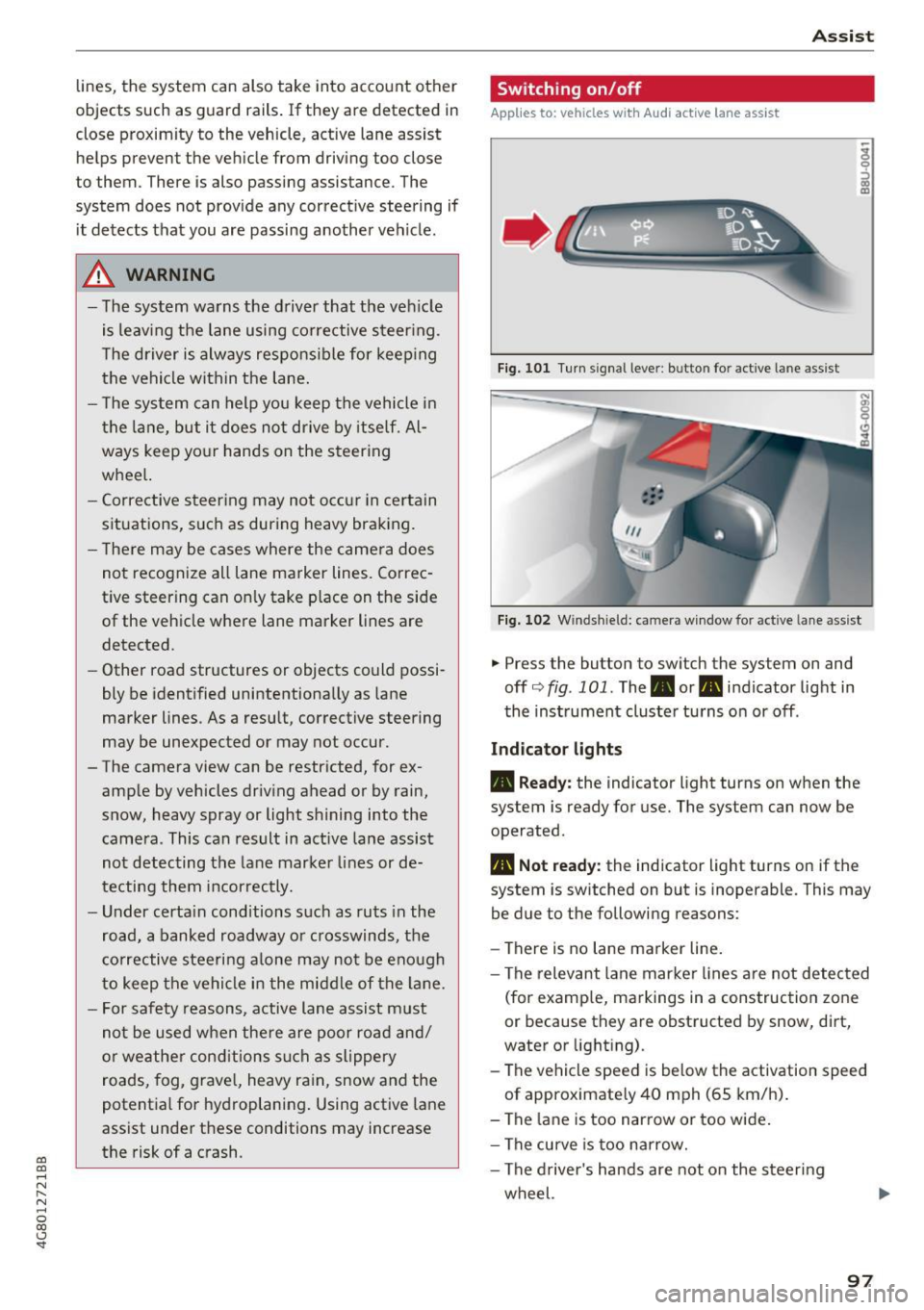
Switching on/off
App lies to : veh icles w it h A udi act ive lane ass ist
Fi g. 10 1 Turn s ignal leve r: bu tto n fo r active lan e ass is t
Fig . 1 02 W inds hield: came ra w indow fo r active lane a ssist
.,. Press the button to sw itch the sys tem on and
off c'.>fig .101. The .or. indicator light in
the inst rument cluste r turns o n or off .
Indicator lights
• Ready: the indicator light turns on when the
system is ready for use. The system can now be
operated .
• Not ready : the indicator light turns on if the
system is switched on but is inoperable. This may
be due to the following reasons:
- There is no lane marker line .
- The relevant lane mar ke r li nes a re not detected
(for examp le, ma rkings in a construction zone
or because they are obstructed by snow, dirt,
water or light ing).
- The vehicle speed is be low the activation speed
of approximate ly 40 mph (65 km/h) .
- The la ne is too nar row or too wide .
- The curve is too narrow.
- The d river's hands are not on the steer ing
wheel.
97
Page 100 of 284

Ass is t
@ Tips
Make sure the camera's fie ld of view
¢
fig. 102 i s not obstructed by st ickers or any
thing else. For information on cleaning, refer
to¢
page 235.
View in instrument cluster display
A ppl ies to: ve hicles w ith Audi active lane assist
Fig . 1 03 Instrument cl uster: act ive lane ass ist is sw itc hed
on a nd prov id ing warn ings
Fi g. 10 4 Inst rument cluster: act ive la ne assist is sw itc hed
on but not ready to provide warnings
You can call up the active lane assist display us
ing the buttons in the multifunction steering
wheel ¢
page 21.
An addit iona l indicator appears in the Head -up
disp lay*.
White line(s) Active lane assist is activated and ready to p rov ide warnings.
Red line(s) Active lane assist warns you
(left or r ight) before leaving a lane
¢ fig. 103. In addit ion, the
steering wheel vibrates light ly.
Gray line(s) Active lane assist is activated,
b ut not ready to give warning
¢ fig . 104.
98
Messages in the instrument clu ster disp lay
If t he a ctive lane assist sw itches off automa tical
l y, the indicator light in the display turns off and
one of the fo llow ing messages appears:
Audi a ctive lane assi st : Currentl y unavailable.
No camera v iew
This message appears if the camera is unable to
de tect the lines. This could happe n if:
- The camera field of view¢
page 97, fig. 102 is
dirty or covered in ice . Clean th is area on the
w indshield.
- The camera fie ld of view is fogged over. Wait
until the fog has cleared before switch ing the
active la ne assist on aga in .
- T he system has been unable to detect the lanes
for an extended p eriod of t ime due to road con
ditions . Switch ac tive lane assist back on when
t he lines a re more visib le.
Audi a cti ve lane assi st: Currently unavailab le
There is a temporary act ive lane assist malfunc
tion. Try switc hing the active lane assist on again
later.
Audi a cti ve l ane assist: System fault!
D rive to an au thor ized A udi dealer or au thorized
Audi Service Facility immediate ly to have the
malfunction corrected.
Audi active lane a ssis t : Plea se take over steering
This message appears if you are not steer ing by
yourself .
If this is the case, active lane assist does
not switch off, b ut it is "not ready" to provide a
warning. The system can help you keep the vehi
cl e in the lane. However, you are responsible for
driv ing the vehicle and must steer it yourse lf .
Adjusting the vibration warning
App lies to: vehicles wit h Audi active la ne ass ist
.,. Select: the I CARI function button > (Car ) * Sys
tems
contro l button > Dri ver assistan ce > Audi
a ct ive lane assist .
Vibrat ion warning
You can swi tch the addit io nal vib ra ti on war ning
in the steering whee l on or off .
Ill-