2017 AUDI A3 SEDAN lock
[x] Cancel search: lockPage 98 of 400

e-tron
for the high-voltage battery can lead to serious damage and/or a decrease of the capacity
void coverage under the New Vehicle Limited
Warranty.
Starting/driving the vehicle
Applies to: ve hicles w ith plug -in hybrid drive
The vehicle is started and stopped with the
I START STOP I button. Please also read the in
formation under
c::> page 78, Starting the engine .
Establishing drive ready mode
See c::> A in Introduction on page 94.
Requirement: a charging cable must not be con
nected to the vehicle
c::> page 117 and the selec
tor lever must be in the P or N position.
- Press the brake pedal.
- Press the
I STAR T STOPI button .
When the vehicle enters drive ready mode, the
status message
e-tron READY appears briefly in
the instrument cluster display and the needle in
the power meter points to
READY c::> page 97.
Driving
The vehicle starts with the electric motor after
establishing the dr ive ready mode and if the con
ditions for electric drive mode have been met
c::> page 100.
The conditions to drive are essentially the same
as for the automatic transmission
c::> page 85 .
You and your passengers should anticipate the
possibility of a sporty acce leration.
Ending drive ready mode
- Place the selector lever in the P position.
- Switch the ignition off with the
I STAR T STOPI
button.
Vehicle sound
The vehicle generates an electronic engine sound
so that your vehicle can be heard from the out
side when in electr ic drive mode. The veh icle
sound automatically fades out at higher speeds
when the sounds from the tires and wind start in
creasing.
96
Switching the ignition on/off
You can switch the ignition on without establish
ing drive ready mode.
- Press the
I START STOP ! button to switch the
ign ition on and off. Do not press the brake ped
al whi le doing this.
When the ignition is sw itched on, the needle
points at
OFF @c::>page 97, fig. 103 or OFF is
displayed @c::>page97, fig .103.
No indicator lights stay turned on when the igni
tion is switched off .
Ignition is switched off automatically
To prevent the vehicle battery from draining, the
ignition will switch off automatically under the
follow ing cond it ions:
- The vehicle must have already been driven.
- The vehicle is stationary.
- The gasoline engine must not be runn ing .
- The driver's door must be open.
- The driver's safety belt must be unbuckled .
- The brake pedal must not be pressed.
In this case, the activated low beam is replaced
by the parking light. The message
Side marker
lights automatically shut off in
30 minutes. See
owner's manual
appears in the instrument clus
ter display . The parking lights w ill switch off af
ter approx imately 30 minutes or when you lock
the veh icle.
If the gasoline engine was not stopped, the mo
tor continues runn ing and the ignit ion does not
automat ica lly switch off
c::> A .
A WARNING
To reduce the risk of poisoning, never allow
the eng ine to run in confined spaces.
(D Tips
The vehicle cannot start when outs ide tem
peratures are below-18 °F (-28 °C)
c::> page 98.
-
Page 107 of 400
a, a, ..... N
" N ..... 0 N > 00
_& WARNING
-Read and follow t he warn ings in
¢page 316, Working in the engin e com
partment before opening the hood and
che cking the coo lan t level.
- The e xpansion ta nk @ may only be ope ned
and filled by an a uthorized Aud i dea le r or
au tho riz e d Au di Service Fac ility.
- Coo lant can en ter the inside of the high
voltage battery when filling the expa nsion
t an k@ and ca use a short circui t, which in
cr eases the ris k of fire.
Refueling
Opening the fuel filler door
App lies to: ve hicles with plug-in hybrid drive
Fig. 112 Dr ive r's doo r: Butto n il
The tan k system must be vented be fore refueling
.. Swi tch the ign ition off with the I
button.
.. Pull on the ~ switch.
.. The fue l filler door wi ll open automatica lly af-
ter venting is com plete .
R ead and fo llow the directions for inserti ng the
f u el pump noz zle
¢ page 105.
Re ad and fo llow the inst ruct ions for re fueling
¢ page 313.
e-tron
Inserting the fuel pump nozzle
Applies to: vehicles with pl ug-in hybrid drive
Fig. 11 3 Fueling proced ure: i nsert t he f uel p ump nozz le
correct ly
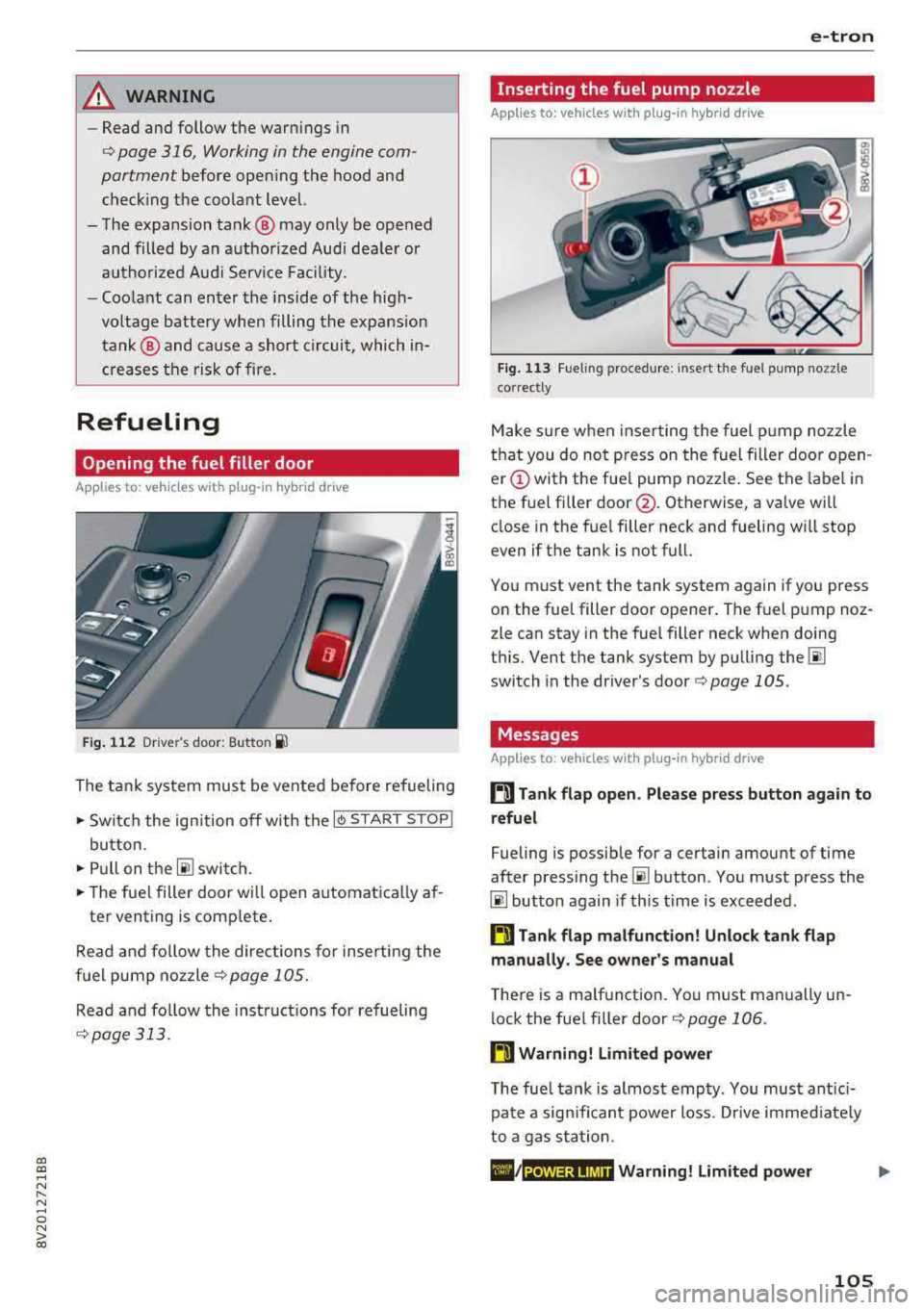
M ake s ure w hen inse rting the fuel pump noz zle
t h at you do no t press o n the fuel filler door o pen
er (!) with the fue l pump nozzle . See the label in
the f uel fi ller
door @. Otherwise, a va lve wi ll
close in the fue l filler neck and fueling w ill stop
even if t he tank is not full.
Yo u m ust vent the tank system again if you press
on the fue l filler doo r opener . The fuel p ump noz
zle can stay in the fuel filler neck when doing
t hi s. Vent the tank system by pu lling
the @!
switch in the dr iver 's door ¢ page 105 .
Messages
Applies to: vehicles with pl ug -in hybrid drive
ti Tank flap open . Please press button again to
refuel
Fueling is possib le for a certain amount of time
after press ing
the~ button . Yo u m ust press the
@I button again if th is time is exceeded .
ti Tank flap malfunction! Unlock tank flap
manually . See owner's manual
T he re is a ma lfunction. Yo u must manually un
lock the fue l fi ller door
¢ page 106 .
ti Warning! Limited power
The fue l tank is almos t emp ty . You must ant ici
p at e a sign ifi can t power loss. Drive immed iate ly
t o a ga s st at ion .
POWER LIMIT Warning! Limited power
105
Page 110 of 400
e-tron
-When charging the high-voltage battery us
ing househo ld/industrial sockets, the elec
trical installat ion can be used at full capaci
ty. Having a qualified electrician regularly inspect the electrical installations that are
used for charging is recommended.
- The vehicle radio and TV systems may have
limited reception when charging the vehi
cle .
Charging at public
charging stations
Applies to: vehicles with plug- in hybrid drive
Use the charging cable supplied at the public
charging stat ion for charging. Contact an author
ized Audi dealer or authorized Aud i Service Facili
ty for more information.
• Fol low the operating instructions at the charg
ing station to charge the high-voltage battery .
• Unlock the veh icle if necessary ¢ page 34.
• Make sure that the selector lever is in the P po
sition and drive r eady mode is switched off.
• Turn the lock until it is vertical to open the cov
er on the charging unit ¢page 112 , fig . 123.
• Slide the cover carefully to the side if necessa
ry .
• Remove the lock on the charging port
¢ page 112, fig . 124.
• Remove the cap from the charging cable.
• Connect the cable to the veh icle charging port .
• If a charging timer is not set, the charging
process will start automatically depending on
the charg ing station
¢ page 112, Setting the
charging timer.
• The vehicle operating s tatus is indicated by the
status
LED @¢ table on page 115.
• Also read the information found in
¢ page 114 , After charging .
(D Tips
Only charge your vehicle at charging stations
that conform to the follow ing standards, de
pending on the country :
- GB/T 18487 .1 and GB/T 20234 (China)
- IEC 61851 and IEC 62196 (Europe)
- SAE Jl 772 (North America, Japan)
108
@ Tips
- It is not possible to charge using the charg
ing timer at some charg ing stations.
- You can use your Audi e-tron charging sys
tem if there is a household or industrial con
nection available at the charging station.
Charging the battery
with the Audi e-tron
charging system
Charging system overview
Applies to: vehicles with plug-in hybrid drive
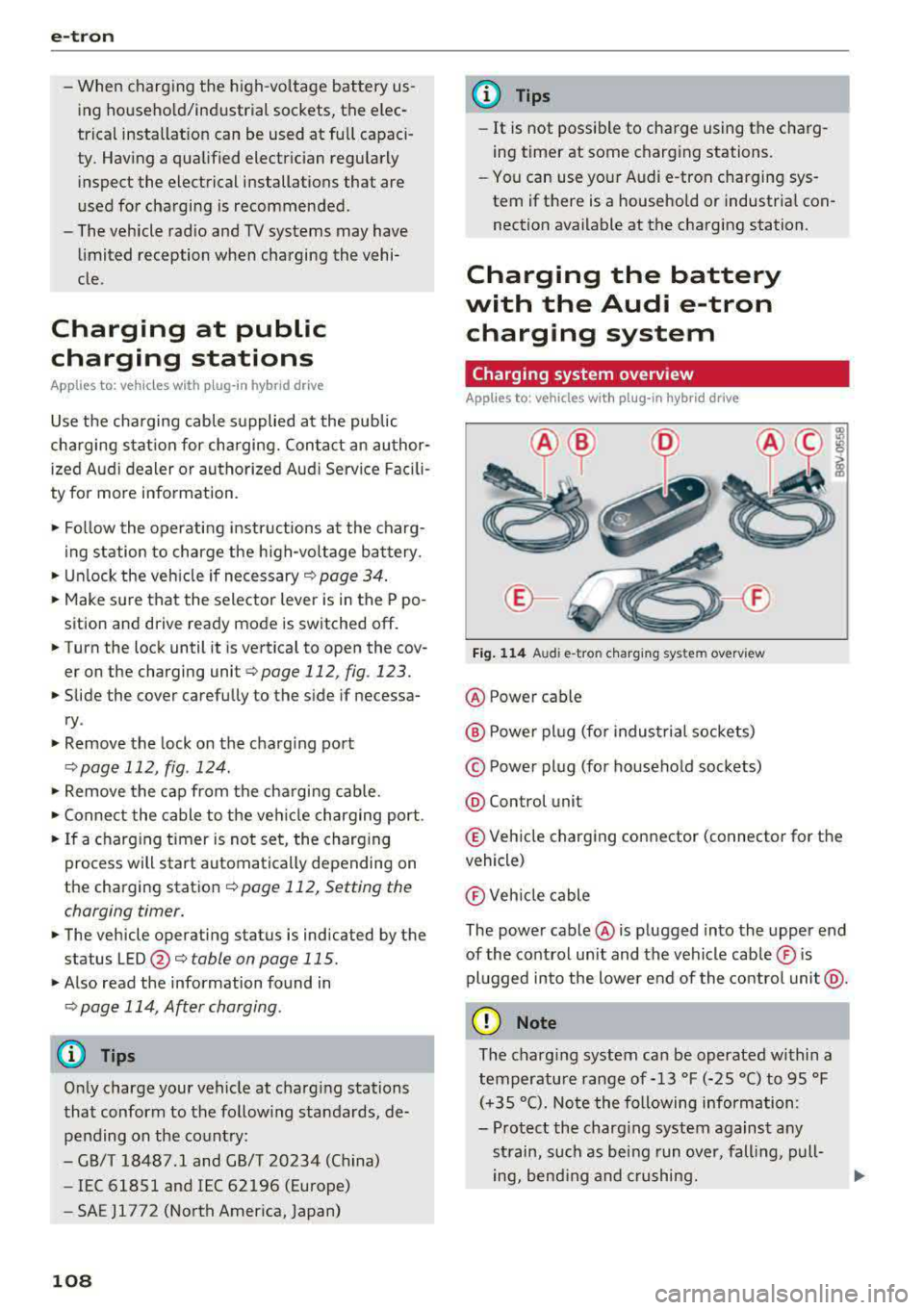
Fig. 114 Audi e-tro n charging sys tem overv iew
@ Power cable
@ P ower plug (for industrial sockets)
© Power plug (for household sockets)
@ Con trol unit
© Vehicle charging connector (connector for the
vehicle)
® Vehicle cable
The power cable @ is plugged into the upper end
of the control unit and the vehicle cable ® is
plugged into the lower end of the control unit@.
(D Note
The charg ing system can be operated within a
temperature range of-13 °F (-25 °C) to 95 °F (+35 °C). Note the following information:
- Protect the charging system against any
strain, such as being run over, falling, pull-
ing, bend ing and crushing.
II>-
Page 112 of 400

e-tron
Charging dock
Applies to: vehicles with plug -in hybrid drive and charging
dock
F ig . 11 7 Opening/clos ing t he charg ing dock
®
F ig . 118 Cha rg in g dock : mount ing th e c harg ing sys te m
You can store the charg ing system in the charg
ing dock.
Opening /closing the charging dock
• If necessary, you can u nlock/ lock the charg ing
dock using the key provided by turning it to the
unlocked position @ or locked position @
¢fig. 117 .
• Opening/closing the door on the charging dock.
Mounting the cha rging system in the
charging dock
• Open the door on the charging dock.
• First insert the control unit in the bottom tabs
on the charging dock and then into the upper
tabs.
• Push the control un it toward the rea r and let it
lock into place .
• Guide the vehicle cable th rough the opening @
¢fig _ 118.
• Wrap the extra cab le length around the adapt
er @ .
• Plug the power cable into the socket in the
charging dock .
110
• Close the door.
• After charging, you can p lace the vehicle charg
ing
connector ©¢ page 108 , fig. 114 in the
holder on the charging dock
door ¢ fig. 117.
Removing th e charging system from th e
charging dock
• Open the door on the charging dock .
• Remove the power cable connector from the
socket in the charging dock.
• Unwrap the cable from the adapter @.
• To loosen the contro l unit from the holder,
press the re lease tabs above the cont rol un it @
r=:> fig. 118 .
(D Tips
-Always keep the door on the cha rging dock
closed.
- Do not place any objects on the door or the
charging dock .
Charging clip
Applies to: vehicles with plug-in hybrid drive and charging clip
Fig. 119 Cha rg in g cl ip: c harg ing sys tem co nnected
Connecting the char ging system to the
charging clip
• First insert the control unit in the bottom tabs
on the charging clip and then into the upper
tabs .
• Push the con trol uni t towa rd the rear -ar row
¢ fig. 119 and let i t lock into place .
• Wrap the extra cable length around the charg
ing connector mount
(D .
• Plug the power cable into the socket @.
• After charging, you can hook the vehicle charg
ing
connector ©¢ page 108, fig. 114 to the
charging connector mount
(D ¢ fig . 119. ..,.
Page 113 of 400

a, a, ..... N
" N ..... 0 N > 00
Removing the charging syst em from the
charging clip
• Remove the power cable connector from the
socket @.
• Unwind the cable from the charging connector
mount (D.
• To loosen the control unit from the bracket,
push the lock ing mechan ism @ upward
9fig. 119.
Transport ing
App lies to: veh icles with plug-in hybrid drive
Fig. 1 20 Storage bag
• Store the charg ing system and the special
charg ing cable* in the bag befo re transport ing .
• Secure the bag using the tie-downs ¢ page 66.
The flat hook must be secured to the left side
of the tie-downs.
_& WARNING
- If the vehicle charging cab le is not secured
or pos itioned correct ly, it can slide out of
place and endanger vehicle occupants when
brak ing, when changing directions, or in an
acc ident.
- Never transport the Audi e-tron charging system or the special charg ing cable" unse
cured.
- Store the Audi e-tron charging system or the spec ial charging cable* in the storage
bag in the luggage compartment.
- Always transport the storage bag in the lug
gage compartment and never i n the passen
ger compartment (for example the seats or
in front of them) .
e-tron
Charging overview
Applies to: vehicles with pl ug-in hybrid drive
Fig. 121 Charging system : control unit
Fi g. 122 Rad iator grille: veh icle charg ing port and bu tton
module
T he charging uni t is located behind the Audi rings
o n the front of the vehicle .
@ ~ Button/LED
@ Display field
© Arrow buttons
@IOKI Butto n
(D Chargi ng timer button
@ Status LED
@ Immediate charging button
T he meaning of the d ifferent status displays for
the cha rging sys tem and the vehicle can be found
u nder
9 page 114, S tatus displays.
A WARNING
There is an error in the control unit if the LED
@ is red. Disconnect the contro l unit from the
power supply. Refer to th is chapter
¢page 114, Status displays. ..,
111
Page 114 of 400

e-tron
@ Tips
-The device runs a se lf-test after power has
been restored to the control unit.
- You can activate a PI N for the control unit
¢ page 117 .
- The vehicle cannot be star te d if a cha rgi ng
connector is connected .
Before charging
App lies to: ve hicles w ith p lug- in hy brid drive
F ig. 1 23 Radiator g rille: ope ning the c harg ing uni t cove r
Fig. 124 Radiator g rille : cha rgi ng por t cap
"Unl ock the ve hicle if necessary ¢ page 34.
... Make s ure that the selector lever is in the P po
sition and drive ready mode is switched off
¢ page 96.
"Turn the lock until it is ve rtical to open the cov
er on the charging
unit ¢ fig. 123 .
... Slide the cover caref ully to t he s ide if necessa
ry .
... Remove the lock on the c harg ing po rt
¢fig. 124.
"Inser t power plug @ or© into the socke t
¢page 108 , fig. 114 .
l) Not availa ble in a ll Info ta in m en t sy ste m s.
112
... Plug the vehicle charging connecto r ©
¢ page 108, fig. 114 into the vehicle charging
port ¢ fig. 124. The c harging p rocess starts au
tomatically if no charg ing timer is set .
(D Tips
Remove ice and s now from the cover using a
h and brush and solvent-free de icing sp ray .
Charging
App lies to : vehicles wi th plug-in hybrid drive
You can switch between the immediate charg ing
@ and charging timer Q) options d uring the
charg ing process if a charg ing t imer is set . Press
the des ired button to do this .
You have different charging options:
Immediate charging
To start the c harging process immed iate ly, press
the b utton @
¢page 111 , fig. 122 . The LE D in
the button turns on.
Setting the charging timer
You can delay the ch arging time w ith the charg
i ng t imer in the Infota inment system
ll _ Yo u can
set two diffe rent timers.
" If a time r was alrea dy set, p ress t he bu tto n Q)
¢page 111, fig. 12 2. The LED in the button
t urns on .
... To set a charging timer , select: IMENU ! button>
Vehicle > left control button > Charge > r ight
control button >
Program timer .
... Select Individual timer or Repeat timer .
... Set the departu re time, the da te or day of the
week .
... You ca n activate the climate cont rol w ith the
charging t imer d uring the c harg ing process by
sele ct ing
Air conditioning wit h the cont rol
knob.
A ./ appears in the box. This activ ation is
separa te from the Infotai nment system set
tings in t he climate cont rol
menu ¢ page 118.
... Press the IBACKI b utton. ..,_
Page 116 of 400

e-tron
After charging
Applies to: vehicles with p lug -in hybrid drive
Unlocking the vehicle charging connector
.,. Press the re lease
Closing the charging unit
.,. Put the cap back on the cha rging port
¢ page 112, fig. 124 .
.,. Carefully slide the cove r back in i ts or igina l po
si tion .
.,. T ur n the lock to the horizonta l position
¢ page 11 2, fig . 123.
Fig . 12 5 R ad ia tor g rille : unl ocking and re mov ing the ve hi
cl e c harg ing connector
@ Note
After com plet ing the charging or clima te control
p rocess, the vehicle enters a sleep mode . No d is
p lays are visib le on t he cha rging unit dur ing this
pe riod . I
f yo u drive with an o pen charg ing unit, both
the cover and the electronics installed behi nd
i t cou ld be damaged .
(D Tips
Deactivating sl eep mode
.,. Unl ock the vehicle ¢ page 34 . Or
.,. Open the driver's door. Or
.,. Press the b utton @¢ page 111 , fig. 122.
Status displays
Applies to: veh icles with plug-in hybrid drive
T he ins trumen t clu ster wi ll show if the charg
ing unit is open. However, please check if the
cover is locked befo re every trip after cha rg
i ng .
You can check the va rious ope rating statuses us
ing the L ED @ , the disp lay fie ld on the control unit
@
¢ page 111, fig . 121 and the stat us LED
@ ¢page 111, fig.122 .
Charging system : control unit
Symbol Error code LED on the control
unit@
Blue Flashe s
On
Green Flashes
Whi te On
330, 340 Red On
114
Mean ing
Self te st
Cable inse rted correctly
Cable inserted and charg· ing
Self test comple ted s uc
cessfully , cab le is not con-
Solution
nected or is connected in -Insert the cable cor rec tly.
correct ly to the vehicle
charging port.
Cable inserted incorrectly
or fau lty. Chec
k the cable and insert
i t co rrectly o r rep lace t he
cab le.
IJi,,
Page 118 of 400

e-tron
LED on the vehicle@ Meaning Solution
Have the power supply or power
supply system inspected. Check
No power supply was recognized the status d isplay on the control
On even though the charging cable is unit
c::> table on page 114. See an
Yellow plugged in.
authorized Audi dealer or author-
ized Audi Serv ice Facility for assis-
tance if necessary.
Flashes The se
lector lever in not in the P Move the selector lever into the P
position. position.
Check if the charging conne ctor is
inserted correct ly
c::> page 112. Re-
The charging connector cou ld not move the charging connector and
On be correctly locked
in the vehicle insert it into the charging port
Red charging port.
again. See an authorized Audi
dealer or author ized Audi Service
Facility for assistance if necessary.
Fau lt in the charging system. The See an authorized Audi dealer or
Flashes high-voltage battery cannot be authorized Audi Service Facility for
charged.
(D Tips
The operation statuses indicated by the LED
@ on the vehicle are also disp layed in the in
strument cluster display/Infotainment sys
tem.
Charging time
Applies to: vehicles with plug-in hybrid drive
The length of the charg ing process using the Audi
e-tron charging system can vary based o n the fol
lowing factors:
- Sockets be ing used (household or industr ial
sockets) .
- System voltage and current strength specif ic to
a country.
- The value set for the charg ing power leve l on
the control unit (SO% or 100%).
- Fluctuations in the system voltage.
- Temperature outside the vehicle.
- Temperature of the high -voltage battery.
- Adjustments to the climate cont rol ins ide the
vehicle.
- Current capac ity of the charging connector.
- Ign it ion is on/off.
116
assistance if necessary.
Example ch arging time s
Connection Charging time at
100% charge
Household socket approximately 10
(100 V, 10 A) hours
Househo ld socket approximately 8 .2
(1 10 V, 10 A) hours
H ouseho ld socket approx imately 5.2
(220 V, 8 A) hours
Househo ld socket approximately 3.8
(230 V, 10 A) hours
I ndustria l socket (200 V,
approximately 2 .3
16 A) hours
Industrial socket (220 V, approximately 2.3
16 A) hours
Industria l socket (230 V,
approximately 2.3
16 A) hours
I ndustria l socket (240 V, approx imately 2.3
16 A) hours
(D Tips
-Mul tiple versions of cha rging cables are of
fered due to the d ifferent power supply sys
tems in different countries . The maximum
charging power may potentially be