2016 VOLVO XC90 T8 ESP
[x] Cancel search: ESPPage 53 of 546
INTRODUCTION
}}
51
Returning to Home view1. Press the Home button briefly.> The most recent Home view mode will bedisplayed.
2. Press again briefly. > All of the Home view's sub-views willreturn to standard mode.
NOTE
From Home view's standard mode, press the Home button to start animated on-screeninstructions describing how to display the var-ious views.
Moving apps and vehicle function buttons
Apps and function buttons can be moved and organized in their respective views.
1. Press and hold an app/button.
> The app/button will change size andbecome transparent. It can then be moved.
2. Drag the app/button to an available position in the view.
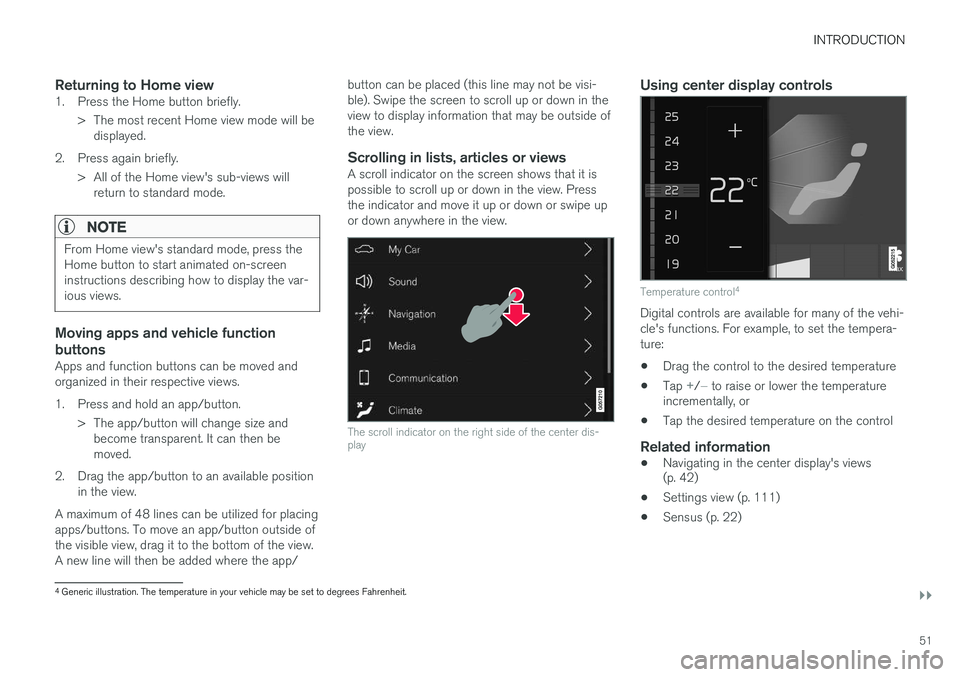
A maximum of 48 lines can be utilized for placingapps/buttons. To move an app/button outside ofthe visible view, drag it to the bottom of the view.A new line will then be added where the app/ button can be placed (this line may not be visi-ble). Swipe the screen to scroll up or down in theview to display information that may be outside ofthe view.
Scrolling in lists, articles or viewsA scroll indicator on the screen shows that it ispossible to scroll up or down in the view. Pressthe indicator and move it up or down or swipe upor down anywhere in the view.
The scroll indicator on the right side of the center dis- play
Using center display controls
Temperature control
4
Digital controls are available for many of the vehi- cle's functions. For example, to set the tempera-ture:
• Drag the control to the desired temperature
• Tap
+/− to raise or lower the temperature
incrementally, or
• Tap the desired temperature on the control
Related information
• Navigating in the center display's views (p. 42)
• Settings view (p. 111)
• Sensus (p. 22)
4
Generic illustration. The temperature in your vehicle may be set to degrees Fahrenheit.
Page 59 of 546

INTRODUCTION
* Option/accessory, for more information, see Introduction.57
Saving/deleting favorites
Save an article as a favorite by tapping the star (
) at the upper right when an article is open.
The star symbol will be filled in (
) when its arti-
cle has been saved as a favorite. To delete a favorite, tap its star again.
Using the search function1. Tap the magnifying glass icon () in the
owner's manual's upper menu. A keyboard will appear at the bottom of the screen.
2. Enter a word, e.g., "seat belt." > Suggested articles will be displayed asmore characters are entered.
3. Confirm by tapping the article. To leave search mode tap the up-arrow next to thesearch box.
Related information
• On-board digital owner's manual (p. 55)
• Using the center display keyboard (p. 35)
Glass
Laminated glass
The windshield and panoramic roof
* are made of
laminated glass, which is reinforced to help pre- vent break-ins and to provide additional sound-proofing. Laminated glass is optional for theother side windows.
Laminated glass symbol 5
Related information
•
Laminated panoramic roof
* (p. 106)
• Power windows (p. 109)
• Defrosting windows and mirrors (p. 195)
• Using sun shades (p. 111)
• Rearview mirror (p. 110)
• Power windows (p. 109)
• Head-up display (HUD)
* (p. 117)
• Activating/deactivating the rain sensor (p. 157)
• Windshield and headlight washers (p. 158)
• Tailgate window wiper and washer (p. 159)
Technician certification
In addition to Volvo factory training, Volvo sup- ports certification by the National Institute forAutomotive Service Excellence (A.S.E.).
Certified technicians have demonstrated a high degree of competence in specific areas. Besidespassing exams, each technician must also haveworked in the field for two or more years before acertificate is issued. These professional techni-cians are best able to analyze vehicle problemsand perform the necessary maintenance proce-dures to keep your Volvo at peak operating con-dition.
XC90 T8 Twin Engine Plug-in Hybrid
Technicians performing work on a vehicle with electrification should also have the necessarytraining and specialized certification required forperforming repairs and/or maintenance on avehicle with electrification.
WARNING
A number of electrical components in the XC90 T8 Twin Engine Plug-in Hybrid usehigh-voltage current and can be extremelydangerous if handled incorrectly. These com-ponents and any orange wiring in the vehiclemay only be handled by trained and qualifiedVolvo service technicians.
5 This symbol is not shown on the windshield or panoramic roof.
Page 88 of 546

||
SAFETY
86
ModificationsIf you are considering modifying your vehicle in any way to accommodate a disability, for exampleby altering or adapting the driver's or front pas-senger's seat(s) and/or airbag systems, pleasecontact Volvo at: In the USA Volvo Cars of North America, LLC Customer Care Center1 Volvo DriveP.O. Box 914Rockleigh, New Jersey 076471-800-458-1552 In Canada Volvo Cars of Canada Corp. National Customer Service9130 Leslie Street, Suite 101Richmond Hill, Ontario L4B 0B91-800-663-8255WARNING
•No objects that add to the total weight on the seat should be placed on the frontpassenger's seat. If a child is seated inthe front passenger's seat with any addi-tional weight, this extra weight couldcause the OWS system to enable the air-bag, which might cause it to deploy in theevent of a collision, thereby injuring thechild.
• The seat belt should never be wrappedaround an object on the front passeng-er's seat. This could interfere with theOWS system's function.
• The front passenger's seat belt shouldnever be used in a way that exerts morepressure on the passenger than normal.This could increase the pressure exertedon the weight sensor by a child, andcould result in the airbag being enabled,which might cause it to deploy in theevent of a collision, thereby injuring thechild.
WARNING
• Keep the following points in mind with respect to the OWS system. Failure tofollow these instructions could adverselyaffect the system's function and result inserious injury to the occupant of the frontpassenger's seat:
• The full weight of the front seat passen-ger should always be on the seat cushion.The passenger should never lift him/herself off the seat cushion using thearmrest in the door or the center console,by pressing the feet on the floor, by sit-ting on the edge of the seat cushion, orby pressing against the backrest in a waythat reduces pressure on the seat cush-ion. This could cause OWS to disable thefront, passenger's side airbag.
WARNING
•Do not place any type of object on the front passenger's seat in such a way thatjamming, pressing, or squeezing occursbetween the object and the front seat,other than as a direct result of the correctuse of the Automatic Locking Retractor/Emergency Locking Retractor (ALR/ELR)seat belt.
• No objects should be placed under thefront passenger's seat. This could inter-fere with the OWS system's function.
Page 105 of 546
INSTRUMENTS AND CONTROLS
}}
* Option/accessory, for more information, see Introduction.103
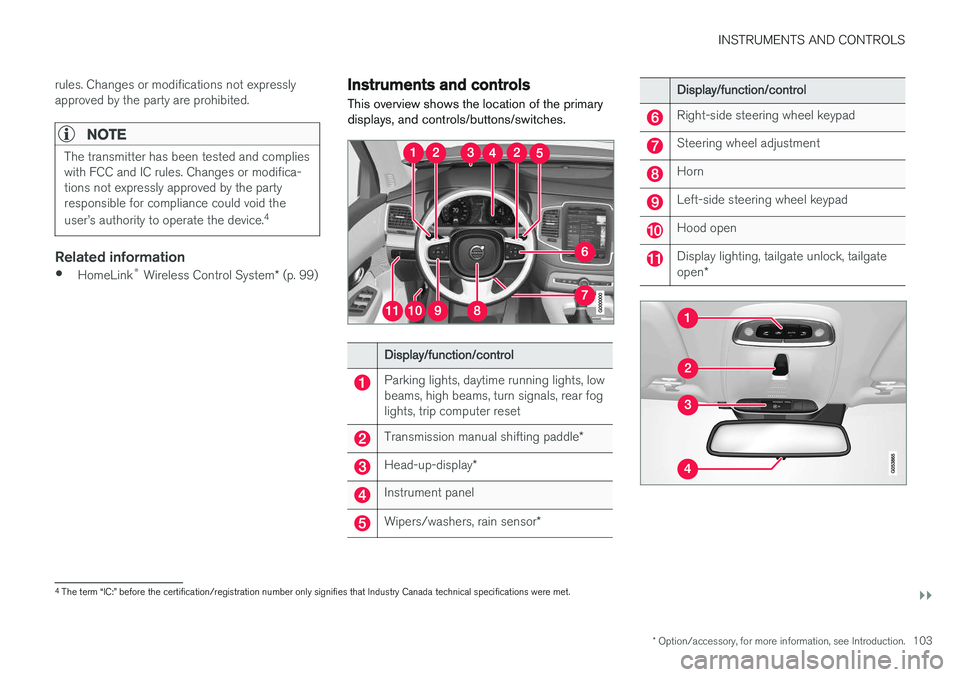
rules. Changes or modifications not expressly approved by the party are prohibited.
NOTE
The transmitter has been tested and complies with FCC and IC rules. Changes or modifica-tions not expressly approved by the partyresponsible for compliance could void the user
Page 107 of 546
INSTRUMENTS AND CONTROLS
}}
* Option/accessory, for more information, see Introduction.105
Adjusting the power door mirrors
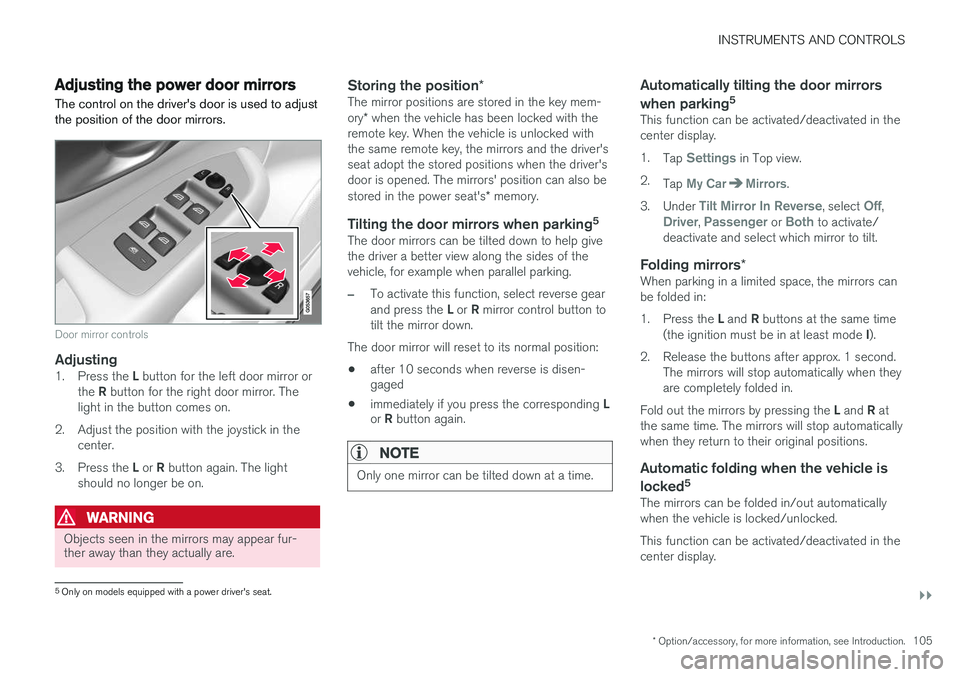
The control on the driver's door is used to adjust the position of the door mirrors.
Door mirror controls
Adjusting1. Press the L button for the left door mirror or
the R button for the right door mirror. The
light in the button comes on.
2. Adjust the position with the joystick in the center.
3. Press the L or R button again. The light
should no longer be on.
WARNING
Objects seen in the mirrors may appear fur- ther away than they actually are.
Storing the position *The mirror positions are stored in the key mem- ory* when the vehicle has been locked with the
remote key. When the vehicle is unlocked with the same remote key, the mirrors and the driver'sseat adopt the stored positions when the driver'sdoor is opened. The mirrors' position can also be stored in the power seat's * memory.
Tilting the door mirrors when parking 5The door mirrors can be tilted down to help give the driver a better view along the sides of thevehicle, for example when parallel parking.
–To activate this function, select reverse gear and press the
L or R mirror control button to
tilt the mirror down.
The door mirror will reset to its normal position:
• after 10 seconds when reverse is disen- gaged
• immediately if you press the corresponding
L
or R button again.
NOTE
Only one mirror can be tilted down at a time.
Automatically tilting the door mirrors when parking 5
This function can be activated/deactivated in the center display. 1.
Tap
Settings in Top view.
2. Tap
My CarMirrors.
3. Under
Tilt Mirror In Reverse, select Off,Driver, Passenger or Both to activate/
deactivate and select which mirror to tilt.
Folding mirrors *When parking in a limited space, the mirrors can be folded in: 1.
Press the L and R buttons at the same time
(the ignition must be in at least mode I).
2. Release the buttons after approx. 1 second. The mirrors will stop automatically when they are completely folded in.
Fold out the mirrors by pressing the L and R at
the same time. The mirrors will stop automaticallywhen they return to their original positions.
Automatic folding when the vehicle is
locked 5
The mirrors can be folded in/out automaticallywhen the vehicle is locked/unlocked. This function can be activated/deactivated in the center display.
5
Only on models equipped with a power driver's seat.
Page 111 of 546
INSTRUMENTS AND CONTROLS
}}
* Option/accessory, for more information, see Introduction.109
point at which it was blocked (or will open fully to the tilt position). The auto-stop feature also functions when the laminated panoramic roof or sun shade is beingopened. The auto-stop feature can be overridden if the closing procedure has been interrupted (e.g., dueto ice around the laminated panoramic roof) bypressing and holding the control forward/downuntil the roof is closed.
Power windows
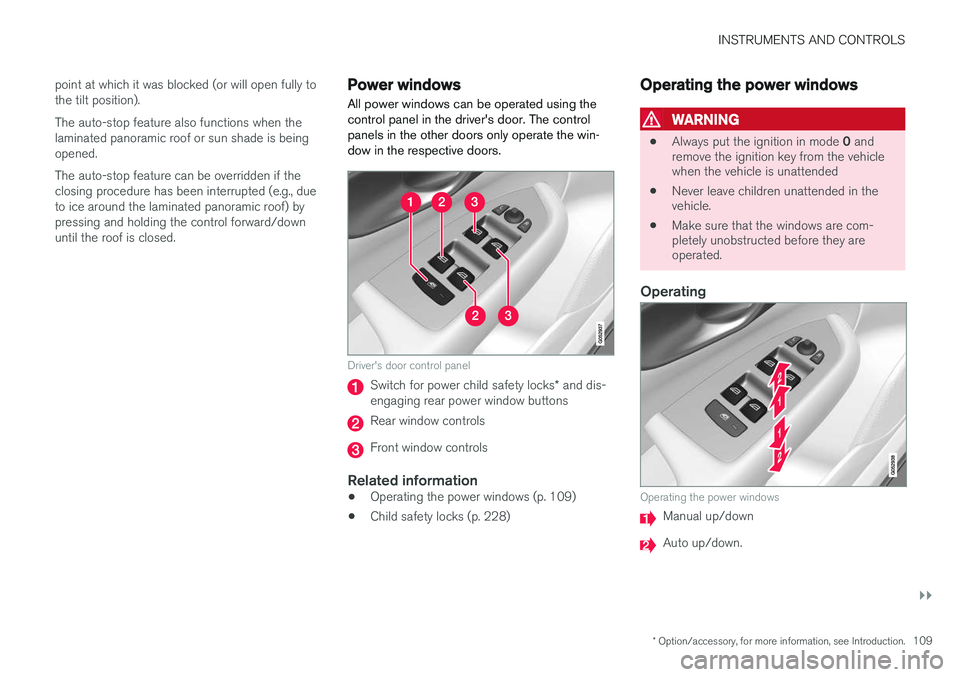
All power windows can be operated using the control panel in the driver's door. The controlpanels in the other doors only operate the win-dow in the respective doors.
Driver's door control panel
Switch for power child safety locks * and dis-
engaging rear power window buttons
Rear window controls
Front window controls
Related information
• Operating the power windows (p. 109)
• Child safety locks (p. 228)
Operating the power windows
WARNING
•
Always put the ignition in mode
0 and
remove the ignition key from the vehicle when the vehicle is unattended
• Never leave children unattended in thevehicle.
• Make sure that the windows are com-pletely unobstructed before they areoperated.
Operating
Operating the power windows
Manual up/down
Auto up/down.
Page 114 of 546

||
INSTRUMENTS AND CONTROLS
* Option/accessory, for more information, see Introduction.
112
Changing a setting
A sub-category in Settings view with various possible settings
1. Tap the category/sub-category to navigate to
the desired setting.
2. Change the setting(s). > The changes are saved immediately.
Types of settings
Type of settingDescription
Trigger functionStarts an app or a separate view for more advanced settings. Tapthe text to e.g., connect aBluetooth device.
Radio buttonSelect one of the possible set- tings by tapping the desired radiobutton to e.g., change the systemlanguage.
Type of settingDescription
Multi- selectionbuttonSelect a level for a particular set- ting by pressing the desired partof the button e.g., to set thedesired level for City Safety.
Check boxTap to activate/deactivate a func- tion e.g., to select automatic startfor steering wheel heating.
SliderSelect a level for a function by pressing and dragging the slidercontrol e.g., to set a volume level.
Informa- tion dis-playThis is not an actual setting but displays information such as thevehicle's VIN number.
Related information
• Center display overview (p. 32)
• Navigating in the center display's views (p. 42)
• Using the center display (p. 49)
• Changing system settings in Settings view(p. 114)
• Categories in Settings view (p. 112)
Categories in Settings view
Settings view consists of a number of main cate- gories and sub-categories that contain settingsand information for many of the vehicle's fea-tures and functions.
The main categories in Settings view are: My
Car, Sound, Navigation, Media,Communication, Climate and System.
Each main category, in turn, contains several sub- categories with possible settings. The tableshows the first level of sub-categories. The possi-ble settings for a function or area are describedin greater detail in their respective articles in theowner's manual. For system settings not descri-bed in the respective articles, see "Changing sys-tem settings in Settings view."
My Car
Sub-categories
Displays
IntelliSafe
Park Assist
Drive Mode/Individual Drive Mode*
Lights
Mirrors
Locking and Unlocking Feedback
Page 116 of 546
INSTRUMENTS AND CONTROLS
* Option/accessory, for more information, see Introduction.
114
Changing system settings in Settings view
Settings view's main category
System contains
general settings and information, such as lan- guage, units of measure, etc.
The system settings under Driver Profile, Date
& Time, Keyboard Layouts, Voice Control,Software Updates, Factory reset andServices are described in their respective arti-
cles in the owner's manual.
Changing system languages1. Pull down the center display's Top view and
tap Settings.
2. Tap
SystemLanguage.
3. Select a new system language. Languages that can be used for voice commands are indicated by a voice control symbol.
> This change affects the language used inthe instrument panel, center display and the head-up display *.
Changing units of measure
Changing length and volume units
1. Pull down the center display's Top view and
tap Settings.
2. Tap
SystemUnitsUnits. 3. Select one of the following measurement
standards:
•
Metric: kilometers, liters and degrees Cel-
sius.
•
Imperial: miles, gallons and degrees Cel-
sius.
•
US: miles, gallons and degrees Fahren-
heit.
> This change affects the units of measure used in the instrument panel, center dis- play and the head-up display *
Changing tire inflation pressure units
1. Pull down the center display's Top view and
tap Settings.
2. Tap
SystemUnitsTire Pressure.
3. Select a unit of measure for tire pressure. > This changes the tire inflation pressureunits used in the
Car status app in the
center display.
Viewing storage information1. Pull down the center display's Top view and
tap Settings.
2. Tap
SystemStorage.
> Storage information for the vehicle's hard drive will be displayed, including total capacity, available capacity and theamount of storage space used by theapps that have been installed.
Viewing the VIN (Vehicle Identification Number)
1. Pull down the center display's Top view and
tap Settings.
2. Tap
SystemVehicle Identification
Number.
> The vehicle's VIN will be displayed.