2016 VOLVO XC90 T8 wheel
[x] Cancel search: wheelPage 340 of 546
DRIVER SUPPORT
* Option/accessory, for more information, see Introduction.
338
Driving lane assistance
The
Lane Departure Warning (LDW) and Lane
Keeping Aid (LKA) * functions are designed to
help reduce the risk of accidents in situations where the vehicle unintentionally leaves its laneon highways or other major roads.
Driving lane assistance systems: LDW
or LKA
There are two versions of the driving lane assis- tance system:
• LDW (
Lane Departure Warning): provides
an audible signal or vibrations in the steering wheel.
• LKA (
Lane Keeping Aid): actively steers the
vehicle to help keep it in its traffic lane and/or alerts the driver using an audible sig-nal or through vibrations in the steeringwheel.
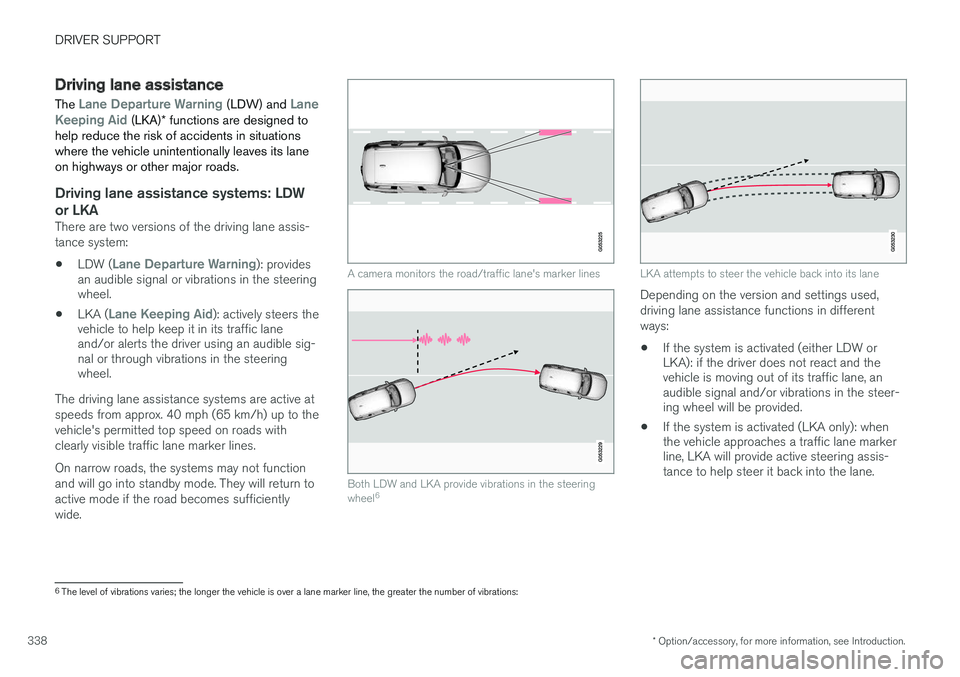
The driving lane assistance systems are active at speeds from approx. 40 mph (65 km/h) up to thevehicle's permitted top speed on roads withclearly visible traffic lane marker lines. On narrow roads, the systems may not function and will go into standby mode. They will return toactive mode if the road becomes sufficientlywide.
A camera monitors the road/traffic lane's marker lines
Both LDW and LKA provide vibrations in the steering wheel 6
LKA attempts to steer the vehicle back into its lane
Depending on the version and settings used, driving lane assistance functions in differentways:
• If the system is activated (either LDW or LKA): if the driver does not react and thevehicle is moving out of its traffic lane, anaudible signal and/or vibrations in the steer-ing wheel will be provided.
• If the system is activated (LKA only): whenthe vehicle approaches a traffic lane markerline, LKA will provide active steering assis-tance to help steer it back into the lane.
6
The level of vibrations varies; the longer the vehicle is over a lane marker line, the greater the number of vibrations:
Page 341 of 546
DRIVER SUPPORT
* Option/accessory, for more information, see Introduction.339
NOTE
If the turn signal is used, neither of the driving lane assistance systems (LDW or LKA) willprovide an alert or steering assistance.
WARNING
This feature is only intended to assist the driver and does not function in all driving,weather, traffic or road conditions. As the driver, you have full responsibility for operating the vehicle in a safe manner.
Steering assistance (LKA only)In order for LKA's steering assistance to function, the driver's hands must be on the steering wheel,which the system monitors continuously.
If this is not the case, this sym-bol will illuminate in the instru- ment panel and
Lane Keeping
Aid Apply steering will appear
to alert the driver to actively steer the vehicle.
If the driver does not take action, an audible sig- nal will sound and LKA will go into standby mode.The function will not become available again untilthe driver actively steers the vehicle.
Dynamic cornering
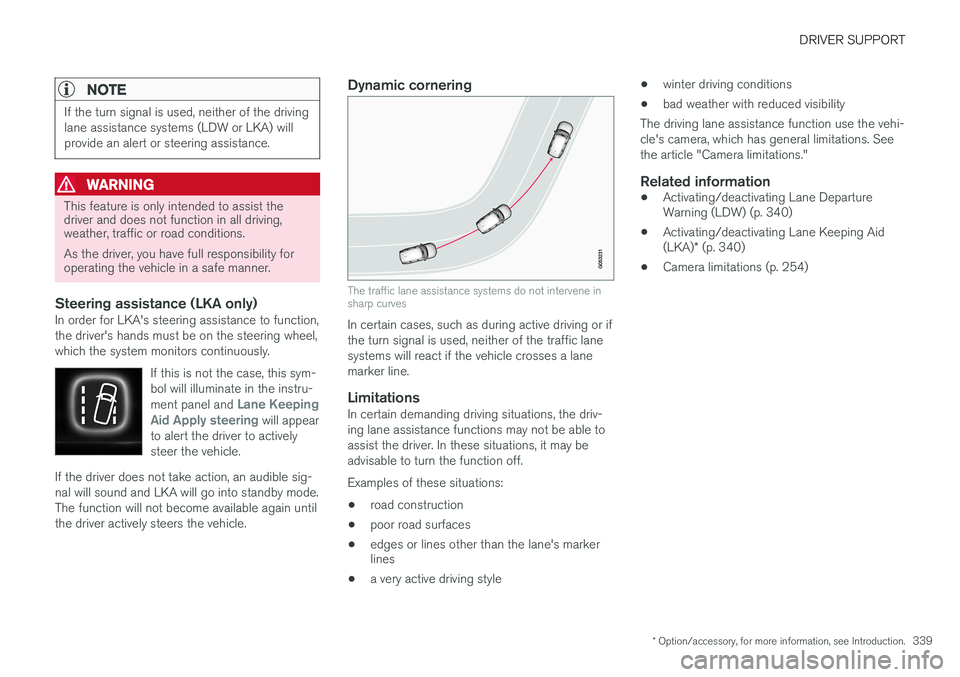
The traffic lane assistance systems do not intervene in sharp curves
In certain cases, such as during active driving or if the turn signal is used, neither of the traffic lanesystems will react if the vehicle crosses a lanemarker line.
LimitationsIn certain demanding driving situations, the driv-ing lane assistance functions may not be able toassist the driver. In these situations, it may beadvisable to turn the function off. Examples of these situations: • road construction
• poor road surfaces
• edges or lines other than the lane's marker lines
• a very active driving style •
winter driving conditions
• bad weather with reduced visibility
The driving lane assistance function use the vehi- cle's camera, which has general limitations. Seethe article "Camera limitations."
Related information
• Activating/deactivating Lane Departure Warning (LDW) (p. 340)
• Activating/deactivating Lane Keeping Aid (LKA)
* (p. 340)
• Camera limitations (p. 254)
Page 342 of 546
DRIVER SUPPORT
* Option/accessory, for more information, see Introduction.
340
Activating/deactivating Lane Departure Warning (LDW)
LDW can be activated/deactivated.
Activating/deactivating
The function can be activated/deactivated in the center display's Function view.
–Tap the Lane Departure Warning button.
> LDW is activated (GREEN indicator light in the button), or is deactivated (GRAY indicator light in the button).
Type of warningChoose the type of warning that the driver willreceive if the vehicle starts to leave its drivinglane. 1. Tap
Settings in the center display's Top
view.
2. Tap
My CarIntelliSafeLane
Departure Warning. 3.
Under
Lane Departure Warning feedback,
select: •
Sound: an audible warning signal will be
provided
•
Vibrations: the driver will be warned by
vibrations in the steering wheel
Related information
• Driving lane assistance (p. 338)
Activating/deactivating Lane Keeping Aid (LKA)
*
LKA can be activated/deactivated.
Activating/deactivating
The function can be activated/deactivated in the center display's Function view.
–Tap Lane Keeping Aid.
> LKA is activated (GREEN indicator light in the button), or is deactivated (GRAY indi- cator light in the button).
Type of warningChoose the type of warning that the driver willreceive if the vehicle starts to leave its drivinglane. 1. Tap
Settings in the center display's Top
view.
2. Tap
My CarIntelliSafeLane Keeping
Aid.
Page 343 of 546
DRIVER SUPPORT
341
3.
Under
Lane Keeping Aid Warning
Feedback, select:
•
Sound: an audible warning signal will be
provided
•
Vibrations: the driver will be warned by
vibrations in the steering wheel
Type of assistanceSelect the type of assistance LKA should provide: 1. Tap
Settings in the center display's Top
view.
2. Tap
My CarIntelliSafeLane Keeping
Aid.
3. Under
Lane Keeping Aid Assistance
Mode, select:
•
Steering: the system will provide steering
assistance but no warning.
•
Both: the system will provide steering
assistance and warning
•
Warning: the system will provide warning
but no steering assistance
Related information
• Driving lane assistance (p. 338)
Page 345 of 546

DRIVER SUPPORT
* Option/accessory, for more information, see Introduction.343
Symbols and messages
SymbolMessageExplanation
Driver support system Reduced functionality Service requiredThe system is not functioning properly. Contact a trained and qualified Volvo service techni- cian.
Windscreen sensor Sensor blocked, see Owner's manualThe camera's functionality is limited.
Lane Keeping Aid Apply steeringLKA's steering assistance does not function if the driver's hands are not on the steering wheel. Steer the vehicle actively.
Related information
•Driving lane assistance (p. 338)
• Activating/deactivating Lane Departure Warning (LDW) (p. 340)
• Activating/deactivating Lane Keeping Aid (LKA)
* (p. 340)
Page 349 of 546

STARTING AND DRIVING
}}
* Option/accessory, for more information, see Introduction.347
kinetic energy into electricity that is used to charge the hybrid battery. This is indicated in theinstrument panel, see also the article "Generalinformation about the XC90 T8 Twin EnginePlug-in Hybrid".
Battery charging gauge in the instrument panel
This function is active at speeds from approx. 90 mph (150 km/h) down to 3 mph (5 km/h).When braking at speeds outside of this range orduring harder braking, the hydraulic brake systemis used.
Cleaning the brake discsCoatings of dirt and water on the brake discsmay result in delayed brake function. This delay isminimized by cleaning the brake linings. Cleaning the brake pads is advisable in wet weather, prior to long-term parking, and after thevehicle has been washed. Do this by braking gen-tly for a short period while the vehicle is moving.
Driving on wet or salted roadsProlonged driving on wet or salted roads canaffect brake function and increase stopping dis-tance. Be sure to keep a safe distance to thevehicle ahead when driving under these condi-tions.
Brake pad inspection
On vehicles equipped with a jack
*, the condition
of the brake pads can be checked by raising thevehicle and performing a visual inspection of thebrake pads.
WARNING
• If the vehicle has been driven immediately prior to a brake pad inspection, the wheelhub, brake components, etc., will be veryhot. Allow time for these components tocool before carrying out the inspection.
• Apply the parking brake and put the gear selector in the Park (
P) position.
• Block the wheels standing on the ground, use rigid wooden blocks or large stones.
WARNING
•
Use the jack intended for the vehicle when changing a tire. For any other job,use stands to support the vehicle.
• The jack should be kept well-greased andclean, and should not be damaged.
• Be sure the jack is on a firm, level, non-slippery surface.
• No objects should be placed between thebase of jack and the ground, or betweenthe jack and the attachment bar on thevehicle.
• The jack must correctly engage the jackattachment.
• Never allow any part of your body to beextended under a vehicle supported by ajack.
Page 350 of 546

||
STARTING AND DRIVING
* Option/accessory, for more information, see Introduction.
348
Instrument panel symbols
SymbolExplanation
A
B
Red symbol: Check the brake fluid
level. If the level is low, top up and have the system inspected todetermine the cause of the loss offluid. Yellow symbol: there is a fault in
the brake pedal sensor.
A
B
Steady glow for more than 2 seconds: there is a fault in theABS system. The normal brakesystem will still function but with-out ABS brake modulation.
If Brake pedalCharacteristics
changed Service required is
displayed, the Brake-by-Wire sys- tem is not functioning properly.The brake pedal must be pressedfarther down and with more pres-sure for braking effect.
A US models
B Canadian models
WARNING
If both symbols illuminate at the same time and the brake level is below the MIN mark in
the reservoir or if a brake system-related mes-sage is shown in the instrument panel: DO
NOT DRIVE . Have the vehicle towed to a
trained and qualified Volvo service technician and have the brake system inspected. If both symbols illuminate at the same time and the brake level is normal (not below the
MIN mark in the reservoir) or if a brake sys-
tem-related message is shown in the instru- ment panel: drive the vehicle carefully to anauthorized Volvo workshop and have thebrake system inspected by a trained andqualified Volvo service technician.
Related information
• Brake functions (p. 348)
• Brake assist system (p. 349)
• Emergency brake lights (p. 350)
• General information about the XC90 T8 Twin Engine Plug-in Hybrid (p. 16)
Brake functions
The vehicle's standard braking features are aug- mented by a number of auxiliary help functions.
In addition to the wheel brakes and the parking brake, the vehicle is equipped with several auto-matic brake assist functions. These systems helpthe driver by e.g., keeping the vehicle stationarywhen the brake pedal is not depressed (at a traf-fic light or intersection), when starting up a hill orwhen driving down a hill. These systems include: • Auto-hold brakes
• Hill Start Assist
• Braking assist after a collision
• Hill Descent Control
*
Related information
•Brakes (p. 346)
• Parking brake (p. 352)
• Hill Descent Control (HDC) (p. 350)
• Auto-hold brake function (p. 349)
Page 354 of 546

STARTING AND DRIVING
352
Parking brake The electric parking brake helps to keep the vehicle stationary when it is parked.
Parking brake control in the tunnel console between the front seats
NOTE
•A faint sound from the parking brake's electric motor can be heard when theparking brake is being applied. Thissound can also be heard during the auto-matic function check of the parkingbrake.
• The brake pedal will move slightly whenthe electric parking brake is applied orreleased.
If the vehicle is not moving when the parking brake is applied, only the rear wheels are affec- ted. If it is applied while the vehicle is moving, thenormal brakes are used on all four wheels. Thebrakes will only be applied on the rear wheelsonce the vehicle has stopped.
Related information
•
Brake functions (p. 348)
• Using the parking brake (p. 352)
• Parking brake malfunctions (p. 354)
Using the parking brake
The electric parking brake helps to keep the vehicle stationary when it is parked.
Applying the parking brake
1. Put the gear selector in P.
2. Press firmly on the brake pedal.
3. Pull up the control. > The symbol in the instrument panelflashes while the parking brake is being applied and glows steadily when the park-ing brake has been fully applied.
4. Release the brake pedal and ensure that the vehicle is stationary.