2016 TOYOTA VENZA display
[x] Cancel search: displayPage 3 of 688
1
2
3
4
5
6
7
3
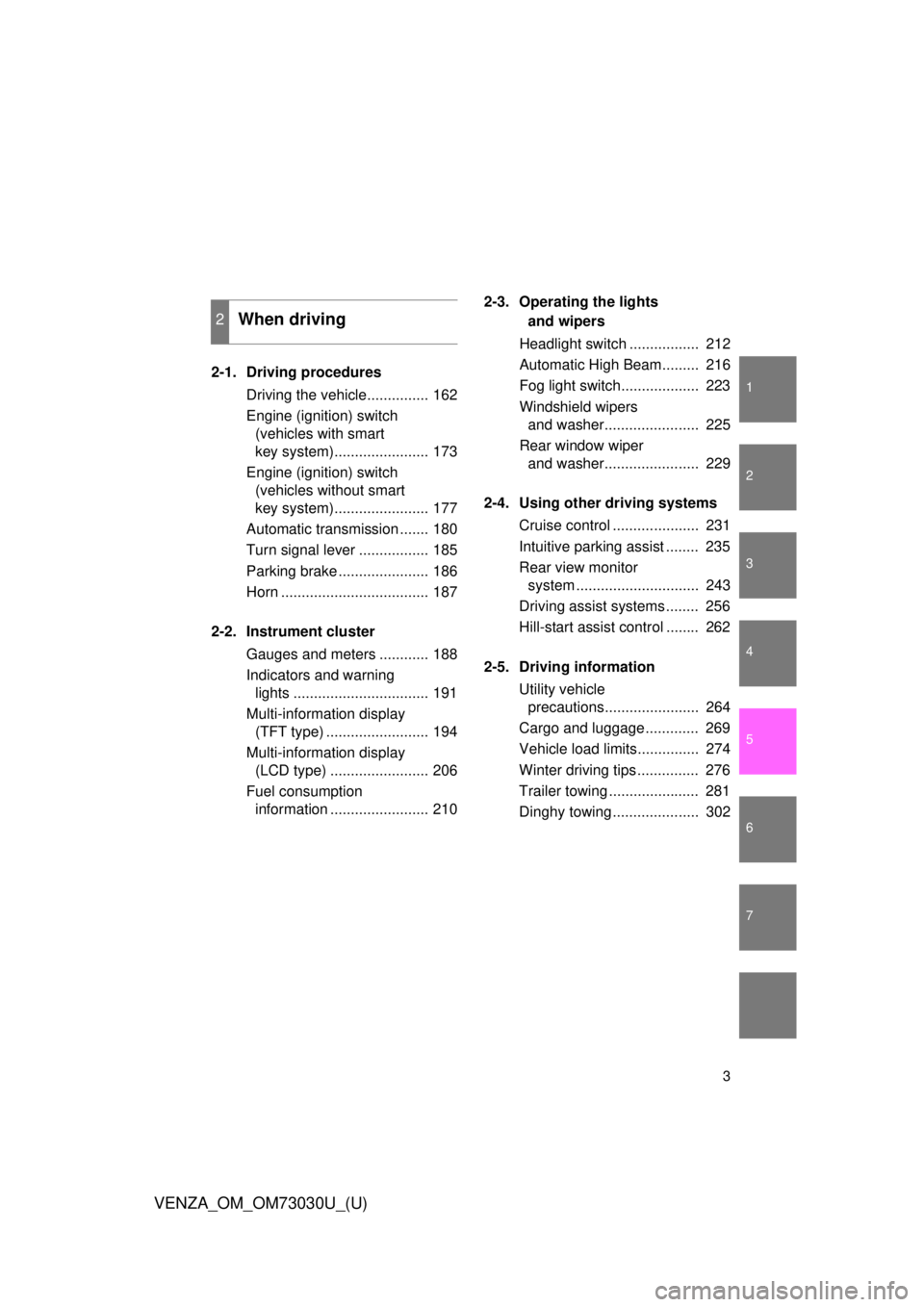
VENZA_OM_OM73030U_(U) 2-1. Driving procedures
Driving the vehicle............... 162
Engine (ignition) switch
(vehicles with smart
key system)....................... 173
Engine (ignition) switch
(vehicles without smart
key system)....................... 177
Automatic transmission ....... 180
Turn signal lever ................. 185
Parking brake ...................... 186
Horn .................................... 187
2-2. Instrument cluster
Gauges and meters ............ 188
Indicators and warning
lights ................................. 191
Multi-information display
(TFT type) ......................... 194
Multi-information display
(LCD type) ........................ 206
Fuel consumption
information ........................ 210 2-3. Operating the lights
and wipers
Headlight switch ................. 212
Automatic High Beam......... 216
Fog light switch................... 223
Windshield wipers
and washer....................... 225
Rear window wiper
and washer....................... 229
2-4. Using other driving systems
Cruise control ..................... 231
Intuitive parking assist ........ 235
Rear view monitor
system .............................. 243
Driving assist systems ........ 256
Hill-start assist control ........ 262
2-5. Driving information
Utility vehicle
precautions....................... 264
Cargo and luggage ............. 269
Vehicle load limits............... 274
Winter driving tips ............... 276
Trailer towing ...................... 281
Dinghy towing ..................... 3022
When driving
Page 4 of 688

TABLE OF CONTENTS Index
4
VENZA_OM_OM73030U_(U) 3-1. Using the air conditioning
system and defogger
Automatic air conditioning
system .............................. 306
Rear window defogger ....... 316
3-2. Using the audio system
(Entune Audio)
Audio system types ............ 318
Audio system...................... 320
Steering wheel audio
switches ........................... 323
USB Port/AUX Port ............ 325
Basic Audio Operations...... 326
Setup menu ........................ 329
General settings ................. 330
Audio settings..................... 332
Display settings .................. 333
Voice settings ..................... 335
Selecting the audio
source .............................. 336
List screen operation .......... 337
Optimal use of the audio
system .............................. 339
Radio operation .................. 340
CD player operation ........... 343
Listening to an iPod............ 350
Listening to a
USB memory device ........ 356
Using the AUX port ............ 362
Preparations to use wireless
communication ................. 363 Registering a Bluetooth ®
audio player for
the first time ...................... 366
Registering a Bluetooth ®
phone for the first time ...... 367
Registering a Bluetooth ®
device ............................... 368
Connecting a Bluetooth ®
device ............................... 370
Displaying a Bluetooth ®
device details .................... 373
Detailed Bluetooth ®
system settings................. 375
Listening to Bluetooth ®
Audio ................................ 377
Using a Bluetooth ®
Phone ............................... 379
Making a call....................... 382
Receiving a call .................. 386
Speaking on the phone....... 387
Bluetooth ®
phone
message function ............. 391
Using the steering wheel
switches............................ 396
Bluetooth ®
phone
settings ............................. 397
Contact/Call History
Settings ............................ 399
What to do if...
(Troubleshooting) ............. 411
Bluetooth ®
.......................... 419
Voice command system ..... 4263
Interior features
Page 6 of 688

TABLE OF CONTENTS Index
6
VENZA_OM_OM73030U_(U) 5-1. Essential information
Emergency flashers ........... 554
If your vehicle needs
to be towed ...................... 555
If you think something is
wrong ............................... 561
Fuel pump shut off
system .............................. 563
5-2. Steps to take in an
emergency
If a warning light turns
on or a warning buzzer
sounds... ......................... 564
If a warning message is
displayed .......................... 578
If you have a flat tire ........... 579
If the engine will not start ... 590
If the shift lever cannot be
shifted from “P”................. 593
If you lose your keys .......... 594
If the electronic key does
not operate properly
(vehicles with smart key
system) ............................ 595
If the battery is
discharged ....................... 598
If your vehicle overheats .... 603
If the vehicle becomes
stuck................................. 606
If your vehicle has to be
stopped in an
emergency ....................... 608 6-1. Specifications
Maintenance data
(fuel, oil level, etc.) ........... 612
Fuel information .................. 626
Tire information................... 630
6-2. Customization
Customizable features ........ 645
6-3. Initialization
Items to initialize ................. 655
Reporting safety defects
for U.S. owners ................. 658
Seat belt instructions for
Canadian owners
(in French) ........................ 659
SRS airbag instructions for
Canadian owners
(in French) ........................ 6615
When trouble arises 6
Vehicle specifications
7
For owners
Page 14 of 688
14
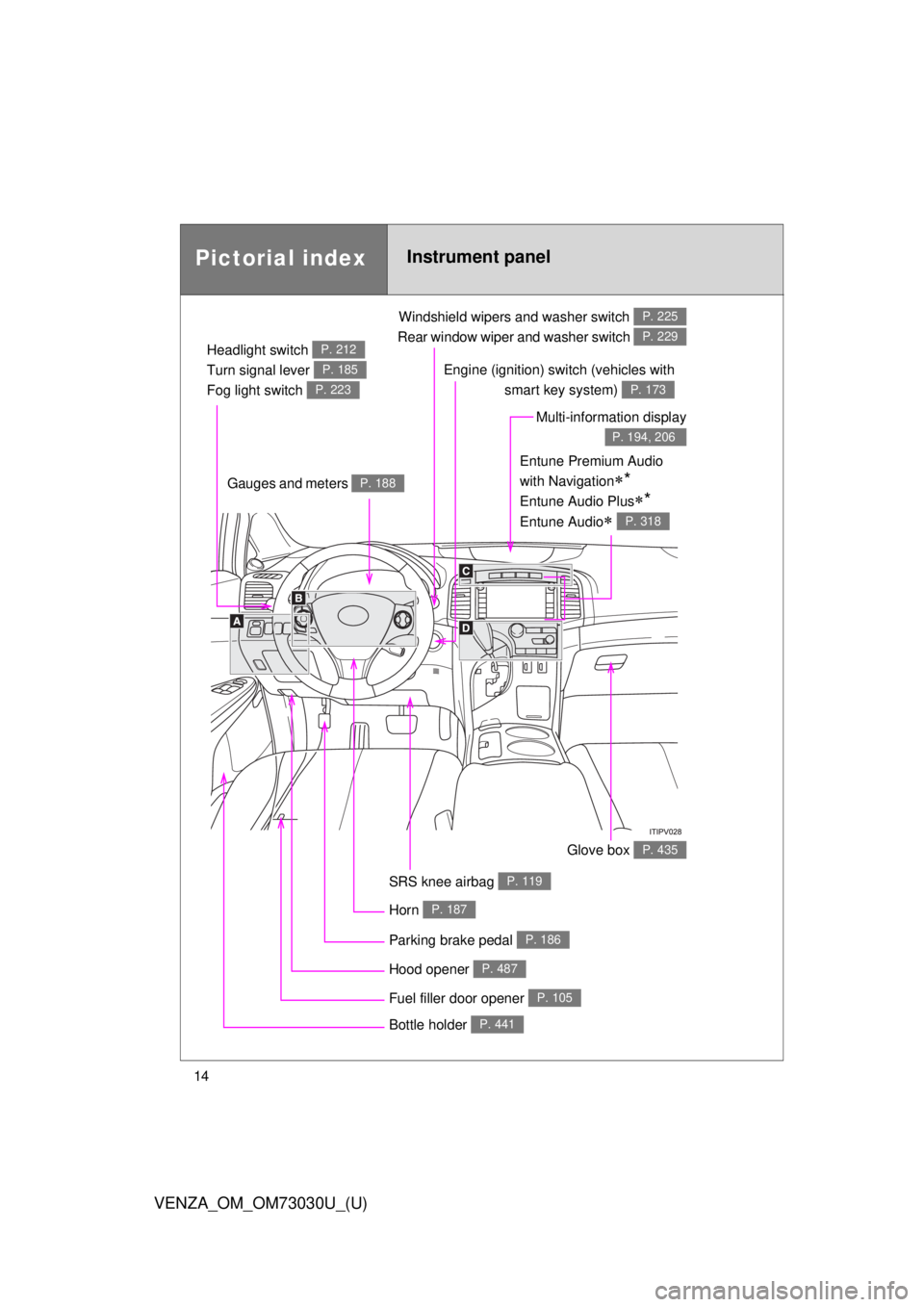
VENZA_OM_OM73030U_(U)Pictorial index Instrument panelHeadlight switch
Turn signal lever
Fog light switch P. 212
P. 185
P. 223
Windshield wipers and washer switch
Rear window wiper and washer switch P. 225
P. 229
Gauges and meters P. 188
Glove box P. 435
Fuel filler door opener P. 105
Hood opener P. 487SRS knee airbag P. 119Multi-information display P. 194, 206
Bottle holder P. 441Parking brake pedal P. 186
Horn P. 187Engine (ignition) switch (vehicles with
smart key system) P. 173
Entune Premium Audio
with Navigation
* Entune Audio Plus
* Entune Audio
P. 318
Page 16 of 688
16
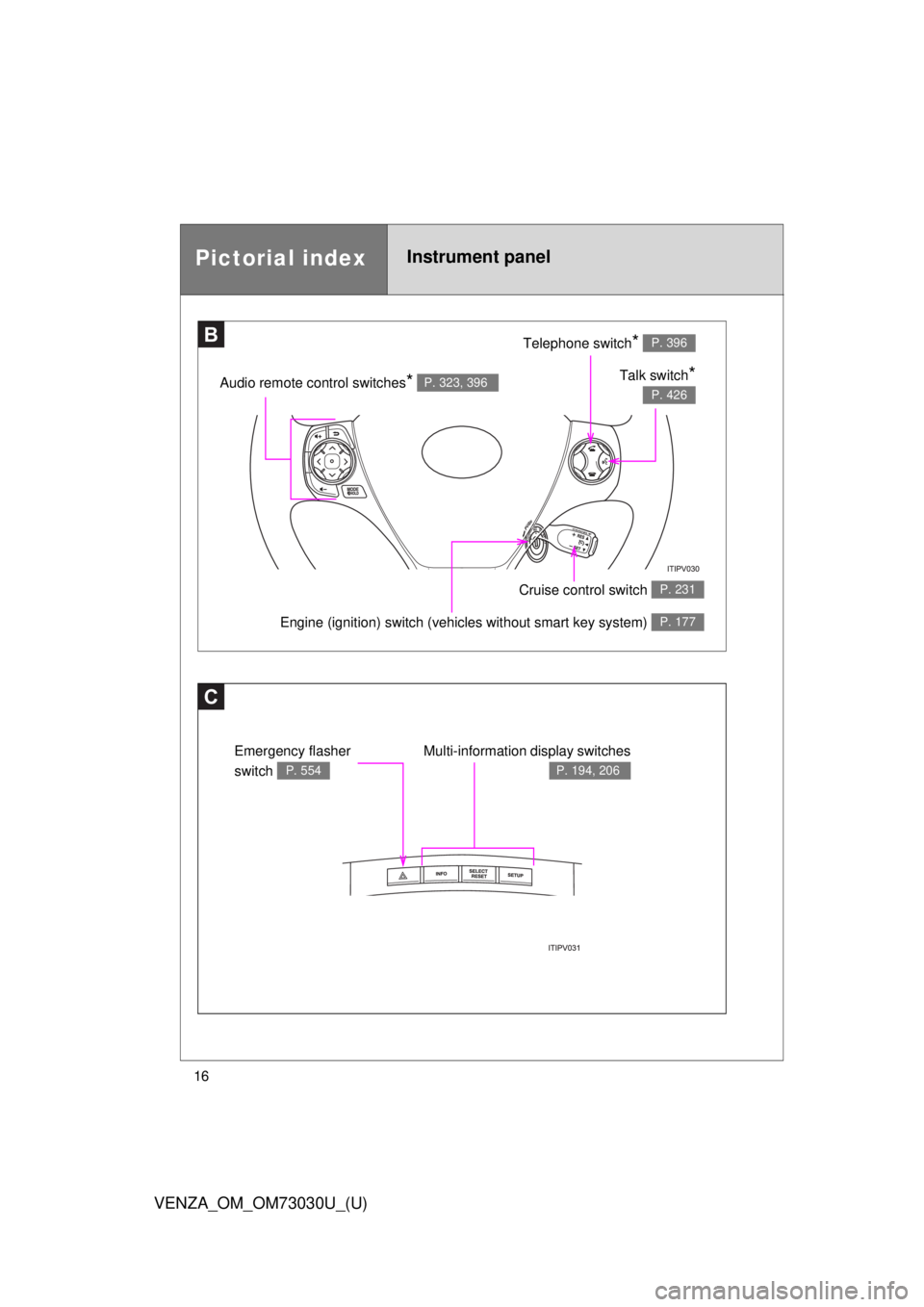
VENZA_OM_OM73030U_(U)Pictorial index Instrument panel
C Multi-information display switches P. 194, 206
Emergency flasher
switch P. 554B Telephone switch
* P. 396
Talk switch
* P. 426
Audio remote control switches
* P. 323, 396
Engine (ignition) switch (veh icles without smart key system) P. 177
Cruise control switch P. 231
Page 36 of 688

361-2. Opening, closing and locking the doors
VENZA_OM_OM73030U_(U) ■ Switching the door unlock function
It is possible to set which doors the entry function unlocks.
Turn the “ENGINE START STOP” switch OFF.
When the indicator on the key surface is turned off, press and hold
or for approximately 5 seconds while pressing on
the key.
The setting changes each time an operation is performed, as shown below.
(When changing the setting continuously, release the buttons, wait for at least
5 seconds, and repeat .)
For vehicles equipped with an alarm:
To prevent unintended triggering of the alarm, unlock the doors
using the wireless remote control and open and close a door once
after the settings have been changed. (If a door is not opened
within 60 second after is pressed, the doors will be locked
again and the alarm will automatically be set.)
In case that the alarm is triggered, immediately stop the alarm.
( P. 112)STEP 1
STEP 2
STEP2
Multi-information
display
(TFT type only) Unlocking function Beep
Hold the driver’s door han-
dle to unlock only the
driver’s door. Exterior: Beeps three
times
Interior: Pings once
Hold the front passenger’s
door handle to unlock all
doors.
Hold either front door han-
dle to unlock all doors. Exterior: Beeps twice
Interior: Pings onceSTEP 3
Page 40 of 688

401-2. Opening, closing and locking the doors
VENZA_OM_OM73030U_(U) ■ When the vehicle is not driven for extended periods
To prevent theft of the vehicle, do not leave the electronic key within 6 ft. (2
m) of the vehicle.
■ Security feature
If a door is not opened within approximately 60 seconds after the vehicle is
unlocked, the security feature automatically locks the vehicle again.
■ Alarms and warning indicators
A combination of exterior and interior alarms as well as warnings displayed
on the multi-information display are used to prevent theft of the vehicle and
unforeseeable accidents resulting from erroneous operation. Perform the
appropriate correction procedure de scribed in the following table.
Alarm Situation Correction procedure
Exterior alarm
sounds once for
10 seconds An attempt was made to
lock the doors using the
entry function while the
electronic key was still
inside the passenger com-
partment Retrieve the elec-
tronic key from the
passenger compart-
ment and lock the
doors again
Exterior alarm
sounds once for
10 seconds An attempt was made to
exit the vehicle and lock
the doors without first turn-
ing the “ENGINE START
STOP” switch OFF Turn the “ENGINE
START STOP” switch
OFF and lock the
doors again
Exterior alarm
sounds once for
10 seconds An attempt was made to
lock the vehicle while a
door is open Close all of the doors
and lock the doors
again
Page 42 of 688

421-2. Opening, closing and locking the doors
VENZA_OM_OM73030U_(U) * 1
: A message will be shown on the multi-information display in the instru-
ment cluster.
* 2
: If the engine does not start when the electronic key is inside the vehicle,
the electronic key battery may be depleted or there may be difficulties
receiving signal from the key. ( P. 595)Alarm Situation Correction procedure
Interior alarm
pings once
* 1
The electronic key has a
low battery Replace the electronic
key battery
An attempt was made to
start the engine without the
electronic key being
present, or the electronic
key was not functioning
normally Start the engine with
the electronic key
present
* 2
Interior alarm
pings once and
exterior alarm
sounds 3 times
* 1
The driver’s door was
closed after the key was
carried outside the vehicle,
and the “ENGINE START
STOP” switch was not
turned OFF Turn the “ENGINE
START STOP” switch
OFF and close the
driver’s door again
An occupant carried the
electronic key outside the
vehicle and closed the
door while the “ENGINE
START STOP” switch was
not OFF Bring the electronic
key back into the vehi-
cle