Page 39 of 688

391-2. Opening, closing and locking the doors
1
Before driving
VENZA_OM_OM73030U_(U) ● Even if the electronic key is not inside the vehicle, it may be possible to
start the engine if the electronic key is near the window.
● The doors may unlock or lock if a large amount of water splashes on the
door handle, such as in the rain or in a car wash when the electronic key
is within the effective range. (The doors will automatically be locked after
approximately 60 seconds if the doors are not opened and closed.)
● If the key is kept near the vehicle while it is being washed, water applied
to a door handle may cause the door to lock and unlock repeatedly. In
this event, place the key in a location 6 ft. (2 m) or more from the vehicle,
taking care not to lose the key.
● If the key is inside the vehicle while it is being washed, water applied to a
door handle may cause a buzzer to sound. In this event, locking all doors
will cause the buzzer to stop sounding.
● It may not be possible to lock the doors if the sensor area is covered by
mud, ice, snow etc. In this event, try locking again after cleaning the
area, or lock by touching the sensor area on the underside of the door
handle.
● Gripping the door handle when wearing a glove may not unlock or lock
the door.
● If the wireless remote control is used to lock the doors when the elec-
tronic key is near the vehicle, there is a possibility that the door may not
be unlocked by the smart key system. (Use the wireless remote control to
unlock the doors.)
● A sudden approach to the effective range or door handle operation may
prevent the doors from being unlocked. In this case, return the door han-
dle to the original position and check that the doors unlock before pulling
the door handle.
Page 40 of 688

401-2. Opening, closing and locking the doors
VENZA_OM_OM73030U_(U) ■ When the vehicle is not driven for extended periods
To prevent theft of the vehicle, do not leave the electronic key within 6 ft. (2
m) of the vehicle.
■ Security feature
If a door is not opened within approximately 60 seconds after the vehicle is
unlocked, the security feature automatically locks the vehicle again.
■ Alarms and warning indicators
A combination of exterior and interior alarms as well as warnings displayed
on the multi-information display are used to prevent theft of the vehicle and
unforeseeable accidents resulting from erroneous operation. Perform the
appropriate correction procedure de scribed in the following table.
Alarm Situation Correction procedure
Exterior alarm
sounds once for
10 seconds An attempt was made to
lock the doors using the
entry function while the
electronic key was still
inside the passenger com-
partment Retrieve the elec-
tronic key from the
passenger compart-
ment and lock the
doors again
Exterior alarm
sounds once for
10 seconds An attempt was made to
exit the vehicle and lock
the doors without first turn-
ing the “ENGINE START
STOP” switch OFF Turn the “ENGINE
START STOP” switch
OFF and lock the
doors again
Exterior alarm
sounds once for
10 seconds An attempt was made to
lock the vehicle while a
door is open Close all of the doors
and lock the doors
again
Page 41 of 688

411-2. Opening, closing and locking the doors
1
Before driving
VENZA_OM_OM73030U_(U) Alarm Situation Correction procedure
Interior alarm
pings continu-
ously
* 1
The “ENGINE START
STOP” switch was turned
to ACCESSORY mode
while the driver’s door was
open (or the driver’s door
was opened while the
“ENGINE START STOP”
switch was in ACCES-
SORY mode) Turn the “ENGINE
START STOP” switch
OFF and close the
driver’s door
The “ENGINE START
STOP” switch was turned
OFF while the driver’s door
was open Close the driver’s
door
Interior alarm
sounds continu-
ously
* 1
When the “ENGINE
START STOP” switch is in
IGNITION ON or ACCES-
SORY mode, an attempt
was made to open the
door and exit the vehicle,
and the shift lever was not
in “P” Shift the shift lever to
“P” and turn the
“ENGINE START
STOP” switch OFF
Interior and exte-
rior alarms sound
continuously
* 1
When the “ENGINE
START STOP” switch is in
IGNITION ON or ACCES-
SORY mode, the driver’s
door was closed after the
key was carried outside
the vehicle, and the shift
lever not in “P” Shift the shift lever to
“P”, turn the “ENGINE
START STOP” switch
OFF and close the
driver’s door again
Page 42 of 688

421-2. Opening, closing and locking the doors
VENZA_OM_OM73030U_(U) * 1
: A message will be shown on the multi-information display in the instru-
ment cluster.
* 2
: If the engine does not start when the electronic key is inside the vehicle,
the electronic key battery may be depleted or there may be difficulties
receiving signal from the key. ( P. 595)Alarm Situation Correction procedure
Interior alarm
pings once
* 1
The electronic key has a
low battery Replace the electronic
key battery
An attempt was made to
start the engine without the
electronic key being
present, or the electronic
key was not functioning
normally Start the engine with
the electronic key
present
* 2
Interior alarm
pings once and
exterior alarm
sounds 3 times
* 1
The driver’s door was
closed after the key was
carried outside the vehicle,
and the “ENGINE START
STOP” switch was not
turned OFF Turn the “ENGINE
START STOP” switch
OFF and close the
driver’s door again
An occupant carried the
electronic key outside the
vehicle and closed the
door while the “ENGINE
START STOP” switch was
not OFF Bring the electronic
key back into the vehi-
cle
Page 43 of 688
431-2. Opening, closing and locking the doors
1
Before driving
VENZA_OM_OM73030U_(U) ■ If the smart key system does not operate properly
● Locking and unlocking the doors: Use the mechanical key. ( P. 595)
● Starting the engine ( P. 596)
■ When the electronic key battery is fully depleted
P. 523
■ Customization
Settings (e.g. smart key system) can be changed.
(Customizable features P. 645)
■ Certification for the smart key system
For vehicles sold in the U.S.A.
FCC ID: HYQ14ACX FCC ID: HYQ14ADF
FCC ID: HYQ13CZD FCC ID: HYQ13CZE
NOTE:
This device complies with part 15 of the FCC Rules. Operation is subject
to the following two conditions: (1) This device may not cause harmful
interference, and (2) this device must accept any interference received,
including interference that may cause undesired operation.
FCC WARNING:
Changes or modifications not expressly approved by the party responsi-
ble for compliance could void the user’s authority to operate the equip-
ment.
Page 44 of 688

441-2. Opening, closing and locking the doors
VENZA_OM_OM73030U_(U) For vehicles sold in Canada
NOTE:
Operation is subject to the following two conditions: (1) this device may
not cause interference, and (2) this device must accept any interference,
including interference that may cause undesired operation of the device.
CAUTION■ Caution regarding interfer ence with electronic devices
● People with implantable cardiac pacemakers, cardiac resynchronization
therapy-pacemakers or implantable ca rdioverter defibrillators should keep
away from the smart key system antennas. ( P. 33)
The radio waves may affect the operation of such devices. If necessary,
the entry function can be disabled. Ask your Toyota dealer for details, such
as the frequency of radio waves and timing of the emitted radio waves.
Then, consult your doctor to see if you should disable the entry function.
● Users of any electrical medical device other than implantable cardiac
pacemakers, cardiac resynchronizati on therapy-pacemakers or implant-
able cardioverter defibrillators should consult the manufacturer of the
device for information about its operation under the influence of radio
waves. Radio waves could have unexpected effects on the operation of
such medical devices.
Ask your Toyota dealer for details for disabling the smart key system.
Page 45 of 688
45 1
1-2. Opening, closing and locking the doors
Before driving
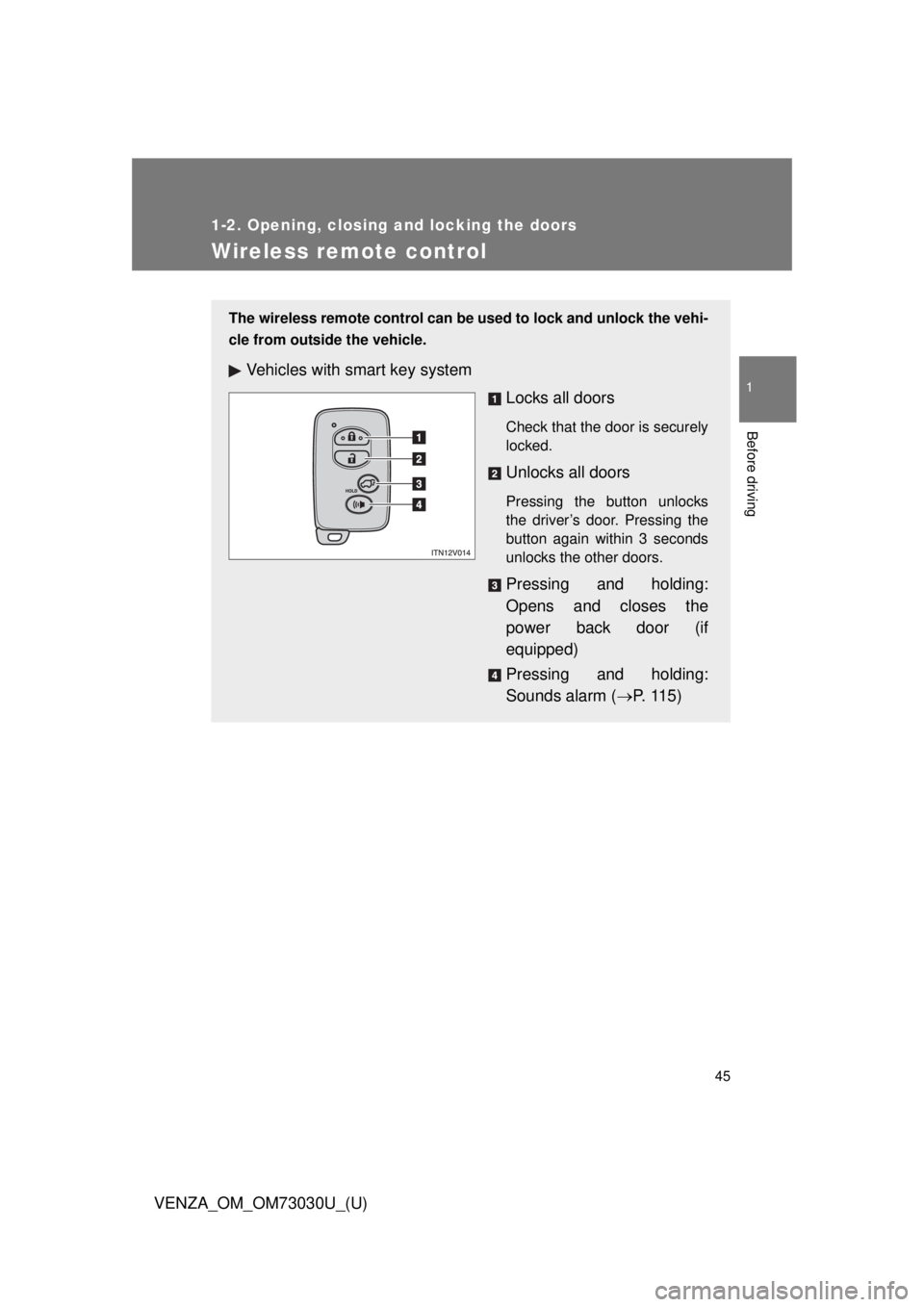
VENZA_OM_OM73030U_(U) Wireless remote control The wireless remote control can be used to lock and unlock the vehi-
cle from outside the vehicle.
Vehicles with smart key system
Locks all doors Check that the door is securely
locked.
Unlocks all doors Pressing the button unlocks
the driver’s door. Pressing the
button again within 3 seconds
unlocks the other doors.
Pressing and holding:
Opens and closes the
power back door (if
equipped)
Pressing and holding:
Sounds alarm ( P. 1 1 5 )
Page 46 of 688
461-2. Opening, closing and locking the doors
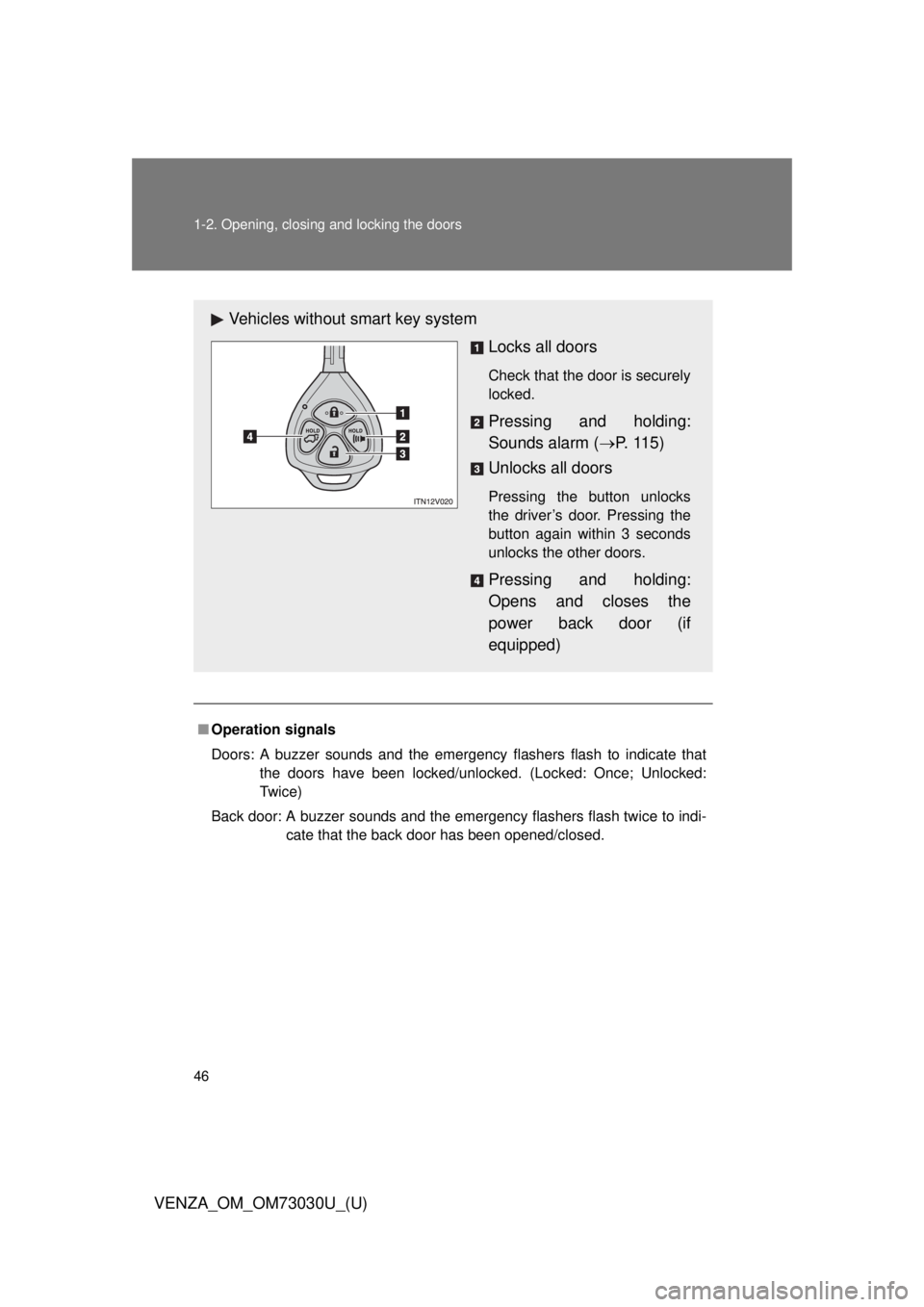
VENZA_OM_OM73030U_(U) ■ Operation signals
Doors: A buzzer sounds and the emergency flashers flash to indicate that
the doors have been locked/unlocked. (Locked: Once; Unlocked:
Tw i c e )
Back door: A buzzer sounds and the emergency flashers flash twice to indi-
cate that the back door has been opened/closed.Vehicles without smart key system
Locks all doors Check that the door is securely
locked.
Pressing and holding:
Sounds alarm ( P. 1 1 5 )
Unlocks all doors Pressing the button unlocks
the driver’s door. Pressing the
button again within 3 seconds
unlocks the other doors.
Pressing and holding:
Opens and closes the
power back door (if
equipped)