Page 543 of 608
543
LC200_OM_OM60M88U_(U)
7
When trouble arises
7-2. Steps to take in an emergency
If the vehicle batter y is discharged
If you have a set of jumper (or booster) cables and a second vehicle
with a 12 volt battery, you can jump start your Toyota following the
steps below.
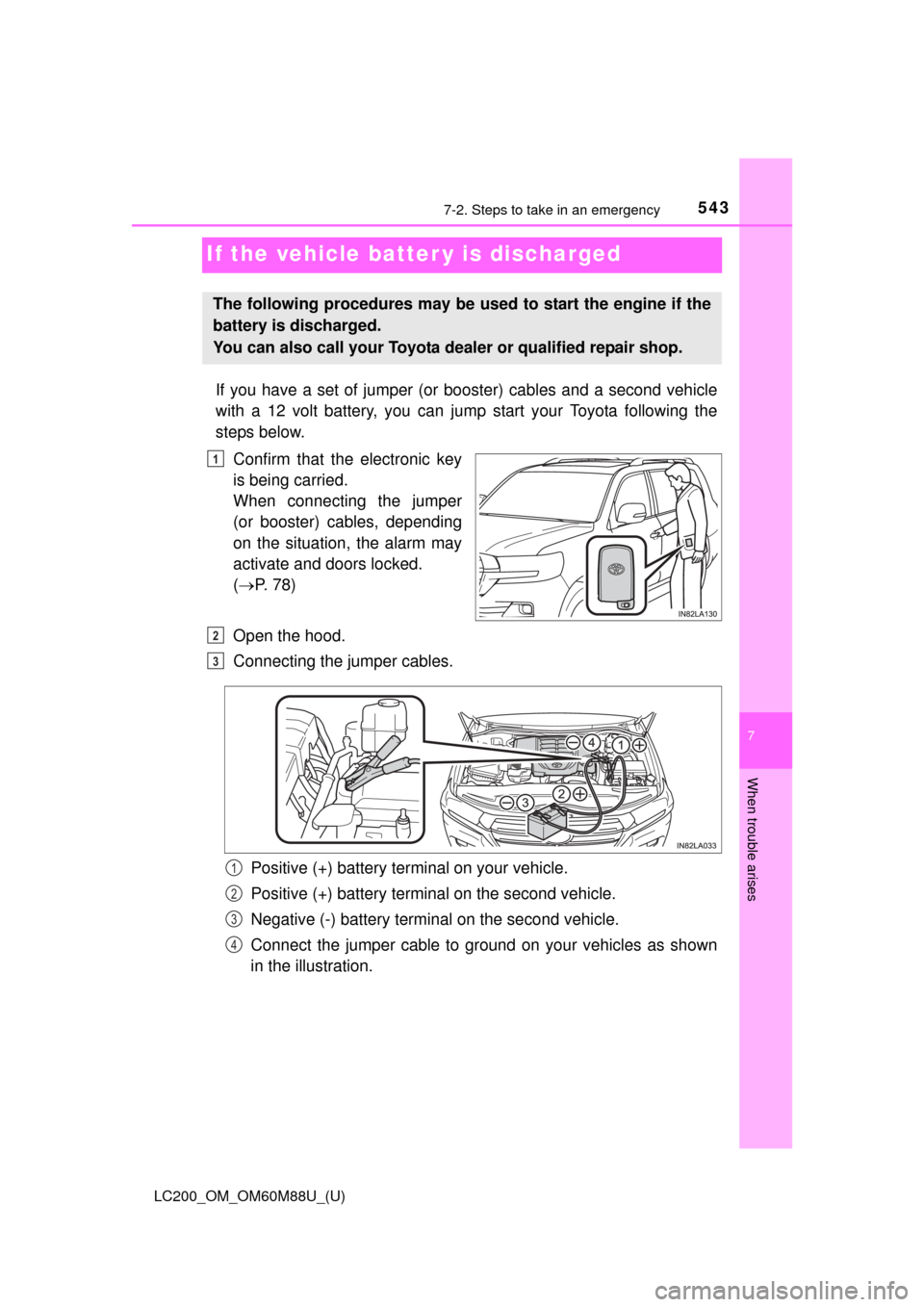
Confirm that the electronic key
is being carried.
When connecting the jumper
(or booster) cables, depending
on the situation, the alarm may
activate and doors locked.
( P. 78)
Open the hood.
Connecting the jumper cables.
Positive (+) battery terminal on your vehicle.
Positive (+) battery terminal on the second vehicle.
Negative (-) battery terminal on the second vehicle.
Connect the jumper cable to ground on your vehicles as shown
in the illustration.
The following procedures may be used to start the engine if the
battery is discharged.
You can also call your Toyota dealer or qualified repair shop.
1
2
3
1
2
3
4
Page 575 of 608
LC200_OM_OM60M88U_(U)
5758-2. Customization
8
Vehicle specifications
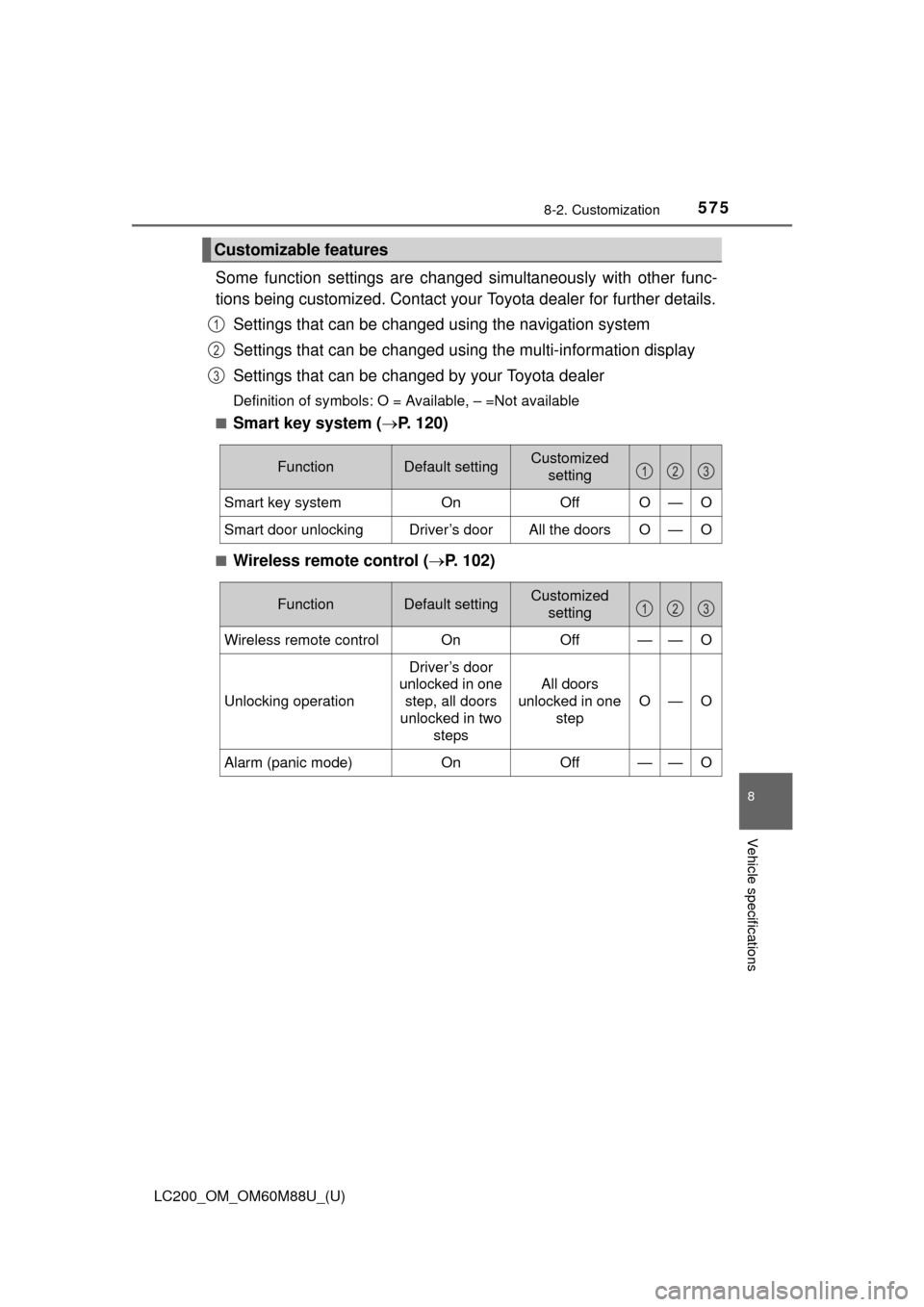
Some function settings are changed simultaneously with other func-
tions being customized. Contact your Toyota dealer for further details.
Settings that can be changed using the navigation system
Settings that can be changed using the multi-information display
Settings that can be changed by your Toyota dealer
Definition of symbols: O = Available, – =Not available
■
Smart key system ( P. 120)
■Wireless remote control ( P. 102)
Customizable features
1
2
3
FunctionDefault settingCustomized
setting
Smart key system OnOffO—O
Smart door unlockingDriver’s doorAll the doorsO—O
123
FunctionDefault settingCustomized
setting
Wireless remote control On Off——O
Unlocking operation
Driver’s door
unlocked in one
step, all doors
unlocked in two steps
All doors
unlocked in one step
O—O
Alarm (panic mode)OnOff——O
123
Page 576 of 608
576
LC200_OM_OM60M88U_(U)
8-2. Customization
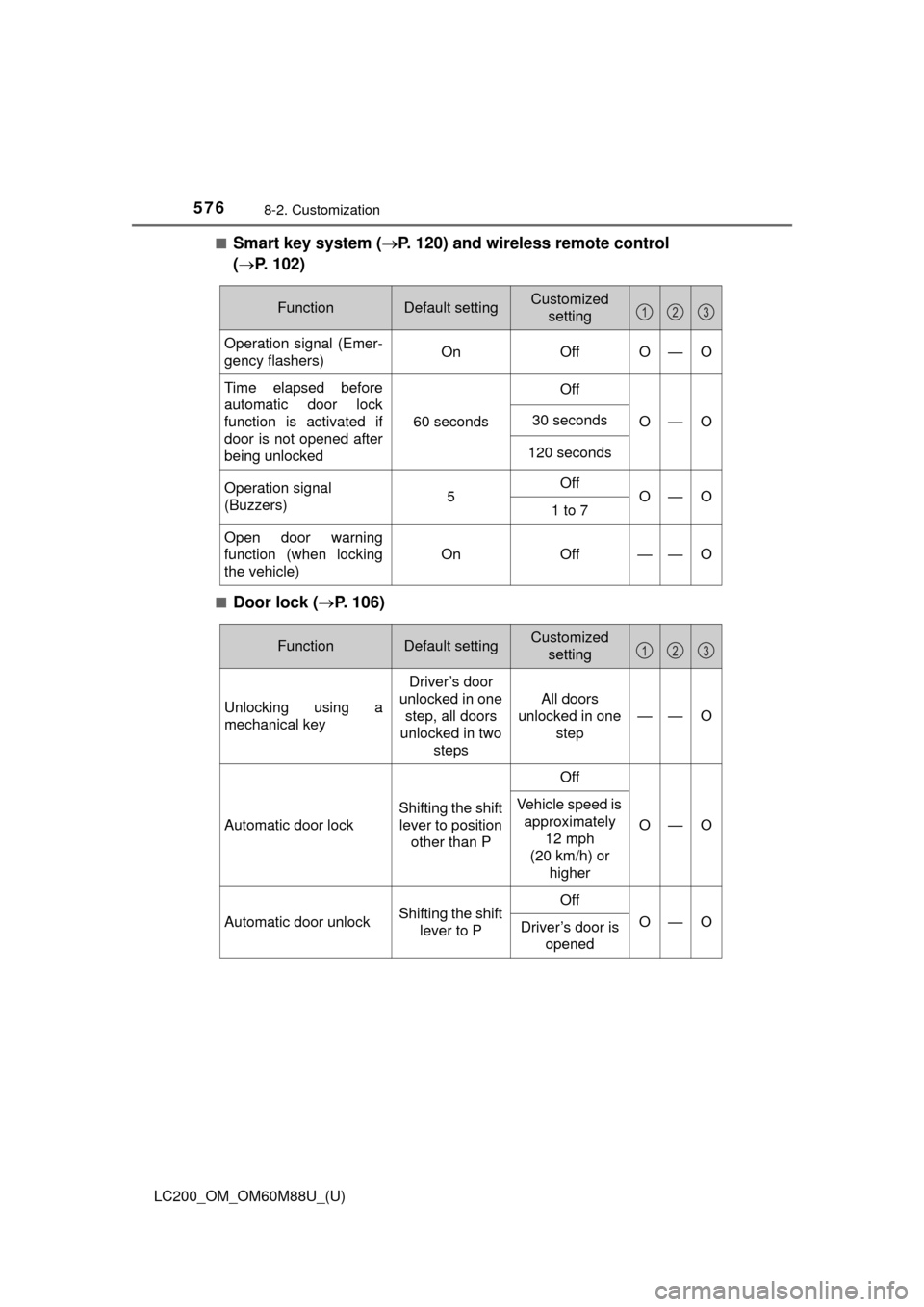
■Smart key system (P. 120) and wireless remote control
( P. 102)
■Door lock ( P. 106)
FunctionDefault settingCustomized
setting
Operation signal (Emer-
gency flashers) On OffO—O
Time elapsed before
automatic door lock
function is activated if
door is not opened after
being unlocked
60 secondsOffO—O30 seconds
120 seconds
Operation signal
(Buzzers)5OffO—O1 to 7
Open door warning
function (when locking
the vehicle)
On Off
——O
123
FunctionDefault settingCustomized
setting
Unlocking using a
mechanical key
Driver’s door
unlocked in one step, all doors
unlocked in two
steps
All doors
unlocked in one step
——O
Automatic door lock Shifting the shift
lever to position other than P OffO—O
Vehicle speed is
approximately
12 mph
(20 km/h) or higher
Automatic door unlock Shifting the shift
lever to P OffO—O
Driver’s door is
opened
123
Page 578 of 608
578
LC200_OM_OM60M88U_(U)
8-2. Customization
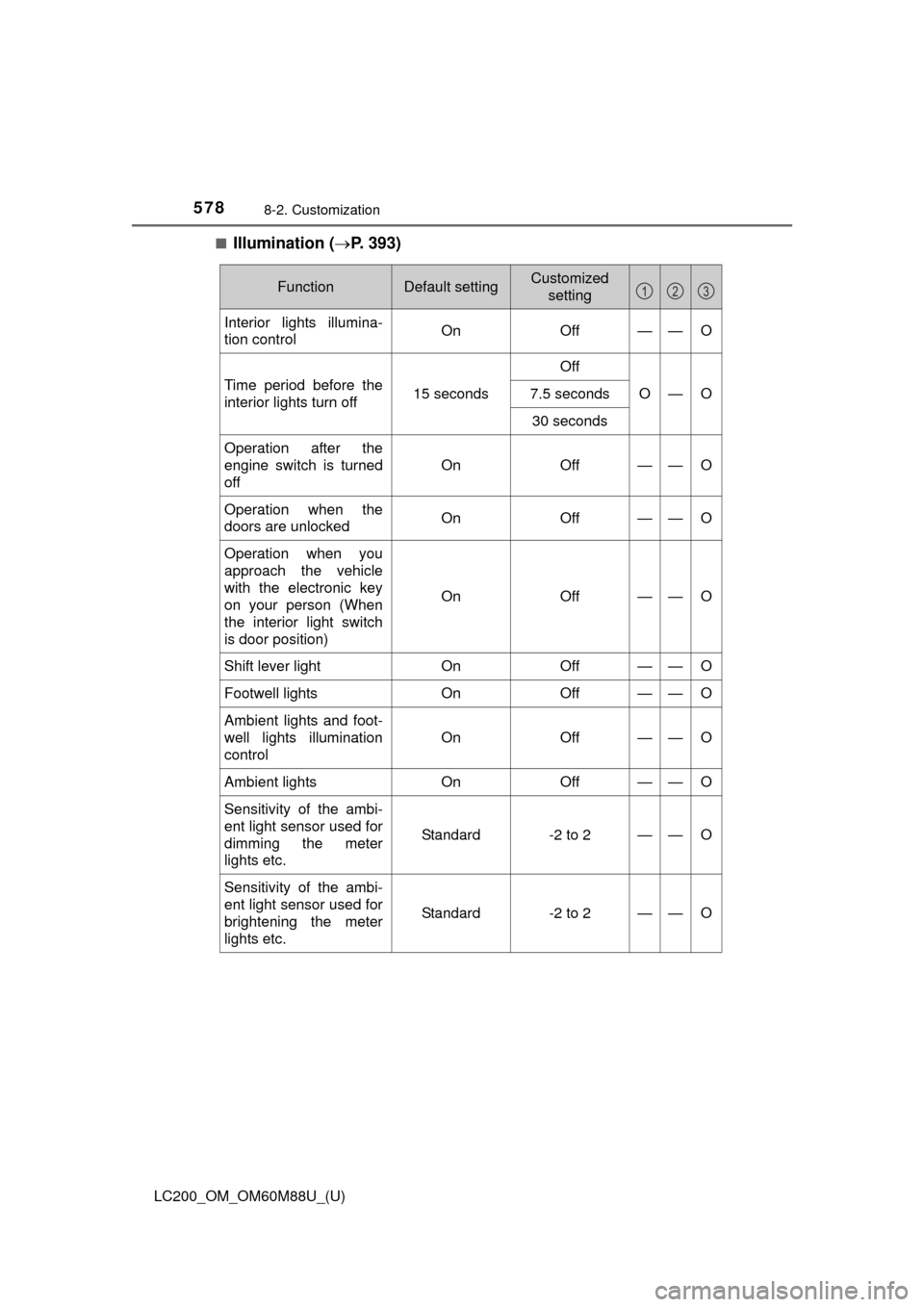
■Illumination (P. 393)
FunctionDefault settingCustomized
setting
Interior lights illumina-
tion control On Off——O
Time period before the
interior lights turn off 15 secondsOff
O—O
7.5 seconds
30 seconds
Operation after the
engine switch is turned
off On Off
——O
Operation when the
doors are unlocked
On Off——O
Operation when you
approach the vehicle
with the electronic key
on your person (When
the interior light switch
is door position)On Off
——O
Shift lever light
OnOff——O
Footwell lights OnOff——O
Ambient lights and foot-
well lights illumination
control On Off
——O
Ambient lights
OnOff——O
Sensitivity of the ambi-
ent light sensor used for
dimming the meter
lights etc.
Standard-2 to 2——O
Sensitivity of the ambi-
ent light sensor used for
brightening the meter
lights etc.
Standard-2 to 2——O
123
Page 580 of 608
580
LC200_OM_OM60M88U_(U)
8-2. Customization
■Outside rear view mirrors (P. 147)
■Front seat heaters and ventilators ( P. 390)
■Driving position memory ( P. 136)
FunctionDefault settingCustomized
setting
Automatic folding/
extending operation Linked to lock-
ing/unlocking of
the doors Off——O
Linked to engine
switch operation
Linked mirror function
when reversing On Off——O
123
FunctionDefault settingCustomized
setting
Adjustment of the front
seat heater tempera-
ture or the ventilator fan
speed during automatic
operation (individual
seat adjustment avail-
able) Level 3
(standard) Level 1 (low) to
level 5 (high)
——O
123
FunctionDefault settingCustomized setting
Selection the door link-
ing driving position
memory with door
unlock operation Driver’s door All doors
——O
123
Page 583 of 608
LC200_OM_OM60M88U_(U)
5838-2. Customization
8
Vehicle specifications
■Vehicle customization
●If the smart key system is turned off, unlock door cannot be selected.
● If the doors are not opened after unlocking and are then automatically re-
locked, a signal will be given if “Operation signal (Emergency flashers)” or
“Operation signal (Buzzer)” are set to on.
■ When setting using the mu lti-information display (vehicles with naviga-
tion system)
When using the multi-information display to set an item that can also be set
using the navigation system, the item displayed on the navigation system will
not change immediately.
If the engine switch is first turned off, the screen display will change once the
engine switch is turned to IGNITION ON mode again.
■ When customizing usi ng the navigation system
Stop the vehicle in a safe place, apply the parking brake, and shift the shift
lever to P. Also, to prevent battery discharge, leave the engine running while
customizing the features.
WARNING
■ During customization
As the engine needs to be running during customization, ensure that the
vehicle is parked in a place with adequate ventilation. In a closed area such
as a garage, exhaust gases including harmful carbon monoxide (CO) may
collect and enter the vehicle. This may lead to death or a serious health
hazard.
NOTICE
■During customization
To prevent battery discharge, ensure that the engine is running while cus-
tomizing features.
Page 588 of 608
588What to do if... (Troubleshooting)
LC200_OM_OM60M88U_(U)
What to do if... (Troubleshooting)
●If you lose your mechanical keys, new genuine mechanical keys can be
made by your Toyota dealer. (P. 103)
●If you lose your electronic keys, the risk of vehicle theft increases signifi-
cantly. Contact your Toyota dealer immediately. ( P. 105)
●Is the electronic key battery weak or depleted? (P. 479)
●Is the engine switch in IGNITION ON mode?
When locking the doors, turn the engine switch off. ( P. 194)
●Is the electronic key left inside the vehicle?
When locking the doors, make sure that you have the electronic key on
your person.
●The function may not operate properly due to the condition of the radio
wave. (P. 122)
●Is the child-protector lock set?
The rear door cannot be opened from inside the vehicle when the lock is
set. Open the rear door from outside and then unlock the child-protector
lock. (P. 109)
If you have a problem, check the following before contacting
your Toyota dealer.
The doors cannot be locked, unlocked, opened or closed
You lose your keys
The doors cannot be locked or unlocked
The rear door cannot be opened
Page 593 of 608
593Alphabetical index
LC200_OM_OM60M88U_(U)
Anti-lock brake system (ABS) ...................................... 357
Function ................................ 357
Warning light ......................... 511
Approach warning
Dynamic radar cruise control................................. 264
Armrest ..................................... 420
Assist grips .............................. 421
Audio input
*
Audio system*
Automatic air conditioning
systemAir conditioning filter ............. 477
Automatic air conditioning
system ......... ....................... 374
Automatic door locking and
unlocking systems ................ 110
Automatic headli ght leveling
system .................................... 207
Function ................................ 207
Automatic High Beam ............. 209
Automatic light control system .................................... 207 Automatic transmission ......... 199
2nd start switch..................... 200
Downshift restriction
warning buzzer ................... 202
If the shift lever cannot be
shifted from P ..................... 539
S mode ................................. 201
AUX port
*
Auxiliary boxes ........................ 403
Back door ................................. 114
Back door handle.................. 115
Wireless remote control ........ 106
Back-up lights Replacing light bulbs ............ 492
Wattage ................................ 559
Battery ...................................... 459 Battery checking ................... 459
If the vehicle battery is discharged ...................... 543
Preparing and checking before winter ...................... 369
Voltmeter ................................ 85
Warning light......................... 510
Blind Spot Monitor (BSM) ....... 343
Bluetooth
®*
B
*: Refer to the “NAVIGATION SYSTEM OWNER’S MANUAL”.