Page 198 of 608
198
LC200_OM_OM60M88U_(U)
4-2. Driving procedures
NOTICE
■To prevent battery discharge
●Do not leave the engine switch in ACCESSORY or IGNITION ON mode
for long periods of time without the engine running.
● If “ACCESSORY” or “IGNITION ON” is displayed on the multi-information
display, the engine switch is not off. When exiting the vehicle, always
check that the engine switch is off.
● Do not stop the engine when the shift lever is in a position other than P. If
the engine is stopped in another shift lever position, the engine switch will
not be turned off but instead be turned to ACCESSORY mode. If the vehi-
cle is left in ACCESSORY mode, battery discharge may occur.
■ When starting the engine
●Do not race a cold engine.
● If the engine becomes difficult to star t or stalls frequently, have your vehi-
cle checked by your Toyota dealer immediately.
■ Symptoms indicating a malfunction with the engine switch
If the engine switch seems to be operating somewhat differently than usual,
such as the switch sticking slightly, there may be a malfunction. Contact
your Toyota dealer immediately.
Page 201 of 608
LC200_OM_OM60M88U_(U)
2014-2. Driving procedures
4
Driving
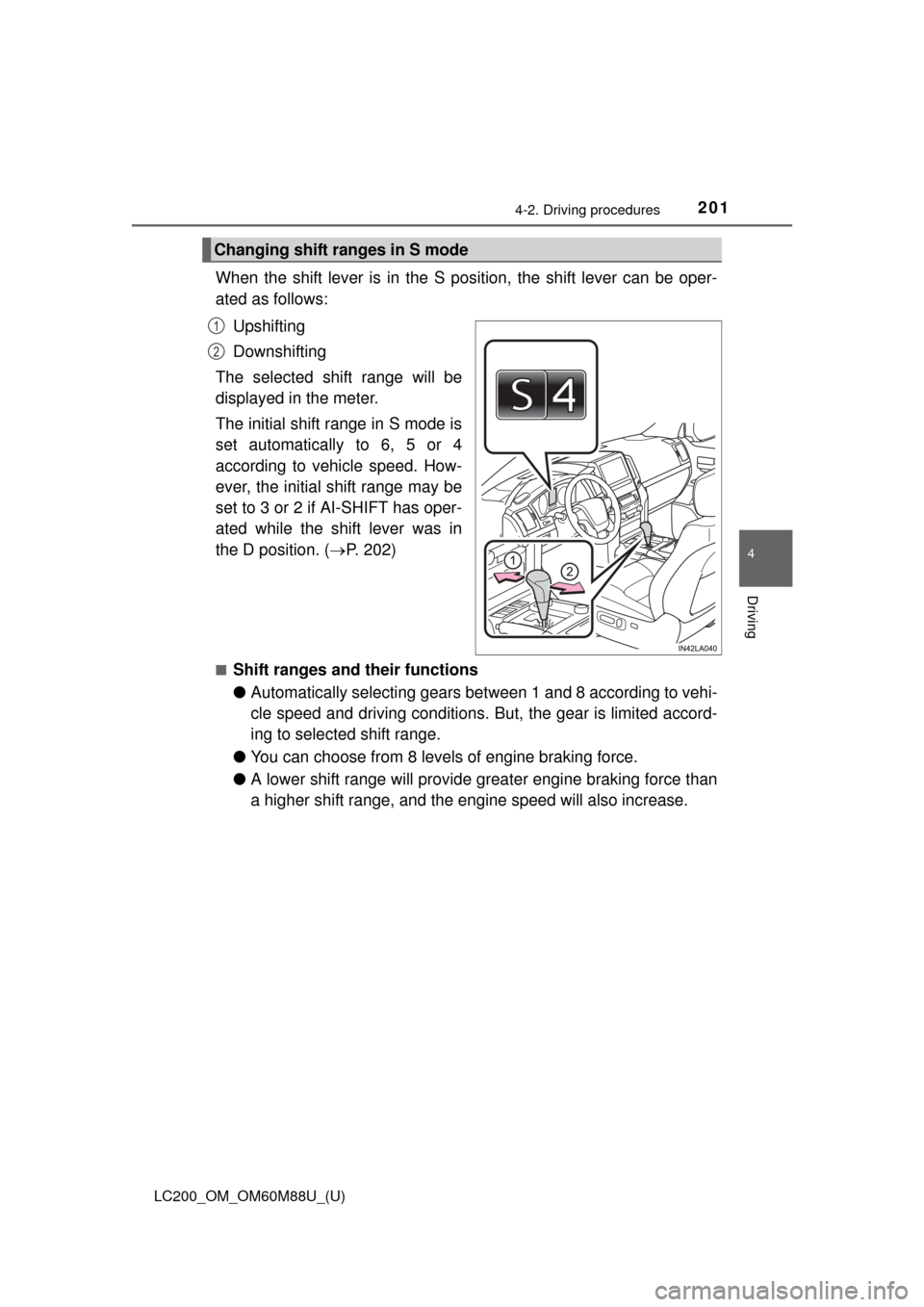
When the shift lever is in the S position, the shift lever can be oper-
ated as follows:Upshifting
Downshifting
The selected shift range will be
displayed in the meter.
The initial shift range in S mode is
set automatically to 6, 5 or 4
according to vehicle speed. How-
ever, the initial shift range may be
set to 3 or 2 if AI-SHIFT has oper-
ated while the shift lever was in
the D position. ( P. 202)
■Shift ranges and their functions
●Automatically selecting gears bet ween 1 and 8 according to vehi-
cle speed and driving conditions. But, the gear is limited accord-
ing to selected shift range.
● You can choose from 8 levels of engine braking force.
● A lower shift range will provide gr eater engine braking force than
a higher shift range, and the engine speed will also increase.
Changing shift ranges in S mode
1
2
Page 204 of 608
204
LC200_OM_OM60M88U_(U)
4-2. Driving procedures
Parking brake
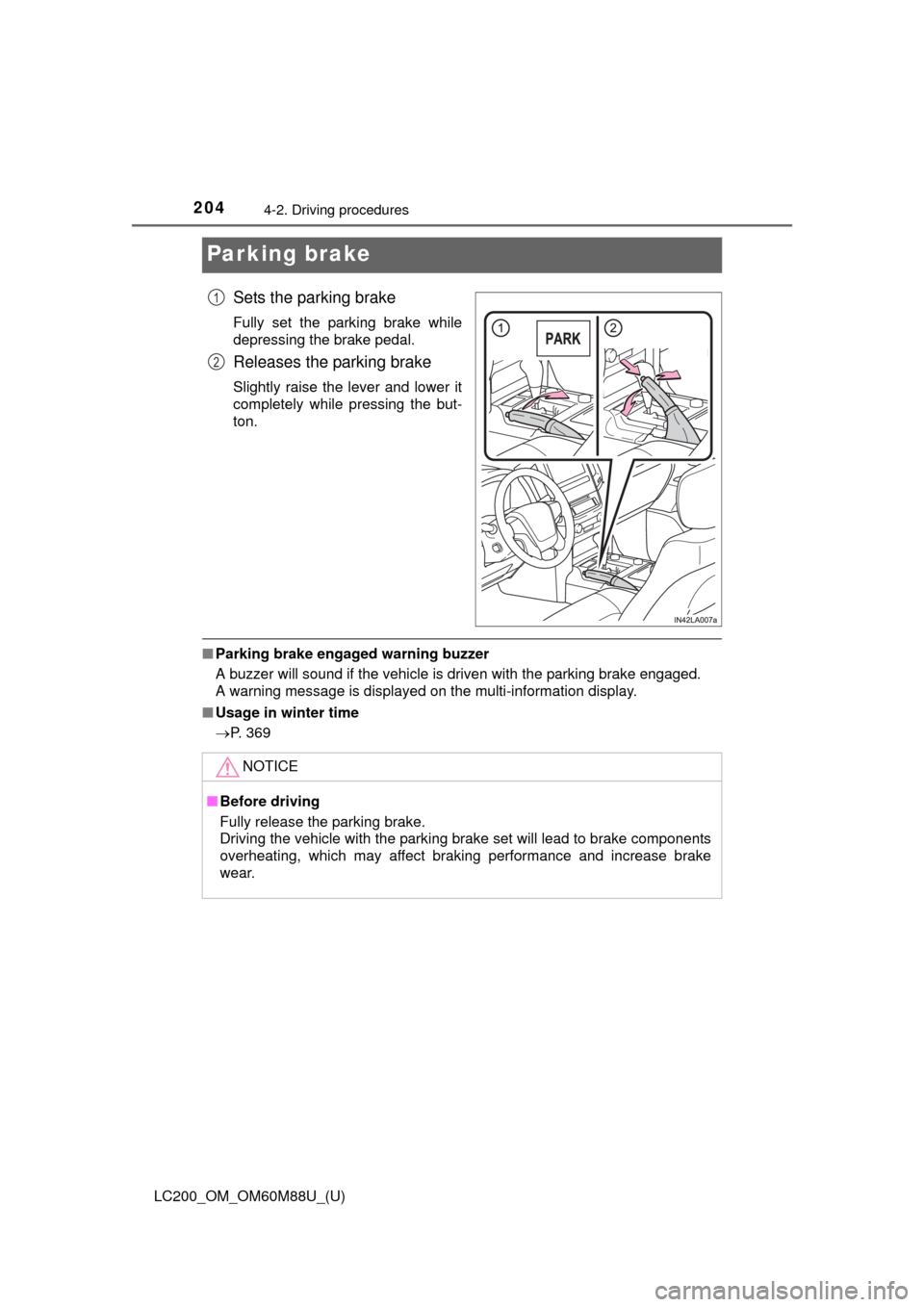
Sets the parking brake
Fully set the parking brake while
depressing the brake pedal.
Releases the parking brake
Slightly raise the lever and lower it
completely while pressing the but-
ton.
■Parking brake engaged warning buzzer
A buzzer will sound if the vehicle is driven with the parking brake engaged.
A warning message is displayed on the multi-information display.
■ Usage in winter time
P. 369
1
2
NOTICE
■Before driving
Fully release the parking brake.
Driving the vehicle with the parking brake set will lead to brake components
overheating, which may affect braking performance and increase brake
wear.
Page 212 of 608

212
LC200_OM_OM60M88U_(U)
4-3. Operating the lights and wipers
●In the situations shown below, the system may not be able to accurately
detect surrounding brightness levels. This may cause the low beams to
remain on or the high beams to cause problems for pedestrians, vehicles
ahead or other parties. In these cases, manually switch between the high
and low beams.
• In bad weather (rain, snow, fog, sandstorms etc.)
• The windshield is obscured by fog, mist, ice, dirt etc.
• The windshield is cracked or damaged.
• The inside rear view mirror or ca mera sensor is deformed or dirty.
• The camera sensor temperature is extremely high.
• Surrounding brightness levels are equal to those of headlights, tail lights or fog lights.
• Vehicles ahead have headlights that are either switched off, dirty, are
changing color, or are not aimed properly.
• When driving through an area of in termittently changing brightness and
darkness
• When frequently and repeatedly driving ascending/descending roads, or roads with rough, bumpy or uneven surfaces (such as stone-paved
roads, gravel tracks etc.)
• When frequently and repeatedly taking curves or driving on a winding road
• There is a highly reflective object ahead of the vehicle, such as a sign or
a mirror.
• The back of a vehicle ahead is highly reflective, such as a container on a truck.
• The vehicle’s headlights are damaged or dirty.
• The vehicle is listing or tilting, due to a flat tire, a trailer being towed etc.
• The high beam and low beam are repeatedly being switched between in an abnormal manner.
• The driver believes that the high beam may be causing problems or dis-
tress to other drivers or pedestrians nearby.
■ If a warning message of the Auto matic High Beam is displayed...
It may indicate a malfunction in the system. Contact your Toyota dealer.
Page 233 of 608
233
LC200_OM_OM60M88U_(U)
4-5. Using the driving support systems
4
Driving
PCS (Pre-Collision System)
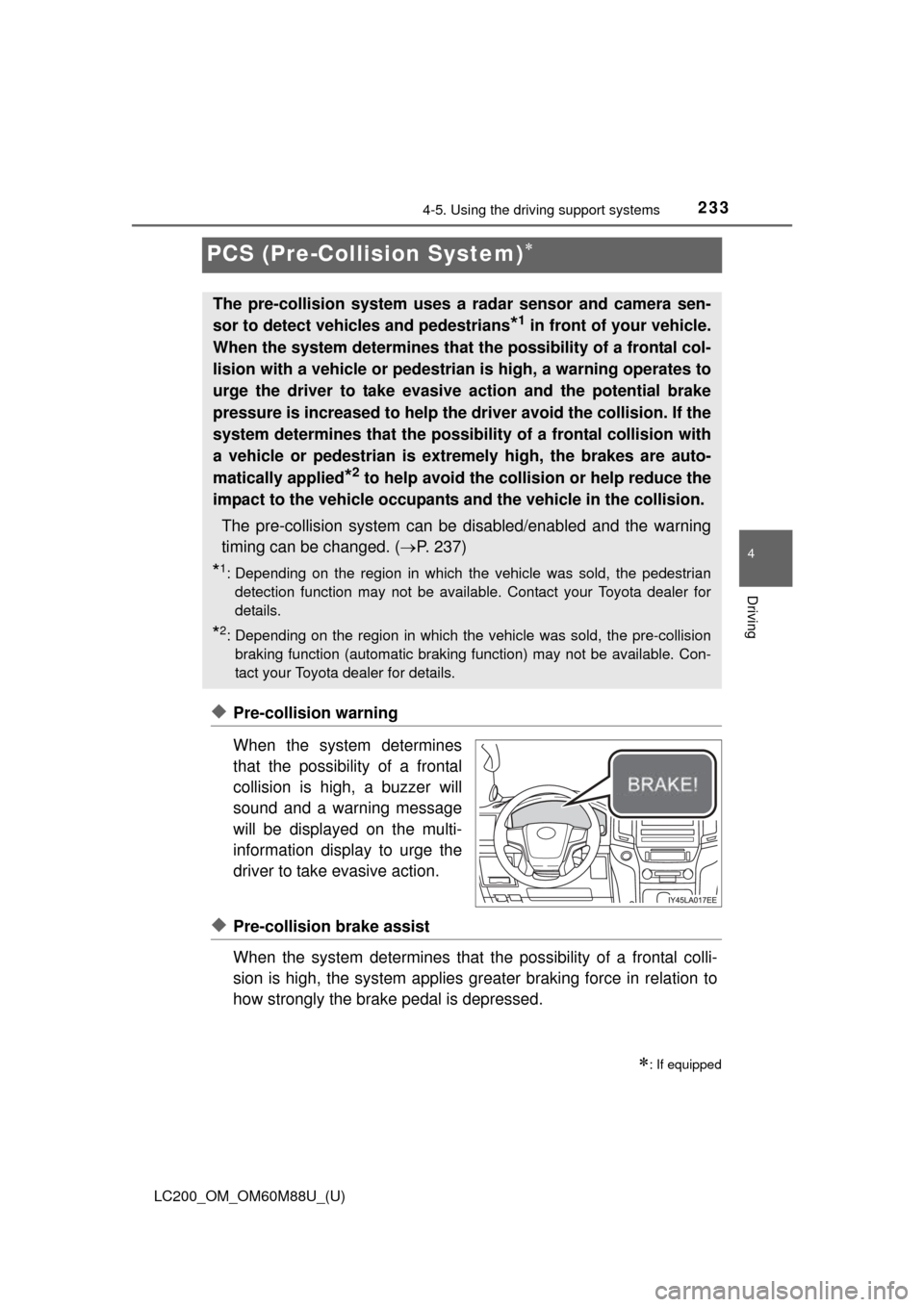
◆Pre-collision warning
When the system determines
that the possibility of a frontal
collision is high, a buzzer will
sound and a warning message
will be displayed on the multi-
information display to urge the
driver to take evasive action.
◆Pre-collision brake assist
When the system determines that the possibility of a frontal colli-
sion is high, the system applies gr eater braking force in relation to
how strongly the brake pedal is depressed.
: If equipped
The pre-collision system uses a radar sensor and camera sen-
sor to detect vehicles and pedestrians
*1 in front of your vehicle.
When the system determines that the possibility of a frontal col-
lision with a vehicle or pedestrian is high, a warning operates to
urge the driver to take evasive action and the potential brake
pressure is increased to help the dr iver avoid the collision. If the
system determines that the possibility of a frontal collision with
a vehicle or pedestrian is extremely high, the brakes are auto-
matically applied
*2 to help avoid the collision or help reduce the
impact to the vehicle occupants and the vehicle in the collision.
The pre-collision system can be disabled/enabled and the warning
timing can be changed. ( P. 237)
*1: Depending on the region in which the vehicle was sold, the pedestrian
detection function may not be available. Contact your Toyota dealer for
details.
*2: Depending on the region in which the vehicle was sold, the pre-collisionbraking function (automatic braking function) may not be available. Con-
tact your Toyota dealer for details.
Page 237 of 608
LC200_OM_OM60M88U_(U)
2374-5. Using the driving support systems
4
Driving
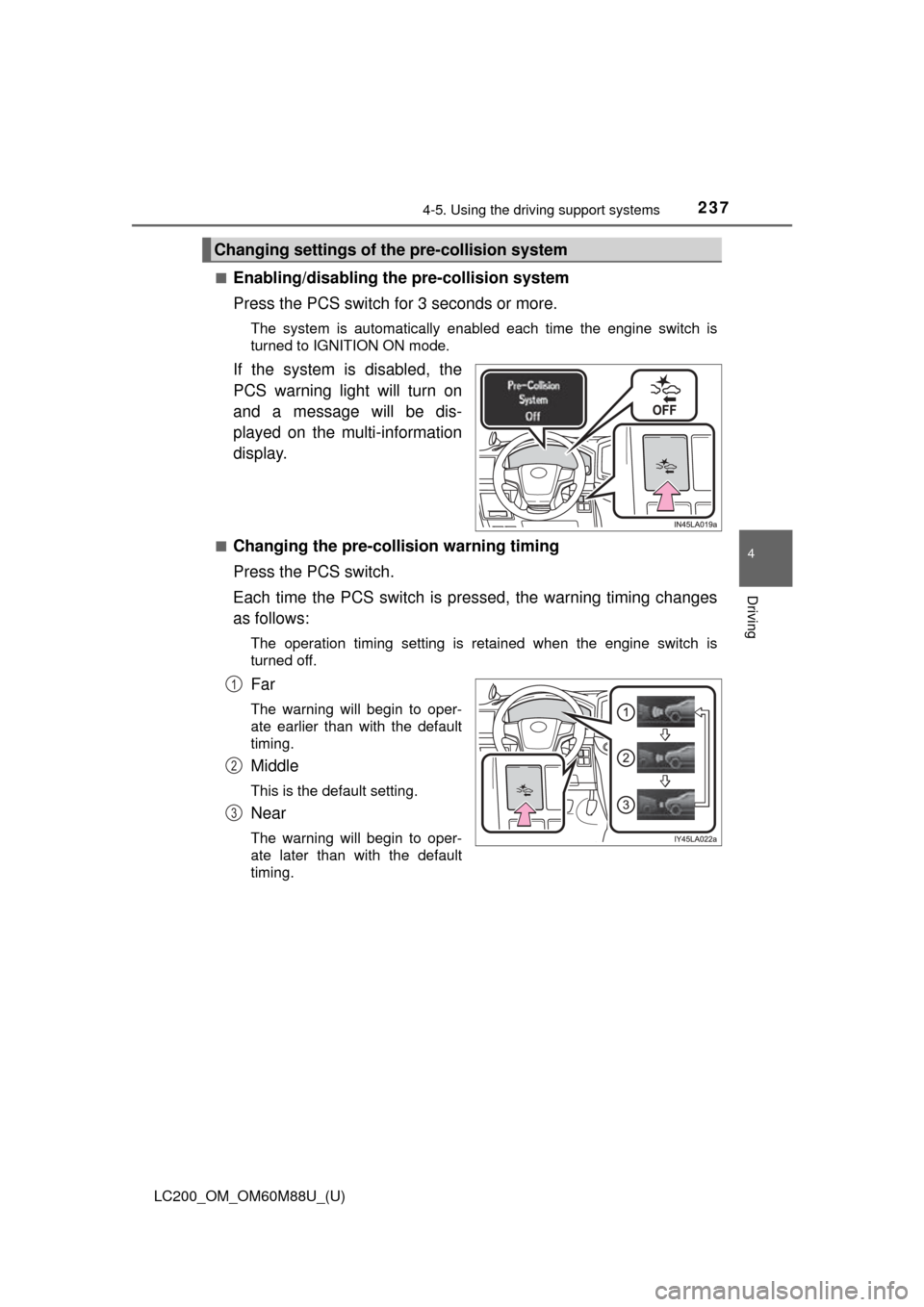
■Enabling/disabling th e pre-collision system
Press the PCS switch for 3 seconds or more.
The system is automatically enabled each time the engine switch is
turned to IGNITION ON mode.
If the system is disabled, the
PCS warning light will turn on
and a message will be dis-
played on the multi-information
display.
■Changing the pre-colli sion warning timing
Press the PCS switch.
Each time the PCS switch is pressed, the warning timing changes
as follows:
The operation timing setting is retained when the engine switch is
turned off.
Far
The warning will begin to oper-
ate earlier than with the default
timing.
Middle
This is the default setting.
Near
The warning will begin to oper-
ate later than with the default
timing.
Changing settings of th e pre-collision system
1
2
3
Page 247 of 608
LC200_OM_OM60M88U_(U)
2474-5. Using the driving support systems
4
Driving
■If the PCS warning light flashes a nd a warning message is displayed on
the multi-information display
The pre-collision system may be temporarily unavailable or there may be a
malfunction in the system.
● In the following situations, the warning light will turn off, the message will
disappear and the system will become operational when normal operating
conditions return:
• When the radar sensor or camera sensor or the area around either sen-
sor is hot, such as in the sun
• When the radar sensor or camera sensor or the area around either sen- sor is cold, such as in an extremely cold environment
• When the radar sensor or front grille emblem is dirty or covered with
snow, etc.
• If the camera sensor is obstructed, such as when the hood is open or a sticker is attached to the windshield near the camera sensor
● If the PCS warning light continues to flash or the warning message does not
disappear, the system may be malfunctioning. Have the vehicle inspected
by your Toyota dealer immediately.
■ If VSC is disabled
●If VSC is disabled ( P. 359), the pre-collision brake assist and pre-collision
braking functions are also disabled.
● The PCS warning light will turn on a nd “VSC Turned Off Pre-collision Brake
System Unavailable” will be displayed on the multi-information display.
Page 248 of 608
248
LC200_OM_OM60M88U_(U)
4-5. Using the driving support systems
LDA (Lane Depar ture Alert)
When driving on highways and freeways with white (yellow) lines, this
function alerts the driver when th e vehicle might depart from its lane.
The LDA system recognizes visi-
ble white (yellow) lines with the
camera sensor on the upper por-
tion of the front windshield.
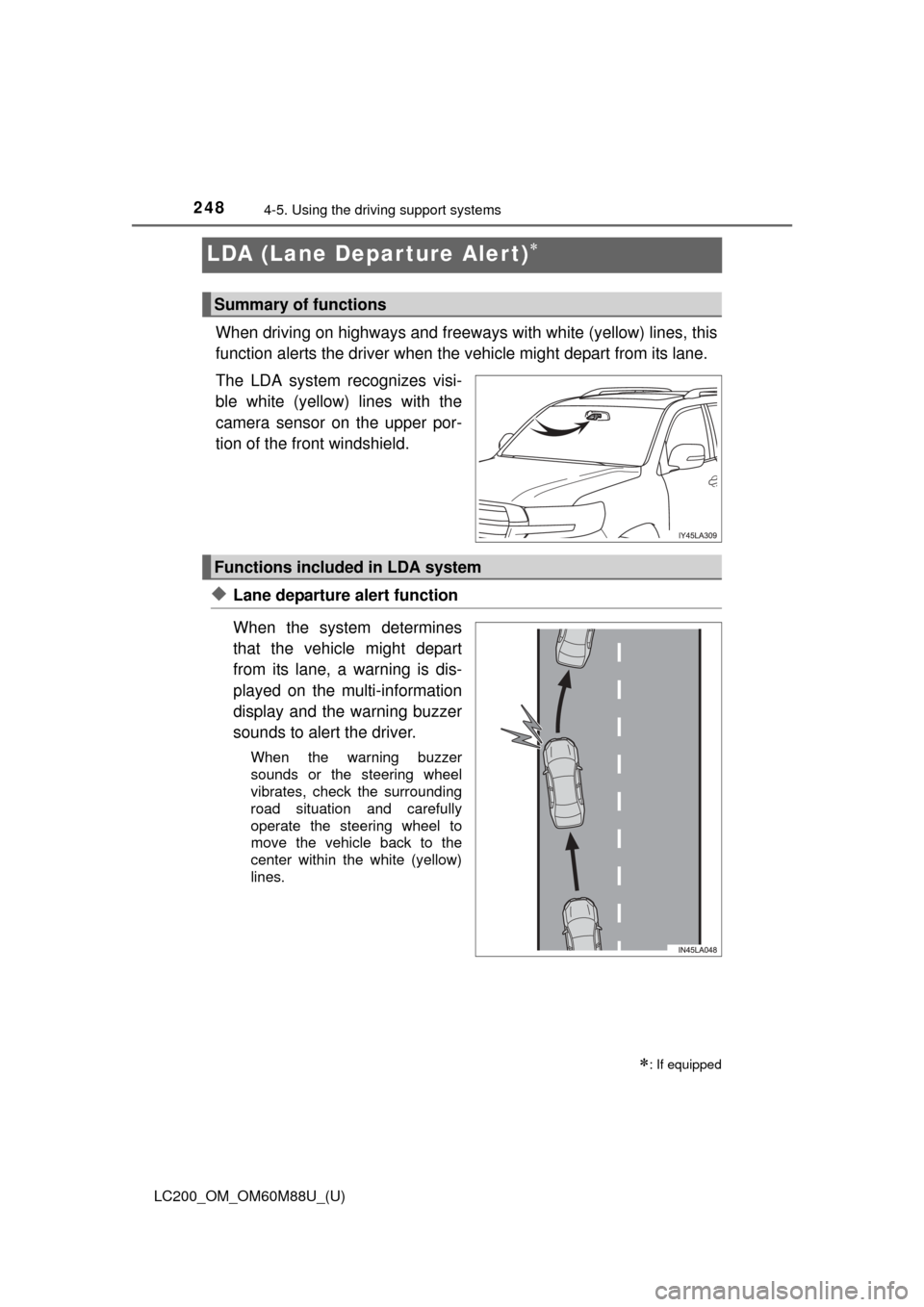
◆Lane departure alert function
When the system determines
that the vehicle might depart
from its lane, a warning is dis-
played on the multi-information
display and the warning buzzer
sounds to alert the driver.
When the warning buzzer
sounds or the steering wheel
vibrates, check the surrounding
road situation and carefully
operate the steering wheel to
move the vehicle back to the
center within the white (yellow)
lines.
: If equipped
Summary of functions
Functions included in LDA system