Page 407 of 608
LC200_OM_OM60M88U_(U)
4075-4. Using the other interior features
5
Interior features
WARNING
Keep the cool box closed while driving.
Injuries may result in the event of sudden braking, sudden swerving or an
accident.
NOTICE
To prevent battery discharge, do not leave the cool box on longer than nec-
essary when the engine is not running.
Page 408 of 608
408
LC200_OM_OM60M88U_(U)
5-4. Using the other interior features
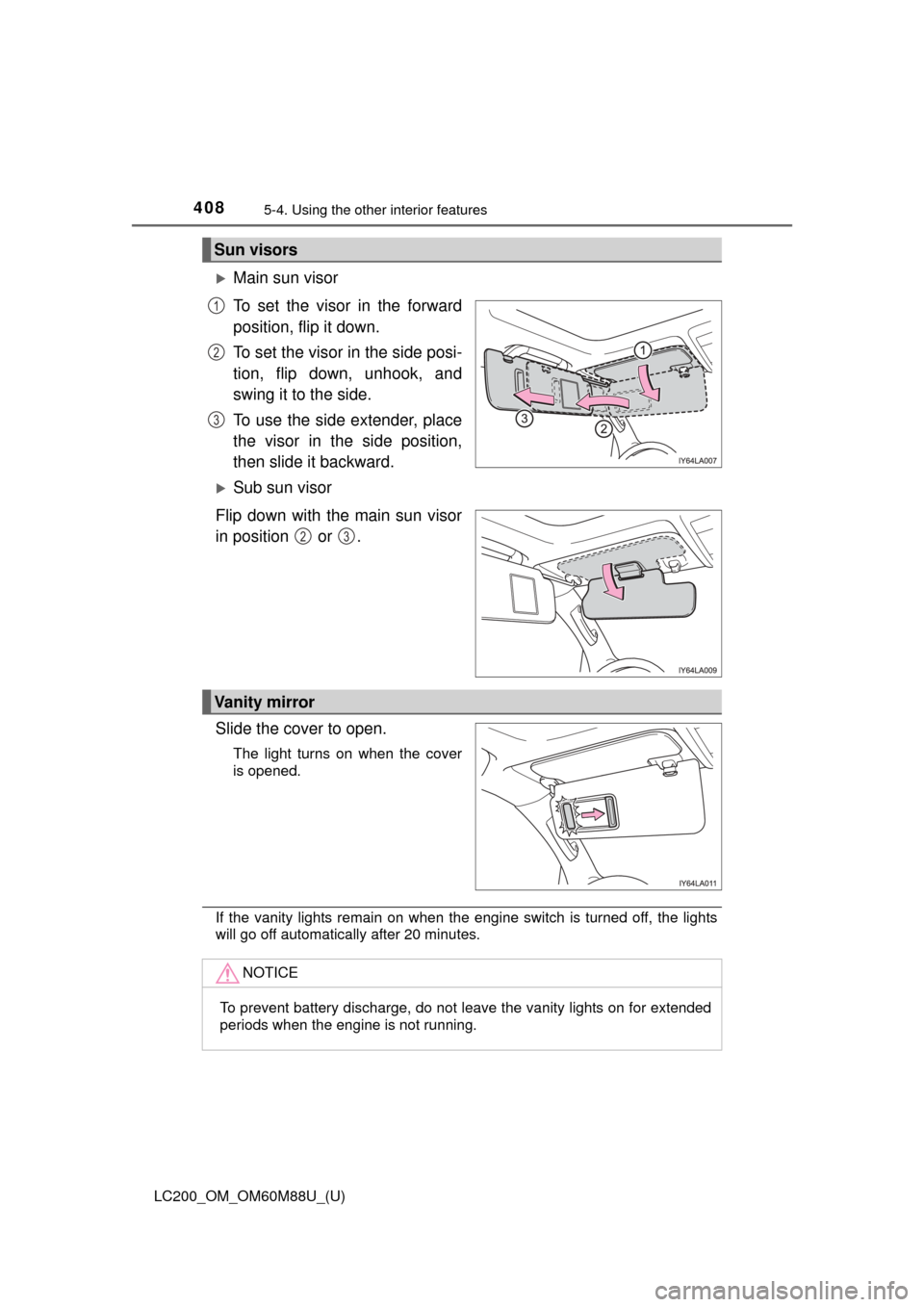
Main sun visor
To set the visor in the forward
position, flip it down.
To set the visor in the side posi-
tion, flip down, unhook, and
swing it to the side.
To use the side extender, place
the visor in the side position,
then slide it backward.
Sub sun visor
Flip down with the main sun visor
in position or .
Slide the cover to open.
The light turns on when the cover
is opened.
If the vanity lights remain on when the engine switch is turned off, the lights
will go off automatically after 20 minutes.
Sun visors
1
2
3
23
Vanity mirror
NOTICE
To prevent battery discharge, do not leave the vanity lights on for extended
periods when the engine is not running.
Page 409 of 608
LC200_OM_OM60M88U_(U)
4095-4. Using the other interior features
5
Interior features
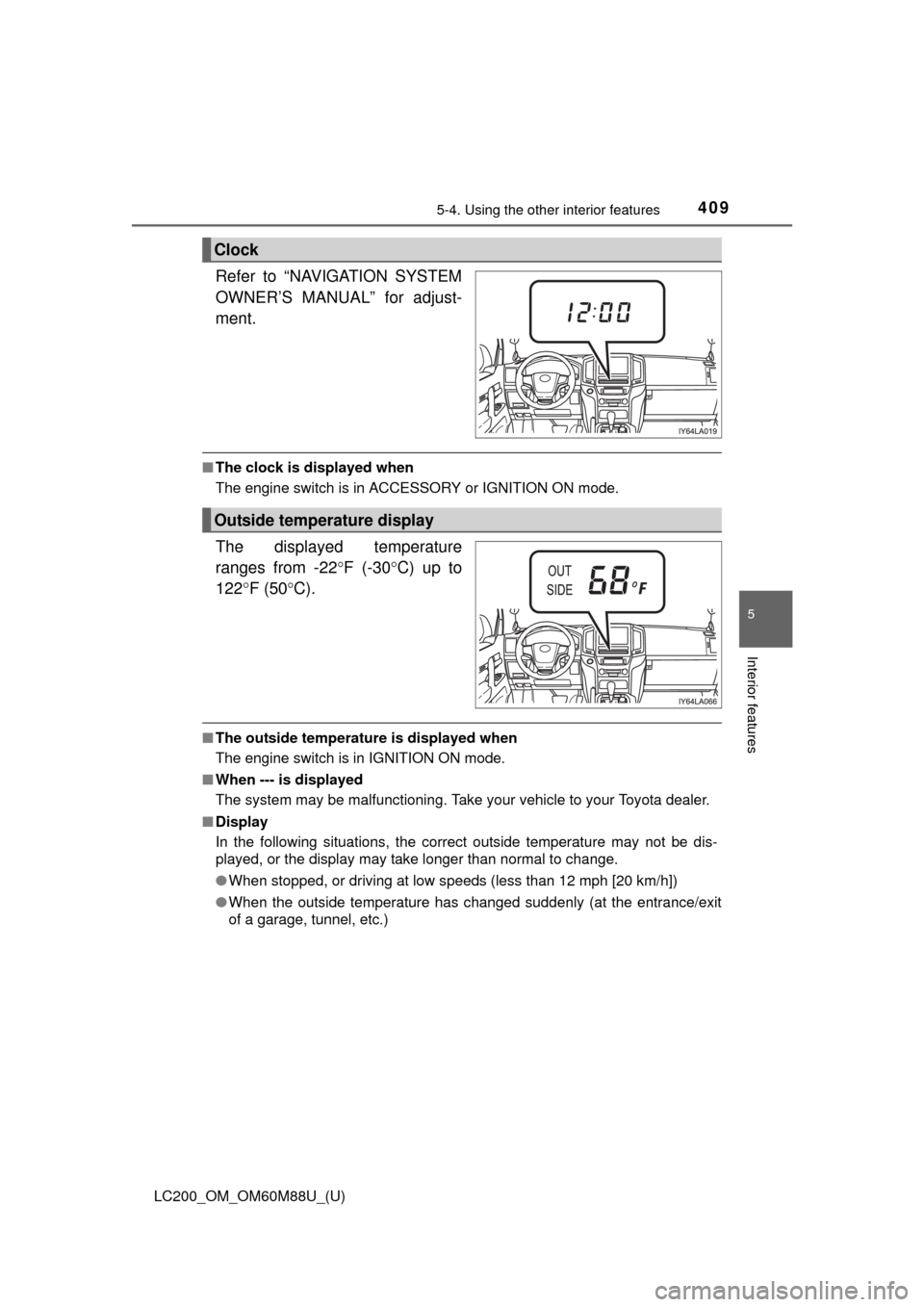
Refer to “NAVIGATION SYSTEM
OWNER’S MANUAL” for adjust-
ment.
■The clock is displayed when
The engine switch is in ACCESSORY or IGNITION ON mode.
The displayed temperature
ranges from -22 F (-30C) up to
122 F (50 C).
■The outside temperature is displayed when
The engine switch is in IGNITION ON mode.
■ When --- is displayed
The system may be malfunctioning. Take your vehicle to your Toyota dealer.
■ Display
In the following situations, the correct outside temperature may not be dis-
played, or the display may take longer than normal to change.
●When stopped, or driving at low speeds (less than 12 mph [20 km/h])
● When the outside temperature has changed suddenly (at the entrance/exit
of a garage, tunnel, etc.)
Clock
Outside temperature display
Page 411 of 608
LC200_OM_OM60M88U_(U)
4115-4. Using the other interior features
5
Interior features
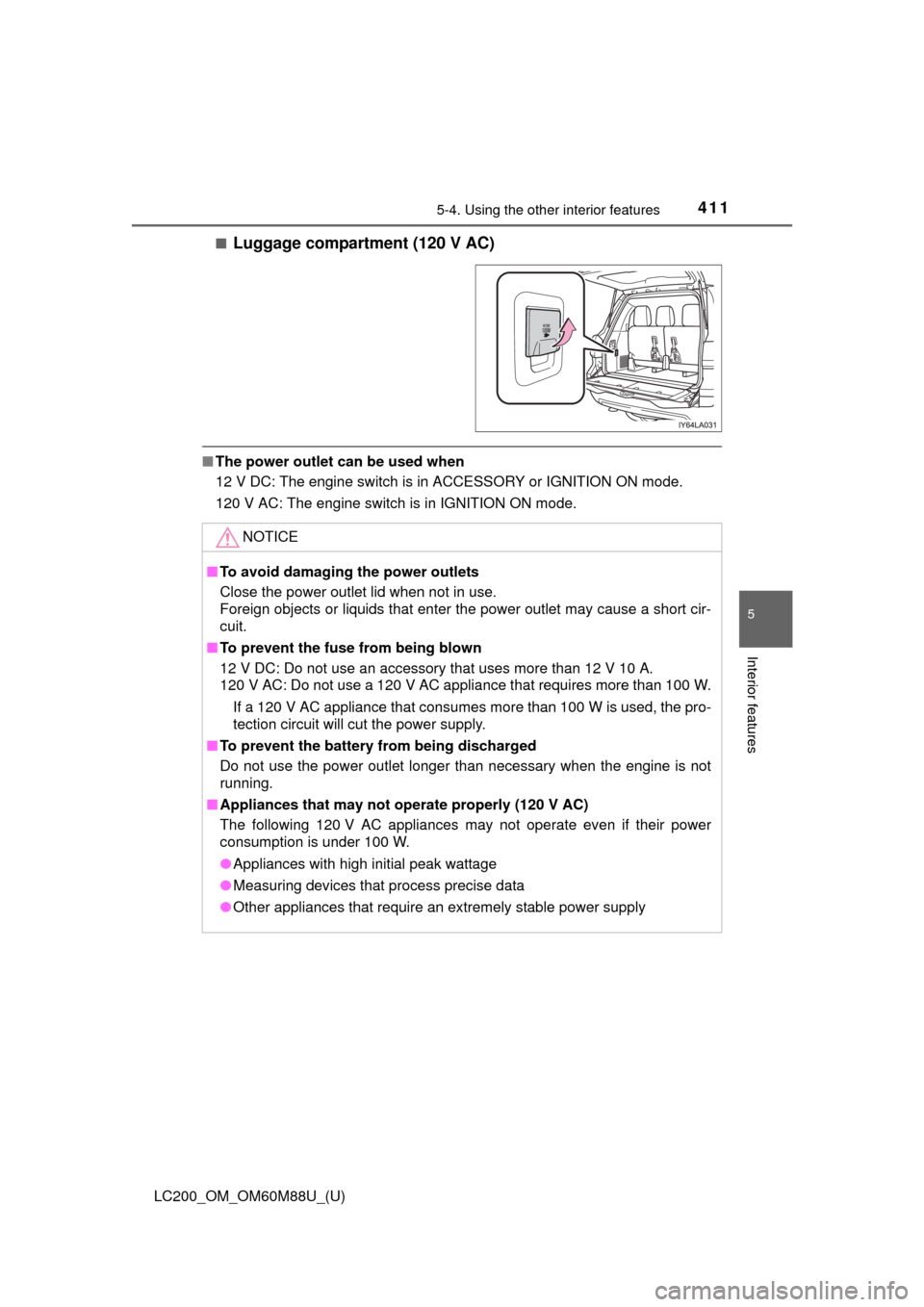
■Luggage compartment (120 V AC)
■The power outlet can be used when
12 V DC: The engine switch is in ACCESSORY or IGNITION ON mode.
120 V AC: The engine switch is in IGNITION ON mode.
NOTICE
■To avoid damaging the power outlets
Close the power outlet lid when not in use.
Foreign objects or liquids that enter the power outlet may cause a short cir-
cuit.
■ To prevent the fuse from being blown
12 V DC: Do not use an accessory that uses more than 12 V 10 A.
120 V AC: Do not use a 120 V AC appliance that requires more than 100 W.
If a 120 V AC appliance that consumes more than 100 W is used, the pro-
tection circuit will cut the power supply.
■ To prevent the battery from being discharged
Do not use the power outlet longer than necessary when the engine is not
running.
■ Appliances that may not operate properly (120 V AC)
The following 120 V AC appliances may not operate even if their power
consumption is under 100 W.
●Appliances with high initial peak wattage
● Measuring devices that process precise data
● Other appliances that require an extremely stable power supply
Page 413 of 608
LC200_OM_OM60M88U_(U)
4135-4. Using the other interior features
5
Interior features
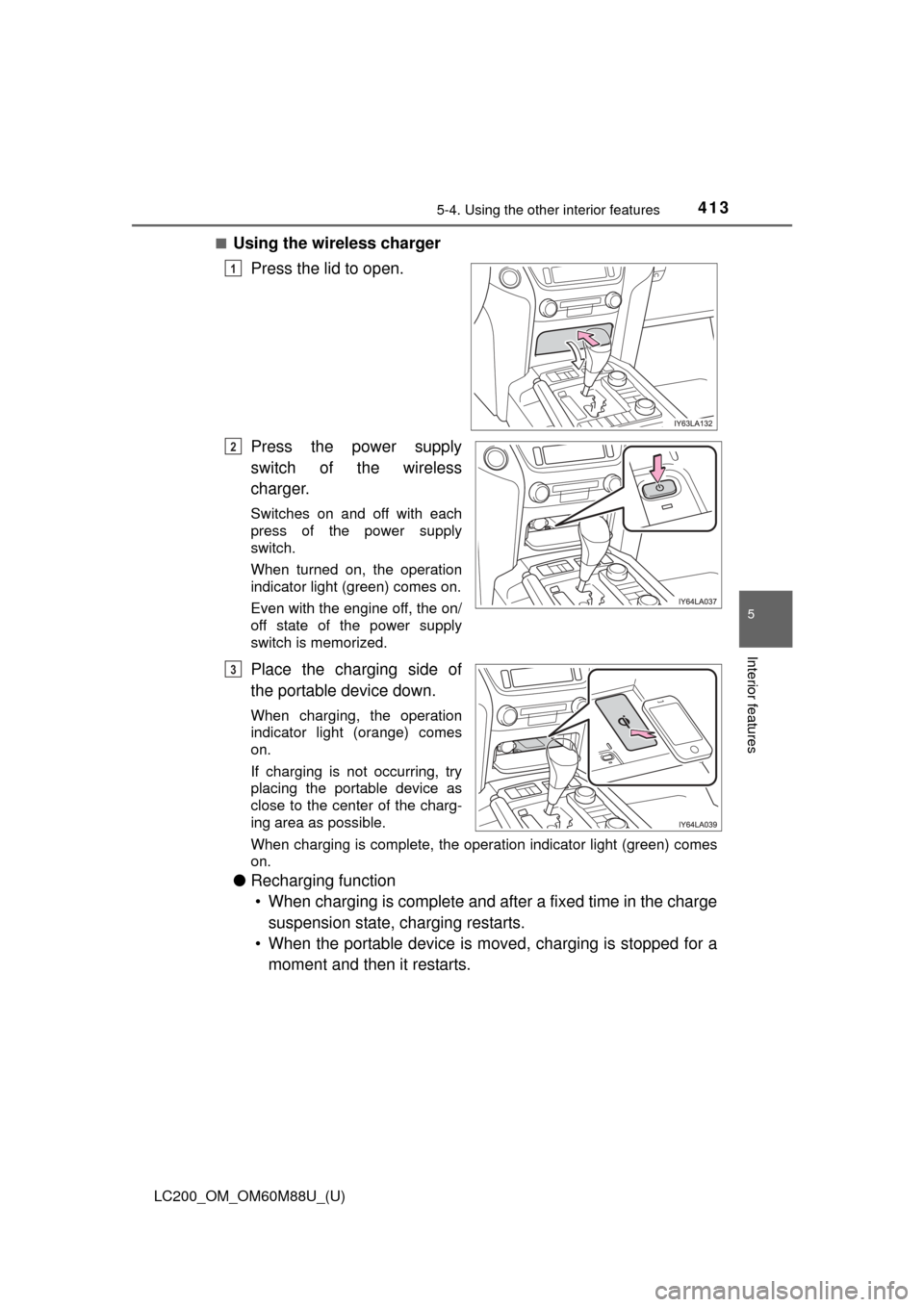
■Using the wireless chargerPress the lid to open.
Press the power supply
switch of the wireless
charger.
Switches on and off with each
press of the power supply
switch.
When turned on, the operation
indicator light (green) comes on.
Even with the engine off, the on/
off state of the power supply
switch is memorized.
Place the charging side of
the portable device down.
When charging, the operation
indicator light (orange) comes
on.
If charging is not occurring, try
placing the portable device as
close to the center of the charg-
ing area as possible.
When charging is complete, the operation indicator light (green) comes
on.
●Recharging function
• When charging is complete and after a fixed time in the charge suspension state, charging restarts.
• When the portable device is moved, charging is stopped for a moment and then it restarts.
1
2
3
Page 415 of 608

LC200_OM_OM60M88U_(U)
4155-4. Using the other interior features
5
Interior features
■The wireless charger can be operated when
The engine switch is in ACCESSORY or IGNITION ON mode.
■ Usable portable devices
Qi standard wireless charge standard can be used on compatible devices.
However, not all Qi standard devices and compatibility are guaranteed.
Starting with mobile phones and smart phones, it is aimed for low power elec-
trically supplied portable devices of no more than 5W.
■ When covers and accessories are attached to portable devices
Do not charge in situations where cover and accessories not able to handle
Qi are attached to the portable device. Depending on the type of cover and
accessory, it may not be possible to charge. When charging is not performed
even with the portable device placed on the charge area, remove the cover
and accessories.
■ While charging, noise enters the AM radio
Turn off the wireless charger and confirm that the noise has decreased. If the
noise decreases, continuously pushing the power supply switch of the wire-
less charger for 2 seconds, the frequency of the charger can be changed and
the noise can be reduced.
Also, on that occasion, the operation indicator light will flash orange 2 times.
■ Important points of the wireless charger
●If the electronic key cannot be detected within the vehicle interior, charging
cannot be done. When the door is opened and closed, charging may be
temporarily suspended.
● When charging, the wireless charging device and portable device will get
warmer, however this is not a malfunction.
When a portable device gets warm while charging, charging may stop due
to the protection function on the portable device side. In this case, when the
temperature of the portable device drops significantly, charge again.
■ Operation sounds
When the power supply is turned on, while searching for the portable device a
sound will be produced, however this is not a malfunction.
Page 419 of 608
LC200_OM_OM60M88U_(U)
4195-4. Using the other interior features
5
Interior features
WARNING
■Conditions in which the function may not operate correctly
In the following conditions, it may not operate correctly
●The portable device is fully charged
● There is foreign matter between the charge area and portable device
● The temperature of the portable device gets higher from charging
● The charging surface of the portable device is facing up
● The placement of the portable device is out of alignment with the charge
area
● Near a TV tower, electric power plant, gas station, radio station, large dis-
play, airport or other facility that generates strong radio waves or electrical
noise
● When the electronic key is in contact with, or is covered by the following
metallic objects
• Cards to which aluminum foil is attached
• Cigarette boxes that have aluminum foil inside
• Metallic wallets or bags
• Coins
• Hand warmers made of metal
• Media such as CDs and DVDs
● When other wireless keys (that emit radio waves) are being used nearby
In addition, excluding the above-mentioned, when the charger does not per-
form normally or the operation indicator light is flashing continuously, it is
considered that the wireless charger is malfunctioning. Contact your Toyota
dealer.
■ To prevent failure or damage to data
●Do not bring magnetic cards, such as credit cards, or magnetic recording
media, etc., close to the charger while charging, otherwise, data may dis-
appear under the influence of magnetism. Also, do not bring precision
instruments such as wrist watches, etc., close to the charger, as such
objects may break.
● Do not leave portable devices in the cabin. The temperature inside the
cabin may become high, when under the sun, and cause damage to the
device.
■ To prevent battery discharge
When the engine is stopped, do not use the wireless charger for a long
time.
Page 429 of 608
LC200_OM_OM60M88U_(U)
4295-4. Using the other interior features
5
Interior features
■Languages
The Safety Connect response center will offer support in multiple languages.
The Safety Connect system will offer voice prompts in English and Spanish.
Please indicate your language of choice when enrolling.
■ When contacting th e response center
You may be unable to contact the response center if the network is busy.
■ Safety Connect backup battery depletion
An exclusive backup battery is built in to assist the Automatic Collision Notifi-
cation, which is activated when impact above a certain level is applied to the
vehicle, or when the airbags operate. This battery is a primary battery, and
cannot be recharged. The red LED indicator will flash to indicate that the bat-
tery should be replaced.
The backup battery will need to be replaced if the Automatic Collision Notifi-
cation operates for 60 seconds or more. For replacement, consult your Toy-
ota dealer.
When the engine switch is turned to IGNITION ON mode, the red indi-
cator light comes on for 2 seconds then turns off. Afterward, the green
indicator light comes on, indicating that the service is active.
The following indicator light patterns indicate specific system usage
conditions:
● Green indicator light on = Active service
● Green indicator light flashing = Sa fety Connect call in process
● Red indicator light (except at vehi cle start-up) = System malfunction
(contact your Toyota dealer)
● No indicator light (off) = Safety Connect service not active
Safety Connect LE D light Indicators