Page 4 of 716

TABLE OF CONTENTS4
HIGHLANDER_U (OM48F09U)5-1. Basic Operations
Audio system types ........... 336
Audio system..................... 340
Steering wheel audio switches .......................... 343
AUX Port/USB Port ........... 344
Basic audio operations ...... 345
5-2. Setup Setup menu ....................... 347
General settings ................ 348
Audio settings.................... 349
Display settings ................. 350
Voice settings .................... 351
5-3. Using the Multimedia system
Selecting the audio source ............................. 352
List screen operation ......... 353
Optimal use of the audio system............................. 355
5-4. Using the radio Radio operation ................. 356
5-5. Playing an audio CD and MP3/WMA/AAC discs
CD player operation .......... 358
5-6. Using an external device
Listening to an iPod........... 364
Listening to a USB memory device................ 368
Using the AUX port ........... 372 5-7. Connecting Bluetooth
®
Preparations to
use wireless
communication ................ 373
Registering a Bluetooth
®
audio player for
the first time ..................... 377
Registering a Bluetooth
®
phone for the first time..... 378
Registering a Bluetooth
®
device .............................. 379
Connecting a Bluetooth
®
device .............................. 381
Displaying a Bluetooth
®
device details................... 383
Detailed Bluetooth
®
system settings................ 384
5-8. Bluetooth
® Audio
Listening to Bluetooth®
Audio ............................... 385
5-9. Bluetooth
® phone
Using a Bluetooth®
Phone .............................. 386
Making a call...................... 388
Receiving a call ................. 391
Speaking on the phone...... 392
Bluetooth
® phone
message function ............ 395
Using the steering wheel switches ................ 399
Bluetooth
® phone
settings ............................ 400
Contact/Call History Settings ........................... 401
What to do if... (Troubleshooting) ............ 410
5Audio system
Page 5 of 716

5
1
8 7
6
5
4
3
2
9
HIGHLANDER_U (OM48F09U)
10
5-10. Bluetooth®
Bluetooth®......................... 414
5-11. Using the voice command system
Voice command system .... 419
6-1. Using the air conditioning system and defogger
Front manual air conditioning system ........ 426
Front automatic air conditioning system ........ 432
Rear manual air conditioning system ........ 439
Rear automatic air conditioning system ........ 442
Heated steering wheel/ seat heaters/
seat ventilators ................ 445
6-2. Using the interior lights Interior lights list ................ 448
• Interior lights ................ 448
• Personal lights ............. 449
6-3. Using the storage features
List of storage features...... 450
• Glove box..................... 451
• Console box ................. 451
• Bottle holders ............... 452
• Cup holders ................. 453
• Auxiliary boxes............. 455
• Open tray ..................... 456
Luggage compartment features ........................... 457 6-4. Using the other interior
features
Other interior features........ 459
• Sun visors .................... 459
• Vanity mirrors ............... 459
• Conversation mirror...... 460
• Clock ............................ 461
• Outside temperature display .......................... 462
• Power outlets ............... 463
• Rear sunshades ........... 466
• Armrest......................... 467
• Coat hooks ................... 468
• Assist grips ................... 468
• Side table ..................... 469
Garage door opener .......... 470
Safety Connect .................. 477
Compass ........................... 483
6Interior features
Page 335 of 716

335
5Audio system
HIGHLANDER_U (OM48F09U)5-5. Playing an audio CD and
MP3/WMA/AAC discs
CD player operation .......... 358
5-6. Using an external device Listening to an iPod .......... 364
Listening to a USB memory device................ 368
Using the AUX port ........... 372
5-7. Connecting Bluetooth
®
Preparations to use wireless
communication ................ 373
Registering a Bluetooth
®
audio player for
the first time .................... 377
Registering a Bluetooth
®
phone for the first time .... 378
Registering a Bluetooth
®
device.............................. 379
Connecting a Bluetooth
®
device.............................. 381
Displaying a Bluetooth
®
device details .................. 383
Detailed Bluetooth
®
system settings ............... 384 5-8. Bluetooth
® Audio
Listening to Bluetooth®
Audio ............................... 385
5-9. Bluetooth
® phone
Using a Bluetooth®
Phone ............................. 386
Making a call ..................... 388
Receiving a call ................. 391
Speaking on the phone ..... 392
Bluetooth
® phone
message function ............ 395
Using the steering wheel switches ................ 399
Bluetooth
® phone
settings ........................... 400
Contact/Call History Settings ........................... 401
What to do if... (Troubleshooting) ............ 410
5-10. Bluetooth
®
Bluetooth®......................... 414
5-11. Using the voice command system
Voice command system .... 419
Page 336 of 716
336
HIGHLANDER_U (OM48F09U)
5-1.Basic Operations
Entune Audio
P. 3 4 0
Entune Audio Plus/Entune Pr emium Audio with Navigation
Owners of models equipped with a navigation system should refer to
the “NAVIGATION AND MULTIMEDIA SYSTEM OWNER’S MAN-
UAL”.
■ Using cellular phones
Interference may be heard through the audio system's speakers if a cellular
phone is being used inside or close to the vehicle while the audio system is
operating.
■ About Bluetooth
®
The Bluetooth wordmark and logo are owned by Bluetooth SIG. and permis-
sion has been granted to use the trademark of the licensee Panasonic
Corporation. Other trademarks and trade names are owned by various differ-
ent owners.
Audio system types
Page 340 of 716
3405-1. Basic Operations
HIGHLANDER_U (OM48F09U)
Audio system
: If equipped
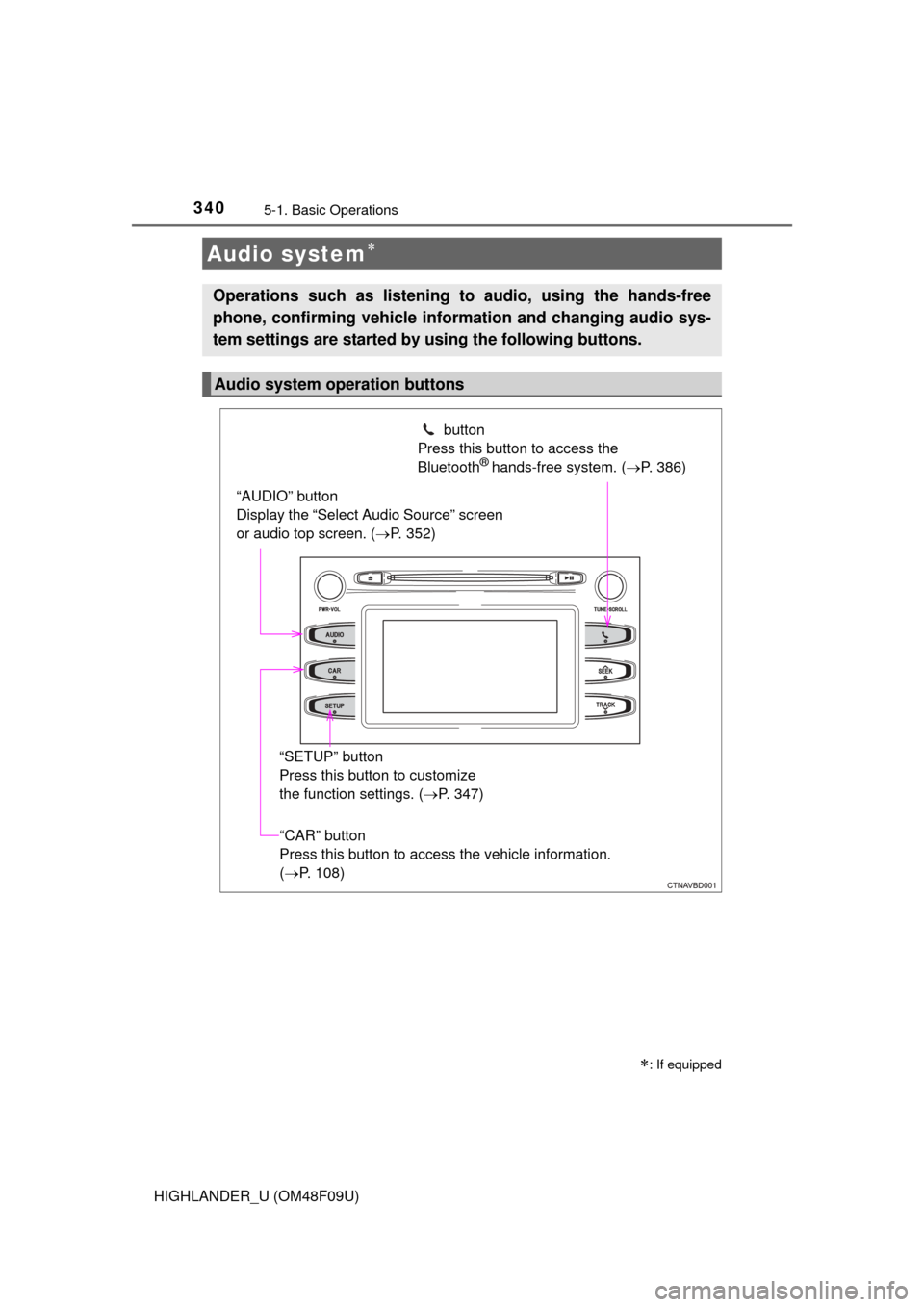
Operations such as listening to audio, using the hands-free
phone, confirming vehicle information and changing audio sys-
tem settings are started by using the following buttons.
Audio system operation buttons
“AUDIO” button
Display the “Select Audio Source” screen
or audio top screen. ( P. 352) button
Press this button to access the
Bluetooth
® hands-free system. ( P. 386)
“CAR” button
Press this button to access the vehicle information.
(P. 108)
“SETUP” button
Press this button to customize
the function settings. (
P. 347)
Page 347 of 716
347
5
Audio system
HIGHLANDER_U (OM48F09U)
5-2.Setup
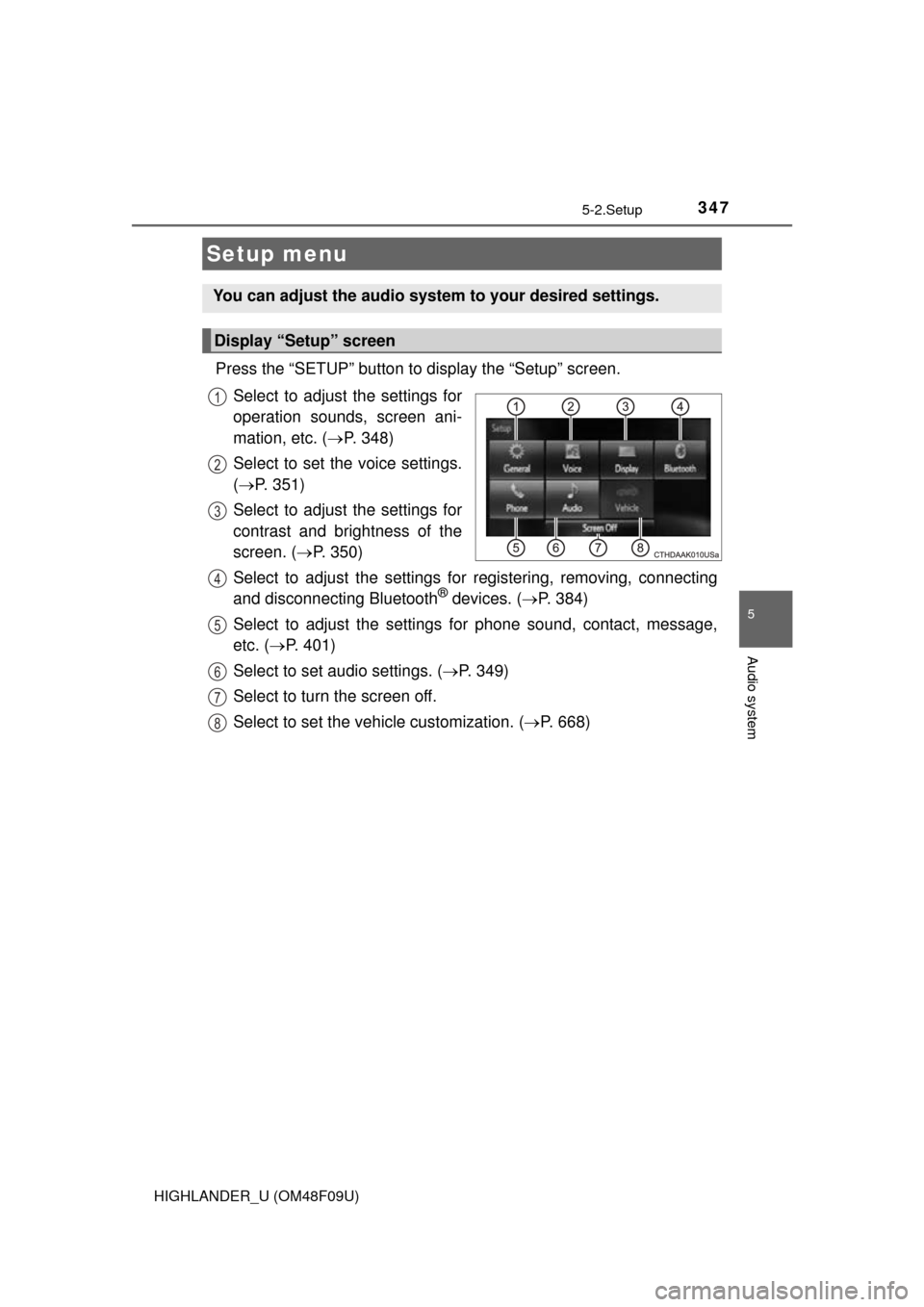
Press the “SETUP” button to display the “Setup” screen.Select to adjust the settings for
operation sounds, screen ani-
mation, etc. ( P. 348)
Select to set the voice settings.
( P. 351)
Select to adjust the settings for
contrast and brightness of the
screen. ( P. 350)
Select to adjust the settings for registering, removing, connecting
and disconnecting Bluetooth
® devices. ( P. 384)
Select to adjust the settings for phone sound, contact, message,
etc. ( P. 401)
Select to set audio settings. ( P. 349)
Select to turn the screen off.
Select to set the vehicle customization. ( P. 668)
Setup menu
You can adjust the audio system to your desired settings.
Display “Setup” screen
1
2
3
4
5
6
7
8
Page 354 of 716
3545-3. Using the Multimedia system
HIGHLANDER_U (OM48F09U)■
Selecting a track/file/song
Press the “
” or “ ” button on “SEEK/TRACK” or turn the
“TUNE·SCROLL” knob to select the desired track/file/song number.
To fast-forward or reverse, press and hold the “ ” or “ ” button on
“SEEK/TRACK”.
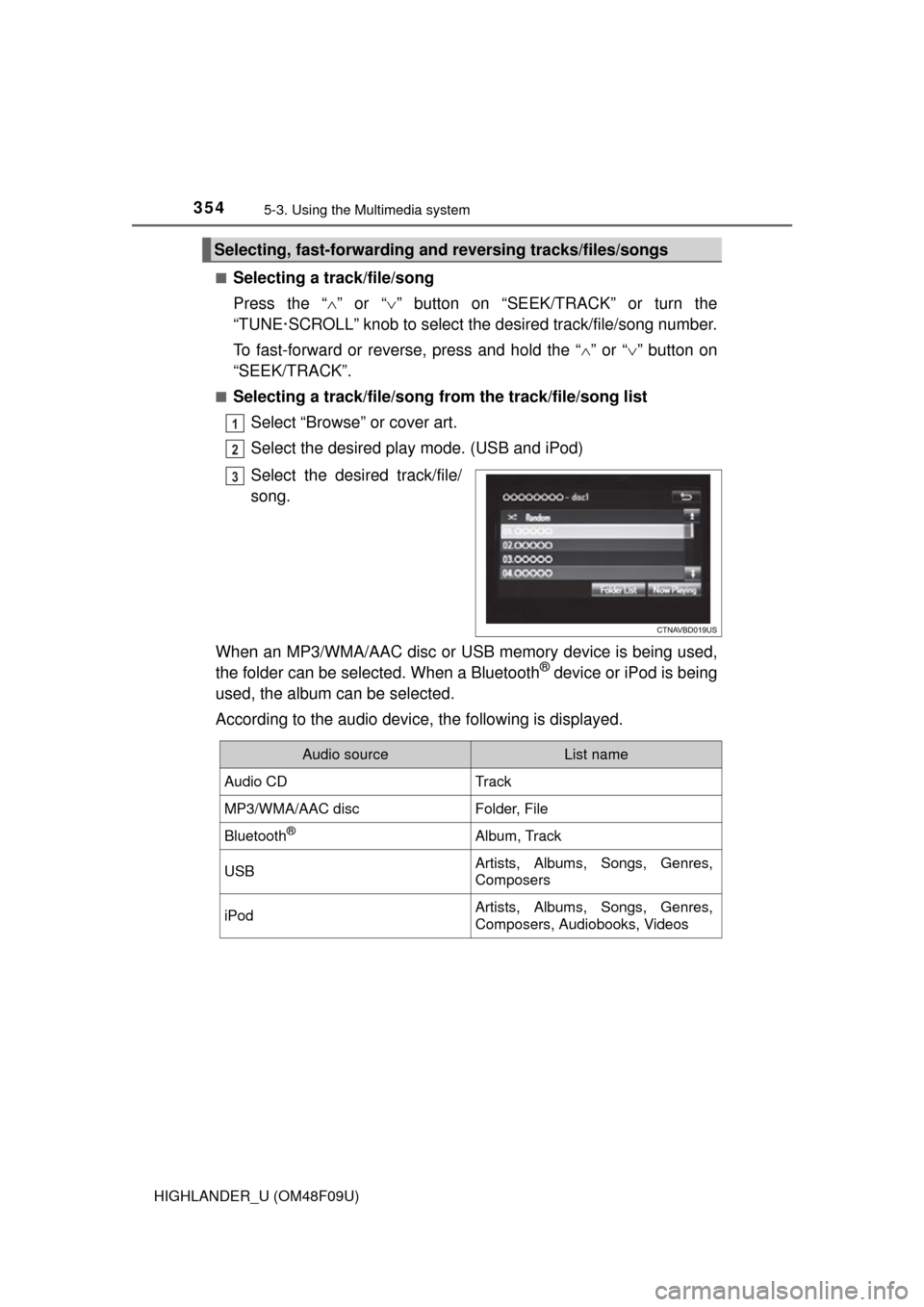
■Selecting a track/file/song from the track/file/song list
Select “Browse” or cover art.
Select the desired play mode. (USB and iPod)
Select the desired track/file/
song.
When an MP3/WMA/AAC disc or USB memory device is being used,
the folder can be selected. When a Bluetooth
® device or iPod is being
used, the album can be selected.
According to the audio device, the following is displayed.
Selecting, fast-forwarding a nd reversing tracks/files/songs
1
2
3
Audio sourceList name
Audio CDTrack
MP3/WMA/AAC discFolder, File
Bluetooth®Album, Track
USBArtists, Albums, Songs, Genres,
Composers
iPodArtists, Albums, Songs, Genres,
Composers, Audiobooks, Videos
Page 373 of 716
373
5
Audio system
HIGHLANDER_U (OM48F09U)
5-7.Connecting Bluetooth®
■About Bluetooth®
Preparations to use wireless communica-
tion
The following can be performed using Bluetooth® wireless com-
munication:
■A portable audio player can be operated and listened to via
audio system
■Hands-free phone calls can be made via a cellular phone
In order to use wireless communication, register and connect a
Bluetooth
® device by performing the following procedures.
The Bluetooth® word mark and logos are
registered trademarks owned Bluetooth
SIG, Inc. and any use of such marks by
PIONEER CORPORATION is under
license. Other trademarks and trade
names are those of their respective own-
ers.