Page 382 of 716
3825-7. Connecting Bluetooth®
HIGHLANDER_U (OM48F09U)
When auto connection has failed or “Bluetooth* Power” is turned off,
you must connect the Bluetooth® device manually.
Follow the steps in “Connecting a Bluetooth
® device” from step .
( P. 381)
*: Bluetooth is a registered trademark of Bluetooth SIG, Inc.
Registering an additional device
Select “Select Device” on the Bluetooth
® audio control screen.
For more information: P. 3 7 9
Selecting a registered device
Select “Select Device” on the Bluetooth
® audio control screen.
For more information: P. 3 8 1
■Reconnecting a Bluetooth® phone
If the system cannot connect due to poor signal strength, the system will
automatically attempt to reconnect.
If the system is attempting to connect to a Bluetooth
® phone and the
Bluetooth® phone is turned off and then back on, the system will attempt to
reconnect.
Manual connection
Connecting a Bluetooth® audio player
11
1
2
1
2
Page 383 of 716
3835-7. Connecting Bluetooth®
5
Audio system
HIGHLANDER_U (OM48F09U)
Display the “Bluetooth* Setup” screen. (P. 376)
Select the device.
Select “Device Info”.
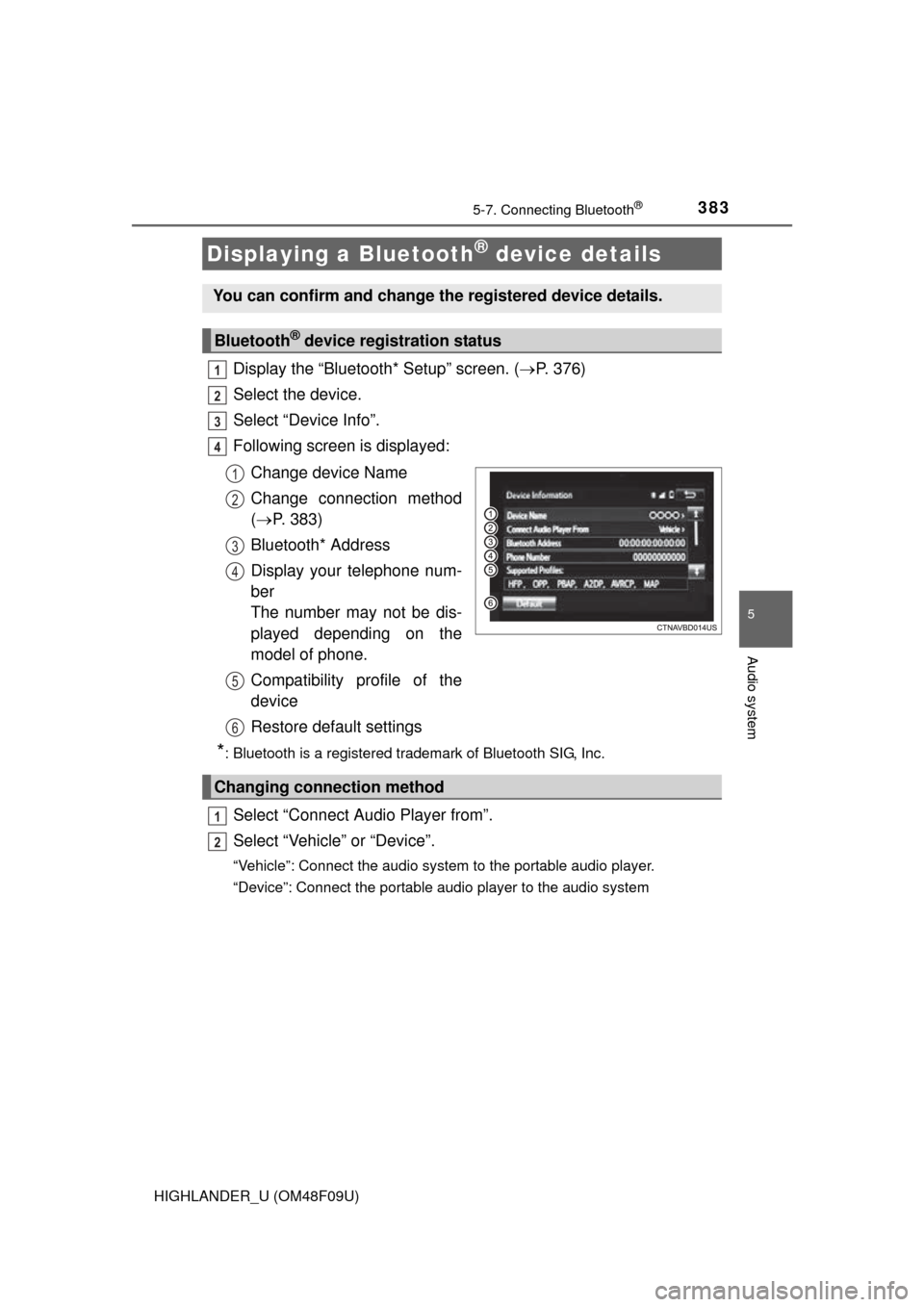
Following screen is displayed:
Change device Name
Change connection method
( P. 383)
Bluetooth* Address
Display your telephone num-
ber
The number may not be dis-
played depending on the
model of phone.
Compatibility profile of the
device
Restore default settings
*: Bluetooth is a registered trademark of Bluetooth SIG, Inc.
Select “Connect Audio Player from”.
Select “Vehicle ” or “Device”.
“Vehicle”: Connect the audio system to the portable audio player.
“Device”: Connect the portable audio player to the audio system
Displaying a Bluetooth® device details
You can confirm and change the registered device details.
Bluetooth® device registration status
1
2
3
4
1
2
3
4
5
6
Changing connection method
1
2
Page 384 of 716
3845-7. Connecting Bluetooth®
HIGHLANDER_U (OM48F09U)
Display the “Bluetooth* Setup” screen. (P. 376)
Select “System Settings”.
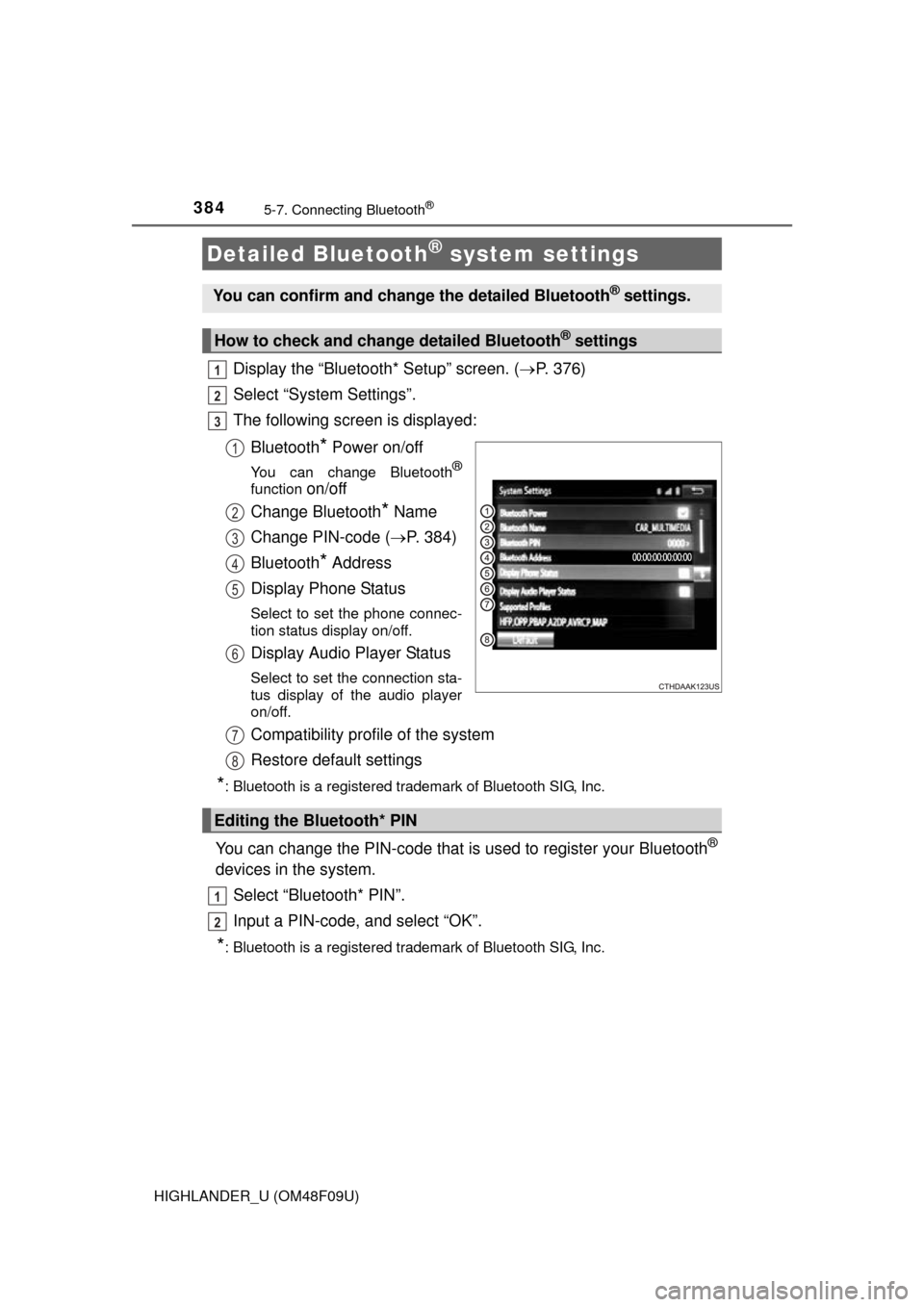
The following screen is displayed:
Bluetooth
* Power on/off
You can change Bluetooth®
function on/off
Change Bluetooth
* Name
Change PIN-code ( P. 384)
Bluetooth
* Address
Display Phone Status
Select to set the phone connec-
tion status display on/off.
Display Audio Player Status
Select to set the connection sta-
tus display of the audio player
on/off.
Compatibility profile of the system
Restore default settings
*: Bluetooth is a registered trademark of Bluetooth SIG, Inc.
You can change the PIN-code that is used to register your Bluetooth®
devices in the system.
Select “Bluetooth* PIN”.
Input a PIN-code, and select “OK”.
*: Bluetooth is a registered trademark of Bluetooth SIG, Inc.
Detailed Bluetooth® system settings
You can confirm and change the detailed Bluetooth® settings.
How to check and change detailed Bluetooth® settings
1
2
3
1
2
3
4
5
6
Editing the Bluetooth* PIN
7
8
1
2
Page 385 of 716
385
5
Audio system
HIGHLANDER_U (OM48F09U)
5-8.Bluetooth® Audio
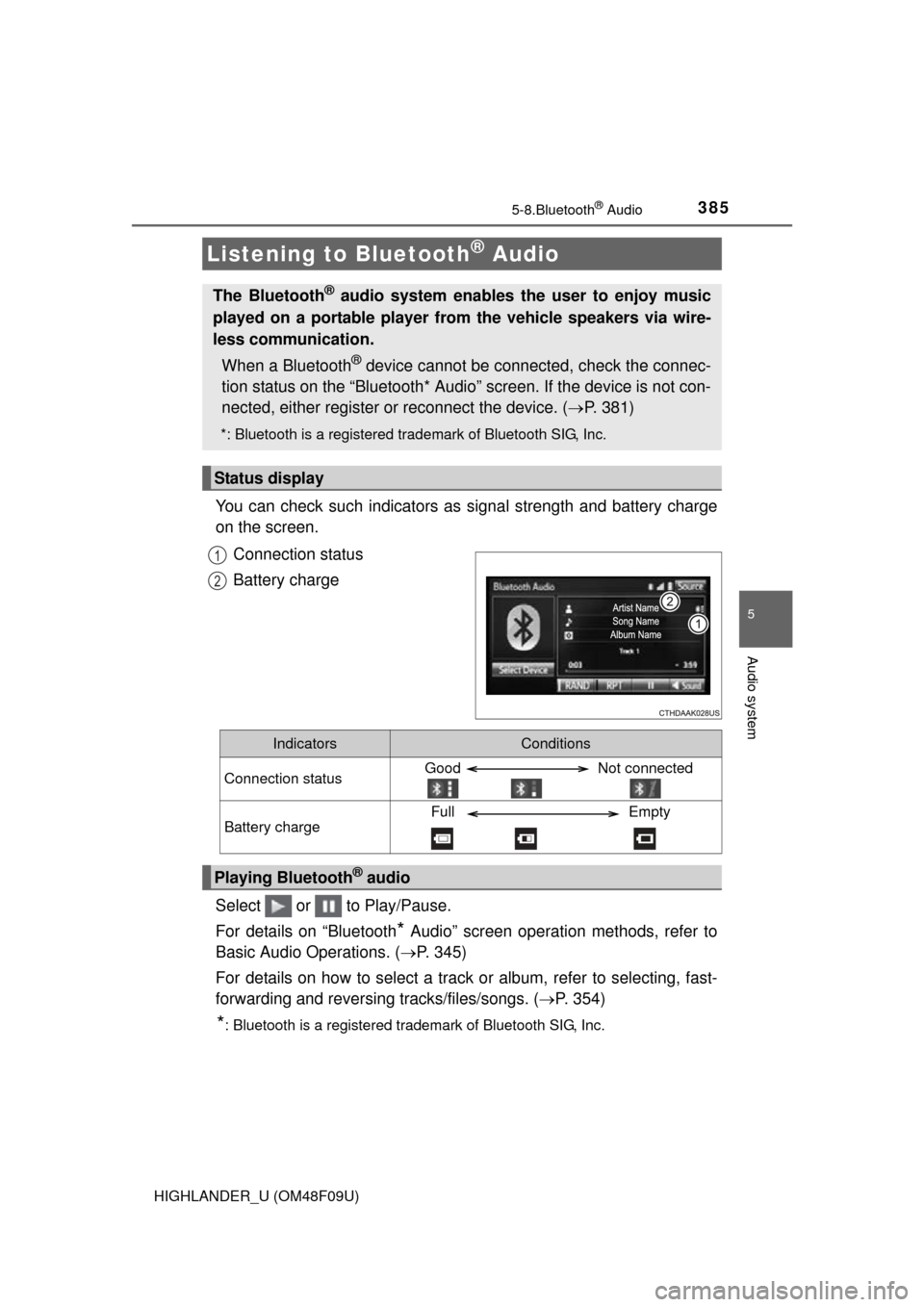
You can check such indicators as signal strength and battery charge
on the screen.
Connection status
Battery charge
Select or to Play/Pause.
For details on “Bluetooth
* Audio” screen operation methods, refer to
Basic Audio Operations. ( P. 345)
For details on how to select a track or album, refer to selecting, fast-
forwarding and reversing tracks/files/songs. ( P. 354)
*: Bluetooth is a registered trademark of Bluetooth SIG, Inc.
Listening to Bluetooth® Audio
The Bluetooth® audio system enables the user to enjoy music
played on a portable player from the vehicle speakers via wire-
less communication.
When a Bluetooth
® device cannot be connected, check the connec-
tion status on the “Bluetooth* Audio” screen. If the device is not con-
nected, either register or reconnect the device. ( P. 381)
*: Bluetooth is a registered trademark of Bluetooth SIG, Inc.
Status display
1
2
IndicatorsConditions
Connection statusGood Not connected
Battery chargeFull Empty
Playing Bluetooth® audio
Page 386 of 716
386
HIGHLANDER_U (OM48F09U)
5-9.Bluetooth® phone
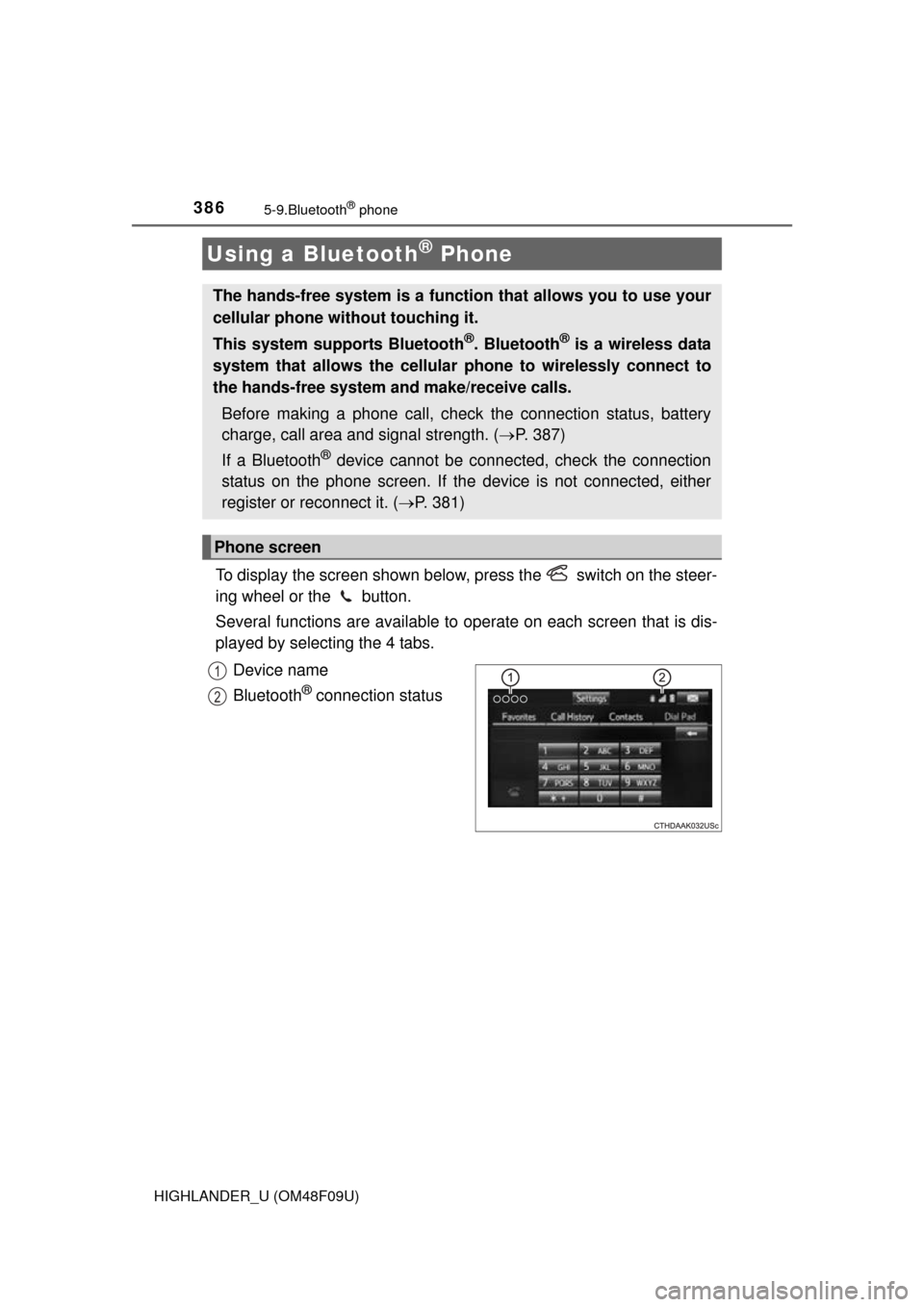
To display the screen shown below, press the switch on the steer-
ing wheel or the button.
Several functions are available to operate on each screen that is dis-
played by selecting the 4 tabs.
Device name
Bluetooth
® connection status
Using a Bluetooth® Phone
The hands-free system is a function that allows you to use your
cellular phone without touching it.
This system supports Bluetooth
®. Bluetooth® is a wireless data
system that allows the cellular phone to wirelessly connect to
the hands-free system and make/receive calls.
Before making a phone call, check the connection status, battery
charge, call area and signal strength. ( P. 387)
If a Bluetooth
® device cannot be connected, check the connection
status on the phone screen. If th e device is not connected, either
register or reconnect it. ( P. 381)
Phone screen
1
2
Page 387 of 716
3875-9. Bluetooth® phone
5
Audio system
HIGHLANDER_U (OM48F09U)■
Telephone switch (
P. 399)
■Microphone
The vehicle’s built in micro-
phone is used when talking on
the phone.
The person you are speaking to
can be heard from the front
speakers.
To use the hands-free system,
you must register your
Bluetooth
® phone in the sys-
tem. ( P. 379)
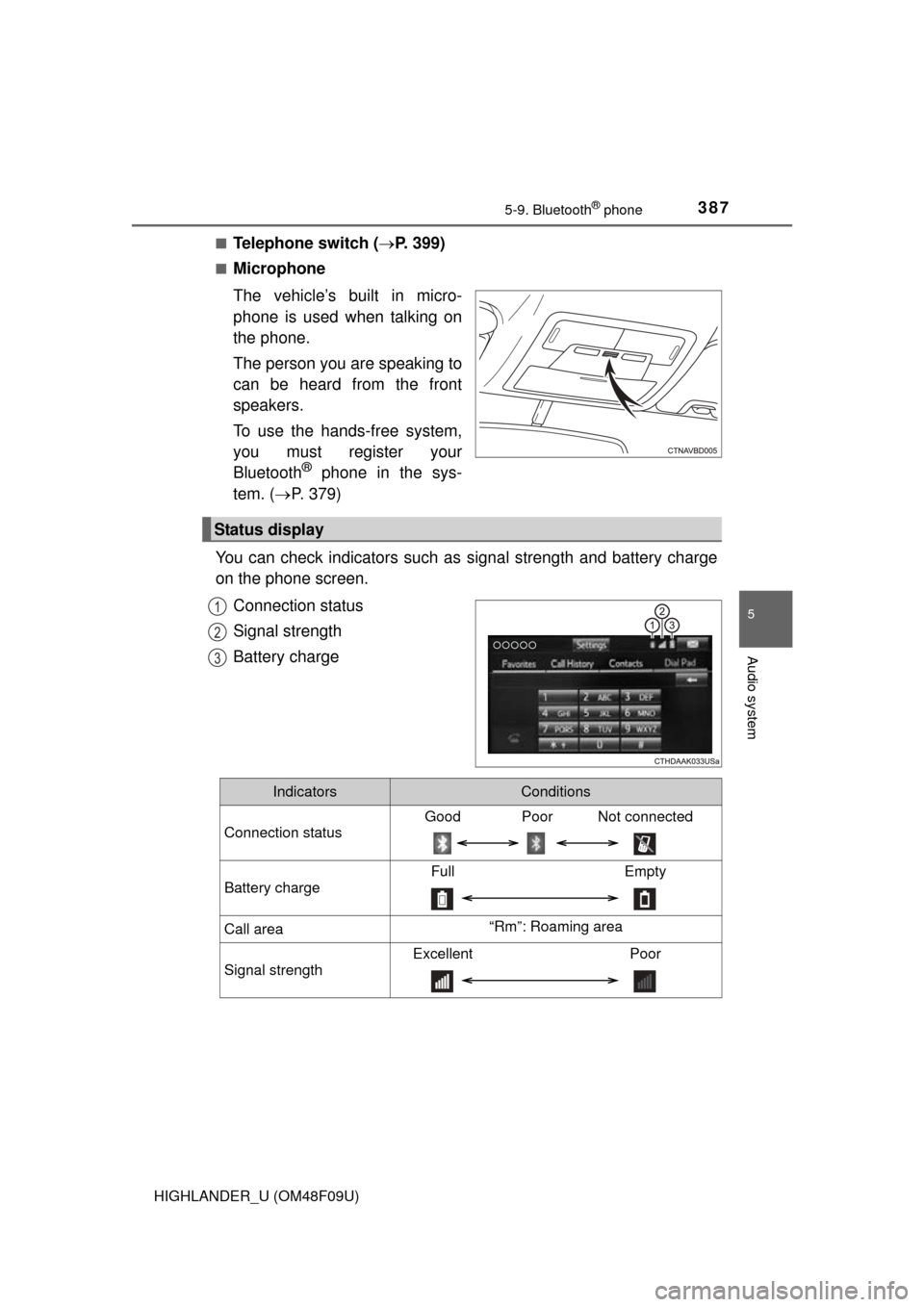
You can check indicators such as signal strength and battery charge
on the phone screen.
Connection status
Signal strength
Battery charge
Status display
1
2
3
IndicatorsConditions
Connection status
Good Poor Not connected
Battery charge
Full Empty
Call area“Rm”: Roaming area
Signal strength
Excellent Poor
Page 388 of 716
3885-9. Bluetooth® phone
HIGHLANDER_U (OM48F09U)
Display the phone screen. (P. 386)
Select the “Dial Pad” tab and enter a phone number.
To delete the input phone number, select .
For the first digit, you can enter “+” by selecting “ ” for a while.
Press the switch on the steering wheel or select .
You can dial a number from the contact data imported from your cellu-
lar phone. The system has one co ntact for each registered phone. Up
to 2500 contacts may be stored in each contact. ( P. 388)
Display the phone screen. ( P. 386)
Select “Contacts” tab.
Choose the desired contact to call from the list.
Choose the number and then press the switch on the steering
wheel or select .
You can transfer the phone numbers in a Bluetooth
® phone to the sys-
tem.
Operation methods differ between PBAP (Phone Book Access Profile)
compatible and PBAP incompatible Bluetooth
® phones. If the cellular
phone does not support either PBAP or OPP (Object Push Profile)
service, you cannot transfer contacts.
Making a call
Once a Bluetooth® phone is registered, you can make a call
using the following procedure:
Dialing
Dialing from the contacts list
When the contact is empty
1
2
3
1
2
3
4
Page 389 of 716
3895-9. Bluetooth® phone
5
Audio system
HIGHLANDER_U (OM48F09U)
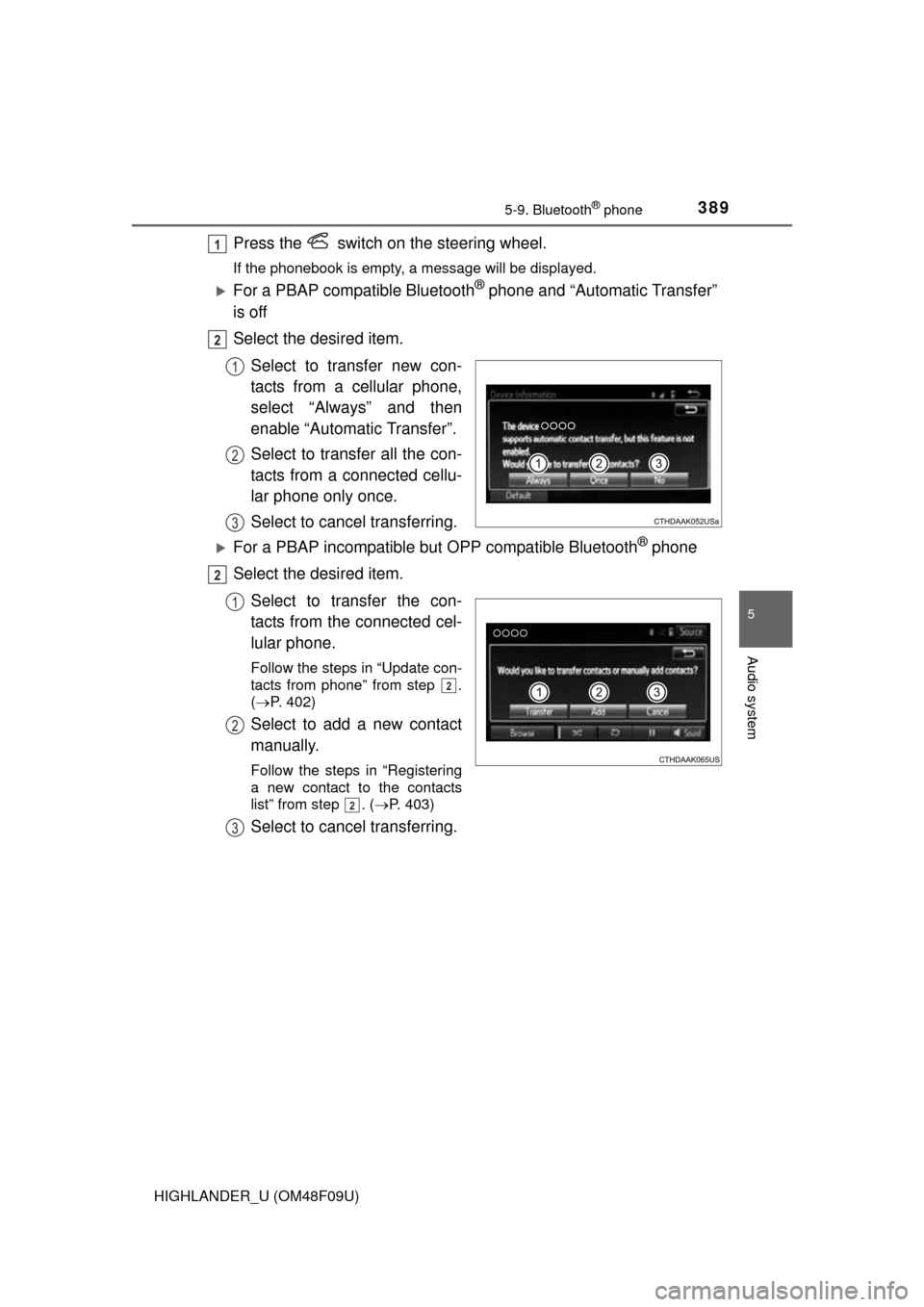
Press the switch on the steering wheel.
If the phonebook is empty, a message will be displayed.
For a PBAP compatible Bluetooth® phone and “Automatic Transfer”
is off
Select the desired item.
Select to transfer new con-
tacts from a cellular phone,
select “Always” and then
enable “Automatic Transfer”.
Select to transfer all the con-
tacts from a connected cellu-
lar phone only once.
Select to cancel transferring.
For a PBAP incompatible bu t OPP compatible Bluetooth® phone
Select the desired item.
Select to transfer the con-
tacts from the connected cel-
lular phone.
Follow the steps in “Update con-
tacts from phone” from step .
( P. 402)
Select to add a new contact
manually.
Follow the steps in “Registering
a new contact to the contacts
list” from step . ( P. 403)
Select to cancel transferring.
1
2
1
2
3
2
1
2
2
2
3