2016 TOYOTA HIGHLANDER CD player
[x] Cancel search: CD playerPage 4 of 716

TABLE OF CONTENTS4
HIGHLANDER_U (OM48F09U)5-1. Basic Operations
Audio system types ........... 336
Audio system..................... 340
Steering wheel audio switches .......................... 343
AUX Port/USB Port ........... 344
Basic audio operations ...... 345
5-2. Setup Setup menu ....................... 347
General settings ................ 348
Audio settings.................... 349
Display settings ................. 350
Voice settings .................... 351
5-3. Using the Multimedia system
Selecting the audio source ............................. 352
List screen operation ......... 353
Optimal use of the audio system............................. 355
5-4. Using the radio Radio operation ................. 356
5-5. Playing an audio CD and MP3/WMA/AAC discs
CD player operation .......... 358
5-6. Using an external device
Listening to an iPod........... 364
Listening to a USB memory device................ 368
Using the AUX port ........... 372 5-7. Connecting Bluetooth
®
Preparations to
use wireless
communication ................ 373
Registering a Bluetooth
®
audio player for
the first time ..................... 377
Registering a Bluetooth
®
phone for the first time..... 378
Registering a Bluetooth
®
device .............................. 379
Connecting a Bluetooth
®
device .............................. 381
Displaying a Bluetooth
®
device details................... 383
Detailed Bluetooth
®
system settings................ 384
5-8. Bluetooth
® Audio
Listening to Bluetooth®
Audio ............................... 385
5-9. Bluetooth
® phone
Using a Bluetooth®
Phone .............................. 386
Making a call...................... 388
Receiving a call ................. 391
Speaking on the phone...... 392
Bluetooth
® phone
message function ............ 395
Using the steering wheel switches ................ 399
Bluetooth
® phone
settings ............................ 400
Contact/Call History Settings ........................... 401
What to do if... (Troubleshooting) ............ 410
5Audio system
Page 47 of 716

471-1. For safe use
1
For safety and security
HIGHLANDER_U (OM48F09U)
WARNING
■SRS airbag precautions
●If the areas where the SRS airbags are stored, such as the steering wheel
pad and front and rear pillar garnishes, are damaged or cracked, have
them replaced by your Toyota dealer.
● Do not place anything, such as a cushion, on the front passenger’s seat.
Doing so will disperse the passenger’s weight, which prevents the sensor
from detecting the passenger’s weight properly. As a result, the SRS front
airbags for the front passenger may not deploy in the event of a collision.
■ Modification and disposal of SRS airbag system components
Do not dispose of your vehicle or per form any of the following modifications
without consulting your Toyota dealer. The SRS airbags may malfunction or
deploy (inflate) accidentally, causing death or serious injury.
● Installation, removal, disassembly and repair of the SRS airbags
● Repairs, modifications, removal or replacement of the steering wheel,
instrument panel, dashboard, seats or seat upholstery, front, side and rear
pillars or roof side rails
● Repairs or modifications of the front fender, front bumper or side of the
occupant compartment
● Installation of a grille guard (bull bars, kangaroo bar, etc.), snow plows,
winches or roof luggage carrier
● Modifications to the vehicle’s suspension system
● Installation of electronic devices such as mobile two-way radios and CD
players
● Modifications to your vehicle for a person with a physical disability
Page 149 of 716

1493-2. Opening, closing and locking the doors
3
Operation of each component
HIGHLANDER_U (OM48F09U)■
Conditions affecting operation
The smart key system uses weak radio waves. In the following situations, the
communication between the electronic key and the vehicle may be affected,
preventing the smart key system, wireless remote control and engine immobi-
lizer system from operating properly. (Ways of coping: P. 624)
● When the electronic key battery is depleted
● Near a TV tower, electric power plant, gas station, radio station, large dis-
play, airport or other facility that generates strong radio waves or electrical
noise
● When carrying a portable radio, cellular phone, cordless phone or other
wireless communication device
● When the electronic key is in contact with, or is covered by the following
metallic objects
• Cards to which aluminum foil is attached
• Cigarette boxes that have aluminum foil inside
• Metallic wallets or bags
• Coins
• Hand warmers made of metal
• Media such as CDs and DVDs
● When other wireless keys (that emit radio waves) are being used nearby
● When carrying the electronic key together with the following devices that
emit radio waves
• Another vehicle’s electronic key or a wireless key that emits radio waves
• Personal computers or personal digital assistants (PDAs)
• Digital audio players
• Portable game systems
● If window tint with a metallic content or metallic objects are attached to the
rear window
● When the electronic key is placed near a battery charger or electronic
devices
Page 335 of 716
335
5Audio system
HIGHLANDER_U (OM48F09U)5-5. Playing an audio CD and
MP3/WMA/AAC discs
CD player operation .......... 358
5-6. Using an external device Listening to an iPod .......... 364
Listening to a USB memory device................ 368
Using the AUX port ........... 372
5-7. Connecting Bluetooth
®
Preparations to use wireless
communication ................ 373
Registering a Bluetooth
®
audio player for
the first time .................... 377
Registering a Bluetooth
®
phone for the first time .... 378
Registering a Bluetooth
®
device.............................. 379
Connecting a Bluetooth
®
device.............................. 381
Displaying a Bluetooth
®
device details .................. 383
Detailed Bluetooth
®
system settings ............... 384 5-8. Bluetooth
® Audio
Listening to Bluetooth®
Audio ............................... 385
5-9. Bluetooth
® phone
Using a Bluetooth®
Phone ............................. 386
Making a call ..................... 388
Receiving a call ................. 391
Speaking on the phone ..... 392
Bluetooth
® phone
message function ............ 395
Using the steering wheel switches ................ 399
Bluetooth
® phone
settings ........................... 400
Contact/Call History Settings ........................... 401
What to do if... (Troubleshooting) ............ 410
5-10. Bluetooth
®
Bluetooth®......................... 414
5-11. Using the voice command system
Voice command system .... 419
Page 338 of 716

3385-1. Basic Operations
HIGHLANDER_U (OM48F09U)
Canada
IC: 216J-YEAP01A473W
NOTE:
This device complies with Industry Canada license-exempt RSS standard(s).
Operation is subject to the following two conditions:
(1) this device may not cause interference, and
(2) this device must accept any interference, including interference that maycause undesired operation of the device.
Le présent appareil est conforme aux CNR d'Industrie Canada applicables
aux appareils radio exempts de licence. L'exploitation est autorisée aux deux
conditions suivantes :
(1) l'appareil ne doit pas produire de brouillage, et
(2) l'utilisateur de l'appareil doit accepter tout brouillage radioélectrique subi, même si le brouillage est susceptible d'en compromettre le fonctionne-
ment.
This radio transmitter (identify the dev ice by certification number, or model
number if Category II) has been approved by Industry Canada to operate with
the antenna types listed below with the maximum permissible gain and
required antenna impedance for each antenna type indicated. Antenna types
not included in this list, having a gain greater than the maximum gain indi-
cated for that type, are strictly prohibited for use with this device.
Le présent émetteur radio (identifier le dispositif par son numéro de certifica-
tion ou son numéro de modèle s'il fait partie du matériel de catégorie I) a été
approuvé par Industrie Canada pour fonctionner avec les types d'antenne
énumérés ci-dessous et ayant un gain admissible maximal et l'impédance
requise pour chaque type d'antenne. Les types d'antenne non inclus dans
cette liste, ou dont le gain est supérieur au gain maximal indiqué, sont stricte-
ment interdits pour l'exploitation de l'émetteur.
LASER PRODUCTS
● Do not take this unit apart or attempt to make any changes yourself.
This is an intricate unit that uses a laser pickup to retrieve information from
the surface of compact discs.
The laser is carefully shielded so that its rays remain inside the cabinet.
Therefore, never try to disassemble the player or alter any of its parts since
you may be exposed to laser rays and dangerous voltages.
● This product utilizes a laser.
Use of controls or adjustments or performance of procedures other than
those specified herein may result in hazardous radiation exposure.
Page 344 of 716
3445-1. Basic Operations
HIGHLANDER_U (OM48F09U)■
iPod
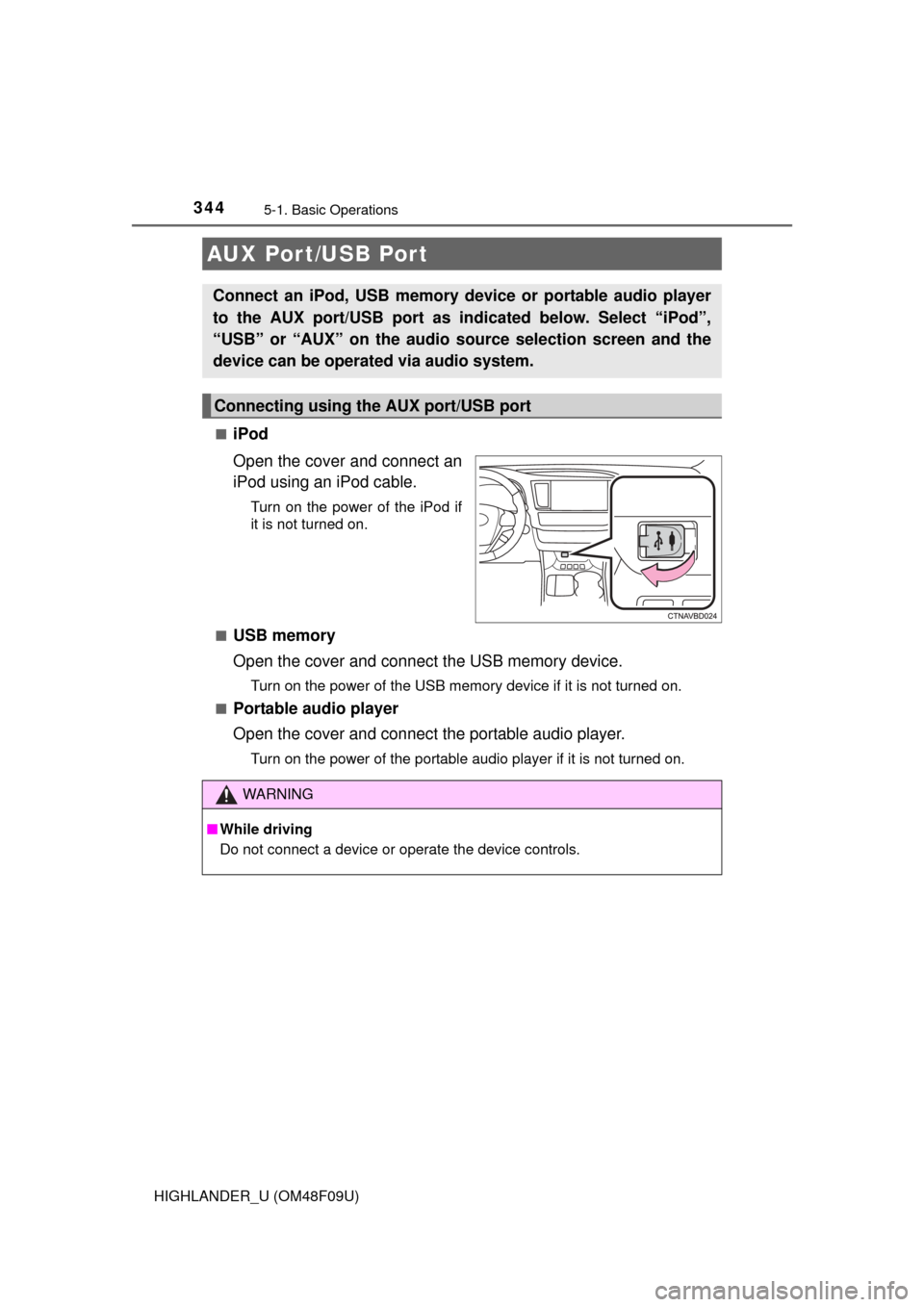
Open the cover and connect an
iPod using an iPod cable.
Turn on the power of the iPod if
it is not turned on.
■
USB memory
Open the cover and connect the USB memory device.
Turn on the power of the USB memory device if it is not turned on.
■
Portable audio player
Open the cover and connect the portable audio player.
Turn on the power of the portable audio player if it is not turned on.
AUX Por t/USB Por t
Connect an iPod, USB memory device or portable audio player
to the AUX port/USB port as indi cated below. Select “iPod”,
“USB” or “AUX” on the audio source selection screen and the
device can be operated via audio system.
Connecting using the AUX port/USB port
WARNING
■ While driving
Do not connect a device or operate the device controls.
Page 346 of 716
3465-1. Basic Operations
HIGHLANDER_U (OM48F09U)
Select to change on/off.
Select to change on/off.
■Using cellular phones
Interference may be heard through the audio system's speakers if a cellular
phone is being used inside or close to the vehicle while the audio system is
operating.
■ Certification (caution)
Laser product
This product is a class 1 laser product.
Do not open the cover of the player or attempt to repair the unit yourself.
Refer servicing to qualified personnel.
●Laser products
• Do not take this unit apart or attempt to make any changes yourself.
This is an intricate unit that uses a laser pickup to retrieve information
from the surface of compact discs. The laser is carefully shielded so that
its rays remain inside the cabinet. Therefore, never try to disassemble the
player or alter any of its parts since you may be exposed to laser rays and
dangerous voltages.
• This product utilizes a laser. Use of controls or adjustments or performance of procedures other than
those specified herein may result in hazardous radiation exposure.
THE USE OF OPTICAL INSTRUMENTS WITH THIS PRODUCT WILL
INCREASE EYE HAZARD.
Random playback
Repeat play
NOTICE
■To prevent battery discharge
Do not leave the audio system on longer than necessary when the engine is
off.
■ To avoid damaging the audio system
Take care not to spill drinks or other fluids on the audio system.
Page 358 of 716
358
HIGHLANDER_U (OM48F09U)
5-5.Playing an audio CD and MP3/WMA/AAC discs
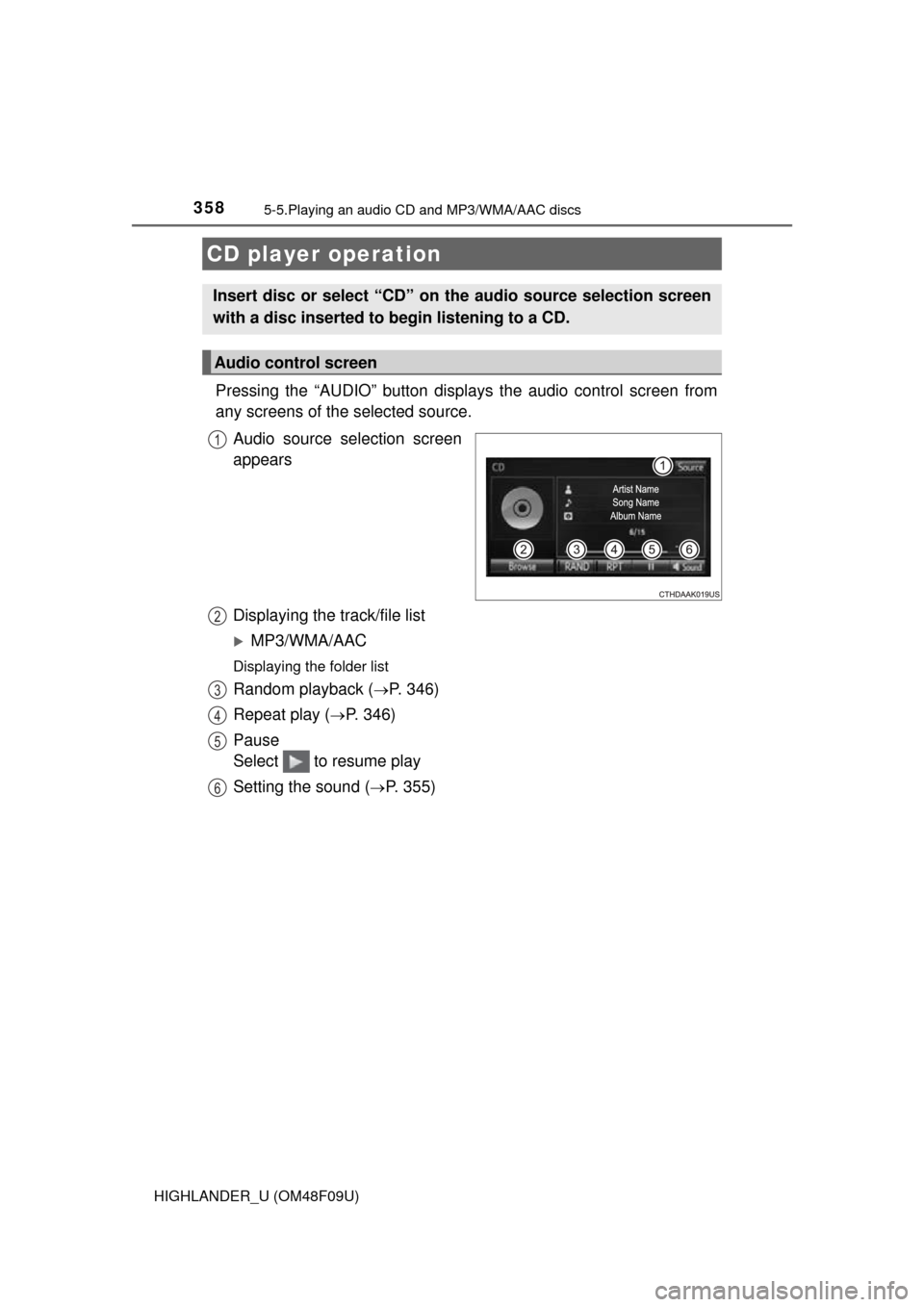
Pressing the “AUDIO” button displays the audio control screen from
any screens of the selected source.
Audio source selection screen
appears
Displaying the track/file list
MP3/WMA/AAC
Displaying the folder list
Random playback (P. 346)
Repeat play (
P. 346)
Pause
Select to resume play
Setting the sound (
P. 355)
CD player operation
Insert disc or select “CD” on the audio source selection screen
with a disc inserted to begin listening to a CD.
Audio control screen
1
2
3
4
5
6