2016 TOYOTA HIGHLANDER lights
[x] Cancel search: lightsPage 288 of 716

2884-5. Using the driving support systems
HIGHLANDER_U (OM48F09U)■
Conditions in which the function may not operate correctly
In the following situations, the camera sensor may be unable to recognize
lane markers causing the lane departure warning function to operate incor-
rectly. However, this does not indicate a malfunction.
●When driving through an area with no lane markers, such as a tollbooth, a
crossing or before a ticket checkpoint
● When driving on a sharp curve
● When lane markers are extremely narrow or extremely wide
● When the vehicle leans to one side an unusual amount due to a heavy load
or improper tire inflation pressure
● When the following distance between your vehicle and the vehicle ahead is
extremely short
● When the lane markers are yellow (These may be more difficult for the sys-
tem to recognize compared to white markers.)
● When the lane markers are broken, Botts’ dots (raised pavement markers)
or stones
● When the lane markers are on a curb etc.
● When lane markers are obscured or partially obscured by sand, dirt, etc.
● When there are shadows on the road running parallel with lane markers, or
if a shadow covers the lane markers
● When driving on a particularly bright road surface, such as concrete
● When driving on a road surface that is bright due to reflected light
● When driving in a location where the light level changes rapidly, such as the
entrance to or exit from a tunnel
● When sunlight or the headlights of oncoming vehicles are shining directly
into the camera lens
● When driving on roads that are branching or merging
● When driving on a road surface that is wet due to rain, previous rainfall,
standing water, etc.
● When the vehicle experiences strong up-and-down motion such as when
driving on an extremely rough road or on a seam in the pavement
● When headlight brightness at nighttime is reduced due to dirt on the lenses,
or when the headlights are misaligned
● When driving on winding roads or roads that are uneven
● When driving on rough or unpaved roads
■ When changing the tires
Depending on the tires used, sufficient performance may not be maintainable.
■ Warning messages for the LDA system
Warning messages are used to indicate a system malfunction or to inform t\
he
driver of the need for caution while driving. ( P. 584)
Page 290 of 716
2904-5. Using the driving support systems
HIGHLANDER_U (OM48F09U)
NOTICE
■To prevent damage to or incorr ect operation of the LDA system
● Do not modify the headlights or attach stickers to the surface of the lights.
● Do not modify the suspension or replace it with non-genuine parts.
● Do not install or place anything on the hood or the grille. Also, do not install
a grille guard (bull bars, kangaroo bar etc.).
● If your windshield needs repairs, contact your Toyota dealer.
■ Camera sensor
Observe the following to ensure that the LDA system functions correctly.
●Keep the windshield clean at all times.
Performance could be affected if the windshield is dirty, or if raindrops,
condensation or ice are adhering to the windshield.
● Do not spill liquid onto the camera sensor
● Do not attach window tinting to the windshield.
● Do not install an antenna in front of the camera lens.
● If the windshield is fogged up, use the windshield defogger to remove fog
from the windshield.
When it is cold, using the heater with air blowing to the feet may allow the
upper part of the windshield to fog up. This will have a negative effect on
the images.
● Do not scratch the camera lens, or let it get dirty.
When cleaning the inside of the windshield, be careful not to get any glass
cleaner etc. on the lens. Also, do not touch the lens.
For lens repair, contact your Toyota dealer.
● Do not change the installation position or direction of the camera sensor or
remove it. The direction of the camera sensor is precisely adjusted.
● Do not subject the camera sensor to strong impact or force, and do not
disassemble the camera sensor.
● Do not replace windshield with non-genuine windshield.
Contact your Toyota dealer.
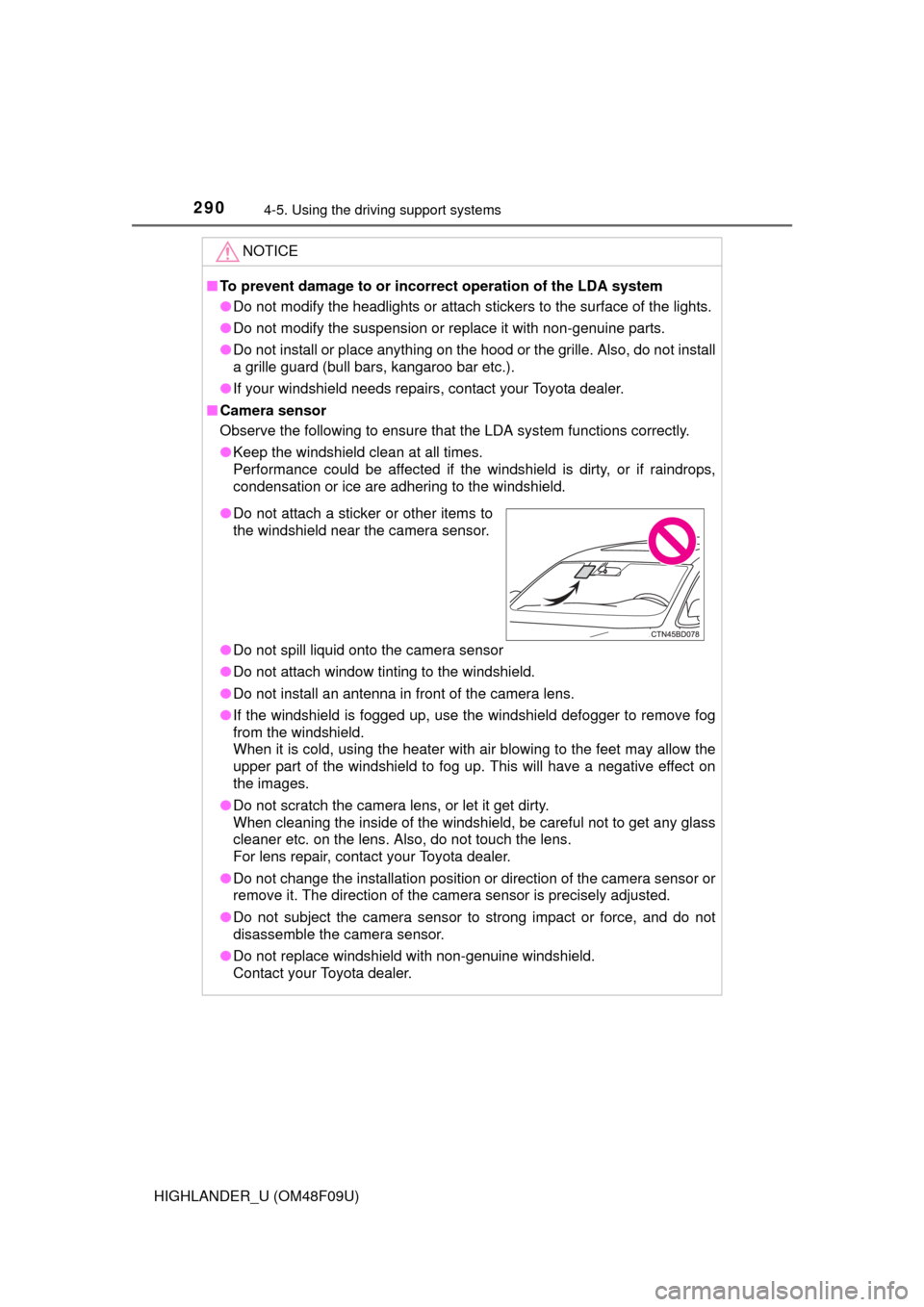
●Do not attach a sticker or other items to
the windshield near the camera sensor.
Page 297 of 716
2974-5. Using the driving support systems
4
Driving
HIGHLANDER_U (OM48F09U)■
If you notice any symptoms
If you notice any of the following symptoms, refer to the likely cause
and the solution, and re-check.
If the symptom is not resolved by
the solution, have the vehicle
inspected by your Toyota dealer.
Things you should know
Likely causeSolution
The image is difficult to see
• The vehicle is in a dark area
• The temperature around the lens
is either high or low
• The outside temperature is low
• There are water droplets on the camera
• It is raining or humid
• Foreign matter (mud etc.) is adhering to the camera
• There are scratches on the cam- era
• Sunlight or headlights are shining
directly into the camera
• The vehicle is under fluorescent
lights, sodium lights, mercury
lights etc.
If this happens due to these causes,
it does not indicate a malfunction.
Back up while visually checking the
vehicle’s surroundings. (Use the
monitor again once conditions have
been improved.)
To adjust the image on the rear view
monitor system screen. (P. 350)
The image is blurry
Dirt or foreign matter (such as water
droplets, snow, mud etc.) is adher-
ing to the camera.Rinse the camera lens with water
and wipe it clean with a soft cloth.
Wash with a mild soap if the dirt is
stubborn.
The image is out of alignment
The camera or surrounding area has
received a strong impact.Have the vehicle inspected by your
Toyota dealer.
Page 299 of 716

2994-5. Using the driving support systems
4
Driving
HIGHLANDER_U (OM48F09U)
WARNING
●In low temperatures, the screen may darken or the image may become
faint. The image could distort when the vehicle is moving, or you may
become unable to see the image on the screen. Be sure to check direct
visually and with the mirrors all around the vehicle before proceeding.
● If the tire sizes are changed, the position of the fixed guide lines displayed
on the screen may change.
● The camera uses a special lens. The distances between objects and
pedestrians that appear in the image displayed on the screen will differ
from the actual distances. ( P. 294)
NOTICE
■How to use the camera
●The rear view monitor system may not operate properly in the following
cases.
• If the back of the vehicle is hit, the position and mounting angle of the
camera may change.
• As the camera has a water proof construction, do not detach, disassem- ble or modify it. This may cause incorrect operation.
• Do not strongly rub the camera lens. If the camera lens is scratched, it
cannot transmit a clear image.
• Do not allow organic solvent, car wax, window cleaner or glass coat to adhere to the camera. If this happens, wipe it off as soon as possible.
• If the temperature changes rapidly, such as when hot water is poured on the vehicle in cold weather, the system may not operate normally.
• When washing the vehicle, do not apply intensive bursts of water to the
camera or camera area. Doing so may result in the camera malfunc-
tioning.
• When the camera is used under fluorescent lights, sodium light or mer-
cury light etc., the lights and the illuminated areas may appear to flicker.
● Do not expose the camera to strong impact as this could cause a malfunc-
tion. If this happens, have the vehicle inspected by your Toyota dealer as
soon as possible.
Page 307 of 716
3074-5. Using the driving support systems
4
Driving
HIGHLANDER_U (OM48F09U)■
Activating the downhill assist control system
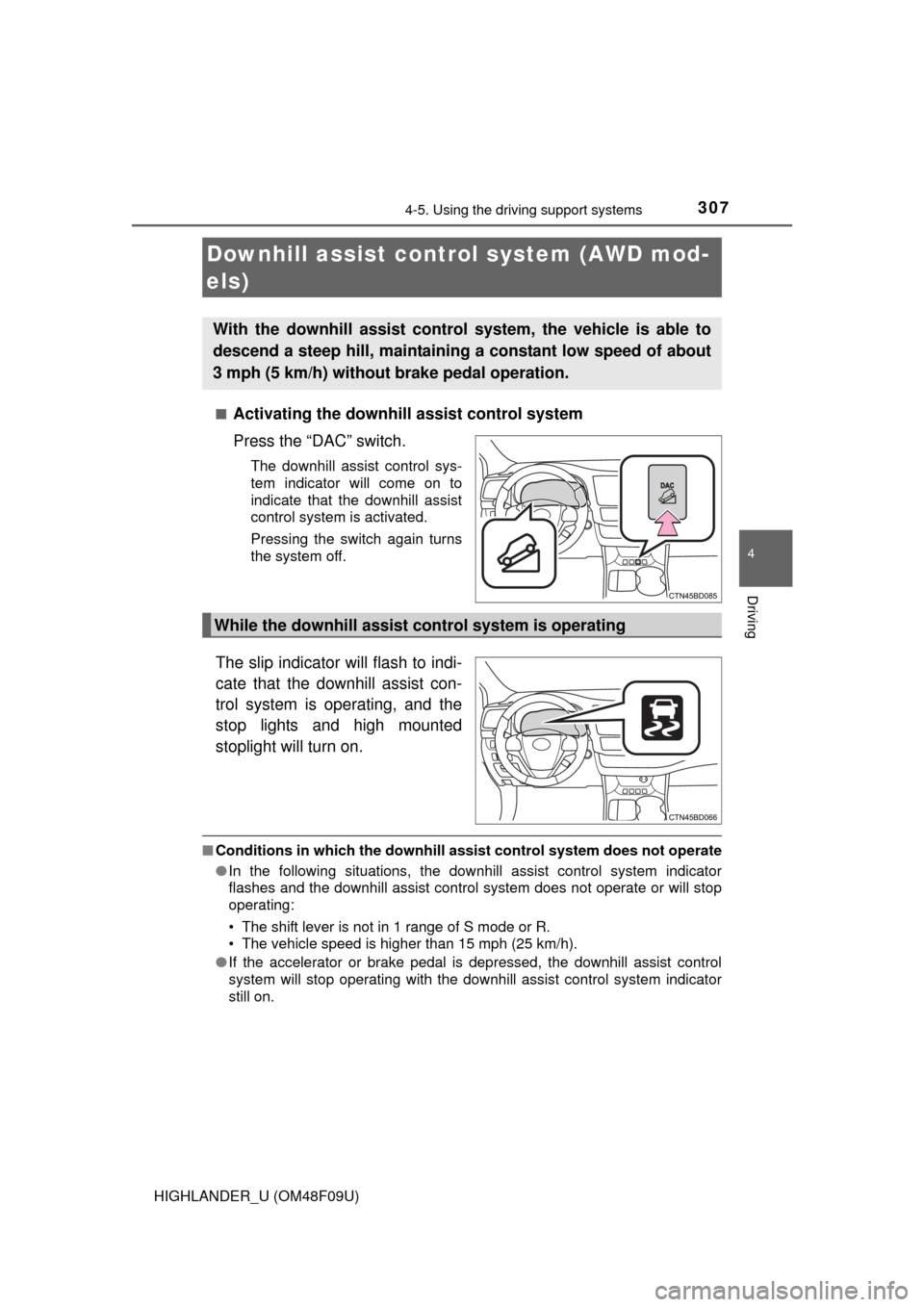
Press the “DAC” switch.
The downhill assist control sys-
tem indicator will come on to
indicate that the downhill assist
control system is activated.
Pressing the switch again turns
the system off.
The slip indicator will flash to indi-
cate that the downhill assist con-
trol system is operating, and the
stop lights and high mounted
stoplight will turn on.
■
Conditions in which the downhill assist control system does not operate
● In the following situations, the downhill assist control system indicator
flashes and the downhill assist control system does not operate or will stop
operating:
• The shift lever is not in 1 range of S mode or R.
• The vehicle speed is higher than 15 mph (25 km/h).
● If the accelerator or brake pedal is depressed, the downhill assist control
system will stop operating with the downhill assist control system indicator
still on.
Downhill assist control system (AWD mod-
els)
With the downhill assist control system, the vehicle is able to
descend a steep hill, maintaining a constant low speed of about
3 mph (5 km/h) without brake pedal operation.
While the downhill assist control system is operating
Page 327 of 716
3274-6. Driving tips
4
Driving
HIGHLANDER_U (OM48F09U)
Perform the following according to the driving conditions:
● Do not try to forcibly open a window or move a wiper that is frozen.
Pour warm water over the frozen area to melt the ice. Wipe away
the water immediately to prevent it from freezing.
● To ensure proper operation of the climate control system fan,
remove any snow that has accumulated on the air inlet vents in
front of the windshield.
● Check for and remove any excess ice or snow that may have accu-
mulated on the exterior lights, ve hicle’s roof, chassis, around the
tires or on the brakes.
● Remove any snow or mud from the bottom of your shoes before
getting in the vehicle.
Accelerate the vehicle slowly, keep a safe distance between you and
the vehicle ahead, and drive at a reduced speed suitable to road con-
ditions.
Park the vehicle and move the shift lever to P without setting the park-
ing brake. The parking brake may fr eeze up, preventing it from being
released. If necessary, block the wheels to prev ent inadvertent sliding
or creeping.
Before driving the vehicle
When driving the vehicle
When parking the vehicle
Page 350 of 716
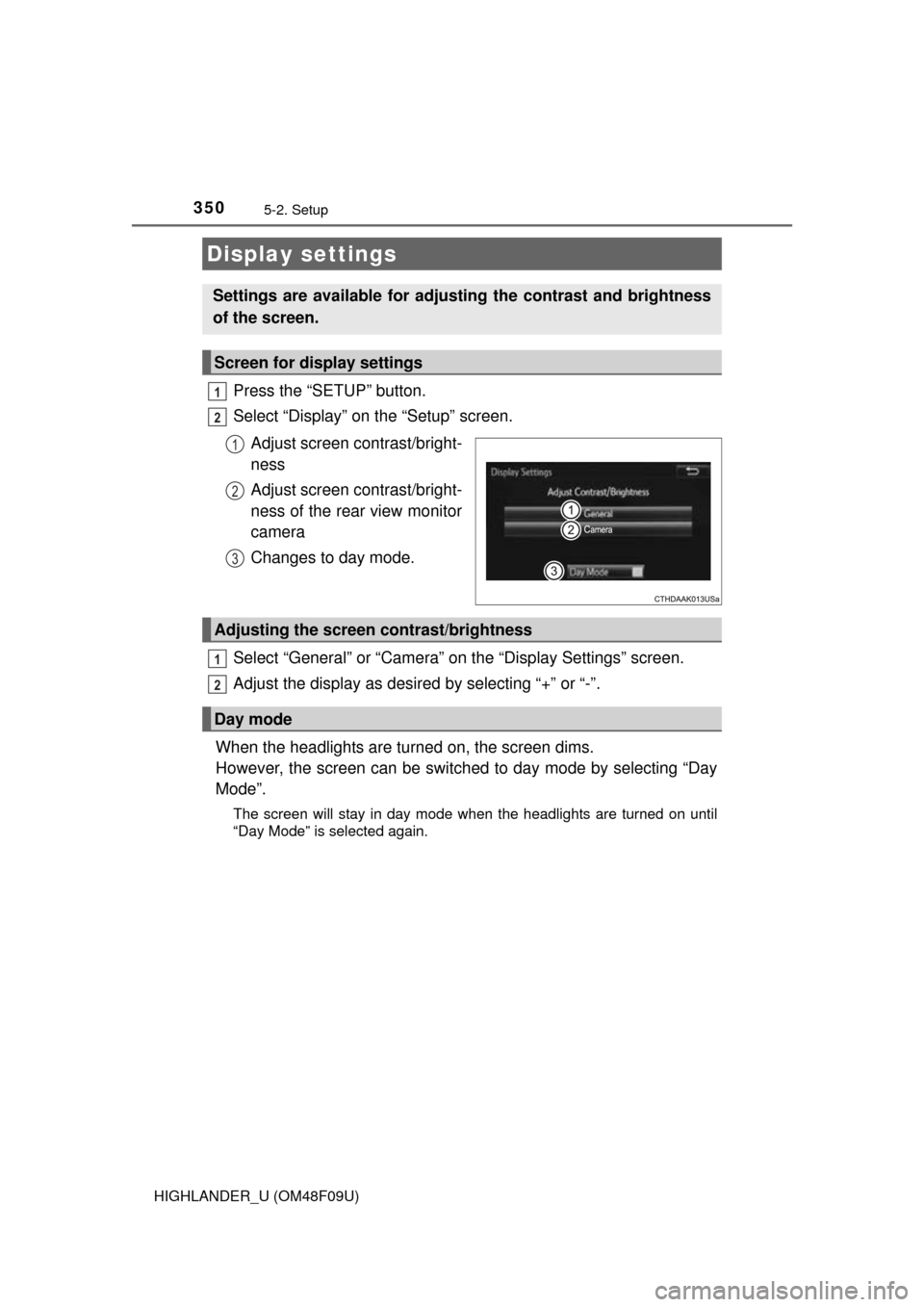
3505-2. Setup
HIGHLANDER_U (OM48F09U)
Press the “SETUP” button.
Select “Display” on the “Setup” screen.Adjust screen contrast/bright-
ness
Adjust screen contrast/bright-
ness of the rear view monitor
camera
Changes to day mode.
Select “General” or “Camera” on the “Display Settings” screen.
Adjust the display as desired by selecting “+” or “-”.
When the headlights are turned on, the screen dims.
However, the screen can be switch ed to day mode by selecting “Day
Mode”.
The screen will stay in day mode when the headlights are turned on until
“Day Mode” is selected again.
Display settings
Settings are available for adjusting the contrast and brightness
of the screen.
Screen for display settings
1
2
1
2
3
Adjusting the screen contrast/brightness
Day mode
1
2
Page 425 of 716

425
6Interior features
HIGHLANDER_U (OM48F09U)6-1. Using the air conditioning
system and defogger
Front manual air conditioning system ........ 426
Front automatic air conditioning system ........ 432
Rear manual air conditioning system ........ 439
Rear automatic air conditioning system ........ 442
Heated steering wheel/ seat heaters/
seat ventilators ................ 445
6-2. Using the interior lights Interior lights list ................ 448
• Interior lights ................. 448
• Personal lights .............. 449
6-3. Using the storage features
List of storage features ..... 450
• Glove box...................... 451
• Console box .................. 451
• Bottle holders ................ 452
• Cup holders .................. 453
• Auxiliary boxes.............. 455
• Open tray ...................... 456
Luggage compartment features ........................... 457 6-4. Using the other interior
features
Other interior features ....... 459
• Sun visors ..................... 459
• Vanity mirrors................ 459
• Conversation mirror ...... 460
• Clock ............................. 461
• Outside temperature display........................... 462
• Power outlets ................ 463
• Rear sunshades............ 466
• Armrest ......................... 467
• Coat hooks.................... 468
• Assist grips ................... 468
• Side table ...................... 469
Garage door opener.......... 470
Safety Connect ................. 477
Compass ........................... 483